Page 1 of 31
System Requirements Document for campusgpt
1. Introduction
CAMPUSGPT is a private, local-first AI-Powered College Knowledge & Study Assistant for final-year B.Tech CSE (AI/ML) project delivery. It is a cohesive full-stack application for college students and administrators, not a basic PDF chatbot or a collection of disconnected demonstrations.
The system enables students to upload and use academic knowledge sources—including syllabus documents, notes, textbooks, lab manuals, regulations, assignments, previous-year papers, and study materials—to obtain grounded academic assistance. It combines local Large Language Models (LLMs), Advanced Retrieval-Augmented Generation (RAG), hybrid semantic and keyword search, reranking, LangGraph multi-agent workflows, quizzes, study planning, summaries, comparisons, personalization, analytics, and administration.
The intended audience is:
- Student users who study against institution-specific academic documents.
- Admin users who manage users, documents, platform analytics, evaluation, and operational health.
The system must operate without paid API keys and must be practical on an 8 GB RAM, CPU-only computer after required models and packages have been downloaded.
Page 2 of 31
2. System Overview
CAMPUSGPT is a locally deployed web application with a React frontend, FastAPI backend, SQLite database, local document-processing pipeline, FAISS vector index, BM25 keyword index, LangGraph workflow engine, and Ollama-hosted lightweight local LLM.
The system supports the following current capabilities:
- Academic document upload and processing.
- Multi-format document understanding for PDF, DOCX, TXT, Markdown, and HTML.
- OCR fallback for scanned PDF documents.
- Grounded AI chat with page-level citations.
- Hybrid semantic and keyword academic search.
- Reranking and metadata-filtered retrieval.
- LangGraph-based intent routing across specialized agents.
- Quiz generation and scored quiz attempts.
- Personalized study planning and recommendations.
- Document summaries, revision materials, and comparisons.
- Conversation persistence and bounded conversational memory.
- Student progress tracking and real-data analytics.
- Administrative document, user, analytics, evaluation, and health controls.
- JWT authentication, password hashing, protected routes, and role-based access.
The application is private. Its academic content is managed within the locally deployed CAMPUSGPT environment and must not require public cloud AI providers or paid hosted vector databases.
Page 3 of 31
2a. Product Interpretation and Delivery Boundary
CAMPUSGPT is an application-owned product with anonymous public entry pages and protected student and administrator workspaces.
Public visitors can review the product through Landing, Features, and About pages, then establish or verify identity through Register and Login.
Student and Admin users authenticate through JWT-based access. The protected interface presents role-appropriate navigation and routes:
- A Student accesses learning, document intelligence, RAG chat, search, quizzes, summaries, planning, progress, profile, and settings.
- An Admin accesses administrative dashboard data, documents, users, analytics, RAG evaluation, system health, and settings.
The application owns account identity, document records, chunk metadata, conversations, quiz attempts, plans, progress, recommendations, feedback, evaluation results, and operational statistics.
Background processing is permitted for document extraction, indexing, embedding creation, retrieval-index maintenance, analytics aggregation, evaluation runs, and local AI generation. However, all visible user actions and outcomes must have a functional application interface.
Current scope excludes:
- Paid AI APIs.
- Paid cloud vector databases.
- Required cloud GPU infrastructure.
- CUDA dependency.
- Fabricated AI responses, citations, analytics, quiz scores, or non-functional controls.
- Public unrestricted academic knowledge-base delivery.
2b. Page Content and Component Coverage
Page 4 of 31
Landing
- Information and state
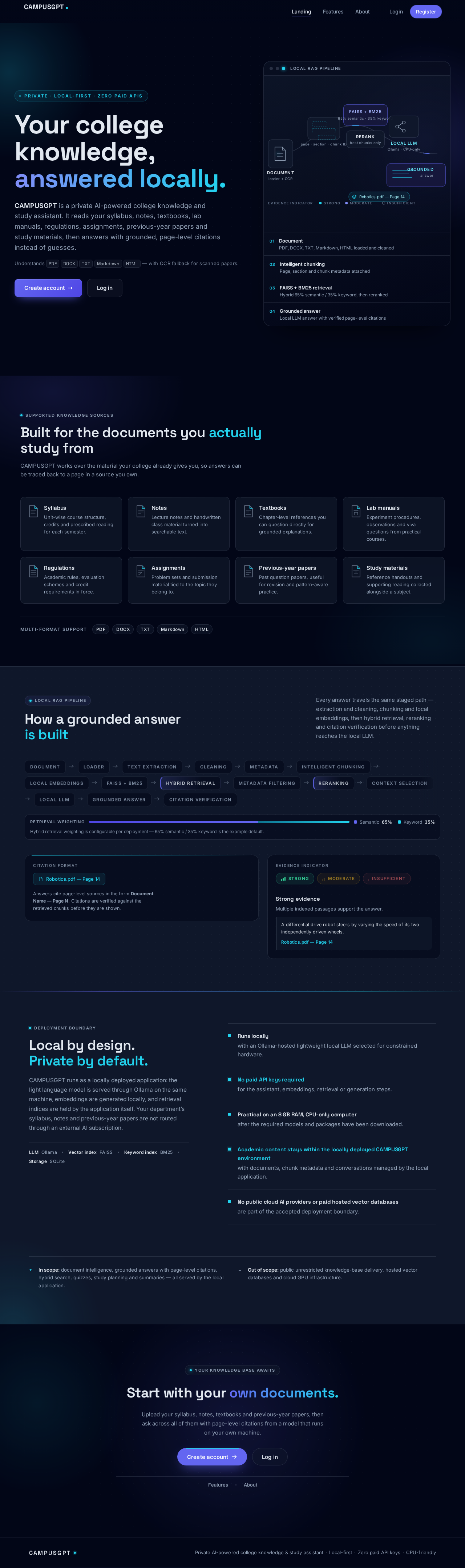
- Public introduction to CAMPUSGPT as a private AI-powered college knowledge and study assistant.
- Explanation that the platform supports college syllabus, notes, textbooks, lab manuals, regulations, assignments, previous-year papers, and study materials.
- Presentation of local, zero-paid-API, CPU-friendly positioning.
- Primary actions
- Navigate to Login.
- Navigate to Register.
- Supporting actions
- Navigate to Features and About.
- Components
- Product hero.
- Capability overview.
- AI/RAG workflow illustration.
- Local-first and privacy-focused messaging.
- Calls to action for Login and Register.
- States
- Responsive navigation state.
- Reduced-motion visual state.
- Clear route-recovery feedback if a public route cannot load.
Page 5 of 31
Features
- Information and state
- Public description of current CAMPUSGPT capabilities.
- Primary actions
- Navigate to Register or Login.
- Supporting actions
- Navigate to Landing and About.
- Components
- Academic chatbot capability panel.
- Document intelligence capability panel.
- Advanced RAG and citation capability panel.
- Hybrid search and reranking panel.
- LangGraph multi-agent architecture panel.
- Quiz, study planning, summary, comparison, analytics, and RAG evaluation panels.
- States
- Responsive card layout.
- Accessible light and dark mode presentation.
Page 6 of 31
About
- Information and state
- Public project information identifying CAMPUSGPT as a serious final-year B.Tech CSE (AI/ML) project.
- Explanation of demonstrated domains: AI/ML, Generative AI, Advanced RAG, Hybrid Search, Reranking, Agentic AI, Multi-Agent Architecture, Local LLM, Document Intelligence, Personalization, Analytics, and Full-Stack Development.
- Primary actions
- Navigate to Register or Login.
- Supporting actions
- Navigate to Landing and Features.
- Components
- Project mission section.
- Local-first architecture overview.
- Technology overview.
- Zero-cost and CPU-only deployment explanation.
Page 7 of 31
Login
- Information and state
- Anonymous access form for returning Student and Admin users.
- Primary actions
- Submit login credentials.
- Supporting actions
- Navigate to Register.
- Return to public pages.
- Components
- Credential form.
- Validation messages.
- Authentication error feedback.
- Success state
- Password verification succeeds.
- Backend issues JWT authentication credentials.
- User is routed to the appropriate protected role experience.
- Error and recovery states
- Invalid credentials are rejected without exposing account details.
- Expired or invalid JWT returns the user to Login.
- Network or backend errors present retry guidance.
Page 8 of 31
Register
- Information and state
- Anonymous self-service account-registration form.
- Primary actions
- Submit account registration details.
- Supporting actions
- Components
- Registration form.
- Role-selection control for STUDENT or ADMIN as specified by the accepted registration requirement.
- Password validation feedback.
- Success state
- A securely hashed password and role are stored.
- The user can proceed to Login or be authenticated according to implemented backend behavior.
- Error and recovery states
- Invalid or duplicate registration data is rejected with actionable validation feedback.
- No secret, password hash, or internal security detail is displayed.
Page 9 of 31
Dashboard
- Access
- Authenticated route. Student and Admin content is role-scoped.
- Student information and state
- Total documents.
- Questions asked.
- Quizzes completed.
- Average quiz score.
- Study progress.
- Topics mastered.
- Charts for quiz performance, subject performance, study progress, and activity.
- Admin information and state
- Users.
- Active students.
- Documents.
- Indexed documents.
- Questions.
- Quizzes.
- System health.
- Primary actions
- Navigate to linked student learning tools or admin management tools.
- Supporting actions
- Refresh database-derived dashboard data.
- Components
- Metric cards.
- Recharts-based visualizations.
- Recent or current activity display using real stored data.
- States
- Loading skeletons while database metrics are retrieved.
- Empty analytics state when no activity exists.
- Error state with retry if analytics retrieval fails.
- No hardcoded analytics values.
Page 10 of 31
AI Assistant
- Access
- Authenticated STUDENT-only route.
- Information and state
- Conversation list and history.
- Active conversation messages.
- Short-term conversational memory within bounded context-window management.
- Evidence indicator: Strong, Moderate, or Insufficient.
- Page-level citations in the form
Document Name — Page N.
- Primary actions
- Start or select a conversation.
- Submit academic question, concept explanation, document-search request, summary request, quiz request, study-planning request, comparison request, or revision request.
- Regenerate an answer.
- Copy rendered Markdown answer text.
- Submit feedback.
- Supporting actions
- Review citations.
- Review conversation history.
- Components
- ChatGPT-style message interface.
- Markdown renderer.
- Citation list.
- Copy control.
- Regenerate control.
- Feedback control.
- Optional streaming response renderer where feasible.
- Success state
- The Supervisor Agent identifies intent and routes to the correct LangGraph agent.
- The student receives grounded content supported by available indexed documents.
- Error and recovery states
- If evidence is insufficient, the assistant clearly states that the available knowledge base does not contain enough information.
- Citation validation failure prevents unsupported citations from appearing.
- Retrieval, model, or processing failure presents a retryable error state.
- The system does not send unlimited conversation history to the LLM.
Page 11 of 31
Documents
- Access
- Authenticated STUDENT-only route.
- Information and state
- Student-owned document list.
- File metadata: document, page, section, subject, semester, department, and chunk ID where applicable.
- Processing status:
UPLOADED, PROCESSING, INDEXED, or FAILED.
- Primary actions
- Upload one or multiple documents.
- Search documents.
- View document metadata.
- Replace a document.
- Re-index a document.
- Delete a document.
- Supporting actions
- Monitor processing status.
- Components
- Multi-file upload control.
- File validation feedback.
- Metadata editor or assignment controls for supported metadata.
- Document table or card list.
- Processing-status badges.
- Search control.
- Re-index, replace, and delete actions.
- Success state
- Accepted files are securely stored and processed through loader, extraction, cleaning, metadata assignment, intelligent chunking, embedding, FAISS indexing, and BM25 indexing.
- Scanned PDFs use OCR fallback when direct text extraction is insufficient.
- Error and recovery states
- Unsupported formats, invalid files, oversize files, duplicate file hashes, unsafe filenames, and processing failures are identified.
- Failed files remain visible with
FAILED status and retry or replacement continuation.
- Grounded chat, search, quiz, summary, and comparison results become available only after indexing completes.
Page 12 of 31
Academic Search
- Access
- Authenticated STUDENT-only route.
- Information and state
- Academic search query.
- Subject, semester, department, and document filters.
- Hybrid semantic and BM25 result ranking.
- Primary actions
- Submit a search query.
- Apply or clear metadata filters.
- Supporting actions
- Review source result metadata.
- Components
- Search input.
- Filter controls.
- Result list showing document name, page, relevant passage, and relevance score.
- Success state
- The system performs configurable hybrid retrieval, such as 65% semantic and 35% keyword weighting.
- Multiple candidate chunks are retrieved and reranked.
- Relevant results are displayed with source metadata.
- Error and recovery states
- Empty search result state explains that no indexed academic content matched the query.
- If no documents are indexed, the page directs the student to Documents.
- Search failures preserve filters and permit retry.
Page 13 of 31
Study Planner
- Access
- Authenticated STUDENT-only route.
- Information and state
- Student semester, subjects, exam dates, available study hours, goals, and stored quiz performance.
- Existing daily and weekly plans.
- Priority topics, revision schedule, and quiz recommendations.
- Primary actions
- Enter or update planning inputs.
- Request plan generation.
- Review daily plan.
- Review weekly plan.
- Supporting actions
- Review identified weak topics.
- Continue to Quiz Center using recommendations.
- Components
- Planning-input form.
- Generated plan display.
- Priority-topic list.
- Revision schedule.
- Quiz recommendation display.
- Success state
- The Study Planner Agent analyzes stored performance and identifies weak areas.
- Daily and weekly plans, priority topics, revision schedule, and quiz recommendations are stored and displayed.
- Error and recovery states
- Missing required planning inputs are identified for correction.
- Limited quiz history is handled by generating only supportable recommendations.
- Generation failure preserves submitted inputs and supports retry.
Page 14 of 31
Quiz Center
- Access
- Authenticated STUDENT-only route.
- Information and state
- Quiz configuration.
- Generated question set.
- Quiz attempt state.
- Stored performance history.
- Primary actions
- Select subject.
- Select topic.
- Select difficulty.
- Select number and type of questions.
- Generate quiz.
- Submit answers.
- Supporting actions
- Review correct answers.
- Review explanations.
- Review weak topics.
- Continue to recommended revision or study-plan work.
- Components
- Quiz configuration form.
- MCQ renderer.
- True/False renderer.
- Short Answer renderer.
- Submission control.
- Score and feedback report.
- Success state
- The Quiz Agent generates questions from retrieved academic documents.
- Submission calculates real score and shows correct answers, explanations, weak topics, and recommended revision.
- Quiz attempts and performance are stored in SQLite.
- Error and recovery states
- Insufficient indexed evidence prevents unsupported quiz generation.
- Missing answers or invalid submission is shown before scoring.
- Generation or storage failure provides retry and does not fabricate results.
Page 15 of 31
Summaries
- Access
- Authenticated STUDENT-only route.
- Information and state
- Selected document, chapter, page, or document pair.
- Generated summary or comparison output.
- Primary actions
- Choose a document, chapter, or page for summarization.
- Request a summary.
- Select two documents for comparison.
- Request comparison.
- Supporting actions
- Review source references.
- Components
- Document selector.
- Chapter/page selector.
- Summary result sections: Overview, Key Concepts, Definitions, Formulas, Important Questions, and Quick Revision.
- Comparison result sections: common concepts, differences, missing topics, and important information with sources.
- Success state
- The Summary Agent produces grounded summaries, revision notes, definitions, formulas, and important exam topics.
- Comparison output cites source evidence for supported findings.
- Error and recovery states
- The page prevents comparison without two valid documents.
- Unindexed or unavailable selections return actionable feedback.
- Insufficient evidence is displayed rather than inferred document content.
Page 16 of 31
Progress
- Access
- Authenticated STUDENT-only route.
- Information and state
- Student progress records.
- Quiz performance.
- Topics mastered.
- Learning history.
- Personalized recommendations.
- Adaptive quiz-difficulty context.
- Primary actions
- Review performance and recommendations.
- Continue to suggested study-plan, quiz, summary, search, or document activity.
- Components
- Progress cards.
- Quiz and subject-performance charts.
- Topic-mastery display.
- Recommendation list.
- Success state
- Recommendations reflect stored department, semester, subjects, goals, learning history, and quiz performance.
- Progress reflects actual stored activity and quiz data.
- Error and recovery states
- Empty-state guidance is shown before sufficient learning activity exists.
- Analytics retrieval errors permit retry.
- No analytics or recommendation content is hardcoded.
Page 17 of 31
Profile
- Access
- Authenticated STUDENT-only route.
- Information and state
- Student department.
- Semester.
- Subjects.
- Goals.
- Personalization details used by planning, recommendations, and adaptive quiz difficulty.
- Primary actions
- View and update profile and personalization details.
- Supporting actions
- Save changes and continue to Study Planner, Progress, or Quiz Center.
- Components
- Profile form.
- Department selector or input.
- Semester input.
- Subject-management input.
- Goal-management input.
- Success state
- Valid updates are stored and become available to personalization workflows.
- Error and recovery states
- Invalid input is rejected with validation guidance.
- Save errors preserve entered changes for retry.
Page 18 of 31
Settings
- Access
- Authenticated route with role-scoped student or admin settings content.
- Information and state
- Account and application settings supported by the current implementation.
- Theme selection for light and dark mode.
- Primary actions
- Update supported settings.
- Log out.
- Supporting actions
- Return to role-appropriate protected workspace.
- Components
- Settings sections.
- Theme control.
- Logout control.
- Success state
- Settings changes apply to supported application behavior.
- Logout invalidates the active session and returns the user to Login.
- Error and recovery states
- Update failures display retryable feedback.
- Protected routes are unavailable after logout.
Page 19 of 31
Users
- Access
- Authenticated ADMIN-only route.
- Information and state
- Managed platform-user records.
- User role and relevant user-management state.
- Primary actions
- Supporting actions
- Components
- User-management table or cards.
- Role display.
- Validation and management feedback.
- Success state
- Admin user-management actions persist through backend APIs and SQLite.
- Error and recovery states
- Unauthorized users are blocked.
- Management failures return actionable error feedback.
Page 20 of 31
Analytics
- Access
- Authenticated ADMIN-only route.
- Information and state
- Platform analytics from actual stored system data.
- Primary actions
- View and refresh analytics.
- Components
- Charts for uploads.
- Charts for AI queries.
- Charts for quiz activity.
- Popular-subject chart.
- Retrieval-performance chart.
- Success state
- Charts and metrics are calculated from database and retrieval/evaluation records.
- Error and recovery states
- Empty data states are truthful when there is no activity.
- Data-loading failure supports retry.
- No metric is hardcoded.
Page 21 of 31
RAG Evaluation
- Access
- Authenticated ADMIN-only route.
- Information and state
- Local question/answer/document evaluation dataset.
- Evaluation history and results.
- Primary actions
- Run local RAG evaluation.
- Review evaluation results.
- Components
- Test dataset selector or loader.
- Evaluation-run control.
- Metrics display for retrieval precision, retrieval recall, context relevance, answer faithfulness, citation correctness, and response latency.
- Success state
- The system runs evaluation locally and stores evaluation results.
- Error and recovery states
- Invalid or unavailable test datasets are identified.
- Evaluation failure preserves prior results and supports a new run.
- Metrics must reflect evaluation output rather than hardcoded values.
Page 22 of 31
System Health
- Access
- Authenticated ADMIN-only route.
- Information and state
- Current system-health status.
- Relevant health indicators for the locally deployed application.
- Primary actions
- Components
- Service-status indicators.
- Local dependency and operational feedback appropriate to the implemented backend.
- Success state
- The page reports real system-health information.
- Error and recovery states
- Unavailable service status is displayed as unavailable or failed rather than fabricated as healthy.
3. Functional Requirements
Page 23 of 31
FR-01 — Cohesive Private Academic Platform
As a Student, I should use one private, cohesive academic AI platform so that I can study against college-specific academic materials rather than use disconnected tools.
- Provenance: explicit.
- Inputs: Academic documents, academic questions, study-planning data, quiz answers, and personalization details.
- Result: CAMPUSGPT provides connected document intelligence, RAG assistance, search, quiz, planning, summary, comparison, progress, and recommendations.
- Acceptance criteria:
- The system supports syllabus, notes, textbooks, lab manuals, regulations, assignments, previous-year papers, and study materials.
- The system is not limited to PDF chat.
- Visible features are connected to functional backend services and stored data.
Page 24 of 31
FR-02 — Registration, Login, Logout, JWT, and RBAC
As a Student or Admin, I should register, log in, log out, and access only role-appropriate protected functions so that my identity and private application state are protected.
- Provenance: explicit; self-service account creation and returning verification are required_inference.
- Access state: Register and Login are public. Student and Admin destinations are protected.
- Inputs: Registration data, role selection, login credentials, JWT.
- Result: Passwords are hashed, JWT authentication is issued on valid login, and role-based access is enforced.
- Acceptance criteria:
- Roles are limited to
STUDENT and ADMIN.
- Registration creates a Student or Admin account using password hashing.
- Login validates credentials and returns JWT-based access.
- Logout ends the active authenticated session.
- ADMIN-only pages reject STUDENT access.
- STUDENT-only pages reject ADMIN access where the page contract identifies the route as Student-only.
- Invalid credentials, malformed tokens, expired tokens, and unauthorized attempts show safe error feedback without leaking secrets.
Page 25 of 31
FR-03 — Student Dashboard Analytics
As a Student, I should view real learning metrics and charts so that I can understand my academic activity and progress.
- Provenance: explicit.
- Owner: Dashboard.
- Result: The dashboard displays total documents, questions asked, quizzes completed, average quiz score, study progress, and topics mastered.
- Acceptance criteria:
- Quiz performance, subject performance, study progress, and activity charts use persisted database data.
- Values are not hardcoded.
- Empty and error states are displayed when activity data is unavailable.
Page 26 of 31
FR-04 — Academic AI Chat
As a Student, I should ask academic questions through a ChatGPT-style assistant so that I can receive grounded help from indexed study materials.
- Provenance: explicit.
- Owner: AI Assistant.
- Inputs: Question or supported intent request.
- Result: A routed LangGraph agent produces an answer grounded in retrieved academic evidence.
- Acceptance criteria:
- The chat supports conversations, history, Markdown rendering, copy, regenerate, feedback, and streaming if feasible.
- Conversations and messages are persisted in SQLite.
- The assistant uses short-term conversational memory and context-window management.
- Unlimited chat history is not sent to the LLM.
- The answer shows an evidence indicator of Strong, Moderate, or Insufficient.
- The system does not generate fake AI responses.
Page 27 of 31
FR-05 — Citation Verification and Insufficient-Evidence Handling
As a Student, I should see only verified page-level citations or a clear insufficient-evidence response so that I can trust academic answers.
- Provenance: explicit.
- Owner: AI Assistant, Academic Search, Summaries, Quiz Center.
- Result: Citations are tied to retrieved document chunks and page metadata.
- Acceptance criteria:
- Citations use a form such as
Robotics.pdf — Page 14.
- The system never fabricates citations.
- The system never invents document content.
- If documents do not contain sufficient evidence, the assistant clearly says that the available knowledge base does not contain enough information.
- Citation validation occurs before citation display.
- Retrieval thresholds and insufficient-context detection are applied before grounded generation.
Page 28 of 31
FR-06 — Advanced RAG Pipeline
As a Student, I should receive answers generated through an advanced local RAG pipeline so that academic responses are based on relevant document evidence.
- Provenance: explicit.
- Owner: Backend RAG services supporting Documents, AI Assistant, Academic Search, Quiz Center, and Summaries.
- Pipeline:
Document → Loader → Text extraction → Cleaning → Metadata → Intelligent chunking → Local embeddings → FAISS + BM25 → Hybrid retrieval → Metadata filtering → Reranking → Context selection → Local LLM → Grounded answer → Citation verification
- Acceptance criteria:
- Local embeddings are produced using sentence-transformers.
- FAISS stores semantic-vector retrieval data.
- BM25 supports keyword retrieval.
- Hybrid retrieval weighting is configurable, with an example default of 65% semantic and 35% keyword.
- Multiple retrieval candidates are obtained and reranked.
- Only the best relevant chunks are sent to the local LLM.
- Metadata filtering supports document, subject, semester, department, page, section, and chunk ID where applicable.
Page 29 of 31
FR-07 — Document Upload and Intelligence
As a Student, I should upload, manage, and index multiple academic documents so that they become searchable and usable for grounded AI workflows.
- Provenance: explicit.
- Owner: Documents.
- Supported formats: PDF, DOCX, TXT, Markdown, and HTML.
- Actions: Upload, delete, replace, search, view metadata, re-index, and monitor processing status.
- Acceptance criteria:
- The system supports multi-document upload.
- Document statuses are exactly
UPLOADED, PROCESSING, INDEXED, and FAILED.
- File hashing prevents duplicate documents.
- Scanned PDFs use Tesseract or EasyOCR fallback when necessary.
- Metadata includes document, page, section, subject, semester, department, and chunk ID.
- Indexed status is reached only after successful extraction, chunking, embedding, and index updates.
- Failed processing has visible recovery through retry, replacement, or re-indexing.
- Chat, search, quiz, summary, and comparison workflows require indexed content before grounded results are available.
Page 30 of 31
FR-08 — Academic Hybrid Search
As a Student, I should perform filtered semantic and BM25 academic search so that I can locate relevant passages in my documents.
- Provenance: explicit.
- Owner: Academic Search.
- Inputs: Search query and optional subject, semester, department, and document filters.
- Result: Search returns document name, page, relevant passage, and relevance score.
- Acceptance criteria:
- Semantic and keyword retrieval are both used.
- Results are reranked.
- Results respect selected metadata filters.
- An empty result state is shown truthfully when no matching indexed content is found.
- Search does not invent passages or source metadata.
Page 31 of 31
FR-09 — LangGraph Multi-Agent Routing
As a Student, I should have requests routed to specialized local AI agents so that the platform can handle different academic intents appropriately.
- Provenance: explicit.
- Owner: AI Assistant and supporting backend.
- Architecture:
- Supervisor Agent.
- RAG Agent.
- Quiz Agent.
- Study Planner Agent.
- Summary Agent.
- Acceptance criteria:
- LangGraph orchestrates the agentic workflow.
- The Supervisor Agent detects intent and routes the request to the correct specialized



No comments yet. Be the first!