
campusgpt

byMuskii

Build a complete, production-style final-year B.Tech CSE (AI/ML) project named CAMPUSGPT — AI-Powered College Knowledge & Study Assistant. This must be ONE cohesive, fully functional application, NOT a basic PDF chatbot or disconnected demos. GOAL: Create a private AI platform for college students that can understand college syllabus, notes, textbooks, lab manuals, regulations, assignments, previous-year papers and study materials. CORE FEATURES: 1. AI academic chatbot 2. Multi-PDF/document upload 3. Advanced RAG with page-level citations 4. Semantic + keyword hybrid search 5. Reranking 6. LangGraph agentic workflow 7. Multiple specialized AI agents 8. Quiz generation 9. Personalized study planner 10. Document summarization 11. Document comparison 12. Academic search 13. Conversation memory 14. Student progress analytics 15. Personalized recommendations 16. Admin dashboard 17. RAG evaluation 18. Authentication and role-based access ZERO-COST REQUIREMENT: The project must work without paid API keys. Do NOT require OpenAI, Gemini, Claude, Groq, Mistral paid APIs, Pinecone or other paid cloud AI services. Use local/open-source tools: - Ollama for local LLM - Lightweight 3B-class quantized model such as Qwen/Gemma - sentence-transformers for local embeddings - FAISS for vector database - BM25 for keyword retrieval - LangChain - LangGraph - FastAPI - SQLite + SQLAlchemy - React + Vite - Tailwind CSS - Recharts - PyMuPDF/pypdf - python-docx - BeautifulSoup - Tesseract/EasyOCR as OCR fallback HARDWARE: Target computer has 8 GB RAM, CPU-only and no dedicated GPU. Optimize heavily for this hardware: - lightweight quantized LLM - no CUDA requirement - no cloud GPU - lazy model loading - caching - efficient FAISS indexing - batch embeddings - limited context - do not load multiple large models simultaneously After models/packages are downloaded, the core application should run locally and work without internet. UI/UX: Use the uploaded reference image only as inspiration. Create an ORIGINAL premium AI education SaaS interface. Design should include: - modern professional sidebar - AI chat interface - document management - dashboard cards - charts - purple/indigo/blue accent theme - clean light mode - dark mode - rounded cards - subtle shadows - responsive design - polished loading, empty and error states - professional animations and interactions Do NOT copy the reference image exactly. PUBLIC: Landing, Features, About, Login, Register. STUDENT: Dashboard, AI Assistant, Documents, Academic Search, Study Planner, Quiz Center, Summaries, Progress, Profile, Settings. ADMIN: Dashboard, Documents, Users, Analytics, RAG Evaluation, System Health, Settings. AUTHENTICATION: Implement registration, login/logout, JWT authentication, password hashing and RBAC. Roles: STUDENT and ADMIN. STUDENT DASHBOARD: Show real database data: - total documents - questions asked - quizzes completed - average quiz score - study progress - topics mastered Add charts for quiz performance, subject performance, study progress and activity. Do not hardcode analytics. AI CHAT: Create a ChatGPT-style academic assistant with: - conversations - history - Markdown - copy - regenerate - feedback - streaming if feasible - source citations Example citation: Robotics.pdf — Page 14 Never fabricate citations. If documents do not contain sufficient evidence, clearly say that the available knowledge base does not contain enough information. ADVANCED RAG PIPELINE: Document → Loader → Text extraction → Cleaning → Metadata → Intelligent chunking → Local embeddings → FAISS + BM25 → Hybrid retrieval → Metadata filtering → Reranking → Context selection → Local LLM → Grounded answer → Citation verification Support PDF, DOCX, TXT, Markdown and HTML. Store metadata such as: document, page, section, subject, semester, department and chunk ID. Use configurable hybrid retrieval, for example 65% semantic + 35% keyword. Retrieve multiple candidates, rerank them and send only the best relevant chunks to the LLM. DOCUMENT INTELLIGENCE: Implement upload, delete, replace, search, metadata, re-indexing and processing status. Statuses: UPLOADED, PROCESSING, INDEXED, FAILED. Prevent duplicate documents using file hashing. For scanned PDFs use OCR fallback. MULTI-AGENT ARCHITECTURE: Use LangGraph. Create: SUPERVISOR AGENT ├── RAG AGENT ├── QUIZ AGENT ├── STUDY PLANNER AGENT └── SUMMARY AGENT Supervisor detects user intent and routes the request to the correct agent. RAG Agent: retrieval, grounded answers, citations and insufficient-evidence detection. Quiz Agent: MCQ, True/False and Short Answer questions with difficulty, answers and explanations. Study Planner Agent: analyze student performance, identify weak topics and generate daily/weekly study plans. Summary Agent: generate document summaries, revision notes, definitions, formulas and important exam topics. Support intents: question answering, document search, summarization, quiz generation, study planning, concept explanation, comparison and revision. QUIZ SYSTEM: Student selects subject, topic, difficulty and number/type of questions. Generate questions from retrieved academic documents. After submission show: score, correct answers, explanations, weak topics and recommended revision. Store attempts and performance in SQLite. PERSONALIZED STUDY PLANNER: Use: semester, subjects, exam dates, available study hours, goals and quiz performance. Generate: daily plan, weekly plan, priority topics, revision schedule and quiz recommendations. Use actual student performance to identify weak areas. SUMMARIZATION: Allow document/chapter/page summaries and generate: Overview, Key Concepts, Definitions, Formulas, Important Questions and Quick Revision. DOCUMENT COMPARISON: Compare two academic documents and show common concepts, differences, missing topics and important information with sources. ACADEMIC SEARCH: Provide semantic + BM25 search with filters for subject, semester, department and document. Show document name, page, relevant passage and relevance score. MEMORY: Store conversations and messages in SQLite. Implement short-term conversational memory and context-window management. Do not send unlimited conversation history to the LLM. PERSONALIZATION: Store student department, semester, subjects, goals, learning history and quiz performance. Use these for recommendations, study plans and adaptive quiz difficulty. ADMIN DASHBOARD: Show real statistics for: users, active students, documents, indexed documents, questions, quizzes and system health. Add charts for uploads, AI queries, quiz activity, popular subjects and retrieval performance. Admin can manage users and documents and re-index/delete documents. RAG EVALUATION: Create an evaluation page with: - retrieval precision - retrieval recall - context relevance - answer faithfulness - citation correctness - response latency Allow local evaluation using a small question/answer/document test dataset. HALLUCINATION CONTROL: Implement evidence-first generation, retrieval thresholds, insufficient-context detection and citation validation. Show an evidence indicator: Strong / Moderate / Insufficient. Never invent document content or citations. DATABASE: Use SQLite + SQLAlchemy with tables for: users, documents, document_chunks, subjects, conversations, messages, study_plans, study_tasks, quizzes, quiz_questions, quiz_attempts, student_progress, recommendations, feedback and evaluations. BACKEND: Use FastAPI with clean modular architecture, Pydantic schemas, JWT authentication, validation, logging, error handling and CORS. Create APIs for authentication, documents, chat, conversations, search, quizzes, study plans, analytics, admin functions and RAG evaluation. FRONTEND: Use React + Vite + Tailwind CSS + Recharts. Create reusable components, protected routes, API service layer, loading/error states and responsive layouts. PROJECT STRUCTURE: campusgpt/ ├── frontend/ ├── backend/ │ ├── app/ │ │ ├── api/ │ │ ├── models/ │ │ ├── schemas/ │ │ ├── services/ │ │ ├── rag/ │ │ ├── agents/ │ │ ├── llm/ │ │ ├── database/ │ │ └── main.py │ ├── data/ │ └── tests/ ├── scripts/ ├── docs/ ├── .env.example └── README.md SECURITY: Use password hashing, JWT, RBAC, file validation, file-size limits, safe filenames, path traversal protection, input validation and environment variables. Never expose secrets. QUALITY: This is a serious final-year project. Do NOT: - create fake AI responses - hardcode analytics - hardcode quiz results - fake RAG citations - create non-functional buttons - require paid APIs - require large models Every visible feature must have a real implementation. Provide: - complete frontend - complete backend - database - AI/RAG pipeline - LangGraph agents - authentication - tests - README - setup instructions - Ollama setup - sample academic documents/data - B.Tech project documentation The final system should demonstrate: AI/ML + Generative AI + Advanced RAG + Hybrid Search + Reranking + Agentic AI + Multi-Agent Architecture + Local LLM + Document Intelligence + Personalization + Analytics + Full-Stack Development TARGET: 8 GB RAM CPU-only Local execution ZERO paid API cost Professional original UI Complete end-to-end working application.

LandingUsers
Landing

Comments (0)

No comments yet. Be the first!

Preview dataChanges stay in this preview.
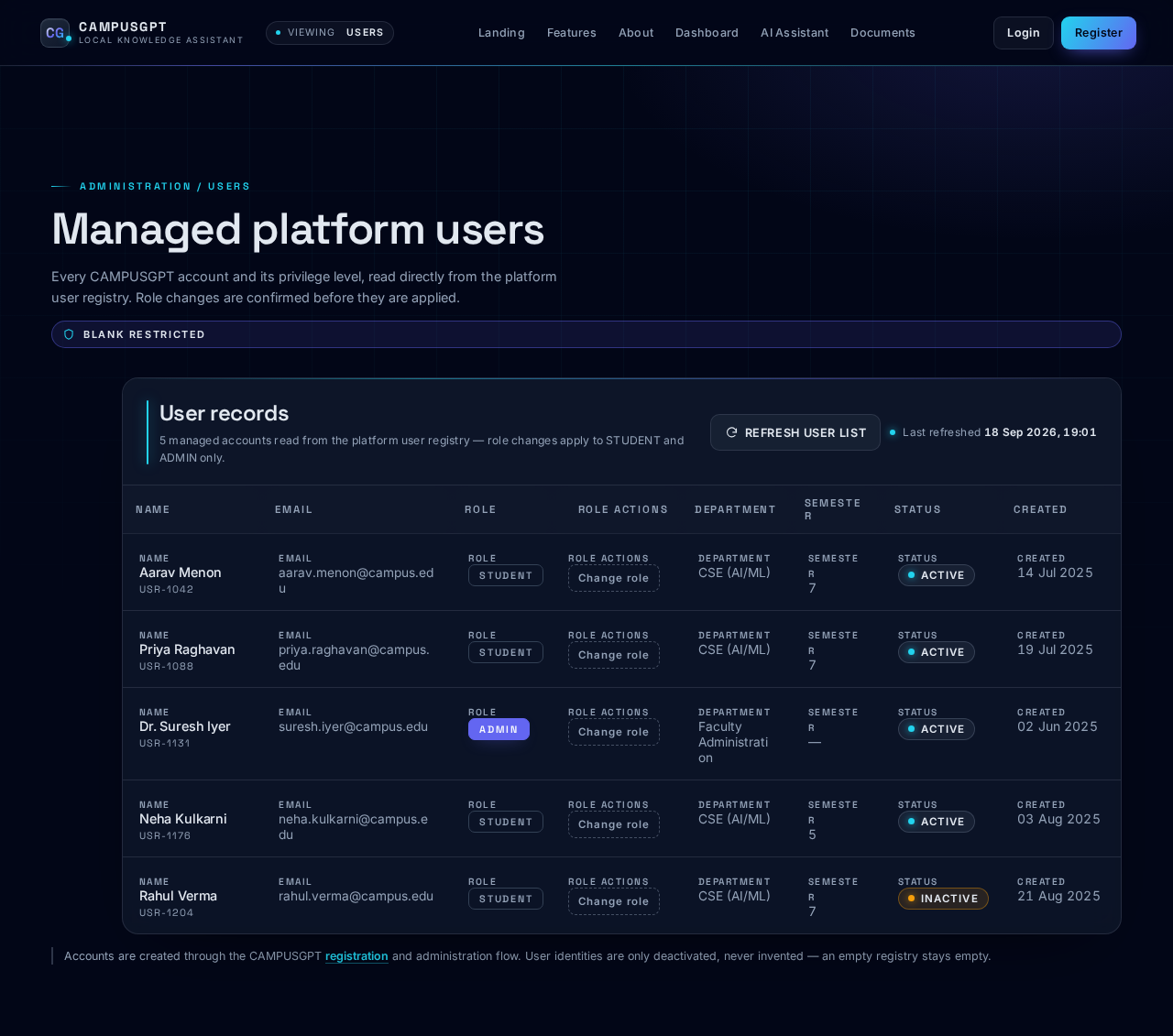
Users design preview
Landing: Review public introduction
Features: Review platform capabilities
About: Review project information
Register: Submit registration with admin role
Login: 1. Submit login credentials
Dashboard: 2. Review platform metrics
Dashboard: Refresh dashboard data
Users: 1. View managed user records
Users: 2. Manage user roles
Users: Refresh user list
Analytics: 1. View platform analytics
Analytics: 2. Refresh analytics charts
RAG Evaluation: Select evaluation dataset
RAG Evaluation: 1. Run local RAG evaluation
RAG Evaluation: 2. Review evaluation metrics
System Health: 1. Refresh health status
System Health: 2. Review service indicators
Settings: 3. Update supported settings
Settings: 4. Log out
Preview dataChanges stay in this preview.
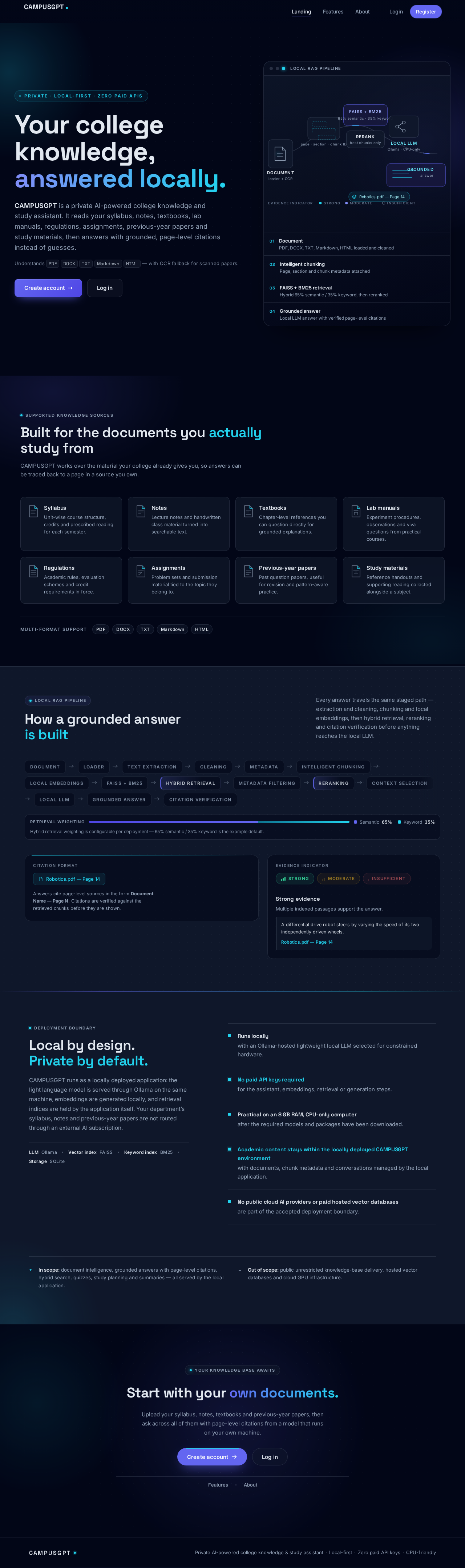
Landing design preview
Landing: Review public introduction
Features: Review platform capabilities
About: Review project information
Register: Submit registration with admin role
Login: 1. Submit login credentials
Dashboard: 2. Review platform metrics
Dashboard: Refresh dashboard data
Users: 1. View managed user records
Users: 2. Manage user roles
Users: Refresh user list
Analytics: 1. View platform analytics
Analytics: 2. Refresh analytics charts
RAG Evaluation: Select evaluation dataset
RAG Evaluation: 1. Run local RAG evaluation
RAG Evaluation: 2. Review evaluation metrics
System Health: 1. Refresh health status
System Health: 2. Review service indicators
Settings: 3. Update supported settings
Settings: 4. Log out