cafe-de-italio
 jay bhatt
Create a Premium Website for Cafe De Italiano Build a modern, premium, mobile-responsive restaurant website for Cafe De Italiano, a popular café and restaurant in Ahmedabad. Business Information Cafe Name: Cafe De Italiano Tagline: Taste, Comfort & Italian Delights Address: Cafe de Italiano, Bellagio Rd, near Iscon Circle, opposite Wide Angle, Sanidhya, Ahmedabad, Gujarat 380058 Phone: +91 97278 44747 Opening Hours: 10:00 AM – 11:00 PM Rating: 4.2/5 from 3,600+ reviews Cuisine: Italian, Pizza, Burgers, Sandwiches, Fries, Nachos, Pasta, Shakes, Desserts, Café Beverages Design Requirements Create a luxurious and modern café website with: Dark theme with elegant Italian styling Premium restaurant UI Smooth animations and transitions Mobile-first responsive design Fast loading pages Modern typography Attractive food photography sections Professional layout similar to top restaurant websites Color Palette: Dark Black (#121212) Deep Red (#B22222) Gold (#D4AF37) White (#FFFFFF) Website Pages 1. Home Page Hero Section: Full-screen background image/video of café Cafe De Italiano logo Catchy headline: "Experience Authentic Italian Flavors in Ahmedabad" Buttons: View Menu Reserve Table Order Online Show: Customer ratings 3600+ reviews Popular dishes Featured food gallery 2. About Us Include: Café story Passion for Italian cuisine Comfortable ambience Friendly staff Quality ingredients Display: Restaurant photos Team section Customer satisfaction statistics 3. Digital Menu Create beautiful categorized menu cards. Pizzas Farm House Pizza Peri Peri French Fries Pizza Cheese Pizza Makhani Pizza Burgers Melting Cheese Burger Sandwiches Peri Peri Sandwiches Fries Schzwan Fries Pasta & Italian Lasagna Nachos Mexican Nachos House of Nachos Supremo Desserts Chocolate Loaded Waffle Shakes Monster Shake Freak Shake Red Velvet Freak Shake Monster Freak Shake For every item: Image Description Price Add to cart button 4. Online Ordering System Allow customers to: Add products to cart Increase/decrease quantity Checkout page Enter address Select payment method Order confirmation screen Admin receives order notification. 5. Table Reservation System Reservation form: Customer Name Mobile Number Email Date Time Number of Guests Special Requests Store reservations in database. Admin dashboard to manage bookings. 6. Food Gallery Create beautiful image gallery with: Café interiors Pizzas Burgers Shakes Desserts Customer moments Use masonry layout and lightbox view. 7. Customer Reviews Show: Overall Rating 4.2/5 Total Reviews 3600+ Featured Reviews: "Wonderful place for hangout, chill out place, tasty food and drinks." "Great decor, coffee and staff service." "Everything which I ordered pizza, pasta, shakes etc. was excellent." Allow customers to submit reviews. 8. Contact Page Display: Address Phone Number Opening Hours Email Embed Google Maps location. Contact Form: Name Phone Message Admin Panel Secure Admin Login Features: Manage menu items Add/Edit/Delete products Manage reservations Manage customer orders Manage gallery images Manage reviews Dashboard analytics Dashboard Cards: Total Orders Today's Orders Reservations Revenue Customers


Comments (0)
Sign in to leave a comment
System Requirements
Cafe De Italiano System Requirements Document
Introduction
Cafe De Italiano is a popular café and restaurant located in Ahmedabad, India. This document outlines the system requirements for developing a modern, premium, mobile-responsive website for Cafe De Italiano. The website aims to enhance the café's online presence, attract both local patrons and tourists, and facilitate online orders and table reservations.
System Overview
The Cafe De Italiano website will serve as a digital extension of the café, offering a luxurious and modern user experience. It will feature a dark theme with elegant Italian styling, smooth animations, and a mobile-first responsive design. The website will include various sections such as a digital menu, online ordering system, table reservation system, food gallery, customer reviews, and contact information. The primary goal is to appeal to a diverse audience, including students, families, working professionals, couples, friend groups, and tourists visiting the Iscon Circle area.
Functional Requirements
- As a User, I should be able to view a full-screen background image/video of the café on the home page.
- As a User, I should be able to see the Cafe De Italiano logo and a catchy headline on the home page.
- As a User, I should be able to click buttons to view the menu, reserve a table, or order online.
- As a User, I should be able to see customer ratings and reviews on the home page.
- As a User, I should be able to view popular dishes and a featured food gallery on the home page.
- As a User, I should be able to read about the café's story, passion for Italian cuisine, and see restaurant photos on the About Us page.
- As a User, I should be able to view a categorized digital menu with images, descriptions, prices, and an add-to-cart button for each item.
- As a User, I should be able to add products to my cart, adjust quantities, and proceed to checkout.
- As a User, I should be able to enter my address, select a payment method, and receive an order confirmation.
- As an Admin, I should receive order notifications.
- As a User, I should be able to fill out a reservation form with my details and special requests.
- As an Admin, I should be able to manage bookings through a dashboard.
- As a User, I should be able to view a beautiful image gallery with café interiors and food items.
- As a User, I should be able to submit and view customer reviews.
- As a User, I should be able to view the café's contact information and location on a map.
- As a User, I should be able to fill out a contact form to send messages to the café.
- As an Admin, I should be able to securely log in to the admin panel.
- As an Admin, I should be able to manage menu items, reservations, customer orders, gallery images, and reviews.
- As an Admin, I should be able to view dashboard analytics with total orders, today's orders, reservations, revenue, and customers.
User Personas
- Local Patrons: Students, families, working professionals, couples, and groups of friends from Ahmedabad.
- Visitors/Tourists: Individuals visiting the Iscon Circle area, searching for highly-rated cafés and restaurants.
- Admin: Staff responsible for managing the website's content, orders, reservations, and customer interactions.
Core User Flows
- User visits home page -> views café background -> clicks "View Menu" -> browses digital menu -> adds items to cart -> proceeds to checkout -> enters address and payment -> receives order confirmation.
- User visits home page -> clicks "Reserve Table" -> fills out reservation form -> reservation stored in database -> admin manages booking.
- User visits food gallery -> views images in masonry layout -> clicks image for lightbox view.
- Admin logs into secure panel -> manages menu items, orders, reservations, gallery, and reviews -> views dashboard analytics.
Visuals Colors and Theme
- primary: #121212 (Dark Black)
- primary_light: #2E2E2E (Lighter Black)
- secondary: #B22222 (Deep Red)
- accent: #D4AF37 (Gold)
- highlight: #FFD700 (Bright Gold)
- bg: #FFFFFF (White)
- surface: rgba(18, 18, 18, 0.8)
- text: #FFFFFF (White)
- text_muted: #B0B0B0 (Muted Grey)
- border: rgba(255, 255, 255, 0.2)
Signature Design Concept
The homepage will feature an interactive 3D model of the café's interior, allowing users to virtually explore the space. Using @react-three/fiber and @react-three/drei, users can click and drag to navigate through different sections of the café, such as the dining area, kitchen, and outdoor seating. As users hover over specific areas, detailed information about the café's offerings and ambiance will appear, creating an immersive and engaging experience. This interactive model will be complemented by smooth transitions and animations powered by gsap.
Interaction Model & Motion Direction
The landing page will utilize a "parallax" interaction model, with layered depth effects as users scroll through the site. Decorative elements such as atmospheric lighting and subtle animations will enhance the storytelling aspect of the café's brand. Internal pages, such as the menu and contact page, will maintain a "static" interaction model for clarity and ease of use.
Non-Functional Requirements
- The website must load within 3 seconds on a standard 4G connection.
- The website must be accessible and usable on all modern browsers and devices.
- The website must be secure, with encrypted data transmission for sensitive information.
- The website must be scalable to accommodate future growth in traffic and features.
Tech Stack
- Frontend: React for Web
- Backend: Python, FastAPI
- Database: MySQL or MariaDB, using Alembic for migrations
- AI Models: Not applicable
- AI Tools: Not applicable
- Local Orchestration: Docker, docker-compose
- Server-side Orchestration: Kubernetes
Assumptions and Constraints
- The website will primarily target users in Ahmedabad, India, and should consider local cultural and design preferences.
- The website must comply with local data protection and privacy regulations.
- The website should be designed to handle peak traffic during weekends and holidays.
Glossary
- Parallax: A design technique where background images move slower than foreground images, creating an illusion of depth.
- Lightbox: A feature that allows users to view images in an enlarged overlay on the current page.
- Masonry Layout: A grid layout that optimizes the use of space by arranging items in a visually appealing manner.
- Responsive Design: A design approach that ensures a website looks and functions well on a variety of devices and screen sizes.
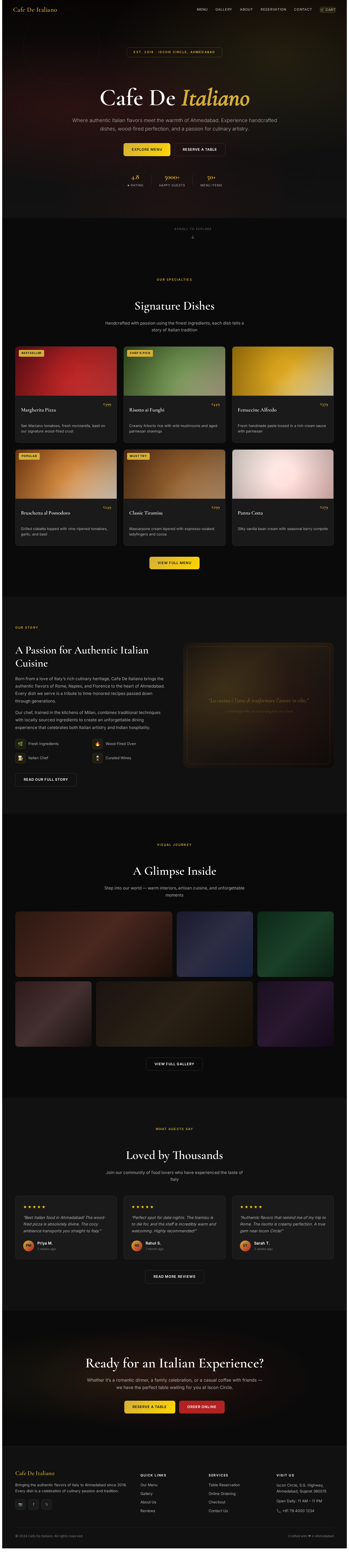
Cafe De Italiano
Where authentic Italian flavors meet the warmth of Ahmedabad. Experience handcrafted dishes, wood-fired perfection, and a passion for culinary artistry.
Signature Dishes
Handcrafted with passion using the finest ingredients, each dish tells a story of Italian tradition
Margherita Pizza
₹399San Marzano tomatoes, fresh mozzarella, basil on our signature wood-fired crust
Risotto ai Funghi
₹449Creamy Arborio rice with wild mushrooms and aged parmesan shavings
Fettuccine Alfredo
₹379Fresh handmade pasta tossed in a rich cream sauce with parmesan
Bruschetta al Pomodoro
₹249Grilled ciabatta topped with vine-ripened tomatoes, garlic, and basil
Classic Tiramisu
₹299Mascarpone cream layered with espresso-soaked ladyfingers and cocoa
Panna Cotta
₹279Silky vanilla bean cream with seasonal berry compote
A Passion for Authentic Italian Cuisine
Born from a love of Italy’s rich culinary heritage, Cafe De Italiano brings the authentic flavors of Rome, Naples, and Florence to the heart of Ahmedabad. Every dish we serve is a tribute to time-honored recipes passed down through generations.
Our chef, trained in the kitchens of Milan, combines traditional techniques with locally sourced ingredients to create an unforgettable dining experience that celebrates both Italian artistry and Indian hospitality.
“La cucina è l’arte di trasformare l’amore in cibo.”
— Cooking is the art of turning love into food
A Glimpse Inside
Step into our world — warm interiors, artisan cuisine, and unforgettable moments
Loved by Thousands
Join our community of food lovers who have experienced the taste of Italy
“Best Italian food in Ahmedabad! The wood-fired pizza is absolutely divine. The cozy ambiance transports you straight to Italy.”
“Perfect spot for date nights. The tiramisu is to die for, and the staff is incredibly warm and welcoming. Highly recommended!”
“Authentic flavors that remind me of my trip to Rome. The risotto is creamy perfection. A true gem near Iscon Circle!”
Ready for an Italian Experience?
Whether it’s a romantic dinner, a family celebration, or a casual coffee with friends —we have the perfect table waiting for you at Iscon Circle.
No comments yet. Be the first!