cafe-brambles

byrohit nathani

i want to create a website for cafe here is a google business profile Cozy vegetarian cafe featuring a relaxed atmosphere and a diverse menu of pasta, pizza, and coffee. Address: Shop no.13, Birla College Road, Patil Nagar Near DG Customs, Kalyan (w) 421301, Kalyan, Maharashtra 421301 Phone: 081492 66568 Reservations: eazydiner.com, zomato.com, swiggy.com, district.in Providers Hours: Open · Closes 11:30 pm Takeout: Now · Ends 11 pm · More hours Suggest an edit · Own this business? Add missing information Add website Price per person: ₹200–1,000 Reported by 63 people Brambles Cafe Brambles Cafe on Google Sip Into Summer Freshness Cool, refreshing, and bursting with tropical flavour our Man… May 26, 2026 Call now Fresh Flavours, Beautifully Crafted Start your day with something vibrant, wholesom… May 26, 2026 Call now Brambales Caffee in Kalyan offers a perfect combination of delicious food, quality coffee, and a warm atmosphere. The… May 21, 2026 If you are looking for a coffee shop in Kalyan with great ambiance and tasty food, Brambales Caffee is a great… May 21, 2026 Brambales Caffee is one of the most loved cafes in Kalyan for coffee lovers and food enthusiasts. Known for its coz… May 21, 2026 View all Reviews Reviews from the web Zomato 4.3/5 53 votes Justdial 4.8/5 1,140 votes EazyDiner 4.7/5 519 reviews Google reviews Write a review Add photos Mahek Mahtani "Loved the food, ambience and service😍 mushroom garlic pizza is a must try 😋" Nikita Rangwani "We ordered Alfredo pasta, cappuccino iced coffee, and some peri peri tofu rice." WanderingWiz "Good spice balance, well cooked paneer, and the portion size was solid." View all Google reviews From Brambles Cafe "Escape the ordinary and immerse yourself in the warm and inviting ambiance of Brambles Cafe. Our cozy haven nestled in Kalyan, Maharashtra, India, is the perfect retreat for those seeking a delightful escape. Indulge in our freshly brewed coffee,... More Popular times Mon Tue Wed Thu Fri Sat Sun Live: Busier than usual

LandingReviews
Landing

Comments (0)

No comments yet. Be the first!

System Requirements

System Requirements Document for cafe-brambles

1. Introduction

Brambles Cafe is a cozy vegetarian cafe in Kalyan, Maharashtra, India, serving a diverse menu of pasta, pizza, and coffee in a relaxed atmosphere. This project delivers a public website for the cafe that presents its story, its menu, its operating hours, its location, its contact number, its price range, and its third-party reservation and ordering channels, and that surfaces the cafe's Google Business Profile content — posts, reviews, and ratings from Zomato, Justdial, EazyDiner, and Google.

The audience is local diners in and around Kalyan: students from Birla College Road, families, and date-night couples looking for a warm escape. The site is a public, anonymous, read-and-route experience. It does not take bookings itself; reservations and ordering are handled by the cafe's existing third-party providers.

Page 1 of 31

2. System Overview

The current delivery is a public, anonymous, first-party website with two destinations: Landing and Reviews. Both are reachable without any account or sign-in. The site presents authoritative cafe content sourced from the cafe's Google Business Profile and routes visitors out to the cafe's reservation and ordering providers (eazydiner.com, zomato.com, swiggy.com, district.in) and to the cafe's phone number.

Actors:

  • Cafe Visitor — a prospective or returning customer who browses the cafe's offerings and details and then acts on a reservation or takeout channel.
  • Cafe Owner / Manager — the person responsible for the cafe's public presence, whose success is a published, accurate site that drives calls, reservations, and visits.
  • Third-party reservation/ordering providers (eazydiner.com, zomato.com, swiggy.com, district.in) — external destinations that own the booking and ordering transaction. They are not personas and are not built by this project.

Narrow exclusions: the site does not implement an on-site booking or ordering system; reservations are handled through the third-party providers listed above. The site does not implement accounts, sign-in, or any authenticated area.

Page 2 of 31

2a. Product Interpretation and Delivery Boundary

The website is a first-party, publicly reachable marketing and information surface for Brambles Cafe. Every visitor sees the same content; there is no private, per-visitor state to own, resume, or protect, so no application-owned identity is established and no destination is gated. The reservation and ordering transaction is owned by external providers: the site's responsibility ends at presenting the correct provider links and the cafe's phone number, and the visitor completes the booking or order on the provider's own surface.

The current horizon covers the Landing and Reviews destinations and the content they present. Nothing beyond that — no on-site booking, no accounts, no admin editing surface — is part of the current delivery.

Page 3 of 31

2b. Source Content Inventory

The following verified facts are supplied by the authoritative Google Business Profile content source and must appear as stated.

Cafe identity and description

  • Name: Brambles Cafe (also appears in source as "Brambales Caffee" in review and post text).
  • Description: Cozy vegetarian cafe featuring a relaxed atmosphere and a diverse menu of pasta, pizza, and coffee.
  • Owner statement ("From Brambles Cafe"): "Escape the ordinary and immerse yourself in the warm and inviting ambiance of Brambles Cafe. Our cozy haven nestled in Kalyan, Maharashtra, India, is the perfect retreat for those seeking a delightful escape. Indulge in our freshly brewed coffee,…"

Location and contact

  • Address: Shop no.13, Birla College Road, Patil Nagar Near DG Customs, Kalyan (w) 421301, Kalyan, Maharashtra 421301.
  • Phone: 081492 66568.

Hours

  • Open · Closes 11:30 pm.
  • Takeout: Now · Ends 11 pm · More hours.

Price

  • Price per person: ₹200–1,000.
  • Reported by 63 people.

Reservation and ordering providers

Page 4 of 31
  • eazydiner.com
  • zomato.com
  • swiggy.com
  • district.in

Google Business Profile posts

  • "Sip Into Summer Freshness" — "Cool, refreshing, and bursting with tropical flavour our Man…" — May 26, 2026 — Call now.
  • "Fresh Flavours, Beautifully Crafted" — "Start your day with something vibrant, wholesom…" — May 26, 2026 — Call now.
  • "Brambales Caffee in Kalyan offers a perfect combination of delicious food, quality coffee, and a warm atmosphere. The…" — May 21, 2026.
  • "If you are looking for a coffee shop in Kalyan with great ambiance and tasty food, Brambales Caffee is a great…" — May 21, 2026.
  • "Brambales Caffee is one of the most loved cafes in Kalyan for coffee lovers and food enthusiasts. Known for its coz…" — May 21, 2026.
  • "View all".

Ratings from the web

  • Zomato: 4.3/5 — 53 votes.
  • Justdial: 4.8/5 — 1,140 votes.
  • EazyDiner: 4.7/5 — 519 reviews.

Google reviews

Page 5 of 31
  • Mahek Mahtani — "Loved the food, ambience and service\xf0\x9f\x98\x8d mushroom garlic pizza is a must try\x20\xf0\x9f\x98\x8b"
  • Nikita Rangwani — "We ordered Alfredo pasta, cappuccino iced coffee, and some peri peri tofu rice."
  • WanderingWiz — "Good spice balance, well cooked paneer, and the portion size was solid."
  • "View all Google reviews".
  • "Write a review", "Add photos".

Popular times

  • Days: Mon, Tue, Wed, Thu, Fri, Sat, Sun.
  • Live status: "Busier than usual".

2c. Page Content and Component Coverage

Page 6 of 31

Landing

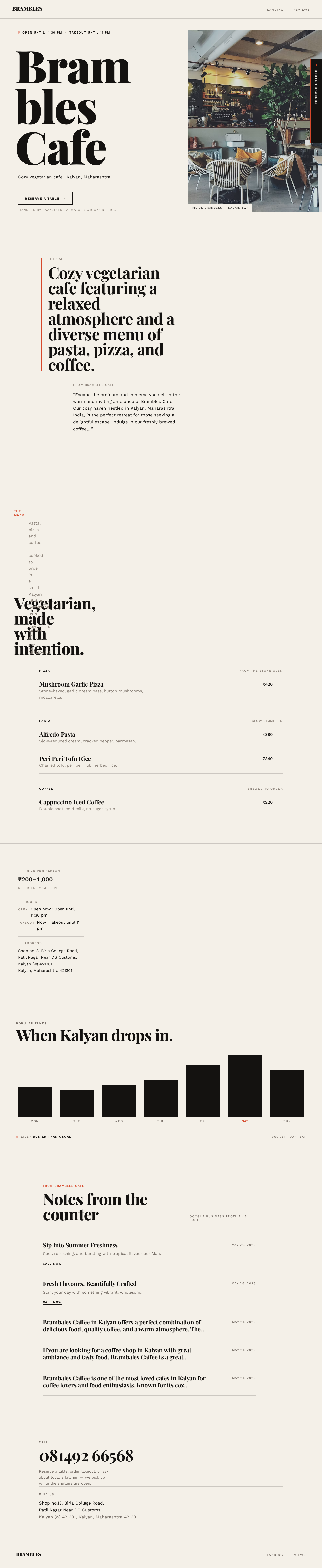
  • Information and state: Cafe name and wordmark "BRAMBLES"; the cafe description (cozy vegetarian cafe featuring a relaxed atmosphere and a diverse menu of pasta, pizza, and coffee); the owner statement from Brambles Cafe; the menu of pasta, pizza, and coffee presented as an editorial list; the price per person range ₹200–1,000 with the "Reported by 63 people" attribution; the address; the phone number 081492 66568; the hours (open until 11:30 pm, takeout until 11 pm); the open/closed status; the reservation and ordering provider links (eazydiner.com, zomato.com, swiggy.com, district.in); the Popular Times strip for Mon–Sun with the live "Busier than usual" status; and a selection of Google Business Profile posts with their dates and "Call now" actions.
  • Primary actions: Reserve a table via a provider; order takeout via a provider; call the cafe; navigate to Reviews.
  • Supporting actions: Follow a provider link from the sticky reservation bar; follow a post's "Call now" action; view the full address; view the full hours.
  • Domain entities: Cafe, Menu item, Price range, Hours, Address, Phone number, Provider link, Business post, Popular-times entry.
  • Component responsibilities:
    • Hero composition — stacked oversized wordmark, single-line location descriptor, full-bleed photograph, baseline rule, status line with status dot, and the reservation CTA.
    • Status line — "OPEN UNTIL 11:30 PM · TAKEOUT UNTIL 11 PM" with the tomato status dot.
    • Editorial menu list — dish rows with name, description, and right-aligned price separated by hairline rules.
    • Price and hours metadata rail — price per person, "Reported by 63 people", hours, and address in small-caps labels.
Page 7 of 31
  • Popular Times strip — seven vertical bars with day labels, current day highlighted.
  • Business posts block — post title, excerpt, date, and "Call now" action per post.
  • Sticky reservation bar — mobile fixed bottom bar; desktop fixed right-edge vertical tab expanding to the four provider links.
  • Contact block — phone number as a call action and the full address.
  • States:
    • Loading: hero photograph and post imagery load progressively; text content renders immediately.
    • Empty: if a post excerpt or image is unavailable, the post row renders its title, date, and "Call now" action without the missing element; the menu list and metadata always render from source content.
    • Success: the visitor sees the cafe identity, description, menu, price, hours, address, phone, and provider links, and can reach a provider or place a call.
    • Error: if a provider link cannot be reached, the visitor retains the phone number and the remaining provider links as alternate paths.
    • Recovery: the sticky reservation bar and the contact block remain available at all times so a failed provider attempt does not strand the visitor.
Page 8 of 31

Reviews

  • Information and state: The cafe's Google Business Profile posts with titles, excerpts, and dates; the ratings from the web (Zomato 4.3/5 with 53 votes, Justdial 4.8/5 with 1,140 votes, EazyDiner 4.7/5 with 519 reviews); the Google reviews with reviewer names and quotes; and the "View all Google reviews", "Write a review", and "Add photos" actions.
  • Primary actions: Read posts, ratings, and reviews; follow "View all Google reviews"; follow "Write a review"; follow "Add photos".
  • Supporting actions: Return to Landing; reach the reservation bar.
  • Domain entities: Business post, Rating, Review, Reviewer, Review source.
  • Component responsibilities:
    • Posts list — each post's title, excerpt, date, and "Call now" action.
    • Ratings row — one entry per source (Zomato, Justdial, EazyDiner) with score and vote/review count.
    • Review pull-quotes — reviewer name in small caps, quote in display italic, tomato left-border rule.
    • Google review actions — "View all Google reviews", "Write a review", "Add photos".
    • Sticky reservation bar — carried from Landing so the reservation path stays one tap away.
  • States:
    • Loading: post and review text renders immediately; any associated imagery loads progressively.
    • Empty: if a rating source or review is unavailable, the remaining ratings and reviews render and the missing entry is omitted rather than shown as a placeholder.
    • Success: the visitor has read the cafe's posts, cross-source ratings, and Google reviews, and can act on "View all Google reviews", "Write a review", or "Add photos".
Page 9 of 31
  • Error: if an external review action cannot be reached, the visitor retains the on-page posts, ratings, and reviews.
  • Recovery: the visitor can return to Landing or use the sticky reservation bar to continue to a provider.

3. Functional Requirements

FR-1 — Present the cafe's description (explicit) As a Cafe Visitor, I should see the cafe described as a cozy vegetarian cafe featuring a relaxed atmosphere and a diverse menu of pasta, pizza, and coffee, so that I understand what Brambles Cafe is before deciding to visit.

  • Trigger/input: the visitor opens Landing.
  • Observable result: the description text is visible on Landing.
  • Access state: anonymous, no sign-in.
  • Failure/recovery: if the description fails to render, the page reloads the content block; the remaining cafe details stay visible.
  • Continuation: the visitor continues to the menu, hours, or reservation path.

FR-2 — Present the cafe's address (explicit) As a Cafe Visitor, I should see the cafe's full address — Shop no.13, Birla College Road, Patil Nagar Near DG Customs, Kalyan (w) 421301, Kalyan, Maharashtra 421301 — so that I can find the cafe.

  • Trigger/input: the visitor opens Landing.
  • Observable result: the full address is visible.
  • Access state: anonymous.
  • Failure/recovery: if the address block fails to render, the page reloads the block; the phone number remains available as an alternate way to reach the cafe.
  • Continuation: the visitor uses the address to plan a visit or calls the cafe.
Page 10 of 31

FR-3 — Present the cafe's phone number (explicit) As a Cafe Visitor, I should see the cafe's phone number 081492 66568 as a call action, so that I can call the cafe directly.

  • Trigger/input: the visitor opens Landing or a post's "Call now" action.
  • Observable result: the phone number is visible and initiates a call when activated.
  • Access state: anonymous.
  • Failure/recovery: if the call action is unavailable on the visitor's device, the number remains visible as plain text to dial manually.
  • Continuation: the visitor places the call.

FR-4 — Present the cafe's hours (explicit) As a Cafe Visitor, I should see the cafe's hours — open until 11:30 pm and takeout until 11 pm — so that I know when I can visit or order.

  • Trigger/input: the visitor opens Landing.
  • Observable result: the hours are visible, including the open/closed status.
  • Access state: anonymous.
  • Failure/recovery: if the status cannot be determined, the stated hours remain visible without a status indicator.
  • Continuation: the visitor decides when to visit or order.
Page 11 of 31

FR-5 — Present the price per person range (explicit) As a Cafe Visitor, I should see the price per person range of ₹200–1,000, with the "Reported by 63 people" attribution, so that I can judge whether the cafe fits my budget.

  • Trigger/input: the visitor opens Landing.
  • Observable result: the price range and its attribution are visible.
  • Access state: anonymous.
  • Failure/recovery: if the price block fails to render, the page reloads the block; the menu list remains visible.
  • Continuation: the visitor continues to the menu or the reservation path.

FR-6 — Present the menu of pasta, pizza, and coffee (explicit) As a Cafe Visitor, I should see the cafe's menu of pasta, pizza, and coffee presented as an editorial list with dish names, descriptions, and prices, so that I can choose what I want.

  • Trigger/input: the visitor opens Landing and scrolls to the menu.
  • Observable result: dish rows render with name, description, and right-aligned price, separated by hairline rules.
  • Access state: anonymous.
  • Failure/recovery: if a dish description is unavailable, the row renders its name and price without the description.
  • Continuation: the visitor proceeds to reserve a table or order takeout.
Page 12 of 31

FR-7 — Direct visitors to reservation and ordering providers (explicit) As a Cafe Visitor, I should be able to reach eazydiner.com, zomato.com, swiggy.com, and district.in from the site, so that I can reserve a table or order takeout through the cafe's existing providers.

  • Trigger/input: the visitor activates the reservation CTA or a provider link in the sticky reservation bar.
  • Observable result: the visitor is taken to the selected provider's own surface.
  • Access state: anonymous; the provider owns any identity or transaction on its own surface.
  • Failure/recovery: if a provider link cannot be reached, the visitor retains the phone number and the remaining provider links as alternate paths.
  • Continuation: the visitor completes the reservation or order on the provider's surface.

FR-8 — Present the cafe's Google Business Profile posts (explicit) As a Cafe Visitor, I should see the cafe's Google Business Profile posts with their titles, excerpts, and dates, so that I can see what the cafe is currently sharing.

  • Trigger/input: the visitor opens Landing or Reviews.
  • Observable result: post rows render with title, excerpt, and date; posts carrying a "Call now" action expose it.
  • Access state: anonymous.
  • Failure/recovery: if a post excerpt or image is unavailable, the row renders its title, date, and "Call now" action without the missing element.
  • Continuation: the visitor follows "Call now" or continues to the reviews.
Page 13 of 31

FR-9 — Present ratings from the web (explicit) As a Cafe Visitor, I should see the cafe's ratings from Zomato (4.3/5, 53 votes), Justdial (4.8/5, 1,140 votes), and EazyDiner (4.7/5, 519 reviews), so that I can gauge the cafe's reputation across sources.

  • Trigger/input: the visitor opens Reviews.
  • Observable result: each rating renders with its source, score, and vote or review count.
  • Access state: anonymous.
  • Failure/recovery: if a rating source is unavailable, the remaining ratings render and the missing entry is omitted rather than shown as a placeholder.
  • Continuation: the visitor reads the Google reviews or proceeds to the reservation path.

FR-10 — Present Google reviews (explicit) As a Cafe Visitor, I should see the cafe's Google reviews with reviewer names and quotes, so that I can read what other diners say.

  • Trigger/input: the visitor opens Reviews.
  • Observable result: review pull-quotes render with the reviewer's name and quote.
  • Access state: anonymous.
  • Failure/recovery: if a review is unavailable, the remaining reviews render and the missing entry is omitted.
  • Continuation: the visitor follows "View all Google reviews" or proceeds to the reservation path.
Page 14 of 31

FR-11 — Provide Google review actions (explicit) As a Cafe Visitor, I should be able to follow "View all Google reviews", "Write a review", and "Add photos", so that I can read more reviews or contribute my own.

  • Trigger/input: the visitor activates one of the three actions on Reviews.
  • Observable result: the visitor is taken to the corresponding Google surface.
  • Access state: anonymous on this site; Google owns any identity required on its own surface.
  • Failure/recovery: if an external action cannot be reached, the visitor retains the on-page posts, ratings, and reviews.
  • Continuation: the visitor returns to Reviews or to Landing.

FR-12 — Present the owner statement (explicit) As a Cafe Visitor, I should see the cafe's own statement — "Escape the ordinary and immerse yourself in the warm and inviting ambiance of Brambles Cafe. Our cozy haven nestled in Kalyan, Maharashtra, India, is the perfect retreat for those seeking a delightful escape. Indulge in our freshly brewed coffee,…" — so that I hear the cafe's voice directly.

  • Trigger/input: the visitor opens Landing.
  • Observable result: the owner statement is visible.
  • Access state: anonymous.
  • Failure/recovery: if the statement fails to render, the page reloads the block; the description and menu remain visible.
  • Continuation: the visitor continues to the menu or the reservation path.
Page 15 of 31

FR-13 — Present Popular Times (explicit) As a Cafe Visitor, I should see the cafe's Popular Times for Mon, Tue, Wed, Thu, Fri, Sat, and Sun, with the live status "Busier than usual", so that I can choose a quieter time to visit.

  • Trigger/input: the visitor opens Landing.
  • Observable result: seven day bars render with day labels and the current day highlighted; the live status is visible.
  • Access state: anonymous.
  • Failure/recovery: if the live status is unavailable, the seven day bars remain visible without the live indicator.
  • Continuation: the visitor decides when to visit.

FR-14 — Keep the reservation path always reachable (explicit) As a Cafe Visitor, I should always have the reservation path one tap away — a fixed bottom bar on mobile and a fixed right-edge tab on desktop that expands to the four provider links — so that I never have to hunt for how to book.

  • Trigger/input: the visitor scrolls or activates the sticky reservation bar.
  • Observable result: the bar remains visible; on desktop the tab expands on hover to show EazyDiner, Zomato, Swiggy, and District as four stacked links.
  • Access state: anonymous.
  • Failure/recovery: if a provider link cannot be reached, the visitor retains the phone number and the remaining provider links.
  • Continuation: the visitor completes the reservation or order on the provider's surface.
Page 16 of 31

FR-15 — Publish an accurate public site for the cafe (required_inference) As a Cafe Owner / Manager, I should have a published, accurate public site that presents the cafe's story, menu, hours, location, contact number, and reservation/takeout provider links, so that customers can find and choose the cafe.

  • Trigger/input: the owner reviews the published site against the cafe's Google Business Profile content.
  • Observable result: the site presents the cafe's description, address, phone, hours, price range, menu, provider links, posts, ratings, and reviews as stated in the source content.
  • Access state: the site is public and anonymous; the owner's responsibility is the accuracy of the published content, not an authenticated editing surface.
  • Failure/recovery: if published content diverges from the source, the owner corrects the content and the site is republished.
  • Continuation: the owner monitors calls, reservations, and visits driven by the site.

4. User Personas

Page 17 of 31

Cafe Visitor

Product context. A prospective or returning customer of Brambles Cafe in Kalyan — a student from Birla College Road, a family member, or part of a date-night couple — looking for a warm, relaxed vegetarian cafe with pasta, pizza, and coffee. They arrive on the site anonymously, often from a search or a shared link, and they are deciding whether and how to visit.

Primary goal. Learn about the cafe's relaxed atmosphere, menu, price range, hours, and location, and then find the right way to reserve a table or order takeout.

Distinct accepted responsibilities. Browsing the cafe's description, menu, price range, hours, address, and phone number; reading the cafe's posts, cross-source ratings, and Google reviews; and acting on a reservation or takeout channel. Their recurring responsibility is browsing the cafe's offerings and details and then acting on a reservation or takeout channel.

Relevant inputs or decisions. Which dish or category interests them; whether the ₹200–1,000 price range fits their budget; whether the cafe is open now or when it opens; whether to reserve a table, order takeout, or simply call; and which provider to use among eazydiner.com, zomato.com, swiggy.com, and district.in.

Interactions with other accepted participants. The visitor's action hands off to a third-party provider, which owns the booking or ordering transaction on its own surface. The visitor's reading of the site is also the outcome the Cafe Owner / Manager is accountable for.

Observable success. The visitor reaches the cafe or a booking provider with the information they need — a completed call, a reservation started on a provider, or a takeout order placed.

Page 18 of 31

Cafe Owner / Manager

Product context. The person responsible for Brambles Cafe's public presence in Kalyan. They already maintain the cafe's Google Business Profile and its presence on Zomato, Justdial, EazyDiner, Swiggy, and District, and they need a first-party site that carries the same facts accurately.

Primary goal. A published, accurate site that presents the cafe's story, menu, hours, location, contact number, and reservation/takeout provider links so customers can find and choose the cafe.

Distinct accepted responsibilities. Ensuring the site's description, address, phone number, hours, price range, menu, provider links, posts, ratings, and reviews match the cafe's authoritative Google Business Profile content; and keeping the reservation path prominent so it drives calls, reservations, and visits.

Relevant inputs or decisions. The cafe's Google Business Profile content as the authoritative source; which provider links to expose; and whether the published content still matches the cafe's current description, hours, and price range.

Interactions with other accepted participants. The owner's published content is what the Cafe Visitor reads and acts on; the owner's success is measured by the calls, reservations, and visits the site drives.

Observable success. A published, accurate site that drives calls, reservations, and visits.

5. Core User Flows

Page 19 of 31

Flow 1 — Cafe Visitor discovers the cafe and decides to visit (Landing)

  1. The visitor arrives on Landing anonymously, with no sign-in.
  2. The visitor reads the hero: the stacked wordmark "BRAMBLES", the line "Cozy vegetarian cafe · Kalyan, Maharashtra.", and the status line "OPEN UNTIL 11:30 PM · TAKEOUT UNTIL 11 PM" with the tomato status dot.
  3. The visitor reads the cafe description — cozy vegetarian cafe featuring a relaxed atmosphere and a diverse menu of pasta, pizza, and coffee — and the owner statement from Brambles Cafe.
  4. The visitor reads the price per person range ₹200–1,000 with the "Reported by 63 people" attribution, and the address and phone number.
  5. The visitor scrolls to the editorial menu list and reads dish rows for pasta, pizza, and coffee, each with a name, description, and right-aligned price.
  6. The visitor reads the Popular Times strip for Mon–Sun with the live "Busier than usual" status and decides when to visit.
  7. Result: the visitor has the cafe's description, menu, price, hours, address, and phone number.
  8. Next step: the visitor proceeds to Flow 2 or Flow 3.
Page 20 of 31

Flow 2 — Cafe Visitor reserves a table through a provider (Landing → provider surface)

  1. From Landing, the visitor activates the reservation CTA or the sticky reservation bar — a fixed bottom bar on mobile, a fixed right-edge tab on desktop that expands on hover to show EazyDiner, Zomato, Swiggy, and District as four stacked links.
  2. The visitor selects one of the four providers.
  3. Handoff: the visitor is taken to the selected provider's own surface, which owns the reservation transaction and any identity it requires.
  4. Result: the visitor has started a reservation on the provider's surface.
  5. Failure/recovery: if the provider link cannot be reached, the visitor returns to Landing and uses the phone number 081492 66568 or another provider link instead.
  6. Next step: the visitor completes the reservation on the provider's surface.

Flow 3 — Cafe Visitor orders takeout through a provider (Landing → provider surface)

  1. From Landing, the visitor reads the takeout hours (takeout until 11 pm) and activates the sticky reservation bar.
  2. The visitor selects a provider that handles ordering.
  3. Handoff: the visitor is taken to the selected provider's own surface, which owns the order transaction and any identity it requires.
  4. Result: the visitor has started a takeout order on the provider's surface.
  5. Failure/recovery: if the provider link cannot be reached, the visitor returns to Landing and calls the cafe on 081492 66568 instead.
  6. Next step: the visitor completes the order on the provider's surface.
Page 21 of 31

Flow 4 — Cafe Visitor calls the cafe (Landing)

  1. From Landing, the visitor activates the phone number 081492 66568 or a post's "Call now" action.
  2. Result: the visitor's device initiates a call to the cafe.
  3. Failure/recovery: if the call action is unavailable on the visitor's device, the number remains visible as plain text to dial manually.
  4. Next step: the visitor speaks with the cafe.

Flow 5 — Cafe Visitor reads posts, ratings, and reviews (Landing → Reviews)

  1. From Landing, the visitor navigates to Reviews.
  2. The visitor reads the cafe's Google Business Profile posts with their titles, excerpts, and dates, including "Sip Into Summer Freshness" and "Fresh Flavours, Beautifully Crafted" (both May 26, 2026) and the three May 21, 2026 posts.
  3. The visitor reads the ratings from the web: Zomato 4.3/5 with 53 votes, Justdial 4.8/5 with 1,140 votes, and EazyDiner 4.7/5 with 519 reviews.
  4. The visitor reads the Google reviews as pull-quotes: Mahek Mahtani ("Loved the food, ambience and service\xf0\x9f\x98\x8d mushroom garlic pizza is a must try\x20\xf0\x9f\x98\x8b"), Nikita Rangwani ("We ordered Alfredo pasta, cappuccino iced coffee, and some peri peri tofu rice."), and WanderingWiz ("Good spice balance, well cooked paneer, and the portion size was solid.").
  5. Result: the visitor has read the cafe's posts, cross-source ratings, and Google reviews.
  6. Next step: the visitor proceeds to Flow 6, returns to Landing, or uses the sticky reservation bar.
Page 22 of 31

Flow 6 — Cafe Visitor acts on Google review actions (Reviews → Google surface)

  1. From Reviews, the visitor activates "View all Google reviews", "Write a review", or "Add photos".
  2. Handoff: the visitor is taken to the corresponding Google surface, which owns any identity required there.
  3. Result: the visitor reads more reviews or contributes their own review or photos.
  4. Failure/recovery: if the external action cannot be reached, the visitor retains the on-page posts, ratings, and reviews.
  5. Next step: the visitor returns to Reviews or to Landing.

Flow 7 — Cafe Owner / Manager publishes and verifies the site

  1. The owner reviews the published site against the cafe's authoritative Google Business Profile content.
  2. The owner confirms the description, address (Shop no.13, Birla College Road, Patil Nagar Near DG Customs, Kalyan (w) 421301, Kalyan, Maharashtra 421301), phone number (081492 66568), hours (open until 11:30 pm, takeout until 11 pm), price range (₹200–1,000, reported by 63 people), menu of pasta, pizza, and coffee, provider links (eazydiner.com, zomato.com, swiggy.com, district.in), posts, ratings, and reviews are presented as stated.
  3. Result: the site is published and accurate.
  4. Failure/recovery: if published content diverges from the source, the owner corrects the content and the site is republished.
  5. Next step: the owner monitors the calls, reservations, and visits the site drives.
Page 23 of 31

6. Visuals Colors and Theme

The creative direction is authoritative for this section. Muse: Tobias van Schneider. Headline: Editorial swagger for a cozy cafe — oversized type, one hot accent, photography that breathes.

Colour tokens (light mode)

RoleHexUse
Background#F4F0E8Warm off-white paper ground (~70% of the page)
Surface#FFFFFFCards and the reservation panel only (~8%)
Text#141210Ink black for type and the primary brand mark (~20%)
Primary#141210Ink black for primary brand elements
Accent#D6482BSaturated tomato red — reservation CTA, open/closed status dot, section rules, hover states (~2%)
Muted#8A8178Warm grey for secondary metadata (hours, address labels)

The accent is the only saturated colour on the page; it earns attention by scarcity. Blue and indigo are forbidden anywhere.

Typography

Page 24 of 31
  • Headings: Playfair Display, 700–900 weight, tight leading (0.9–0.95), tight tracking (-0.02em), mixed case with occasional all-caps for labels.
  • Body: Work Sans, 400/500, 1.6 line-height.
  • Scale: 1.333 modular scale, mobile-first — 40/30/22/18/16 (mobile) → 128/72/40/20/17 (desktop).
  • Headline clamp: clamp(40px, 9vw, 128px). Section heading clamp: clamp(30px, 5vw, 72px). Body: 17px desktop, 16px mobile. Labels: 12px, 0.12em tracking, uppercase.
  • Inter, Roboto, Arial, Helvetica, Open Sans, Lato, Poppins, and system-ui are forbidden for any text.

Shape language. Sharp corners everywhere — no border-radius on cards, buttons, or images. Rules are 1px hairlines in ink or muted grey. The only round element is the "open" status dot. Images are full-bleed or hard-cropped rectangles, never rounded. Buttons are rectangular with a 1px ink border that fills with tomato on hover.

Layout. Asymmetric editorial grid: 12-column desktop grid with content deliberately offset — headlines start at column 2 or 3, images bleed to the right edge, metadata sits in a narrow left rail. On mobile the grid collapses to a single column but keeps the asymmetric rhythm through indentation and rule placement. Sections are separated by full-width 1px ink rules, not whitespace alone. The reservation CTA is pinned as a sticky bottom bar on mobile and a fixed right-edge tab on desktop.

Imagery. Large-scale editorial food and interior photography — monochrome or warm-toned, shot close and cropped tight: a macro of coffee crema, a mushroom garlic pizza shot from directly above, a hand pouring. Interiors shot with available light, warm and slightly grainy. No stock photos of models smiling at salads. No flat illustration. Occasional high-contrast black-and-white treatment on one hero image.

Page 25 of 31

7. Signature Design Concept

The public entry is a split composition, not a centered headline with a button.

On the left, a 7-column stack carries the wordmark BRAMBLES in Playfair Display at clamp(64px, 14vw, 180px), stacked over three lines, left-aligned, bleeding slightly off the left edge on mobile. Beneath it sits a single line of Work Sans body: "Cozy vegetarian cafe · Kalyan, Maharashtra." Above the wordmark sits the status line "OPEN UNTIL 11:30 PM · TAKEOUT UNTIL 11 PM" in 12px uppercase with the tomato status dot. The reservation CTA sits as a rectangular ink-bordered button pinned to the bottom-left of the type stack, not centered.

On the right, a 5-column full-bleed photograph of the cafe interior or a signature dish, cropped hard to the right edge, extending below the fold.

A thin 1px ink rule runs horizontally across the full viewport at the baseline of the wordmark, anchoring the composition. No gradient, no blob, no centered anything.

The type is the hero, not a photo with type on top. The composition recomposes only accepted content — the wordmark, the location descriptor, the status line, the reservation CTA, and the hero photograph — and introduces no new behaviour, page, or destination.

Page 26 of 31

8. Interaction Model & Motion Direction

Interaction Model: Static Motion Tempo: restrained Hero Dimensionality: flat

Landing Hero Motion Brief

  • Focal subject: the stacked "BRAMBLES" wordmark and the full-bleed cafe photograph, anchored by the full-viewport 1px ink rule at the wordmark's baseline.
  • Input → transformation → outcome thesis: as the visitor scrolls into view, the headline lines fade up 16px with a 200ms stagger per line, and the hero photograph crossfades in over 400–600ms ease-out; the outcome is a composed first frame in which the type and the photograph settle into the asymmetric grid, with the reservation CTA already pinned and reachable.
  • Motion vocabulary: slow crossfades (400–600ms ease-out) on image swaps; type reveals (fade up 16px, 200ms stagger per line) on scroll into view; hover on images a subtle 1.02 scale over 600ms with no bounce; the "open now" status dot pulses gently (opacity 0.4→1, 2s loop) as the only continuous motion. No parallax, no scroll-jacking, no gradient animations.
  • Composed first frame: the wordmark stack on the left with the status line above it and the reservation CTA below it, the full-bleed photograph on the right cropped hard to the right edge, and the 1px ink rule running across the full viewport at the wordmark's baseline.
  • Reduced-motion state: all reveals become instant, the status dot stops pulsing but stays visible, and the composition holds its static arrangement.

9. Non-Functional Requirements

Page 27 of 31
  • NFR-1 — Anonymous public access (explicit): both Landing and Reviews are reachable without an account or sign-in. No destination is gated. Rationale: the site is a public information surface with no private per-visitor state to own or protect.
  • NFR-2 — Third-party reservation ownership (explicit): reservations and ordering are handled through eazydiner.com, zomato.com, swiggy.com, and district.in rather than an on-site booking system. The site's responsibility ends at presenting the correct provider links and the cafe's phone number. Rationale: explicit hard constraint in the authoritative user evidence.
  • NFR-3 — Vegetarian positioning (explicit): the cafe is vegetarian, and the site's description and content must reflect that. Rationale: explicit hard constraint in the authoritative user evidence.
  • NFR-4 — Content accuracy against the source (required_inference): the description, address, phone number, hours, price range, menu, provider links, posts, ratings, and reviews presented on the site must match the cafe's authoritative Google Business Profile content. Rationale: the owner's accepted success is a published, accurate site.
  • NFR-5 — Readable text and controls stay whole (explicit): headlines, wordmarks, labels, numbers, and card text and controls stay entirely inside the viewport and their container at 375px, 768px, and 1280px, wrapping or scaling (for example font-size: clamp(...) with its mobile size) to fit, and no other element covers any part of them. Imagery, decoration, and motion may be cropped, bled off an edge, rotated, overlapped, or cut as the direction asks, as long as they cover no readable text or control.
  • NFR-6 — Reduced motion (explicit): with prefers-reduced-motion, all reveals become instant and the status dot stops pulsing but stays visible.
  • NFR-7 — No blue or indigo (explicit): blue and indigo are forbidden anywhere on the site; the generic indigo/blue-on-white SaaS template is forbidden for this project.
Page 28 of 31

10. Tech Stack

  • Frontend: React, built as a static-first public site with two routes — Landing and Reviews.
  • Styling: the creative direction's tokens implemented directly — Playfair Display and Work Sans, the #F4F0E8 / #FFFFFF / #141210 / #D6482B / #8A8178 palette, sharp corners, and 1px hairline rules.
  • Content: the cafe's Google Business Profile content is the authoritative content source; it is presented as site content rather than fetched live from a third-party API.
  • Backend: a single shared backend (Python/FastAPI) serving the site's content endpoints, extending one process, port, and deployment rather than introducing separate services.
  • Storage: a lightweight store for the cafe's content records (description, address, phone, hours, price range, menu items, provider links, posts, ratings, reviews, popular-times entries).
  • Deployment: Docker and docker-compose for the frontend and the shared backend. Kubernetes is not required for this delivery.
Page 29 of 31

11. Assumptions and Constraints

  • A-1 (assumption): The Google Business Profile content supplied in the requirement thread is the authoritative and complete content source for the site; no additional cafe facts are invented.
  • A-2 (assumption): The menu is presented from the categories named in the source — pasta, pizza, and coffee — with the specific dishes named in the source (mushroom garlic pizza, Alfredo pasta, cappuccino iced coffee, peri peri tofu rice) available as menu content.
  • A-3 (assumption): The hours shown are the source-stated hours — open until 11:30 pm and takeout until 11 pm — and the open/closed status reflects them.
  • A-4 (assumption): The Popular Times strip presents the seven source days (Mon–Sun) with the source live status "Busier than usual".
  • C-1 (constraint): The cafe is vegetarian.
  • C-2 (constraint): Reservations are handled through third-party providers (eazydiner.com, zomato.com, swiggy.com, district.in) rather than an on-site booking system.
  • C-3 (constraint): The site is public and anonymous; no accounts, sign-in, or authenticated area are part of the current delivery.
  • C-4 (constraint): Blue and indigo are forbidden anywhere; the generic indigo/blue-on-white SaaS template is forbidden for this project.
  • C-5 (constraint): Readable text and controls stay whole at 375px, 768px, and 1280px; imagery, decoration, and motion may be cropped or bled as the direction asks, provided they cover no readable text or control.
Page 30 of 31

12. Glossary

  • Brambles Cafe — the cozy vegetarian cafe in Kalyan, Maharashtra, India, that this website presents.
  • Cafe Visitor — a prospective or returning customer who browses the cafe's offerings and details and then acts on a reservation or takeout channel.
  • Cafe Owner / Manager — the person responsible for the cafe's public presence and for the accuracy of the published site.
  • Provider — a third-party reservation or ordering service (eazydiner.com, zomato.com, swiggy.com, district.in) that owns the booking or ordering transaction on its own surface.
  • Google Business Profile content — the authoritative source content for the site: the cafe's description, address, phone number, hours, price range, posts, ratings, and reviews.
  • Popular Times — the source data showing how busy the cafe is on each day of the week (Mon–Sun), with the live status "Busier than usual".
  • Editorial menu list — the menu presentation in which each dish is a row with its name, description, and right-aligned price, separated by hairline rules.
  • Sticky reservation bar — the always-reachable reservation path: a fixed bottom bar on mobile and a fixed right-edge tab on desktop that expands to the four provider links.
Page 31 of 31
Landing design preview
Landing: Review published site content
Landing: Verify description, address, phone, hours, price, menu, and provider links
Reviews: Verify posts, ratings, and reviews
Landing: Confirm site accuracy and monitor outcomes
Landing design preview
Landing: Review published site content
Landing: Verify description, address, phone, hours, price, menu, and provider links
Reviews: Verify posts, ratings, and reviews
Landing: Confirm site accuracy and monitor outcomes