Page 1 of 25
System Requirements Document for budgeting-receipt-scanner
Page 2 of 25
1. Introduction
budgeting-receipt-scanner is a modern, mobile-first AI budgeting application for households who want to stop guessing about their money. It gives a single person — the household money manager — a quiet, ledger-like record of income, spending, and savings, and it turns the raw evidence of daily life (a grocery receipt, a month of transactions) into structured, comparable data.
The product intent is a coded archive of personal spending: a dashboard that shows income, spending, savings, and an interactive pie chart breaking spending into categories (groceries, housing, transport, entertainment, etc.); an AI Financial Coach that analyzes transactions, identifies overspending, and suggests ways to save; a Budget Survey that collects income, household size, expenses, goals, and lifestyle to calculate an ideal monthly budget — especially for groceries — and compares it against actual spending; a Receipt Scanner that accepts uploaded receipts and uses OCR/AI to extract store, date, items, quantities, prices, tax, and total, then categorizes each item and stores the data; a Grocery Tracker that sorts purchased items by category, price, frequency, and store; a Price Comparison that compares products across Walmart, Safeway, Superstore, Costco, and similar retailers using mock data initially; and a Loan Calculator that computes payments, total interest, and amortization.
The audience is practical, slightly anxious about money, and mobile-first: someone standing in a grocery aisle with one hand on a phone. They do not want a toy dashboard or a bank's blue trust-signal. They want a well-kept record they can trust and act on.
This document specifies a functional MVP first, using mock data where external APIs are unavailable, with secure authentication, a proper database, a responsive UI, clean architecture, and modular code.
Page 3 of 25
2. System Overview
The MVP is a responsive web application with a mobile-first layout, backed by a persistent database and a secure authentication boundary. All budgeting data — receipts, extracted line items, transactions, survey answers, computed budgets, grocery purchase history, comparison results, and loan calculations — is owned by the signed-in user and persisted server-side.
Actors. The accepted active-human catalog is closed and consists of three personas: the Budgeting App User, the AI Financial Coach Consumer, and the Price-Conscious Shopper. These are three distinct working roles over the same account and the same data; they are not separate accounts, and the application does not differentiate permissions between them. External retailers (Walmart, Safeway, Superstore, Costco, and similar) are non-persona external actors whose price data is represented by mock data in the MVP.
Accepted behavior. The application provides: a public Landing surface; self-service Sign Up and returning Login; a Dashboard with income, spending, savings, and an interactive category pie chart; an AI Financial Coach; a Budget Survey with ideal-vs-actual comparison; a Receipt Scanner with OCR/AI extraction and item categorization; a Grocery Tracker with sorting by category, price, frequency, and store; a Price Comparison over named retailers using mock data; and a Loan Calculator producing payment, total interest, and amortization.
Ownership. All ten surfaces are first-party application pages. Identity is application-owned: users establish their own account through Sign Up and verify it on return through Login. Retailer price data is external in origin but is served to the user through the application's Price Comparison page as explicitly mock data.
Narrow exclusions. The MVP does not integrate live retailer pricing APIs; Price Comparison uses mock data initially and must never present invented prices as real. The MVP does not include bank-account aggregation, bill payment, investment tracking, or multi-user shared households beyond the household-size input collected by the Budget Survey.
Page 4 of 25
2a. Product Interpretation and Delivery Boundary
Delivery. This is a first-party, application-owned product delivered as a responsive web application with a mobile-first layout. Every accepted capability is reachable through the application's own interface; nothing is delegated to a provider surface or an external destination for the user's core work.
Access ownership. The application owns identity. Because budgeting data is private, durable, and must remain bound to the correct person across sessions, the user establishes their own account on first use (Sign Up) and verifies it on return (Login). Landing, Login, and Sign Up are anonymously reachable; every other page requires a signed-in session. There is no invitation, provisioning, or pre-existing-account boundary in the source, so enrollment is self-service. Identity establishes continuity of the user's own record only — it does not create roles, tiers, or differentiated visibility over shared state.
Current vs. future. Current scope is the functional MVP described in this document, with mock data wherever an external API is unavailable — specifically retailer pricing. Future scope (Section 11) covers live retailer price feeds and any additional external integrations; these are explicitly out of current acceptance.
2b. Source Content Inventory
No reference directive in this project declares a content_source. This section is intentionally omitted.
2c. Page Content and Component Coverage
Page 5 of 25
Landing
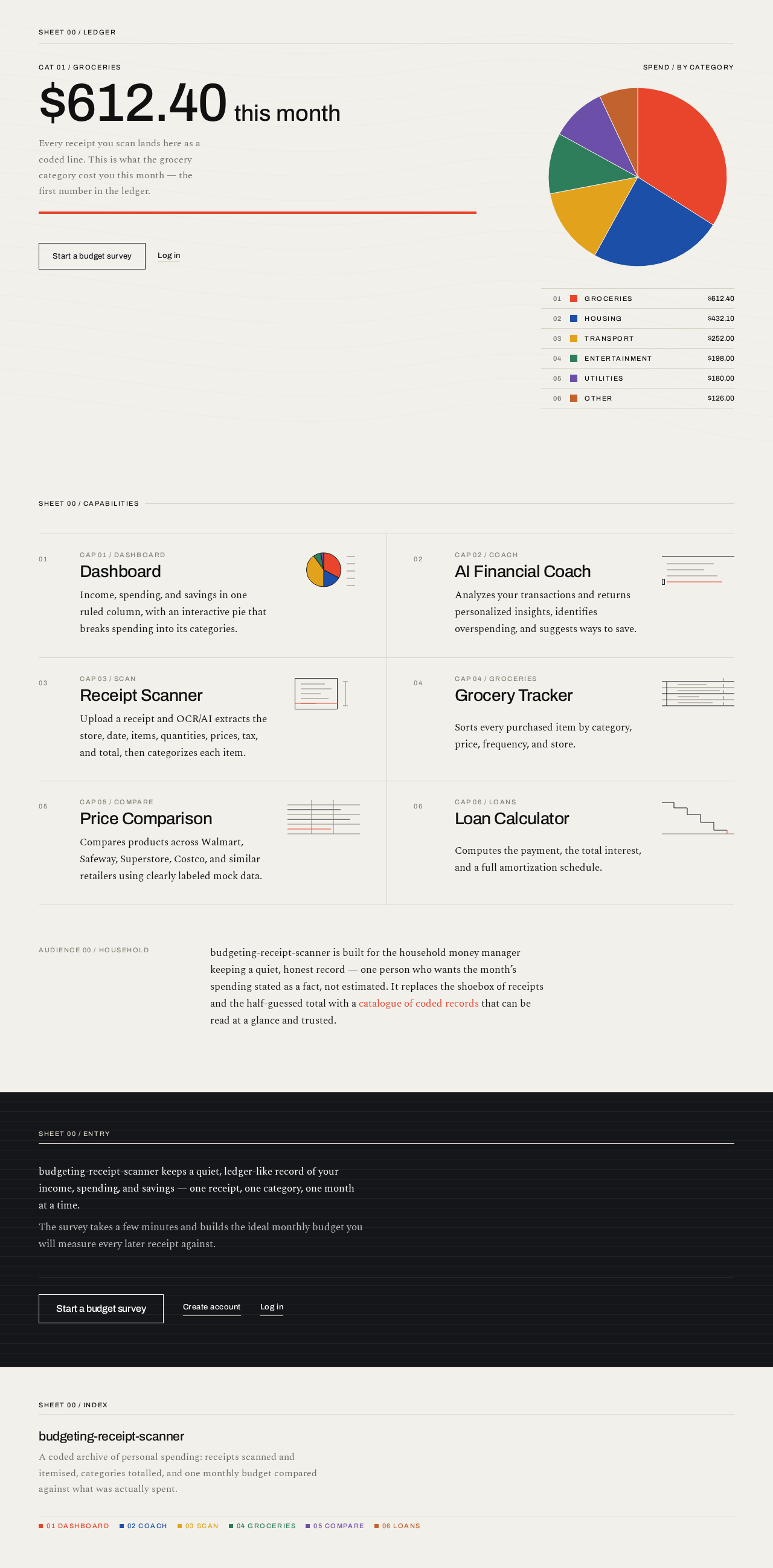
- Information/state: Anonymous public entry. Explains the AI budgeting app and its budgeting, receipt, grocery, comparison, and loan capabilities, and who it is for. Presents the month's grocery spend as the hero figure with the category code
CAT 01 / GROCERIES above it and a full-width red rule beneath.
- Primary action:
Start a budget survey — a rectangular black-bordered button pinned to the baseline of the headline block, routing to Sign Up (or Login if already signed in).
- Supporting actions: Navigate to Login; navigate to Sign Up.
- Domain entities: Category code, category label, hero spend figure, pie artefact, numbered legend.
- Component responsibilities: Specimen-sheet header (
SHEET 00 / LEDGER code label + hairline rule); oversized left-aligned hero figure bleeding to the right edge; flat 320px pie artefact drawn in the coded colour alphabet with a numbered legend; feature line-drawings (scanner rectangle with sweeping line, descending amortization staircase, receipt column of hairlines); optional topographic ruled-line field at 12% opacity behind the hero, never behind text.
- States: Loading — hero figure and pie render from static/placeholder values with a 180ms linear fade. Empty — not applicable (no user data). Success — full composition fits above the fold at 375px with the headline wrapping to two lines. Error — if the hero figure cannot be resolved, the code label and red rule remain and the figure area shows a hairline-bounded placeholder. Recovery — the primary button remains reachable at all times.
Login
- Information/state: Anonymous returning-verification surface. Email and password fields; inline validation; a link to Sign Up.
- Primary action: Submit credentials to establish a session.
- Supporting actions: Navigate to Sign Up; navigate back to Landing.
- Domain entities: User identity, session.
- Component responsibilities: Specimen-sheet header (
SHEET 00 / ACCESS); rectangular 1px-bordered inputs at 44px minimum height; rectangular submit button; inline error region.
- States: Loading — submit button disabled with a 180ms linear fade on the pending indicator. Empty — fields blank, submit disabled until both are non-empty. Success — session established, redirect to Dashboard. Error — invalid credentials or network failure shown as an inline ruled message above the form; fields retain entered values. Recovery — user may correct and resubmit without losing context.
Sign Up
- Information/state: Anonymous self-service enrollment surface. Collects the minimum identity information needed to create an account; states that budgeting data is private to the account.
- Primary action: Create the account and establish a session.
- Supporting actions: Navigate to Login; navigate back to Landing.
- Domain entities: User identity, session.
- Component responsibilities: Specimen-sheet header (
SHEET 00 / ENROL); rectangular 1px-bordered inputs; rectangular submit button; inline validation and error region.
- States: Loading — submit disabled with a 180ms linear fade. Empty — fields blank, submit disabled. Success — account created, session established, redirect to Dashboard. Error — duplicate account, weak credential, or network failure shown inline with entered values retained. Recovery — user may correct and resubmit, or switch to Login.
Page 6 of 25
Dashboard
- Information/state: Signed-in home. Stacked column of ruled data blocks — income, spending, savings — each an aligned label/value pair with the value right-aligned in tabular numerals. Below them, the interactive spending-category pie as a centred artefact with a numbered legend. The savings delta is the single huge red figure on this screen.
- Primary action: Select a pie segment or legend entry to focus a category.
- Supporting actions: Navigate to any numbered destination via the bottom bar (mobile) or left rail (desktop); open the AI Financial Coach; open the Receipt Scanner.
- Domain entities: Income total, spending total, savings total, category, category amount, category share, period.
- Component responsibilities: Specimen-sheet header (
SHEET 01 / OVERVIEW); three ruled label/value blocks with tabular numerals; full-width red rule under the primary figure; pie artefact with 420ms arc sweep on first paint and on category selection; numbered legend using the coded colour alphabet; numbered navigation (01 Dashboard, 02 Coach, 03 Scan, 04 Groceries, 05 Compare, 06 Loans) with the active item marked by a solid red square.
- States: Loading — data blocks show hairline-bounded placeholders; pie renders after data resolves. Empty — no transactions yet: blocks show zero values with a ruled prompt to scan a receipt or complete the budget survey. Success — totals and pie render; selecting a category updates the focused segment and its legend entry. Error — if aggregation fails, the affected block shows an inline ruled error and the remaining blocks still render. Recovery — a retry control re-requests the failed block without reloading the page.
AI Financial Coach
- Information/state: Signed-in analysis surface. Presents personalized insights derived from the user's transactions, explicit overspending identification, and concrete savings suggestions. The overspend amount is the single huge red figure on this screen.
- Primary action: Request or refresh the analysis of current transactions.
- Supporting actions: Select an insight to see the transactions behind it; navigate to the Dashboard or Budget Survey for context.
- Domain entities: Transaction, category, insight, overspending flag, savings suggestion, period.
- Component responsibilities: Specimen-sheet header (
SHEET 02 / COACH); full-width red rule under the primary figure; ruled insight rows with category code prefixes (CAT 04 /); suggestion rows with tabular numerals; empty and error regions.
- States: Loading — insight rows fade in at 60ms stagger as analysis resolves. Empty — no transactions available: ruled prompt to scan a receipt first. Success — insights, overspending flags, and suggestions render, each traceable to the transactions that produced it. Error — analysis failure shown as an inline ruled message with the last successful analysis retained if one exists. Recovery — a retry control re-runs the analysis.
Budget Survey
- Information/state: Signed-in questionnaire collecting income, household size, expenses, goals, and lifestyle. On completion, presents the calculated ideal monthly budget — with groceries called out specifically — alongside the user's actual spending for comparison.
- Primary action: Submit survey answers to calculate the ideal monthly budget.
- Supporting actions: Move between survey steps; revise previously entered answers; re-run the survey later.
- Domain entities: Income, household size, expense, goal, lifestyle, ideal monthly budget, ideal grocery budget, actual spending, actual grocery spending, variance.
- Component responsibilities: Specimen-sheet header (
SHEET 03 / SURVEY); stepped ruled question blocks with rectangular inputs; progress indicator as a numbered index; results view with ideal-vs-actual ruled comparison rows and tabular numerals; the grocery variance as the single huge red figure on the results view.
- States: Loading — results compute after submission with a 180ms linear fade. Empty — no survey completed yet: the form opens at step one. Success — ideal monthly budget and ideal grocery budget render beside actual spending with a signed variance. Error — incomplete or invalid answers block submission with inline ruled messages on the offending fields. Recovery — answers are retained so the user can correct and resubmit; a previously completed survey remains viewable until replaced.
Page 7 of 25
Receipt Scanner
- Information/state: Signed-in upload surface. The uploaded receipt image is shown in monochrome inside a solid
#14161A specimen mount; a single red scan line sweeps it once; extracted fields fade in as ruled label/value rows with tabular numerals.
- Primary action: Upload a receipt image and run OCR/AI extraction.
- Supporting actions: Review and correct extracted fields; confirm the categorized items into stored data; discard an upload.
- Domain entities: Receipt, store, date, item, quantity, price, tax, total, category.
- Component responsibilities: Specimen-sheet header (
SHEET 04 / SCAN); dark specimen mount with monochrome receipt image and single red scan line; extracted-field rows (ITEM 07 / TAX style code labels) fading in at 60ms stagger; per-item category chips drawn from the coded colour alphabet; confirm and discard controls as rectangular 1px-bordered buttons.
- States: Loading — scan line travels down the mount once; fields are not yet shown. Empty — no receipt uploaded: the mount shows a ruled upload prompt. Success — store, date, items, quantities, prices, tax, and total render as ruled rows, each item carries a category, and confirming stores the receipt and its items. Error — unreadable image or extraction failure shown as an inline ruled message inside the mount, with the upload retained for retry. Recovery — the user may re-run extraction, manually correct any extracted field before confirming, or discard and upload a different image.
Grocery Tracker
- Information/state: Signed-in, revisitable purchase history built from stored receipt items. Sortable by category, price, frequency, and store.
- Primary action: Choose a sort dimension (category, price, frequency, or store).
- Supporting actions: Filter the list; open an item to see its purchase history; navigate to Price Comparison for a selected product.
- Domain entities: Purchased item, category, price, purchase frequency, store, purchase date.
- Component responsibilities: Specimen-sheet header (
SHEET 05 / GROCERIES); sort control as a numbered ruled list; ruled item rows with category chips from the coded colour alphabet and tabular numerals for price and frequency; store grouping headers.
- States: Loading — rows render as hairline-bounded placeholders. Empty — no stored receipt items yet: ruled prompt to scan a receipt. Success — items render in the selected sort order with the active sort marked by a solid red square. Error — if the history cannot be loaded, an inline ruled message replaces the list. Recovery — a retry control re-requests the history; the previously selected sort is preserved.
Price Comparison
- Information/state: Signed-in comparison surface. Compares products across Walmart, Safeway, Superstore, Costco, and similar retailers. All prices shown are explicitly mock data for the MVP and are labeled as such.
- Primary action: Enter or select a product to compare across retailers.
- Supporting actions: Switch the compared product; open a retailer's row to see the mock price detail; navigate to Grocery Tracker for the user's own purchase history.
- Domain entities: Product, retailer, mock price, comparison result.
- Component responsibilities: Specimen-sheet header (
SHEET 06 / COMPARE); a persistent mock-data notice rendered as a ruled label; ruled retailer rows with tabular numerals; the lowest mock price marked with the red rule; product input as a rectangular 1px-bordered field.
- States: Loading — retailer rows render as hairline-bounded placeholders. Empty — no product selected: ruled prompt to enter or choose a product. Success — retailer rows render with mock prices and the lowest marked. Error — if comparison data cannot be resolved, an inline ruled message states that no mock comparison is available for that product. Recovery — the user may try a different product or retry; the mock-data notice remains visible in every state.
Page 8 of 25
Loan Calculator
- Information/state: Signed-in calculator. Takes loan inputs and returns the periodic payment, total interest, and a full amortization schedule. The monthly payment is the single huge red figure on this screen.
- Primary action: Calculate payment, total interest, and amortization from the entered inputs.
- Supporting actions: Adjust inputs and recalculate; scroll the amortization schedule; navigate away and return.
- Domain entities: Principal, interest rate, term, payment amount, total interest, amortization period row (period, payment, principal portion, interest portion, remaining balance).
- Component responsibilities: Specimen-sheet header (
SHEET 07 / LOANS); rectangular 1px-bordered input fields; full-width red rule under the payment figure; amortization rendered as a ruled descending staircase table with tabular numerals.
- States: Loading — results compute after submission with a 180ms linear fade. Empty — no calculation run yet: inputs shown with the results region ruled and blank. Success — payment, total interest, and the full amortization schedule render. Error — invalid inputs (non-numeric, zero or negative term, out-of-range rate) block calculation with inline ruled messages on the offending fields. Recovery — inputs are retained so the user can correct and recalculate.
Page 9 of 25
3. Functional Requirements
Each requirement is a distinct story point with provenance, lifecycle facts, and observable acceptance.
FR-01 — Dashboard financial summary (explicit)
As a Budgeting App User, I should see my income, spending, and savings on the dashboard so that I know where I stand this period.
- Trigger/input: Opening the Dashboard while signed in.
- Observable result: Three ruled label/value blocks render with income, spending, and savings totals in tabular numerals; the savings delta is the single huge red figure.
- Access state: Requires a signed-in session.
- Failure/recovery: If aggregation fails, the affected block shows an inline ruled error while the others still render; a retry control re-requests the failed block.
- Continuation: The user can select a pie category or navigate to any numbered destination.
FR-02 — Interactive spending-category pie chart (explicit)
As a Budgeting App User, I should see an interactive pie chart breaking my spending into categories (groceries, housing, transport, entertainment, etc.) so that I can see the shape of my spending at a glance.
- Trigger/input: Opening the Dashboard; selecting a pie segment or legend entry.
- Observable result: The pie renders as a flat artefact in the coded colour alphabet with a numbered legend; segments sweep their arc once on first paint and once on category selection (420ms cubic-bezier(0.2, 0, 0, 1)); the selected category is emphasized in the legend.
- Access state: Requires a signed-in session.
- Failure/recovery: If category data is unavailable, the pie area shows a ruled placeholder and the totals blocks remain usable.
- Continuation: The user can move between categories or leave the Dashboard.
FR-03 — AI Financial Coach analysis (explicit)
As an AI Financial Coach Consumer, I should have my transactions analyzed so that I receive personalized insights grounded in my own data.
- Trigger/input: Requesting or refreshing the analysis on the AI Financial Coach page.
- Observable result: Ruled insight rows render, each traceable to the transactions that produced it.
- Access state: Requires a signed-in session.
- Failure/recovery: Analysis failure shows an inline ruled message; the last successful analysis is retained if one exists; a retry control re-runs the analysis.
- Continuation: The user can select an insight to inspect its transactions or move to the Dashboard or Budget Survey.
FR-04 — Overspending identification (explicit)
As an AI Financial Coach Consumer, I should have overspending identified so that I know exactly where I have gone over.
- Trigger/input: Running the coach analysis.
- Observable result: Overspending is flagged explicitly, with the overspend amount set as the single huge red figure on the coach screen.
- Access state: Requires a signed-in session.
- Failure/recovery: If overspending cannot be determined, the coach states this inline rather than showing a zero or an estimate.
- Continuation: The user can act on the flagged category via the Budget Survey or Dashboard.
FR-05 — Savings suggestions (explicit)
As an AI Financial Coach Consumer, I should receive suggestions for ways to save so that I have a concrete next action.
- Trigger/input: Running the coach analysis.
- Observable result: Suggestion rows render with tabular numerals, each tied to the category or transaction pattern that motivated it.
- Access state: Requires a signed-in session.
- Failure/recovery: If no suggestions can be produced, the coach states this inline instead of inventing generic advice.
- Continuation: The user can revisit the coach after new receipts are scanned.
FR-06 — Budget Survey input collection (explicit)
As a Budgeting App User, I should be asked about my income, household size, expenses, goals, and lifestyle so that the app can calculate a budget that fits my actual situation.
- Trigger/input: Opening the Budget Survey and completing the stepped question blocks.
- Observable result: Answers are captured across all five input areas and retained across steps.
- Access state: Requires a signed-in session.
- Failure/recovery: Incomplete or invalid answers block submission with inline ruled messages on the offending fields; entered answers are retained.
- Continuation: The user can correct and resubmit, or leave and return later.
FR-07 — Ideal monthly budget calculation (explicit)
As a Budgeting App User, I should have an ideal monthly budget calculated from my survey answers so that I have a target to spend against.
- Trigger/input: Submitting the completed Budget Survey.
- Observable result: An ideal monthly budget renders, with the ideal grocery budget called out specifically.
- Access state: Requires a signed-in session.
- Failure/recovery: If calculation fails, an inline ruled message appears and the submitted answers remain available for retry.
- Continuation: The user can proceed to the ideal-vs-actual comparison.
FR-08 — Ideal vs. actual spending comparison (explicit)
As a Budgeting App User, I should see my ideal budget compared with my actual spending — especially for groceries — so that I can see the gap.
- Trigger/input: Completing the Budget Survey, or revisiting the results view after new receipts are stored.
- Observable result: Ruled comparison rows show ideal and actual side by side with a signed variance; the grocery variance is the single huge red figure on the results view.
- Access state: Requires a signed-in session.
- Failure/recovery: If actual spending is unavailable, the comparison states this inline and shows the ideal figures alone.
- Continuation: The user can re-run the survey later or scan receipts to update actuals.
FR-09 — Receipt upload (explicit)
As a Budgeting App User, I should upload receipts so that my purchases enter the record without manual entry.
- Trigger/input: Selecting a receipt image on the Receipt Scanner page.
- Observable result: The image appears in monochrome inside the dark specimen mount and a single red scan line sweeps it once.
- Access state: Requires a signed-in session.
- Failure/recovery: An unreadable or unsupported image shows an inline ruled message inside the mount; the upload is retained for retry or discard.
- Continuation: The user can re-run extraction or upload a different image.
FR-10 — OCR/AI field extraction (explicit)
As a Budgeting App User, I should have OCR/AI extract the store, date, items, quantities, prices, tax, and total from my receipt so that I do not have to type them.
- Trigger/input: Running extraction on an uploaded receipt.
- Observable result: Extracted fields fade in as ruled label/value rows with tabular numerals, one row at a time at 60ms stagger, covering store, date, items, quantities, prices, tax, and total.
- Access state: Requires a signed-in session.
- Failure/recovery: Extraction failure shows an inline ruled message; the user may re-run extraction or manually correct any field before confirming.
- Continuation: The user reviews and confirms the extracted data.
FR-11 — Item categorization and storage (explicit)
As a Budgeting App User, I should have each extracted item categorized and stored so that my receipt becomes usable data.
- Trigger/input: Confirming the extracted receipt data.
- Observable result: Each item carries a category chip drawn from the coded colour alphabet, and the receipt with its items, quantities, prices, tax, and total is persisted to the database.
- Access state: Requires a signed-in session; stored data is bound to the signed-in user.
- Failure/recovery: If storage fails, an inline ruled message appears and the extracted data remains on screen so the user can retry confirmation without re-uploading.
- Continuation: The stored items become available on the Dashboard, Grocery Tracker, and AI Financial Coach.
FR-12 — Grocery Tracker sorting (explicit)
As a Budgeting App User, I should sort my purchased items by category, price, frequency, and store so that I can see my grocery behavior from different angles.
- Trigger/input: Choosing a sort dimension on the Grocery Tracker.
- Observable result: Item rows re-render in the selected order with the active sort marked by a solid red square; price and frequency show in tabular numerals.
- Access state: Requires a signed-in session.
- Failure/recovery: If history cannot be loaded, an inline ruled message replaces the list; a retry control re-requests it and preserves the selected sort.
- Continuation: The user can switch sort dimensions or open an item's purchase history.
FR-13 — Grocery purchase history (explicit)
As a Budgeting App User, I should revisit my stored purchase history so that I can track what I buy and how often.
- Trigger/input: Opening the Grocery Tracker after receipts have been stored.
- Observable result: Stored items render with category, price, frequency, and store, grouped by store when that sort is active.
- Access state: Requires a signed-in session.
- Failure/recovery: An empty history shows a ruled prompt to scan a receipt rather than an error.
- Continuation: The user can navigate to Price Comparison for a selected product.
FR-14 — Price comparison across retailers (explicit)
As a Price-Conscious Shopper, I should compare products across Walmart, Safeway, Superstore, Costco, and similar retailers so that I can plan cheaper grocery purchases.
- Trigger/input: Entering or selecting a product on the Price Comparison page.
- Observable result: Ruled retailer rows render with prices in tabular numerals and the lowest mock price marked with the red rule.
- Access state: Requires a signed-in session.
- Failure/recovery: If no comparison is available for a product, an inline ruled message states this; the user may try a different product or retry.
- Continuation: The user can compare another product or move to the Grocery Tracker.
FR-15 — Mock price data only (explicit)
As a Price-Conscious Shopper, I should see clearly labeled mock prices so that I am never misled by invented real prices.
- Trigger/input: Viewing any price on the Price Comparison page.
- Observable result: A persistent mock-data notice renders as a ruled label in every state of the page, and no price is presented as a live retailer price.
- Access state: Requires a signed-in session.
- Failure/recovery: If the mock dataset cannot be resolved, the page states that no mock comparison is available rather than substituting a value.
- Continuation: The notice remains visible while the user compares products.
FR-16 — Loan payment and total interest calculation (explicit)
As a Price-Conscious Shopper, I should calculate loan payments and total interest so that I can judge what financing actually costs.
- Trigger/input: Entering principal, interest rate, and term on the Loan Calculator and submitting.
- Observable result: The periodic payment renders as the single huge red figure with a full-width red rule beneath it, and total interest renders in tabular numerals.
- Access state: Requires a signed-in session.
- Failure/recovery: Invalid inputs (non-numeric, zero or negative term, out-of-range rate) block calculation with inline ruled messages; inputs are retained.
- Continuation: The user can adjust inputs and recalculate.
FR-17 — Amortization schedule (explicit)
As a Price-Conscious Shopper, I should see an amortization schedule so that I can see how the balance falls over the term.
- Trigger/input: Running a loan calculation.
- Observable result: A ruled descending staircase table renders with period, payment, principal portion, interest portion, and remaining balance in tabular numerals.
- Access state: Requires a signed-in session.
- Failure/recovery: If the schedule cannot be produced, an inline ruled message appears and the payment and total-interest figures remain visible.
- Continuation: The user can scroll the schedule or recalculate with different inputs.
FR-18 — Secure authentication (explicit)
As a Budgeting App User, I should sign in securely before accessing my budgeting data so that my financial record stays private.
- Trigger/input: Attempting to reach any protected page without a session.
- Observable result: The user is routed to Login; protected data is not rendered until a session is established.
- Access state: Landing, Login, and Sign Up are anonymous; all other pages require a session.
- Failure/recovery: Invalid credentials show an inline ruled message with entered values retained; the user may correct and resubmit.
- Continuation: On success the user reaches the Dashboard.
FR-19 — Self-service enrollment (required_inference)
As a Budgeting App User, I should create my own account on first use so that I can begin keeping my own record.
- Trigger/input: Choosing to start from Landing or Login.
- Observable result: An account is created and a session is established, routing the user to the Dashboard.
- Access state: Sign Up is anonymously reachable.
- Failure/recovery: Duplicate account, weak credential, or network failure shows an inline ruled message with entered values retained; the user may correct and resubmit or switch to Login.
- Continuation: The user proceeds to the Dashboard or Budget Survey.
FR-20 — Returning verification (required_inference)
As a Budgeting App User, I should verify my identity on return so that I resume the same private record.
- Trigger/input: Submitting credentials on Login.
- Observable result: A session is established and the user's own persisted data is loaded.
- Access state: Login is anonymously reachable; all protected pages require the resulting session.
- Failure/recovery: Invalid credentials show an inline ruled message with entered values retained.
- Continuation: The user reaches the Dashboard with their prior data intact.
FR-21 — Durable persistence (required_inference)
As a Budgeting App User, I should have my receipts, transactions, budgets, and purchases persisted so that my record survives across sessions.
- Trigger/input: Confirming a receipt, submitting a survey, or storing any derived data.
- Observable result: Data is written to the database and is present on return after signing in again.
- Access state: Persisted data is bound to the signed-in user.
- Failure/recovery: A failed write shows an inline ruled message and the in-progress data remains on screen for retry.
- Continuation: The user can retry the write or continue with other work.
FR-22 — Mock data where APIs are unavailable (explicit)
As a Price-Conscious Shopper, I should have the MVP work with mock data where external APIs are unavailable so that the product is functional now.
- Trigger/input: Using Price Comparison, the only capability whose external source is unavailable in the MVP.
- Observable result: Comparison results render from a mock dataset, clearly labeled as mock.
- Access state: Requires a signed-in session.
- Failure/recovery: If the mock dataset cannot be resolved, the page states this rather than fabricating a value.
- Continuation: The user can continue comparing products or use the rest of the app.
Page 10 of 25
4. User Personas
The active-human catalog is closed and consists of exactly three personas. They are three working roles over one account and one private record; the application does not differentiate permissions between them.
Page 11 of 25
Budgeting App User
Product context. The household money manager. They open the app on a phone, often one-handed, and they want a quiet, honest record rather than a dashboard that performs. They are the person who actually scans the receipts and answers the survey.
Primary goal. A personalized monthly budget with an actual-vs-ideal grocery comparison and an organized purchase history.
Distinct accepted responsibilities. They own the Dashboard view of income, spending, savings, and the interactive category pie chart. They complete the Budget Survey across income, household size, expenses, goals, and lifestyle, and they read the resulting ideal monthly budget — especially for groceries — against their actual spending. They upload receipts and confirm the OCR/AI-extracted store, date, items, quantities, prices, tax, and total. They sort purchased items by category, price, frequency, and store in the Grocery Tracker.
Relevant inputs and decisions. Their own income and household facts; the receipt images they choose to upload; whether an extracted field is correct enough to confirm; which sort dimension answers the question they currently have.
Interactions with other accepted participants. Their confirmed receipts and survey answers are the raw material the AI Financial Coach Consumer analyzes and the Price-Conscious Shopper compares against. Nothing they do requires another human's approval.
Observable success. The Dashboard shows real totals and a category pie; the Budget Survey results show an ideal grocery budget beside actual grocery spending with a signed variance; the Grocery Tracker lists their items in the sort order they chose.
Page 12 of 25
AI Financial Coach Consumer
Product context. The same person wearing a different hat: they have data now and they want to know what to do about it. They arrive at the coach with a specific worry — usually that they are overspending somewhere and cannot see where.
Primary goal. Actionable, personalized savings guidance grounded in their own transaction data.
Distinct accepted responsibilities. They request and refresh the coach's analysis of their transactions, read the personalized insights, read the explicit overspending identification, and read the savings suggestions. They trace an insight back to the transactions that produced it and decide where to cut spending.
Relevant inputs and decisions. The transaction and receipt data already in their record; which flagged category they will act on; whether a suggestion is realistic for their household.
Interactions with other accepted participants. Their analysis depends entirely on the Budgeting App User's confirmed receipts and survey answers; the overspend figure they see is the same spending the Dashboard and Budget Survey compare against.
Observable success. The coach shows insights traceable to their own transactions, an explicit overspend amount as the screen's primary figure, and suggestions they can act on — with an honest statement rather than invented advice when none can be produced.
Page 13 of 25
Price-Conscious Shopper
Product context. The same person planning the next purchase and, separately, weighing financing. They are in the aisle or at the kitchen table deciding whether to buy here or there, and whether a loan is affordable.
Primary goal. Informed purchase and financing choices based on comparison and amortization figures.
Distinct accepted responsibilities. They compare products across Walmart, Safeway, Superstore, Costco, and similar retailers, reading mock prices that are always labeled as mock. They enter loan principal, rate, and term and read the payment, total interest, and amortization schedule.
Relevant inputs and decisions. The product they want to compare; the loan terms they are actually considering; whether the lowest mock price or the amortization shape changes their plan.
Interactions with other accepted participants. Their comparison work is informed by the Grocery Tracker history the Budgeting App User maintains; their loan figures are independent of the household record but live in the same account.
Observable success. Retailer rows render with the lowest mock price marked and the mock-data notice visible; the loan calculator shows the payment as the screen's primary figure with a full amortization schedule beneath it.
5. Core User Flows
Page 14 of 25
Flow 1 — First use: enroll and reach the Dashboard (Budgeting App User)
- The user arrives at Landing anonymously and reads the hero:
CAT 01 / GROCERIES above the month's grocery spend, with the red rule beneath and the pie artefact beside it.
- The user selects Start a budget survey, the only button on the hero, pinned to the baseline of the headline block.
- Because no session exists, the app routes to Sign Up.
- The user enters the minimum identity information and submits. The submit control is disabled during the request.
- Observable result: the account is created, a session is established, and the user lands on Dashboard.
- Failure/recovery: if the account already exists or the credential is rejected, an inline ruled message appears and the entered values are retained; the user corrects and resubmits, or switches to Login.
- Continuation: the Dashboard shows zero-value blocks with a ruled prompt to scan a receipt or complete the budget survey.
Flow 2 — Returning use: verify and resume the record (Budgeting App User)
- The user opens the app and is routed to Login because a protected page was requested without a session.
- The user submits credentials.
- Observable result: a session is established and the user's own persisted data loads on Dashboard — prior totals, prior pie, prior receipts.
- Failure/recovery: invalid credentials show an inline ruled message with entered values retained; the user corrects and resubmits.
- Continuation: the user proceeds to any numbered destination.
Flow 3 — Read the month on the Dashboard (Budgeting App User)
- The user opens Dashboard while signed in.
- The three ruled blocks render income, spending, and savings with values right-aligned in tabular numerals; the savings delta is the single huge red figure with a full-width red rule beneath it.
- The pie artefact sweeps its arcs once on first paint (420ms cubic-bezier(0.2, 0, 0, 1)) and the numbered legend renders in the coded colour alphabet.
- The user selects a pie segment or a legend entry.
- Observable result: the selected segment sweeps again and is emphasized in the legend, so the user can read that category's share.
- Failure/recovery: if a totals block fails to aggregate, that block shows an inline ruled error while the others still render; a retry control re-requests only the failed block.
- Continuation: the user moves to the AI Financial Coach or the Receipt Scanner.
Page 15 of 25
Flow 4 — Complete the Budget Survey and see ideal vs. actual (Budgeting App User)
- The user opens Budget Survey and works through the stepped ruled question blocks covering income, household size, expenses, goals, and lifestyle.
- The user submits.
- Observable result: the results view renders the ideal monthly budget with the ideal grocery budget called out specifically, beside actual spending, with a signed variance; the grocery variance is the single huge red figure.
- Failure/recovery: if any answer is incomplete or invalid, submission is blocked with inline ruled messages on the offending fields and all entered answers are retained; the user corrects and resubmits.
- Continuation: the user can re-run the survey later, and the comparison updates as new receipts are confirmed.
Flow 5 — Scan a receipt and store its items (Budgeting App User)
- The user opens Receipt Scanner and selects a receipt image.
- Observable result: the image appears in monochrome inside the solid
#14161A specimen mount and a single red scan line sweeps it once.
- Extraction runs. Extracted fields fade in as ruled label/value rows with tabular numerals, one row at a time at 60ms stagger: store, date, items, quantities, prices, tax, total.
- Each item receives a category chip drawn from the coded colour alphabet.
- The user reviews the rows and corrects any field that is wrong.
- The user confirms.
- Observable result: the receipt and its items, quantities, prices, tax, and total are persisted to the database, bound to the signed-in user.
- Failure/recovery: if the image is unreadable, an inline ruled message appears inside the mount and the upload is retained; the user may re-run extraction, correct fields manually, or discard and upload a different image. If storage fails, the extracted data stays on screen so the user can retry confirmation without re-uploading.
- Continuation: the stored items appear on the Dashboard, in the Grocery Tracker, and in the AI Financial Coach's analysis.
Flow 6 — Review the AI Financial Coach (AI Financial Coach Consumer)
- The user opens AI Financial Coach while signed in and requests the analysis.
- Observable result: ruled insight rows fade in at 60ms stagger, each traceable to the transactions that produced it.
- Overspending is flagged explicitly, with the overspend amount set as the single huge red figure under a full-width red rule.
- Savings suggestions render as ruled rows with tabular numerals, each tied to the category or pattern that motivated it.
- The user selects an insight to inspect the transactions behind it.
- Failure/recovery: if analysis fails, an inline ruled message appears and the last successful analysis is retained; a retry control re-runs it. If no suggestions can be produced, the coach says so rather than inventing generic advice.
- Continuation: the user acts on a flagged category, then returns to the Dashboard or Budget Survey to check the effect.
Page 16 of 25
Flow 7 — Sort grocery purchase history (Budgeting App User)
- The user opens Grocery Tracker after at least one receipt has been confirmed.
- Stored items render as ruled rows with category chips and tabular numerals for price and frequency.
- The user chooses a sort dimension: category, price, frequency, or store.
- Observable result: rows re-render in the selected order and the active sort is marked by a solid red square; choosing store groups the rows under store headers.
- The user opens an item to see its purchase history.
- Failure/recovery: if history cannot be loaded, an inline ruled message replaces the list; a retry control re-requests it and preserves the selected sort. An empty history shows a ruled prompt to scan a receipt rather than an error.
- Continuation: the user moves to Price Comparison for a selected product.
Flow 8 — Compare prices across retailers (Price-Conscious Shopper)
- The user opens Price Comparison while signed in. The persistent mock-data notice is visible as a ruled label.
- The user enters or selects a product.
- Observable result: ruled retailer rows render for Walmart, Safeway, Superstore, Costco, and similar retailers, with prices in tabular numerals and the lowest mock price marked by the red rule.
- The user reads the comparison and decides where they would buy.
- Failure/recovery: if no mock comparison exists for that product, an inline ruled message states this; the user tries a different product or retries. No price is ever fabricated to fill the gap.
- Continuation: the user compares another product or moves to the Grocery Tracker to check their own history.
Flow 9 — Calculate a loan (Price-Conscious Shopper)
- The user opens Loan Calculator while signed in.
- The user enters principal, interest rate, and term in the rectangular 1px-bordered fields and submits.
- Observable result: the periodic payment renders as the single huge red figure with a full-width red rule beneath it; total interest renders in tabular numerals; the amortization schedule renders as a ruled descending staircase table with period, payment, principal portion, interest portion, and remaining balance.
- The user scrolls the schedule to see how the balance falls over the term.
- Failure/recovery: invalid inputs (non-numeric, zero or negative term, out-of-range rate) block calculation with inline ruled messages on the offending fields and all inputs retained; the user corrects and recalculates. If the schedule cannot be produced, the payment and total-interest figures remain visible with an inline ruled message.
- Continuation: the user adjusts inputs and recalculates, or leaves the page and returns later.
Page 17 of 25
6. Visuals, Colors and Theme
The creative direction is authoritative for this section. The muse is Peter Saville; the headline idea is one coded artefact carries the whole ledger. A budgeting app is fundamentally a coded archive — categories, totals, tax lines, store names, month-over-month deltas — so the Factory Records language of one exact spot colour, a coded colour alphabet, precise small type in a field of silence, and a single centred artefact becomes the identity itself. This avoids the blue-on-white SaaS reflex entirely and gives the receipt scanner a genuine visual metaphor: a specimen sheet.
Colour tokens — light mode
| Role | Hex | Use |
|---|
| Background | #F2F0EB | Paper-warm off-white ground |
| Surface | #FBFAF7 | Cards as slightly lighter specimen sheets |
| Text | #111111 | True-black ink type |
| Primary | #14161A | Buttons, receipt scanner specimen mount |
| Accent | #E8452C | The single most important number on any screen (savings delta, overspend flag, active category) |
| Muted | #8A8578 | Secondary metadata |
| Hairline | #D8D3C7 | 1px structure rules, topographic field |
Page 18 of 25
Coded colour alphabet — chart system only
Used only inside the pie chart, category chips, and receipt line-item tags — never as decoration.
| Code | Hex |
|---|
| Red | #E8452C |
| Blue | #1B4FA8 |
| Yellow | #E3A21B |
| Green | #2E7D5B |
| Violet | #6B4FA8 |
| Rust | #C2622E |
Text #111111 on #F2F0EB and #FBFAF7 clears body-size contrast comfortably. Accent red is used for text only at 16px or larger, or on a light chip.
Typography
- Headings: Archivo at 500–600, tight tracking (−0.02em), sentence case, set very large for the one number that matters.
- Metadata: Archivo 500 uppercase at 11px with 0.14em letterspacing, always prefixed by a category code such as
CAT 04 /.
- Body: Spectral 400 at 16–17px with 1.65 leading. A classical serif makes the ledger read as a document rather than a dashboard. Never bold body; hierarchy comes from size, rule, and colour code.
- Scale: 1.333 modular — 12 / 16 / 21 / 28 / 38 / 50 / 67 / 89. Mobile hero number 40px, desktop 89px. Section titles 28px mobile → 38px desktop. Body 16px mobile → 17px desktop. All display sizes via
clamp(), e.g. clamp(40px, 9vw, 89px).
Page 19 of 25
Shape language
Hard rectangles. Zero radius on cards, panels, inputs, and buttons — corners are cut, not rounded. Structure is drawn with 1px hairlines (#D8D3C7) rather than fill or shadow. The only filled shapes are the pie segments, category colour chips, and the single red rule that marks the primary figure on a screen. Buttons are rectangular with a 1px black border and a 44px minimum height. The receipt scanner panel is a solid #14161A block with white extracted text, framed like a specimen mount.
Layout
A strict 6-column mobile grid and 12-column desktop grid with 16px gutters, 20px mobile page margin, 64px desktop margin, and a visible baseline rhythm of 8px. Every screen is a specimen sheet: a small uppercase code label top-left (SHEET 03 / SPENDING), a hairline rule, then content. The Dashboard is a stacked column of ruled data blocks — income, spending, savings — each an aligned label/value pair with the value right-aligned in tabular numerals, followed by the pie as a centred artefact with a numbered legend below it. Navigation is a bottom bar on mobile and a left rail on desktop, both as a numbered list (01 Dashboard, 02 Coach, 03 Scan, 04 Groceries, 05 Compare, 06 Loans) with the active item marked by a solid red square rather than a highlight. Nothing is centred except the single hero artefact.
Page 20 of 25
Imagery
No photography of people, no 3D blobs, no stock. Imagery is the data itself: the pie as a flat geometric artefact, ruled tables, and one abstract line drawing per feature — a scanner as a rectangle with a sweeping line, a loan as a descending amortization staircase drawn in 1px rules, a receipt as a column of hairlines. A single found-diagram treatment (thin topographic-style ruled lines in #D8D3C7) may sit behind the landing hero at 12% opacity, never behind text. Receipt thumbnails from the user's own uploads appear as small monochrome specimen mounts.
Avoid
Rounded corners, soft shadows, glass panels, or hover-lift cards. Blue/indigo primary on white — the only blues present are one member of the coded chart alphabet, never UI chrome. Inter, Roboto, Arial, Helvetica, Open Sans, Lato, Poppins, or system-ui for headings or body. Gradient blobs, mesh gradients, glow effects, or 3D renders anywhere in the hero. Decorative icons or illustrations that are not a diagram of the data. Centred headline + subtext + button hero composition. Photography of people, stock lifestyle imagery, or device mockups. Motion beyond a single sweep or fade — no bounce, spring, parallax, or particle fields.
Page 21 of 25
7. Signature Design Concept
The specimen sheet. The public entry is not a centred headline with a button beneath it. It is a full-width paper field (#F2F0EB) laid out as a single specimen mount.
Set left-aligned and bleeding to the right edge is one oversized figure: the month's grocery spend in Archivo 500 at clamp(40px, 9vw, 89px). Above it, in 11px uppercase Archivo with 0.14em letterspacing, sits the category code CAT 01 / GROCERIES. Beneath it, a solid #E8452C rule spans the full viewport width — the one red mark that says this is the number that matters.
To the right of the figure on desktop, and directly below the red rule on mobile, sits a flat 320px pie artefact drawn in the coded colour alphabet with a numbered legend beneath it. The pie is the only centred element on the page.
The only button is a rectangular black-bordered Start a budget survey, pinned to the baseline of the headline block — never floating over it, never centred.
At 375px the headline wraps to two lines, the pie sits under the red rule, and the whole composition still fits above the fold. Behind the hero, at 12% opacity and never behind text, a field of thin topographic-style ruled lines in #D8D3C7 gives the paper its grain.
This concept recomposes only accepted content — the grocery category, the spend figure, the pie, and the survey entry point. It introduces no new behaviour, page, or destination.
Page 22 of 25
8. Interaction Model & Motion Direction
Interaction Model: Static (direction)
Motion Tempo: still
Hero Dimensionality: flat
Landing Hero Motion Brief
- Focal subject: the oversized grocery spend figure with its
CAT 01 / GROCERIES code label and the full-width #E8452C rule beneath it, with the flat 320px pie artefact beside it on desktop and below it on mobile.
- Input → transformation → outcome thesis: on first paint, the red rule draws left-to-right across the viewport and the pie's segments sweep their arcs once into their final positions (420ms cubic-bezier(0.2, 0, 0, 1)); the outcome is a fully composed specimen sheet — the month's grocery spend stated as a fact, with its category shape beside it. No further motion occurs.
- Motion vocabulary: 180ms linear fades; a 1px rule that draws left-to-right when a data block enters; a single arc sweep for pie segments on first paint and once more on category selection; a single horizontal scan line travelling down the dark receipt panel followed by extracted fields fading in one row at a time at 60ms stagger. No bounce, no lift, no parallax, no particles.
- Composed first frame: paper field
#F2F0EB; CAT 01 / GROCERIES in 11px uppercase Archivo at top-left of the figure block; the grocery spend figure at clamp(40px, 9vw, 89px) in Archivo 500, left-aligned and bleeding right; the red rule at full width beneath it; the flat pie artefact with numbered legend to the right on desktop, below the rule on mobile; the black-bordered Start a budget survey button pinned to the headline baseline.
- Reduced-motion state: under
prefers-reduced-motion, all sweeps and staggers resolve instantly to their final state — the rule is already drawn, the pie is already at its final arcs, and the extracted receipt fields are already visible. The composition is identical; only the transition is removed.
Page 23 of 25
9. Non-Functional Requirements
NFR-01 — Mobile-first responsive UI (explicit)
The interface is designed mobile-first and remains responsive across viewports. A strict 6-column mobile grid and 12-column desktop grid apply, with 16px gutters, 20px mobile page margin, 64px desktop margin, and an 8px baseline rhythm. Rationale: the source explicitly requires a mobile-first, responsive UI, and the audience uses the app one-handed in a grocery aisle.
NFR-02 — Readable text and controls stay whole (explicit, from creative direction)
Headlines, wordmarks, labels, numbers, card text, and controls stay entirely inside the viewport and their container at 375px, 768px, and 1280px, wrapping or scaling (for example font-size: clamp(...) with its mobile size) to fit. No other element covers any part of them. Imagery, decoration, and motion may be cropped, bled off an edge, rotated, overlapped, or cut as the direction asks, provided they cover no readable text or control. Rationale: the direction states this rule takes precedence for readable text and controls.
NFR-03 — Secure authentication (explicit)
Authentication is required before any budgeting data is accessible. Landing, Login, and Sign Up are anonymously reachable; every other page requires a session. Credentials are handled securely and sessions are established only on successful verification. Rationale: the source explicitly requires secure authentication, and the data is private financial information.
NFR-04 — Proper database (explicit)
A proper database persists receipts, extracted line items, transactions, survey answers, computed budgets, grocery purchase history, and loan calculations, bound to the owning user. Rationale: the source explicitly requires a proper database, and the accepted journeys require durable, resumable state.
NFR-05 — Clean architecture and modular code (explicit)
The codebase is organized with clean architecture and modular code, separating presentation, domain logic, and data access so that the mock price source can later be replaced by a live retailer integration without restructuring the application. Rationale: the source explicitly requires clean architecture and modular code, and the MVP-to-live-data transition depends on it.
NFR-06 — Functional MVP with mock data (explicit)
The MVP is functional end to end using mock data where APIs are unavailable. Price Comparison is the capability affected in the current scope. Rationale: the source explicitly requires a functional MVP first, using mock data where APIs are unavailable.
NFR-07 — Never invent real prices (explicit)
Price Comparison must use mock data initially and must never present invented prices as real. A persistent mock-data notice is visible in every state of the page, and no value is fabricated to fill a missing comparison. Rationale: explicit hard constraint in the authoritative source.
NFR-08 — Motion restraint and reduced-motion support (explicit, from creative direction)
Motion is limited to 180ms linear fades, a 1px rule drawing left-to-right, a single 420ms cubic-bezier(0.2, 0, 0, 1) arc sweep for pie segments, and a single scan line with 60ms staggered field fades on the receipt scanner. Under prefers-reduced-motion, all sweeps and staggers resolve instantly to final state. Rationale: the direction specifies a still tempo and forbids bounce, spring, parallax, and particle fields.
NFR-09 — Accessibility of the colour system (required_inference)
Because the coded colour alphabet carries category meaning, every colour-coded element is also identified by its number and label — the pie legend is numbered, category chips carry their code, and receipt line-item tags carry their code — so category identity never depends on colour alone. Rationale: the direction makes colour a primary carrier of meaning; the numbered legend and code prefixes are the accepted mechanism that keeps it readable.
Page 24 of 25
10. Tech Stack
- Frontend: React, delivered as a responsive, mobile-first web application. [Default — not specified by user]
- Backend: Python with FastAPI. [Default — not specified by user]
- Database: A relational database appropriate to the structured receipt, item, transaction, budget, and purchase records described in this document. [Default — not specified by user]
- Containerization: Docker and docker-compose for local development and deployment. [Default — not specified by user]
- OCR/AI extraction: An OCR/AI capability that extracts store, date, items, quantities, prices, tax, and total from uploaded receipt images, and categorizes each item. [Default — not specified by user]
- Price data: A mock dataset for Walmart, Safeway, Superstore, Costco, and similar retailers, isolated behind a modular data-access boundary so a live integration can replace it later. [Default — not specified by user]
No source-specified technology choices were provided beyond the explicit requirements for secure authentication, a proper database, a responsive UI, clean architecture, and modular code; the items above are labeled defaults.
11. Assumptions and Constraints
Constraints (explicit, binding)
- Price Comparison must use mock data initially; never invent real prices. This applies to the Price Comparison capability. It does not prohibit the rest of the application from functioning, and it does not prohibit a future live retailer integration.
- Build a functional MVP first, using mock data where APIs are unavailable. Current scope is the MVP; live external integrations are future scope.
- Mobile-first design.
- Secure authentication required.
- Proper database required.
- Responsive UI, clean architecture, and modular code required.
Page 25 of 25
Assumptions
- Single-user accounts. Each account holds one private record. The Budget Survey's household-size input describes the household being budgeted for; it does not create additional accounts or shared access. (Assumption — narrow, consistent with the source.)
- Self-service enrollment. The source establishes no invitation, provisioning, or pre-existing-account boundary, so enrollment is self-service through Sign Up. (required_inference)
- No differentiated permissions. The three personas are working roles over one account and one record. The application does not implement roles, tiers, or role-based visibility. (Assumption — consistent with the source, which never establishes differentiated control.)
- Mock price dataset is curated, not generated. Mock prices are a fixed, labeled dataset. No price is synthesized at request time to fill a gap. (Assumption — required by the never-invent-real-prices constraint.)
- OCR/AI extraction may require manual correction. Extracted fields are presented for review before confirmation, and the user may correct any field. (required_inference — necessary for the receipt lifecycle to be usable when extraction is imperfect.)
- Loan calculations are deterministic. Payment, total interest, and amortization are computed from the entered principal, rate, and term; no external rate feed is used. (Assumption — consistent with the source, which specifies only the calculation.)
Future scope (not current acceptance)
- Live retailer price feeds. Replacing the mock price dataset with live pricing from Walmart, Safeway, Superstore, Costco, and similar retailers. This is explicitly deferred by the "mock data initially" constraint and is not part of current pages or acceptance.
- Additional external API integrations beyond retailer pricing, where the MVP currently uses mock or local data.
12. Glossary
- Specimen sheet — the visual and structural unit of every screen: an 11px uppercase code label top-left, a 1px hairline rule across the content width, then the content. No page titles, no breadcrumbs.
- Coded colour alphabet — the six exact spot colours (
#E8452C, #1B4FA8, #E3A21B, #2E7D5B, #6B4FA8, #C2622E) used only inside the pie chart, category chips, and receipt line-item tags, always paired with a number and label so a category is recognisable by colour and number everywhere in the app.
- Category code — the 11px uppercase prefix that identifies a data row's category, e.g.
CAT 01 / GROCERIES, CAT 04 /, ITEM 07 / TAX.
- Primary figure — the one number per screen allowed to be huge and red, set at
clamp(40px, 9vw, 89px) in Archivo with a full-width #E8452C rule beneath it: the savings delta on the Dashboard, the overspend amount on the AI Financial Coach, the grocery variance on the Budget Survey results, the monthly payment on the Loan Calculator.
- Specimen mount — the solid
#14161A panel on the Receipt Scanner in which the uploaded receipt image is shown in monochrome with a single red scan line sweeping it once.
- Ideal monthly budget — the budget calculated from the Budget Survey answers (income, household size, expenses, goals, lifestyle), with the grocery portion called out specifically.
- Actual spending — the spending derived from the user's stored receipts and transactions, compared against the ideal monthly budget.
- Mock price data — the fixed, clearly labeled dataset used by Price Comparison in the MVP in place of live retailer pricing. Mock prices are never presented as real prices.
- Amortization schedule — the period-by-period table of payment, principal portion, interest portion, and remaining balance produced by the Loan Calculator.
- Purchase frequency — the count of how often a purchased item appears across the user's stored receipts, used as a Grocery Tracker sort dimension.
- Numbered navigation — the running index (01 Dashboard, 02 Coach, 03 Scan, 04 Groceries, 05 Compare, 06 Loans) rendered as a bottom bar on mobile and a left rail on desktop, with the active item marked by a solid red square.
 Aloaye Omo-ikirodah
No comments yet. Be the first!