bronze-todo
build a todo with single page design and minimal design

Comments (0)
Sign in to leave a comment
Project Tasks11
Implement HomeHeader for Home
As a frontend developer, implement the HomeHeader section for the Home page. This is a sticky header using framer-motion's useScroll and useTransform hooks to animate background opacity (rgba(247,247,247,0.4) → 0.95), backdrop blur (0px → 12px), and box-shadow on scroll. Includes an animated SVG logo with path draw animation (pathVariants: pathLength 0→1 over 0.7s), fill fade-in (fillVariants: delay 0.5s), and animated checkmark (checkVariants: delay 0.6s). Brand link points to /Home. Uses hh- CSS prefix.
Implement HomeHero for Home
As a frontend developer, implement the HomeHero section for the Home page. Uses framer-motion containerVariants (staggerChildren: 0.08, delayChildren: 0.1) and itemVariants (opacity 0→1, y 18→0 over 0.6s cubic-bezier ease). Computes time-of-day via getTimeOfDay() (morning/afternoon/evening/night) with useMemo, renders dynamic greeting ('Good morning', 'Good afternoon', etc.) via getGreeting(). Applies hh-hero--{timeOfDay} CSS class for ambient background variation. Contains animated pill badge, h1 headline with accent span, subheadline, decorative divider, and motivational quote. Uses hh- CSS prefix.
Implement HomeInputSection for Home
As a frontend developer, implement the HomeInputSection section for the Home page. Uses useState for taskValue, isFocused, and particles array. useRef for input element. Implements generateParticles() which creates 8 radial burst particles with random angles, distances (40-70px), colors from PARTICLE_COLORS array, and sizes (5-10px). typingProgress computed as min(taskValue.length/40, 1) drives animated focus ring color via hsl interpolation. handleSubmit triggers particle burst, clears input, and clears particles after 800ms setTimeout. Supports Enter key submission via handleKeyDown. framer-motion animates focus ring scale, opacity, and dynamic boxShadow. Uses his- CSS prefix.
Implement HomeTaskList for Home
As a frontend developer, implement the HomeTaskList section for the Home page. Uses framer-motion Reorder.Group for drag-to-reorder, AnimatePresence for enter/exit animations. initialTasks array has 6 items with id, title, tag (Work/Personal/Health/Home), and completed fields. TaskCard component uses local useState for 'completing' state and a random congratsMessage from CONGRATULATIONS_MESSAGES array. On completion: AnimatePresence triggers rotateY:180 card-flip exit animation (0.8s cubic-bezier). Includes CheckIcon SVG, TrashIcon SVG, and DragHandle (3×2 dot grid). Card supports whileHover y-lift. onComplete and onDelete props wired to parent state. Uses htl- CSS prefix.
Implement HomeEmptyState for Home
As a frontend developer, implement the HomeEmptyState section for the Home page. Contains an animated SVG illustration (200×200 viewBox) of a notebook with: breathing animation (scale 1→1.08→1, 3.5s infinite, breathe helper), floating bubbles (float helper: y ±4px, 4s infinite), and line-draw animations (drawLine variants: pathLength 0→1, 1.2s ease). SVG elements: rounded rectangle notebook body (surface fill, border stroke), spine accent rectangle (accent color, 0.5 opacity), 3 horizontal lines drawn sequentially (delays 0.3/0.5/0.7s). Outer div uses hes-glow-ring class for radial glow effect. fadeInUp variants animate text content. whileHover scale:1.04 on illustration wrap. Uses hes- CSS prefix.
Implement HomeCompletionFeedback for Home
As a frontend developer, implement the HomeCompletionFeedback section for the Home page. Uses useState for visible (bool) and messageIndex (int). showToast callback sets random CONGRATULATIONS_MESSAGES index and sets visible=true. useEffect auto-dismisses after AUTO_DISMISS_MS (2000ms) via setTimeout cleanup. 3 celebration messages in CONGRATULATIONS_MESSAGES array with main/sub text pairs. AnimatePresence wraps: backdrop overlay (opacity fade) and toast card with 3D flip animation (rotateX: 90→0→-90 spring, scale 0.85→1, transformStyle preserve-3d). 6 CONFETTI_PARTICLES with staggered delays, x/y/rotate exit values. Icons from lucide-react: CheckCircle and PartyPopper. Demo trigger button shows toast on click. Uses hcf- CSS prefix.
Implement HomeFooter for Home
As a frontend developer, implement the HomeFooter section for the Home page. Contains AnimatedLink sub-component using framer-motion whileHover/initial variants: link color animates from #6D6875 to #C9ADA7 (spring stiffness 300, damping 25), underline span scaleX 0→1 (spring stiffness 400, damping 30). footerLinks array: Privacy (/Privacy), Terms (/Terms), Home (/Home). Renders description paragraph, hr divider, nav with links separated by ● dot spans, and copyright line with dynamic currentYear and hf-brand span for 'bronze-todo'. Uses hf- CSS prefix.
Implement Todo CRUD API
As a Backend Developer, implement the FastAPI endpoints for todo task management: POST /api/tasks (create task), GET /api/tasks (list all tasks), PATCH /api/tasks/{id} (update task - mark complete, update title), DELETE /api/tasks/{id} (delete task), PATCH /api/tasks/reorder (bulk reorder tasks by updating order indices). Task model fields: id (UUID), title (str), completed (bool, default False), order (int), created_at (datetime). Return consistent JSON responses. Note: frontend tasks 159e7626, 1758f07c, 6bd86020, 6ebbb10c, a81faf80, ac89cdec, df0b2efc depend on this API.
Task Model DB Migration
As a Backend Developer, define the SQLAlchemy Task model and create Alembic migration. Table: tasks (id UUID primary key, title VARCHAR(500) NOT NULL, completed BOOLEAN DEFAULT FALSE, order_index INTEGER NOT NULL DEFAULT 0, created_at DATETIME DEFAULT NOW). Run alembic revision --autogenerate and alembic upgrade head. Add seed data with 3 example tasks for local development.
Setup Global Task State
As a Frontend Developer, set up global state management for tasks using React Context or Zustand. State shape: { tasks: Task[], isLoading: bool, error: string|null }. Actions: fetchTasks (GET /api/tasks), addTask (POST /api/tasks), toggleComplete (PATCH /api/tasks/{id}), deleteTask (DELETE /api/tasks/{id}), reorderTasks (PATCH /api/tasks/reorder). Wire axios/fetch calls with proper error handling and loading states. This state layer will be consumed by HomeTaskList, HomeInputSection, HomeEmptyState, and HomeCompletionFeedback sections. Note: depends on backend task task-backend-todo-api being complete.
Integrate Todo App E2E
As a Tech Lead, verify the end-to-end integration between the Home page frontend sections and the Todo CRUD backend API. Ensure: task list fetches on mount and renders correctly, add task input POSTs to API and updates UI, mark-complete PATCHes task and triggers completion animation, delete removes from API and UI, drag-to-reorder persists new order via bulk reorder endpoint. Verify empty state renders when API returns empty list, loading and error states are handled gracefully across HomeTaskList and HomeInputSection.
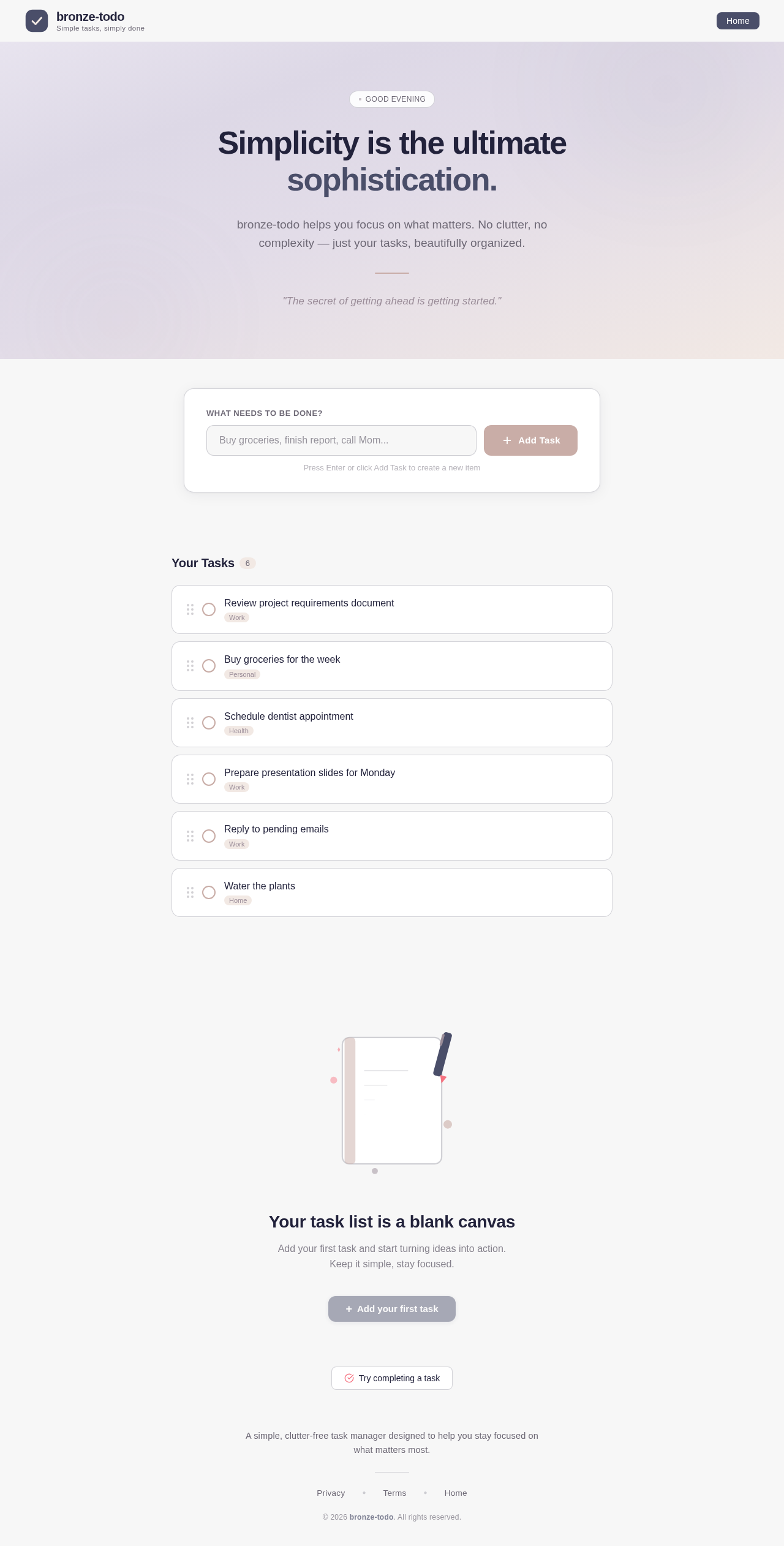
Simplicity is the ultimate sophistication.
bronze-todo helps you focus on what matters. No clutter, no complexity — just your tasks, beautifully organized.
"The secret of getting ahead is getting started."
Press Enter or click Add Task to create a new item
Your task list is a blank canvas
Add your first task and start turning ideas into action. Keep it simple, stay focused.
No comments yet. Be the first!