bronze-gaming
 Emmanuel Somuyiwa
create a gaming app a car racing


Comments (0)
Sign in to leave a comment
System Requirements
System Requirements Document for bronze-gaming
1. Introduction
The bronze-gaming project aims to create an engaging car racing game application. The target audience is players seeking a fun and interactive racing experience. The game will feature low-poly 3D graphics and physics-driven interactions inspired by the playful style of Bruno Simon.
2. System Overview
The bronze-gaming application is a car racing game that allows players to set up races, participate in active gameplay, and view results. The game is designed to be accessible without requiring user accounts, providing an anonymous entry point for players. The application will feature a custom user interface with a focus on interactive and visually distinctive experiences.
2a. Product Interpretation and Delivery Boundary
The game is delivered as a standalone application with custom UI components. It includes four main pages: Landing, Race Setup, Race, and Results. Each page serves a specific purpose in the player's journey, from entering the game to setting up and participating in races, and finally viewing race results. The game does not require user accounts, ensuring easy access for all players.
2b. Source Content Inventory
Not applicable as no content source directive was provided.
2c. Page Content and Component Coverage
Landing
- Information/State: Introduction to the game, start button.
- Primary Actions: Start a new race.
- Supporting Actions: View game instructions.
- Components: Full-bleed 3D race track hero, animated cars.
- States: Loading, ready to start, error handling.
Race Setup
- Information/State: Race options, car selection.
- Primary Actions: Confirm race setup, start race.
- Supporting Actions: Return to landing.
- Components: Interactive camera pans, hover interactions.
- States: Setup complete, error handling.
Race
- Information/State: Active race status, player controls.
- Primary Actions: Control car, pause race.
- Supporting Actions: View race details.
- Components: Physics-driven interactions, camera follow.
- States: Race in progress, paused, error handling.
Results
- Information/State: Race outcome, player performance.
- Primary Actions: Start a new race, return to setup.
- Supporting Actions: Share results.
- Components: Animated race finish, results display.
- States: Results displayed, error handling.
3. Functional Requirements
- As a Player, I should be able to start the game from the Landing page without needing an account. (Provenance: required_inference)
- As a Player, I should be able to set up a race by selecting options and cars on the Race Setup page. (Provenance: required_inference)
- As a Player, I should be able to participate in a race, controlling my car and competing against others. (Provenance: required_inference)
- As a Player, I should be able to view the results of a race and choose to start a new race or return to the setup. (Provenance: required_inference)
4. User Personas
- Player: The primary user of the game, responsible for starting races, controlling a car during gameplay, and viewing race outcomes.
5. Core User Flows
-
Starting the Game
- The Player accesses the Landing page.
- The Player clicks the start button to proceed to the Race Setup page.
-
Setting Up a Race
- The Player selects race options and a car on the Race Setup page.
- The Player confirms the setup and starts the race, transitioning to the Race page.
-
Participating in a Race
- The Player controls their car during the race using on-screen controls.
- The race progresses with dynamic camera follow and physics-driven interactions.
-
Viewing Results
- Upon race completion, the Player is directed to the Results page.
- The Player views their performance and can choose to start a new race or return to the setup.
6. Visuals Colors and Theme
- Muse: Bruno Simon
- Palette:
- Background: #F0F4F8
- Surface: #FFFFFF
- Text: #333333
- Primary: #FF6B6B
- Accent: #4ECDC4
- Muted: #C7C7C7
- Typography:
- Headings: Fredoka, Bold
- Body: Nunito
- Scale: 1.333 modular
- Shape Language: Low-poly 3D forms, rounded edges
- Layout: 3D scene-focused with floating labels
- Motion: Physics-driven interactions, bouncy easing
7. Signature Design Concept
The Landing page features a full-bleed 3D race track hero with animated cars zooming by. The playful, large Fredoka headlines animate into place, guiding the user's focus. Hover interactions reveal additional race details, and interactive camera pans create a dynamic feel.
8. Interaction Model & Motion Direction
- Interaction Model: Animated
- Motion Tempo: Cinematic
- Hero Dimensionality: webgl
- Landing Hero Motion Brief: The focal subject is a vibrant 3D race track with animated cars. The input is the player's start action, transforming into an immersive race setup experience. The motion vocabulary includes bouncy animations and camera pans, with a composed first frame showing the race track. A reduced-motion state simplifies animations for accessibility.
9. Non-Functional Requirements
- The application must load quickly and handle physics-driven interactions smoothly. (Provenance: required_inference)
- The game should be accessible on a range of devices without requiring high-end hardware. (Provenance: required_inference)
10. Tech Stack
- Frontend: React, Three.js for 3D graphics
- Backend: Node.js for game logic
- Deployment: Docker for containerization
11. Assumptions and Constraints
- The game will not require user accounts, ensuring easy access for all players.
- The visual style will remain playful and stylized, avoiding realistic car renders.
12. Glossary
- Player: The user interacting with the game.
- Race Setup: The process of selecting race options and cars before starting a race.
- Race: The active gameplay where the player controls a car.
- Results: The outcome of a race, showing player performance.
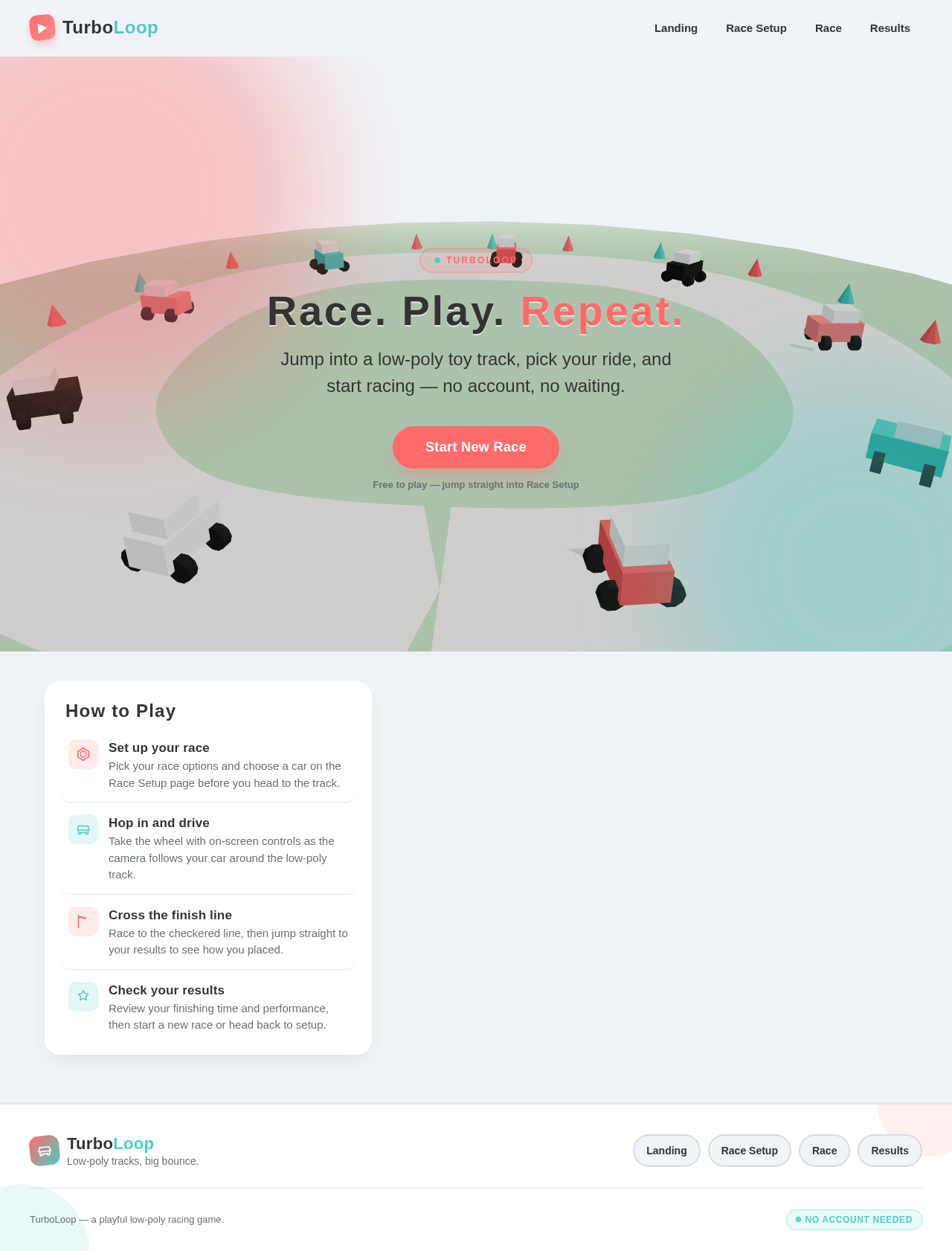
Race. Play. Repeat.
Jump into a low-poly toy track, pick your ride, and start racing — no account, no waiting.
Free to play — jump straight into Race Setup
How to Play
Set up your race
Pick your race options and choose a car on the Race Setup page before you head to the track.
Hop in and drive
Take the wheel with on-screen controls as the camera follows your car around the low-poly track.
Cross the finish line
Race to the checkered line, then jump straight to your results to see how you placed.
Check your results
Review your finishing time and performance, then start a new race or head back to setup.
Race. Play. Repeat.
Jump into a low-poly toy track, pick your ride, and start racing — no account, no waiting.
Free to play — jump straight into Race Setup
How to Play
Set up your race
Pick your race options and choose a car on the Race Setup page before you head to the track.
Hop in and drive
Take the wheel with on-screen controls as the camera follows your car around the low-poly track.
Cross the finish line
Race to the checkered line, then jump straight to your results to see how you placed.
Check your results
Review your finishing time and performance, then start a new race or head back to setup.
No comments yet. Be the first!