bronze-calculator
 Diya Trivedi
start a project to build a simple simgle page design of calculator

Comments (0)
Sign in to leave a comment
System Requirements
System Requirements Document for bronze-calculator
1. Introduction
bronze-calculator is a simple calculator delivered as a single-page design. The product intent is narrow and complete: an anonymous visitor arrives at one page, enters numbers and operators, reads a computed result, and clears the entry to start a new calculation — all without navigating away. The design must be simple and must live on exactly one page.
The audience is anyone who needs a fast, correct answer to basic arithmetic and wants that one loop — punch numbers, read a big result, clear, repeat — to feel effortless and a little bit stylish. The page is public and requires no account, sign-in, or stored history.
2. System Overview
bronze-calculator is a single-page, client-facing calculator. It is delivered as one custom page, Calculator, which is anonymously reachable and hosts the entire product: the wordmark and descriptor, the numeric display with its live expression, the keypad, the operator column, the clear row, and the equals key.
Current delivery:
- One page only, per the explicit single-page constraint.
- No application-owned identity, no accounts, no sessions, no persistence of calculations.
- All arithmetic entry, computation, display, and clearing happen on that one page.
- The only active human actor is the Calculator user.
Actors:
- Calculator user (human, active) — enters numbers and operators, reads results, clears to start over.
- The browser/client runtime (non-persona system actor) — evaluates the entered expression and renders the result.
Narrow exclusions: no multi-page navigation, no saved history, no accounts, no sharing, no scientific or advanced functions beyond what basic arithmetic entry requires, no server-side persistence.
Removed from scope
- Multi-page navigation (also: multi-screen flow, routed app)
- Account creation and sign-in (also: login, authentication)
- Saved calculation history (also: memory log, past results)
- Scientific/advanced calculator modes (also: graphing, unit conversion)
2a. Product Interpretation and Delivery Boundary
The requester asked for a simple single-page calculator design. That is the whole product: one page, one loop. The page is public and anonymous — there is no identity, no protected state, and nothing to resume across visits. Everything the Calculator user does happens in the browser on the single Calculator page, and the result of each calculation is visible immediately on that page.
The current horizon contains only this single-page calculator. Anything beyond basic arithmetic entry, result display, and clearing is outside the current delivery. There is no future-horizon feature set defined by the source; the product is intentionally complete as specified.
2c. Page Content and Component Coverage
Calculator
The single page of the product. It introduces the calculator and hosts the full arithmetic loop. It is anonymously reachable with no access requirement.
Information and state
- Wordmark: "BRONZE" stacked over "CALCULATOR" with a thin rule and a one-line descriptor.
- Display: the current result as an oversized right-aligned figure, with the live expression in small muted type beneath it.
- Keypad state: the currently active operator is visually indicated in the operator column.
- Clear row: a muted secondary row for clearing the entry.
- No loading state is required (computation is immediate and local). No empty-history state exists because no history is stored.
Primary actions
- Enter digits (0–9) and a decimal point.
- Select an operator (+, −, ×, ÷).
- Press equals to compute and display the result.
- Clear the entry to start a new calculation.
Supporting actions
- Read the live expression beneath the result.
- Read the active-operator indication.
Domain entities
- Current entry (the number being typed).
- Pending operand and selected operator.
- Computed result.
- Live expression string.
Component responsibilities
- Wordmark block — renders "BRONZE" / "CALCULATOR" and the descriptor; decorative only, no interaction.
- Display — renders the result figure and the live expression; updates on computation.
- Keypad grid — 4×5 grid of flat hairline keys for digits, decimal point, operators, clear, and equals.
- Operator column — indicates the active operator.
- Equals key — the single saturated accent block; triggers computation.
- Clear row — resets the entry and pending state.
States
- Empty/initial: display shows a starting figure (e.g. 0) with no pending expression.
- Entry in progress: digits accumulate in the display; live expression reflects the pending operation.
- Success: equals computes and the result crossfades into the display; the expression remains visible beneath.
- Error/recovery: an invalid expression (e.g. division by zero) shows an error indication in the display; pressing clear returns the page to the initial state so the user can start over.
- Reduced motion: reveals resolve to final state; only the colour state change on key press remains.
3. Functional Requirements
FR-1 — Single-page calculator delivery (explicit) As a Calculator user, I should get the entire calculator on one page so that I never have to navigate away to do arithmetic.
- Trigger: opening the page.
- Observable result: the wordmark, display, and keypad are all present on the single Calculator page.
- Access: anonymous, no requirement.
- Failure/recovery: not applicable (static delivery).
- Continuation: the user proceeds to enter numbers.
FR-2 — Enter numbers (explicit) As a Calculator user, I should enter digits and a decimal point so that I can build the number I want to calculate with.
- Trigger: pressing a digit or decimal key.
- Observable result: the entered digits appear in the display.
- Access: anonymous.
- Failure/recovery: pressing clear resets the entry.
- Continuation: the user selects an operator or presses equals.
FR-3 — Select an operator (explicit) As a Calculator user, I should select an arithmetic operator so that I can combine two numbers.
- Trigger: pressing +, −, ×, or ÷.
- Observable result: the selected operator is indicated in the operator column and reflected in the live expression.
- Access: anonymous.
- Failure/recovery: selecting a different operator replaces the pending one.
- Continuation: the user enters the second operand.
FR-4 — Compute and display the result (explicit) As a Calculator user, I should press equals to compute the result so that I get a correct answer to my arithmetic.
- Trigger: pressing the equals key.
- Observable result: the computed result appears as the oversized display figure, with the live expression beneath it.
- Access: anonymous.
- Failure/recovery: an invalid expression shows an error indication; clear returns to the initial state.
- Continuation: the user reads the result, then clears or continues.
FR-5 — Clear to start over (explicit) As a Calculator user, I should clear the entry so that I can start a new calculation from a clean state.
- Trigger: pressing the clear control in the clear row.
- Observable result: the display and pending expression reset to the initial state.
- Access: anonymous.
- Failure/recovery: not applicable.
- Continuation: the user begins a new calculation.
FR-6 — Read the live expression (required_inference) As a Calculator user, I should see the current expression in small muted type beneath the result so that I understand what operation is pending.
- Trigger: entering numbers or selecting an operator.
- Observable result: the expression string updates beneath the result figure.
- Access: anonymous.
- Failure/recovery: clear resets the expression.
- Continuation: the user completes or clears the calculation.
4. User Personas
Calculator user
Product context. An anonymous visitor who lands on the single Calculator page needing a quick, correct answer to basic arithmetic. They have no account, no stored history, and no expectation of anything beyond the one page in front of them.
Primary goal. Get a correct arithmetic result without navigating away from the page.
Distinct accepted responsibilities.
- Enter numbers and a decimal point.
- Select an operator.
- Press equals to compute.
- Read the result and the live expression.
- Clear the entry to start a new calculation.
Relevant inputs or decisions. Which digits to enter, which operator to apply, when to press equals, and when to clear.
Interactions with other accepted participants. None — the Calculator user is the only active human actor; the browser runtime evaluates the expression on their behalf.
Observable success. A correct result appears in the oversized display, and the user can clear and repeat the loop without leaving the page.
5. Core User Flows
Flow A — Perform a basic calculation
- The Calculator user opens the Calculator page (anonymous, no sign-in).
- The page shows the wordmark, the display at its initial figure, and the keypad.
- The user presses digit keys to enter the first number; the digits appear in the display.
- The user presses an operator key (+, −, ×, ÷); the operator is indicated in the operator column and the live expression updates beneath the result.
- The user presses digit keys to enter the second number.
- The user presses the equals key; the browser evaluates the expression and the computed result crossfades into the oversized display, with the live expression beneath it.
- The user reads the result. Continuation: they press clear to start a new calculation, or continue entering a new operation.
Flow B — Clear and start over
- From any state on the Calculator page, the user presses the clear control in the clear row.
- The display and pending expression reset to the initial state.
- The user begins a new calculation (Flow A).
Flow C — Recover from an invalid expression
- The user enters an expression that cannot be evaluated (e.g. division by zero) and presses equals.
- The display shows an error indication.
- The user presses clear; the page returns to the initial state.
- The user starts a new calculation (Flow A).
6. Visuals Colors and Theme
Muse: Tobias van Schneider — editorial swagger for arithmetic; one hot red accent on warm black.
Headline: "BRONZE / CALCULATOR" — oversized Playfair Display wordmark over a tracked uppercase label.
Palette (light mode)
- Background:
#F4F0E8(warm off-white ground) - Surface:
#FFFFFF(calculator body) - Text:
#111111(near-black) - Primary:
#111111 - Accent:
#E02B1D(equals key, active operator, result underline — never large fills) - Muted:
#8A857B(secondary labels, clear row)
Typography
- Headings: Playfair Display, 700–900 weight, tight leading (−0.03em).
- Body and keys: Space Grotesk 400/500; uppercase 11–12px with 0.14em tracking for keypad legend and the "BRONZE / CALCULATOR" eyebrow.
- Scale (1.333 modular): display result
clamp(56px, 12vw, 128px); hero headlineclamp(40px, 7vw, 88px); key numeralsclamp(20px, 3.2vw, 32px); labels 12px; body 16px. Line-height 1.0 on display, 1.5 on body.
Shape language. Sharp corners everywhere — 0px radius on the calculator body, keys, and rules. A 1px #111 hairline frames the calculator; a 3px #111 rule separates the display from the keypad; the equals key is a solid #E02B1D block with white digits. No shadows, no rounded pills, no borders softer than 1px.
Layout. Asymmetric editorial split at 1280px: a 9-column left column with the oversized wordmark stacked over "CALCULATOR" with a thin rule and a one-line descriptor; a 5-column right column holding the calculator body pinned to the top-right. At 768px the columns stack with the wordmark reduced to one line; at 375px everything becomes a single column — wordmark, then the calculator body full-width with a 4-column keypad grid. The display sits above the keypad as a right-aligned figure with the live expression in small muted type beneath it.
Imagery. No photography and no illustration. Visual interest is typographic: oversized Playfair numerals, the hairline grid, and the single red equals block. Optional decorative element: an oversized ghosted '×' or '÷' glyph in Playfair at 400px, cropped by the page edge as a watermark behind the wordmark at 6% #111 opacity, never overlapping readable copy or controls.
Avoid. Rounded pill buttons or soft card shadows; any blue, indigo, or violet accent; gradient backgrounds or glassmorphism; centred headline with subtext and a CTA button; photography or stock illustrations; Inter, Roboto, Arial, or system-ui as a font choice; grids of identical hover-lift cards; decorative elements overlapping readable text or keys.
7. Signature Design Concept
The public entry is a flat, full-viewport warm off-white field with no centred headline and no button-blob. The dominant element is the wordmark "BRONZE" set in Playfair Display 900 at clamp(56px, 11vw, 136px), left-aligned, with "CALCULATOR" beneath it in Space Grotesk uppercase 12px 0.3em tracking — a 9-column typographic block on the left. To its right, in a 5-column column, the calculator itself: a white sharp-cornered body with a 1px #111 frame, a right-aligned Playfair result at clamp(56px, 12vw, 128px), a 3px rule, then a 4×5 keypad of flat hairline keys with the #E02B1D equals key as the one saturated block. A ghosted oversized '÷' glyph is cropped by the right edge behind the wordmark. On load the wordmark rises 12px into place; the result crossfades when it changes.
Signature moves:
- Oversized Playfair Display wordmark "BRONZE" spanning 9 of 12 columns at
clamp(56px, 11vw, 136px), with "CALCULATOR" as a 12px uppercase tracked label beneath it. - The result is set in Playfair Display 700 at
clamp(56px, 12vw, 128px), right-aligned and underlined by a single 3px#111rule — the display is the hero type, not a UI field. - A single solid
#E02B1Dequals key as the only saturated block on the page, with white Playfair digits; every other key is a flat white tile with a 1px#111hairline and Space Grotesk numerals. - A ghosted oversized '÷' glyph in Playfair at 400px, cropped by the right viewport edge behind the wordmark at 6% opacity — decoration only, never over text or controls.
- A 1px
#111hairline grid frames the calculator body and separates the display, keypad, and clear row into ruled bands, echoing an editorial page rather than an app card.
8. Interaction Model & Motion Direction
Interaction Model: Animated Motion Tempo: restrained Hero Dimensionality: flat
Landing Hero Motion Brief
- Focal subject: the oversized "BRONZE" wordmark and the calculator body beside it.
- Input → transformation → outcome thesis: on load, the wordmark rises 12px into place (600ms type reveal); as the user enters numbers and presses equals, the result crossfades (600ms) into the oversized display; key presses flip colour instantly (120ms). The outcome is a confident, editorial arithmetic loop with no bounce and no particles.
- Motion vocabulary: restrained and slow — a 600ms crossfade on result update, a single type reveal on load, an instant 120ms colour flip on key press.
- Composed first frame: warm off-white field, wordmark left-aligned in Playfair 900, calculator body top-right with its initial display figure, ghosted '÷' cropped at the right edge.
- Reduced-motion state: all reveals resolve to their final state; only the colour state change on key press remains.
9. Non-Functional Requirements
- Single page (explicit). The product must be delivered as exactly one page; no additional routes or screens.
- Simplicity (explicit). The design must be simple — no features beyond basic arithmetic entry, result display, and clearing.
- Anonymous access (required_inference). The page is publicly reachable with no account, sign-in, or session.
- No persistence (required_inference). No calculation history or user data is stored; each visit starts fresh.
- Readable text and controls (explicit design constraint). Headlines, wordmarks, labels, numbers, and controls stay entirely inside the viewport and their container at 375px, 768px, and 1280px, wrapping or scaling to fit; no element covers any part of them. Decoration may be cropped or bled off an edge but never over readable text or controls.
- Reduced motion (explicit design constraint). With
prefers-reduced-motion, reveals resolve to their final state and only the colour state change remains. - Accessibility (required_inference). Keys are operable by keyboard and pointer; the display and expression are readable by assistive technology.
10. Tech Stack
- Frontend: React (single-page application) with the Calculator page as the sole route.
- Styling: CSS with the specified palette, Playfair Display and Space Grotesk fonts, sharp-cornered hairline layout, and
clamp()responsive type. - Computation: client-side arithmetic evaluation in the browser; no backend required for the current product.
- Deployment: static hosting of the built single-page app; Docker/docker-compose only if a containerized static server is desired.
11. Assumptions and Constraints
- Assumption: the calculator supports the four basic operations (+, −, ×, ÷), a decimal point, and clear, which is the minimum needed for "basic arithmetic" as stated.
- Assumption: the initial display figure is
0. - Assumption: computation is local to the browser; no server round-trip is needed.
- Constraint: exactly one page (explicit).
- Constraint: the design must be simple (explicit).
- Constraint: the palette, fonts, surfaces, tone, and layout follow the supplied creative direction; the generic indigo/blue-on-white SaaS template is forbidden.
- Constraint: no accounts, no history, no multi-page navigation.
12. Glossary
- Calculator user — the anonymous human visitor who performs arithmetic on the page.
- Display — the oversized right-aligned result figure with the live expression beneath it.
- Live expression — the small muted string showing the pending operation.
- Keypad — the 4×5 grid of flat hairline keys for digits, operators, clear, and equals.
- Equals key — the single saturated
#E02B1Dblock that triggers computation. - Clear row — the muted secondary row that resets the entry and pending state.
- Wordmark — the "BRONZE / CALCULATOR" typographic block.
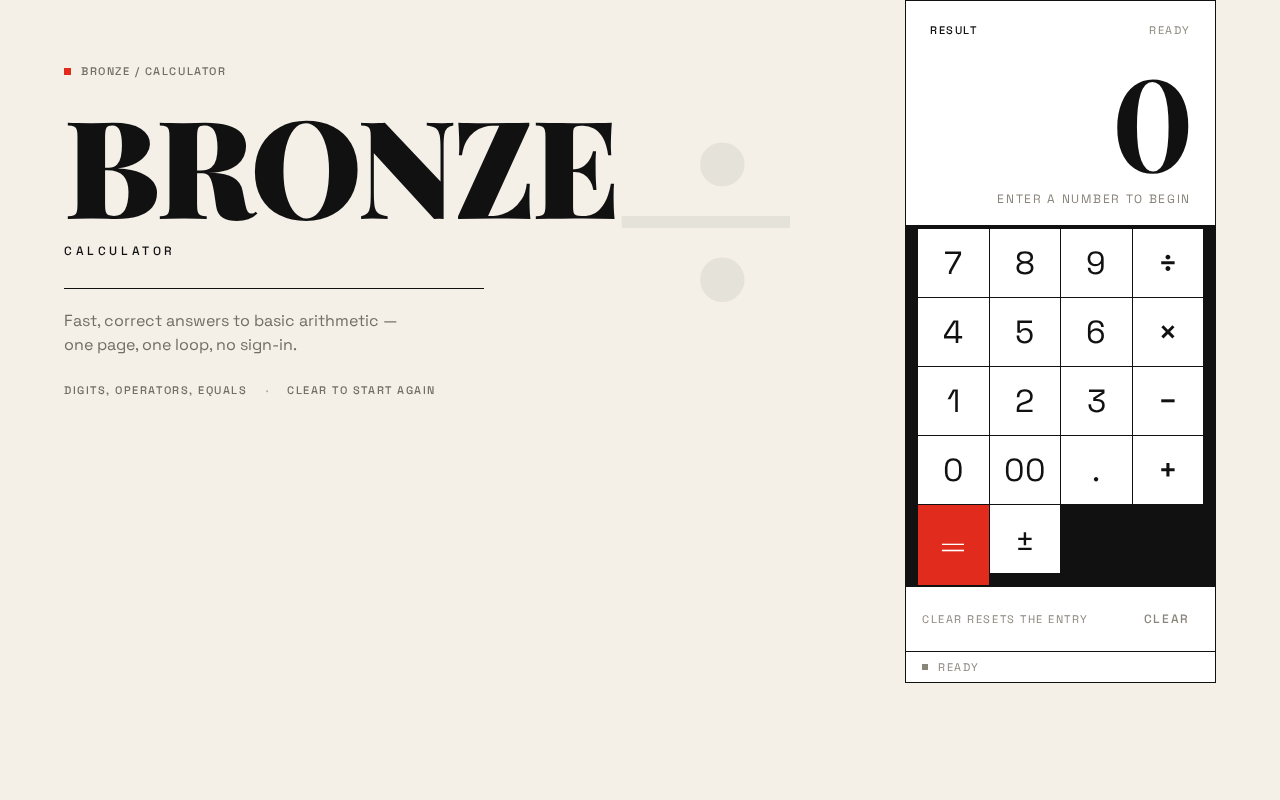
Bronze / Calculator
BRONZE
Calculator
Fast, correct answers to basic arithmetic — one page, one loop, no sign-in.
Enter a number to begin
Bronze / Calculator
BRONZE
Calculator
Fast, correct answers to basic arithmetic — one page, one loop, no sign-in.
Enter a number to begin
No comments yet. Be the first!