bright-bright
 Kim Diaz


Comments (0)
Sign in to leave a comment
System Requirements
System Requirements Document for bright-bright
1. Introduction
bright-bright is a private, dark AI workspace for doing business work in one sandbox with an all-in-one AI assistant, agent, and bots. The workspace supports memory, drafting, coding, and open module management, alongside bot scaling, competition entry, and visibility into sales and income, including crypto and bitcoin.
This document is the requested system requirements document for bright-bright. Its audience is the Workspace Owner and Bot Operator who use and modify the private workspace.
Success criteria
- The Workspace Owner can enter a private workspace and use its distinct sandbox, memory, drafting, coding, and module-management areas.
- The workspace supports the stated 4–7 bots and presents the three stated price tiers: $150, $500, and $2,000.
- The owner can work with Kaggle and other competitions and see sales and income, including crypto and bitcoin, in real time where supported by available data.
- Brain, core, weights, and nodes remain open for the owner to modify and add.
- The interface does not promise income, competition results, or real-time gains.
2. System Overview
bright-bright is a private AI workspace with a custom React interface and a shared FastAPI backend. Its accepted human users are the Workspace Owner and Bot Operator. The owner uses the sandbox for business work with an AI assistant, agent, and bots; the operator’s accepted work centers on scaling bots and modifying open modules. The product includes the named areas and workflows in this document, without assuming unspecified business capabilities.
The workspace is private and uses application-owned identity. The current page contract includes an anonymous Landing and Login, followed by protected workspace pages. The product includes the free-tier capabilities referenced by the user, but no specific free-tier feature list or tier entitlements were supplied. The three stated prices are preserved as values; no billing, payment, subscription, or tier-enforcement workflow is specified.
2a. Product Interpretation and Delivery Boundary
The current delivery is a private, application-owned workspace. A user can reach Landing anonymously, establish identity through self-service enrollment before first use, and use Login to verify identity on return. Protected workspace pages require login. Identity supports private ownership and continuity; it does not imply differentiated permissions between the accepted personas.
The supplied page contract is the current information architecture: Landing, Login, Sandbox, memory, drafting, coding, module management, Bots, Competitions, and Revenue. The shared backend supports application APIs and domain modules. The provisioned infrastructure is backend (FastAPI), database (MariaDB), frontend (React), litellm (LiteLLM gateway), postgres (PostgreSQL supporting LiteLLM), and redis (Redis for the accepted shared caching, state, queue, or coordination need). PostgreSQL is separate from application-owned storage. No additional service is specified.
The product supports the stated business-work, bot, competition, revenue, and open-module scope. It does not promise outcomes, invent free-tier entitlements, or add adjacent business, financial, competition, or account-management capabilities.
2c. Page Content and Component Coverage
Landing
- Information and state: Anonymous public entry explaining Athena as a private AI workspace, its sandbox, and its memory, drafting, coding, and module-management areas. Use the supplied hero copy: “One workspace. More room to build.”; “Run business work with an AI assistant, agents, bots and open modules in your private workspace.”; and “Enter workspace.”
- Primary action: Enter workspace leads to Login.
- Supporting content: A visual workspace preview may show accepted areas and open module panels; it must not imply unaccepted capabilities or guaranteed outcomes.
- Entities and components: Product identity, accepted workspace areas, hero headline and subline, workspace preview, and entry action.
- States: Initial content loads without requiring identity. If the entry action cannot continue, retain the page and provide a recoverable retry path. No private workspace state is exposed here.
Login
- Information and state: Anonymous identity-verification entry for the private workspace. Supports first-use self-service enrollment and returning-user verification.
- Primary actions: Establish identity before first use; verify identity on return; continue to Sandbox after successful verification.
- Entities and components: Application identity and private-workspace access state. No additional account-management functions are specified.
- States: Show progress while verification is pending; on success, continue to Sandbox. On invalid or failed verification, keep protected content unavailable, explain that access was not established, and allow retry. Enrollment or verification failure must not expose private state.
Sandbox
- Information and state: Protected, central business-work context for the Workspace Owner, bringing together the all-in-one AI assistant, agent, and bot for business work. It is the workspace’s central starting and return context, not a claim that every possible business task is supported.
- Primary actions: Initiate business work with the assistant, agent, or bot; continue to the distinct memory, drafting, coding, module management, Bots, Competitions, or Revenue areas.
- Entities and components: Workspace-owned business-work context and assistant, agent, and bot interaction.
- States: Show the current workspace context and available accepted destinations. If an interaction cannot complete, show its failure without representing it as successful and allow the user to continue or retry where applicable. No specific assistant tools, business-task catalog, or output format is specified.
memory
- Information and state: Protected area for the owner’s durable memory.
- Primary actions: Work with memory in the workspace. The user’s request establishes memory as a distinct area but does not specify particular memory operations or fields.
- Entities and components: Owner-associated durable memory and its readable workspace presentation.
- States: Distinguish loading, available memory, and an empty memory state. If memory cannot be loaded or saved, show the failure and allow recovery or retry without claiming an unsaved change persisted.
drafting
- Information and state: Protected area for the owner’s drafts.
- Primary actions: Work on drafts. Specific draft types, fields, and sending or publishing actions are not specified.
- Entities and components: Owner-associated drafts and drafting workspace.
- States: Distinguish loading, available drafts, and an empty state. If draft work cannot be saved or loaded, show the failure and allow retry; do not imply an unsaved draft is durable.
coding
- Information and state: Protected area for the owner’s code work.
- Primary actions: Work on code in the workspace. Execution environments, languages, runtime limits, and deployment actions are not specified.
- Entities and components: Owner-associated code work and coding workspace.
- States: Distinguish loading, available code work, and an empty state. If code work cannot be loaded or saved, show the failure and allow retry without claiming persistence.
module management
- Information and state: Protected area where the owner can modify and add brain, core, weights, and nodes. These remain open to user modification and addition.
- Primary actions: Add or modify the named module elements and inspect the resulting workspace state.
- Entities and components: Brain, core, weights, nodes, and their user-modified or added state. Do not impose a closed architecture that prevents the requested changes.
- States: Show the current module state and whether a requested change succeeded. If a change fails, preserve the last confirmed state, report the failure, and allow correction or retry. Do not claim an unconfirmed change was applied.
Bots
- Information and state: Protected area for the stated 4–7 bots used to scale business work, with the three stated price tiers: $150, $500, and $2,000.
- Primary actions: Work with the bot set and its tier association as needed to represent the accepted scaling scope. The source does not specify bot creation, deployment, billing, or tier entitlements; do not imply those workflows.
- Entities and components: Bots, the stated 4–7 range, and the three price values.
- States: Present the bot and tier information available to the workspace. If bot or tier information cannot be loaded, show the failure and allow retry. Do not imply a bot is active, paid for, or producing results without confirmed state.
Competitions
- Information and state: Protected area for the owner’s work to enter Kaggle and other competitions.
- Primary actions: Initiate competition-entry work for Kaggle or another competition. The source does not specify competition discovery, submission formats, external account linking, or automated submission.
- Entities and components: Competition and entry work, including Kaggle as a named competition destination.
- States: Show the available entry-work state and any confirmed result. If entry work cannot proceed or its result is unavailable, report that state and allow continuation or retry where applicable. Do not claim acceptance or a competition result without confirmation.
Revenue
- Information and state: Protected area for viewing sales and income in real time, including crypto and bitcoin, to support the user’s stated income-generation goal.
- Primary actions: Review the available sales and income information, including crypto and bitcoin.
- Entities and components: Sales, income, crypto, bitcoin, and the time or freshness of available information.
- States: Show loading, available information, and an empty or unavailable-data state. Indicate when information is not current or cannot be retrieved; allow retry. Do not represent estimates or unavailable data as confirmed real-time income, and do not promise gains.
3. Functional Requirements
-
As a Workspace Owner, I should be able to enter the public bright-bright workspace entry and proceed toward my private workspace.
Provenance:required_inferencefor the anonymous entry and transition; the product and private workspace areexplicit.
Lifecycle and access: From Landing, the owner selects “Enter workspace” and reaches Login. Landing is anonymous; no private state is shown. If navigation fails, the owner can retry from Landing.
Acceptance: Landing presents the supplied hero meaning and an entry action that leads to Login. -
As a Workspace Owner, I should be able to establish application identity before first use and verify identity on return.
Provenance:required_inference.
Lifecycle and access: The owner completes self-service enrollment before first use, or verifies identity on return through Login. Successful verification opens the protected Sandbox. Failed enrollment or verification leaves protected state unavailable and permits retry.
Acceptance: First use cannot enter protected pages without identity establishment; returning access requires verification. No additional account-management capability is implied.
-
As a Workspace Owner, I should be able to do business work from one sandbox with an all-in-one AI assistant, agent, and bot.
Provenance:explicit.
Lifecycle and access: From the protected Sandbox, the owner initiates business work with the assistant, agent, or bot and observes the interaction’s result or an explicit failure. The owner can continue in the Sandbox or move to another accepted workspace area.
Acceptance: The Sandbox provides the accepted assistant, agent, and bot business-work context. It must not claim unsupported task coverage or successful results when an interaction fails. -
As a Workspace Owner, I should be able to use a distinct memory area for durable workspace memory.
Provenance: The named area and durable memory areexplicitin Planning Scope; the minimum observable loading, empty, and recovery states arerequired_inference.
Lifecycle and access: From a verified session, the owner opens memory and sees available memory or an empty state. A failed load or save is reported and can be retried; the owner can return to the Sandbox or another accepted area.
Acceptance: memory is a distinct protected destination and represents durable owner-associated memory without inventing unspecified memory operations.
-
As a Workspace Owner, I should be able to use a distinct drafting area for drafts.
Provenance: The named area and drafts areexplicitin Planning Scope; minimum observable states and recovery arerequired_inference.
Lifecycle and access: From a verified session, the owner opens drafting and works with drafts. Loading or saving failure is visible; retry is available where applicable, and the owner can continue to another accepted area.
Acceptance: drafting is a distinct protected destination. No sending, publishing, or specific draft schema is implied. -
As a Workspace Owner, I should be able to use a distinct coding area for code work.
Provenance: The named area and code work areexplicitin Planning Scope; minimum observable states and recovery arerequired_inference.
Lifecycle and access: From a verified session, the owner opens coding and works with code. Loading or saving failure is visible; retry is available where applicable, and the owner can continue to another accepted area.
Acceptance: coding is a distinct protected destination. No runtime, language, or deployment behavior is implied.
-
As a Workspace Owner, I should be able to modify and add brain, core, weights, and nodes.
Provenance:explicit.
Lifecycle and access: From a verified session, the owner opens module management, modifies or adds one of the named elements, and observes whether the change was applied. On failure, the last confirmed state remains authoritative and the owner can correct or retry. The owner can continue to another accepted area.
Acceptance: brain, core, weights, and nodes remain open to modification and addition; the system does not falsely report an unconfirmed change as successful. -
As a Workspace Owner, I should be able to work with 4 to 7 bots to scale business work.
Provenance: The bot range and scaling goal areexplicit; the Bots destination and minimum observable state arerequired_inference.
Lifecycle and access: From a verified session, the owner opens Bots and reviews or works with the bot set. The page represents the stated 4–7 range and the three price values. If information is unavailable, the owner sees an error and can retry or continue elsewhere.
Acceptance: The product supports the stated 4–7 bot scope without inventing bot deployment, billing, or tier entitlements. -
As a Workspace Owner, I should be able to use the three stated price tiers: $150, $500, and $2,000.
Provenance:explicit.
Lifecycle and access: From a verified session, the owner can see the three price values in the bot-scaling context. If tier information cannot be loaded, the page reports that failure and permits retry.
Acceptance: The values are preserved exactly. No currency period, included features, payment, subscription, or enforcement behavior is inferred.
-
As a Workspace Owner, I should be able to enter Kaggle and other competitions.
Provenance: Competition entry and Kaggle areexplicit; the Competitions destination and minimum observable recovery arerequired_inference.
Lifecycle and access: From a verified session, the owner initiates competition-entry work for Kaggle or another competition and sees a confirmed result or an explicit unavailable/failed state. The owner can retry where applicable or continue elsewhere.
Acceptance: The product supports competition-entry work without claiming a submission was accepted or a competition was won. No external account or submission mechanism is assumed. -
As a Workspace Owner, I should be able to view sales and income in real time, including crypto and bitcoin.
Provenance:explicit; the Revenue destination and minimum freshness/error states arerequired_inference.
Lifecycle and access: From a verified session, the owner opens Revenue and reviews available sales and income information, including crypto and bitcoin. The page communicates unavailable or stale information and allows retry.
Acceptance: The product does not promise income or gains and does not present unavailable or unconfirmed information as real-time results. -
As a Workspace Owner, I should be able to use anything available on the free tier.
Provenance:explicit.
Lifecycle and access: In the private workspace, the owner can use the capabilities available on the free tier. If a free-tier capability is unavailable, the system must not represent it as available.
Acceptance: The free-tier inclusion is preserved, but no specific feature list, entitlement, or tier comparison is invented.
4. User Personas
Workspace Owner
- Provenance:
required_inference, as supplied by the closed Planning Scope persona catalog. - Product context: Uses bright-bright as a private, single-sandbox environment for business work with an AI assistant, agent, and bots.
- Primary goal: Do business work in one workspace and scale it with 4–7 bots.
- Distinct responsibilities: Uses the Sandbox, memory, drafting, coding, module management, Bots, Competitions, and Revenue areas; works with the stated three price values; enters Kaggle and other competitions; reviews sales and income including crypto and bitcoin; modifies and adds brain, core, weights, and nodes.
- Relevant inputs and decisions: Initiates business work, chooses whether to modify or add open module elements, works with competition-entry tasks, and reviews available revenue information.
- Interactions with other accepted participants: No other accepted human participant is required for these workflows. The assistant, agents, bots, and external competition or financial sources are non-persona actors; their specific integrations are not defined.
- Observable success: The owner can access the private workspace, use its accepted areas, observe confirmed results or failures, and continue or recover without false success claims.
Bot Operator
- Provenance:
required_inference, as supplied by the closed Planning Scope persona catalog. - Product context: Works with the bot-scaling and open-module aspects of the private workspace.
- Primary goal: Scale business work with 4–7 bots and keep brain, weights, and nodes open to modification and addition.
- Distinct responsibilities: Works with bots across the stated $150, $500, and $2,000 price values and modifies or adds open module elements.
- Relevant inputs and decisions: Works with the bot set and chooses module changes or additions; the source does not define separate operator permissions or a distinct bot deployment workflow.
- Interactions with other accepted participants: No other accepted human participant is required. The Workspace Owner is a separate accepted persona, but no handoff or shared-state permission model is specified.
- Observable success: The operator can work with the accepted bot and module scope and see whether a change or operation succeeded or failed.
5. Core User Flows
1. First use and private workspace entry — Workspace Owner
- The owner opens Landing anonymously and sees the bright-bright workspace introduction and “Enter workspace.”
- The owner selects “Enter workspace” and reaches Login.
- On first use, the owner completes self-service identity establishment. If it fails, Login reports that access was not established and allows retry; protected workspace state remains unavailable.
- After successful establishment, the owner enters the protected Sandbox.
- The owner continues with business work or opens another accepted destination.
2. Returning to the private workspace — Workspace Owner or Bot Operator
- The user opens Login from the public entry.
- The user verifies identity. If verification fails, protected state remains unavailable and the user can retry.
- On success, the user enters the protected workspace. The Workspace Owner continues to Sandbox; the Bot Operator continues to the accepted bot or module work context.
- The user proceeds to an accepted destination. Identity establishes continuity, not differentiated permissions.
3. Business work in the Sandbox — Workspace Owner
- From a verified session, the owner opens Sandbox.
- The owner initiates business work with the all-in-one AI assistant, agent, or bot.
- The workspace presents the interaction’s observable result or reports failure without claiming success.
- The owner continues in the Sandbox or opens memory, drafting, coding, module management, Bots, Competitions, or Revenue as needed.
- If an interaction fails, the owner can continue or retry where applicable; no unsupported task workflow is implied.
4. Work with durable memory — Workspace Owner
- From a verified session, the owner opens memory.
- The owner sees available durable memory or an empty state.
- If memory cannot be loaded or saved, the workspace reports the failure and permits recovery or retry; it does not claim an unsaved change persisted.
- The owner returns to Sandbox or continues to another accepted destination.
5. Work with drafts — Workspace Owner
- From a verified session, the owner opens drafting.
- The owner works with drafts in the drafting area.
- The workspace shows the available draft state. If loading or saving fails, it reports the failure and permits retry where applicable.
- The owner continues in drafting or returns to Sandbox or another accepted destination.
6. Work with code — Workspace Owner
- From a verified session, the owner opens coding.
- The owner works with code in the coding area.
- The workspace shows the available code-work state. If loading or saving fails, it reports the failure and permits retry where applicable.
- The owner continues in coding or returns to Sandbox or another accepted destination.
7. Modify or add open modules — Workspace Owner and Bot Operator
- From a verified session, the user opens module management.
- The user selects brain, core, weights, or nodes to modify or add.
- The workspace reports whether the change was applied. On failure, the last confirmed state remains authoritative and the user can correct or retry.
- The user continues module work or returns to Sandbox or another accepted destination.
8. Work with bots and stated price tiers — Workspace Owner and Bot Operator
- From a verified session, the user opens Bots.
- The user reviews or works with the bot set in the stated 4–7 range.
- The user sees the three stated price values: $150, $500, and $2,000.
- If bot or tier information is unavailable, the workspace reports the failure and permits retry or continuation elsewhere.
- The user continues bot-related work. No billing, payment, tier entitlement, or deployment step is implied.
9. Enter a competition — Workspace Owner
- From a verified session, the owner opens Competitions.
- The owner initiates entry work for Kaggle or another competition.
- The workspace shows a confirmed result or reports that entry could not proceed or its result is unavailable.
- The owner retries where applicable or continues elsewhere. The flow does not claim acceptance, a win, or a competition outcome.
10. Review sales and income — Workspace Owner
- From a verified session, the owner opens Revenue.
- The owner reviews available sales and income information, including crypto and bitcoin.
- The workspace indicates whether the information is current, stale, unavailable, or confirmed.
- If information cannot be retrieved, the owner can retry or continue elsewhere. No income or gain is promised.
11. Use free-tier capabilities — Workspace Owner
- From a verified session, the owner uses capabilities available on the free tier within the accepted workspace scope.
- The workspace does not represent unavailable capabilities as included.
- The owner continues with available work. The free-tier feature list and any tier transition are unspecified.
6. Visuals Colors and Theme
The authoritative creative direction names Gleb Kuznetsov as the muse and calls for a cinematic, dark, polished private AI workspace that feels capable, open to change, and controlled. The supplied screenshots are optional visual context only; they do not prescribe page structure, navigation, or additional product capabilities.
- Dark-mode palette: background
#080B16; raised surface#11182B; text#EAF1FF; primary#18234A; accent#00D9F5; muted text#8192B2. - Color roles: Use deep navy for the page and raised panels, pale text for readable content, muted blue-grey for secondary labels, and cyan for active controls and status signals. Do not use a white-first page or blue-indigo buttons on white.
- Typography: Space Grotesk bold for headings, with spaced uppercase labels; DM Sans for body text. Use the specified 1.25-step scale: display 48px mobile to 88px desktop, then 32px, 24px, 18px, and 16px. Use serif-style display lettering only if paired with a real serif; the specified heading family remains Space Grotesk.
- Shape and surfaces: Dark, squared panels with thin blue-grey borders and small corner radii. Use cyan edges and simple line icons for active states. Module controls use bordered dark panels with readable configuration rows.
- Layout: On desktop, place the left-aligned headline and workspace preview in an asymmetric two-column hero. Stack the preview below the headline at 375px and 768px. Keep all text and controls inside the viewport.
- Imagery: Use the workspace interface as the main visual. Show only accepted workspace areas and editable module panels; do not add stock photos.
- Responsive readability: At 375px, 768px, and 1280px, headlines, wordmarks, labels, numbers, card text, and controls must remain fully readable within their containers. Wrap or scale text as needed. No element may cover readable text or controls. Decorative imagery and motion may be cropped or overlapped only where they do not obscure readable content or controls.
- Motion and reduced motion: Use restrained light sweeps and short panel reveals; keep controls still. Provide a usable static arrangement when reduced motion is enabled. Moving or scrollable content must allow each item to become fully readable; reduced-motion layouts may wrap items or allow horizontal scrolling.
- Content integrity: Do not promise income, competition results, or real-time gains.
7. Signature Design Concept
The public Landing hero pairs the headline “One workspace. More room to build.” on the left with a large, layered dark workspace preview on the right. The preview recomposes only accepted content: compact memory, drafting, coding, and module-management panels, with a narrow cyan status rail on the active area and readable configuration rows. A cyan “Enter workspace” action anchors the composition. On mobile, the preview stacks below the headline. The concept communicates a private, editable workspace without implying unaccepted features or guaranteed business outcomes.
8. Interaction Model & Motion Direction
Interaction Model: Animated
Motion Tempo: restrained
Hero Dimensionality: layered_2d
Landing Hero Motion Brief
- Focal subject: The accepted workspace preview, showing memory, drafting, coding, and open module panels.
- Input → transformation → outcome thesis: The visitor selects “Enter workspace” → the interface transitions to Login → successful identity establishment or verification leads to the private Sandbox. The hero animation itself does not imply business results.
- Motion vocabulary: Restrained light sweeps and short panel reveals; cyan status signals may appear on the active preview panel. Keep controls still.
- Composed first frame: Left-aligned headline and subline beside a large dark workspace panel on desktop; the panel sits below the copy on mobile. Use navy blocks, cyan status lights, and a cyan action.
- Reduced-motion state: Present the same content in a static, usable layout with all text and controls fully readable.
9. Non-Functional Requirements
- Private access —
explicitconstraint; identity mechanicsrequired_inference: Protected workspace state is unavailable until identity is established and verified. Landing and Login remain anonymously reachable. Returning users verify identity before entering protected pages. - Durable state —
explicitPlanning Scope requirement: The system must support durable application-owned workspace state for accepted durable content, including memory. Do not infer additional data categories or operations. - Open modification —
explicit: Brain, core, weights, and nodes remain open for user modification and addition; the system must not impose a closed structure that prevents this accepted work. - Real-time information honesty —
required_inference: Revenue information must communicate freshness and distinguish unavailable or stale data from confirmed current information. This supports the stated real-time visibility goal without promising gains. - Failure transparency —
required_inference: For accepted stateful interactions, show whether the operation succeeded or failed; do not represent unconfirmed changes, competition entry, or revenue information as successful or current. - Responsive readability — creative direction: At 375px, 768px, and 1280px, readable text and controls remain fully within their viewport and containers. Reduced-motion presentation remains usable and readable.
- No differentiated permissions inferred: Application identity and session continuity do not establish role-based access control or differentiated visibility. No such controls are specified.
10. Tech Stack
Provisioned infrastructure
- Frontend: React application UI.
- Backend: Shared FastAPI process for application APIs and domain modules; reuse it for feature APIs.
- Application-owned storage: MariaDB for persistent application data.
- Model-provider gateway: LiteLLM gateway (
litellm) for backend model-provider calls. - Gateway storage: PostgreSQL (
postgres) supporting LiteLLM, separate from application-owned storage. - Shared coordination: Redis (
redis) for the accepted shared caching, state, queue, or coordination need.
No additional service is specified. The provisioned infrastructure does not itself establish product requirements, domain entities, authentication behavior, or additional workflows.
11. Assumptions and Constraints
- [Source constraint] The workspace is private.
- [Source constraint] The owner can modify and add brain, core, weights, and nodes.
- [Source constraint] The product includes anything available on the free tier; the specific free-tier feature list is not supplied.
- [Source commitment] The bot range is 4–7; the stated price values are $150, $500, and $2,000. Billing periods and tier entitlements are unspecified.
- [Source commitment] The owner enters Kaggle and other competitions and uses crypto and bitcoin to generate sales and income in real time. The product must not promise results or gains.
- [Required inference] Application-owned identity is established through self-service enrollment before first use and verified on return, as specified by Planning Scope.
- [Required inference] The supplied versioned page and access contract is authoritative. Landing and Login are anonymous; Sandbox, memory, drafting, coding, module management, Bots, Competitions, and Revenue require login.
- [Unspecified] External competition, crypto, bitcoin, and sales-data providers, integrations, and data sources are not identified. Do not invent them.
- [Unspecified] No specific assistant task catalog, bot deployment workflow, competition submission mechanism, financial transaction capability, or free-tier entitlement list is defined.
12. Glossary
- AI assistant, agent, and bot: The all-in-one AI work capabilities named by the user; their detailed task catalog is unspecified.
- Bot: One of the 4–7 bots used to scale business work.
- Brain, core, weights, and nodes: Open workspace elements the user can modify and add.
- Competition entry: The owner’s work to enter Kaggle and other competitions; submission mechanics and outcomes are unspecified.
- Private workspace: The application-owned, identity-protected bright-bright workspace.
- Real time: The user’s requested freshness for sales and income information; actual data availability and provider timing are unspecified.
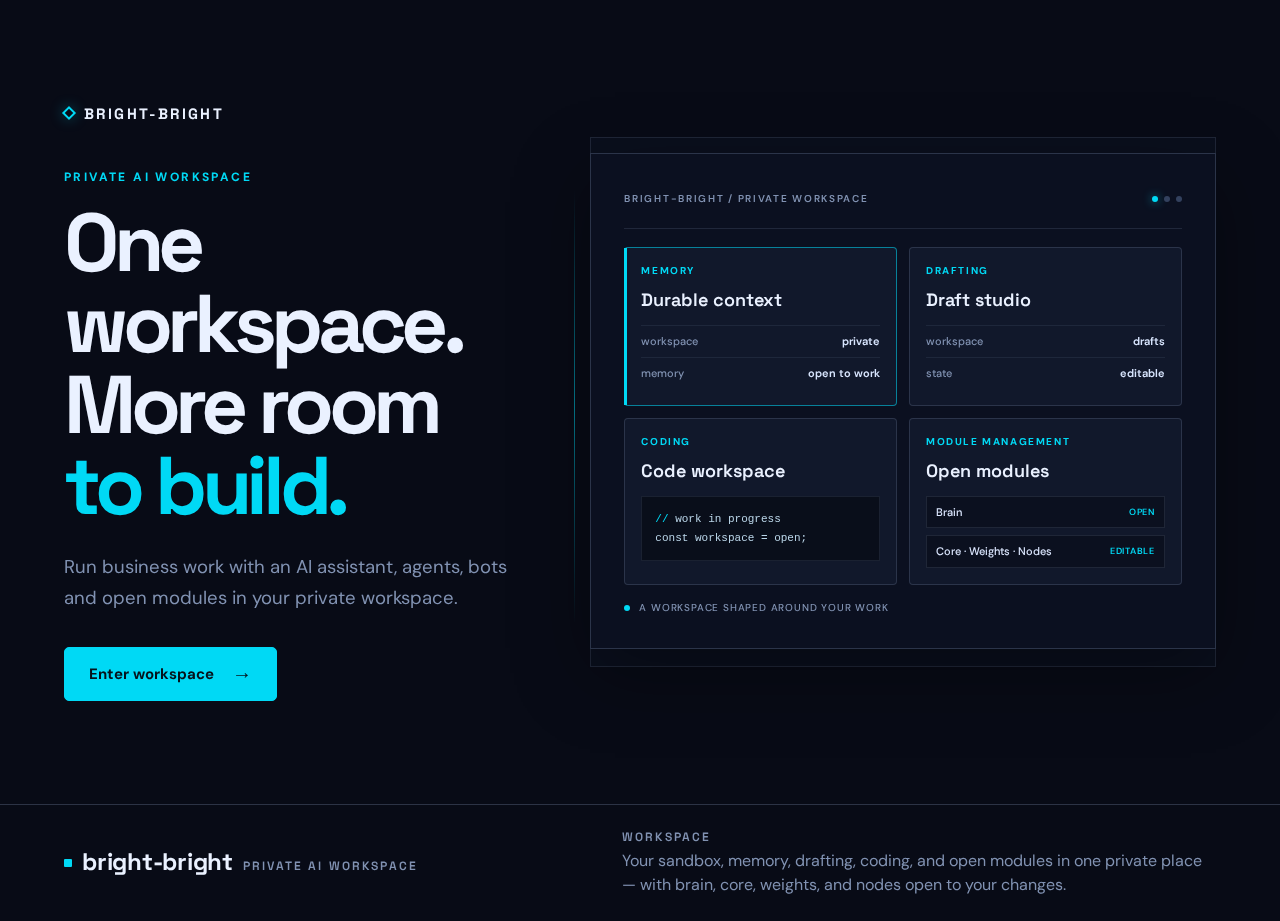
Private AI workspace
One workspace.
More room to build.
Run business work with an AI assistant, agents, bots and open modules in your private workspace.
Durable context
Draft studio
Code workspace
// work in progress
const workspace = open;Open modules
Private AI workspace
One workspace.
More room to build.
Run business work with an AI assistant, agents, bots and open modules in your private workspace.
Durable context
Draft studio
Code workspace
// work in progress
const workspace = open;
No comments yet. Be the first!