brave-lock
 Rjaneesh goud Goud
App lock screen
Comments (0)
Sign in to leave a comment
System Requirements
System Requirements Document (SRD)
Project Name: brave-lock
1. Introduction
The brave-lock project is designed to provide a secure and customizable app lock screen solution for users in India (IN). This document outlines the system requirements for the development of the brave-lock application, focusing on its functionality, design, and technical specifications.
The primary goal of brave-lock is to enhance privacy and security by enabling users to lock their apps using various authentication methods, such as PIN, pattern, or biometric unlock.
2. System Overview
The brave-lock system will serve as a standalone application that allows users to secure their apps with a lock screen. It will support multiple authentication methods, ensuring flexibility and ease of use. The system will cater to individual users who want to protect their apps and sensitive data from unauthorized access.
Key features include:
- Multi-method authentication (PIN, pattern, biometric).
- Customizable lock screen themes.
- Compatibility with Android and iOS platforms.
- Intuitive user interface designed for Indian users, considering local preferences and usability.
3. Functional Requirements
As User:
- As User I should be able to set a PIN to lock my apps.
- As User I should be able to set a pattern to lock my apps.
- As User I should be able to use biometric authentication (fingerprint/face recognition) to lock my apps.
- As User I should be able to customize the lock screen theme.
- As User I should be able to view a list of locked apps and manage them.
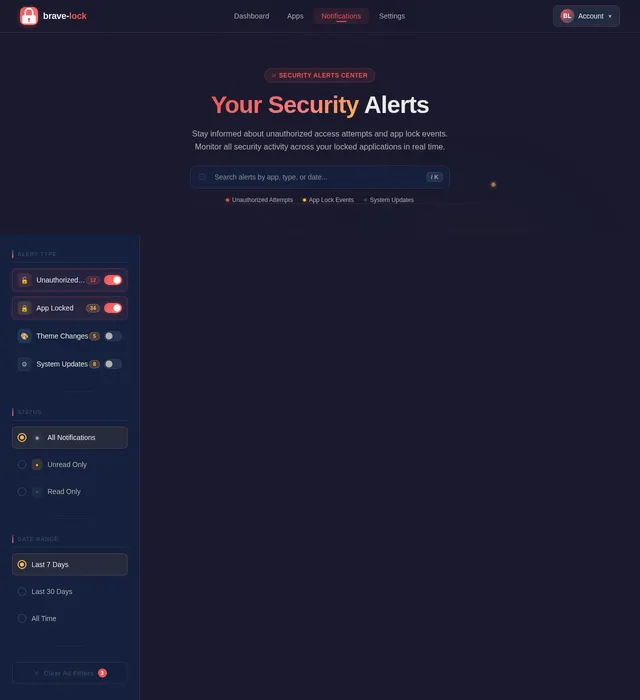
- As User I should be able to receive notifications if someone tries to unlock my apps unsuccessfully.
- As User I should be able to enable/disable the lock screen feature for specific apps.
4. User Personas
1. Admin
- Responsible for managing app updates, monitoring system performance, and ensuring security compliance.
2. User
- The primary persona who uses the brave-lock app to secure their applications.
5. Visuals Colors and Theme
Color Palette:
The brave-lock app will feature a bold and modern color palette to evoke a sense of security and sophistication.
- Background: #1A1A2E (Dark Navy Blue)
- Surface: #16213E (Deep Blue)
- Text: #EAEAEA (Light Gray)
- Accent: #F05454 (Vibrant Red)
- Muted Tones: #30475E (Steel Blue)
This palette ensures high contrast for readability and a professional aesthetic.
6. Signature Design Concept
Concept: Interactive Vault Door Homepage
The brave-lock homepage will feature a 3D interactive vault door as its centerpiece. Users will see a realistic vault door that rotates and opens when they interact with it.
- Animation: The vault door will have smooth, metallic animations, with gears turning and locking mechanisms clicking into place.
- Interaction: Users can swipe or tap to "unlock" the vault, revealing the app's main dashboard.
- Transitions: Upon unlocking, the vault door will slide open with a glowing effect, transitioning seamlessly into the app interface.
- Micro-interactions: Hover effects on buttons will mimic the feel of pressing physical buttons on a safe.
- Color shifts: The vault door will subtly change its glow based on the time of day (e.g., cool blue at night, warm gold during the day).
This design will make the app feel secure, engaging, and unforgettable.
7. Non-Functional Requirements
- The app must load within 2 seconds on modern smartphones.
- The system must support Android 10+ and iOS 13+.
- The biometric authentication must comply with industry standards for security (e.g., FIDO2).
- The app must use encryption (AES-256) for storing sensitive data.
- The system must handle up to 1 million users concurrently without performance degradation.
8. Tech Stack
Frontend:
- React for Web
- React Native for mobile app
Backend:
- Python
- FastAPI
Database:
- MySQL (preferred) or MariaDB for relational data
- MongoDB for NoSQL data storage
AI Models:
- GPT 5.4 for user-friendly responses
- Google Nano Banana for image generation
AI Tools:
- Litellm for LLM Routing
- Langchain
Local Orchestration:
- Docker
- docker-compose
Server-Side Orchestration:
- Kubernetes
9. Assumptions and Constraints
Assumptions:
- Users will have smartphones with biometric capabilities (e.g., fingerprint scanner, face recognition).
- The app will primarily target users in India, with localization for Indian languages and preferences.
- Users will have internet access for app updates and cloud-based features.
Constraints:
- The app must comply with Indian data protection laws (e.g., IT Act 2000).
- The system must operate within the constraints of mobile device hardware.
- The app must be lightweight to ensure compatibility with low-end devices.
10. Glossary
- PIN: Personal Identification Number used for authentication.
- Pattern: A graphical password where users draw a specific shape to unlock.
- Biometric Authentication: Security method using physical characteristics like fingerprints or facial recognition.
- AES-256: Advanced Encryption Standard with a 256-bit key length, used for secure data encryption.
- FIDO2: Industry standard for strong authentication.
- Docker: A tool for containerizing applications.
- Kubernetes: A system for automating deployment, scaling, and management of containerized applications.
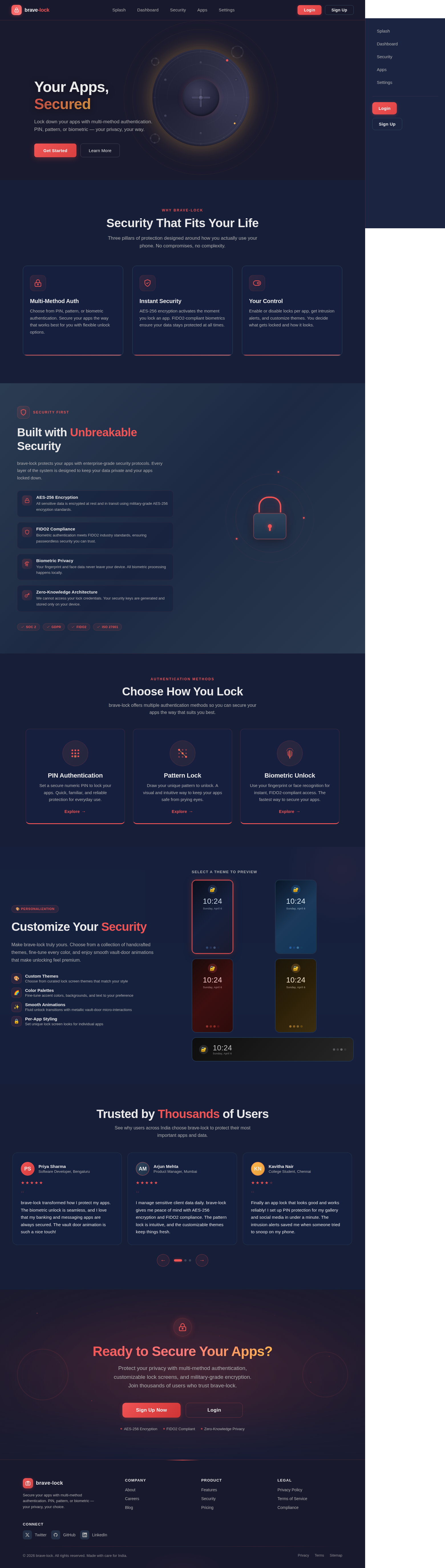
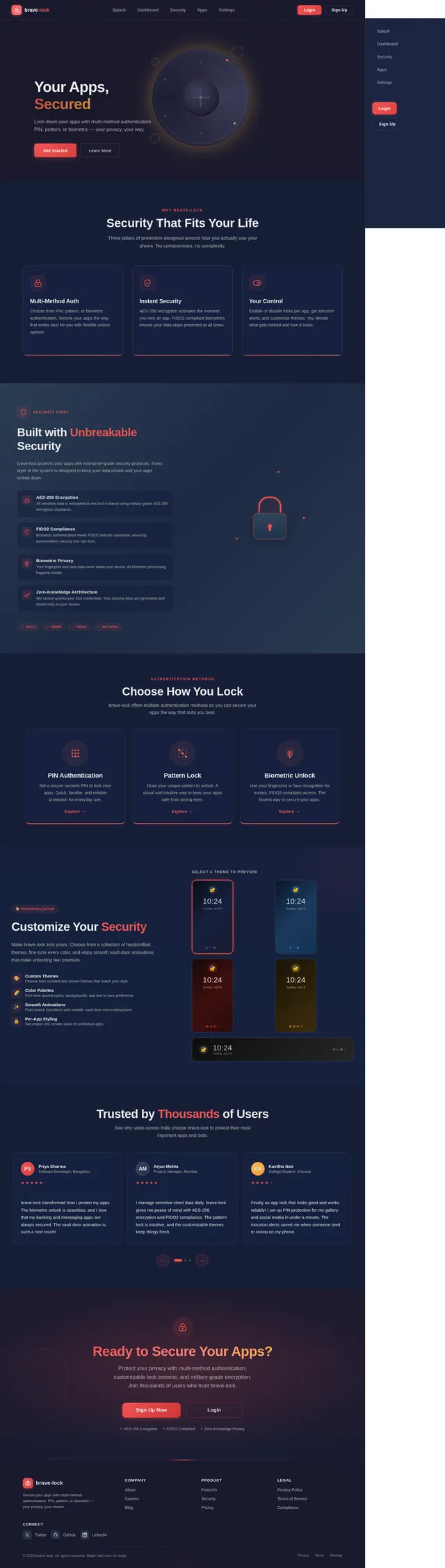
Your Apps, Secured
Lock down your apps with multi-method authentication. PIN, pattern, or biometric — your privacy, your way.
Security That Fits Your Life
Three pillars of protection designed around how you actually use your phone. No compromises, no complexity.
Multi-Method Auth
Choose from PIN, pattern, or biometric authentication. Secure your apps the way that works best for you with flexible unlock options.
PIN · Pattern · BiometricInstant Security
AES-256 encryption activates the moment you lock an app. FIDO2-compliant biometrics ensure your data stays protected at all times.
AES-256 · FIDO2Your Control
Enable or disable locks per app, get intrusion alerts, and customize themes. You decide what gets locked and how it looks.
Per-App · Alerts · ThemesBuilt with Unbreakable Security
brave-lock protects your apps with enterprise-grade security protocols. Every layer of the system is designed to keep your data private and your apps locked down.
- AES-256 EncryptionAll sensitive data is encrypted at rest and in transit using military-grade AES-256 encryption standards.
- FIDO2 ComplianceBiometric authentication meets FIDO2 industry standards, ensuring passwordless security you can trust.
- Biometric PrivacyYour fingerprint and face data never leave your device. All biometric processing happens locally.
- Zero-Knowledge ArchitectureWe cannot access your lock credentials. Your security keys are generated and stored only on your device.
Choose How You Lock
brave-lock offers multiple authentication methods so you can secure your apps the way that suits you best.
PIN Authentication
Set a secure numeric PIN to lock your apps. Quick, familiar, and reliable protection for everyday use.
Explore→Pattern Lock
Draw your unique pattern to unlock. A visual and intuitive way to keep your apps safe from prying eyes.
Explore→Biometric Unlock
Use your fingerprint or face recognition for instant, FIDO2-compliant access. The fastest way to secure your apps.
Explore→Customize Your Security
Make brave-lock truly yours. Choose from a collection of handcrafted themes, fine-tune every color, and enjoy smooth vault-door animations that make unlocking feel premium.
- Custom ThemesChoose from curated lock screen themes that match your style
- Color PalettesFine-tune accent colors, backgrounds, and text to your preference
- Smooth AnimationsFluid unlock transitions with metallic vault-door micro-interactions
- Per-App StylingSet unique lock screen looks for individual apps
Trusted by Thousands of Users
See why users across India choose brave-lock to protect their most important apps and data.
brave-lock transformed how I protect my apps. The biometric unlock is seamless, and I love that my banking and messaging apps are always secured. The vault door animation is such a nice touch!
I manage sensitive client data daily. brave-lock gives me peace of mind with AES-256 encryption and FIDO2 compliance. The pattern lock is intuitive, and the customizable themes keep things fresh.
Finally an app lock that looks good and works reliably! I set up PIN protection for my gallery and social media in under a minute. The intrusion alerts saved me when someone tried to snoop on my phone.
As someone who shares devices with family, brave-lock is essential. I can lock work apps while keeping entertainment apps accessible for my kids. The multi-method authentication is incredibly flexible.
The design quality of brave-lock is outstanding. Dark navy theme, smooth animations, and the interactive vault door make security feel premium. It loads in under 2 seconds every time. Highly recommend!
Ready to Secure Your Apps?
Protect your privacy with multi-method authentication, customizable lock screens, and military-grade encryption. Join thousands of users who trust brave-lock.
No comments yet. Be the first!