brave-application
 Nisha Sekar
Create a web application project, Work log. It should capture date, time and effort of tasks. Add filters in UI to display tasks and provide options to export. Set a reminder for every hour starting from 10 am till 6 pm on weekdays to capture work log. Use SPA springboot, angular, postgres DB.

Comments (0)
Sign in to leave a comment
System Requirements
System Requirements Document (SRD)
brave-application
1. Introduction
The brave-application is a web-based work log application designed to help users track their daily tasks and productivity. Developed for users in India (IN), the application captures task details such as date, time, and effort, while providing advanced filtering and export options. It also includes browser-based hourly reminders to ensure consistent task logging during work hours.
This document outlines the system requirements for the brave-application, including functional and non-functional requirements, user personas, design concepts, and technical specifications.
2. System Overview
The brave-application is a Single Page Application (SPA) built using Spring Boot for the backend, Angular for the frontend, and PostgreSQL for the database. The application is designed to:
- Allow users to log tasks with details such as date, time, and effort.
- Provide filtering options to view tasks based on specific criteria.
- Enable exporting of task logs in CSV, Excel, and PDF formats.
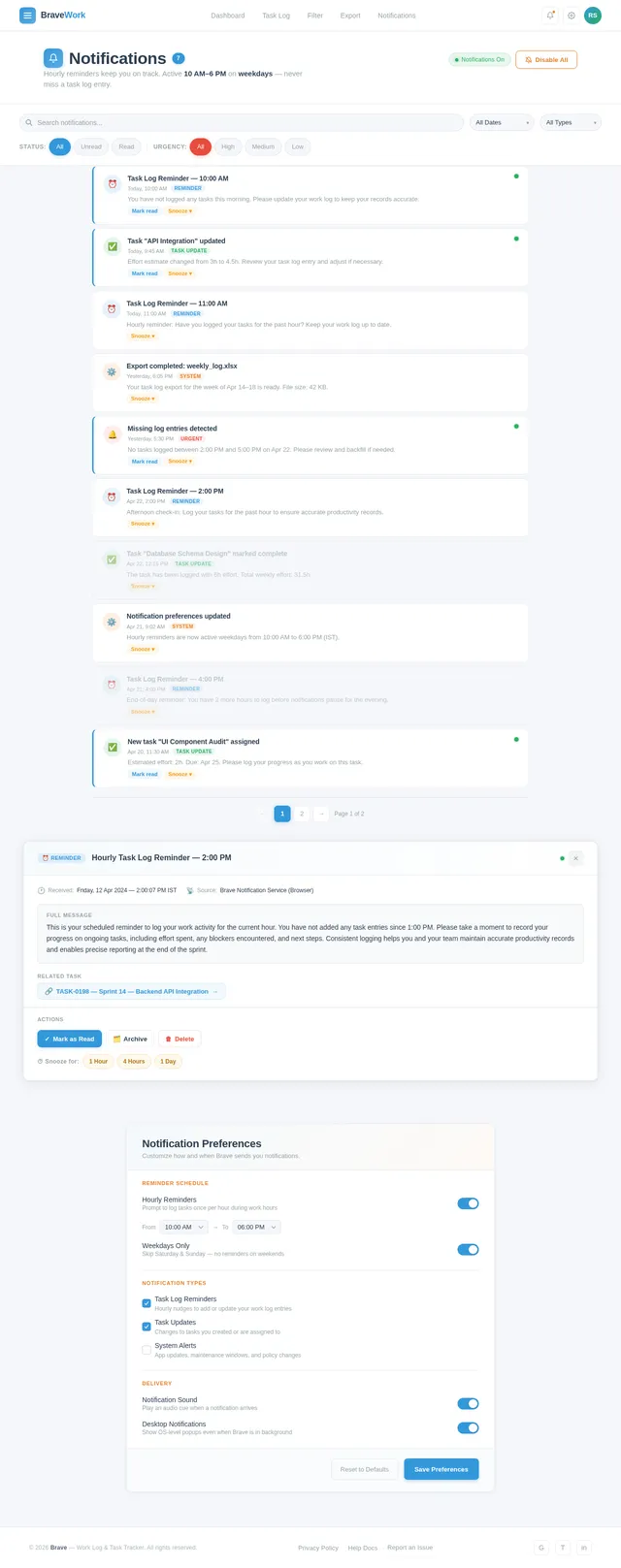
- Send browser notifications as hourly reminders from 10 AM to 6 PM on weekdays.
This system is tailored for professionals and teams who need an efficient way to track and manage their work logs.
3. Functional Requirements
Task Logging
- As a User, I should be able to log tasks with date, time, and effort details.
Filtering
- As a User, I should be able to filter tasks by date, time range, or other criteria.
Exporting
- As a User, I should be able to export task logs in CSV, Excel, and PDF formats.
Notifications
- As a User, I should receive browser notifications every hour from 10 AM to 6 PM on weekdays to remind me to log my tasks.
4. User Personas
4.1 Regular User
- Description: A professional or team member who uses the application to log and track daily tasks.
- Goals:
- Log tasks efficiently.
- Filter and view tasks based on specific criteria.
- Export task logs for reporting or analysis.
- Receive timely reminders to maintain consistency.
5. Visuals Colors and Theme
The brave-application will feature a professional and modern color palette, reflecting productivity and focus.
- Background: #F5F7FA (light grayish blue)
- Surface: #FFFFFF (pure white)
- Text: #2C3E50 (dark slate gray)
- Accent: #3498DB (vivid blue)
- Muted: #95A5A6 (soft gray)
This palette ensures readability and a clean, distraction-free interface.
6. Signature Design Concept
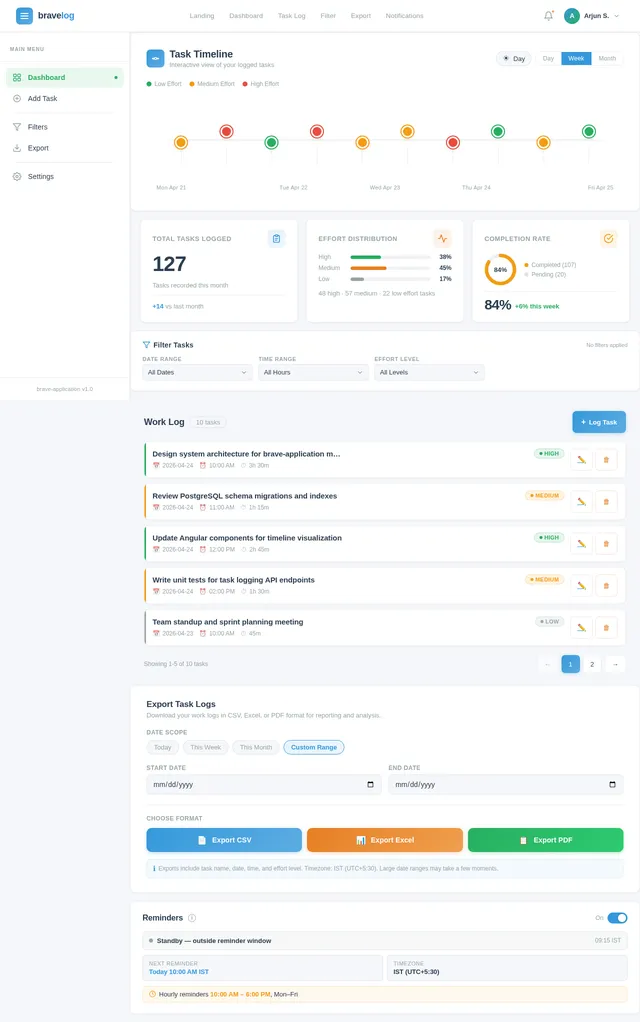
The brave-application will feature an interactive timeline dashboard as its signature design concept.
Key Features:
- Dynamic Timeline Visualization: The homepage will display a horizontal timeline that dynamically updates as users log tasks. Each task will appear as a clickable node on the timeline, showing details like task name, date, and effort when hovered over.
- Micro-Interactions: Smooth animations will occur when users add, edit, or delete tasks, with nodes expanding or contracting in real-time.
- Color-Coded Effort Levels: Tasks will be color-coded based on effort (e.g., green for low effort, yellow for medium, red for high).
- Day/Night Mode: The timeline will subtly shift colors based on the time of day, enhancing user experience and reducing eye strain.
This design will make task tracking visually engaging and intuitive, setting the application apart from traditional work log tools.
7. Non-Functional Requirements
- Performance: The application should load within 2 seconds for all primary pages.
- Scalability: The system should support up to 10,000 concurrent users.
- Availability: The application should maintain 99.9% uptime.
- Security: All data should be encrypted in transit and at rest.
- Localization: Default timezone set to IST (Indian Standard Time).
8. Tech Stack
Frontend
- Angular
Backend
- Spring Boot
Database
- PostgreSQL
Notifications
- Browser-based notifications using the Web Notifications API
Deployment
- Docker and Docker Compose for local orchestration
- Kubernetes for server-side orchestration
9. Assumptions and Constraints
Assumptions
- Users will primarily access the application via modern web browsers (e.g., Chrome, Firefox, Edge).
- Notifications will be enabled in the user's browser settings.
Constraints
- The application will only send reminders during weekdays (Monday to Friday) between 10 AM and 6 PM IST.
- Export functionality will support CSV, Excel, and PDF formats only.
10. Glossary
- SPA: Single Page Application, a web application that loads a single HTML page and dynamically updates content.
- IST: Indian Standard Time, the time zone for India (UTC+5:30).
- Web Notifications API: A browser API that allows web applications to display notifications to users.
- Docker: A platform for developing, shipping, and running applications in containers.
- Kubernetes: An open-source system for automating deployment, scaling, and management of containerized applications.

Track Tasks,
Stay Productive
Log your daily work with ease, visualize effort on an interactive timeline, and export detailed reports. Stay on top of every task with smart hourly reminders.
Interactive Timeline Dashboard
Your tasks, visualized in real time. Each node on the timeline represents a logged task, color-coded by effort level so you can see your workday at a glance.
The timeline dynamically grows throughout your day. Hover over any node to reveal task details, effort level, and timestamps. Track your productivity rhythm effortlessly.
Explore your dashboard →Everything You Need to Stay on Track
Powerful features designed to make task tracking simple, insightful, and actionable for professionals.
Task Logging
Log tasks effortlessly with date, time, and effort details. Capture your work in seconds and maintain a complete productivity record.
Advanced Filtering
Filter tasks by date range, time, or effort level. Find exactly what you need with powerful, intuitive search criteria.
Export Options
Export your task logs in CSV, Excel, or PDF formats. Generate professional reports ready for sharing and analysis.
Color-Coded Effort Levels
Every task you log is assigned an effort level, instantly color-coded so you can assess your workload distribution at a glance.
Easily identify task intensity at a glance
Low Effort
Quick Tasks
Routine activities that require minimal time and focus. These tasks keep your day moving without draining your energy.
Medium Effort
Focused Work
Tasks that demand moderate concentration and time. These form the core of your productive hours throughout the day.
High Effort
Deep Work
Complex tasks requiring deep focus and significant time investment. Plan these during your peak productivity windows.
Stay on Track with Smart Reminders
Never miss a task log again. Receive browser notifications every hour during work hours to keep your productivity records up to date.
- Hourly reminders on weekdays (10 AM – 6 PM)
- Customizable notification settings
- Day/night mode brightness adjustment
Export
Export Your Data, Your Way.
Download your task logs in the format that works best for you. Whether it’s a quick CSV, a detailed spreadsheet, or a polished PDF report — your data is always portable.
CSV Export
.csvExport for reporting — lightweight, universal format perfect for quick data analysis and sharing with any tool.
Excel Export
.xlsxFull spreadsheet compatibility — preserves formatting, formulas, and structure for detailed productivity analysis.
PDF Export
.pdfProfessional PDF reports — polished, print-ready documents ideal for stakeholder reviews and archiving.
How exporting works
Your Productivity, Supercharged
Everything you need to log, track, and report your work with confidence and speed.
Log 10+ Tasks Daily in Under 5 Minutes
Streamlined task entry with smart defaults for date, time, and effort lets you capture your entire workday without breaking focus.
Avg. 30s per taskFilter Tasks by Date, Time, or Effort in Seconds
Advanced filtering instantly narrows your work log to exactly what you need, whether reviewing yesterday or analyzing a full quarter.
Instant resultsExport Reports in CSV, Excel, or PDF
Generate professional reports in your preferred format with one click. Perfect for weekly stand-ups, client updates, or performance reviews.
3 export formatsMaintain 100% Productivity Accountability
Hourly browser reminders from 10 AM to 6 PM keep you on track. Color-coded effort levels give you instant visibility into your work intensity.
8 daily remindersReady to Master Your Work Log?
Start tracking tasks effortlessly with smart reminders, powerful filters, and instant exports. Take control of your productivity today.
No credit card required. Your data encrypted in transit and at rest.
Frequently Asked Questions
Everything you need to know about tracking your work with brave-application.
No comments yet. Be the first!