brainstomers
 Inedia Dorcas
generate an educational app that helps in exam. it comprises of the admin, teachers and student login. subjects and topics can be placed by the teachers and admin, questions can either be generated authomatically, of inputted by the teachers. the questions are marke authomatically and scores revied to the students immedially. the students each have their loggins. the app can be called brainstomers app


Comments (0)
Sign in to leave a comment
System Requirements
System Requirements Document for brainstomers
1. Introduction
The Brainstomers app is an educational application designed to assist in exam preparation. It provides distinct login access for administrators, teachers, and students. The app allows teachers and administrators to manage subjects and topics, generate or input questions, and automatically mark these questions. Students can log in to practice exams and immediately review their scores. The app aims to create a friendly, engaging, and efficient environment for exam preparation.
2. System Overview
Brainstomers is a web-based application that supports three distinct user roles: Administrator, Teacher, and Student. Each role has specific responsibilities and access rights within the app. The application facilitates the management of educational content and provides a platform for students to practice and assess their knowledge through automatically marked questions.
2a. Product Interpretation and Delivery Boundary
- Delivery and Access Ownership: The application is owned and managed by the Brainstomers team, with distinct login roles for administrators, teachers, and students. Each user role has specific access to different parts of the application.
- Current Boundaries: The current version includes login functionalities, subject and topic management, question generation and input, automatic marking, and immediate score review.
- Future Boundaries: Future expansions may include additional features such as detailed analytics, personalized learning paths, and enhanced collaboration tools.
2b. Source Content Inventory
Not applicable as no explicit content_source directive is provided.
2c. Page Content and Component Coverage
Landing
- Purpose: Introduces Brainstomers, its purpose, and who it serves.
- Components:
- Overview of the app's features.
- Call-to-action for login or sign-up.
- Friendly illustrations and welcoming text.
Admin Login
- Purpose: Provides access for administrators to manage exam content.
- Components:
- Login form for administrators.
- Password recovery option.
- Access to admin-specific features upon successful login.
Teacher Login
- Purpose: Provides access for teachers to manage subjects, topics, and questions.
- Components:
- Login form for teachers.
- Password recovery option.
- Access to teacher-specific features upon successful login.
Student Login
- Purpose: Provides access for students to practice exams and review scores.
- Components:
- Login form for students.
- Password recovery option.
- Access to student-specific features upon successful login.
Admin Subjects
- Purpose: Workspace for administrators to manage subjects and topics.
- Components:
- List of subjects and topics.
- Options to add, edit, or remove subjects/topics.
Teacher Subjects
- Purpose: Workspace for teachers to manage subjects and topics.
- Components:
- List of subjects and topics.
- Options to add, edit, or remove subjects/topics.
Teacher Questions
- Purpose: Workspace for teachers to input and manage questions.
- Components:
- Question input form.
- List of existing questions with edit/delete options.
Question Generator
- Purpose: Allows automatic generation of questions.
- Components:
- Options to select criteria for question generation.
- Preview of generated questions.
Exam Practice
- Purpose: Student workspace for practicing exam questions.
- Components:
- List of available practice exams.
- Interface for answering questions.
Scores
- Purpose: Allows students to review their scores immediately after marking.
- Components:
- Display of scores for completed exams.
- Feedback on performance.
3. Functional Requirements
- As an Administrator, I should be able to log in to manage subjects and topics. (explicit)
- As a Teacher, I should be able to log in to manage subjects, topics, and input questions. (explicit)
- As a Student, I should be able to log in to practice exams and review scores immediately. (explicit)
- As a Teacher, I should be able to generate questions automatically or input them manually. (explicit)
- As a Student, I should receive immediate feedback on my scores after completing an exam. (explicit)
- As an Administrator, I should be able to invite or provision new administrators and teachers. (required_inference)
- As a Student, I should be able to self-enroll and create an individual account. (required_inference)
4. User Personas
- Administrator: Manages subjects and topics, oversees educational content.
- Teacher: Manages subjects, topics, and questions; inputs and generates questions.
- Student: Practices exams and reviews scores immediately after marking.
5. Core User Flows
Administrator Flow
- Access the Admin Login page.
- Enter credentials and log in.
- Manage subjects and topics through the Admin Subjects page.
- Log out when finished.
Teacher Flow
- Access the Teacher Login page.
- Enter credentials and log in.
- Manage subjects and topics through the Teacher Subjects page.
- Input or generate questions in the Teacher Questions or Question Generator page.
- Log out when finished.
Student Flow
- Access the Student Login page.
- Enter credentials and log in.
- Select an exam to practice from the Exam Practice page.
- Complete the exam and receive immediate score feedback on the Scores page.
- Log out when finished.
6. Visuals Colors and Theme
- Muse: Pablo Stanley
- Palette:
- Background: #FFF9F1
- Surface: #FFFFFF
- Text: #333333
- Primary: #FFB400
- Accent: #FF6F61
- Muted: #D0E2FF
- Typography:
- Headings: Nunito — Bold
- Body: DM Sans
- Scale: 1.333 modular
- Shape Language: Rounded cards, pill buttons, blob shapes
- Layout: Generous white space, big radii, offset shadows
- Motion: Springy micro-interactions, playful hover states
7. Signature Design Concept
The landing page features a large illustrated character welcoming users with oversized friendly type on a cream background. The primary color highlights the call-to-action, with pill-shaped buttons and rounded, colorful cards for subject and topic presentation. Hand-drawn accents around call-to-action buttons and soft offset shadows give a floating effect to UI components.
8. Interaction Model & Motion Direction
- Interaction Model: Animated
- Motion Tempo: Expressive
- Hero Dimensionality: Layered_2d
- Landing Hero Motion Brief: A large illustrated character waves to users, inviting them to explore the app. The primary call-to-action button uses a springy hover effect, and the interface elements subtly animate into view, creating an engaging first impression.
9. Non-Functional Requirements
- The application must support concurrent logins for multiple users.
- The system should handle automatic marking and score calculation efficiently.
- The user interface must be responsive and accessible on various devices.
10. Tech Stack
- Frontend: React
- Backend: Python/FastAPI
- Database: PostgreSQL
- Deployment: Docker, Kubernetes (if required)
11. Assumptions and Constraints
- The application will initially support English language only.
- User data privacy and security are prioritized, with appropriate measures in place.
- The application will be web-based, with potential future expansion to mobile platforms.
12. Glossary
- Administrator: A user role responsible for managing subjects and topics.
- Teacher: A user role responsible for managing subjects, topics, and questions.
- Student: A user role responsible for practicing exams and reviewing scores.
- Question Generator: A feature that allows automatic generation of exam questions.
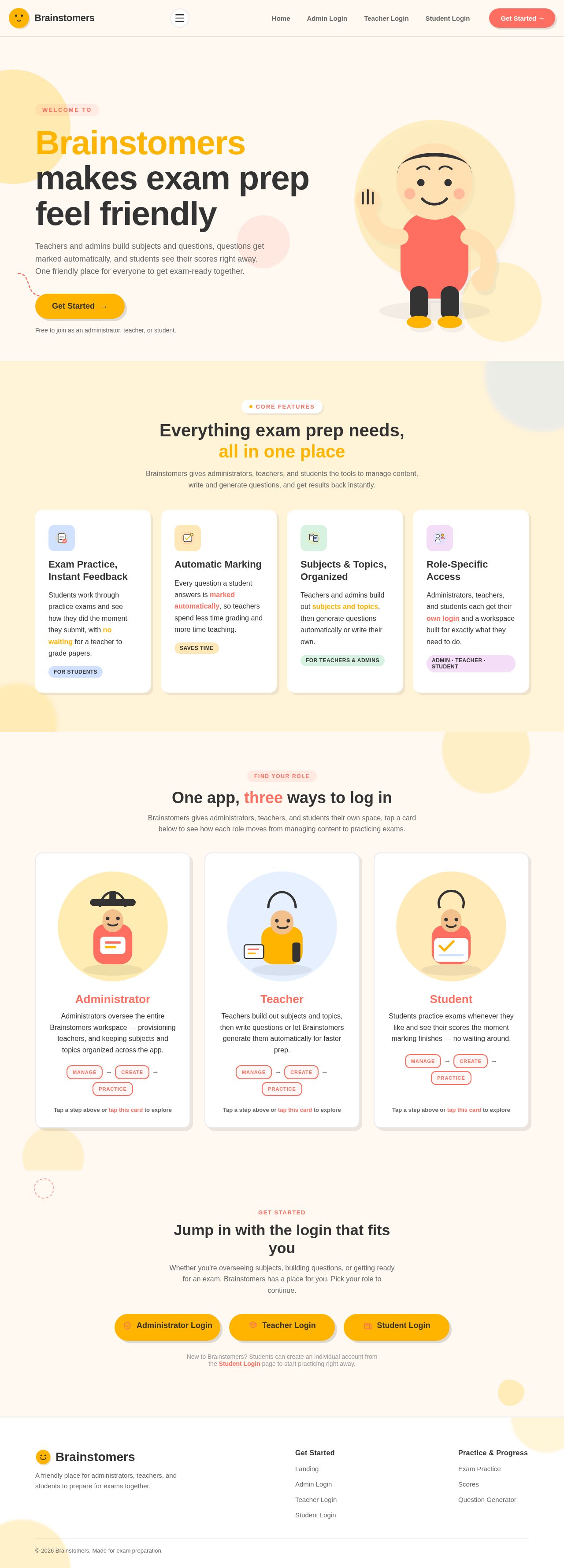
Brainstomers makes exam prep feel friendly
Teachers and admins build subjects and questions, questions get marked automatically, and students see their scores right away. One friendly place for everyone to get exam-ready together.
Free to join as an administrator, teacher, or student.
Everything exam prep needs, all in one place
Brainstomers gives administrators, teachers, and students the tools to manage content, write and generate questions, and get results back instantly.
Exam Practice, Instant Feedback
Students work through practice exams and see how they did the moment they submit, with no waiting for a teacher to grade papers.
For StudentsAutomatic Marking
Every question a student answers is marked automatically, so teachers spend less time grading and more time teaching.
Saves TimeSubjects & Topics, Organized
Teachers and admins build out subjects and topics, then generate questions automatically or write their own.
For Teachers & AdminsRole-Specific Access
Administrators, teachers, and students each get their own login and a workspace built for exactly what they need to do.
Admin · Teacher · StudentOne app, three ways to log in
Brainstomers gives administrators, teachers, and students their own space, tap a card below to see how each role moves from managing content to practicing exams.
Administrator
Administrators oversee the entire Brainstomers workspace — provisioning teachers, and keeping subjects and topics organized across the app.
Teacher
Teachers build out subjects and topics, then write questions or let Brainstomers generate them automatically for faster prep.
Student
Students practice exams whenever they like and see their scores the moment marking finishes — no waiting around.
Get Started
Jump in with the login that fits you
Whether you're overseeing subjects, building questions, or getting ready for an exam, Brainstomers has a place for you. Pick your role to continue.
New to Brainstomers? Students can create an individual account from the Student Login page to start practicing right away.
Brainstomers makes exam prep feel friendly
Teachers and admins build subjects and questions, questions get marked automatically, and students see their scores right away. One friendly place for everyone to get exam-ready together.
Free to join as an administrator, teacher, or student.
Everything exam prep needs, all in one place
Brainstomers gives administrators, teachers, and students the tools to manage content, write and generate questions, and get results back instantly.
Exam Practice, Instant Feedback
Students work through practice exams and see how they did the moment they submit, with no waiting for a teacher to grade papers.
For StudentsAutomatic Marking
Every question a student answers is marked automatically, so teachers spend less time grading and more time teaching.
Saves TimeSubjects & Topics, Organized
Teachers and admins build out subjects and topics, then generate questions automatically or write their own.
For Teachers & AdminsRole-Specific Access
Administrators, teachers, and students each get their own login and a workspace built for exactly what they need to do.
Admin · Teacher · StudentOne app, three ways to log in
Brainstomers gives administrators, teachers, and students their own space, tap a card below to see how each role moves from managing content to practicing exams.
Administrator
Administrators oversee the entire Brainstomers workspace — provisioning teachers, and keeping subjects and topics organized across the app.
Teacher
Teachers build out subjects and topics, then write questions or let Brainstomers generate them automatically for faster prep.
Student
Students practice exams whenever they like and see their scores the moment marking finishes — no waiting around.
Get Started
Jump in with the login that fits you
Whether you're overseeing subjects, building questions, or getting ready for an exam, Brainstomers has a place for you. Pick your role to continue.
New to Brainstomers? Students can create an individual account from the Student Login page to start practicing right away.
No comments yet. Be the first!