book-show
 Jatin Yadav
create two page book show website


Comments (0)
Sign in to leave a comment
Project Tasks17
Implement Header for Details
As a frontend developer, implement the Header section for the Details page. This component (imported from '../styles/Header.css') uses useState for mobile menu open/close toggle and scroll detection via useEffect with a passive scroll listener that sets 'scrolled' state when window.scrollY > 8, applying 'hdr-scrolled' class. Renders FiBookOpen brand logo, NAV_LINKS array with FiSearch and FiBookOpen icons, a 'Browse Library' CTA button, and a hamburger/close toggle (FiMenu/FiX). Mobile menu uses Framer Motion AnimatePresence with height/opacity animation (duration 0.28, cubic ease). Note: This component may already exist from a previous page — reuse if available.
Create Novel Database Models
As a Backend Developer, define the MySQL database schema and SQLAlchemy ORM models for the novels table. Fields: id, title, author, summary, publication_date, genre, page_count, language, isbn, format, cover_bg, cover_color, created_at, updated_at. Write Alembic migration scripts and a seed script to populate the database with sample novel data for development and testing. This is a prerequisite for all backend API tasks.
Setup Design System Theme
As a Frontend Developer, configure the global design system and theme for the book-show React application. Set up CSS custom properties (or a theme config) for all SRD-specified colors: primary (#4A90E2), primary_light (#B3C7E6), secondary (#FF6F61), accent (#FFD700), highlight (#FFA500), bg (#FFFFFF), surface (rgba(255,255,255,0.8)), text (#333333), text_muted (#777777), border (rgba(0,0,0,0.1)). Configure framer-motion and react-icons as shared dependencies. Set up global CSS resets, typography scale, and responsive breakpoints. This is a prerequisite for all frontend section tasks.
Implement DetailsBreadcrumb for Details
As a frontend developer, implement the DetailsBreadcrumb section for the Details page. This nav component renders a Framer Motion animated back-link to '/Search' (initial opacity 0, x -12, animating to opacity 1, x 0 over 0.35s) using FiArrowLeft, a breadcrumb trail with FiChevronRight separator showing 'Search > To Kill a Mockingbird', and a current-page indicator with a status dot and text span. Uses static hardcoded book title for the current crumb. Depends on Header being in place.
Implement DetailsHero for Details
As a frontend developer, implement the DetailsHero section for the Details page. Uses static BOOK_DATA object (title, author, year, genre, pages). Renders decorative background shapes (dh-shape--1/2/3) and accent lines. Five staggered Framer Motion elements animate in sequentially: genre badge with dot (delay 0), h1 title with typographic quote spans (delay 0.1), author byline (delay 0.2), publication year with bullet (delay 0.3), animated scaleX rule (delay 0.35), and meta pills with FiTag/FiCalendar/FiUser icons (delay 0.4). All use ease [0.22, 1, 0.36, 1]. Independent of other content sections — can be built in parallel.
Implement DetailsBookDisplay for Details
As a frontend developer, implement the DetailsBookDisplay section for the Details page. Uses a static 'novel' object with coverBg gradient and coverColor. Defines containerVariants (staggerChildren 0.14, delayChildren 0.1), fadeUp (opacity/y 28, duration 0.55), and scaleReveal (scale 0.92→1, duration 0.6) Framer Motion variants. Renders a two-column dbd-grid: left column shows a stylized book cover div with dynamic background gradient, title/author text in coverColor, a shimmer overlay div, and whileHover rotateY. Right column renders a 'Quick Stats' card panel with dbd-stat-item entries using FiBookOpen, FiCalendar, FiHash icons. whileInView trigger with once:true and margin '-60px'. Independent of other content sections.
Implement DetailsSummary for Details
As a frontend developer, implement the DetailsSummary section for the Details page. Uses useState for 'expanded' toggle and 'needsToggle' flag, and useRef pointing to the summary text container. A ResizeObserver in useEffect checks scrollHeight against HEIGHT_LIMIT (200px) to set needsToggle — observer is cleaned up on unmount. Renders a long SAMPLE_SUMMARY paragraph with a collapsible expand/collapse toggle using Framer Motion AnimatePresence and FiChevronDown icon that rotates on expand. Includes decorative dsm-accent-line and dsm-flourish elements. Independent of other content sections.
Implement DetailsMetadata for Details
As a frontend developer, implement the DetailsMetadata section for the Details page. Renders a static metadataRows array of 6 entries (Genre, Publication Date, Page Count, Language, ISBN, Format) each with a react-icons/fi icon (FiBookOpen, FiCalendar, FiLayers, FiGlobe, FiHash, FiFileText). Uses containerVariants (staggerChildren 0.07, delayChildren 0.12) and rowVariants (opacity/x -14 slide-in, duration 0.45) with whileInView once:true, amount 0.15. Conditionally renders dm-format-badge or dm-genre-pill for the Genre row based on 'badge' flag. Independent of other content sections.
Implement DetailsAuthorInfo for Details
As a frontend developer, implement the DetailsAuthorInfo section for the Details page. Uses useState for 'bioExpanded' toggle. Static authorData object with name, birth/death years, bioFull, bioShort, and avatarUrl (null). Bio truncation logic: if bioText.length > BIO_TRUNCATE_LEN (220), slices at word boundary and appends ellipsis unless expanded. Avatar column conditionally renders img tag or dai-avatar-fallback div with first initial. Info column shows author name, birth–death dates with dai-divider-dot separator, expandable bio paragraph with 'Read more' button using FiArrowRight. Card animates in via whileInView (opacity 0/y 28, duration 0.5). Independent of other content sections.
Implement DetailsRelated for Details
As a frontend developer, implement the DetailsRelated section for the Details page. Uses useState for canScrollLeft/canScrollRight edge detection and useRef for the carousel DOM element. checkScrollEdges useCallback reads scrollLeft vs scrollWidth/clientWidth with a 4px threshold. scrollBy useCallback queries '.drr-card' offsetWidth, adds 20px gap, calls el.scrollBy with smooth behavior, and rechecks edges after 350ms setTimeout. Renders 8 static relatedBooks entries each with unique coverBg gradient and coverColor. Each drr-card displays a styled book cover div and book info. Left/right chevron nav buttons (FiChevronLeft/FiChevronRight) are conditionally disabled based on scroll edge state. Independent of other content sections.
Implement DetailsCTA for Details
As a frontend developer, implement the DetailsCTA section for the Details page. Manages 7 state values: isWishlisted, isMarkedRead, rating (1-5), hoveredStar, reviewOpen, reviewText, reviewSubmitted. handleWishlist and handleMarkRead are mutually exclusive toggles via useCallback. Star rating system uses starVariants (idle/hover/tap spring animations) and starFillVariants (pathLength 0→1 fill animation, duration 0.35). getRatingLabel returns contextual text for hover/selected star (0-5 labels). Primary button class/icon/label ternary switches between dcta-btn--primary, dcta-btn--wishlisted, dcta-btn--marked states. Secondary 'Mark as Read' button mirrors same pattern. Review panel with FiEdit3 toggle uses AnimatePresence, textarea for reviewText, FiSend submit button that sets reviewSubmitted, and a FiCheck success confirmation state. Independent of other content sections.
Implement Footer for Details
As a frontend developer, implement the Footer section for the Details page. Renders a bsf-spine-row of 20 colored spine spans (repeating 5 hex colors: #4A90E2, #FF6F61, #FFD700, #FFA500, #B3C7E6) as decorative book spines. Inner section has bsf-top row with FiBookOpen brand logo linking to '/Details' with brand name and tagline, and a nav with 'Browse Novels' and 'Novel Details' links. A bsf-divider separates bsf-bottom row showing dynamic copyright year via new Date().getFullYear() and a FiHeart (fill='currentColor') crafted-for-readers tagline. Note: This component may already exist from a previous page — reuse if available.
Build Novels Search API
As a Backend Developer, implement the FastAPI endpoints for novel search and retrieval. Create GET /api/novels/search?q={query}&type={title|author} for search functionality and GET /api/novels/{id} for fetching detailed novel information. Include pagination support, input validation via Pydantic models, and proper error handling (404, 422). This API powers the Search page results and the Details page novel data. Note: Frontend section tasks for Search and Details pages depend on this API.
Implement Search Page Bookshelf
As a Frontend Developer, implement the Search page featuring the interactive bookshelf design. Render a horizontally scrollable virtual bookshelf with parallax depth effect using framer-motion. Each book cover represents a novel fetched from the API. Implement hover tooltip showing brief summary and author info. Implement search input fields for title and author search. On book click, trigger page-flip animation and navigate to the Details page. Connect to GET /api/novels/search endpoint for real-time search results. Depends on temp_backend_novels_api for live data and temp_theme_setup for design tokens.
Setup React Router Navigation
As a Frontend Developer, configure React Router (v6+) for client-side navigation between the Search page (/) and the Details page (/details/:id). Set up route definitions, a NotFound fallback, and ensure the router is initialized at the app root. This is a prerequisite for page navigation and for the breadcrumb/back-link components on the Details page. Note: Required before DetailsBreadcrumb (task 16997008) and the Search page can link to Details.
Integrate Search Page API
As a Tech Lead, verify the end-to-end integration between the Search page frontend implementation and the Novels Search API. Ensure novel search results flow correctly from GET /api/novels/search into the bookshelf UI, hover tooltips display real data, and clicking a novel navigates to the correct Details page route with the novel ID. Confirm API error states and loading states are handled gracefully in the UI.
Integrate Details Page API
As a Tech Lead, verify the end-to-end integration between the Details page frontend sections and the Novels Detail API (GET /api/novels/{id}). Ensure that DetailsHero, DetailsBookDisplay, DetailsSummary, DetailsAuthorInfo, DetailsMetadata, and DetailsRelated sections all correctly consume real novel data from the API instead of static hardcoded values. Confirm data flows correctly, API responses are handled properly in the UI, loading and error states work, and all interactions function as expected. Depends on all Details section tasks (16997008, 2007d38d, 31721db2, 4c310360, 4d9b035b, 8603c886, c3d3b85d, cad736e9, cee171e8, fff259fc) and the backend API task.
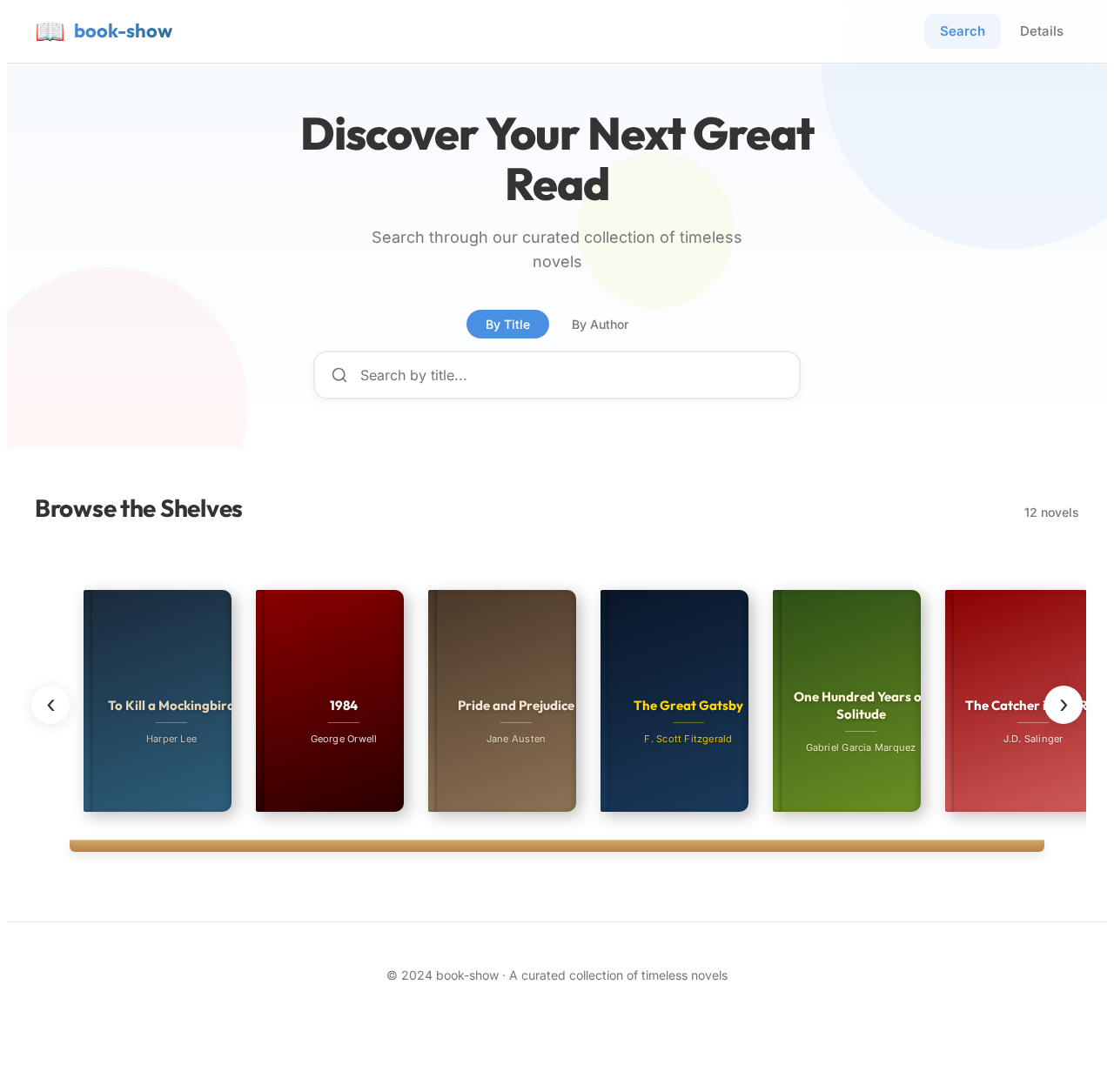
Discover Your Next Great Read
Search through our curated collection of timeless novels
No comments yet. Be the first!