“QUOTATION SOFTWARE.”
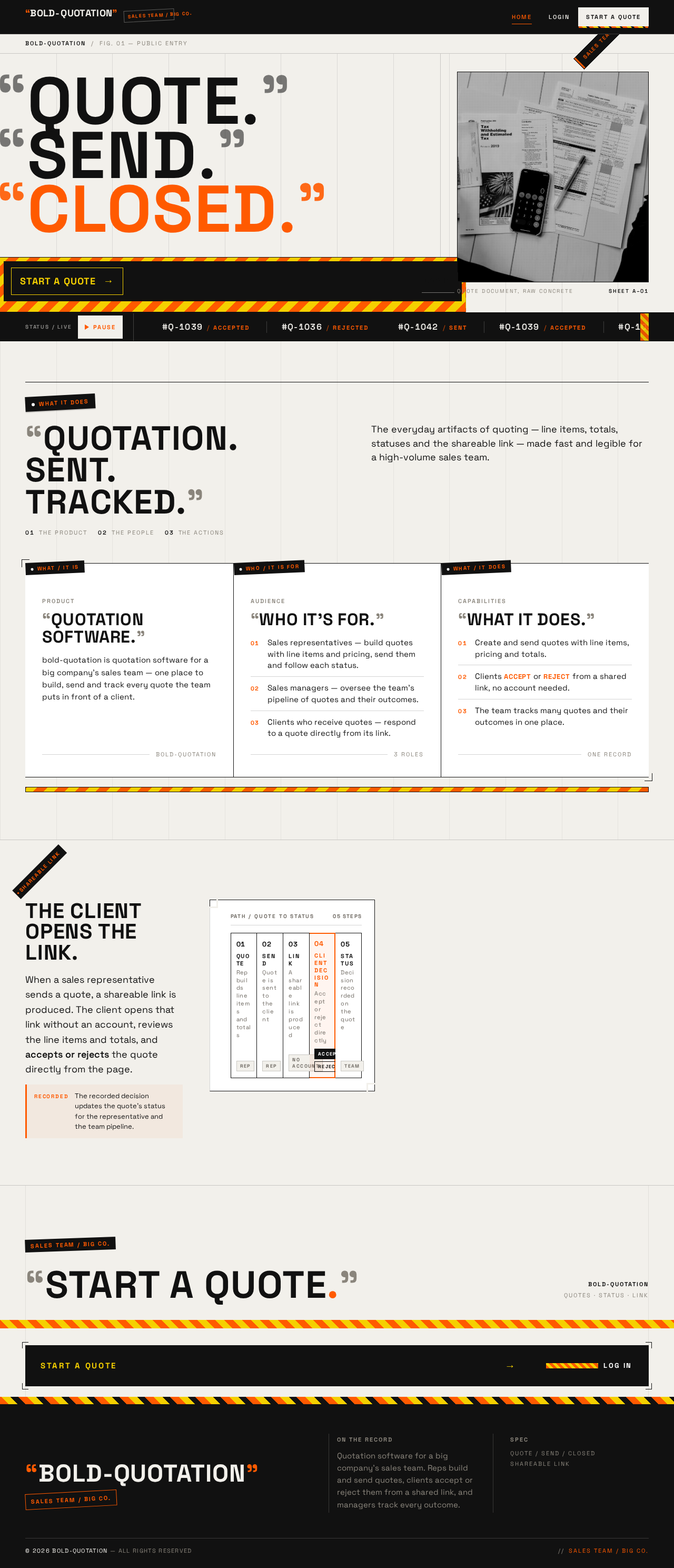
bold-quotation is quotation software for a big company’s sales team — one place to build, send and track every quote the team puts in front of a client.
BOLD-QUOTATION
 murilo m
quotation software

Sign in to leave a comment
bold-quotation is quotation software for a big company. Its sales team handles many quotes at once: sales representatives build quotes with line items and pricing for clients, send them out, and track each one's status; sales managers oversee the team's pipeline of quotes and their outcomes to keep deals moving; and clients receive a quote through a shareable link and accept or reject it directly, without an account.
The product's intent is to turn the everyday artifacts of quoting — line items, totals, statuses, the shareable link — into a fast, legible, high-volume sales machine with a distinct point of view. The audience is a large company's sales organization (representatives and managers) and the external clients who respond to its quotes.
bold-quotation is a first-party web application with an application-owned backend. It delivers:
Actors: Sales representative, Sales manager (application-owned identity, role-restricted working surfaces), and Client / quote recipient (link access, no account). The backend owns quote records, line items, pricing totals, statuses, shareable links, and the recorded client decision.
Removed from scope
bold-quotation is delivered as a first-party web application with its own backend. Sales team members establish identity through self-service Sign Up and return through Login; their quote records, statuses, and outcomes are durable and application-owned, so work can be resumed across sessions. The Landing page is anonymously reachable and explains the product before sign-in. The client's side of the lifecycle is deliberately account-free: the Client / quote recipient reaches the quote only through the shareable link produced by the sales representative and records an accept or reject decision there. No client account, client dashboard, or client history is part of the current product. No future-horizon requirements were stated by the user.
FR-1 — Create a quote (explicit) As a Sales representative, I should build a quote with line items and pricing for a client, so that I can send a priced offer.
FR-2 — Browse quotes and statuses (explicit) As a Sales representative, I should view the list of my quotes and their current statuses, so that I know which quotes need attention.
FR-3 — Send a quote and obtain the shareable link (explicit) As a Sales representative, I should send a quote to the client and obtain the shareable link, so that the client can respond.
FR-4 — Track the client's decision (explicit) As a Sales representative, I should see whether a client accepted or rejected a quote, so that I know the quote's outcome.
FR-5 — Accept or reject a quote from a link (explicit) As a Client / quote recipient, I should accept or reject a quote directly from the link I received, so that I can respond without an account.
FR-6 — Oversee the team pipeline (explicit) As a Sales manager, I should review the team's many quotes and their outcomes, so that I can keep deals moving.
FR-7 — Self-service enrollment (required_inference) As a Sales representative or Sales manager, I should create my own account on Sign Up, so that I can begin using the quotation software.
FR-8 — Returning verification (required_inference) As a Sales representative or Sales manager, I should sign in on Login, so that I can resume my quote work with role-appropriate access.
FR-9 — Anonymous product entry (required_inference) As a visitor, I should understand on Landing that this is quotation software for a big company's sales team, who it is for, and what it does, so that I can decide to sign up or sign in.
Muse and headline: Virgil Abloh — "Quoted precision: quotation software dressed in the 3% remix." Industrial, confident, a little wry: a workwear-grade tool with streetwear signage energy.
Color tokens (light mode):
#F2F0EB (concrete-and-paper ground)#FFFFFF (quote cards and forms)#111111 (ink black — body text and primary buttons)#FF5A00 (safety orange — primary CTA, active status, hazard-stripe motif; under 10% of any screen)#8A857C (metadata, timestamps, secondary labels)#F5D000 (only inside the diagonal construction-tape stripe, never as text)Typography:
Shape language: Hard edges and industrial framing. Zero border-radius on cards and buttons (strict 2px on inputs only). Hairline 1px ink borders, exposed grid rules, corner crop-marks on hero and quote cards, and a repeating diagonal hazard-stripe band (orange/yellow on ink) as section divider and CTA underline. Labels look like sewn-in garment tags: small ink rectangle with orange text, pinned to the top-left corner of cards.
Layout: Asymmetric editorial grid with a visible 12-column baseline and exposed vertical rules between columns. Landing hero is left-heavy: oversized quoted headline stacked in an 8-column block, narrow right rail of metadata labels, hazard-stripe CTA. App surfaces (Quotes, Pipeline, Quote Details) use a dense tabular grid with sticky column headers, tabular numerals right-aligned for prices, and a persistent left rail with quoted nav labels. Quote Link is a single centred document card with crop-marks and a large Accept (ink) / Reject (outlined) pair.
Imagery: Industrial textures and product-on-concrete photography — a quote document photographed flat on raw concrete, macro shots of paper stock and staples, halftone-treated monochrome imagery. Typography itself is the primary image. No stock people, no gradient blobs, no 3D renders.
Avoid: Blue–indigo accents or gradient blob heroes; rounded, soft, pastel or glassy surfaces; centred headline + subtext + single button SaaS hero; grids of identical hover-lift cards; stock photography of people shaking hands; Inter, Roboto, Arial, Helvetica, Poppins or system-ui for headings or body; excessive quotation-mark decoration on body copy; playful bounce or springy easing. The generic indigo/blue-on-white SaaS template is forbidden.
The public entry is a full-bleed paper ground (#F2F0EB) built as a construction drawing. A massive stacked headline in Archivo Expanded all-caps, ink black, spans the full viewport width — "QUOTE." on line one, "SEND." on line two, "CLOSED." on line three — each word wrapped in literal oversized quotation marks, with the final word set in safety orange. To the left, a small garment-tag label pinned at 45° reads "SALES TEAM / BIG CO." in orange-on-ink. Beneath the headline, a hazard-stripe band (orange/yellow on ink) runs edge-to-edge with the primary CTA "START A QUOTE" sitting on it in ink, leading to Sign Up. On the right, a single photographed quote document lies flat on concrete, cropped by the viewport edge, with corner crop-marks. Exposed 1px vertical rules divide the columns. No centred hero, no subtext paragraph above the fold, no blue button. All readable text and controls stay whole inside the viewport and their containers at 375px, 768px, and 1280px, wrapping or scaling with clamp() as needed; the photograph and decoration may bleed and crop.
Interaction Model: Animated Motion Tempo: expressive Hero Dimensionality: flat
Landing Hero Motion Brief
Quotation software for a big company’s sales team

The everyday artifacts of quoting — line items, totals, statuses and the shareable link — made fast and legible for a high-volume sales team.
bold-quotation is quotation software for a big company’s sales team — one place to build, send and track every quote the team puts in front of a client.
When a sales representative sends a quote, a shareable link is produced. The client opens that link without an account, reviews the line items and totals, and accepts or rejects the quote directly from the page.
RecordedThe recorded decision updates the quote’s status for the representative and the team pipeline.
Quotation software for a big company’s sales team
The everyday artifacts of quoting — line items, totals, statuses and the shareable link — made fast and legible for a high-volume sales team.
bold-quotation is quotation software for a big company’s sales team — one place to build, send and track every quote the team puts in front of a client.
When a sales representative sends a quote, a shareable link is produced. The client opens that link without an account, reviews the line items and totals, and accepts or rejects the quote directly from the page.
RecordedThe recorded decision updates the quote’s status for the representative and the team pipeline.
No comments yet. Be the first!