bold-platform
 Doraemon
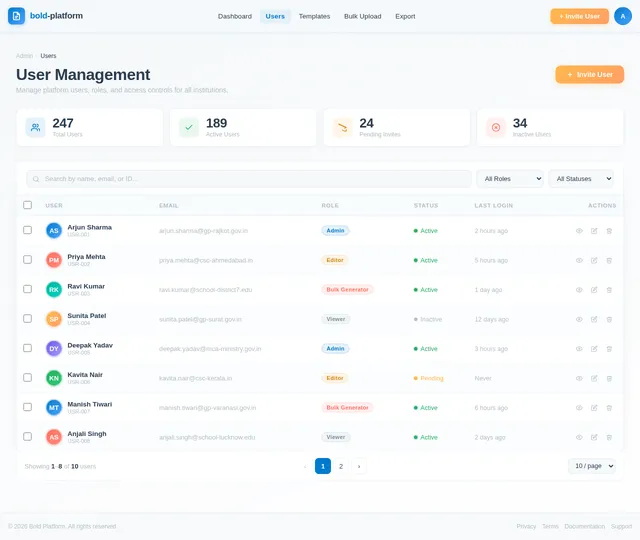
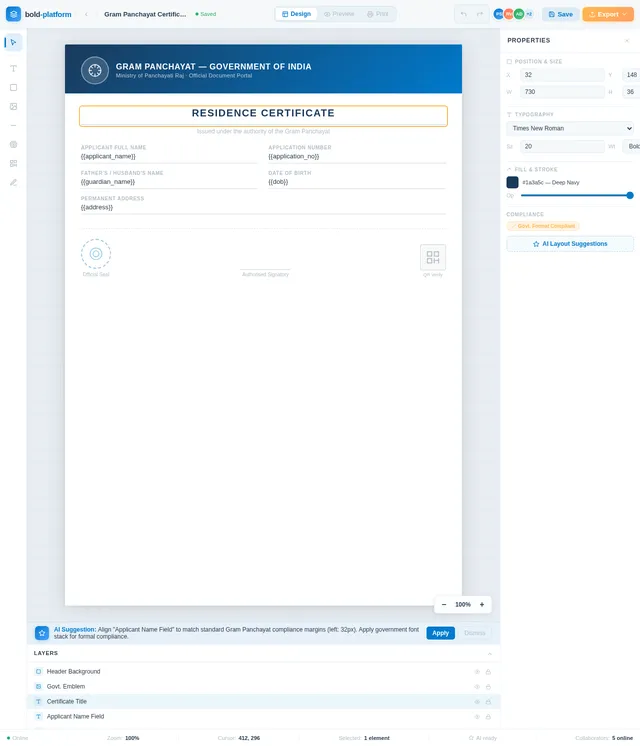
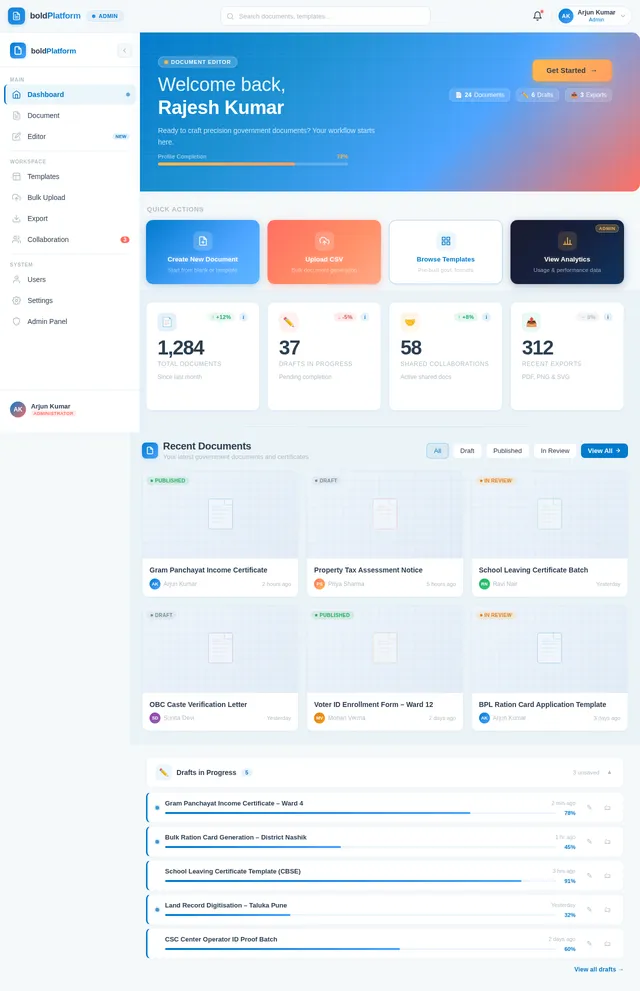
Create a fully production-ready, enterprise-grade, scalable SaaS platform for designing, automating, validating, and generating Indian government-style documents such as Gram Panchayat letters, certificates, notices, and official forms. This system must exceed Canva, Figma, and Photoshop in document precision, automation, compliance, and workflow management. CORE OBJECTIVE Build a document intelligence platform combining: High precision design editor Automated document generation engine AI assisted layout system Government compliant formatting engine Multi user collaboration system Enterprise workflow management TARGET USERS Gram Panchayat offices Government officials CSC centers Schools and institutions Bulk document generators COMPLETE SYSTEM ARCHITECTURE Frontend: Next.js latest with App Router TypeScript strict mode Tailwind CSS + ShadCN UI Zustand or Redux Toolkit Editor Engine: Fabric.js or Konva.js with custom abstraction layer Backend: Node.js with Express or Next.js server actions Database: PostgreSQL with Prisma ORM Storage: AWS S3 with CDN Authentication: JWT + OAuth (Google login) Role based access control FULL FEATURE MODULES 1. AUTH SYSTEM Signup login logout OTP based login Password reset Session management Role system: Admin Editor Viewer 2. USER DASHBOARD Recent documents Saved templates Draft system Activity history 3. ADVANCED EDITOR ENGINE Canvas Features: Infinite zoom from 0.1x to 10x Pixel perfect rendering Sub pixel accuracy Objects: Text Images Shapes QR codes Barcodes Tables Controls: Drag move Resize Rotate Multi select Group ungroup 4. PRECISION CONTROL SYSTEM Rulers with px mm inch Smart guides Snap system: Grid Edges Baseline Manual controls: X position Y position Width Height Rotation Scale 5. TYPOGRAPHY ENGINE Full Hindi English support Custom font upload Controls: Font family Font size Font weight Line height Letter spacing Paragraph spacing Advanced: Text alignment Text warp Text on path 6. LAYER MANAGEMENT SYSTEM Layer panel Drag reorder Nested groups Controls: Lock Hide Opacity Blend modes 7. TEMPLATE SYSTEM Prebuilt templates: Panchayat letter Certificate Notice ID card Create custom template Save template Share template 8. DYNAMIC DATA ENGINE Variable system: {{name}} {{date}} {{village}} Form based auto fill Bulk generation: Upload CSV Generate thousands of documents 9. AI AUTOMATION SYSTEM Upload image and convert to editable template Auto detect text positions Auto align elements Suggestions: Improve spacing Fix alignment Suggest fonts 10. BACKGROUND SYSTEM Upload background Adjust: Brightness Contrast Saturation Blur 11. EFFECTS ENGINE Shadow Glow Stroke Gradient 12. EXPORT SYSTEM PDF print ready PNG high resolution SVG vector DPI control: 72 150 300 13. PRINT SYSTEM A4 layout Margin control Print preview 14. COLLABORATION SYSTEM Real time editing Multi cursor support Comments 15. VERSION CONTROL Save versions Restore versions Compare versions 16. ADMIN PANEL Manage users Manage templates View analytics 17. SECURITY Input sanitization Secure uploads Rate limiting 18. PERFORMANCE Lazy loading Virtual rendering GPU acceleration 19. MOBILE SUPPORT Touch drag Pinch zoom Responsive UI 20. OFFLINE MODE Local storage editing Sync when online 21. PLUGIN SYSTEM External extensions support 22. EXTRA FEATURES Digital signature system QR verification Auto numbering system Watermark protection WORKFLOWS User Workflow: Login Create document Select template Edit content Save draft Export Admin Workflow: Login Manage users Upload templates Monitor usage Bulk Workflow: Upload CSV Map fields Generate documents Download all AI Workflow: Upload image Detect layout Convert to editable Fine tune DATABASE DESIGN Tables: Users Documents Templates Assets Versions Activity logs API STRUCTURE Auth APIs Document APIs Template APIs Upload APIs Export APIs OUTPUT REQUIREMENTS Full folder structure Frontend: components editor dashboard Backend: routes controllers models Provide working starter code FINAL INSTRUCTION Focus on: Clean architecture Scalability Maintainability Performance

Comments (0)
Sign in to leave a comment
System Requirements
System Requirements Document (SRD) for bold-platform
1. Introduction
The bold-platform is a cutting-edge, enterprise-grade SaaS platform designed to revolutionize the creation, automation, validation, and generation of Indian government-style documents. This platform aims to exceed the capabilities of existing tools like Canva, Figma, and Photoshop by focusing on precision, compliance, automation, and workflow management tailored to the unique needs of government offices, institutions, and bulk document generators in India.
The platform will integrate advanced AI capabilities, a high-precision design editor, and a robust backend to ensure scalability, security, and seamless collaboration. It will cater to a diverse user base, including Gram Panchayat offices, government officials, CSC centers, schools, and other institutions.
2. System Overview
The bold-platform is designed to address the challenges faced by Indian government entities and institutions in creating and managing official documents. By combining a high-precision design editor, an AI-assisted layout system, and a government-compliant formatting engine, the platform will enable users to:
- Design and customize documents with pixel-perfect precision.
- Automate repetitive tasks such as bulk document generation and data population.
- Ensure compliance with Indian government formatting standards.
- Collaborate in real-time with multi-user support.
- Manage workflows efficiently with enterprise-grade tools.
The platform will be scalable, secure, and optimized for both desktop and mobile devices, ensuring accessibility and usability across various environments.
3. Functional Requirements
- As a User, I should be able to log in using OTP or Google OAuth.
- As a User, I should be able to create, edit, and save documents with pixel-perfect precision.
- As a User, I should be able to select pre-built templates or create custom templates.
- As a User, I should be able to upload CSV files for bulk document generation.
- As a User, I should be able to export documents in PDF, PNG, or SVG formats.
- As a User, I should be able to collaborate in real-time with other users.
- As an Admin, I should be able to manage users, templates, and monitor platform usage.
- As a User, I should be able to upload an image and convert it into an editable template.
- As a User, I should be able to use AI suggestions for improving document layouts.
- As a User, I should be able to validate document compliance with Indian government standards.
- As a User, I should be able to digitally sign documents and add QR verification.
- As a User, I should be able to work offline and sync changes when back online.
- As a User, I should be able to use a pre-resolved API supervisor to validate document workflows.
4. User Personas
4.1 Admin
- Responsibilities: Manage users, templates, and platform analytics.
- Key Features: Role-based access control, user management, template uploads, and usage monitoring.
4.2 Editor
- Responsibilities: Create, edit, and manage documents.
- Key Features: Access to the advanced editor engine, template customization, and AI-assisted layout tools.
4.3 Viewer
- Responsibilities: View and comment on documents.
- Key Features: Real-time collaboration and commenting.
4.4 Bulk Document Generator
- Responsibilities: Generate large volumes of documents.
- Key Features: CSV upload, field mapping, and bulk export.
5. Visuals Colors and Theme
Color Palette
- Background: #F5F8FA (Light Mist)
- Surface: #FFFFFF (Pure White)
- Text: #2C3E50 (Deep Slate)
- Accent: #FF6F61 (Coral Red)
- Muted: #B0BEC5 (Soft Steel)
This color palette reflects a professional yet approachable design, aligning with the platform's focus on precision and usability.
6. Signature Design Concept
The "Living Blueprint" Homepage
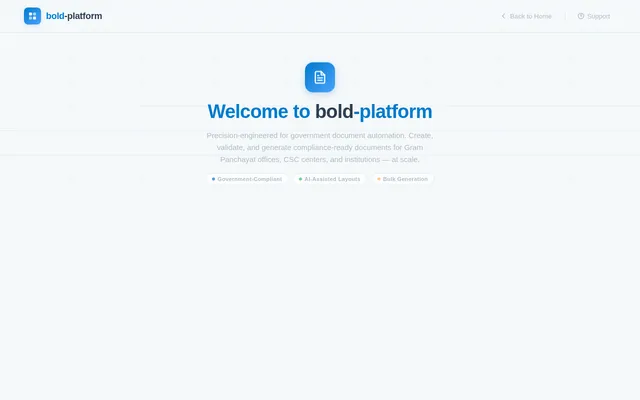
The homepage of bold-platform will resemble a dynamic architectural blueprint. Upon landing, users will see a grid-like canvas with subtle pencil-sketch animations that evolve as they scroll. Key features include:
- Interactive Grid: The background grid will shift subtly as users move their cursor, creating a sense of depth and interactivity.
- Animated Icons: Icons for features like "Create Document" and "Bulk Generate" will animate as if being drawn in real-time.
- Blueprint Transitions: Sections of the homepage will "unfold" like pages of a blueprint, revealing content with smooth transitions.
- Micro-Interactions: Hovering over elements will trigger subtle animations, such as buttons glowing or text underlining itself.
- Color Shifts: The blueprint theme will shift from cool blues (#007ACC) to warm accents (#FF6F61) as users interact with different sections.
This design will make the platform instantly memorable and convey its focus on precision and innovation.
7. Non-Functional Requirements
- Scalability: The system must handle up to 10,000 concurrent users and support bulk document generation for up to 1 million documents per day.
- Performance: Ensure sub-second response times for all major operations.
- Security: Implement robust input sanitization, secure uploads, and rate limiting.
- Accessibility: Ensure WCAG 2.1 compliance for all user interfaces.
- Localization: Support Hindi and English languages by default, with the ability to add more.
8. Tech Stack
Frontend
- React (Web)
- React Native (Mobile)
- Tailwind CSS
- Zustand or Redux Toolkit
Backend
- Python with FastAPI
Database
- MySQL with Alembic for migrations
AI Models
- GPT 5.4 for user-friendly responses
- Claude 4.6 Opas for academic or coding work
- Google Nano Banana for image generation
AI Tools
- LangChain
- LiteLLM for LLM Routing
Orchestration
- Docker and Docker Compose (Local)
- Kubernetes (Server-side)
9. Assumptions and Constraints
- The platform will primarily target Indian government offices and institutions.
- All templates must adhere to Indian government formatting standards.
- The system must support both online and offline workflows.
- The platform will prioritize horizontal scaling for handling high traffic.
10. Glossary
- SaaS: Software as a Service.
- Gram Panchayat: Local self-government organization in India.
- AI: Artificial Intelligence.
- CSV: Comma-Separated Values.
- WCAG: Web Content Accessibility Guidelines.
- JWT: JSON Web Token.
- OAuth: Open Authorization protocol.

Design Government
Documents with Precision
Create, automate, and validate Indian government-style documents with pixel-perfect accuracy. Powered by AI-assisted layouts, bulk generation, and real-time collaboration.
Built for Scale, Designed for Trust
50,000+
Active Users
2.4M+
Documents Generated
120+
Enterprise Clients
99.9%
Uptime Guaranteed
Everything You Need to Build Official Documents
From pixel-perfect design to AI-powered automation, bold-platform gives you enterprise-grade tools to create, validate, and distribute government documents at scale.
Pixel-Perfect Editor
Design government documents with sub-pixel precision using our advanced editor engine with snap-to-grid, smart guides, and exact measurements.
Open Editor→AI-Assisted Layouts
Let AI suggest optimal layouts, font pairings, and element placement based on document type and Indian government formatting standards.
Explore AI Tools→Bulk Generation
Upload CSV data and generate thousands of personalized documents in minutes. Map fields, preview results, and export in bulk with one click.
Start Bulk Upload→Compliance Validation
Automatically validate documents against Indian government formatting standards. Get real-time feedback and fix issues before finalizing.
Learn More→Real-Time Collaboration
Work simultaneously with team members on the same document. See live cursors, leave comments, and track changes in real time.
View Dashboard→Export Formats
Export your finished documents in PDF, PNG, or SVG formats with print-ready quality. Supports custom DPI settings and bleed margins.
Export Options→Digital Signatures
Add legally-valid digital signatures and QR verification codes to official documents. Ensure authenticity and prevent tampering.
Explore Signing→Template Library
Access a growing library of pre-built templates for Gram Panchayat certificates, school documents, official notices, and more.
Browse Templates→From Template to Finished Document in Minutes
Our streamlined workflow takes you from selecting a template to exporting compliance-ready government documents — with AI assistance at every step.
Choose a Template
Browse our library of pre-built government document templates or start from scratch with a blank canvas.
□ STEP.INITDesign with Precision
Use the pixel-perfect editor with AI-assisted layouts to customize every element of your document.
□ STEP.EDITValidate Compliance
Automatically verify your documents meet Indian government formatting standards and regulations.
□ STEP.VERIFYBulk Generate
Upload CSV data to populate templates and generate hundreds of documents in a single batch.
□ STEP.BATCHExport & Share
Download finished documents as PDF, PNG, or SVG. Add digital signatures and QR verification codes.
□ STEP.EXPORTIntelligence Built Into Every Document
Harness cutting-edge artificial intelligence to streamline document creation, ensure compliance, and automate workflows at scale.
AI-Powered Layout Suggestions
Let our intelligent engine analyze your content and recommend optimal layouts for government documents. From spacing and alignment to element hierarchy, the AI ensures your documents meet professional standards effortlessly.
Image-to-Template Conversion
Upload a photo or scan of any existing government document and our AI will intelligently convert it into a fully editable, pixel-perfect template. Preserve formatting, detect fields, and recreate layouts in seconds.
Automated Compliance Validation
Ensure every document meets Indian government formatting standards before export. Our AI scans for margins, font usage, seal placement, signature blocks, and language compliance in real time.
Document Generation Automation
Combine AI intelligence with bulk processing to generate thousands of personalized government documents from a single template. Upload CSV data and let the platform handle field mapping, validation, and batch export.
Pre-Built Government Templates
Start with professionally designed, compliance-ready templates for Indian government documents. Customize every element with pixel-perfect precision.
Gram Panchayat Birth Certificate
Official birth certificate template compliant with Gram Panchayat formatting standards.
School Bonafide Certificate
Standard bonafide certificate for educational institutions with seal placement.
Official Government Notice
Formal notice template following Indian government gazette formatting guidelines.
Caste Certificate
State-approved caste certificate layout with verification QR code support.
Transfer Certificate (TC)
Standardized TC format accepted by schools and boards across Indian states.
Revenue Department Notice
Revenue and land department official notice with bilingual header support.
Income Certificate
Income verification certificate template with digital signature placement.
Panchayat Meeting Minutes
Structured template for recording Gram Sabha and Panchayat meeting proceedings.
Built for Every Role in Your Organization
From platform administrators to document reviewers, bold-platform adapts to every workflow with purpose-built tools for each persona.
Admin
Platform Administrator
Responsibilities
- Manage users, roles, and permissions
- Upload and organize document templates
- Monitor platform analytics and usage
- Configure compliance and security settings
Key Features
Editor
Document Creator & Designer
Responsibilities
- Create and edit documents with pixel-perfect precision
- Customize templates for specific requirements
- Leverage AI-assisted layout suggestions
- Add digital signatures and QR verification
Key Features
Bulk Generator
High-Volume Document Producer
Responsibilities
- Upload CSV data for mass document generation
- Map data fields to template placeholders
- Generate thousands of documents in minutes
- Export in PDF, PNG, or SVG formats
Key Features
Viewer
Reviewer & Collaborator
Responsibilities
- View and review shared documents
- Add comments and annotations in real-time
- Collaborate with editors on document feedback
- Track document revision history
Key Features
What Our Users Say
Government offices, schools, and institutions across India rely on bold-platform for precision document workflows.
bold-platform completely transformed how we issue certificates and official notices. What used to take our team hours of manual formatting now happens in minutes with full compliance to government standards.
The bulk generation feature is a game-changer. We processed over 15,000 village-level certificates in a single batch using CSV upload. The pixel-perfect output meets every compliance requirement.
From transfer certificates to student ID cards, bold-platform handles all our document needs. The AI layout suggestions save us countless hours, and the real-time collaboration lets our staff work together seamlessly.
The digital signature and QR verification features give our documents instant authenticity. Even our field officers in remote areas use the offline mode to prepare documents and sync later. Truly built for Indian governance.
Simple, Transparent Pricing
Choose the plan that fits your document workflow. Start free and scale as your organization grows.
Starter
Perfect for individuals and small offices getting started.
What’s included
- Up to 50 documents/month
- 10 pre-built templates
- PDF & PNG export
- Basic compliance checks
- Single user access
Professional
For teams and offices that need bulk generation & AI tools.
What’s included
- Unlimited documents
- Full template library
- AI-assisted layouts
- Bulk CSV generation
- Real-time collaboration
- Digital signatures & QR
- Priority support
Enterprise
Tailored for government bodies and large-scale deployments.
What’s included
- Everything in Professional
- Dedicated account manager
- On-premise deployment
- Custom compliance rules
- API access & integrations
- SLA guarantee
- Offline mode support
Ready to Transform Your Document Workflow?
Join thousands of government offices and institutions already using bold-platform to create pixel-perfect, compliant documents in minutes — not hours.
No credit card required · Free tier available · Setup in under 2 minutes
No comments yet. Be the first!