
bold-bot

byAman Rai

Act as a Senior UI/UX Designer, Frontend Engineer, Three.js Developer, and Product Designer. Design and develop a world-class frontend for an AI-powered Excel Assistant. The frontend should feel like a premium SaaS application built by Apple, Vercel, Linear, Framer, and ChatGPT. The design must be clean, elegant, futuristic, interactive, responsive, and optimized for performance. Do NOT create a basic dashboard. Create a highly animated, immersive user experience. ================================== Theme ================================== • Light Mode Only • Pure white (#FFFFFF) background • Very soft shadows • Glassmorphism cards • Frosted blur effects • Rounded corners (20-24px) • Soft gradients • Blue accent (#2563EB) • Purple accent (#7C3AED) • Cyan highlights • Minimalistic aesthetic ================================== Animation Requirements ================================== Every page should feel alive. Implement: • Framer Motion animations • Smooth page transitions • Scroll reveal animations • Floating cards • Hover elevation • Magnetic buttons • Ripple click effects • Smooth loading skeletons • Animated progress bars • Morphing icons • Animated gradients • Glow effects • Mouse tracking effects • Floating particles • Cursor interactions Everything should animate smoothly at 60 FPS. ================================== 3D Effects ================================== Use Three.js / React Three Fiber. Include: • Floating 3D Excel Spreadsheet • Rotating AI Brain • Floating data cubes • Animated neural network • Interactive hologram • Floating charts • Animated nodes connected with lines • Moving particles • Glass spheres • Floating geometric objects Mouse movement should rotate objects. Objects should slowly float continuously. ================================== Landing Page ================================== Hero Section Large headline: "Analyze Excel Files with AI in Seconds" Subheading Upload your spreadsheet. Clean data. Generate insights. Visualize trends. Download professional reports. CTA Buttons Upload Excel Try Demo Hero Illustration A beautiful floating 3D Excel sheet connected to an AI brain with animated data flowing between them. Background Animated gradient mesh Floating particles Blur circles Glass effects ================================== Navigation ================================== Top Navbar Logo Home Features Dashboard Pricing About Login Get Started Navbar should become glassmorphism while scrolling. ================================== Dashboard ================================== Beautiful sidebar Animated icons Collapsible Smooth transitions Dashboard Cards Files Uploaded Rows Processed Columns Detected AI Insights Generated Reports Downloaded Storage Used Cards should animate when hovering. ================================== Upload Section ================================== Large drag-and-drop area 3D upload icon Animated border Glow while dragging Progress animation Upload percentage Success animation ================================== Dataset Preview ================================== Professional table Sticky headers Resizable columns Column sorting Search Pagination Column statistics Hover effects Smooth transitions ================================== Data Cleaning Page ================================== Interactive cards Missing values Duplicates Outliers Incorrect data types Date conversion Buttons Auto Fix Preview Undo Apply Changes Animated before-after comparison. ================================== Charts Page ================================== Beautiful interactive charts Bar Pie Line Area Scatter Histogram Heatmap Treemap Sunburst Charts should animate while loading. ================================== AI Insights Page ================================== ChatGPT-style cards Executive Summary Business Insights Recommendations Risk Analysis Opportunities Each insight should appear using typing animation. ================================== Export Page ================================== Download buttons Excel CSV PDF Word PowerPoint Each button should have hover animation. ================================== Loading Experience ================================== Create premium loading animations. Skeleton loaders Floating shimmer Animated progress indicators AI Thinking animation ================================== Micro Interactions ================================== Hover effects Button bounce Icon rotation Card lift Smooth shadows Animated borders Glass reflections Cursor glow ================================== Typography ================================== Use: Inter SF Pro Display Poppins Large bold headings Excellent spacing ================================== Icons ================================== Lucide React Heroicons Animated SVG icons ================================== Technology ================================== React Next.js Tailwind CSS TypeScript Framer Motion React Three Fiber Three.js Drei GSAP Shadcn UI Lucide React ================================== Performance ================================== Lazy loading Code splitting Image optimization GPU accelerated animations Responsive design Accessibility support ================================== Responsiveness ================================== Desktop Laptop Tablet Mobile No layout shifts. ================================== Overall Feel ================================== The application should look premium enough that users would believe it is a paid SaaS product worth $99/month. It should have the visual quality of: • ChatGPT • Vercel • Linear • Framer • Notion AI • Arc Browser • Stripe Dashboard Focus heavily on elegant animations, 3D interactions, premium glassmorphism, smooth transitions, modern UI components, and a delightful user experience. Generate production-ready React code with reusable components, clean architecture, and maintainable code. Redesign the sidebar navigation for the AI Excel Assistant. Keep ONLY these four navigation tabs: 1. Upload 2. Clean Data 3. Dashboard 4. AI Insights Remove all other sidebar items such as: - Home - Reports - Export - Settings - Profile - Pricing - Help - Documentation - Logout - Any additional menu items Sidebar Requirements: • Modern premium SaaS design • Light mode only • Glassmorphism effect • White background (#FFFFFF) • Active tab with blue gradient (#2563EB → #3B82F6) • Rounded corners (18-20px) • Soft shadow • Smooth hover animation • Animated active indicator • Lucide React icons for each tab • Framer Motion animations • Smooth page transition when switching tabs • Collapsible sidebar on tablet/mobile • Width: 260px • Icons and text perfectly aligned • Professional spacing • Premium typography using Inter font Workflow: 📤 Upload ↓ 🧹 Clean Data ↓ 📊 Dashboard ↓ 🤖 AI Insights Each tab should represent one step of the workflow. When a user clicks a tab: - Animate the transition smoothly. - Highlight the active tab. - Keep completed steps visually marked with a subtle check indicator. - Disable future steps until the previous step is completed (optional). Do not add any extra navigation items. The sidebar should contain ONLY these four workflow tabs and nothing else. create only frontend

LandingUpload
Landing

Comments (0)

No comments yet. Be the first!

System Requirements

System Requirement Document
Page 1 of 5

System Requirements Document for bold-bot

Introduction

The bold-bot project aims to develop a world-class frontend for an AI-powered Excel Assistant. This application is designed to provide a premium user experience, akin to products developed by leading tech companies such as Apple, Vercel, Linear, Framer, and ChatGPT. The focus is on creating a clean, elegant, futuristic, and highly interactive user interface that is responsive and optimized for performance.

System Overview

The bold-bot project is a frontend application that leverages advanced UI/UX design principles and cutting-edge technologies to deliver an immersive and animated user experience. The application is intended to assist users in analyzing Excel files using AI, providing functionalities such as data cleaning, insight generation, and professional report downloads. The design emphasizes a minimalistic aesthetic with light mode only, incorporating glassmorphism, soft gradients, and interactive 3D effects.

Page 2 of 5

Functional Requirements

  • As a User, I should be able to upload Excel files for analysis.
  • As a User, I should be able to clean data by addressing missing values, duplicates, outliers, and incorrect data types.
  • As a User, I should be able to view a dashboard displaying files uploaded, rows processed, columns detected, AI insights generated, reports downloaded, and storage used.
  • As a User, I should be able to access AI insights presented in ChatGPT-style cards, including executive summaries, business insights, recommendations, risk analysis, and opportunities.
  • As a User, I should be able to download reports in Excel, CSV, PDF, Word, and PowerPoint formats.
  • As a User, I should experience smooth animations and transitions throughout the application.
  • As a User, I should be able to interact with 3D effects such as floating Excel spreadsheets and rotating AI brains.
  • As a User, I should be able to navigate through the application using a modern, collapsible sidebar with only four tabs: Upload, Clean Data, Dashboard, and AI Insights.

User Personas

  • User: Individuals who need to analyze and visualize Excel data using AI tools. They are looking for a premium, easy-to-use application that offers advanced data processing and insight generation capabilities.

Core User Flows

  • User uploads Excel file -> Cleans data -> Views dashboard -> Accesses AI insights.
  • User navigates through the sidebar -> Upload -> Clean Data -> Dashboard -> AI Insights.
Page 3 of 5

Visuals Colors and Theme

  • primary: #2563EB (Blue)
  • primary_light: #3B82F6 (Light Blue)
  • secondary: #7C3AED (Purple)
  • accent: #00FFFF (Cyan)
  • highlight: #FFD700 (Gold)
  • bg: #FFFFFF (White)
  • surface: rgba(255, 255, 255, 0.8) (Glassmorphism effect)
  • text: #000000 (Black)
  • text_muted: #6B7280 (Gray)
  • border: rgba(0, 0, 0, 0.1) (Light Gray)

Signature Design Concept

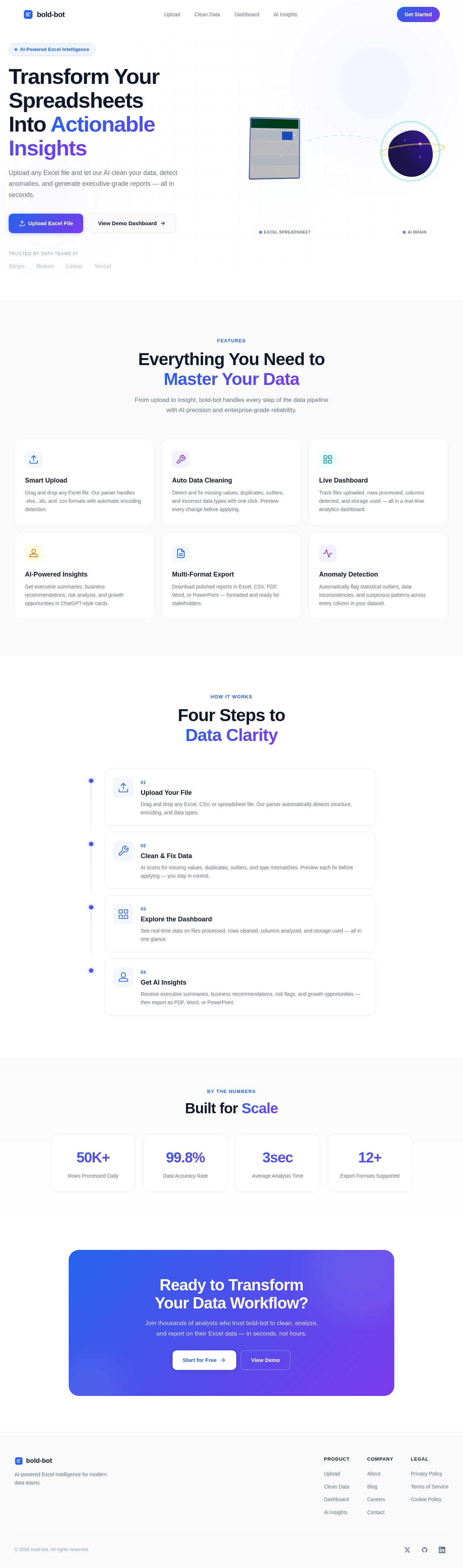
The bold-bot homepage will feature an interactive 3D scene using @react-three/fiber and @react-three/drei. Users will be greeted with a floating 3D Excel spreadsheet connected to an AI brain, with animated data flowing between them. As users move their mouse, the 3D objects will rotate and float, creating a dynamic and engaging experience. The background will feature an animated gradient mesh with floating particles and blur circles, enhancing the futuristic aesthetic. Users can interact with the scene by clicking on elements to reveal more information or initiate actions.

Page 4 of 5

Interaction Model & Motion Direction

The landing page will employ a "parallax" interaction model, providing layered depth via scroll. Decorative elements like floating particles and gradient meshes will translate at different speeds, while core content remains in the natural flow. Internal pages will use an "animated" model with scroll-triggered reveals, hover transitions, and spring physics on interactive elements, ensuring a polished and engaging user experience.

Non-Functional Requirements

  • The application must maintain a smooth 60 FPS animation performance.
  • It should be responsive across desktop, laptop, tablet, and mobile devices.
  • The design must support accessibility standards.
  • The application should utilize lazy loading, code splitting, and image optimization for performance.

Tech Stack

  • Frontend: React, Next.js, Tailwind CSS, TypeScript
  • Animation: Framer Motion, GSAP
  • 3D Effects: React Three Fiber, Three.js, Drei
  • Icons: Lucide React, Heroicons

Assumptions and Constraints

  • The application will only support light mode.
  • The sidebar will contain only four navigation tabs as specified.
  • The design must adhere to a premium SaaS aesthetic.
Page 5 of 5

Glossary

  • Glassmorphism: A design trend that uses transparency, blur, and shadow to create a frosted-glass effect.
  • Parallax: An effect where background images move slower than foreground images, creating a sense of depth.
  • Framer Motion: A library for creating animations in React applications.
  • React Three Fiber: A React renderer for Three.js, enabling the creation of 3D graphics in React applications.
Landing design preview
Landing: View Hero
Landing: Click Upload CTA
Landing: Try Demo
Upload: Drag Drop File
Upload: View Progress
Upload: Preview Dataset
CleanData: View Issues
CleanData: Auto Fix Data
CleanData: Preview Changes
Dashboard: View Stats
Dashboard: Explore Charts
AIInsights: View Summary
AIInsights: Download Report