bold-admin
 Hussain Bekhushi
Create a production-ready School Management System using Python Flask for backend, ReactJS for frontend, PostgreSQL for database, and Docker to deploy. Include student list, teacher list, grade list, subject list, class list, and an admin panel.


Comments (0)
Sign in to leave a comment
System Requirements
System Requirements Document for School Management System
1. Introduction
Bold Admin is a production-ready School Management System for a single school's administrative and teaching staff. It gives the school one ordered, trustworthy place to hold its core records — students, teachers, grades, subjects and classes — and gives the administrator a dedicated panel to keep those records correct and complete. Teachers use the same records for their daily teaching work: reviewing who is in their classes, which subjects are taught, and how students are performing, and entering marks for their students. Teacher-entered marks are held as Pending Admin Approval and become visible to students and parents only after the administrator approves them. The system also includes an Attendance Management module for recording and reviewing daily student attendance, and a Fee Management module for recording each student's fee obligations and payments. A Parent Portal lets parents view their own child's attendance and approved grades and download a grade report card, subject to a fee-clearance business rule.
The product is delivered as a Python Flask backend, a ReactJS frontend, a PostgreSQL database, and Docker-based deployment. It is intended for three active human roles: the School Administrator, who owns record accuracy; the Teacher, who reads the records to plan and track teaching; and the Parent, who reads their own child's attendance and grades. Access to school records is protected: the administrator self-enrolls, and the administrator, teachers and parents verify their identity before reaching protected surfaces.
The audience is a school office, its teaching staff and the school's parents. The tone is clear and correct but warm and optimistic — a records tool people are happy to open every day.
2. System Overview
Bold Admin is a web application with three runnable services: a shared backend process exposing the application APIs and domain modules, a database holding application-owned persistent data, and a frontend React application serving the user interface. The backend is the single shared process for all feature APIs; the frontend talks only to that backend, and the backend is the only service that talks to the database.
The current delivery covers:
- An anonymous Landing page that explains the school system and offers entry into the panel.
- Anonymous Login and Sign Up surfaces that establish identity before protected records.
- Seven record lists — student list, teacher list, grade list, subject list, class list, attendance list, fee list — each a first-class destination.
- An admin panel where the School Administrator creates, edits and removes records across all seven record types and approves teacher-entered marks.
- A Parent Portal where a signed-in Parent views their own child's attendance and approved grades and downloads a grade report card, blocked when school fees are pending for more than 60 days.
Three active human roles use the system: the School Administrator (full record management, grade approval, plus the teacher list, fee list and admin panel), the Teacher (read access to students, grades, subjects, classes and attendance for daily teaching work, plus entering marks that stay pending until approved), and the Parent (read access to their own child's attendance and approved grades, plus a conditional grade report card download). Identity is application-owned: the administrator self-enrolls through Sign Up, and all three roles sign in through Login. The teacher list, the fee list, the admin panel and the Parent Portal are restricted to their respective roles; the student, grade, subject, class and attendance lists require a signed-in session.
Narrow exclusions: the system does not include timetable scheduling, a student portal, messaging, online payment gateway processing, or any capability beyond the nine named destinations and the identity surfaces required to reach them. Grade report cards are generated inside the application for the Parent Portal only; they are not a general report-card generation capability for the administrator or teacher.
Removed from scope
- Timetable scheduling
- Student portal
- Messaging and notifications
- Online payment gateway processing (also: payment gateway, online fee payment, card payment)
Added to scope
- Attendance Management module (also: attendance tracking, attendance list)
- Fee Management module (also: fee management, fee list, fee records)
- Parent Portal (also: parent portal, parent view, guardian portal)
- Grade report card download for parents (also: report card, report-card download)
- Fee-clearance business rule blocking grade report card downloads when school fees are pending for more than 60 days (also: 60-day fee rule, pending-fee block)
- Teacher mark entry with a 2-step grade approval flow (also: grade approval, pending admin approval, mark approval)
2a. Product Interpretation and Delivery Boundary
Bold Admin is delivered entirely as a first-party application. The Flask backend owns all school-record data, all attendance data, all fee data and all identity state; the ReactJS frontend renders every surface; PostgreSQL persists everything; Docker packages and runs the three services together. There is no provider-owned or external surface in the current delivery — every page a person sees is built and owned by this application. Fee records are maintained inside the application; no external payment provider is integrated. Grade report cards are composed by the backend from the application's own grade, student and fee records and delivered as a download from the Parent Portal.
Access is split into two boundaries. The anonymous boundary covers Landing, Login and Sign Up: these are reachable without a session and are where a person first meets the product and establishes identity. The protected boundary covers the seven record lists, the admin panel and the Parent Portal: these require a signed-in session, and the teacher list, fee list and admin panel additionally require the administrator role, while the Parent Portal requires the parent role and shows only the signed-in parent's own child. A protected destination never establishes access to itself; identity is always established at Login or Sign Up first.
The fee-clearance business rule is enforced by the backend, not only in the frontend: when a student has any school fee that has been pending for more than 60 days, the grade report card download for that student is blocked and the Parent Portal shows the reason inline. The rule gates the report card download only; it does not block the parent's view of attendance or grades.
Everything described in this document is current. No future-horizon capabilities are committed; the exclusions listed above are deliberate boundaries, not deferred work.
2c. Page Content and Component Coverage
Landing
- Information and state: Product name "Bold Admin", the headline "Every student record, in one soft place", the subline "Bold Admin holds the student, teacher, class, subject and grade lists for your school.", and a lime capsule call to action "Open the panel". Anonymous, no session required. If a session already exists, the call to action leads directly into the protected area; otherwise it leads to Login.
- Primary action: "Open the panel" — routes a signed-in visitor to the admin panel (administrator) or the student list (teacher), and an anonymous visitor to Login.
- Supporting actions: A secondary text link to Sign Up for a first-time administrator; a text link to Login for a returning user.
- Domain entities: None read or written; purely presentational.
- Component responsibilities: Curved pink hero block with oversized Comfortaa headline and glossy blob cluster; lime capsule CTA pinned beneath the headline; a short summary strip naming the record types (students, teachers, classes, subjects, grades, attendance, fees) as rounded icon chips.
- States: Loading — not applicable (static content). Empty — not applicable. Success — hero renders with CTA. Error — if the session probe fails, the CTA falls back to the anonymous Login route. Recovery — the visitor can always reach Login or Sign Up from the hero.
Login
- Information and state: Email and password fields, a submit control, and a link to Sign Up. Anonymous access. On success the session is established and the person is routed to the admin panel (administrator) or the student list (teacher).
- Primary action: Submit credentials to verify identity.
- Supporting actions: Navigate to Sign Up; toggle password visibility.
- Domain entities: Account (email, password credential, role).
- Component responsibilities: Centered white capsule card on blush ground; labeled inputs with inline validation; capsule primary button; inline error region.
- States: Loading — submit button shows a pending state and is disabled. Empty — fields start blank with placeholder guidance. Success — session established, redirect to the role-appropriate destination. Error — invalid credentials show an inline message without clearing the email field. Recovery — the person may retry, or follow the Sign Up link.
Sign Up
- Information and state: Name, email, password and password confirmation fields for a self-starting administrator. Anonymous access. On success an administrator account is created and the person is signed in and routed to the admin panel.
- Primary action: Create the administrator account.
- Supporting actions: Navigate to Login; toggle password visibility.
- Domain entities: Account (name, email, password credential, role = administrator).
- Component responsibilities: Centered white capsule card; labeled inputs with inline validation; capsule primary button; inline error region.
- States: Loading — submit button pending and disabled. Empty — blank fields with guidance. Success — account created, session established, redirect to admin panel. Error — duplicate email or validation failure shown inline with the offending field marked. Recovery — correct the field and resubmit, or switch to Login.
student list
- Information and state: A list of student records showing name, class, and identifying details, with a count chip. Requires a signed-in session; visible to the School Administrator and the Teacher. The administrator sees create, edit and delete controls; the teacher sees a read-only list.
- Primary action: Browse and search the student records.
- Supporting actions (administrator): Add a student, edit a student, remove a student. Supporting actions (teacher): Filter by class; open a student's detail view.
- Domain entities: Student (name, class assignment, identifying details), Class, Attendance record, Fee record.
- Component responsibilities: White capsule panels with a pink left rail and a lime count chip; search field; per-row action controls gated by role; confirmation dialog for removal.
- States: Loading — capsule skeleton rows. Empty — a friendly empty panel with an "Add student" prompt for the administrator, and a plain "No students yet" message for the teacher. Success — rows render with the count chip updated. Error — a failed load shows an inline retry panel; a failed save shows an inline row-level message and preserves entered values. Recovery — retry the load, or correct and resubmit the row.
teacher list
- Information and state: A list of teacher records showing name, subjects taught, and contact details, with a count chip. Requires a signed-in session and the administrator role; teachers do not see this destination.
- Primary action: Browse and search teacher records.
- Supporting actions: Add a teacher, edit a teacher, remove a teacher.
- Domain entities: Teacher (name, subjects taught, contact details), Subject.
- Component responsibilities: White capsule panels with pink left rail and lime count chip; search field; per-row action controls; confirmation dialog for removal.
- States: Loading — capsule skeleton rows. Empty — empty panel with an "Add teacher" prompt. Success — rows render with the count chip updated. Error — inline retry panel on load failure; inline row-level message on save failure with values preserved. Recovery — retry or correct and resubmit.
grade list
- Information and state: A list of grade records linking a student, a subject, and a score or grade value, with a count chip. Requires a signed-in session; visible to the School Administrator and the Teacher. The administrator manages records; the teacher reads them to track student results.
- Primary action: Browse and filter grade records.
- Supporting actions (administrator): Add a grade, edit a grade, remove a grade. Supporting actions (teacher): Filter by student, subject or class.
- Domain entities: Grade (student reference, subject reference, score or grade value), Student, Subject.
- Component responsibilities: White capsule panels with pink left rail and lime count chip; filter controls; per-row action controls gated by role; confirmation dialog for removal.
- States: Loading — capsule skeleton rows. Empty — empty panel with an "Add grade" prompt for the administrator, and a plain "No grades recorded" message for the teacher. Success — rows render with the count chip updated. Error — inline retry panel on load failure; inline row-level message on save failure with values preserved. Recovery — retry or correct and resubmit.
subject list
- Information and state: A list of subject records showing subject name and any associated details, with a count chip. Requires a signed-in session; visible to the School Administrator and the Teacher.
- Primary action: Browse and search subject records.
- Supporting actions (administrator): Add a subject, edit a subject, remove a subject. Supporting actions (teacher): Search subjects.
- Domain entities: Subject (name, details).
- Component responsibilities: White capsule panels with pink left rail and lime count chip; search field; per-row action controls gated by role; confirmation dialog for removal.
- States: Loading — capsule skeleton rows. Empty — empty panel with an "Add subject" prompt for the administrator, and a plain "No subjects yet" message for the teacher. Success — rows render with the count chip updated. Error — inline retry panel on load failure; inline row-level message on save failure with values preserved. Recovery — retry or correct and resubmit.
class list
- Information and state: A list of class records showing class name and associated details, with a count chip. Requires a signed-in session; visible to the School Administrator and the Teacher.
- Primary action: Browse and search class records.
- Supporting actions (administrator): Add a class, edit a class, remove a class. Supporting actions (teacher): Search classes; open a class to see its students.
- Domain entities: Class (name, details), Student.
- Component responsibilities: White capsule panels with pink left rail and lime count chip; search field; per-row action controls gated by role; confirmation dialog for removal.
- States: Loading — capsule skeleton rows. Empty — empty panel with an "Add class" prompt for the administrator, and a plain "No classes yet" message for the teacher. Success — rows render with the count chip updated. Error — inline retry panel on load failure; inline row-level message on save failure with values preserved. Recovery — retry or correct and resubmit.
admin panel
- Information and state: The administrator's record-management hub. Requires a signed-in session and the administrator role. Shows summary counts for students, teachers, grades, subjects, classes, attendance and fees, and provides entry points into each record list plus inline create/edit/delete management for all seven record types.
- Primary action: Manage school records — create, edit and remove students, teachers, grades, subjects, classes, attendance records and fee records.
- Supporting actions: Jump to any record list; review summary counts; sign out.
- Domain entities: Student, Teacher, Grade, Subject, Class, Attendance record, Fee record.
- Component responsibilities: Blush ground with white capsule summary cards carrying lime count chips; a curved pink header block; per-record-type management sections with capsule action buttons; confirmation dialogs for removal; inline error regions.
- States: Loading — capsule skeleton cards and sections. Empty — summary cards show zero counts with a prompt to add the first record of each type. Success — counts and sections reflect saved changes immediately. Error — a failed load shows an inline retry panel; a failed save shows an inline message with values preserved. Recovery — retry the load, or correct and resubmit the record.
Parent Portal
- Information and state: The Parent's read-only view of their own child. Requires a signed-in session and the parent role; the portal shows only the child linked to the signed-in parent and never another student's records. Shows the child's attendance records (date, class, status — present, absent, late, excused) and grade records (subject, score or grade value), plus a grade report card download control. The download control reflects the fee-clearance business rule: when any school fee for the child has been pending for more than 60 days, the download is blocked and the reason is stated inline; otherwise the report card downloads.
- Primary action: Review the child's attendance and grades, and download the grade report card when fees are clear.
- Supporting actions: Filter attendance by date range; filter grades by subject; retry a failed load; sign out.
- Domain entities: Student (the signed-in parent's child), Attendance record, Grade, Subject, Fee record (read only, used to evaluate the 60-day pending-fee rule), Grade report card (generated download).
- Component responsibilities: Blush ground with a curved pink header block naming the child; white capsule panels with a pink left rail and a lime count chip for the attendance panel and the grade panel; a capsule report card download button with an adjacent inline status region; inline error regions.
- States: Loading — capsule skeleton panels for attendance and grades. Empty — a plain "No attendance recorded yet" panel and a "No grades recorded yet" panel, with the download control disabled and explained. Success — attendance and grade rows render; the report card downloads when no fee is pending more than 60 days. Blocked — when a fee has been pending more than 60 days, the download control is disabled and an inline message states that the report card is unavailable until outstanding fees are cleared; attendance and grades remain fully readable. Error — a failed load shows an inline retry panel; a failed download shows an inline message without leaving the page. Recovery — retry the load or the download, or return to the attendance and grade panels.
3. Functional Requirements
FR-1 — Production-ready School Management System (explicit) As a School Administrator I should have a production-ready School Management System so that my school's records are held in one dependable place.
- Trigger: the administrator opens the application.
- Observable result: the application loads, serves the Landing page, and routes the administrator through identity into the protected records.
- Access: anonymous entry at Landing; protected records require a session.
- Failure/recovery: if the backend is unreachable, the frontend shows an inline retry state rather than a blank page.
- Continuation: after recovery the administrator resumes at the destination they were heading to.
FR-2 — Python Flask backend (explicit) As a School Administrator I should have the system's APIs served by a Python Flask backend so that all record operations run through one consistent service.
- Trigger: any frontend request for records or identity.
- Observable result: the Flask backend handles the request and returns the result to the frontend.
- Access: backend enforces session and role checks on protected routes.
- Failure/recovery: failed requests return a structured error the frontend renders inline.
- Continuation: the person retries the action.
FR-3 — ReactJS frontend (explicit) As a School Administrator and Teacher I should use a ReactJS frontend so that every list and the admin panel are responsive and consistent.
- Trigger: navigating to any page.
- Observable result: the React application renders the requested page with its loading, empty, success and error states.
- Access: the frontend hides administrator-only controls from teachers and redirects unauthenticated visitors to Login.
- Failure/recovery: a failed page load shows an inline retry panel.
- Continuation: the person retries or navigates elsewhere.
FR-4 — PostgreSQL database (explicit) As a School Administrator I should have all school records persisted in PostgreSQL so that data survives restarts and is consistent across sessions.
- Trigger: any create, edit or delete action.
- Observable result: the change is committed to PostgreSQL and reflected on the next read.
- Access: only the backend accesses the database.
- Failure/recovery: a failed write returns an error and leaves the prior record intact.
- Continuation: the administrator corrects and resubmits.
FR-5 — Docker deployment (explicit) As a School Administrator I should have the system deployed with Docker so that backend, frontend and database run together reproducibly.
- Trigger: deployment.
- Observable result: the three services start together and the application is reachable.
- Access: unchanged by deployment.
- Failure/recovery: a failed service start is visible in container logs and can be restarted.
- Continuation: restart the affected service.
FR-6 — Student list (explicit) As a School Administrator I should see and manage the student list so that student records are correct and complete. As a Teacher I should see the student list so that I know who is in my classes.
- Trigger: opening the student list.
- Observable result: student records render with a count chip; the administrator can add, edit and remove students; the teacher sees a read-only list and can filter by class.
- Access: signed-in session required; administrator and teacher.
- Failure/recovery: load failure shows an inline retry panel; save failure shows an inline row-level message with values preserved.
- Continuation: retry or correct and resubmit; the updated count chip confirms the change.
FR-7 — Teacher list (explicit) As a School Administrator I should see and manage the teacher list so that teacher records are correct and complete.
- Trigger: opening the teacher list.
- Observable result: teacher records render with a count chip; the administrator can add, edit and remove teachers.
- Access: signed-in session and administrator role required; teachers do not see this destination.
- Failure/recovery: load failure shows an inline retry panel; save failure shows an inline row-level message with values preserved.
- Continuation: retry or correct and resubmit.
FR-8 — Grade list (explicit) As a School Administrator I should see and manage the grade list so that student results are recorded accurately. As a Teacher I should see the grade list so that I can track student results.
- Trigger: opening the grade list.
- Observable result: grade records render with a count chip; the administrator can add, edit and remove grades; the teacher can filter by student, subject or class.
- Access: signed-in session required; administrator and teacher.
- Failure/recovery: load failure shows an inline retry panel; save failure shows an inline row-level message with values preserved.
- Continuation: retry or correct and resubmit.
FR-9 — Subject list (explicit) As a School Administrator I should see and manage the subject list so that the school's subjects are recorded accurately. As a Teacher I should see the subject list so that I know which subjects are taught.
- Trigger: opening the subject list.
- Observable result: subject records render with a count chip; the administrator can add, edit and remove subjects; the teacher sees a read-only list.
- Access: signed-in session required; administrator and teacher.
- Failure/recovery: load failure shows an inline retry panel; save failure shows an inline row-level message with values preserved.
- Continuation: retry or correct and resubmit.
FR-10 — Class list (explicit) As a School Administrator I should see and manage the class list so that class records are correct and complete. As a Teacher I should see the class list so that I know my classes and their students.
- Trigger: opening the class list.
- Observable result: class records render with a count chip; the administrator can add, edit and remove classes; the teacher can search classes and open a class to see its students.
- Access: signed-in session required; administrator and teacher.
- Failure/recovery: load failure shows an inline retry panel; save failure shows an inline row-level message with values preserved.
- Continuation: retry or correct and resubmit.
FR-11 — Admin panel (explicit) As a School Administrator I should have an admin panel so that I can manage all school records from one place.
- Trigger: the administrator opens the admin panel.
- Observable result: summary counts for students, teachers, grades, subjects, classes, attendance and fees render, with entry points into each record list and inline create/edit/delete management for all seven record types.
- Access: signed-in session and administrator role required.
- Failure/recovery: load failure shows an inline retry panel; save failure shows an inline message with values preserved.
- Continuation: retry or correct and resubmit; counts update immediately on success.
FR-12 — Administrator self-service enrollment (required_inference) As a School Administrator I should be able to create my own account so that I can start using the system without an invitation.
- Trigger: the administrator opens Sign Up from Landing or Login.
- Observable result: an administrator account is created, the session is established, and the administrator lands on the admin panel.
- Access: anonymous.
- Failure/recovery: duplicate email or validation failure is shown inline with the offending field marked; the entered values are preserved.
- Continuation: correct the field and resubmit, or switch to Login.
FR-13 — Identity verification before protected records (required_inference) As a School Administrator or Teacher I should verify my identity before reaching protected records so that school data stays private.
- Trigger: the person opens Login, or is redirected there from a protected destination.
- Observable result: on valid credentials the session is established and the person is routed to the admin panel (administrator) or the student list (teacher).
- Access: anonymous at Login; protected destinations require the resulting session.
- Failure/recovery: invalid credentials show an inline message without clearing the email field.
- Continuation: retry, or follow the Sign Up link.
FR-14 — Attendance Management module (explicit) As a School Administrator I should record and manage daily student attendance so that the school has an accurate attendance history. As a Teacher I should see the attendance list so that I know which students were present or absent.
- Trigger: opening the attendance list from the admin panel or the navigation.
- Observable result: attendance records render with a count chip, each record linking a student, a class, a date and an attendance status (present, absent, late, excused); the administrator can add, edit and remove attendance records; the teacher sees a read-only list and can filter by class, student or date.
- Access: signed-in session required; administrator and teacher. Only the administrator writes attendance records.
- Failure/recovery: load failure shows an inline retry panel; save failure shows an inline row-level message with values preserved.
- Continuation: retry or correct and resubmit; the updated count chip confirms the change.
FR-15 — Fee Management module (explicit) As a School Administrator I should record and manage student fee obligations and payments so that the school knows what each student owes and has paid.
- Trigger: opening the fee list from the admin panel.
- Observable result: fee records render with a count chip, each record linking a student, a fee description, an amount, a due date, an amount paid and a payment status (unpaid, partially paid, paid); the administrator can add, edit and remove fee records and record payments against them.
- Access: signed-in session and administrator role required; teachers do not see this destination.
- Failure/recovery: load failure shows an inline retry panel; save failure shows an inline row-level message with values preserved.
- Continuation: retry or correct and resubmit; the updated count chip confirms the change.
FR-16 — Attendance and fee summary on the admin panel (explicit) As a School Administrator I should see attendance and fee summary counts on the admin panel so that I can spot gaps in attendance recording and outstanding fees from one place.
- Trigger: the administrator opens the admin panel.
- Observable result: the summary cards include attendance records and fee records alongside students, teachers, grades, subjects and classes, each with a lime count chip and an entry point into its list.
- Access: signed-in session and administrator role required.
- Failure/recovery: load failure shows an inline retry panel.
- Continuation: the administrator opens the relevant list to act on the summary.
FR-17 — Parent Portal (explicit) As a Parent I should have a Parent Portal so that I can see my own child's attendance and grades without asking the school office.
- Trigger: the parent signs in through Login and is routed to the Parent Portal, or opens the Parent Portal from the navigation.
- Observable result: the portal renders the signed-in parent's own child's attendance records (date, class, status — present, absent, late, excused) and grade records (subject, score or grade value), each panel with a lime count chip; the parent can filter attendance by date range and grades by subject.
- Access: signed-in session and parent role required; the portal shows only the child linked to the signed-in parent, and the backend scopes every read to that parent's child. Parents do not see the record lists, the teacher list, the fee list or the admin panel.
- Failure/recovery: load failure shows an inline retry panel; a failed read returns a structured error the frontend renders inline rather than a blank page.
- Continuation: the parent retries the load, clears a filter, or proceeds to the grade report card download.
FR-18 — Grade report card download for parents (explicit) As a Parent I should be able to download my child's grade report card from the Parent Portal so that I have a record of their results.
- Trigger: the parent uses the report card download control in the Parent Portal.
- Observable result: the backend composes the report card from the application's own grade, student and fee records for the signed-in parent's child and returns it as a download; the Parent Portal shows the download state inline.
- Access: signed-in session and parent role required; the download is scoped to the signed-in parent's own child.
- Failure/recovery: a failed download shows an inline message without leaving the page; the parent retries.
- Continuation: the parent retries the download or returns to the attendance and grade panels.
FR-19 — Fee-clearance business rule for grade report card downloads (explicit) As a School Administrator I should have grade report card downloads blocked when school fees are pending for more than 60 days so that outstanding fees are enforced consistently.
- Trigger: a parent requests a grade report card download from the Parent Portal.
- Observable result: the backend evaluates the child's fee records. If any school fee has been pending for more than 60 days — that is, the fee's due date is more than 60 days in the past and the payment status is not paid — the download is blocked and the Parent Portal shows an inline message stating that the report card is unavailable until outstanding fees are cleared. If no fee is pending more than 60 days, the report card downloads.
- Access: enforced by the backend on the download route, not only hidden in the frontend; the rule applies to the report card download only and does not block the parent's view of attendance or grades.
- Failure/recovery: a blocked download leaves the parent on the Parent Portal with the reason stated inline and the attendance and grade panels still readable; a failed evaluation returns a structured error rendered inline.
- Continuation: once the administrator records the outstanding payment so that no fee is pending more than 60 days, the parent's next download attempt succeeds.
4. User Personas
School Administrator
The School Administrator is the person accountable for the accuracy and completeness of the school's records. Their product context is the admin panel and the seven record lists, which together form their working surface. Their primary goal is to keep students, teachers, grades, subjects, classes, attendance and fees correct and current so that the rest of the school can rely on them.
Their distinct responsibilities are the full management lifecycle of every record type — creating, editing and removing students, teachers, grades, subjects, classes, attendance records and fee records — plus sole access to the teacher list, the fee list and the admin panel. They are the only role that self-enrolls through Sign Up, and the only role that can change record state. Their relevant inputs are record details (names, class assignments, subject associations, grade values, contact details, attendance dates and statuses, fee amounts, due dates and payments) and their own account credentials. They interact with teachers indirectly: the records they maintain are the records teachers read. Their observable success is an admin panel whose summary counts match reality, and record lists that render without errors and reflect every change immediately.
What makes this role different is ownership: the administrator is the only participant who writes, and the only participant who sees the teacher list, the fee list and the admin panel.
Teacher
The Teacher is a member of the school's teaching staff who uses the records for daily teaching work. Their product context is the student list, class list, subject list, grade list and attendance list, which they read to know who is in their classes, which subjects are taught, how students are performing, and who was present or absent. Their primary goal is to have an accurate, current view of their students, their results and their attendance without needing to ask the office.
Their distinct responsibilities are reading and filtering: filtering the student list by class, searching classes and opening a class to see its students, searching subjects, filtering grades by student, subject or class, and filtering attendance by class, student or date. They do not create, edit or remove records, and they do not see the teacher list, the fee list, the admin panel or the Parent Portal. Their relevant inputs are their own account credentials and the filter selections they make. They interact with the School Administrator indirectly: the administrator's record changes are what the teacher reads. Their observable success is a read-only list that loads cleanly, filters correctly, and shows the current state of the school's records.
What makes this role different is read-only scope: the teacher consumes the records the administrator maintains, with no write controls and no access to administrator-only destinations.
Parent
The Parent is a guardian of a student at the school who wants to see their own child's attendance and results without contacting the office. Their product context is the Parent Portal, which shows the attendance records and grade records of the child linked to their account, plus a grade report card download. Their primary goal is a current, trustworthy view of their child's attendance and grades, and a report card they can keep.
Their distinct responsibilities are reading their own child's records and requesting the report card download: filtering attendance by date range, filtering grades by subject, and downloading the grade report card when the fee-clearance rule allows it. They never see another student's records, never create, edit or remove any record, and do not see the record lists, the teacher list, the fee list or the admin panel. Their relevant inputs are their own account credentials and the filter selections they make. They interact with the School Administrator indirectly: the administrator's attendance, grade and fee records determine what the parent sees and whether the report card download is available. Their observable success is a Parent Portal that loads cleanly, shows only their child's current attendance and grades, and either downloads the report card or states plainly why it is blocked.
What makes this role different is scoped read-only access plus one conditional action: the parent reads only their own child's records and can download a report card only when no school fee has been pending for more than 60 days.
5. Core User Flows
Flow A — Administrator self-enrolls and reaches the admin panel
- The prospective administrator opens the application anonymously and lands on Landing, which shows the headline, subline and the lime "Open the panel" call to action.
- They follow the Sign Up link from the hero or from Login.
- On Sign Up they enter their name, email, password and password confirmation.
- They submit. The backend validates the input and creates an administrator account; the session is established.
- They are routed to the admin panel, where summary counts for students, teachers, grades, subjects, classes, attendance and fees render (all zero on first use, each with a prompt to add the first record).
- Failure/recovery: if the email is already registered or a field fails validation, an inline message marks the offending field and the entered values are preserved; the person corrects the field and resubmits, or switches to Login.
- Continuation: from the admin panel the administrator proceeds to any record list.
Flow B — Administrator signs in
- The administrator opens Login anonymously, either directly or by following the "Open the panel" call to action from Landing.
- They enter their email and password and submit.
- The backend verifies the credentials and establishes the session.
- They are routed to the admin panel.
- Failure/recovery: invalid credentials show an inline message without clearing the email field; the administrator retries, or follows the Sign Up link if they have no account.
- Continuation: the administrator proceeds to any record list.
Flow C — Administrator manages the student list
- From the admin panel the administrator opens the student list.
- The list loads as white capsule panels with a pink left rail and a lime count chip showing the number of students.
- To add a student, the administrator uses the "Add student" control, enters the student's details and class assignment, and submits. The backend commits the record to PostgreSQL and the new row appears with the count chip incremented.
- To edit a student, the administrator opens the row's edit control, changes the details and submits; the row updates and the count chip is unchanged.
- To remove a student, the administrator uses the row's remove control and confirms in the confirmation dialog; the row disappears and the count chip decrements.
- Failure/recovery: a failed load shows an inline retry panel; a failed save shows an inline row-level message with the entered values preserved. The administrator retries or corrects and resubmits.
- Continuation: the administrator returns to the admin panel or moves to another record list.
Flow D — Administrator manages the teacher list
- From the admin panel the administrator opens the teacher list (administrator-only).
- The list loads with a lime count chip showing the number of teachers.
- The administrator adds a teacher with name, subjects taught and contact details, edits an existing teacher, or removes a teacher after confirming in the dialog. Each successful change is committed to PostgreSQL and reflected in the list and count chip.
- Failure/recovery: load failure shows an inline retry panel; save failure shows an inline row-level message with values preserved.
- Continuation: the administrator returns to the admin panel or moves to another record list.
Flow E — Administrator manages the grade list
- From the admin panel the administrator opens the grade list.
- The list loads with a lime count chip showing the number of grade records.
- The administrator adds a grade by selecting a student and a subject and entering the score or grade value, edits an existing grade, or removes a grade after confirming in the dialog. Each successful change is committed to PostgreSQL and reflected in the list and count chip.
- Failure/recovery: load failure shows an inline retry panel; save failure shows an inline row-level message with values preserved.
- Continuation: the administrator returns to the admin panel or moves to another record list.
Flow F — Administrator manages the subject list
- From the admin panel the administrator opens the subject list.
- The list loads with a lime count chip showing the number of subjects.
- The administrator adds a subject, edits an existing subject, or removes a subject after confirming in the dialog. Each successful change is committed to PostgreSQL and reflected in the list and count chip.
- Failure/recovery: load failure shows an inline retry panel; save failure shows an inline row-level message with values preserved.
- Continuation: the administrator returns to the admin panel or moves to another record list.
Flow G — Administrator manages the class list
- From the admin panel the administrator opens the class list.
- The list loads with a lime count chip showing the number of classes.
- The administrator adds a class, edits an existing class, or removes a class after confirming in the dialog. Each successful change is committed to PostgreSQL and reflected in the list and count chip.
- Failure/recovery: load failure shows an inline retry panel; save failure shows an inline row-level message with values preserved.
- Continuation: the administrator returns to the admin panel or moves to another record list.
Flow H — Teacher signs in and reviews records
- The teacher opens Login anonymously, either directly or by following the "Open the panel" call to action from Landing.
- They enter their email and password and submit. The backend verifies the credentials and establishes the session.
- They are routed to the student list, which renders read-only with a lime count chip.
- Failure/recovery: invalid credentials show an inline message without clearing the email field; the teacher retries.
- Continuation: the teacher moves to the class list, subject list or grade list.
Flow I — Teacher reviews students by class
- From the student list the teacher uses the class filter to narrow the list to a class.
- The list re-renders showing only students in that class, with the count chip reflecting the filtered count.
- The teacher opens a student's detail view to read the student's identifying details and class assignment.
- Failure/recovery: a failed load shows an inline retry panel; the teacher retries.
- Continuation: the teacher clears the filter or moves to another list.
Flow J — Teacher reviews classes and their students
- From the class list the teacher searches for a class by name.
- The list re-renders showing matching classes with the count chip reflecting the filtered count.
- The teacher opens a class to see its students.
- Failure/recovery: a failed load shows an inline retry panel; the teacher retries.
- Continuation: the teacher returns to the class list or moves to another list.
Flow K — Teacher reviews subjects
- From the subject list the teacher searches for a subject by name.
- The list re-renders showing matching subjects with the count chip reflecting the filtered count.
- Failure/recovery: a failed load shows an inline retry panel; the teacher retries.
- Continuation: the teacher moves to another list.
Flow L — Teacher tracks student results
- From the grade list the teacher filters by student, subject or class.
- The list re-renders showing matching grade records with the count chip reflecting the filtered count.
- The teacher reads the score or grade value for each record to track student results.
- Failure/recovery: a failed load shows an inline retry panel; the teacher retries.
- Continuation: the teacher clears the filter or moves to another list.
Flow N — Administrator manages the attendance list
- From the admin panel the administrator opens the attendance list.
- The list loads as white capsule panels with a pink left rail and a lime count chip showing the number of attendance records.
- To add a record, the administrator selects a student and a class, picks a date, chooses a status (present, absent, late, excused) and submits. The backend commits the record to PostgreSQL and the new row appears with the count chip incremented.
- To edit a record, the administrator opens the row's edit control, changes the status or date and submits; the row updates and the count chip is unchanged.
- To remove a record, the administrator uses the row's remove control and confirms in the confirmation dialog; the row disappears and the count chip decrements.
- Failure/recovery: a failed load shows an inline retry panel; a failed save shows an inline row-level message with the entered values preserved. The administrator retries or corrects and resubmits.
- Continuation: the administrator returns to the admin panel or moves to another record list.
Flow O — Administrator manages the fee list
- From the admin panel the administrator opens the fee list (administrator-only).
- The list loads with a lime count chip showing the number of fee records.
- The administrator adds a fee record by selecting a student and entering a fee description, amount and due date; edits an existing record; records a payment against a record, which updates the amount paid and the payment status (unpaid, partially paid, paid); or removes a record after confirming in the dialog. Each successful change is committed to PostgreSQL and reflected in the list and count chip.
- Failure/recovery: load failure shows an inline retry panel; save failure shows an inline row-level message with values preserved.
- Continuation: the administrator returns to the admin panel or moves to another record list.
Flow M — Teacher attempts an administrator-only destination
- A signed-in teacher navigates toward the teacher list or admin panel.
- The frontend does not expose those destinations to the teacher; a direct request is rejected by the backend's role check.
- The teacher is returned to a destination they are permitted to see (the student list).
- Failure/recovery: the rejection is shown as a plain inline message, not a blank page.
- Continuation: the teacher continues with the record lists they can read.
Flow P — Teacher reviews attendance
- From the student list or the navigation the teacher opens the attendance list, which renders read-only with a lime count chip.
- The teacher filters by class, student or date; the list re-renders showing only matching records with the count chip reflecting the filtered count.
- The teacher reads each record's date and status to see who was present, absent, late or excused.
- Failure/recovery: a failed load shows an inline retry panel; the teacher retries.
- Continuation: the teacher clears the filter or moves to another list.
Flow Q — Parent signs in and reviews their child's attendance and grades
- The parent opens Login anonymously, either directly or by following the "Open the panel" call to action from Landing.
- They enter their email and password and submit. The backend verifies the credentials and establishes the session.
- They are routed to the Parent Portal, which loads the attendance panel and the grade panel for the child linked to their account, each with a lime count chip.
- The parent filters attendance by date range and grades by subject; each panel re-renders showing only matching records with the count chip reflecting the filtered count.
- The parent reads each attendance record's date, class and status (present, absent, late, excused) and each grade record's subject and score or grade value.
- Failure/recovery: invalid credentials show an inline message without clearing the email field; a failed load shows an inline retry panel. The parent retries.
- Continuation: the parent proceeds to the grade report card download, or signs out.
Flow R — Parent downloads the grade report card when fees are clear
- From the Parent Portal the parent uses the report card download control.
- The backend evaluates the child's fee records and finds no school fee pending for more than 60 days.
- The backend composes the report card from the application's own grade, student and fee records for the signed-in parent's child and returns it as a download.
- The Parent Portal shows the download state inline.
- Failure/recovery: a failed download shows an inline message without leaving the page; the parent retries.
- Continuation: the parent returns to the attendance and grade panels.
Flow S — Parent is blocked from the grade report card by pending fees
- From the Parent Portal the parent uses the report card download control.
- The backend evaluates the child's fee records and finds at least one school fee pending for more than 60 days — its due date is more than 60 days in the past and its payment status is not paid.
- The backend blocks the download; no report card is returned.
- The Parent Portal shows an inline message stating that the report card is unavailable until outstanding fees are cleared, and the attendance and grade panels remain fully readable.
- Failure/recovery: the parent stays on the Parent Portal with the reason stated inline; a failed evaluation shows an inline message and the parent retries.
- Continuation: once the administrator records the outstanding payment so that no fee is pending more than 60 days, the parent's next download attempt succeeds.
Flow T — Parent attempts a destination outside the Parent Portal
- A signed-in parent navigates toward a record list, the teacher list, the fee list or the admin panel.
- The frontend does not expose those destinations to the parent; a direct request is rejected by the backend's role check.
- The parent is returned to the Parent Portal.
- Failure/recovery: the rejection is shown as a plain inline message, not a blank page.
- Continuation: the parent continues with their child's attendance and grades.
6. Visuals Colors and Theme
The visual identity follows the Karim Rashid sensual pop minimalism direction: soft, bright, curved and optimistic, with no flat grey admin tables, no square corners, no blue or indigo buttons, no photographic stock imagery, and no hard shadows or hairline borders.
Mode: light only.
Colour tokens (exact hex by role):
- Background (blush ground):
#FFF4F1 - Surface (capsule panels, cards):
#FFFFFF - Text:
#241A2B - Primary (bubblegum pink — actions, headings, hero block, left rails):
#FF4FA3 - Accent (lime — count chips, status signals, hero highlight):
#B6F03C - Muted (secondary text, placeholders):
#7A6E80
Typography:
- Headings: Comfortaa, bold weight, rounded geometric capitals, soft tracking, large scale.
- Body: Quicksand, regular and medium weights.
- Scale: 1.333 modular — 44 / 34 / 24 / 18 / 16 px, with a 72 px desktop hero headline (44 px on mobile). Headlines use
clamp()so they scale between the mobile and desktop sizes and stay entirely inside the viewport and their container at 375 px, 768 px and 1280 px.
Shape language: capsule buttons, blob panels and curved section edges. Corners are fully round; no sharp boxes. Section edges curve with a 64 px radius between the blush ground and white panels.
Spacing rhythm: generous, soft spacing on a 4 px base with 16 / 24 / 32 / 48 / 64 px steps; capsule panels carry generous internal padding so text never touches a curved edge.
Imagery style: glossy 3D blob shapes and simple rounded icons for students, teachers, classes and grades. No photographs.
Accessibility: text and controls remain whole at every viewport; the pink-on-blush and lime-on-white combinations are used only where contrast supports readable text, with #241A2B text on light surfaces and white text on the pink hero.
7. Signature Design Concept
The public entry is a full-width bubblegum pink hero block with a curved lower edge that fills the first screen. An oversized Comfortaa headline — "Every student record, in one soft place" — sits left at 44 px on mobile rising to 72 px on desktop, with the subline "Bold Admin holds the student, teacher, class, subject and grade lists for your school." beneath it in Quicksand. A large glossy 3D blob cluster sits to the right of the headline, its lime highlight morphing slowly. The lime capsule call to action "Open the panel" pins directly under the headline. Below the curved edge, the blush ground carries a short strip of rounded icon chips naming the record types, each in a white capsule with a pink left rail. The concept recomposes only accepted content and controls: the headline, subline, CTA, Sign Up and Login links, and the record-type summary.
8. Interaction Model & Motion Direction
Interaction Model: Animated Motion Tempo: expressive Hero Dimensionality: layered_2d
Landing Hero Motion Brief
- Focal subject: the glossy 3D blob cluster beside the headline, with its lime highlight.
- Input → transformation → outcome thesis: as the visitor moves the pointer across the hero, the blob cluster's lime highlight drifts across its surface and the cluster's form morphs slowly; the headline and CTA remain fixed and fully readable. On hover, the lime capsule CTA gives a soft bounce. The outcome is a warm, alive first impression that never obscures text or controls.
- Motion vocabulary: slow liquid morphs on blobs, soft bounces on hover, one glossy highlight moving across the hero panel.
- Composed first frame: pink hero block with curved lower edge; oversized Comfortaa headline left; blob cluster right with lime highlight; lime capsule CTA pinned under the headline; blush ground and record-type chips below the curve.
- Reduced-motion state: with
prefers-reduced-motion, the blob cluster renders static with its lime highlight fixed, hover bounces are removed, and the record-type chips wrap into rows so every item is fully readable.
9. Non-Functional Requirements
- Production readiness (explicit): the system must be deployable and operable as a production application — services start together under Docker, configuration is supplied through environment variables, and failures are visible in logs.
- Technology constraints (explicit): backend in Python Flask; frontend in ReactJS; database in PostgreSQL; deployment with Docker. These are hard constraints and are not substituted.
- Data durability (explicit, via PostgreSQL requirement): all school records persist in PostgreSQL and survive service restarts.
- Access control (required_inference): protected record lists require a signed-in session; the teacher list, the fee list and the admin panel additionally require the administrator role, and the Parent Portal requires the parent role and is scoped to the signed-in parent's own child — all enforced by the backend, not only hidden in the frontend.
- Fee-clearance enforcement (explicit): the 60-day pending-fee rule that blocks grade report card downloads is evaluated and enforced by the backend on the download route; the frontend reflects the blocked state but is never the only guard.
- Credential handling (required_inference): passwords are stored only as salted hashes; sessions are established server-side and carried to the frontend.
- Responsive readability (explicit, from the design direction): headlines, wordmarks, labels, numbers, card text and controls stay entirely inside the viewport and their container at 375 px, 768 px and 1280 px, wrapping or scaling to fit; no element covers any part of them.
- Reduced motion (explicit, from the design direction): with
prefers-reduced-motion, a usable static arrangement is provided. - Consistency (required_inference): every record list uses the same capsule panel, pink left rail and lime count chip pattern so the administrator and teacher can move between lists without relearning layout.
10. Tech Stack
- Backend: Python with Flask, serving all application APIs and domain modules from one shared process.
- Frontend: ReactJS single-page application.
- Database: PostgreSQL, accessed only by the backend.
- Deployment: Docker, running the backend, frontend and database services together (for example via
docker-compose.yml).
The provisioned service inventory is: backend (shared Flask process for application APIs and domain modules, including the attendance, fee and parent-portal modules), database (PostgreSQL for application-owned persistent data), and frontend (React application UI). The backend is the single shared process for all feature APIs; the attendance and fee modules, the Parent Portal reads and the grade report card download with its fee-clearance check are added as routes and domain modules inside that existing backend process, so no additional services are required for the current scope.
11. Assumptions and Constraints
- Single school (assumption): the system serves one school; multi-school tenancy is not in scope.
- Three roles (from Planning Scope): the active human roles are the School Administrator, the Teacher and the Parent; no other roles are introduced.
- Administrator self-enrollment (required_inference): the administrator creates their own account through Sign Up; there is no invitation boundary.
- Teacher and parent accounts (required_inference): teacher and parent accounts exist and sign in through Login; the mechanism by which those accounts are provisioned is not specified by the source and is not expanded into an adjacent account-management capability.
- Role restriction (from Planning Scope): the teacher list, the fee list and the admin panel are restricted to the administrator role; the Parent Portal is restricted to the parent role and scoped to the signed-in parent's own child; the student, grade, subject, class and attendance lists require a signed-in session and are visible to the administrator and the teacher.
- Read-only teacher access (required_inference): teachers read the student, grade, subject, class and attendance lists and do not create, edit or remove records.
- Read-only parent access (explicit): parents read only their own child's attendance and grades and can download that child's grade report card; they do not create, edit or remove any record.
- Fee-clearance rule (explicit): a grade report card download is blocked when any school fee for the child has been pending for more than 60 days (due date more than 60 days in the past and payment status not paid); the rule gates the download only and does not block the parent's view of attendance or grades.
- Technology constraints (explicit): Flask, ReactJS, PostgreSQL and Docker are fixed and not substituted.
- Design defaults (from the creative direction): light mode only; Comfortaa headings and Quicksand body; the exact palette in Section 6.
- Attendance and fee scope (explicit): attendance records and fee records are application-owned data maintained by the administrator; no external payment gateway, invoicing provider or notification channel is integrated.
- Report card scope (explicit): the grade report card is composed by the backend from the application's own grade, student and fee records and delivered as a download in the Parent Portal; it is not a general report-card generation capability for the administrator or teacher.
- Exclusions (explicit boundary): timetables, the student portal, messaging, and online payment gateway processing are out of scope.
12. Glossary
- Bold Admin — the product name of this School Management System.
- School Administrator — the role that manages all school records and has sole access to the teacher list, the fee list and the admin panel.
- Teacher — the role that reads the student, grade, subject, class and attendance lists for daily teaching work.
- Parent — the role that reads only their own child's attendance and grades in the Parent Portal and can download that child's grade report card when fees are clear.
- Student list — the destination holding student records, with class assignment and identifying details.
- Teacher list — the administrator-only destination holding teacher records, with subjects taught and contact details.
- Grade list — the destination holding grade records linking a student, a subject and a score or grade value.
- Subject list — the destination holding subject records.
- Class list — the destination holding class records and their students.
- Attendance list — the destination holding attendance records linking a student, a class, a date and an attendance status (present, absent, late, excused).
- Fee list — the administrator-only destination holding fee records linking a student, a fee description, an amount, a due date, an amount paid and a payment status (unpaid, partially paid, paid).
- Admin panel — the administrator's record-management hub with summary counts and entry points into every record list.
- Parent Portal — the parent-only destination showing the signed-in parent's own child's attendance and grades, with a grade report card download.
- Grade report card — the downloadable record of a child's grades composed by the backend from the application's own grade, student and fee records.
- Fee-clearance rule — the business rule that blocks a grade report card download when any school fee for the child has been pending for more than 60 days.
- Landing — the anonymous public entry page explaining the product and offering entry into the panel.
- Login — the anonymous identity-verification surface.
- Sign Up — the anonymous administrator self-enrollment surface.
- Capsule panel — the rounded white record container with a pink left rail and lime count chip used across record lists.
- Count chip — the lime capsule showing the number of records in a list or summary card.
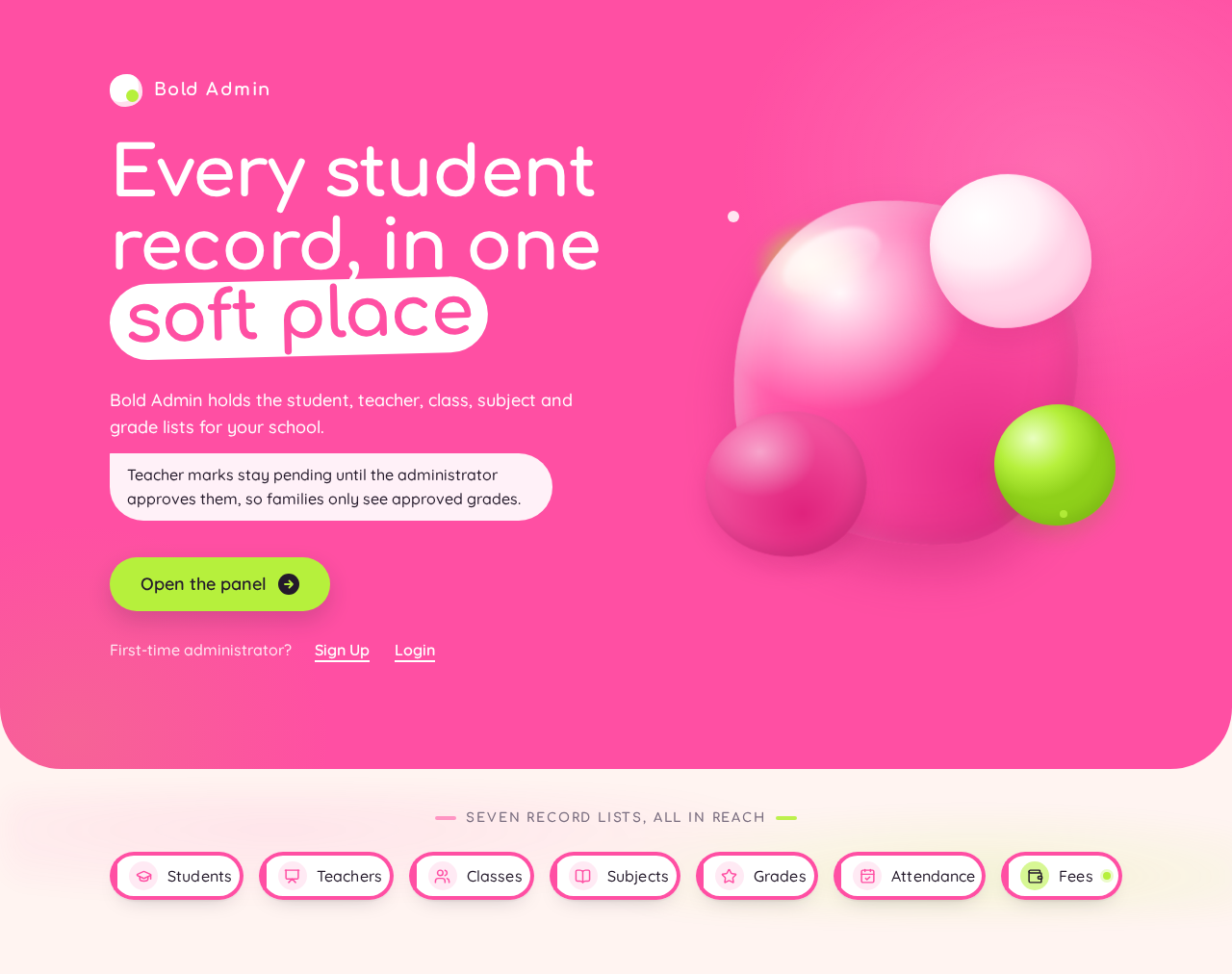
Every student record, in one soft place
Bold Admin holds the student, teacher, class, subject and grade lists for your school.
Teacher marks stay pending until the administrator approves them, so families only see approved grades.
Seven record lists, all in reach
- Students
- Teachers
- Classes
- Subjects
- Grades
- Attendance
- Fees
Every student record, in one soft place
Bold Admin holds the student, teacher, class, subject and grade lists for your school.
Teacher marks stay pending until the administrator approves them, so families only see approved grades.
Seven record lists, all in reach
- Students
- Teachers
- Classes
- Subjects
- Grades
- Attendance
- Fees
No comments yet. Be the first!