Page 1 of 17
System Requirements Document for boardey-ai
1. Introduction
boardey-ai is an AI-assisted board and whiteboard application. It lets a person start a board, prompt an AI to generate or arrange content on it, and iterate on that board until it is ready to use or share. A second participant can join an existing board, review the AI-generated content, and add or adjust items toward a shared result.
The product intent is "think together, visually, faster": the board is the working surface, the AI is a content-generation and arrangement partner inside that surface, and collaboration happens directly on the board rather than in a separate document or thread.
Audience. The primary audience is product managers, strategists, designers, and founders — people who run workshops, brainstorms, and async planning sessions and who need a visual wall of ideas rather than a spreadsheet. The application is delivered as a first-party web application with application-owned identity, a public entry surface, a shared verification surface, a revisitable board overview, and a focused board editing workspace.
Page 2 of 17
2. System Overview
boardey-ai is a custom-UI web application with a backend integration. It provides four current destinations:
- Landing — an anonymous public entry surface that explains the AI-assisted board product before identity establishment or protected work.
- Login — a shared verification surface used by returning users to reach their boards and the collaborative editing workspace.
- Boards — a protected, revisitable overview for locating and opening existing boards.
- Board Editor — a protected, focused workspace for creating boards, generating or arranging content with AI, and editing existing shared boards.
Actors. Two accepted human personas participate: the Board Creator, who starts a new board, prompts the AI to generate or arrange content, and iterates until the board is ready to use or share; and the Board Collaborator, who opens a shared board, reviews the AI-generated content, and adds or adjusts items to reach a shared result. The AI content-generation service is a non-persona system actor that executes generation and arrangement work inside the editor.
Accepted behavior. Board creation and AI-assisted generation/arrangement of board content; iterative editing of a board; opening and reviewing an existing shared board; contributing edits to a shared board; locating and reopening existing boards; self-service enrollment and returning verification for both personas.
Ownership. All four destinations are first-party application surfaces. Identity is application-owned. The Landing surface is anonymously reachable; Boards and Board Editor require an established identity. The AI generation service is a supporting system actor, not a destination.
Narrow exclusions. No specific Boardey AI features were confirmed by the source; the reference is a loose product-category reference only. No adjacent account-management capabilities, no administrative or permission-tiered surfaces, no billing, and no integrations beyond the accepted AI generation and collaboration behavior are in scope.
Page 3 of 17
2a. Product Interpretation and Delivery Boundary
boardey-ai is delivered as a first-party web application that the user reaches directly in a browser. The public entry surface is anonymous: a visitor can read what the product does and understand the AI-assisted board concept before establishing any identity. The board overview and the board editor are protected surfaces — they hold durable, actor-specific state (a person's boards, and the shared state of a board that multiple people edit), so access to them requires an established identity.
Identity is application-owned and self-service. A new participant establishes identity on first use; a returning participant verifies identity to reach existing boards and the editor. This is the minimum continuity needed for a person to privately own and resume their boards and for a shared board's edits to remain bound to the correct participant. It does not introduce roles, permission tiers, or differentiated visibility over shared board state.
The AI generation and arrangement capability is part of the current product and is executed by a backend service invoked from the board editor. Collaboration on a shared board is current: a collaborator opens an existing board, reviews generated content, and contributes edits.
Future or unconfirmed material — anything beyond the accepted board creation, AI generation/arrangement, editing, sharing, and collaboration behavior — is out of the current delivery boundary and is not represented in current pages or acceptance.
2c. Page Content and Component Coverage
Page 4 of 17
Landing
- Information and state. Anonymous public entry. Explains the AI-assisted board product: what a board is, that an AI can generate and arrange board content from a prompt, and that boards can be shared and edited together. No identity required; no protected board state is shown.
- Primary actions. Start a board (entry into identity establishment for a new participant); proceed to verification for a returning participant.
- Supporting actions. Read example prompts and product explanation; navigate to the verification surface.
- Domain entities. Example board prompts; product explanation content; board preview representations.
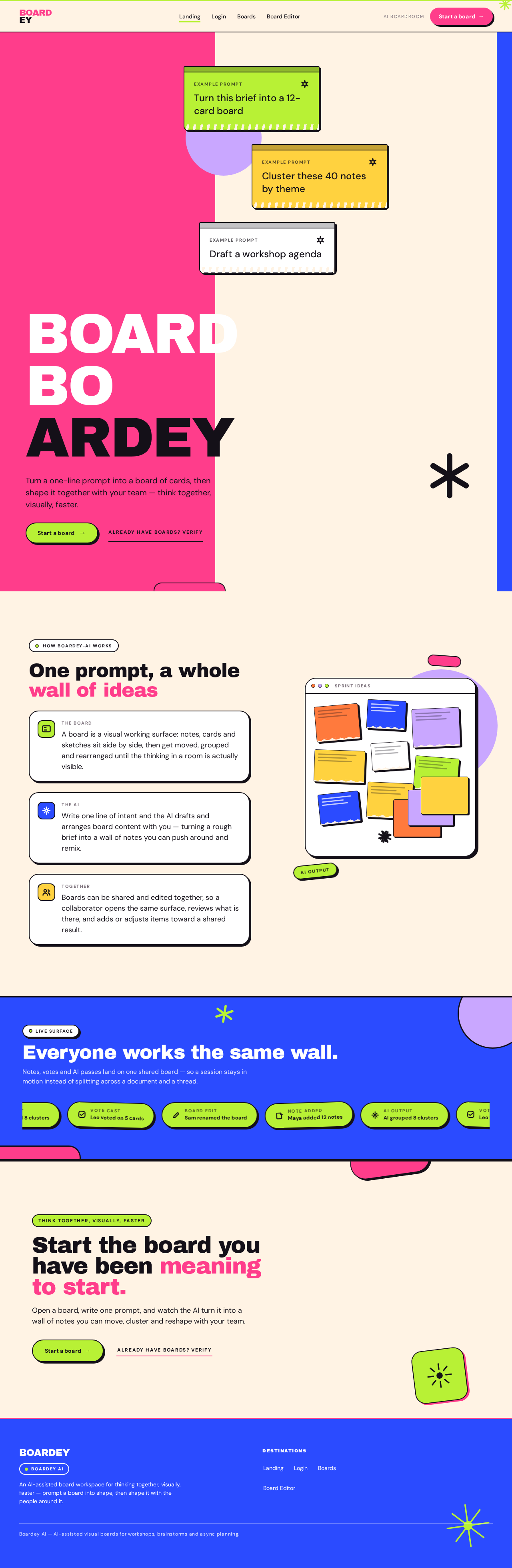
- Component responsibilities. Hero composition carrying the product wordmark and a single primary call to action; example-prompt cards showing real one-line prompts; activity strip communicating collaborative board activity; entry control that routes a new participant into identity establishment and a returning participant into verification.
- States. Loading: static content, no data fetch required. Empty: not applicable — content is authored. Success: visitor understands the product and can begin. Error: if the entry control cannot reach the identity flow, show an inline message and keep the control available for retry. Recovery: retry the entry action; the surface remains fully readable.
Login
- Information and state. Shared verification surface for both personas. Establishes identity for a first-time participant and verifies identity for a returning participant. Anonymous entry; no protected board state is shown before verification succeeds.
- Primary actions. Establish identity as a new participant (self-service enrollment); verify identity as a returning participant; submit credentials.
- Supporting actions. Switch between enrollment and verification; return to the public entry surface.
- Domain entities. Participant identity (credential and display identity); session continuity for the participant.
- Component responsibilities. Identity form with the fields required for enrollment and for verification; mode switch between the two; submit control; inline validation and error region; post-success routing into the board overview.
- States. Loading: submit control shows an in-progress state while the request is in flight and is not double-submittable. Empty: initial form state with no input. Success: identity established or verified; participant is routed to the board overview. Error: invalid or incomplete input shows a field-level message; failed verification shows a form-level message without clearing entered values. Recovery: correct the input and resubmit; the participant remains on this surface until verification succeeds.
Boards
- Information and state. Protected overview of the participant's boards. Shows existing boards with enough identity to recognize and choose one — board title, last-modified information, and a content preview. Shows collaborative activity on boards the participant can access.
- Primary actions. Open an existing board into the editor; create a new board and enter the editor.
- Supporting actions. Scan and compare boards; read recent collaboration activity.
- Domain entities. Board (title, preview content, last-modified metadata, participants); collaboration activity entries.
- Component responsibilities. Board wall presenting boards as varied cards with previews; create-board control; activity strip carrying recent collaboration entries; per-board open control; empty-state region for a participant with no boards.
- States. Loading: board wall shows placeholder cards while boards are fetched. Empty: a participant with no boards sees an explanation and a create-board control. Success: boards are listed and openable. Error: if boards cannot be loaded, show an inline message with a retry control; if a single board cannot be opened, show an inline message on that card and keep the rest usable. Recovery: retry the failed load; the participant stays on this surface.
Page 5 of 17
Board Editor
- Information and state. Protected focused workspace for a single board. Holds the board's current content — notes and arranged items — plus the board title and the participants currently on the board. Reflects AI generation in progress and newly generated content as it arrives.
- Primary actions. Enter a prompt and send it to the AI to generate or arrange board content; add a note directly; edit or adjust existing items; move and arrange items on the canvas; rename the board.
- Supporting actions. Select a tool from the tool rail; open a side panel; review the board's participants; return to the board overview.
- Domain entities. Board (title, content items, participants); board item (note content, position, colour/field assignment, origin as authored or AI-generated); AI generation request (prompt text, in-progress state, resulting items).
- Component responsibilities. Full-bleed canvas rendering board items; floating tool rail for selecting the active tool; floating AI prompt capsule with a send control that reflects the generating state; side panel presenting board details and participants; item editor for changing an item's content; board title control; navigation back to the board overview.
- States. Loading: the canvas shows a loading state while the board's content is fetched. Empty: a board with no items shows an invitation to enter a prompt or add a note. Success: items render on the canvas; a completed generation adds its items to the board; an edit is reflected immediately. Error: a failed generation shows an inline message on the prompt capsule and leaves the board unchanged and editable; a failed save of an edit shows an inline message and keeps the participant's change available to retry; a failed board load shows a message with a retry control. Recovery: resend the prompt or retry the save; the participant remains in the editor with the board's prior content intact.
Page 6 of 17
3. Functional Requirements
FR-1 — Start a board from the public entry surface (explicit)
As a Board Creator, I should be able to start a board from the public entry surface so that I can begin working without first knowing the product's internals.
- Trigger/input: the visitor activates the start-a-board control on Landing.
- Observable result: the visitor is taken into identity establishment, and on success arrives at a new board in the Board Editor.
- Access state: Landing is anonymous; the board itself is protected.
- Failure/recovery: if the entry action cannot reach identity establishment, an inline message is shown and the control remains available for retry.
- Continuation: after the board opens, the creator can prompt the AI or add notes.
FR-2 — Establish identity as a new participant (required_inference)
As a Board Creator or Board Collaborator, I should be able to establish my own identity on first use so that my boards and my edits remain mine and can be resumed.
- Trigger/input: the participant submits the enrollment form on Login.
- Observable result: an identity is established for the participant and they are routed to the board overview.
- Access state: Login is anonymously reachable; protected board state remains unavailable until identity is established.
- Failure/recovery: invalid or incomplete input shows a field-level message; a failed attempt shows a form-level message and preserves entered values so the participant can correct and resubmit.
- Continuation: the participant reaches Boards and can create or open a board.
FR-3 — Verify identity as a returning participant (required_inference)
As a Board Creator or Board Collaborator, I should be able to verify my identity so that I can reach my existing boards and the editor again.
- Trigger/input: the returning participant submits the verification form on Login.
- Observable result: the participant's session is established and they are routed to the board overview with their existing boards available.
- Access state: Login is anonymously reachable; Boards and Board Editor remain unavailable until verification succeeds.
- Failure/recovery: failed verification shows a form-level message without clearing entered values; the participant remains on Login and can retry.
- Continuation: the participant opens an existing board or creates a new one.
FR-4 — Locate and open an existing board (required_inference)
As a Board Creator or Board Collaborator, I should be able to see my boards and open one so that I can resume work on it.
- Trigger/input: the participant opens Boards and selects a board.
- Observable result: the selected board opens in the Board Editor with its current content.
- Access state: Boards requires an established identity.
- Failure/recovery: if boards cannot be loaded, an inline message with a retry control is shown; if one board cannot be opened, an inline message appears on that board and the rest remain usable.
- Continuation: the participant works in the editor.
FR-5 — Create a new board (explicit)
As a Board Creator, I should be able to create a new board so that I have a fresh surface for a new piece of work.
- Trigger/input: the creator activates the create-board control on Boards (or arrives from the Landing entry).
- Observable result: a new, empty board is created and opened in the Board Editor.
- Access state: requires an established identity.
- Failure/recovery: if creation fails, an inline message is shown and the control remains available for retry.
- Continuation: the creator prompts the AI or adds notes to the new board.
FR-6 — Generate or arrange board content with AI (explicit)
As a Board Creator, I should be able to enter a prompt and have the AI generate or arrange content on my board so that I can turn an idea or a brief into board content quickly.
- Trigger/input: the creator types a prompt into the AI prompt capsule in the Board Editor and sends it.
- Observable result: the prompt capsule shows a generating state; when generation completes, the resulting items appear on the board as new board items.
- Access state: requires an established identity and an open board.
- Failure/recovery: a failed generation shows an inline message on the prompt capsule, leaves the board unchanged, and keeps the prompt available to resend.
- Continuation: the creator reviews the generated items and iterates with further prompts or direct edits.
FR-7 — Iterate on a board until it is ready (explicit)
As a Board Creator, I should be able to edit and adjust board content so that I can refine the board until it is ready to use or share.
- Trigger/input: the creator adds a note, edits an item's content, moves or arranges items, or renames the board.
- Observable result: the change is reflected on the board and persisted to the board's state.
- Access state: requires an established identity and an open board.
- Failure/recovery: a failed save shows an inline message and keeps the participant's change available to retry; the board's prior content remains intact.
- Continuation: the creator continues editing or leaves the board and returns to the overview.
FR-8 — Open a shared board and review its content (required_inference)
As a Board Collaborator, I should be able to open a board shared with me and review its content so that I can understand what has been produced before contributing.
- Trigger/input: the collaborator opens Boards and selects the shared board.
- Observable result: the board opens in the Board Editor showing its current items, including AI-generated content, and the board's participants.
- Access state: requires an established identity.
- Failure/recovery: if the board cannot be loaded, a message with a retry control is shown.
- Continuation: the collaborator contributes edits.
FR-9 — Contribute edits to a shared board (required_inference)
As a Board Collaborator, I should be able to add or adjust items on a shared board so that the group reaches a shared result.
- Trigger/input: the collaborator adds a note, edits an item, or moves and arranges items on the open board.
- Observable result: the collaborator's changes appear on the board alongside the existing content and are persisted to the shared board state.
- Access state: requires an established identity and access to the shared board.
- Failure/recovery: a failed save shows an inline message and keeps the change available to retry.
- Continuation: the collaborator continues contributing or leaves the board; the board retains the combined result.
FR-10 — See who is on a board and what has changed (required_inference)
As a Board Creator or Board Collaborator, I should be able to see the board's participants and recent collaboration activity so that I know who else is working on it.
- Trigger/input: the participant views the board's participant information in the editor, or the activity strip on Boards.
- Observable result: the board's participants are shown in the editor, and recent collaboration activity is shown on the overview.
- Access state: requires an established identity.
- Failure/recovery: if participant or activity information cannot be loaded, the rest of the surface remains usable and an inline message is shown.
- Continuation: the participant continues working on the board.
Page 7 of 17
4. User Personas
Page 8 of 17
Board Creator
Product context. The Board Creator is the person who brings a piece of work to the product — a brief, a workshop, a brainstorm, a planning session — and needs it turned into a visual board quickly. They arrive either from the public entry surface with an idea already in mind, or from the board overview to resume something in progress.
Primary goal. Turn an idea or brief into a board of content fast, then refine it until it is ready to use or share.
Distinct accepted responsibilities. Starting a new board; entering prompts that ask the AI to generate or arrange board content; reviewing what the AI produced; adding and editing notes directly; moving and arranging items; renaming the board; deciding when the board is ready to use or share.
Relevant inputs and decisions. The prompt text they write; whether a generated result is good enough or needs another prompt; which items to keep, change, or rearrange; when the board is finished.
Interactions with other participants. The creator is the one who produces the board that a Board Collaborator later opens and contributes to. The creator sees the board's participants and recent collaboration activity, so they know when others have joined or changed the board.
Observable success. A board exists with content on it, the content reflects the creator's intent after iteration, and the board is available for others to open and contribute to.
What makes this role different. The creator's work is generative and authorial: they drive the AI, decide what the board should contain, and own the board's readiness. The collaborator's work is responsive: they arrive at an existing board and work within content someone else produced.
Page 9 of 17
Board Collaborator
Product context. The Board Collaborator is someone who has been given access to a board that already exists — typically one the Board Creator produced with AI assistance — and who needs to understand it and add to it. They arrive through the board overview, not through the public entry surface.
Primary goal. Understand what is already on a shared board and contribute their own items so the group reaches a shared result.
Distinct accepted responsibilities. Opening a shared board; reviewing its existing content, including AI-generated items; adding notes; adjusting existing items; moving and arranging items; seeing who else is on the board.
Relevant inputs and decisions. What the existing board content means; which items need adding, changing, or regrouping; whether their contribution is complete.
Interactions with other participants. The collaborator works on the same board as the Board Creator and any other participants. Their edits appear alongside existing content, and the board retains the combined result after they leave.
Observable success. Their contributions are on the board, persisted, and visible alongside the content that was already there.
What makes this role different. The collaborator does not start from a blank surface and does not own the board's readiness. Their work is review-and-contribute: they must first read what exists, then add to it without discarding it.
5. Core User Flows
Page 10 of 17
Flow 1 — Board Creator starts a board and generates content with AI
- The Board Creator arrives at the Landing surface as an anonymous visitor and reads what the product does, including the example prompts shown on the entry surface.
- The creator activates the start-a-board control. Because the board is protected state, they are taken into identity establishment on Login.
- On Login, the creator completes the enrollment form and submits it. Their identity is established and they are routed to the board overview.
- On Boards, the creator activates the create-board control. A new, empty board is created and opens in the Board Editor.
- In the Board Editor, the empty board shows an invitation to enter a prompt or add a note. The creator types a prompt into the AI prompt capsule — for example, asking the AI to turn a brief into a set of cards — and sends it.
- The prompt capsule shows a generating state while the request is in flight. When generation completes, the resulting items appear on the board as new board items.
- The creator reviews the generated items. If the result is not what they wanted, they send another prompt; the board keeps its existing content and the new result is added.
- If a generation fails, an inline message appears on the prompt capsule, the board is unchanged, and the creator resends the prompt.
- The creator continues iterating — adding notes directly, editing item content, moving and arranging items, renaming the board — until the board is ready to use or share.
- The creator leaves the board and returns to Boards, where the board now appears with its content preview and last-modified information.
Flow 2 — Board Creator returns to an existing board
- The Board Creator arrives at Login and submits the verification form.
- Their identity is verified and they are routed to Boards, where their existing boards are listed.
- The creator scans the board wall, comparing previews and last-modified information, and selects a board.
- The board opens in the Board Editor with its current content, including any items added by collaborators.
- The creator continues editing or prompting the AI, and their changes are persisted to the board.
- If the board cannot be loaded, a message with a retry control is shown and the creator retries without losing their place on the overview.
Page 11 of 17
Flow 3 — Board Collaborator joins a shared board and contributes
- The Board Collaborator arrives at Login and establishes identity on first use, or verifies identity if returning.
- They are routed to Boards, where the shared board appears in their board wall with its preview and recent collaboration activity shown in the activity strip.
- The collaborator selects the shared board. It opens in the Board Editor showing its current items — including the AI-generated content the Board Creator produced — and the board's participants.
- The collaborator reviews the existing content to understand what has been produced.
- The collaborator adds a note, edits an existing item, or moves and arranges items. Their changes appear on the board alongside the existing content and are persisted to the shared board state.
- If a save fails, an inline message is shown and the collaborator's change remains available to retry.
- The collaborator continues contributing until the group's shared result is reached, then leaves the board. The board retains the combined result, and the creator sees the collaborator's contributions when they next open it.
Flow 4 — Board Creator sees collaboration activity on their boards
- The Board Creator verifies identity on Login and arrives at Boards.
- The activity strip on the overview shows recent collaboration entries — who added notes, what the AI grouped, who contributed edits.
- The creator reads the activity to see which boards have moved since they last looked.
- The creator opens the board with the most recent activity and reviews the changes in the Board Editor.
- The creator continues working on the board, and their own changes are persisted alongside the collaborators' contributions.
Page 12 of 17
6. Visuals, Colors and Theme
The creative direction is authoritative for this section. The muse is Jessica Walsh, and the headline idea is saturated play maximalism for an AI boardroom that feels like a party, not a spreadsheet. The product's promise is "think together, visually, faster", so the surface reads as a wall of sticky notes and colour rather than a grey enterprise canvas. Colour is art-directed, not chaotic: boards and the editor stay legible while the brand stays unmistakable.
Colour tokens — light mode
| Role | Hex | Use |
|---|
| Background | #FFF3E4 | Warm cream ground; colour fields read as painted, not printed |
| Surface | #FFFFFF | Cards, panels, editor canvas frame — white reads as "a sheet on a coloured desk" |
| Text | #141018 | Deep ink for all body and headline text (contrast on cream ≈ 15:1) |
| Primary | #FF3D8B | Hot pink brand action colour — buttons, active tool, AI prompt send, board chrome |
| Accent | #B8F135 | Acid lime second voice — AI-generated content tags, presence avatars, generating state, sticky-note highlights |
| Muted | #7A6E78 | Metadata, timestamps, helper copy |
| Field — tangerine | #FF7A3D | Full-bleed colour block / sticky note |
| Field — cobalt | #2B4BFF | Full-bleed colour block / sticky note |
| Field — lilac | #C9A7FF | Full-bleed colour block / sticky note |
| Field — sunflower | #FFD23F | Full-bleed colour block / sticky note |
| Hairline | #E8DDD2 | 1px hairline borders on non-interactive surfaces |
Supporting colour fields are used as full-bleed blocks and sticky notes — never as gradients, always as flat fields. Interactive cards carry a 2px solid ink border; everything else uses the 1px hairline.
Typography
- Headings: Archivo Black at weight 400 (it is the weight), tracking
-0.03em, sentence case, very large. Headlines behave like poster type and may wrap into 2–3 stacked lines that fill the column.
- Secondary headings: Unbounded 500 for section titles and panel headers — a slightly futuristic counter-voice.
- Body: DM Sans.
- Micro-labels: all-caps only for micro-labels (board status, tool names, timestamps) at 11–12px with
+0.14em tracking.
- Scale: 1.333 modular on a 16px base — 128 / 96 / 72 / 48 / 32 / 24 / 18 / 16 / 14.
- Responsive sizes: mobile display 56px → desktop 128px via
clamp(3.5rem, 9vw, 8rem); section headings clamp(2rem, 4.5vw, 3rem); board titles 24–32px; UI labels 12–14px.
- Line-height: 0.92 for display, 1.5 for body, 1.35 for UI.
Shape language. Hard-edged colour fields cut by soft chunky radii: cards and panels at 24–32px radius, buttons as full pills, sticky notes as 4px-radius squares with a hand-torn bottom edge. Overlapping shapes are the default composition — a lilac circle half-behind a white card, a lime sticker rotated −6° on a panel corner, a pink capsule crossing a section boundary. Sticker elements (star, arrow, speech bubble, asterisk) are drawn with thick 3px strokes in ink or white and pasted at 5–12° rotations. Depth comes from a hard 4px offset shadow in ink (#141018) or pink (#FF3D8B) that reads as a printed sticker lifted off the page — never a soft blurred drop shadow.
Layout. Colour-blocked sections stacked vertically, each a different flat field (cream → pink → cream → lime → cobalt with white type), with hard horizontal cuts between them and never gradient blends. The board list is a masonry wall of cards at varying widths and heights, each carrying a coloured top bar and a rotated sticker corner — deliberately not a uniform grid of identical tiles. The editor is a full-bleed canvas with a floating left tool rail (pill buttons, 56px wide) and a floating bottom-centre AI prompt bar shaped like a chunky capsule with a lime send button; panels slide in from the right as white sheets over the canvas. The grid is asymmetric editorial: 12 columns at 1280px, content pushed left with generous right margin, headlines allowed to break the column and bleed to the viewport edge on the landing page. At 768px the grid collapses to 6 columns and colour blocks stack full-width; at 375px everything is single column with 20px gutters and the tool rail becomes a bottom bar.
Imagery. Colour and shape are the imagery — no stock photography in hero positions. Where humans appear, they appear as art-directed cut-out portraits with a flat colour field behind them and a thick ink outline, always cropped hard (head cut by the frame edge) and rotated 2–4°. Supporting visuals are glossy 3D props shot on flat colour: a pink foam hand, an oversized pencil, a squishy lime cube, a chrome asterisk — used as sticker objects floating over colour blocks. Board content previews are rendered as miniature sticky-note walls in the palette's field colours, and the AI's output is visualised as a burst of overlapping notes fanning out from a lime spark — never as a robot or a brain icon. Icons are thick-line 2.5px ink pictograms with rounded caps.
Readable text and controls. Headlines, wordmarks, labels, numbers, card text, and controls stay entirely inside the viewport and their container at 375px, 768px, and 1280px, wrapping or scaling to fit, and no other element covers any part of them. Imagery, decoration, and motion may be cropped, bled off an edge, rotated, overlapped, or cut as the direction asks, as long as they cover no readable text or control. Moving and scrollable content — the activity marquee, ticker, or horizontally scrollable rows — may cross the viewport or container edge by design; every item becomes fully readable as it passes. Under prefers-reduced-motion, the marquee becomes a static wrapped row of activity chips and no element rotates.
Page 13 of 17
7. Signature Design Concept
The public entry surface is a full-bleed warm cream canvas split into three asymmetric colour zones: a large hot-pink block occupying the left 42% of the viewport from top to bottom edge, a cobalt block as a narrow vertical strip at the far right edge bleeding off the frame, and the cream ground between them.
The dominant element is the word BOARDEY set in Archivo Black at clamp(3.5rem, 11vw, 10rem), stacked in three lines inside the pink block, flush left, with the final "Y" breaking out of the pink block onto the cream ground in ink. Beneath it sits a single ink line of 20px body copy and one pill call to action — "Start a board →" — in lime with ink text, pinned inside the pink block.
Overlapping the pink/cream boundary are three rotated sticky-note cards (lime, sunflower, white) tilted −6°, 3°, and −2°, each carrying a real one-line example prompt — "Turn this brief into a 12-card board", "Cluster these 40 notes by theme", "Draft a workshop agenda" — with a small AI spark glyph in the corner. A marquee strip of activity chips runs along the very bottom edge in ink on lime.
Nothing is centred; there is no gradient and no floating blue button. The three-line Archivo Black wordmark that starts inside a solid hot-pink block and lets its last letter break out onto the cream ground is the signature device, and it repeats on the Login page and as a compact lockup in the editor's top bar. The sticky-note card is the primary UI unit everywhere: real example prompts on the landing hero, board previews on the Boards page, and the user's own notes in the editor — each with a coloured top bar, a 4px-radius body, a hand-torn bottom edge, and a hard 4px offset shadow.
Page 14 of 17
8. Interaction Model & Motion Direction
Interaction Model: Animated
Motion Tempo: expressive
Hero Dimensionality: layered_2d
Page 15 of 17
Landing Hero Motion Brief
Focal subject. The three-line Archivo Black "BOARDEY" wordmark inside the hot-pink block, with its final letter breaking onto the cream ground, and the three rotated sticky-note cards overlapping the pink/cream boundary.
Input → transformation → outcome thesis. As the visitor scrolls or the page settles, the colour blocks and the wordmark scale in from 0.94 to 1 with a slight overshoot, and the three sticky-note cards enter in a staggered sequence, each rotating ±2° on hover with a 180ms spring. The outcome is a composed, fully readable hero in which the wordmark, the body line, and the pill call to action are all whole and unobstructed, and the example prompts are legible on their notes.
Motion vocabulary. Staggered scale-ins (0.94 → 1 with slight overshoot, 380ms cubic-bezier(0.2, 0.9, 0.25, 1.1)) on cards, stickers, and colour blocks as they enter the viewport; ±2° sticker rotation on hover with a 180ms spring; colour flips on hover for pills (pink → ink, white text); a marquee ticker of board activity along the bottom edge that pauses on hover.
Composed first frame. The cream ground fills the viewport; the pink block occupies the left 42% with the wordmark stacked flush left inside it and the "Y" crossing onto the cream; the cobalt strip bleeds off the right edge; the three sticky notes sit rotated across the pink/cream boundary; the lime pill call to action is pinned inside the pink block; the ink-on-lime activity marquee runs along the bottom edge.
Reduced-motion state. All entrances become instant opacity changes, the ticker becomes a static wrapped row of activity chips, and no element rotates. The hero remains fully composed and every readable element stays whole.
Page 16 of 17
9. Non-Functional Requirements
- NFR-1 — Identity and session continuity (required_inference). Identity is application-owned and self-service. A participant establishes identity on first use and verifies it on return. Session continuity must persist so that a participant's boards and edits remain bound to them across visits. Rationale: boards are durable, actor-specific state and shared boards carry edits from multiple participants.
- NFR-2 — Protected state boundary (required_inference). Boards and Board Editor must not expose board state to an unauthenticated visitor. The Landing surface is anonymously reachable and must not display protected board state. Rationale: the accepted access contract marks Boards and Board Editor as requiring login.
- NFR-3 — Persistence of board content (explicit). Board content, including AI-generated items and participant edits, must persist so that a board can be reopened and resumed, and so that a collaborator's contributions remain on the board after they leave.
- NFR-4 — Generation feedback (explicit). The AI prompt capsule must visibly indicate a generating state while a request is in flight, and generated items must appear on the board when generation completes. Rationale: the accepted behavior requires an observable generating state and an observable result.
- NFR-5 — Failure isolation (required_inference). A failed generation, failed save, or failed load must not destroy existing board content. The participant's unsaved change or prompt must remain available to retry. Rationale: recovery must be possible without losing accepted work.
- NFR-6 — Responsive legibility (explicit). Headlines, wordmarks, labels, numbers, card text, and controls must stay entirely inside the viewport and their container at 375px, 768px, and 1280px, wrapping or scaling to fit, with no other element covering any part of them.
- NFR-7 — Reduced motion (explicit). Under
prefers-reduced-motion, all entrances become instant opacity changes, the activity ticker becomes a static wrapped row of activity chips, and no element rotates.
- NFR-8 — Backend integration (explicit). The application requires backend integration to execute AI generation and arrangement, and to persist boards and their content.
10. Tech Stack
- Frontend: React web application with custom UI.
[Default — not specified by user]
- Backend: Python / FastAPI service providing board persistence and the AI generation and arrangement integration.
[Default — not specified by user]
- Storage: Application database for participant identity, boards, board items, and collaboration activity.
[Default — not specified by user]
- AI generation: A backend-invoked AI content-generation service that accepts a prompt and returns board items.
[Default — not specified by user]
- Packaging and deployment: Docker / docker-compose for local and single-host deployment.
[Default — not specified by user]
No source-specified technology choices were provided; the items above are labeled defaults and do not constitute product behavior.
Page 17 of 17
11. Assumptions and Constraints
- A-1. The reference to Boardey AI is a loose product-category reference only; no specific Boardey AI features were confirmed, so no feature is copied from it. (Source-stated.)
- A-2. Identity is application-owned and self-service, established on first use and verified on return. This is a required inference needed to make the accepted board-creation, board-resumption, and shared-board journeys executable. (Required inference.)
- A-3. Boards and Board Editor require an established identity; Landing and Login are anonymously reachable. (Planning Scope access contract.)
- A-4. The AI generation and arrangement capability is current and is invoked from the Board Editor. (Explicit.)
- A-5. Collaboration on a shared board is current: a collaborator opens an existing board, reviews its content, and contributes edits. (Required inference from the accepted Board Collaborator persona.)
- A-6. No roles, permission tiers, or differentiated visibility over shared board state are established. Identity and session continuity alone do not create differentiated permissions. (Constraint.)
- A-7. No adjacent account-management capabilities — password reset flows, profile management, invitations, or administrative surfaces — are in scope. (Constraint.)
- A-8. No billing, subscription, or payment capability is in scope. (Constraint.)
- A-9. No integrations beyond the accepted AI generation and arrangement behavior are in scope. (Constraint.)
- A-10. The creative direction is authoritative for visual design, colour, typography, shape, layout, imagery, and motion. (Source-stated.)
- A-11. The generic indigo/blue-on-white SaaS template is forbidden for this project. (Source-stated.)
- A-12. Where the creative direction asks readable text or a control to be cropped, clipped, covered, or run off an edge, the text or control stays whole and the gesture is carried by imagery or decoration instead. (Source-stated.)
12. Glossary
- Board — A visual working surface containing notes and arranged items, created by a participant and editable by participants with access to it.
- Board item — A single element on a board, such as a note. An item has content, a position, a colour/field assignment, and an origin (authored by a participant or generated by the AI).
- AI prompt capsule — The floating prompt input in the Board Editor through which a participant sends a prompt to the AI to generate or arrange board content.
- Generating state — The visible state of the AI prompt capsule while a generation request is in flight.
- Board Creator — The accepted persona who starts a new board, prompts the AI to generate or arrange content, and iterates until the board is ready to use or share.
- Board Collaborator — The accepted persona who opens a shared board, reviews the AI-generated content, and adds or adjusts items to reach a shared result.
- Board overview — The protected Boards surface listing a participant's boards with previews and last-modified information, and showing recent collaboration activity.
- Board Editor — The protected focused workspace for a single board, containing the canvas, the tool rail, the AI prompt capsule, and the board's participant information.
- Activity strip — The strip on the Boards surface carrying recent collaboration entries, such as who added notes or contributed edits.
- Sticky-note card — The primary UI unit of the product: a card with a coloured top bar, a 4px-radius body, a hand-torn bottom edge, and a hard 4px offset shadow.
No comments yet. Be the first!