birthday-gift-scrapbook
 maria manaran
CANVA WEBSITE PROMPT: “A LITTLE PIECE OF FOREVER” 🎀 Create a beautiful, emotional, interactive birthday gift website titled “A Little Piece of Forever” — a digital scrapbook filled with love, gratitude, memories, and heartfelt birthday wishes. The website should feel like opening a handwritten letter inside a dreamy memory book. IMPORTANT: FULL CANVA EDITABILITY - Use exactly 6 individual, real Canva photo frames. - Each frame must support replacing photos through Canva’s Replace or Upload Photo feature. - Never flatten, merge, or convert the photo frames into background images. - Keep all text, captions, decorations, buttons, and backgrounds as separate editable elements. - Label the frames subtly as Photo 1 through Photo 6. - Give every photo its own editable caption. - Organize the website into separate, clearly labeled pages or sections. - Use Canva-compatible animations and interactive navigation where supported. - If a website-style scrolling layout cannot preserve the required editability, create separate connected Canva website pages instead. DESIGN AESTHETIC Create a premium, dreamy, Pinterest-inspired digital scrapbook. Color palette: blush pink, warm ivory, dusty lavender, soft peach, and white. Visual elements: - Rounded instant-film and Polaroid-style photo frames. - Delicate ribbons, tiny hearts, stars, pressed flowers, and paper stickers. - Soft shadows, subtle paper textures, and handwritten accents. - Elegant serif headings paired with a clean handwritten font. - Gentle fade-in animations, floating sparkles, and smooth page transitions where supported. - A balanced, mobile-friendly layout with generous spacing. The design should feel personal, nostalgic, warm, and meaningful—not overly crowded or excessively romantic. --- SECTION 1 — THE LITTLE SURPRISE 🎁 Main title: “Today Is All About You!” Subtitle: “A tiny corner of the world, created just to celebrate your existence.” Button: “Step Into Your Surprise ✨” Create a dreamy opening screen with floating stars, delicate flowers, and a soft pink background. Make the button lead to the next section if supported by Canva’s website navigation. SECTION 2 — BEFORE YOU EXPLORE 💌 Heading: “A Few Words From My Heart” Editable message: “Sometimes, a simple birthday greeting doesn’t feel like enough to express how much someone means to us. So, I wanted to create something a little different—a small collection of words, memories, and wishes just for you. I hope that as you explore these pages, you find little reasons to smile. And whenever life feels overwhelming, I hope you remember that your presence makes this world a little more wonderful. Today, we celebrate you—not just because it’s your birthday, but because you are someone worth celebrating every single day.” SECTION 3 — SIX LITTLE PIECES OF HAPPINESS 📸 Heading: “Moments I Wish I Could Keep Forever” Subtitle: “Six little spaces for memories that deserve a place in our story.” Create a scrapbook gallery with exactly six separate, editable Canva photo frames. Arrange them in a beautiful collage that adapts to mobile screens. PHOTO 1 Caption: “A moment worth remembering ✨” PHOTO 2 Caption: “Your smile, my favorite detail 🤍” PHOTO 3 Caption: “The days that became memories 🌷” PHOTO 4 Caption: “One for the memory books 📖” PHOTO 5 Caption: “Happiness looked like this 💫” PHOTO 6 Caption: “A little moment, a lasting memory 🫶” For every photo: - Use a separate rounded Canva frame. - Keep the photo and caption independently editable. - Add a small, subtle “Photo 1” through “Photo 6” identifier. - Apply gentle animations if available. - Preserve the frame’s dimensions and position when photos are replaced. - Keep all decorations separate from the frames. SECTION 4 — A LETTER JUST FOR YOU 💗 Heading: “If You Ever Need a Reminder” Editable letter: “Happy Birthday to someone who deserves so many beautiful things in life. As you begin another chapter, I hope you give yourself permission to grow, to explore, to make mistakes, and to discover the wonderful things waiting for you. May you always find courage when things get difficult and hope when the road ahead feels uncertain. I hope you meet people who appreciate your heart, experience moments that make you genuinely happy, and discover new reasons to believe in yourself. Never feel like you have to have everything figured out. Take life one day at a time, celebrate your little victories, and be proud of how far you have come. Thank you for being a part of this world in your own special way. I hope the coming year gives you countless reasons to laugh, beautiful places to discover, and memories that make you smile even years from now. You deserve a birthday filled with warmth and a future filled with wonderful possibilities. Happy Birthday! May your next chapter be your most beautiful one yet. 🎂✨” SECTION 5 — MY WISHES FOR YOUR NEW CHAPTER 🌟 Heading: “If I Could Wish You a Thousand Things…” Display these phrases as separate editable text elements with gentle fade-in animations. “May your heart find more reasons to smile.” “May your dreams find their way to reality.” “May you discover places that take your breath away.” “May you find happiness in the smallest things.” “May you always have the courage to begin again.” “May you be surrounded by people who appreciate you.” “And may this year give you stories worth telling for the rest of your life.” Decorate this section with tiny stars, floral details, and handwritten notes. Keep the text readable on mobile devices. SECTION 6 — A LITTLE WISH BEFORE YOU GO 🎂 Create a separate, elegant final page resembling the last page of a handwritten scrapbook. Opening text: “BEFORE THIS LITTLE SURPRISE ENDS…” Reveal the main message in a beautiful centered layout: “I hope the coming year is gentle with you. I hope it brings unexpected happiness, unforgettable adventures, and beautiful beginnings. I hope you learn to appreciate the person you are becoming and never stop believing in the person you dream of being. And when another birthday comes around, may you look back on this year with a grateful heart and a thousand stories to tell. Keep growing. Keep dreaming. Keep making memories. The world still has so many beautiful things waiting for you. Happy Birthday! 🎂💗” Final small text: “A little gift, made with a lot of heart.” Button: “Let’s Remember It All Again ↻” Make the button return visitors to the beginning if supported by the website navigation. --- FINAL CANVA INSTRUCTIONS 1. Keep exactly six real, editable Canva photo frames across the entire website. 2. Do not count decorative illustrations or background pictures as photo frames. 3. Ensure every text element can be edited independently. 4. Keep decorations, captions, and photos on separate selectable layers. 5. Use a consistent color palette, font pairing, and spacing system. 6. Make the website suitable for phones, tablets, and desktop screens. 7. Use Canva-supported animation and navigation features; do not promise unsupported custom website behavior. 8. Make the recipient’s name, all messages, colors, and captions easy to customize. 9. If a generated design contains flattened or non-editable photo placeholders, replace them manually with actual Canva Frames using Elements → Frames. 10. Before finishing, verify that all six frames can be individually selected and that each accepts a replacement photo without changing the overall layout. Final creative direction: Make the finished website feel like a handmade gift preserved inside a digital scrapbook—a beautiful little reminder that some people deserve more than an ordinary birthday greeting.

Comments (0)
Sign in to leave a comment
System Requirements
System Requirements Document for birthday-gift-scrapbook
1. Introduction
A Little Piece of Forever is a digital birthday gift: a dreamy, handmade-feeling scrapbook website built in Canva and given to one person on their birthday. It is not a product with accounts, feeds, or analytics — it is a keepsake. The site is composed of six clearly labeled pages that carry a recipient from a soft opening surprise, through a heartfelt message, a gallery of six captioned photo memories, a personal letter, a list of wishes for the year ahead, and finally a closing page that lets them begin again.
The audience is twofold. The Gift Creator builds and personalizes the scrapbook — replacing each of the six Canva photo frames with real photos, editing the recipient's name, messages, captions, and colors, and keeping every element on its own editable layer. The Birthday Recipient opens the finished site on a phone, tablet, or desktop and moves through it in a quiet moment, reading and revisiting it.
The defining constraint is full Canva editability: exactly six real, individually replaceable Canva photo frames; every text element, caption, decoration, button, and background kept as a separate editable element; and no flattened or merged imagery. The design language is a premium, dreamy, Pinterest-inspired scrapbook in blush pink, warm ivory, dusty lavender, soft peach, and white — personal, nostalgic, warm, and meaningful, never crowded or excessively romantic.
2. System Overview
The delivered artifact is a Canva-built website consisting of six connected pages. It is a static, presentation-only experience: there is no backend, no database, no user accounts, and no server-side logic. All content is authored and edited inside Canva by the Gift Creator; all navigation and animation rely on Canva-supported website features.
Actors
- Gift Creator (human) — builds, personalizes, and verifies the scrapbook in Canva.
- Birthday Recipient (human) — opens and experiences the finished site.
- Canva (provider) — owns the editing surface, the photo-frame replacement mechanism, the website hosting/publishing, and the supported animation and navigation features.
Accepted behavior at a glance
- Six pages: The Little Surprise, Before You Explore, Six Little Pieces of Happiness, A Letter Just For You, My Wishes For Your New Chapter, A Little Wish Before You Go.
- Exactly six real Canva photo frames, each with its own editable caption and a subtle "Photo 1"–"Photo 6" identifier.
- Two navigation buttons: "Step Into Your Surprise\x20\xe2\x9c\xa8" (opening page) and "Let's Remember It All Again\x20\xe2\x86\xbb" (final page, returning to the beginning).
- Gentle, Canva-supported fade-in animations and page transitions only.
Narrow exclusions
- No custom-coded website behavior beyond what Canva supports.
- No flattening, merging, or background-conversion of the six photo frames.
- No decorative illustration or background picture may count as one of the six photo frames.
- No accounts, logins, comments, analytics, or data collection.
2a. Product Interpretation and Delivery Boundary
This is a provider-owned, static keepsake site. Canva owns the editing surface, the frame-replacement mechanism, the publishing/hosting, and the supported animation and navigation features. The Gift Creator owns all content decisions — photos, captions, messages, colors, and the recipient's name. The Birthday Recipient owns only the act of reading and navigating.
There is no application-owned identity in this product. The site is public and ephemeral: anyone with the link can open it, and no state is stored about any visitor. The "Let's Remember It All Again\x20\xe2\x86\xbb" button simply returns the visitor to the opening page; it does not create a session, save progress, or remember the visitor. No account creation, login, or personalization-by-visitor is in scope.
Current vs. future. Everything described in this document is current. No future-phase features are committed. Any capability not explicitly named in the source — comments, RSVP, music players, guest books, analytics, multi-recipient variants — is out of scope and must not be added.
2b. Source Content Inventory
Not applicable. No reference directive in this request declares a content_source; all content is authored directly in the user requirement thread and is reproduced in the page coverage and flows below.
2c. Page Content and Component Coverage
The Little Surprise
- Information / state: Opening page of the scrapbook. Displays the main title "Today Is All About You!", the subtitle "A tiny corner of the world, created just to celebrate your existence.", and the entry button "Step Into Your Surprise\x20\xe2\x9c\xa8". Background is a soft pink / warm ivory ground with floating stars and delicate flowers.
- Primary action: The recipient taps or clicks "Step Into Your Surprise\x20\xe2\x9c\xa8" to advance to the next page (Canva-supported navigation).
- Supporting actions: None. No other controls on this page.
- Domain entities: Page title, subtitle, entry button, decorative stars, decorative flowers, background.
- Component responsibilities: Title text element (independently editable); subtitle text element (independently editable); button element (independently editable, with Canva-supported link to the next page); decorative star and flower elements (each on its own layer, separate from text and button); background layer (separate, editable).
- States:
- Loading: Page renders with a gentle fade-in of the title and subtitle (Canva-supported).
- Empty: Not applicable — content is authored, not fetched.
- Success: Title, subtitle, and button are visible; button navigates to Before You Explore.
- Error / recovery: If Canva navigation is unavailable, the button remains visible and the recipient can scroll or use the Canva page navigation to continue. The Gift Creator can re-link the button in Canva.
Before You Explore
- Information / state: Displays the heading "A Few Words From My Heart" and the editable introductory message beginning "Sometimes, a simple birthday greeting doesn't feel like enough…" and ending "…someone worth celebrating every single day."
- Primary action: The recipient reads the message and continues to the next page.
- Supporting actions: None.
- Domain entities: Heading, message body, decorative accents.
- Component responsibilities: Heading text element (independently editable); message body text element (independently editable, preserving paragraph breaks); decorative elements on separate layers; background layer separate.
- States:
- Loading: Gentle fade-in of heading and message.
- Empty: Not applicable.
- Success: Full message is readable on phone, tablet, and desktop.
- Error / recovery: If the message overflows on small screens, the Gift Creator adjusts the text box size in Canva; the message remains fully readable.
Six Little Pieces of Happiness
- Information / state: Displays the heading "Moments I Wish I Could Keep Forever", the subtitle "Six little spaces for memories that deserve a place in our story.", and a scrapbook gallery of exactly six separate, editable Canva photo frames arranged in a collage that adapts to mobile screens. Each frame carries a subtle "Photo 1"–"Photo 6" identifier and its own editable caption:
- Photo 1 — "A moment worth remembering\x20\xe2\x9c\xa8"
- Photo 2 — "Your smile, my favorite detail\x20\xf0\x9f\xa4\x8d"
- Photo 3 — "The days that became memories\x20\xf0\x9f\x8c\xb7"
- Photo 4 — "One for the memory books\x20\xf0\x9f\x93\x96"
- Photo 5 — "Happiness looked like this\x20\xf0\x9f\x92\xab"
- Photo 6 — "A little moment, a lasting memory\x20\xf0\x9f\xab\xb6"
- Primary action: The recipient browses the six captioned memories.
- Supporting actions: None on the recipient side. The Gift Creator replaces each frame's photo via Canva's Replace or Upload Photo feature.
- Domain entities: Six Canva photo frames, six captions, six "Photo N" identifiers, heading, subtitle, decorative elements.
- Component responsibilities: Each of the six frames is a separate, rounded Canva frame on its own layer; each caption is a separate text element; each "Photo N" identifier is a separate text element; decorations (ribbons, hearts, stars, pressed flowers, paper stickers) are on separate layers, never merged with frames; background layer separate.
- States:
- Loading: Frames fade in gently (Canva-supported) as the page appears.
- Empty: If a frame has not yet been filled, it shows the Canva frame placeholder — the Gift Creator replaces it with a real photo.
- Success: All six frames display their photos with captions and identifiers; layout is intact on phone, tablet, and desktop.
- Error / recovery: If a frame is flattened or non-editable, the Gift Creator replaces it manually with an actual Canva Frame via Elements → Frames, then re-verifies that it accepts a replacement photo without changing the overall layout.
A Letter Just For You
- Information / state: Displays the heading "If You Ever Need a Reminder" and the editable birthday letter beginning "Happy Birthday to someone who deserves so many beautiful things in life." and ending "Happy Birthday! May your next chapter be your most beautiful one yet.\x20\xf0\x9f\x8e\x82✨".
- Primary action: The recipient reads the letter.
- Supporting actions: None.
- Domain entities: Heading, letter body, decorative accents.
- Component responsibilities: Heading text element (independently editable); letter body text element (independently editable, preserving paragraph breaks); decorative elements on separate layers; background layer separate.
- States:
- Loading: Gentle fade-in of heading and letter.
- Empty: Not applicable.
- Success: Full letter is readable on phone, tablet, and desktop.
- Error / recovery: If the letter overflows on small screens, the Gift Creator adjusts the text box in Canva; the letter remains fully readable.
My Wishes For Your New Chapter
- Information / state: Displays the heading "If I Could Wish You a Thousand Things…" and seven separate editable wish phrases, each with a gentle fade-in animation:
- "May your heart find more reasons to smile."
- "May your dreams find their way to reality."
- "May you discover places that take your breath away."
- "May you find happiness in the smallest things."
- "May you always have the courage to begin again."
- "May you be surrounded by people who appreciate you."
- "And may this year give you stories worth telling for the rest of your life."
- Primary action: The recipient reads the wishes.
- Supporting actions: None.
- Domain entities: Heading, seven wish text elements, decorative stars, floral details, handwritten notes.
- Component responsibilities: Heading text element (independently editable); each of the seven wishes is its own separate editable text element; decorative stars, floral details, and handwritten notes are on separate layers; background layer separate.
- States:
- Loading: Each wish fades in gently (Canva-supported).
- Empty: Not applicable.
- Success: All seven wishes are readable on mobile devices.
- Error / recovery: If a wish is unreadable on a small screen, the Gift Creator adjusts its text box size or position in Canva; the wish remains fully readable.
A Little Wish Before You Go
- Information / state: A separate, elegant final page resembling the last page of a handwritten scrapbook. Displays the opening text "BEFORE THIS LITTLE SURPRISE ENDS…", the centered main message beginning "I hope the coming year is gentle with you." and ending "Happy Birthday!\x20\xf0\x9f\x8e\x82\xf0\x9f\x92\x97", the final small text "A little gift, made with a lot of heart.", and the button "Let's Remember It All Again\x20\xe2\x86\xbb".
- Primary action: The recipient taps or clicks "Let's Remember It All Again\x20\xe2\x86\xbb" to return to the beginning (Canva-supported navigation).
- Supporting actions: None.
- Domain entities: Opening text, main message, final small text, return button, decorative accents.
- Component responsibilities: Opening text element (independently editable); main message text element (independently editable, centered layout); final small text element (independently editable); button element (independently editable, with Canva-supported link back to The Little Surprise); decorative elements on separate layers; background layer separate.
- States:
- Loading: Gentle fade-in of opening text and main message.
- Empty: Not applicable.
- Success: All text and the button are visible; the button returns the visitor to the beginning.
- Error / recovery: If Canva navigation is unavailable, the button remains visible and the recipient can use Canva page navigation to return to the beginning. The Gift Creator can re-link the button in Canva.
3. Functional Requirements
FR-1 — Opening surprise page (explicit) As a Birthday Recipient, I should see an opening page titled "Today Is All About You!" with the subtitle "A tiny corner of the world, created just to celebrate your existence." and a button labeled "Step Into Your Surprise\x20\xe2\x9c\xa8", so that I feel welcomed into the gift.
- Trigger/input: The recipient opens the site.
- Observable result: The opening page renders with the title, subtitle, and button visible on a soft pink background with floating stars and delicate flowers.
- Access state: Public, no identity required.
- Failure/recovery: If the button's navigation is unavailable, the recipient can continue via Canva page navigation.
- Continuation: The recipient taps the button to advance to Before You Explore.
FR-2 — Entry button navigation (explicit) As a Birthday Recipient, I should be able to tap "Step Into Your Surprise\x20\xe2\x9c\xa8" and be taken to the next section, so that I can begin exploring the gift.
- Trigger/input: Tap or click on the button.
- Observable result: The site advances to the Before You Explore page (Canva-supported navigation).
- Access state: Public.
- Failure/recovery: If navigation is unavailable, the recipient uses Canva page navigation.
- Continuation: The recipient reads the introductory message.
FR-3 — Heartfelt introductory message (explicit) As a Birthday Recipient, I should read the heading "A Few Words From My Heart" and the editable message about creating something a little different — a small collection of words, memories, and wishes — and about being someone worth celebrating every single day.
- Trigger/input: The recipient arrives on Before You Explore.
- Observable result: The full message is displayed and readable.
- Access state: Public.
- Failure/recovery: If the message overflows on a small screen, the Gift Creator adjusts the text box in Canva.
- Continuation: The recipient continues to the gallery.
FR-4 — Scrapbook gallery of six memories (explicit) As a Birthday Recipient, I should see the heading "Moments I Wish I Could Keep Forever", the subtitle "Six little spaces for memories that deserve a place in our story.", and a collage of exactly six captioned photo memories that adapts to my screen.
- Trigger/input: The recipient arrives on Six Little Pieces of Happiness.
- Observable result: Six photo frames with their captions and identifiers are displayed in a responsive collage.
- Access state: Public.
- Failure/recovery: If a frame is flattened or non-editable, the Gift Creator replaces it with a real Canva Frame via Elements → Frames.
- Continuation: The recipient continues to the letter.
FR-5 — Six exact photo captions (explicit) As a Birthday Recipient, I should see each of the six photos paired with its own caption: "A moment worth remembering\x20\xe2\x9c\xa8", "Your smile, my favorite detail\x20\xf0\x9f\xa4\x8d", "The days that became memories\x20\xf0\x9f\x8c\xb7", "One for the memory books\x20\xf0\x9f\x93\x96", "Happiness looked like this\x20\xf0\x9f\x92\xab", and "A little moment, a lasting memory\x20\xf0\x9f\xab\xb6".
- Trigger/input: The recipient views the gallery.
- Observable result: Each caption appears with its corresponding photo.
- Access state: Public.
- Failure/recovery: If a caption is unreadable, the Gift Creator adjusts its text box in Canva.
- Continuation: The recipient continues to the letter.
FR-6 — Subtle "Photo 1"–"Photo 6" identifiers (explicit) As a Birthday Recipient, I should see a small, subtle "Photo 1" through "Photo 6" identifier on each frame, so that the gallery reads as a catalogued set.
- Trigger/input: The recipient views the gallery.
- Observable result: Each frame carries its own identifier.
- Access state: Public.
- Failure/recovery: If an identifier is missing, the Gift Creator adds it as a separate text element in Canva.
- Continuation: The recipient continues to the letter.
FR-7 — Personal birthday letter (explicit) As a Birthday Recipient, I should read the heading "If You Ever Need a Reminder" and the editable letter about growth, courage, hope, self-belief, and celebrating how far I have come.
- Trigger/input: The recipient arrives on A Letter Just For You.
- Observable result: The full letter is displayed and readable.
- Access state: Public.
- Failure/recovery: If the letter overflows on a small screen, the Gift Creator adjusts the text box in Canva.
- Continuation: The recipient continues to the wishes.
FR-8 — Seven wishes for the new chapter (explicit) As a Birthday Recipient, I should see the heading "If I Could Wish You a Thousand Things…" and seven separate editable wish phrases, each with a gentle fade-in animation, decorated with tiny stars, floral details, and handwritten notes, and readable on mobile devices.
- Trigger/input: The recipient arrives on My Wishes For Your New Chapter.
- Observable result: All seven wishes are displayed and readable.
- Access state: Public.
- Failure/recovery: If a wish is unreadable on a small screen, the Gift Creator adjusts its text box in Canva.
- Continuation: The recipient continues to the final page.
FR-9 — Closing page (explicit) As a Birthday Recipient, I should see a separate, elegant final page resembling the last page of a handwritten scrapbook, with the opening text "BEFORE THIS LITTLE SURPRISE ENDS…", the centered main message about a gentle coming year, unexpected happiness, beautiful beginnings, and gratitude, and the final small text "A little gift, made with a lot of heart."
- Trigger/input: The recipient arrives on A Little Wish Before You Go.
- Observable result: The opening text, main message, and final small text are displayed.
- Access state: Public.
- Failure/recovery: If the message overflows on a small screen, the Gift Creator adjusts the text box in Canva.
- Continuation: The recipient may tap the return button.
FR-10 — Return-to-beginning button (explicit) As a Birthday Recipient, I should be able to tap "Let's Remember It All Again\x20\xe2\x86\xbb" and be returned to the beginning of the site, so that I can revisit the gift.
- Trigger/input: Tap or click on the button.
- Observable result: The site returns to The Little Surprise (Canva-supported navigation).
- Access state: Public.
- Failure/recovery: If navigation is unavailable, the recipient uses Canva page navigation to return to the beginning.
- Continuation: The recipient may re-explore the gift.
FR-11 — Exactly six real Canva photo frames (explicit) As a Gift Creator, I should use exactly six individual, real Canva photo frames across the entire website, so that the gallery matches the brief.
- Trigger/input: The Gift Creator builds the gallery in Canva.
- Observable result: Exactly six real Canva frames exist across the site.
- Access state: Canva editing surface (Gift Creator).
- Failure/recovery: If a frame is flattened or non-editable, the Gift Creator replaces it with a real Canva Frame via Elements → Frames.
- Continuation: The Gift Creator verifies each frame individually.
FR-12 — Frame photo replacement (explicit) As a Gift Creator, I should be able to replace each frame's photo through Canva's Replace or Upload Photo feature, so that I can personalize the gallery.
- Trigger/input: The Gift Creator selects a frame and uses Replace or Upload Photo.
- Observable result: The new photo appears inside the frame.
- Access state: Canva editing surface.
- Failure/recovery: If the frame does not accept a replacement, the Gift Creator replaces the frame with a real Canva Frame via Elements → Frames.
- Continuation: The Gift Creator repeats for all six frames.
FR-13 — No flattening or merging of frames (explicit) As a Gift Creator, I should never flatten, merge, or convert the photo frames into background images, so that each frame remains independently editable.
- Trigger/input: The Gift Creator edits the gallery.
- Observable result: Each frame remains a separate, selectable element.
- Access state: Canva editing surface.
- Failure/recovery: If a frame has been flattened, the Gift Creator replaces it with a real Canva Frame via Elements → Frames.
- Continuation: The Gift Creator re-verifies editability.
FR-14 — Separate editable elements (explicit) As a Gift Creator, I should keep all text, captions, decorations, buttons, and backgrounds as separate editable elements, so that every part of the site can be customized independently.
- Trigger/input: The Gift Creator builds and edits the site.
- Observable result: Each text, caption, decoration, button, and background is its own selectable layer.
- Access state: Canva editing surface.
- Failure/recovery: If elements are merged, the Gift Creator separates them into individual layers.
- Continuation: The Gift Creator verifies each element is independently editable.
FR-15 — Independent caption editability (explicit) As a Gift Creator, I should be able to edit each photo's caption independently of its photo, so that captions can be personalized without affecting the images.
- Trigger/input: The Gift Creator selects a caption text element.
- Observable result: The caption text changes without altering the photo or frame.
- Access state: Canva editing surface.
- Failure/recovery: If the caption is merged with the photo, the Gift Creator separates them into individual layers.
- Continuation: The Gift Creator repeats for all six captions.
FR-16 — Frame dimensions and position preserved on replacement (explicit) As a Gift Creator, I should be able to replace a photo without changing the frame's dimensions or position, so that the collage layout stays intact.
- Trigger/input: The Gift Creator replaces a photo in a frame.
- Observable result: The frame's dimensions and position remain unchanged.
- Access state: Canva editing surface.
- Failure/recovery: If the layout shifts, the Gift Creator restores the frame's dimensions and position in Canva.
- Continuation: The Gift Creator repeats for all six frames.
FR-17 — Decorations separate from frames (explicit) As a Gift Creator, I should keep all decorations separate from the frames, so that decorations can be moved or edited without affecting the photos.
- Trigger/input: The Gift Creator places decorations on the gallery page.
- Observable result: Decorations sit on their own layers, distinct from the frames.
- Access state: Canva editing surface.
- Failure/recovery: If a decoration is merged with a frame, the Gift Creator separates them into individual layers.
- Continuation: The Gift Creator verifies separation.
FR-18 — Decorative illustrations do not count as photo frames (explicit) As a Gift Creator, I should not count decorative illustrations or background pictures as photo frames, so that the site contains exactly six real photo frames.
- Trigger/input: The Gift Creator reviews the site's frames.
- Observable result: Only the six real Canva frames count as photo frames.
- Access state: Canva editing surface.
- Failure/recovery: If a decorative illustration was mistakenly counted, the Gift Creator adds a real Canva Frame to restore the count to six.
- Continuation: The Gift Creator re-verifies the count.
FR-19 — Consistent palette, font pairing, and spacing (explicit) As a Gift Creator, I should use a consistent color palette, font pairing, and spacing system across the site, so that the scrapbook feels cohesive.
- Trigger/input: The Gift Creator builds and edits the site.
- Observable result: The palette (blush pink, warm ivory, dusty lavender, soft peach, white), the serif-heading + handwritten-body font pairing, and the spacing system are applied consistently.
- Access state: Canva editing surface.
- Failure/recovery: If an element breaks the system, the Gift Creator restores the palette, font, or spacing.
- Continuation: The Gift Creator reviews the whole site.
FR-20 — Responsive across phones, tablets, and desktops (explicit) As a Birthday Recipient, I should be able to view the site comfortably on a phone, tablet, or desktop, so that the gift works wherever I open it.
- Trigger/input: The recipient opens the site on any of these devices.
- Observable result: The layout adapts and remains readable.
- Access state: Public.
- Failure/recovery: If the layout breaks on a device, the Gift Creator adjusts the layout in Canva.
- Continuation: The recipient continues reading.
FR-21 — Canva-supported animation and navigation only (explicit) As a Gift Creator, I should use only Canva-supported animation and navigation features, so that the site does not promise unsupported custom behavior.
- Trigger/input: The Gift Creator adds animations and navigation.
- Observable result: Only Canva-supported animations and navigation are used.
- Access state: Canva editing surface.
- Failure/recovery: If an animation or navigation is unsupported, the Gift Creator replaces it with a supported alternative or removes it.
- Continuation: The Gift Creator verifies the site in Canva.
FR-22 — Easy customization of name, messages, colors, and captions (explicit) As a Gift Creator, I should be able to easily customize the recipient's name, all messages, colors, and captions, so that the gift can be personalized.
- Trigger/input: The Gift Creator edits the relevant elements in Canva.
- Observable result: The recipient's name, messages, colors, and captions update without breaking the layout.
- Access state: Canva editing surface.
- Failure/recovery: If an edit breaks the layout, the Gift Creator restores the element's position and size.
- Continuation: The Gift Creator reviews the personalized site.
FR-23 — Replace flattened placeholders with real Canva Frames (explicit) As a Gift Creator, if a generated design contains flattened or non-editable photo placeholders, I should replace them manually with actual Canva Frames using Elements → Frames, so that the frames remain editable.
- Trigger/input: The Gift Creator inspects the design for flattened placeholders.
- Observable result: All six frames are real Canva Frames.
- Access state: Canva editing surface.
- Failure/recovery: If a replacement frame does not accept a photo, the Gift Creator replaces it again via Elements → Frames.
- Continuation: The Gift Creator re-verifies the frames.
FR-24 — Final verification of all six frames (explicit) As a Gift Creator, before finishing, I should verify that all six frames can be individually selected and that each accepts a replacement photo without changing the overall layout, so that the gift is fully editable.
- Trigger/input: The Gift Creator performs the final check in Canva.
- Observable result: All six frames are individually selectable and accept replacement photos without layout changes.
- Access state: Canva editing surface.
- Failure/recovery: If a frame fails the check, the Gift Creator replaces it with a real Canva Frame and re-verifies.
- Continuation: The Gift Creator publishes the site.
FR-25 — Six real Canva Frames verified for replacement (required_inference) As a Gift Creator, I should use six real Canva Frames and verify that each independently accepts photo replacement without changing its dimensions or position, so that the accepted gallery journey is executable.
- Trigger/input: The Gift Creator builds and verifies the gallery.
- Observable result: Six real Canva Frames each accept a replacement photo without layout change.
- Access state: Canva editing surface.
- Failure/recovery: If a frame fails, the Gift Creator replaces it with a real Canva Frame via Elements → Frames.
- Continuation: The Gift Creator publishes the site.
FR-26 — Separately editable Canva elements (required_inference) As a Gift Creator, I should keep text, captions, decorations, buttons, backgrounds, and photo frames as separately editable Canva elements, so that the accepted editability journey is executable.
- Trigger/input: The Gift Creator builds and edits the site.
- Observable result: Each element type remains on its own selectable layer.
- Access state: Canva editing surface.
- Failure/recovery: If elements are merged, the Gift Creator separates them into individual layers.
- Continuation: The Gift Creator verifies editability.
FR-27 — Canva-supported navigation and animations only where available (required_inference) As a Gift Creator, I should use Canva-supported navigation and animations only where available, so that the accepted navigation and animation journeys are executable.
- Trigger/input: The Gift Creator adds navigation and animations.
- Observable result: Only available Canva-supported navigation and animations are used.
- Access state: Canva editing surface.
- Failure/recovery: If a feature is unavailable, the Gift Creator uses a supported alternative or removes it.
- Continuation: The Gift Creator verifies the site in Canva.
4. User Personas
Gift Creator
Product context. The Gift Creator is the person building and personalizing the scrapbook in Canva. They are not a developer; they work entirely inside Canva's editing surface, using Canva's Replace or Upload Photo feature, text editing, and layer management. Their work is done before the gift is given.
Primary goal. Produce a finished, mobile-friendly digital scrapbook where all six photo frames remain individually selectable and accept replacement photos without changing the layout, and where every text, caption, decoration, button, and background is independently editable.
Distinct accepted responsibilities.
- Use exactly six individual, real Canva photo frames across the entire website.
- Replace each frame's photo through Canva's Replace or Upload Photo feature.
- Never flatten, merge, or convert the photo frames into background images.
- Keep all text, captions, decorations, buttons, and backgrounds as separate editable elements.
- Label the frames subtly as "Photo 1" through "Photo 6" and give every photo its own editable caption.
- Organize the website into separate, clearly labeled pages or sections.
- Use Canva-compatible animations and interactive navigation where supported.
- Apply a consistent color palette, font pairing, and spacing system.
- Make the recipient's name, all messages, colors, and captions easy to customize.
- If a generated design contains flattened or non-editable photo placeholders, replace them manually with actual Canva Frames using Elements → Frames.
- Before finishing, verify that all six frames can be individually selected and that each accepts a replacement photo without changing the overall layout.
Relevant inputs or decisions. Which six photos to use; what captions to write; the recipient's name; the messages and letter text; the color choices within the specified palette; the font pairing; the spacing system; whether to use a scrolling layout or separate connected Canva pages.
Interactions with other accepted participants. The Gift Creator's work is invisible to the Birthday Recipient — the recipient only sees the finished site. The Gift Creator's decisions determine what the recipient reads and sees.
Observable success. The finished site contains exactly six real Canva frames, each individually selectable and accepting a replacement photo without layout change; every text element is independently editable; the palette, font pairing, and spacing are consistent; and the site is suitable for phones, tablets, and desktop screens.
Birthday Recipient
Product context. The Birthday Recipient is the person the gift is made for. They open the finished site — typically on a phone, in a quiet moment — and move through it as a keepsake experience. They have no editing role and no account.
Primary goal. Experience a warm, nostalgic, personal birthday gift that feels like opening a handwritten letter inside a dreamy memory book, and be able to revisit it.
Distinct accepted responsibilities.
- Step into the surprise from the opening screen.
- Read the heartfelt message and the personal letter.
- Browse the six captioned photo memories.
- Read the wishes for their new chapter.
- Reach the final page and, if they wish, use the button that returns them to the beginning.
Relevant inputs or decisions. Whether to tap "Step Into Your Surprise\x20\xe2\x9c\xa8"; how long to linger on each page; whether to tap "Let's Remember It All Again\x20\xe2\x86\xbb" to revisit.
Interactions with other accepted participants. The Birthday Recipient interacts only with the finished site. They do not interact with the Gift Creator through the site; the gift is one-directional.
Observable success. The recipient can move through all six pages, read every message and caption, and return to the beginning using the final button.
5. Core User Flows
Flow 1 — Gift Creator builds and personalizes the scrapbook
- The Gift Creator opens Canva and creates the six-page scrapbook: The Little Surprise, Before You Explore, Six Little Pieces of Happiness, A Letter Just For You, My Wishes For Your New Chapter, and A Little Wish Before You Go.
- On Six Little Pieces of Happiness, the Gift Creator places exactly six individual, real Canva photo frames in a collage that adapts to mobile screens.
- For each frame, the Gift Creator uses Canva's Replace or Upload Photo feature to insert a personal photo. The frame's dimensions and position remain unchanged.
- The Gift Creator adds a subtle "Photo 1" through "Photo 6" identifier above each frame and a separate editable caption below each frame, using the exact captions from the brief.
- The Gift Creator keeps all decorations (ribbons, hearts, stars, pressed flowers, paper stickers) on separate layers, never merged with the frames.
- The Gift Creator edits the recipient's name, the introductory message, the letter, the seven wishes, and the closing message as separate editable text elements.
- The Gift Creator applies the consistent palette (blush pink, warm ivory, dusty lavender, soft peach, white), the serif-heading + handwritten-body font pairing, and the spacing system across all six pages.
- The Gift Creator adds Canva-supported gentle fade-in animations and page transitions, and links "Step Into Your Surprise\x20\xe2\x9c\xa8" to Before You Explore and "Let's Remember It All Again\x20\xe2\x86\xbb" to The Little Surprise.
- If any frame is flattened or non-editable, the Gift Creator replaces it manually with an actual Canva Frame via Elements → Frames.
- Before finishing, the Gift Creator verifies that all six frames can be individually selected and that each accepts a replacement photo without changing the overall layout.
- The Gift Creator publishes the site and shares the link with the Birthday Recipient.
Flow 2 — Birthday Recipient opens and moves through the gift
- The Birthday Recipient opens the site link on their phone, tablet, or desktop.
- The Little Surprise page renders with the title "Today Is All About You!", the subtitle "A tiny corner of the world, created just to celebrate your existence.", and the button "Step Into Your Surprise\x20\xe2\x9c\xa8" on a soft pink background with floating stars and delicate flowers.
- The recipient taps "Step Into Your Surprise\x20\xe2\x9c\xa8" and is taken to Before You Explore.
- On Before You Explore, the recipient reads the heading "A Few Words From My Heart" and the full introductory message.
- The recipient continues to Six Little Pieces of Happiness and browses the six captioned photo memories, each with its "Photo N" identifier and caption.
- The recipient continues to A Letter Just For You and reads the heading "If You Ever Need a Reminder" and the full letter.
- The recipient continues to My Wishes For Your New Chapter and reads the heading "If I Could Wish You a Thousand Things…" and the seven wishes, each fading in gently.
- The recipient continues to A Little Wish Before You Go and reads the opening text "BEFORE THIS LITTLE SURPRISE ENDS…", the centered main message, and the final small text "A little gift, made with a lot of heart."
- The recipient taps "Let's Remember It All Again\x20\xe2\x86\xbb" and is returned to The Little Surprise.
- If the recipient wants to revisit any page, they use Canva page navigation or the return button.
Flow 3 — Gift Creator recovers from a flattened or non-editable frame
- During the final verification, the Gift Creator finds a frame that cannot be individually selected or does not accept a replacement photo.
- The Gift Creator deletes the flattened placeholder.
- The Gift Creator inserts a real Canva Frame via Elements → Frames.
- The Gift Creator positions and sizes the new frame to match the original layout.
- The Gift Creator replaces the photo via Canva's Replace or Upload Photo feature and confirms the frame's dimensions and position remain unchanged.
- The Gift Creator re-verifies that all six frames are individually selectable and accept replacement photos without changing the overall layout.
6. Visuals Colors and Theme
The creative direction is authoritative for this section: Austerely coded remembrance after Peter Saville — one exact blush spot colour on ivory, gallery silence around a single kept artefact.
Muse and headline. Peter Saville. The scrapbook is treated as a museum vitrine holding one personal thing, coded and dated like a Factory Records sleeve — warm rather than clinical.
Palette (light mode).
| Role | Hex | Use |
|---|---|---|
| Background | #FAF6F1 | Warm ivory page ground everywhere — the paper of the scrapbook. |
| Surface | #F3E4E6 | Soft peach surface behind instant-film frames and caption cards. |
| Text | #2A2426 | Ink for all reading text. |
| Primary | #C97B8B | Blush pink — the one exact spot colour: hairline rules, "Photo 1"–"Photo 6" catalogue numbers, button outlines, small caption ticks. Never a large fill. |
| Accent | #9C8AA5 | Dusty lavender — reserved for the wishes page (Section 5) so that page reads as its own colour-coded artefact. |
| Muted | #8B7F84 | Small metadata and identifiers. |
| White | #FFFFFF | Permitted only as the instant-film frame border around each photo. |
Proportion: ~80% ivory ground, ~10% peach surfaces, ~7% ink, ~3% blush and lavender combined. No gradients, no glass, no colour washes.
Typography.
- Headings: Cormorant Garamond at 300–400 weight, set large with tight leading (0.95–1.05) and slightly wide tracking on small all-caps metadata. Headings are sentence case; each page has one flush-left or one centred display line, not both.
- Body: Caveat (handwritten voice) at 22–30px with roomy line-height 1.6, used for letter bodies, captions, and marginal notes, always in ink
#2A2426or blush#C97B8B. - Small metadata lines ("PHOTO 1 / SIX", "SECTION 03"): Cormorant Garamond 500, uppercase, 11–13px, letter-spacing 0.18em, in muted
#8B7F84. - Scale: 1.333 modular — display 44px mobile / 76px tablet / 104px desktop (
clamp(44px, 8vw, 104px)); page heading 30/44/58px; subheading 22/28/34px; letter body 22/26/30px Caveat; caption 20/22/24px Caveat; metadata 11/12/13px caps. Line-height 1.05 for display, 1.6 for all handwritten body.
Shape language. Sharp corners and hairline rules, not soft cards: 1px rules in blush #C97B8B or ink at 20% opacity separate sections; metadata sits above a rule, content below it. The only rounded elements are the six photo frames, which take a 10px radius and a 10px white instant-film border with a 4px deeper bottom lip — the frame is the single soft object in an otherwise rectilinear page. Decorative pressed flowers and tiny stars are line-drawn at 1px in blush or lavender, never filled, never overlapping text. No blobs, no sticker clusters, no drop-shadowed cards.
Layout. One artefact per page, centred on a 12-column grid with a 96px desktop gutter (24px mobile), and a maximum measure of 62 characters for the letter pages. Each of the six sections is its own Canva page. Page 03 is the only multi-object page: the six frames sit in a 3×2 gallery grid on desktop (each column 320px with a 48px gap), collapsing to a single column at 375px with the caption block directly beneath each frame. Each frame carries a metadata line above it ("PHOTO 1 / SIX") and its caption below it on its own layer. Navigation is a fixed 1px blush rule at the top with six small caps page numbers, plus the two buttons from the brief placed as outlined blush pills at the foot of pages 01 and 06.
Imagery. The six photos are the only photographic content, each held in its own instant-film frame with the white border and a small blush catalogue number printed on the bottom lip. Everything else is line-art and paper: 1px botanical outlines, a single pressed-flower silhouette at the head of each page, and a thin ruled metadata block. No stock photography, no gradient art, no 3D props. The paper texture is a flat 4% noise overlay on the ivory ground, applied as its own layer so it stays editable.
7. Signature Design Concept
The vitrine. Page 01 opens as a gallery wall, not a SaaS hero. The whole viewport is ivory #FAF6F1 with a 4% paper grain. Flush-left, spanning nine of twelve columns, "Today Is All About You!" is set in Cormorant Garamond 300 at clamp(44px, 8vw, 104px), ink #2A2426, tight leading, with the word "You" alone on the final line in blush #C97B8B. Directly beneath the headline's left edge sits a 1px blush rule 180px wide, and under it, in Caveat 30px, the subtitle "A tiny corner of the world, created just to celebrate your existence." The right three columns hold empty ivory space except for one line-drawn pressed flower at 40% opacity, cropped by the right viewport edge. The "Step Into Your Surprise\x20\xe2\x9c\xa8" button is a blush-outlined pill, 1px border, ink label, pinned to the bottom-left of the viewport above the fold, never centred. Three 1px stars drift slowly in the negative space. No gradient, no blob, no centred stack.
Signature moves carried across the site.
- Every page is a vitrine: a single centred artefact — headline, letter, gallery, or wish list — with 96px of empty ivory above and below it, and a 1px blush rule with a small caps metadata line ("SECTION 03 / SIX PIECES") sitting above the content like a museum label.
- The six photo frames are catalogued like Factory Records sleeves: each carries a small blush "PHOTO 1 / SIX" identifier above the frame and its handwritten caption on a separate layer below, with the frame's white instant-film border and rounded 10px corners as the only soft shape on the page.
- The "If You Ever Need a Reminder" letter is set as a single column of Caveat at 30px on a 62-character measure, with one blush drop-cap "H" and generous 1.6 leading — a handwritten page inside a printed book, no card, no shadow.
- Section 5's seven wishes are seven separate ruled rows, each with a small lavender star in the left margin and the wish in Caveat, fading in one after another at 120ms intervals as the reader scrolls — a coded list rather than floating text.
- Navigation is a fixed 1px blush rule across the top of every page with six small caps page numbers (01–06) and no logo; the current page's number is the only one in ink, the rest in muted
#8B7F84.
8. Interaction Model & Motion Direction
Interaction Model: Static (direction) Motion Tempo: still Hero Dimensionality: flat
Landing Hero Motion Brief
- Focal subject: The flush-left display line "Today Is All About You!" with the word "You" in blush, the 1px blush rule beneath it, the Caveat subtitle, and the blush-outlined "Step Into Your Surprise\x20\xe2\x9c\xa8" pill pinned bottom-left.
- Input → transformation → outcome thesis: On page load, the display line fades in over 600ms with a 40ms stagger across its words; the subtitle and rule follow; then everything holds. The three 1px stars drift slowly (8px per 12s, no rotation). The outcome is a still, coded first frame that reads as a gallery wall — the recipient's eye lands on "You" and then on the button.
- Motion vocabulary: Restrained and precise, matching Saville's near-stillness. On page load each page's display line fades in over 600ms with a 40ms stagger across its words, then everything holds. The six frames fade in sequentially at 120ms intervals as they enter the viewport. A single slow drift of three line-drawn stars (8px per 12s, no rotation) is the only continuous motion. Page transitions are a 250ms crossfade. Nothing bounces, nothing floats upward, no sparkle particles.
- Composed first frame: Ivory
#FAF6F1ground with 4% paper grain; flush-left display line in Cormorant Garamond 300 with "You" in blush#C97B8B; 1px blush rule 180px wide; Caveat 30px subtitle; blush-outlined pill button bottom-left; one line-drawn pressed flower at 40% opacity cropped by the right edge; three 1px stars in the negative space. - Reduced-motion state: Under
prefers-reduced-motion, all motion stops entirely. The display line, subtitle, rule, button, pressed flower, and stars are all visible in a static arrangement. The six frames and captions on page 03 remain visible in a static grid.
9. Non-Functional Requirements
NFR-1 — Full Canva editability (explicit) The site must remain fully editable in Canva: exactly six real Canva photo frames, each supporting photo replacement via Canva's Replace or Upload Photo feature; all text, captions, decorations, buttons, and backgrounds as separate editable elements; no flattened, merged, or background-converted frames.
- Rationale: The brief's central constraint — the gift must remain customizable after delivery.
NFR-2 — Responsive layout (explicit) The site must be suitable for phones, tablets, and desktop screens, with a balanced, mobile-friendly layout and generous spacing.
- Rationale: The recipient may open the gift on any device.
NFR-3 — Consistent design system (explicit) The site must use a consistent color palette (blush pink, warm ivory, dusty lavender, soft peach, white), a consistent font pairing (elegant serif headings + clean handwritten body), and a consistent spacing system.
- Rationale: Cohesion is part of the premium, dreamy aesthetic.
NFR-4 — Canva-supported animation and navigation only (explicit) Only Canva-supported animation and navigation features may be used; the site must not promise unsupported custom website behavior.
- Rationale: The site is delivered inside Canva; unsupported behavior would break the gift.
NFR-5 — Tone and density (explicit) The design must feel personal, nostalgic, warm, and meaningful — not overly crowded or excessively romantic.
- Rationale: The brief explicitly sets this tone.
NFR-6 — Readable text and controls at every viewport (explicit) Headlines, labels, numbers, captions, and controls must stay entirely inside the viewport and their container at 375px, 768px, and 1280px, wrapping or scaling to fit. No other element may cover any part of them.
- Rationale: The recipient must be able to read every message and use every button on any device.
NFR-7 — Reduced-motion support (required_inference)
Under prefers-reduced-motion, all motion must stop and a usable static arrangement must remain, with all six frames and captions visible in a static grid.
- Rationale: Required to make the accepted animation journey usable for recipients who prefer reduced motion.
10. Tech Stack
- Canva — the sole authoring, editing, and hosting surface. The site is built, edited, animated, and published entirely inside Canva. Canva owns the photo-frame replacement mechanism (Replace / Upload Photo), the website navigation, and the supported animation features.
- No backend, database, or server-side code. The site is static and presentation-only. No accounts, no data collection, no APIs.
- No custom frontend framework. The delivered artifact is a Canva website, not a React or React Native application. No Docker, no Kubernetes, no separate services.
11. Assumptions and Constraints
Assumptions
- [Assumption — narrow] The Gift Creator has a Canva account with access to the website-building and photo-frame features.
- [Assumption — narrow] The six photos the Gift Creator wants to use are available to them as image files.
- [Assumption — narrow] The Birthday Recipient receives the published site link from the Gift Creator.
- [Assumption — narrow] Canva's supported animation and navigation features are sufficient for the gentle fade-ins, floating stars, and page transitions described in the brief.
Constraints
- Exactly six individual, real Canva photo frames across the entire website.
- Each frame must support replacing photos through Canva's Replace or Upload Photo feature.
- Never flatten, merge, or convert the photo frames into background images.
- Keep all text, captions, decorations, buttons, and backgrounds as separate editable elements.
- Do not count decorative illustrations or background pictures as photo frames.
- Ensure every text element can be edited independently.
- Keep decorations, captions, and photos on separate selectable layers.
- Preserve each frame's dimensions and position when photos are replaced.
- Keep all decorations separate from the frames.
- Use Canva-supported animation and navigation features; do not promise unsupported custom website behavior.
- If a website-style scrolling layout cannot preserve the required editability, create separate connected Canva website pages instead.
- If a generated design contains flattened or non-editable photo placeholders, replace them manually with actual Canva Frames using Elements → Frames.
- Before finishing, verify that all six frames can be individually selected and that each accepts a replacement photo without changing the overall layout.
- Make the recipient's name, all messages, colors, and captions easy to customize.
- Make the website suitable for phones, tablets, and desktop screens.
- Use a consistent color palette, font pairing, and spacing system.
- The design should feel personal, nostalgic, warm, and meaningful — not overly crowded or excessively romantic.
Out of scope
- No accounts, logins, or identity of any kind.
- No comments, guest books, RSVPs, or analytics.
- No music players, video, or interactive games.
- No custom-coded website behavior beyond what Canva supports.
- No multi-recipient variants or personalization-by-visitor.
12. Glossary
- Canva Frame — A real, editable Canva element that holds a photo and supports replacement via Canva's Replace or Upload Photo feature. The site must contain exactly six of these.
- Gift Creator — The person who builds and personalizes the scrapbook in Canva.
- Birthday Recipient — The person the gift is made for, who opens and experiences the finished site.
- The Little Surprise — The opening page of the scrapbook (Section 1).
- Before You Explore — The introductory message page (Section 2).
- Six Little Pieces of Happiness — The gallery page holding the six photo frames and captions (Section 3).
- A Letter Just For You — The personal letter page (Section 4).
- My Wishes For Your New Chapter — The wishes page with seven editable phrases (Section 5).
- A Little Wish Before You Go — The final page with the closing message and return button (Section 6).
- Photo N identifier — The subtle "Photo 1" through "Photo 6" label on each frame.
- Vitrine — The signature design concept: a single centred artefact surrounded by empty ivory space, with a 1px blush rule and a small caps metadata line above it, like a museum label.
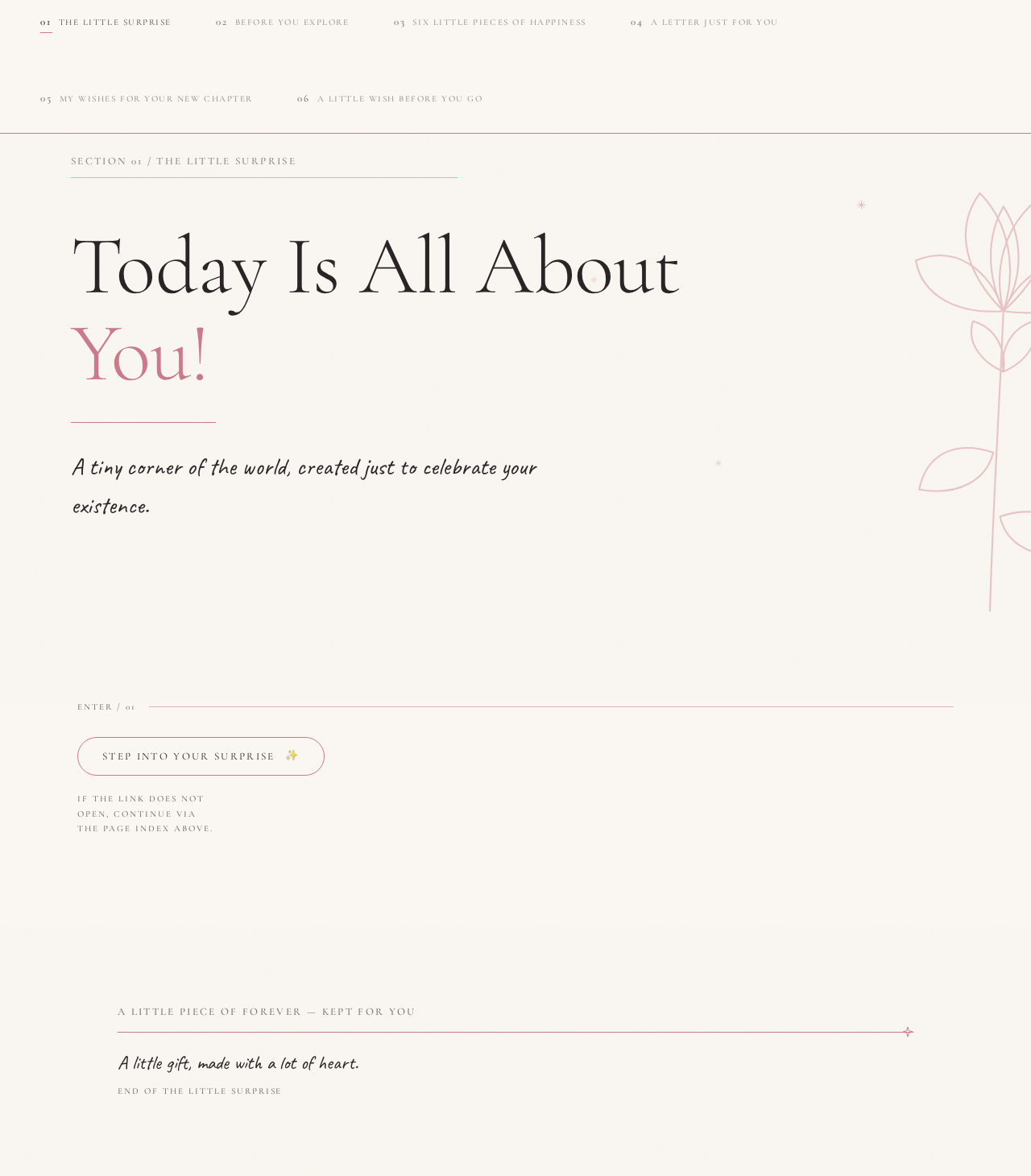
Today Is All About You!
A tiny corner of the world, created just to celebrate your existence.
If the link does not open, continue via the page index above.
Today Is All About You!
A tiny corner of the world, created just to celebrate your existence.
If the link does not open, continue via the page index above.
No comments yet. Be the first!