binary-quotex
 vikram singh sarangdevot
I have a stretagy of trading binary so can you code for me so I can trade in quotex with trading view

Comments (0)
Sign in to leave a comment
System Requirements
System Requirements Document for binary-quotex
1. Introduction
binary-quotex is a personal trading instrument for a single binary-options trader who already has their own trading strategy. The product exists so that the trader can encode their own binary-options strategy rules into a tool, watch TradingView chart data drive those rules into concrete trade signals, and then act on a signal by placing the corresponding trade on Quotex.
The audience is the trader themselves — a solo operator running their own strategy during live sessions, reading charts, and executing trades on Quotex. The product is not a signal marketplace, not a copy-trading service, not a broker, and not a replacement strategy engine: the strategy belongs to the trader and the tool applies it.
The product intent, in one line: let the trader define their own binary-options strategy once, see it fire as signals from TradingView chart data, and place the resulting trade on Quotex.
2. System Overview
binary-quotex is a web application with a public entry surface, application-owned identity (self-service enrollment and returning login), and three authenticated working surfaces: Strategy, Signals, and Trade. A persistent instrument frame — a 72px icon-only left rail plus a top status strip — carries connection state, active account, session P/L, and the countdown across every authenticated page.
Current delivery covers:
- Public entry (Landing) — an anonymous surface that explains the product supports the trader's own binary-options strategy on Quotex with TradingView, before any identity is established.
- Identity — self-service enrollment (Sign Up) and returning verification (Login), both anonymously reachable.
- Strategy — the trader defines and configures their own binary-options strategy rules so the tool can apply them.
- Signals — strategy-based trade signals or setups derived from TradingView chart data are shown to the trader.
- Trade — the trader acts on a signal by placing the corresponding trade on Quotex.
Actors:
- Binary Options Trader (human, active) — the sole active human persona. Owns the strategy rules, the signals they act on, and the trades they place.
- Quotex (external venue) — the trading venue the tool must work with. Quotex is connected by the trader; the product does not claim official integration.
- TradingView (external charting/analysis platform) — the source of chart data used in the trading workflow. TradingView is connected by the trader; the product does not claim official integration.
Narrow exclusions:
- Trading is limited to binary options on Quotex.
- The strategy is the trader's own and must not be replaced with a different strategy.
- No blue or indigo brand primary or accent; colour is data (green/red), not decoration.
- No gradients, glassmorphism, blurred shadows, soft 12px+ radii, or rounded-card grids.
- No illustrated characters, stock photography of people, or 3D renders as hero imagery.
- No animated number interpolation, springy easing, or bouncy hover states on financial values.
- No implication that Quotex or TradingView are officially integrated rather than connected by the trader.
2a. Product Interpretation and Delivery Boundary
Delivery ownership. binary-quotex is a first-party web application. The trader's strategy rules, the signals derived from them, and the trade records they produce are durable, trader-owned state, so the application owns identity: the trader enrolls themselves through Sign Up and verifies returning access through Login. Both identity surfaces are anonymously reachable; the Landing surface is the anonymous public entry that precedes them. Strategy, Signals, and Trade are protected destinations and require login.
External ownership. Quotex and TradingView are external platforms connected by the trader. The product works with them — it consumes TradingView chart data as part of the trading workflow and places trades on Quotex — but it does not own, operate, or claim official integration with either. The trader supplies their own Quotex account or connection; the product does not create Quotex accounts.
Current vs. future. Everything in this document is current delivery. No future-horizon requirements were accepted in the authoritative thread; nothing here is deferred.
What this product is not. It is not a broker, not a custodian of funds, not a signal marketplace, not a copy-trading network, and not a house-strategy engine. The strategy is the trader's own and the tool applies it.
2c. Page Content and Component Coverage
Landing
- Information / state: Anonymous public entry. Explains that the product supports the trader's own binary-options strategy on Quotex with TradingView. No trader-specific state is shown; no protected data is available.
- Primary action: Enter the product — a single green CALL-style primary button pinned directly beneath the type block, left-aligned, never centred. Routes to Sign Up (new trader) or Login (returning trader).
- Supporting actions: Navigate to Login; navigate to Sign Up.
- Domain entities: None owned. References Quotex (venue) and TradingView (chart source) as connected external platforms.
- Component responsibilities:
- Hero instrument — full-bleed dark cockpit mock occupying the right two-thirds of the viewport: a live-looking TradingView-style candle chart with a green CALL chip and a red PUT chip pinned to the last two candles, a countdown ring at the top-right, and a four-row signal list beneath it, all in the product's own palette.
- Type column — left third on
#0E1116: a Silkscreen wordmark, then a 40px→80px display headline stacked in three tight lines spanning the column edge-to-edge, a single 16px IBM Plex Sans subline, and the one green primary button pinned beneath the type block. - Vertical rule — 1px
#2A313Bseparating type from instrument.
- States:
- Loading: hero instrument renders its static composed first frame; no live feed is claimed on the public surface.
- Empty: not applicable — the hero is a composed instrument mock, not a data-bound list.
- Success: the trader reads the proposition and enters via the primary button.
- Error: not applicable to the public surface; no data fetch is required to render it.
- Recovery: not applicable.
Login
- Information / state: Anonymous returning-verification surface. Collects the trader's credentials and verifies returning access to their durable strategy rules, signals, and trade records.
- Primary action: Verify returning access and enter the authenticated frame.
- Supporting actions: Navigate to Sign Up for a trader who does not yet have an account; navigate back to Landing.
- Domain entities: Trader identity (application-owned).
- Component responsibilities:
- Credential form — ruled label/value rows sharing the same left-aligned label column and right-aligned tabular value column as the rest of the product.
- Submit control — Silkscreen uppercase button label, 2px hard corners, depresses 2px on press and returns with no transition.
- Error region — inline, monochrome, with
#FF4D4Dreserved for the destructive/failure state only.
- States:
- Loading: submit control shows a pressed/disabled state while verification is in flight.
- Empty: form fields empty on first render.
- Success: the trader enters the authenticated frame and lands on their working surfaces.
- Error: invalid credentials produce an inline error; the form remains filled and re-submittable.
- Recovery: the trader corrects the credential and resubmits, or navigates to Sign Up.
Sign Up
- Information / state: Anonymous self-service enrollment surface. Establishes the trader's application-owned identity so their strategy rules, signals, and trade records can be durably owned and resumed.
- Primary action: Create the trader's account and enter the authenticated frame.
- Supporting actions: Navigate to Login for a trader who already has an account; navigate back to Landing.
- Domain entities: Trader identity (application-owned).
- Component responsibilities:
- Enrollment form — ruled label/value rows, IBM Plex Sans labels and helper text, tabular numerals where numeric.
- Submit control — Silkscreen uppercase button label, 2px hard corners, 2px press depression.
- Error region — inline, monochrome,
#FF4D4Dfor the failure state only.
- States:
- Loading: submit control shows a pressed/disabled state while enrollment is in flight.
- Empty: form fields empty on first render.
- Success: identity is established and the trader enters the authenticated frame.
- Error: an unusable or already-taken credential produces an inline error; the form remains filled and re-submittable.
- Recovery: the trader corrects the input and resubmits, or navigates to Login.
Strategy
- Information / state: Protected. Shows the trader's own binary-options strategy rules as durable, trader-owned configuration. Displays the rule chain — indicator → condition → entry → expiry — with the active node highlighted in green as each condition is met during a live session.
- Primary action: Define or configure a strategy rule so the tool can apply it.
- Supporting actions: Edit an existing rule; review the rule chain; confirm the configured rule set that Signals will evaluate.
- Domain entities: Strategy rule (indicator, condition, entry, expiry); rule chain node; trader identity (owner).
- Component responsibilities:
- Rule chain diagram — the trader's own rules drawn as a connected pixel flow (indicator → condition → entry → expiry) that highlights the active node in green as each condition is met during a live session.
- Rule editor — ruled label/value rows sharing the same left-aligned label column and right-aligned tabular value column used across the product.
- Rule list — dense ruled rows, not a card grid.
- Instrument frame — 72px icon-only left rail with a 3px green active bar, plus the top status strip (connection, account, session P/L, countdown).
- States:
- Loading: rule rows render in a pending state while the trader's saved rules are retrieved.
- Empty: no rules configured yet — the trader is prompted to define their first rule; the rule chain shows an unconfigured flow.
- Success: the rule is saved and appears in the rule list and the rule chain.
- Error: a rule that cannot be saved produces an inline error; the trader's entered values are preserved.
- Recovery: the trader corrects the rule and resaves; previously saved rules remain intact.
Signals
- Information / state: Protected. Shows strategy-based trade signals or setups derived from TradingView chart data. Each signal row carries asset, direction chip, confidence, timeframe, expiry, and action.
- Primary action: Act on a signal — hand off to Trade to place the corresponding trade on Quotex.
- Supporting actions: Hover a signal row to expand it in place and reveal the exact strategy rule that fired; scan the dense list of instrument rows.
- Domain entities: Signal (asset, direction, confidence, timeframe, expiry, action); the strategy rule that fired; TradingView chart data (external source).
- Component responsibilities:
- Signal row — the product's signature component: a dense ruled row (asset, direction chip, confidence, timeframe, expiry, action) that expands in place on hover to reveal the exact strategy rule that fired, never a card grid. On arrival, the row blinks its status pip twice.
- Direction chip — green
#33C46Bfor CALL/up, red#FF4D4Dfor PUT/down. - Confidence value — Silkscreen with tabular alignment, so the number reads as instrument output.
- Live price line — the one continuous motion allowed: the live price line drawing left-to-right across the chart, stopping the moment the feed stalls.
- Instrument frame — the same 72px rail and top status strip as every authenticated page.
- States:
- Loading: signal rows render in a pending state while TradingView chart data is evaluated against the trader's rules.
- Empty: no signal currently meets the trader's configured rules — the list shows an explicit no-signal state rather than fabricated rows.
- Success: a signal row appears with its direction chip, confidence, timeframe, and expiry, and expands on hover to show the rule that fired.
- Error: if the TradingView feed stalls, the live price line stops and the connection state in the top status strip reflects the stall; no stale signal is presented as live.
- Recovery: when the feed resumes, the live price line continues and signal evaluation resumes against the trader's rules.
- Responsive behaviour: At 375px the rail becomes a bottom bar and rows reflow to two lines with the action button kept whole and right-aligned.
Trade
- Information / state: Protected. Shows the signal the trader is acting on and the corresponding trade being placed on Quotex. Carries the countdown that governs the trade's expiry.
- Primary action: Place the corresponding trade on Quotex for the selected signal.
- Supporting actions: Review the signal's asset, direction, timeframe, and expiry before committing; observe the countdown; observe the resulting trade state.
- Domain entities: Trade (asset, direction, amount, expiry, state); the originating signal; the trader's Quotex connection (external venue).
- Component responsibilities:
- Trade ticket — ruled label/value rows sharing the same left-aligned label column and right-aligned tabular value column as strategy rules and signal cards.
- Direction control — green
#33C46BCALL button and red#FF4D4DPUT button; buttons depress 2px on press and return with no transition. - Countdown — Silkscreen timer digits, 40px mobile → 64px desktop, flipping a digit per second; the countdown's final five seconds render in
#FF4D4D. - Session P/L — carried in the top status strip; the winning P/L figure uses
#33C46B. - Instrument frame — the same 72px rail and top status strip as every authenticated page.
- States:
- Loading: the trade ticket renders in a pending state while the selected signal and the trader's Quotex connection are resolved.
- Empty: no signal has been selected for trading — the trader is directed back to Signals to choose one.
- Success: the trade is placed on Quotex and its state is shown on the ticket; session P/L in the top status strip updates.
- Error: if the Quotex connection is unavailable or the trade cannot be placed, the failure is shown on the ticket in
#FF4D4Dand no trade is recorded as placed. - Recovery: the trader retries placement once the connection state in the top status strip is healthy, or returns to Signals to choose another signal.
- Responsive behaviour: At 375px the rail becomes a bottom bar and rows reflow to two lines with the action button kept whole and right-aligned.
3. Functional Requirements
FR-1 — Encode the trader's own binary-options strategy As a Binary Options Trader, I should be able to define and configure my own binary-options strategy rules so the tool can apply them.
- Provenance:
explicit(the trader has a strategy of trading binary and wants the tool coded for it) withrequired_inferencemechanics for rule storage. - Trigger/input: the trader opens Strategy and enters or edits a rule (indicator, condition, entry, expiry).
- Observable result: the rule is saved as durable, trader-owned configuration and appears in the rule list and the rule chain diagram.
- Access state: protected — requires login.
- Failure/recovery: a rule that cannot be saved shows an inline error and preserves the trader's entered values; previously saved rules remain intact.
- Continuation: the saved rule set is what Signals evaluates.
- Constraint: the strategy is the trader's own and must not be replaced with a different strategy.
FR-2 — Derive signals from TradingView chart data using the trader's rules As a Binary Options Trader, I should see strategy-based trade signals or setups derived from TradingView chart data.
- Provenance:
explicit(trade in quotex with trading view) withrequired_inferencemechanics for signal derivation. - Trigger/input: TradingView chart data is evaluated against the trader's configured strategy rules.
- Observable result: signal rows appear carrying asset, direction chip, confidence, timeframe, expiry, and action; hovering a row expands it in place to reveal the exact strategy rule that fired.
- Access state: protected — requires login.
- Failure/recovery: if the TradingView feed stalls, the live price line stops and the connection state reflects the stall; no stale signal is presented as live. When the feed resumes, evaluation resumes.
- Continuation: the trader acts on a signal by handing off to Trade.
- Constraint: TradingView is connected by the trader; the product does not claim official integration.
FR-3 — Place the corresponding trade on Quotex As a Binary Options Trader, I should be able to act on a signal by placing the corresponding trade on Quotex.
- Provenance:
explicit(trade in quotex) withrequired_inferencemechanics for trade placement and state. - Trigger/input: the trader selects a signal and commits the trade on the Trade surface.
- Observable result: the trade is placed on Quotex and its state is shown on the trade ticket; session P/L in the top status strip updates.
- Access state: protected — requires login.
- Failure/recovery: if the Quotex connection is unavailable or the trade cannot be placed, the failure is shown on the ticket in
#FF4D4Dand no trade is recorded as placed; the trader retries once the connection state is healthy or returns to Signals. - Continuation: the trader observes the countdown to expiry and the resulting trade state.
- Constraint: trading is limited to binary options on Quotex; Quotex is connected by the trader and the product does not claim official integration.
FR-4 — Self-service enrollment As a Binary Options Trader, I should be able to create an account through self-service enrollment.
- Provenance:
required_inference(required to make the accepted current journey executable without adding a product capability). - Trigger/input: an anonymous visitor opens Sign Up and submits enrollment details.
- Observable result: the trader's application-owned identity is established and they enter the authenticated frame.
- Access state: anonymous — Sign Up is reachable without login.
- Failure/recovery: an unusable or already-taken credential produces an inline error; the form remains filled and re-submittable.
- Continuation: the trader proceeds to Strategy to define their rules.
FR-5 — Verify returning access As a Binary Options Trader, I should be able to verify returning access through the Login surface.
- Provenance:
required_inference(required to make the accepted current journey executable without adding a product capability). - Trigger/input: a returning trader opens Login and submits credentials.
- Observable result: the trader re-enters the authenticated frame and their durable strategy rules, signals, and trade records are available to them.
- Access state: anonymous — Login is reachable without login.
- Failure/recovery: invalid credentials produce an inline error; the form remains filled and re-submittable, and the trader may navigate to Sign Up.
- Continuation: the trader resumes work on Strategy, Signals, or Trade.
FR-6 — Connect a Quotex account or connection As a Binary Options Trader, I should have a Quotex account or connection so I can place trades on Quotex.
- Provenance:
required_inference(required to make the accepted current journey executable without adding a product capability). - Trigger/input: the trader supplies their own Quotex account or connection.
- Observable result: the connection state is visible in the top status strip, and trade placement on Quotex becomes possible.
- Access state: protected — requires login.
- Failure/recovery: an unavailable connection is reflected in the top status strip and blocks trade placement with an explicit failure on the trade ticket.
- Continuation: the trader places trades on Quotex.
- Constraint: the product does not create Quotex accounts and does not claim official integration.
FR-7 — Use TradingView chart data in the trading workflow As a Binary Options Trader, I should have the tool use TradingView chart data as part of my trading workflow.
- Provenance:
required_inference(required to make the accepted current journey executable without adding a product capability). - Trigger/input: the trader's session runs with TradingView chart data feeding the workflow.
- Observable result: the live price line draws left-to-right across the chart in the product's own palette, and signal evaluation runs against the trader's rules.
- Access state: protected — requires login.
- Failure/recovery: if the feed stalls, the live price line stops the moment the feed stalls and the connection state reflects it.
- Continuation: when the feed resumes, the live price line continues and evaluation resumes.
- Constraint: TradingView is connected by the trader; the product does not claim official integration.
FR-8 — Persistent instrument frame across authenticated pages As a Binary Options Trader, I should see the same instrument frame on every authenticated page so I never re-learn the frame.
- Provenance:
required_inference(required to make the accepted live-session workflow usable and to keep connection, account, session P/L, and countdown observable). - Trigger/input: the trader navigates between Strategy, Signals, and Trade.
- Observable result: a 72px icon-only left rail with a 3px green active bar and a top status strip showing connection, account, session P/L, and the countdown persist across all authenticated pages.
- Access state: protected — requires login.
- Failure/recovery: a stalled connection is visible in the status strip rather than hidden.
- Continuation: the trader moves between working surfaces without losing session context.
4. User Personas
Binary Options Trader
Product context. A solo trader who already has their own binary-options strategy and wants a tool that encodes it, watches TradingView chart data through it, and lets them place the resulting trade on Quotex. They work in live sessions, often in dark hours, reading the tape rather than marketing. The tool is a personal instrument panel they own and built — not a service they subscribe to for someone else's signals.
Primary goal. Execute trades on Quotex that follow their own strategy, with the strategy's rules applied consistently and the signal-to-trade path short enough to act on during a live session.
Distinct accepted responsibilities.
- Define and configure their own binary-options strategy rules so the tool can apply them (Strategy).
- Read strategy-based signals derived from TradingView chart data, and inspect the exact rule that fired for any signal (Signals).
- Act on a signal by placing the corresponding trade on Quotex (Trade).
- Establish and verify their own access so their rules, signals, and trade records remain theirs and resumable (Sign Up, Login).
- Supply their own Quotex account or connection (Trade / connection state).
Relevant inputs or decisions.
- The rule definition itself: indicator, condition, entry, expiry.
- Which signal to act on, and in which direction (CALL/up or PUT/down).
- The trade amount and expiry for the selected signal.
- Whether to retry a failed placement or return to Signals for another setup.
Interactions with other accepted participants.
- Quotex — the external venue where the trade is placed. The trader connects their own Quotex account; the product places the trade but does not own the venue or claim official integration.
- TradingView — the external charting/analysis platform whose chart data feeds the workflow. The trader connects it; the product consumes its chart data but does not own it or claim official integration.
Observable success. A trade placed on Quotex that follows the trader's own strategy, with the signal that produced it traceable to the exact rule that fired, and session P/L visible in the top status strip.
What makes this role's work different. The trader is simultaneously the strategy author and the executor. They do not consume someone else's signals and they do not delegate the decision — the tool's job is to apply their rules faithfully and get out of the way during a live session. That is why the product's identity is an instrument panel rather than a feed, and why the strategy must never be replaced with a house strategy.
5. Core User Flows
Flow A — First-time trader: from public entry to a defined strategy
- The trader arrives at Landing anonymously. The hero instrument shows a working cockpit mock — candle chart, CALL/PUT chips on the last candles, countdown ring, four-row signal list — and the left type column states that the product supports the trader's own binary-options strategy on Quotex with TradingView.
- The trader presses the single green primary button pinned beneath the type block.
- The trader lands on Sign Up and submits enrollment details.
- Observable result: the trader's application-owned identity is established and they enter the authenticated frame. If the credential is unusable or already taken, an inline error appears, the form stays filled, and the trader corrects and resubmits — or navigates to Login.
- The trader opens Strategy and defines their first rule: indicator → condition → entry → expiry.
- Observable result: the rule is saved as durable, trader-owned configuration, appears in the rule list, and renders in the rule chain diagram. If the save fails, an inline error appears and the entered values are preserved.
- Next step: the trader moves to Signals, where the saved rule set is what gets evaluated.
Flow B — Returning trader: verify access and resume
- The trader arrives at Login anonymously.
- The trader submits credentials.
- Observable result: the trader re-enters the authenticated frame with their durable strategy rules, signals, and trade records available. If the credentials are invalid, an inline error appears, the form stays filled, and the trader corrects and resubmits or navigates to Sign Up.
- Next step: the trader resumes on Strategy, Signals, or Trade. The same 72px rail and top status strip are present, so the frame is never re-learned.
Flow C — Live session: signal to placed trade
- The trader is logged in and on Signals. The top status strip shows connection state, active account, session P/L, and the countdown.
- TradingView chart data is evaluated against the trader's configured rules. The live price line draws left-to-right across the chart.
- Observable result: a signal row appears carrying asset, direction chip, confidence, timeframe, expiry, and action. The row blinks its status pip twice on arrival. The trader hovers the row and it expands in place to reveal the exact strategy rule that fired.
- The trader decides to act and hands off to Trade.
- On Trade, the trader reviews the signal's asset, direction, timeframe, and expiry on the trade ticket, and commits the trade.
- Observable result: the trade is placed on Quotex and its state is shown on the ticket; session P/L in the top status strip updates. The countdown flips a digit per second, with its final five seconds in red.
- Failure/recovery: if the Quotex connection is unavailable or the trade cannot be placed, the failure is shown on the ticket in red and no trade is recorded as placed. The trader retries once the connection state in the top status strip is healthy, or returns to Signals to choose another signal.
- Continuation: the trader observes the countdown to expiry and the resulting trade state, then returns to Signals for the next setup.
Flow D — Live session: feed stall and recovery
- The trader is logged in and on Signals during a live session.
- The TradingView feed stalls.
- Observable result: the live price line stops the moment the feed stalls, and the connection state in the top status strip reflects the stall. No stale signal is presented as live.
- Recovery: when the feed resumes, the live price line continues and signal evaluation resumes against the trader's rules.
- Continuation: the trader resumes reading signals and acting on them.
Flow E — No signal currently meets the rules
- The trader is logged in and on Signals.
- TradingView chart data is evaluated against the trader's configured rules and no setup currently qualifies.
- Observable result: the list shows an explicit no-signal state rather than fabricated rows.
- Continuation: the trader waits for the next evaluation, or returns to Strategy to review and adjust their own rules.
6. Visuals Colors and Theme
Muse and headline. Susan Kare — charming clarity: pixel-precise instruments for a trader who reads the tape, not the marketing. The tool is a personal instrument panel: every number, candle, countdown, and button read at a glance without decoration competing for attention, yet with enough craft that it never reads as a generic dashboard template.
Mode. Dark mode.
Colour tokens by role.
| Role | Token | Value |
|---|---|---|
| Background (instrument ground) | --bg | #0E1116 |
| Surface (panels) | --surface | #161B22 |
| Hairline border | --border | #2A313B |
| Body text on ground and surface | --text | #EDF0F3 |
| Muted — secondary labels and metadata only | --muted | #8A93A0 |
| Primary — CALL / up / active state, active nav pill, CALL button, live status dot, winning P/L | --primary | #33C46B |
| Accent — PUT / down / loss state, countdown's final five seconds, destructive actions | --accent | #FF4D4D |
| Raised-element offset shadow | --shadow | solid black, 2px offset |
Colour rules. Colour is data, not decoration. No gradients, no tinted panels, no coloured chrome. --muted is never used for prices or trade state. Green and red appear only where they carry trade meaning. No blue or indigo primary or accent anywhere.
Typography.
| Role | Family | Weights | Treatment |
|---|---|---|---|
| Headings, wordmark, section titles, KPI numerals, timer digits, button labels | Silkscreen | 400 / 700 only | Uppercase, 0.04em tracking, no italics, no letter-spacing on numerals so tabular alignment holds |
| Reading copy, table values, form labels, helper text | IBM Plex Sans | 400 / 500 / 600 | Tabular numerals enabled |
Type scale. 1.25 modular on a 4px baseline: 12 / 14 / 16 / 20 / 25 / 32 / 40 / 50 / 64 / 80.
| Element | Mobile | Desktop |
|---|---|---|
| Page hero | 40px | 80px |
| Section titles | 20px | 32px |
| KPI numerals | 32px | 50px |
| Timer digits | 40px | 64px |
| Body | 15px | 16px, line-height 1.55 |
Radius and shape language. Pixel-grid geometry: 2px hard corners on every panel, button, and input; 4px only on the outer app shell. Icons drawn on a 16px pixel grid at 1px or 2px stroke, chunky and legible, with a 2px offset shadow instead of a blur. No gradients, no glass, no soft shadows. Depth comes from a 1px #2A313B hairline plus a 2px solid black offset on raised elements — the visual grammar of a pressed key.
Spacing rhythm. 4px baseline grid; 12-column layout grid with 4px gutters. Ruled label/value rows share one left-aligned label column and one right-aligned tabular value column across strategy rules, signal cards, and trade tickets, so the eye scans vertically without re-anchoring.
Imagery style. The interface is the imagery: pixel icons for every instrument, direction, and action; a live candlestick chart rendered in the product's own palette (green/red bodies, muted wicks, hairline grid); and a small set of schematic diagrams — the rule chain from indicator to entry to expiry drawn as a connected pixel flow. No stock photography, no 3D renders, no illustration for its own sake.
Avoid. Any blue or indigo primary or accent. Gradients, glassmorphism, blurred shadows, soft 12px+ radii, or any rounded-card grid. Inter, Roboto, Arial, Helvetica, Open Sans, Lato, Poppins, or system-ui for headings or body. Centred hero stacks with a headline, subtext, and button over a gradient blob. Illustrated characters, stock photography of people, or 3D renders as hero imagery. Colour used decoratively. Animated number interpolation, springy easing, or bouncy hover states on financial values.
7. Signature Design Concept
The landing hero is a working instrument, not a marketing banner.
The viewport splits on a 1px #2A313B vertical rule. The right two-thirds is a full-bleed dark cockpit mock on #0E1116/#161B22: a live-looking TradingView-style candle chart with green and red bodies and muted wicks on a hairline grid, a green CALL chip and a red PUT chip pinned to the last two candles, a countdown ring at the top-right, and a four-row signal list beneath it — each row a dense ruled line of asset, direction chip, confidence, timeframe, expiry, and action, in the product's own palette.
The left third is a hard-edged type column on #0E1116: a Silkscreen wordmark, then a 40px→80px display headline stacked in three tight lines that spans the column edge-to-edge, a single 16px IBM Plex Sans subline, and one green CALL-style primary button pinned directly beneath the type block, left-aligned, never centred.
No gradient blob, no centred stack, no floating cards. The composition recomposes only accepted content and controls: the hero instrument depicts the Signals and Trade surfaces' own vocabulary, and the single primary button is the anonymous entry action that routes to Sign Up or Login. Nothing in the hero claims live data on the public surface — it is a composed first frame of the instrument the trader is about to own.
8. Interaction Model & Motion Direction
Interaction Model: Static Motion Tempo: restrained Hero Dimensionality: flat
Landing Hero Motion Brief
- Focal subject. The cockpit mock's candle chart with the green CALL chip and red PUT chip pinned to the last two candles, the countdown ring at the top-right, and the four-row signal list beneath it.
- Input → transformation → outcome thesis. The composed first frame presents the instrument already in a working state; the trader's input is the single green primary button beneath the type block, whose outcome is entry into the product (Sign Up or Login). No motion is required to carry the thesis — the frame itself is the argument.
- Motion vocabulary. Frame-by-frame and instant, per the direction: numbers tick by swapping discrete frames rather than interpolating; the countdown flips a digit per second; a signal row blinks its status pip twice on arrival; buttons depress 2px on press and return with no transition; page transitions are a 120ms hard cut. The one continuous motion allowed anywhere in the product is the live price line drawing left-to-right across the chart, and it stops the moment the feed stalls.
- Composed first frame. The hero renders as a single static composition: type column left, 1px rule, instrument right, primary button pinned beneath the type block. Nothing animates on load.
- Reduced-motion state. With
prefers-reduced-motion, the hero is already static and remains fully usable: the composed first frame is unchanged, the primary button remains whole and operable, and no readable text or control is cropped, covered, or run off an edge at 375px, 768px, or 1280px. Inside the authenticated product, the live price line and countdown remain the only continuous motion; under reduced motion the countdown continues to flip a digit per second as discrete state rather than interpolation, and the price line's drawing is the sole continuous element.
9. Non-Functional Requirements
NFR-1 — Readable text and controls stay whole at every viewport.
Headlines, wordmarks, labels, numbers, cards' text, and controls stay entirely inside the viewport and their container at 375px, 768px, and 1280px, wrapping or scaling (for example font-size: clamp(...) with its mobile size) to fit, and no other element covers any part of them. At 375px the 72px rail becomes a bottom bar and signal/trade rows reflow to two lines with the action button kept whole and right-aligned. Provenance: explicit (creative direction). Rationale: the trader reads numbers and presses buttons under time pressure; a clipped control is a trading error.
NFR-2 — Colour is data, not decoration.
Green #33C46B and red #FF4D4D appear only where they carry trade meaning. --muted #8A93A0 is never used for prices or trade state. No blue or indigo primary or accent. Provenance: explicit (creative direction). Rationale: misread colour is a misread trade.
NFR-3 — No animated interpolation on financial values.
Numbers tick by swapping discrete frames rather than interpolating. No springy easing or bouncy hover states on financial values. Provenance: explicit (creative direction). Rationale: the trader must read the current value, not a value in transit.
NFR-4 — Feed stall is visible, never hidden.
The live price line stops the moment the feed stalls, and the connection state in the top status strip reflects the stall. No stale signal is presented as live. Provenance: required_inference (required to keep the accepted live-session workflow truthful). Rationale: acting on a stale signal is the failure mode this product must not create.
NFR-5 — Durable, trader-owned state.
Strategy rules, signals, and trade records are durable and bound to the correct trader, resumable across sessions. Provenance: required_inference (required by the accepted journeys and the planning scope's durable-state requirement). Rationale: the trader's rules and records are theirs and must survive a session.
NFR-6 — No claim of official integration.
The product must not imply that Quotex or TradingView are officially integrated rather than connected by the trader. Provenance: explicit (creative direction). Rationale: the trader connects their own accounts; the product works with those platforms, it does not represent them.
NFR-7 — Trading is limited to binary options on Quotex.
The product places binary-options trades on Quotex only. Provenance: explicit (authoritative constraint). Rationale: this is the accepted scope of the tool.
NFR-8 — The trader's own strategy is never replaced.
The tool applies the trader's strategy; it must not substitute a house or default strategy. Provenance: explicit (authoritative constraint). Rationale: the strategy is the trader's own and is the reason the tool exists.
10. Tech Stack
- Frontend: React (web application). The instrument frame, ruled label/value rows, pixel-icon vocabulary, and the signal-row component are all first-party UI.
- Backend: Python / FastAPI, extending a single shared backend process for the product's APIs and domain features — strategy rules, signal derivation, trade placement, and identity.
- Storage: appropriate durable storage for trader identity, strategy rules, signals, and trade records.
- Containerization: Docker / docker-compose for the runnable services.
- External platforms: Quotex (trading venue) and TradingView (chart data source), both connected by the trader. No official integration is claimed.
[Default — not specified by user] for the specific storage engine, the exact FastAPI route layout, and the docker-compose service topology; these are implementation defaults consistent with the accepted behavior and add no product capability.
11. Assumptions and Constraints
Assumptions
- A1 [required_inference] — The trader supplies their own Quotex account or connection; the product does not create Quotex accounts.
- A2 [required_inference] — The trader connects TradingView as the chart data source for the workflow; the product consumes that chart data but does not own the platform.
- A3 [required_inference] — Application-owned identity is required because strategy rules, signals, and trade records are durable, trader-specific state that must remain bound to the correct trader and be resumable.
- A4 [required_inference] — The Landing surface is anonymous and precedes identity establishment; Strategy, Signals, and Trade are protected and require login.
- A5 [Default — not specified by user] — The specific storage engine, FastAPI route layout, and docker-compose service topology are implementation defaults.
Constraints
- C1 [explicit] — Trading is limited to binary options on Quotex.
- C2 [explicit] — The strategy is the trader's own and must not be replaced with a different strategy.
- C3 [explicit] — The product must work with Quotex as the trading venue.
- C4 [explicit] — The product must work with TradingView (charts/analysis) as part of the trading workflow.
- C5 [explicit] — No blue or indigo primary or accent; the product's colour is green/red data.
- C6 [explicit] — No gradients, glassmorphism, blurred shadows, soft 12px+ radii, or rounded-card grids.
- C7 [explicit] — No Inter, Roboto, Arial, Helvetica, Open Sans, Lato, Poppins, or system-ui for headings or body.
- C8 [explicit] — No centred hero stacks with a headline, subtext, and button over a gradient blob.
- C9 [explicit] — No illustrated characters, stock photography of people, or 3D renders as hero imagery.
- C10 [explicit] — No animated number interpolation, springy easing, or bouncy hover states on financial values.
- C11 [explicit] — Do not imply Quotex or TradingView are officially integrated rather than connected by the trader.
- C12 [explicit] — Readable text and controls stay whole at every viewport; where a direction asks readable text or a control to be cropped, clipped, covered, or run off an edge, keep it whole and carry the gesture with imagery or decoration instead.
12. Glossary
- Binary option — A trade with a fixed payout and a fixed expiry, where the outcome is one of two directions (CALL/up or PUT/down). The only instrument type this product trades.
- CALL / up — The green
#33C46Bdirection state: the trader's position that the asset rises. - PUT / down — The red
#FF4D4Ddirection state: the trader's position that the asset falls. - Countdown — The Silkscreen timer governing a trade's expiry, flipping a digit per second, with its final five seconds in red.
- Expiry — The moment a binary option resolves; one of the four nodes in the trader's rule chain.
- Instrument frame — The persistent chrome on every authenticated page: a 72px icon-only left rail with a 3px green active bar, plus a top status strip showing connection state, active account, session P/L, and the countdown.
- Quotex — The external binary-options trading venue the tool works with. Connected by the trader; not officially integrated.
- Rule chain — The trader's own strategy rules drawn as a connected pixel flow: indicator → condition → entry → expiry, with the active node highlighted in green as each condition is met during a live session.
- Session P/L — The trader's profit and loss for the current session, carried in the top status strip; the winning figure uses
#33C46B. - Signal — A strategy-based trade setup derived from TradingView chart data, rendered as a dense ruled row carrying asset, direction chip, confidence, timeframe, expiry, and action.
- Signal row — The product's signature component: a dense ruled row that expands in place on hover to reveal the exact strategy rule that fired, never a card grid.
- Strategy rule — The trader's own configuration the tool applies: indicator, condition, entry, and expiry.
- TradingView — The external charting/analysis platform whose chart data feeds the trading workflow. Connected by the trader; not officially integrated.
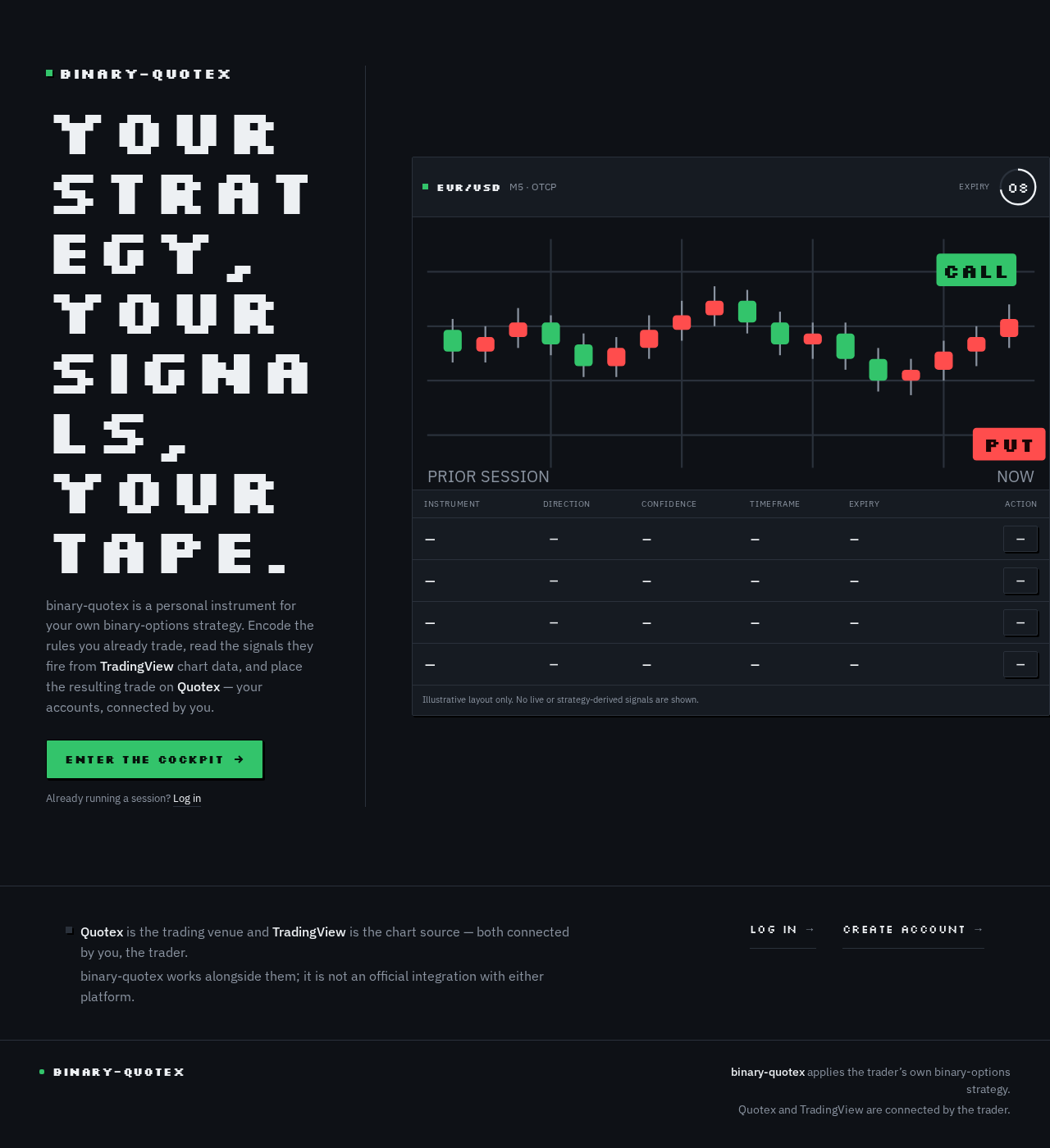
Your strategy,your signals,your tape.
binary-quotex is a personal instrument for your own binary-options strategy. Encode the rules you already trade, read the signals they fire from TradingView chart data, and place the resulting trade on Quotex — your accounts, connected by you.
Enter the cockpitAlready running a session? Log in
- ———
- ———
- ———
- ———
Illustrative layout only. No live or strategy-derived signals are shown.
Quotex is the trading venue and TradingView is the chart source — both connected by you, the trader.binary-quotex works alongside them; it is not an official integration with either platform.
Your strategy,your signals,your tape.
binary-quotex is a personal instrument for your own binary-options strategy. Encode the rules you already trade, read the signals they fire from TradingView chart data, and place the resulting trade on Quotex — your accounts, connected by you.
Enter the cockpitAlready running a session? Log in
- ———
- ———
- ———
- ———
Illustrative layout only. No live or strategy-derived signals are shown.
Quotex is the trading venue and TradingView is the chart source — both connected by you, the trader.binary-quotex works alongside them; it is not an official integration with either platform.
No comments yet. Be the first!