bike-repair-booking
 Hemen Ashodia
A booking app for a neighborhood bike repair shop: landing page, list of repair services with prices, book a repair slot, and a staff page to see and update today's bookings.


Comments (0)
Sign in to leave a comment
System Requirements
System Requirements Document for bike-repair-booking
1. Introduction
bike-repair-booking is a booking application for a neighborhood bike repair shop. It gives everyday riders a straight answer on what the shop fixes and what each repair costs, and lets them reserve a repair slot they can trust. It gives the shop's mechanics a single place to see today's bookings and keep them current as work moves through the stand.
The product intent is deliberately narrow and trade-honest: a public landing page for the shop, a printed-price-board list of repair services with prices, a focused repair-slot booking flow, and a staff page for viewing and updating today's bookings. There is no marketplace, no multi-shop tenancy, no parts inventory, and no customer account area beyond what booking a slot requires.
The audience is two roles: Customer — a neighborhood rider who needs a repair and wants to see services and prices, then reserve a slot; and Shop Staff — a repair-shop worker responsible for the day's workload, who opens the staff page to see today's bookings and update them as work progresses.
2. System Overview
The system is a first-party web application with a public, anonymous-facing surface and a restricted staff surface.
Current delivery. Five pages are delivered in the current horizon, in this order: landing page, Services, Booking, Login, staff page. The landing page, Services, and Booking are anonymously reachable. Login is the anonymous entry point for staff identity. The staff page is role-restricted and requires returning verification.
Actors. Two accepted human personas: Customer and Shop Staff. The application itself owns identity, service catalogue data, slot availability, and booking records. No third-party provider owns any accepted human-facing capability.
Accepted behavior. Customers browse the shop's repair services with prices, choose a service, pick a repair slot, and receive a confirmed booking with a reference number. Staff are provisioned or invited, complete returning verification, then view today's bookings and update each booking's status as work progresses.
Ownership. All five pages are application-owned custom UI. Identity is application-owned: staff identity must remain bound to the correct participant so that viewing and updating shared booking records is trustworthy.
Narrow exclusions. No customer account area, no payment processing, no parts inventory, no multi-location support, no customer-facing booking history beyond the confirmation of a placed booking, and no staff account self-registration — staff access is provisioned or invited.
2a. Product Interpretation and Delivery Boundary
The shop's public face is anonymous and open. A rider can land on the shop's page, read the service list and prices, and start a booking without creating anything. Booking a repair slot produces a confirmed appointment with a reference number the rider can keep; the confirmation is the durable artifact, not an account.
Staff access is different in kind. Today's bookings are shared shop state that must stay bound to the correct worker, so staff identity is application-owned and established through an invitation or provisioning path rather than open sign-up. A staff member completes returning verification on the Login page before the staff page will show or accept changes to today's bookings. The Login page is itself anonymously reachable — it is the entry boundary, not a protected destination.
Everything described in this document is current. Nothing in the accepted requirements establishes a future horizon, so no future section is carried.
2b. Page Content and Component Coverage
landing page
- Information and state. The shop's public first impression: the shop mark, the headline, the shop's plain-spoken promise, and the entry points into the service list and the booking flow. Anonymous; no identity state.
- Primary actions. Go to the service list with prices; start booking a repair slot.
- Supporting actions. Read the shop's turnaround line; follow the shop mark as the wordmark back to the top of the page.
- Domain entities. Shop identity (name, mark), the turnaround announcement, the service list summary, the booking entry point.
- Component responsibilities.
- Hazard-stripe ticker — a full-width stripe across the very top carrying one honest line about walk-ins and same-day turnaround; scrolls slowly, and wraps to static stripes under reduced motion.
- Shop badge — a hand-built circular badge with the shop name around the rim and a wheel at the centre; used as the wordmark and as a section stamp.
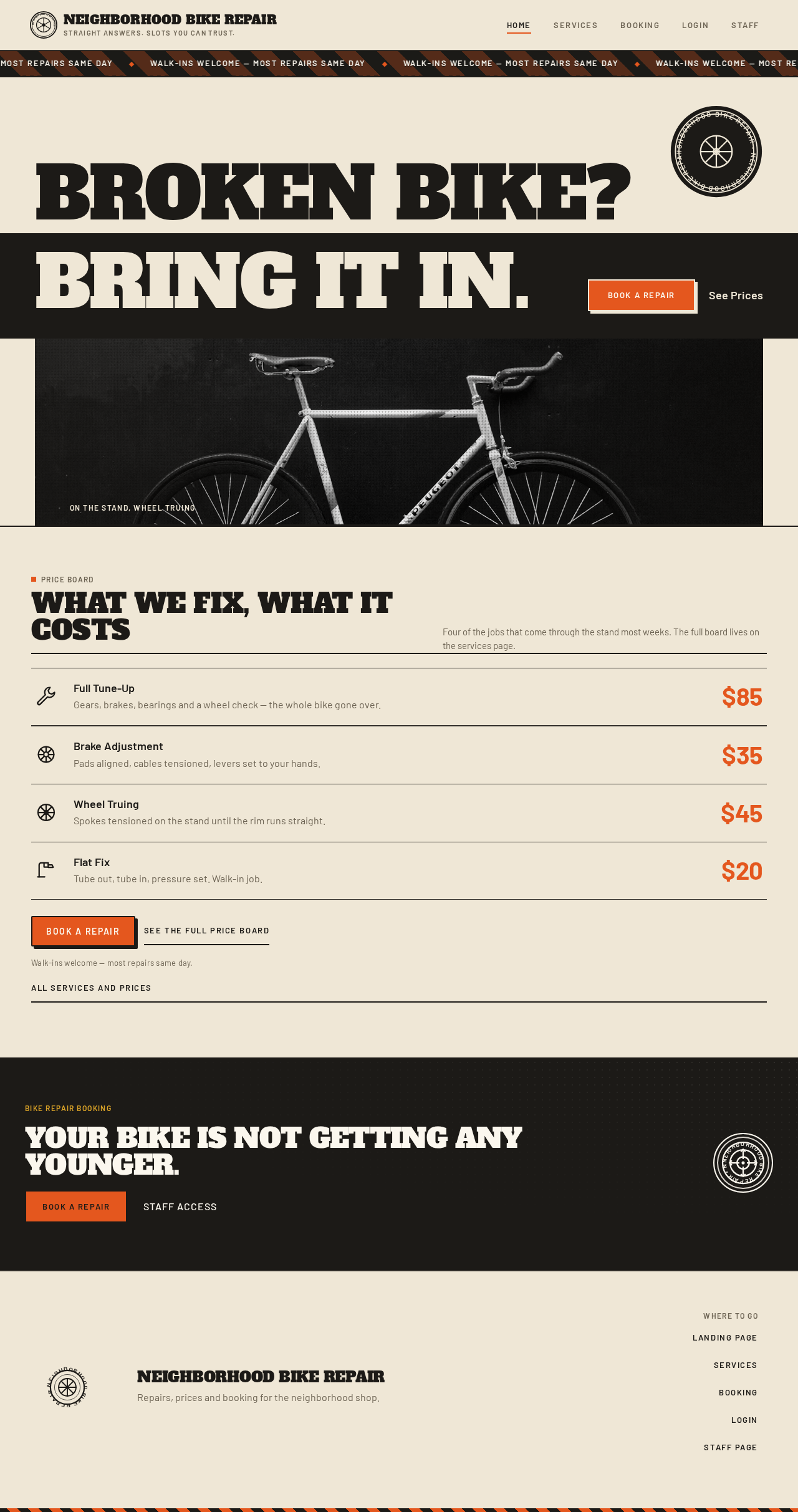
- Hero headline block — the headline set at poster scale, stacked across the grid and running to the right edge, with the final line sitting on a solid ink block spanning the full width.
- Hero imagery — a halftoned workshop photograph cropped hard against the ink rule.
- Primary CTA — a thick-bordered orange rectangle for booking a repair, pinned to the bottom-left of the ink block.
- Secondary link — a plain link to see prices, beside the primary CTA.
- Section headers — badge-scale headings with a visible ink rule beneath each.
- States. Loading: the shop badge acts as the loading mark while the page's content resolves. Empty: not applicable — the landing page always has shop content. Success: the page renders fully with the ticker running and both entry points live. Error: if the service summary cannot be resolved, the page still renders the shop identity and both entry points, and the service list is reached from the Services page. Recovery: retry the page load; the ticker and hero remain readable throughout.
Services
- Information and state. The shop's repair services with their prices, presented as a printed price board. Anonymous; independently revisitable.
- Primary actions. Read each service's name, description, and price; start booking a repair slot.
- Supporting actions. Move from a specific service into the booking flow with that service in mind.
- Domain entities. Repair service (name, description, price).
- Component responsibilities.
- Price board — service name left, description beneath, price right-aligned in condensed figures, with hairline ink rules between rows; no floating cards.
- Row hover treatment — an orange underline that draws in on hover.
- Service glyphs — thick-line vector icons (wrench, chain, wheel, brake, gear, pump, bell) as service markers.
- Booking entry — the control that carries the rider into the booking flow.
- States. Loading: the shop badge as the loading mark while services resolve. Empty: if no services are published, the board shows a plain statement that the shop's service list is not available right now, with the booking entry still offered. Success: every service renders with its name, description, and price, and the booking entry is live. Error: if the service list fails to load, the board shows a plain failure statement and a retry control. Recovery: retry reloads the board; the rider can still reach the booking flow.
Booking
- Information and state. A single work-order panel for reserving a repair slot, with numbered steps: 1 service, 2 slot, 3 details. Anonymous; the rider's selections and details are held for the duration of the booking.
- Primary actions. Choose a service; choose a repair slot; enter the rider's details; submit the booking.
- Supporting actions. Move back to an earlier step to change a choice; read the running summary of the work order.
- Domain entities. Repair service, repair slot (date and time), rider details, booking (reference number, service, slot, status).
- Component responsibilities.
- Numbered step stamps — a chunky numbered stamp for each of the three steps, marking the current step.
- Service step — the service selection, showing each service's name and price.
- Slot step — the repair-slot selection.
- Details step — the rider's details for the work order.
- Work-order summary — the running record of service, slot, and details.
- Submit control — the thick-bordered control that places the booking.
- Confirmation stamp — the panel scaling down like a rubber stamp hitting paper, with a circular "SLOT BOOKED" badge rotating 8° into place beside the reference number.
- States. Loading: the shop badge as the loading mark while services and available slots resolve. Empty: if no repair slots are available, the slot step states this plainly and the rider can return to the service step or leave the flow without losing the page. Success: the booking is placed and the confirmation shows the reference number, the chosen service, and the chosen slot. Error: if the booking cannot be placed, the panel states the failure plainly and keeps the rider's selections and details intact so the booking can be resubmitted. Recovery: resubmit from the same panel; if a chosen slot is no longer available, the slot step reopens for a new choice with the rest of the work order preserved.
Login
- Information and state. The anonymous entry boundary for shop staff identity. It establishes first-use identity from an invitation or provisioning path, and performs returning verification for staff who already have access.
- Primary actions. Establish staff access from an invitation or provisioning path; complete returning verification.
- Supporting actions. Read the plain statement that staff access is provisioned or invited rather than self-registered.
- Domain entities. Staff identity, invitation or provisioning credential, verification credential.
- Component responsibilities.
- Shop badge — the same hand-built badge, used here as the section stamp.
- First-use establishment — the path that turns an invitation or provisioning credential into a staff identity.
- Returning verification — the path that verifies a staff member who already has access.
- Plain access statement — the note that staff access is provisioned or invited.
- States. Loading: the shop badge as the loading mark while the verification or establishment request is in flight. Empty: not applicable — the page always presents its two paths. Success: the staff member is verified and continues to the staff page. Error: an invalid, expired, or already-used credential is stated plainly, with the path to request a fresh invitation or provisioning from the shop. Recovery: retry verification, or use the establishment path with a valid credential.
staff page
- Information and state. Today's bookings as a job-ticket rail, with a count of today's jobs stamped in the corner. Role-restricted; requires returning verification.
- Primary actions. See today's bookings; update a booking's status.
- Supporting actions. Read each ticket's code, time, service, and customer; read the stamped count of today's jobs.
- Domain entities. Booking (code, time, service, customer, status), status value (pending, in progress, done), today's job count.
- Component responsibilities.
- Job-ticket rail — today's bookings as stacked bordered ticket rows.
- Ticket row — a bordered ticket carrying the booking's code, time, service, and customer.
- Status chip — a three-state chip (pending mustard, in progress denim, done forest) that flips instantly on click.
- Inline status control — the control on each ticket that sets the booking's status.
- Today's job count — the count of today's jobs stamped in the corner.
- States. Loading: the shop badge as the loading mark while today's bookings resolve. Empty: if there are no bookings for today, the rail states plainly that today has no bookings and shows the zero count. Success: every one of today's bookings renders as a ticket with its code, time, service, customer, and current status, and the count matches the rail. Error: if today's bookings cannot be loaded, the rail states the failure plainly with a retry control; if a status update fails, the ticket keeps its previous status and states the failure on that ticket. Recovery: retry reloads the rail; retry the status update on the affected ticket.
2c. Functional Requirements
Each requirement is a distinct story point with its provenance, lifecycle facts, and observable acceptance.
FR-1 — Landing page for the neighborhood bike repair shop (explicit) As a Customer, I should land on the shop's public page so that I immediately understand who the shop is and what I can do next.
- Trigger/input: the rider opens the shop's public page.
- Observable result: the shop's identity, headline, and both entry points — booking a repair and seeing prices — are present and readable.
- Access state: anonymous; no identity required.
- Failure/recovery: if supporting content cannot resolve, the shop identity and both entry points still render; reloading recovers the rest.
- Continuation: the rider goes to the service list or starts a booking.
FR-2 — List of repair services with prices (explicit) As a Customer, I should see the shop's repair services with their prices so that I know what the shop fixes and what each repair costs before I commit.
- Trigger/input: the rider opens the service list.
- Observable result: each service renders with its name, description, and price, in a printed-price-board layout.
- Access state: anonymous; no identity required.
- Failure/recovery: if the list fails to load, a plain failure statement and a retry control are shown; the rider can still reach the booking flow.
- Continuation: the rider starts a booking, optionally with a specific service in mind.
FR-3 — Book a repair slot (explicit) As a Customer, I should book a repair slot so that I have a confirmed appointment at the shop.
- Trigger/input: the rider enters the booking flow and works through the numbered steps — service, slot, details.
- Observable result: the booking is placed and the confirmation shows a reference number, the chosen service, and the chosen slot.
- Access state: anonymous; no identity required.
- Failure/recovery: if the booking cannot be placed, the panel states the failure and preserves the rider's selections and details for resubmission; if the chosen slot is no longer available, the slot step reopens with the rest of the work order preserved.
- Continuation: the rider keeps the reference number for the appointment.
FR-4 — Staff page to see and update today's bookings (explicit) As a Shop Staff member, I should see today's bookings and update them so that the shop's view of the day's work stays accurate as jobs progress.
- Trigger/input: the staff member opens the staff page and acts on a ticket's inline status control.
- Observable result: today's bookings render as tickets with code, time, service, customer, and status, with a stamped count of today's jobs; a status change is reflected on the ticket immediately.
- Access state: role-restricted; requires returning verification.
- Failure/recovery: if today's bookings cannot be loaded, the rail states the failure with a retry control; if a status update fails, the ticket keeps its previous status and states the failure on that ticket.
- Continuation: the staff member continues through the rail, updating further tickets.
FR-5 — Shop staff must be provisioned or invited before using staff access (required_inference) As a Shop Staff member, I should be provisioned or invited into staff access so that my identity is bound to the shop before I can see or change shared booking records.
- Trigger/input: the shop provisions or invites the staff member; the staff member uses that credential on the Login page.
- Observable result: a staff identity exists and is bound to the shop.
- Access state: the Login page is anonymously reachable; the resulting staff identity is what unlocks the staff page.
- Failure/recovery: an invalid, expired, or already-used credential is stated plainly, with the path to request a fresh invitation or provisioning from the shop.
- Continuation: the staff member completes returning verification.
FR-6 — Shop staff must complete returning verification before viewing or updating today's bookings (required_inference) As a Shop Staff member, I should complete returning verification so that today's bookings are only shown to and changed by the correct worker.
- Trigger/input: the staff member submits their verification credential on the Login page.
- Observable result: the staff member is verified and continues to the staff page, where today's bookings are visible and updatable.
- Access state: the staff page remains unavailable until verification succeeds.
- Failure/recovery: a failed verification is stated plainly and can be retried.
- Continuation: the staff member works through today's bookings.
3. User Personas
Customer
A neighborhood rider who needs a repair. They are not shopping for a shop — they already know this one, or they found it because it is nearby — and they want two things without ceremony: a straight answer on what a repair costs, and a slot they can trust.
- Product context. The Customer meets the shop on the public landing page, reads the service list as a printed price board, and books a repair slot in a single work-order panel. Nothing about this requires an account.
- Primary goal. A confirmed repair appointment at the shop, with a reference number they can keep.
- Distinct accepted responsibilities. Browsing the shop's repair services with prices; choosing a service; choosing a repair slot; entering their details; placing the booking; keeping the reference number.
- Relevant inputs or decisions. Which service matches the problem with the bike; which slot fits their day; whether the price is acceptable before committing.
- Interactions with other accepted participants. The Customer's booking becomes one of today's bookings on the Shop Staff member's rail, where the staff member reads the customer's name, the service, and the time, and moves the job through its statuses.
- Observable success. The confirmation shows a reference number, the chosen service, and the chosen slot, and the rider leaves with an appointment.
Shop Staff
A repair-shop worker responsible for the day's workload. They work with tools and grease, not with dashboards, and they need the day's jobs in front of them in a form they can act on between stands.
- Product context. The Shop Staff member is provisioned or invited into staff access, completes returning verification on the Login page, and then works from the staff page, where today's bookings appear as a job-ticket rail.
- Primary goal. An accurate, current view of today's bookings.
- Distinct accepted responsibilities. Establishing staff access from an invitation or provisioning path; completing returning verification; reading today's bookings as tickets with code, time, service, and customer; updating each booking's status as work progresses; reading the stamped count of today's jobs.
- Relevant inputs or decisions. Which job is next; whether a job is pending, in progress, or done; whether the rail matches the physical state of the shop.
- Interactions with other accepted participants. The staff member acts on bookings that Customers placed; the status they set is the shop's record of that customer's job.
- Observable success. Every one of today's bookings is on the rail with its current status, the count matches the rail, and each status change lands immediately on its ticket.
4. Core User Flows
Flow 1 — A rider learns what the shop fixes and what it costs
- The Customer opens the shop's public landing page. The hazard-stripe ticker runs along the top with the shop's turnaround line, the shop badge stamps the top-right corner, and the headline reads at poster scale.
- The Customer follows the plain "see prices" link beside the primary CTA.
- The Services page renders the shop's repair services as a printed price board: service name left, description beneath, price right-aligned in condensed figures, hairline ink rules between rows.
- The Customer reads the services and prices. Hovering a row draws an orange underline in.
- Result: the Customer knows what the shop fixes and what each repair costs.
- Continuation: the Customer starts a booking, with the service they need in mind.
Failure/recovery: if the service list fails to load, the board states the failure plainly with a retry control; the Customer retries, or goes straight to the booking flow.
Flow 2 — A rider books a repair slot
- The Customer enters the Booking page, either from the landing page's "book a repair" CTA or from the Services page.
- Step 1 — service. The Customer chooses the repair service. Each service shows its name and price.
- Step 2 — slot. The Customer chooses a repair slot.
- Step 3 — details. The Customer enters their details for the work order.
- The Customer reviews the running work-order summary and submits the booking.
- Result: the panel scales down like a rubber stamp hitting paper, and a circular "SLOT BOOKED" badge rotates 8° into place beside the reference number. The confirmation shows the reference number, the chosen service, and the chosen slot.
- Continuation: the Customer keeps the reference number for the appointment.
Failure/recovery: if the booking cannot be placed, the panel states the failure plainly and keeps the Customer's selections and details intact; the Customer resubmits. If the chosen slot is no longer available, the slot step reopens for a new choice with the rest of the work order preserved. If no repair slots are available at all, the slot step says so plainly and the Customer can return to the service step or leave without losing the page.
Flow 3 — A staff member is provisioned and establishes access
- The shop provisions or invites the Shop Staff member.
- The Shop Staff member opens the Login page — the anonymous entry boundary for staff identity. The shop badge stamps the page, and the plain statement notes that staff access is provisioned or invited rather than self-registered.
- The Shop Staff member uses the establishment path with the credential the shop provided.
- Result: a staff identity exists and is bound to the shop.
- Continuation: the Shop Staff member completes returning verification.
Failure/recovery: if the credential is invalid, expired, or already used, the page states this plainly and points to requesting a fresh invitation or provisioning from the shop.
Flow 4 — A staff member verifies and works today's bookings
- The Shop Staff member opens the Login page and submits their verification credential.
- Result: verification succeeds and the Shop Staff member continues to the staff page.
- The staff page renders today's bookings as a job-ticket rail: each booking is a bordered ticket with its code, time, service, and customer, and a three-state status chip — pending mustard, in progress denim, done forest. A count of today's jobs is stamped in the corner.
- The Shop Staff member reads the rail and identifies the next job.
- The Shop Staff member clicks a ticket's inline status control to move the job from pending to in progress.
- Result: the status chip flips instantly on that ticket, and the shop's record of that customer's job now reads in progress.
- The Shop Staff member continues through the rail, moving jobs to done as they finish.
- Continuation: the rail stays the shop's current view of the day.
Failure/recovery: if today's bookings cannot be loaded, the rail states the failure plainly with a retry control, and the Shop Staff member retries. If a status update fails, the ticket keeps its previous status and states the failure on that ticket, and the Shop Staff member retries the update. If there are no bookings for today, the rail says so plainly and shows the zero count.
5. Visuals, Colors and Theme
Muse: Aaron Draplin. Headline: "Bold, honest, hand-built — a neighborhood shop that means it."
The register is unpretentious, sturdy, plain-spoken and a little proud — workwear, not startup. Nothing here should feel like a SaaS dashboard; it should feel like the shop's painted sign and a stamped work order.
Colour tokens (light mode)
| Role | Hex | Use |
|---|---|---|
| Background | #EFE7D6 | Kraft-paper ground carrying the page |
| Surface | #FBF7EE | Work-order cards and panels, on a 2px ink border |
| Text | #1C1A17 | Type, borders, badge fills, the stamp |
| Primary | #1C1A17 | Ink black — the primary for type, borders, badge fills and the stamp |
| Accent | #E4571E | The single hot signal: CTAs, price figures, the "today" rail marker, the active status chip |
| Muted | #6E6555 | Labels, meta and secondary copy |
| Status — pending | #D9A227 | Mustard status chip only |
| Status — in progress | #2E4A6B | Denim status chip only |
| Status — done | #3F5A3A | Forest status chip only |
Mustard, denim and forest appear only as small coded status chips and as thin rule accents — never as large fields. No gradients anywhere; every colour is flat and opaque. Blue and indigo are excluded from the palette entirely.
Typography
- Headings: Alfa Slab One — slab-serif display, single weight, all caps, tight tracking and tight leading. Never italic, never light, never letterspaced wide. Headline scale
clamp(44px, 9vw, 132px). - Body: Barlow. Scale 1.25 modular on a 4px baseline: 132 / 72 / 44 / 32 / 24 / 18 / 16 / 14. Body 18px desktop, 16px mobile, line-height 1.5.
- Labels: 12–13px all-caps Barlow SemiBold with 0.12em tracking.
- Price figures: Barlow Condensed 700 at 28–40px, so the numbers read like a price board.
Shape language
Hard edges and chunky borders. 2px ink outlines on every panel, card and input; 0–4px radii only — essentially square. Badges are circular or shield-shaped with a doubled outline. Buttons are thick-bordered rectangles with a solid 4px ink offset shadow that moves on press. Halftone dot fields and 45° hazard stripes are the only decorations, and they are always flat.
Layout
Poster-like stacked sections with ruled dividers, on a 12-column grid with a visible 2px ink rule under each section header. The services list is a printed price board: service name left, description beneath, price right-aligned in condensed figures, hairline ink rules between rows — no cards floating in space. Booking is a single work-order panel with numbered steps (1 service, 2 slot, 3 details), each with a chunky numbered stamp. The staff page is a job-ticket rail: today's bookings as stacked ticket rows with a status chip and an inline status control, plus a count of today's jobs stamped in the corner.
Responsive behavior: at 375px everything collapses to one column and the price moves under the service name; at 768px the price board gets a two-column split; at 1280px the grid opens with generous kraft margins.
Imagery
Thick-line vector icons drawn at 2px stroke weight — wrench, chain, wheel, brake, gear, pump, bell — used as section markers and service glyphs. Halftone-treated monochrome photos of the workshop, hands on a chain, a wheel truing stand, cropped hard against the ink rules. A hand-built circular badge with "NEIGHBORHOOD BIKE REPAIR" set around the rim and a wheel at the centre acts as the shop mark. No stock photography of smiling cyclists, no 3D renders, no glass.
6. Signature Design Concept
The painted shop sign, stamped.
The landing page is a full-bleed kraft-paper hero that reads like a sign painted on the shop's wall. The headline "BROKEN BIKE? BRING IT IN." is set in Alfa Slab One at clamp(44px, 9vw, 132px), stacked across nine of twelve columns and deliberately running to the right edge of the viewport, with the final line sitting on a solid ink block that spans the full width. Below it, a halftoned photo of a wheel in a truing stand is cropped hard by the ink rule. The CTA "BOOK A REPAIR" is a thick-bordered orange rectangle pinned to the bottom-left of the ink block, with a second plain link "SEE PRICES" beside it. The circular shop badge stamps the top-right corner, overlapping the headline's first line but never covering any letter. A thin hazard-stripe ticker runs along the top edge.
There is no centred text, no gradient, and no floating card. The composition is asymmetric and poster-like, and every readable element — headline, badge wordmark, CTA label, link label — stays whole inside the viewport at 375px, 768px and 1280px, wrapping or scaling to fit. The gesture of running to the edge is carried by the ink block and the cropped photograph, never by the type.
7. Interaction Model & Motion Direction
Interaction Model: Static Motion Tempo: restrained Hero Dimensionality: flat
Landing Hero Motion Brief
- Focal subject. The painted shop sign: the stacked headline running to the right edge, the ink block beneath it, the halftoned wheel-in-a-truing-stand photograph cropped hard by the ink rule, and the circular shop badge stamping the top-right corner.
- Input → transformation → outcome thesis. The page loads → the hazard-stripe ticker begins its slow scroll along the top edge and the section headers snap in → the rider reads the shop's promise and both entry points are live and readable. No accepted behavior is added; the motion only reveals what is already there.
- Motion vocabulary. Sturdy and instant: 120–160ms ease-out state changes, no bounce, no float. Snap-in reveals for section headers. A hover state that flips a badge from ink to orange. One purposeful loop only: the thin hazard-stripe ticker across the top of the landing page announcing today's turnaround.
- Composed first frame. The kraft-paper ground fills the viewport. The hazard-stripe ticker sits along the very top edge. The headline's first line begins at the left margin and runs toward the right edge; the shop badge overlaps it at the top-right without covering a letter. The ink block spans the full width beneath the headline's final line, with the orange "BOOK A REPAIR" rectangle pinned to its bottom-left and the plain "SEE PRICES" link beside it. The halftoned wheel photograph is cropped by the ink rule below.
- Reduced-motion state. With
prefers-reduced-motion, the ticker stops and displays whole, wrapping into static stripes. Snap-in reveals resolve to their final state immediately. The stamp-press effect on booking confirmation resolves to its final scale and rotation without animating. All readable text and controls remain whole and inside the viewport.
8. Non-Functional Requirements
- NFR-1 — Readable text and controls stay whole at every viewport. Headlines, wordmarks, labels, numbers, cards' text and controls stay entirely inside the viewport and their container at 375px, 768px and 1280px, wrapping or scaling (for example
font-size: clamp(...)with its mobile size) to fit, and no other element covers any part of them. (Source: creative direction.) - NFR-2 — Moving content is judged by its motion. The hazard-stripe ticker may cross the viewport edge by design; every item becomes fully readable as it passes. With
prefers-reduced-motionit stops and shows whole items, wrapping into rows or sitting in a horizontally scrollable row (overflow-x: auto). (Source: creative direction.) - NFR-3 — Flat, opaque surfaces only. No gradients, no glassmorphism, no blurred blobs, no translucent surfaces, and no blue or indigo anywhere in the palette. (Source: creative direction.)
- NFR-4 — Staff access is bound to the correct participant. Today's bookings are shared shop state; viewing and updating them requires returning verification, and staff identity is established only through provisioning or invitation. (Source: planning scope — required inference.)
- NFR-5 — Booking records are durable. A placed booking produces a reference number that the Customer keeps, and the booking appears on the staff page's rail for today. (Source: explicit booking requirement.)
- NFR-6 — Status changes are reflected immediately. A status change on a ticket is reflected on that ticket instantly, and a failed update leaves the previous status in place with the failure stated on the ticket. (Source: explicit staff update requirement.)
9. Tech Stack
- Frontend: React, as a first-party web application with custom UI across all five pages.
- Backend: Python with FastAPI, owning identity, the service catalogue, slot availability, and booking records.
- Storage: a relational store for services, slots, bookings, and staff identities.
- Packaging and run: Docker with docker-compose for local and single-host operation. Kubernetes is not required by any accepted requirement and is not included.
[Default — not specified by user] for the specific React tooling, the relational engine, and the container base images; these are presentation and technology defaults only and do not change any product behavior.
10. Assumptions and Constraints
- A-1. The shop's repair services and their prices are shop-maintained data; the accepted requirements do not specify a staff-facing editor for them, so the service list is treated as published shop data. (Assumption — narrow.)
- A-2. "Today's bookings" means bookings whose repair slot falls on the current calendar day in the shop's local time. (Assumption — narrow.)
- A-3. A booking's status takes exactly one of three values: pending, in progress, done. (Source: creative direction's three-state status chip.)
- A-4. Staff access is provisioned or invited; there is no staff self-registration. (Source: planning scope — required inference.)
- A-5. The Customer does not create an account to book a repair slot; the confirmation and its reference number are the durable artifact. (Source: anonymous access on landing page, Services, and Booking.)
- A-6. No payment is taken in the application. (Constraint — no accepted requirement establishes payment.)
- A-7. No parts inventory, multi-location support, or customer booking history area is in scope. (Constraint — narrow exclusions.)
- A-8. The Login page is anonymously reachable; it is the entry boundary for staff identity, not a protected destination. The staff page is the protected destination. (Source: planning scope access contract.)
11. Glossary
- Repair service — a specific repair the shop performs, with a name, a description, and a price.
- Repair slot — a date and time at which the shop can take a repair.
- Booking — a Customer's reserved repair slot for a chosen repair service, carrying a reference number and a status.
- Reference number — the identifier the Customer keeps after a booking is placed.
- Today's bookings — the bookings whose repair slot falls on the current calendar day in the shop's local time.
- Status — a booking's progress value: pending, in progress, or done.
- Job-ticket rail — the staff page's presentation of today's bookings as stacked bordered ticket rows.
- Price board — the Services page's presentation of repair services: name left, description beneath, price right-aligned in condensed figures, hairline ink rules between rows.
- Work order — the Booking page's single panel with numbered steps (1 service, 2 slot, 3 details).
- Shop badge — the hand-built circular badge with the shop name around the rim and a wheel at the centre, used as the wordmark, as a section stamp, and as the loading mark.
- Hazard-stripe ticker — the full-width stripe across the very top of the landing page carrying the shop's turnaround line.
- Returning verification — the step by which a staff member who already has access confirms their identity before the staff page will show or accept changes to today's bookings.
- Provisioning or invitation — the path by which the shop establishes a staff member's access; there is no staff self-registration.

What we fix, what it costs
Four of the jobs that come through the stand most weeks. The full board lives on the services page.
What we fix, what it costs
Four of the jobs that come through the stand most weeks. The full board lives on the services page.
No comments yet. Be the first!