bicycle-repair-booking
 Hemen Ashodia
A booking and repair-tracking app for a neighborhood bicycle repair shop: customers book a service slot, drop off their bike, follow repair status (received, diagnosing, waiting for parts, ready), approve extra parts costs, and pay at pickup. Mechanics get a job board; the owner sees daily workload and parts inventory.


Comments (0)
Sign in to leave a comment
System Requirements
System Requirements Document for bicycle-repair-booking
1. Introduction
This document specifies the system requirements for bicycle-repair-booking, a booking and repair-tracking application for a neighborhood bicycle repair shop. The product serves three audiences inside one operational system: customers who need to reserve a service slot, hand over their bicycle, follow the repair through its stages, approve extra parts costs, and pay at pickup; mechanics who work from a job board and move jobs through the repair stages; and the shop owner who reviews daily workload and parts inventory to plan capacity and keep parts available.
The intent is a single, legible operational record of every repair — from the moment a slot is booked to the moment the bike is paid for and collected — with honest, unambiguous status visible to the customer and a fast, scannable board for the mechanic. The audience is a small local service business and its neighborhood customers, not an enterprise fleet operation.
2. System Overview
The current delivery is a first-party web application with custom UI, application-owned identity, and a backend that persists repair records, job state, workload, and inventory. Three active human personas use it: Customer, Mechanic, and Owner.
Customers self-enroll, verify on return, book a service slot, record and confirm drop-off of the booked bike, follow the repair through the four stages received → diagnosing → waiting for parts → ready, review and approve extra parts costs, and pay at pickup. Mechanics are provisioned or invited into staff accounts and work from a job board that shows repair jobs and lets them progress each job through the status stages. The owner is likewise provisioned or invited and reviews the shop's daily workload and available parts inventory.
Narrow exclusions: this document does not add shipping, delivery, e-commerce checkout of parts to consumers, multi-shop franchise management, marketing campaigns, or any capability not named in the authoritative requirement thread. Repair status is exactly the four named stages; no additional stages are introduced.
2a. Product Interpretation and Delivery Boundary
The application owns identity for all three personas. Customers establish their own identity through self-service enrollment and verify on return; mechanics and the owner receive staff access through invitation or provisioning rather than self-service enrollment. Protected repair, job board, workload, and inventory destinations require returning verification before their state is available. The anonymous entry surface (Landing) and the two identity-access surfaces (Sign Up, Login) are reachable without an established session; every other destination is role-restricted.
Delivery is first-party and headless-capable: the backend owns repair records, status transitions, parts-cost approvals, payment-at-pickup records, job assignments, workload aggregation, and inventory levels, and exposes them to the custom UI. No provider-owned or external destination owns any accepted customer, mechanic, or owner responsibility in the current horizon.
Everything described in this document is current. No future-horizon capabilities are accepted; nothing in this SRD is deferred.
2b. Source Content Inventory
Not applicable. No reference directive with content_source authority was supplied.
2c. Page Content and Component Coverage
The page inventory is the supplied final page contract, preserved exactly and in order: Landing, Sign Up, Login, Booking, Drop-off, Repair Status, Parts Approval, Pickup Payment, Job Board, Daily Workload, Parts Inventory.
Landing
- Information/state: Anonymous public entry. Full-bleed red identity band (#D22630) across the top containing a flush-left headline in Archivo 700 (40px mobile / 56px tablet / 72px desktop) spanning roughly nine columns and wrapping to three lines; a 2px black rule beneath it; a single line of uppercase letterspaced subtext in white. On the right of the band, a vertical four-stop status ladder: four white ruled rows, each with a colour code square (black outline = received, red fill = diagnosing, yellow fill = waiting for parts, solid black = ready) and the stage name in white uppercase. Below the band, on the paper ground (#F7F5F0), a horizontal rule then a row of three ruled entry points: Book a slot, Track a repair, Shop staff.
- Primary actions: Enter the customer booking path; enter the customer repair-tracking path; enter the staff path.
- Supporting actions: Read the four-stage status legend; read the shop's identity rule.
- Domain entities: Repair stage (received, diagnosing, waiting for parts, ready); service slot; repair job.
- Component responsibilities: Identity band; headline block; status ladder (four ruled rows with code squares and labels); entry-point row of three ruled rectangles with 2px black borders.
- States: Loading — static content, no loading state required. Empty — not applicable. Success — band and entry points render at 375px, 768px, and 1280px with the status ladder stacking beneath the headline at 375px and all text and controls fully inside the viewport. Error — not applicable. Recovery — not applicable.
Sign Up
- Information/state: Anonymous self-service enrollment for customers. Fields for the customer's identifying and contact details and credentials, presented as ruled rows with uppercase 11px letterspaced micro-labels above every value.
- Primary actions: Submit enrollment to establish a customer identity.
- Supporting actions: Move to Login if already enrolled.
- Domain entities: Customer identity.
- Component responsibilities: Enrollment form; field-level validation messaging; submit control (solid red rectangle, white text, 2px black border, zero radius); link to Login.
- States: Loading — submit control shows an in-progress state while the enrollment request is in flight. Empty — pristine form. Success — customer identity established and the customer continues to the booking path. Error — invalid or incomplete fields are flagged inline with the specific field named; a duplicate or rejected enrollment is reported without discarding entered values. Recovery — the customer corrects the flagged fields and resubmits; entered values are preserved.
Login
- Information/state: Anonymous returning verification for Customer, Mechanic, and Owner. Credential fields with uppercase micro-labels; a note that staff access is provisioned or invited.
- Primary actions: Submit credentials to verify identity and reach the role-appropriate protected destination.
- Supporting actions: Move to Sign Up (customers); read the staff provisioning note.
- Domain entities: Customer identity; Mechanic identity; Owner identity; session.
- Component responsibilities: Credential form; submit control; link to Sign Up; staff provisioning notice.
- States: Loading — submit control shows an in-progress state during verification. Empty — pristine form. Success — session established and the actor is routed to the destination matching their role. Error — incorrect credentials are reported without revealing which field was wrong; a customer with no enrollment is directed to Sign Up; a staff member without provisioning is told access requires invitation or provisioning. Recovery — the actor retries credentials or follows the indicated path.
Booking
- Information/state: Role-restricted to Customer. A two-column timetable: the left column is the week's slot grid as ruled rows showing time, bay, and availability; the right column is the selected slot summary in a black-bordered panel. Uppercase 11px letterspaced micro-labels above every value and rule.
- Primary actions: Select an available service slot; confirm the booking.
- Supporting actions: Move between weeks of the slot grid; clear or change the selected slot.
- Domain entities: Service slot (time, bay, availability); booking; customer; bicycle.
- Component responsibilities: Week slot grid as ruled rows; selected-slot summary panel; confirm control (solid red rectangle); availability indicator per row.
- States: Loading — the week's slot grid shows a ruled loading state while availability is fetched. Empty — a week with no available slots shows an explicit no-availability message in the grid area. Success — the booking is confirmed and the customer is shown the confirmed slot and the next step (drop-off). Error — a slot taken between display and confirmation is reported and the grid refreshes with that row marked unavailable. Recovery — the customer selects another available slot and reconfirms.
Drop-off
- Information/state: Role-restricted to Customer. The booked slot and bicycle details, with a confirmation that the bike has been handed to the shop. Ruled rows with micro-labels.
- Primary actions: Record and confirm delivery of the booked bike.
- Supporting actions: Review the booked slot and bicycle details before confirming.
- Domain entities: Booking; bicycle; drop-off record; repair job.
- Component responsibilities: Booked-slot summary; bicycle detail rows; drop-off confirmation control; resulting repair-job reference.
- States: Loading — booked-slot and bicycle details load into ruled rows. Empty — if no booking exists for the customer, an explicit message directs them to Booking. Success — drop-off is confirmed, the repair job exists, and its status is received. Error — a drop-off attempted against a booking that is not in a droppable state is refused with the reason stated. Recovery — the customer resolves the stated reason (for example, books a slot first) and retries.
Repair Status
- Information/state: Role-restricted to Customer. A single horizontal four-stop progress line spanning the content column: received, diagnosing, waiting for parts, ready. Each stop is a ruled square with a stage label; the current stop is filled red, the others are black outline. Colour is never the only signal — every stop carries its stage label. Metadata such as timestamps appears in muted grey (#6B6B6B).
- Primary actions: Read the current repair stage and its history.
- Supporting actions: Move to Parts Approval when a parts-cost approval is pending; move to Pickup Payment when the repair is ready.
- Domain entities: Repair job; repair stage; stage history; timestamp.
- Component responsibilities: Four-stop progress line; current-stop marker; stage labels; stage history list; contextual link to Parts Approval or Pickup Payment.
- States: Loading — the progress line renders in a ruled loading state while the job is fetched. Empty — a customer with no repair job sees an explicit message directing them to Booking. Success — the current stage is marked in red with its label, and the history is listed. Error — a failed fetch is reported with a retry control. Recovery — retry reloads the current stage; the last known stage is not silently replaced by a wrong one.
Parts Approval
- Information/state: Role-restricted to Customer. The extra parts proposed for the repair, each as a ruled row with part name, quantity, and cost, with a total. Uppercase micro-labels above every value.
- Primary actions: Approve the extra parts costs; decline them.
- Supporting actions: Review each proposed part and its cost before deciding.
- Domain entities: Parts-cost approval request; part; quantity; cost; total; repair job.
- Component responsibilities: Proposed-parts ruled list; total row; approve control (solid red rectangle); decline control (white with 2px black border); decision state indicator.
- States: Loading — the proposed-parts list loads into ruled rows. Empty — no pending approval shows an explicit message and a link back to Repair Status. Success — the decision is recorded and the customer sees the resulting state (approved parts proceed; declined parts are recorded as declined). Error — a submission failure is reported and the decision is not recorded. Recovery — the customer resubmits the same decision; the proposed parts and total remain visible.
Pickup Payment
- Information/state: Role-restricted to Customer. The amount due for the completed repair, itemized as ruled rows, with the repair job reference. Available when the repair is ready.
- Primary actions: Pay for the repair at pickup.
- Supporting actions: Review the itemized amount before paying.
- Domain entities: Payment; amount due; itemization; repair job; pickup.
- Component responsibilities: Itemized amount rows; total; pay control (solid red rectangle); payment result indicator.
- States: Loading — the amount due loads into ruled rows. Empty — a repair that is not ready shows an explicit message that payment is available at pickup when the repair is ready. Success — payment is recorded and the customer sees confirmation of payment and pickup. Error — a declined or failed payment is reported with the reason and the amount due remains unchanged. Recovery — the customer retries payment; the itemization is preserved.
Job Board
- Information/state: Role-restricted to Mechanic. A dense ruled table with one row per repair job; the leftmost column is an 8px colour-coded stage bar (black outline = received, red fill = diagnosing, yellow fill = waiting for parts, solid black = ready) paired with the stage label so colour is never the only signal. Columns carry uppercase 11px letterspaced micro-labels.
- Primary actions: Open a job; progress a job to the next repair stage.
- Supporting actions: Scan the board by stage; read job and customer/bicycle identifiers per row.
- Domain entities: Repair job; repair stage; assignment; customer; bicycle.
- Component responsibilities: Ruled job table; 8px stage bar column; stage label column; job detail view; stage-advance control.
- States: Loading — the table renders a ruled loading state while jobs are fetched. Empty — no jobs in the current view shows an explicit empty-board message. Success — the stage change is recorded and the row's stage bar and label update immediately with a hard swap. Error — a rejected stage change is reported and the row keeps its previous stage. Recovery — the mechanic retries the stage change; the board reflects the authoritative stage.
Daily Workload
- Information/state: Role-restricted to Owner. The shop's daily workload as a 7-day ruled column chart in flat red and yellow blocks, with uppercase micro-labels and a visible 1px horizontal rule separating bands.
- Primary actions: Review the day's workload across the seven-day window.
- Supporting actions: Read per-day counts and the current day's total.
- Domain entities: Daily workload; day; job count; repair stage distribution.
- Component responsibilities: 7-day ruled column chart; per-day value labels; current-day marker; legend pairing each block colour with its label.
- States: Loading — the chart renders a ruled loading state while workload is aggregated. Empty — a day with no jobs shows a zero-height ruled column with an explicit zero label rather than a blank gap. Success — the seven-day workload is displayed with labelled values. Error — a failed aggregation is reported with a retry control. Recovery — retry reloads the workload; no partial or fabricated values are shown.
Parts Inventory
- Information/state: Role-restricted to Owner. Available shop parts inventory as a tabular list; rows at or below the low-stock threshold carry a low-stock yellow rule (#F2B705) paired with a low-stock label. Uppercase micro-labels above every column.
- Primary actions: Review available parts inventory and identify low-stock items.
- Supporting actions: Scan the list by part; read quantity and low-stock status per row.
- Domain entities: Part; quantity on hand; low-stock threshold; low-stock status.
- Component responsibilities: Inventory table; low-stock yellow rule; low-stock label; quantity column; part name column.
- States: Loading — the table renders a ruled loading state while inventory is fetched. Empty — an empty inventory shows an explicit message rather than an empty table. Success — parts and quantities are listed with low-stock rows marked by rule and label. Error — a failed fetch is reported with a retry control. Recovery — retry reloads inventory; stale quantities are not presented as current.
3. Functional Requirements
FR-1 — Customer books a service slot (explicit) As a Customer, I should book a service slot for bicycle repair at the neighborhood shop, so that I have a reserved time and bay for my bike.
- Trigger/input: The customer opens Booking and selects an available slot from the week's ruled slot grid (time, bay, availability).
- Observable result: The selected slot is shown in the black-bordered summary panel and, on confirmation, the booking is recorded against the customer.
- Access state: Role-restricted; requires an established customer identity and returning verification.
- Failure/recovery: If the slot is taken before confirmation, the grid refreshes with that row marked unavailable and the customer selects another slot.
- Continuation: The customer proceeds to Drop-off for the booked slot.
FR-2 — Customer drops off the bike (explicit) As a Customer, I should drop off my bike for the booked service, so that the shop has the bicycle and the repair can begin.
- Trigger/input: The customer opens Drop-off, reviews the booked slot and bicycle details, and confirms delivery.
- Observable result: The drop-off is recorded and a repair job exists with status received.
- Access state: Role-restricted; requires an established customer identity and returning verification.
- Failure/recovery: A drop-off attempted against a booking that is not in a droppable state is refused with the reason stated; the customer resolves the reason and retries.
- Continuation: The customer follows the repair on Repair Status.
FR-3 — Customer follows repair status (explicit) As a Customer, I should follow my repair status through received, diagnosing, waiting for parts, and ready, so that I know honestly where my bike is in the process.
- Trigger/input: The customer opens Repair Status for their repair job.
- Observable result: The four-stop progress line shows the current stage filled red with its stage label, the other stops in black outline, and the stage history with timestamps.
- Access state: Role-restricted; requires an established customer identity and returning verification.
- Failure/recovery: A failed fetch is reported with a retry control; the last known stage is not silently replaced by a wrong one.
- Continuation: When a parts-cost approval is pending the customer moves to Parts Approval; when the repair is ready the customer moves to Pickup Payment.
FR-4 — Customer approves extra parts costs (explicit) As a Customer, I should approve extra parts costs, so that additional parts are only fitted with my consent.
- Trigger/input: The customer opens Parts Approval and reviews each proposed part as a ruled row with part name, quantity, and cost, plus the total.
- Observable result: The customer's approve or decline decision is recorded against the repair job and the resulting state is shown.
- Access state: Role-restricted; requires an established customer identity and returning verification.
- Failure/recovery: A submission failure is reported and the decision is not recorded; the customer resubmits with the proposed parts and total still visible.
- Continuation: The customer returns to Repair Status to continue following the repair.
FR-5 — Customer pays at pickup (explicit) As a Customer, I should pay at pickup, so that I settle the repair cost when I collect my bike.
- Trigger/input: The customer opens Pickup Payment for a repair that is ready and reviews the itemized amount due.
- Observable result: Payment is recorded and the customer sees confirmation of payment and pickup.
- Access state: Role-restricted; requires an established customer identity and returning verification.
- Failure/recovery: A declined or failed payment is reported with the reason and the amount due remains unchanged; the customer retries with the itemization preserved.
- Continuation: The repair is settled and the bike is collected.
FR-6 — Mechanic works from a job board (explicit) As a Mechanic, I should get a job board, so that I can see the shop's repair jobs and work them in one scan.
- Trigger/input: The mechanic opens Job Board.
- Observable result: A dense ruled table lists one row per repair job, with an 8px colour-coded stage bar and stage label in the leftmost column and uppercase micro-labelled columns.
- Access state: Role-restricted; requires a provisioned or invited staff identity and returning verification.
- Failure/recovery: A failed fetch is reported with a retry control; no fabricated rows are shown.
- Continuation: The mechanic opens a job to progress it.
FR-7 — Mechanic progresses a job through the repair stages (explicit) As a Mechanic, I should progress repair jobs through diagnosing, waiting for parts, and ready, so that customers see current status.
- Trigger/input: The mechanic opens a job from Job Board and advances it to the next repair stage.
- Observable result: The stage change is recorded and the row's stage bar and label update immediately with a hard swap.
- Access state: Role-restricted; requires a provisioned or invited staff identity and returning verification.
- Failure/recovery: A rejected stage change is reported and the row keeps its previous stage; the mechanic retries and the board reflects the authoritative stage.
- Continuation: The updated stage is visible to the customer on Repair Status.
FR-8 — Owner sees daily workload (explicit) As an Owner, I should see daily workload, so that I can plan capacity for the day's jobs.
- Trigger/input: The owner opens Daily Workload.
- Observable result: A 7-day ruled column chart in flat red and yellow blocks shows per-day workload with labelled values and a current-day marker.
- Access state: Role-restricted; requires a provisioned or invited staff identity and returning verification.
- Failure/recovery: A failed aggregation is reported with a retry control; no partial or fabricated values are shown.
- Continuation: The owner uses the workload view to schedule the day's work.
FR-9 — Owner sees parts inventory (explicit) As an Owner, I should see parts inventory, so that I can keep parts available for repairs.
- Trigger/input: The owner opens Parts Inventory.
- Observable result: A tabular list shows available parts with quantities; rows at or below the low-stock threshold carry a low-stock yellow rule paired with a low-stock label.
- Access state: Role-restricted; requires a provisioned or invited staff identity and returning verification.
- Failure/recovery: A failed fetch is reported with a retry control; stale quantities are not presented as current.
- Continuation: The owner identifies low-stock items and reorders.
FR-10 — Customer self-service enrollment (required_inference) As a Customer, I should enroll myself before creating or returning to my repair records, so that my bookings, repairs, approvals, and payments stay bound to me.
- Trigger/input: An unenrolled visitor opens Sign Up and submits identifying and contact details and credentials.
- Observable result: A customer identity is established and the customer continues into the booking path.
- Access state: Anonymous entry; no session required to reach Sign Up.
- Failure/recovery: Invalid or incomplete fields are flagged inline with the specific field named; a duplicate or rejected enrollment is reported without discarding entered values, and the customer corrects and resubmits.
- Continuation: The customer proceeds to Booking.
FR-11 — Staff access by invitation or provisioning (required_inference) As a Mechanic or Owner, I should receive my account by invitation or provisioning, so that role-restricted work is available to me.
- Trigger/input: The shop provisions or invites the staff member; the staff member verifies on Login.
- Observable result: The staff member reaches the destination matching their role — Job Board for a Mechanic, Daily Workload and Parts Inventory for the Owner.
- Access state: Anonymous entry to Login; staff accounts are not self-service.
- Failure/recovery: A staff member without provisioning is told access requires invitation or provisioning.
- Continuation: The staff member proceeds to their role-restricted work.
FR-12 — Returning verification (required_inference) As a Customer, Mechanic, or Owner, I should verify on return, so that I can resume my protected repair, job board, workload, and inventory state.
- Trigger/input: The actor opens Login and submits credentials.
- Observable result: A session is established and the actor is routed to the destination matching their role.
- Access state: Anonymous entry to Login; protected destinations remain unavailable until verification succeeds.
- Failure/recovery: Incorrect credentials are reported without revealing which field was wrong; a customer with no enrollment is directed to Sign Up; a staff member without provisioning is told access requires invitation or provisioning.
- Continuation: The actor resumes their role-appropriate work.
4. User Personas
Customer
Product context. A neighborhood bike owner who has handed a bicycle to a local repair shop and wants to know, without phoning or visiting, exactly where the repair stands. Their relationship with the shop is episodic but durable: a booking, a drop-off, a repair, a payment, and possibly another repair later.
Primary goal. Get the bicycle repaired and paid for with honest visibility into each stage, and without surprise costs.
Distinct accepted responsibilities. The Customer is the only persona who books a service slot, records and confirms drop-off of the bike, follows the repair through received, diagnosing, waiting for parts, and ready, approves or declines extra parts costs, and pays at pickup. They are also the only persona who self-enrolls.
Relevant inputs and decisions. Which slot (time and bay) to reserve; confirming the bike has been handed over; whether to approve or decline the proposed extra parts and their total; whether to pay the itemized amount at pickup.
Interactions with other accepted participants. The Customer's drop-off creates the repair job the Mechanic works from Job Board. The Customer's approval decision gates the parts the Mechanic fits. The Customer's payment settles the repair the Owner sees in daily workload. The Customer never sees the job board, workload, or inventory.
Observable success. The four-stop progress line reaches ready, the parts decision is recorded, payment is confirmed, and the bike is collected.
Mechanic
Product context. A shop mechanic working a bench and a bay, moving between several bicycles in a day. Their working context is the shop floor, not a customer conversation, and their tolerance for ambiguity is low — they need to read the whole shop's state in one scan and change a job's stage without ceremony.
Primary goal. Move assigned repair jobs accurately through diagnosing, waiting for parts, and ready so that customers see current status.
Distinct accepted responsibilities. The Mechanic is the only persona who works from the job board and progresses jobs through the repair stages. They do not book slots, approve parts costs, pay, or see workload and inventory.
Relevant inputs and decisions. Which job to open next; whether a job is genuinely in diagnosing, waiting for parts, or ready; when to advance a job's stage.
Interactions with other accepted participants. The Mechanic acts on the repair job the Customer created at drop-off, and each stage change becomes the status the Customer reads on Repair Status. A job held in waiting for parts is the state that corresponds to a pending parts-cost approval for the Customer.
Observable success. Every job on the board carries a correct stage bar and label, and stage changes are recorded without the row reverting.
Owner
Product context. The shop owner who plans the day and keeps parts on the shelf. Their view is the shop as a whole rather than any single bicycle, and they read workload and inventory as signage — a quick, legible statement of the day's load and what is running low.
Primary goal. See the day's jobs and stock levels clearly enough to schedule work and reorder parts.
Distinct accepted responsibilities. The Owner is the only persona who reviews daily workload and parts inventory. They do not book, drop off, approve parts costs, pay, or work the job board.
Relevant inputs and decisions. How many jobs fall on each of the next seven days and where the current day sits; which parts are at or below the low-stock threshold and need reordering.
Interactions with other accepted participants. The Owner's workload view reflects the jobs Customers booked and Mechanics progressed; the inventory view reflects the parts consumed by repairs, including parts a Customer approved.
Observable success. The seven-day workload is legible with labelled values, and low-stock parts are identifiable by rule and label.
5. Core User Flows
Flow A — Customer books a slot, drops off the bike, and follows the repair
- The Customer opens Landing anonymously and reads the four-stage status ladder (received, diagnosing, waiting for parts, ready) and the three entry points.
- The Customer chooses Book a slot and, having no identity yet, is directed to Sign Up.
- On Sign Up, the Customer enters identifying and contact details and credentials and submits. The identity is established and the Customer continues into the booking path.
- On Booking, the Customer reads the week's ruled slot grid (time, bay, availability), selects an available slot, and sees it appear in the black-bordered selected-slot panel.
- The Customer confirms the booking. The booking is recorded against the Customer and the confirmed slot is shown.
- Failure path: if the slot was taken between display and confirmation, the grid refreshes with that row marked unavailable; the Customer selects another available slot and reconfirms.
- The Customer proceeds to Drop-off, reviews the booked slot and bicycle details, and confirms delivery of the bike.
- The drop-off is recorded and a repair job exists with status received. The Customer is shown the repair-job reference.
- The Customer opens Repair Status and sees the four-stop progress line with received filled red and labelled, the other stops in black outline, and the stage history with timestamps.
- As the Mechanic progresses the job (Flow D), the Customer's progress line advances through diagnosing and waiting for parts.
- When a parts-cost approval is pending, the Customer moves to Parts Approval (Flow B). When the repair reaches ready, the Customer moves to Pickup Payment (Flow C).
Flow B — Customer approves extra parts costs
- From Repair Status, the Customer sees the repair is in waiting for parts and follows the contextual link to Parts Approval.
- On Parts Approval, the Customer reviews each proposed part as a ruled row with part name, quantity, and cost, and reads the total.
- The Customer decides: approve the extra parts costs, or decline them.
- The decision is recorded against the repair job and the resulting state is shown to the Customer.
- Failure path: if the submission fails, the failure is reported and the decision is not recorded; the proposed parts and total remain visible and the Customer resubmits the same decision.
- The Customer returns to Repair Status to continue following the repair. Approved parts proceed to be fitted by the Mechanic; declined parts are recorded as declined.
Flow C — Customer pays at pickup
- From Repair Status, the Customer sees the repair has reached ready and follows the contextual link to Pickup Payment.
- On Pickup Payment, the Customer reviews the itemized amount due as ruled rows, with the repair job reference.
- The Customer pays the amount due at pickup.
- Payment is recorded and the Customer sees confirmation of payment and pickup.
- Failure path: if the payment is declined or fails, the reason is reported and the amount due remains unchanged; the Customer retries with the itemization preserved.
- The repair is settled and the Customer collects the bike.
Flow D — Mechanic works the job board and progresses a repair
- The Mechanic verifies on Login with a provisioned or invited staff account and is routed to Job Board.
- On Job Board, the Mechanic scans the dense ruled table: one row per repair job, with the 8px colour-coded stage bar and stage label in the leftmost column, and uppercase micro-labelled columns.
- The Mechanic opens a job — for example the job the Customer created at drop-off, currently received.
- The Mechanic advances the job to diagnosing. The stage change is recorded and the row's stage bar and label update immediately with a hard swap.
- The Mechanic advances the job to waiting for parts when parts are needed. This is the state the Customer sees on Repair Status while a parts-cost approval is pending.
- Failure path: if a stage change is rejected, the rejection is reported and the row keeps its previous stage; the Mechanic retries and the board reflects the authoritative stage.
- Once parts are fitted and the repair is complete, the Mechanic advances the job to ready. The Customer's progress line now shows ready and the Customer can pay at pickup.
- The Mechanic continues with the next job on the board.
Flow E — Owner reviews daily workload and parts inventory
- The Owner verifies on Login with a provisioned or invited staff account and is routed to the owner destinations.
- On Daily Workload, the Owner reads the 7-day ruled column chart in flat red and yellow blocks, with per-day labelled values and the current-day marker, and sees the day's load.
- Failure path: if the aggregation fails, the failure is reported with a retry control; no partial or fabricated values are shown, and the Owner retries.
- On Parts Inventory, the Owner reads the tabular list of available parts with quantities, and identifies rows at or below the low-stock threshold by their low-stock yellow rule and paired low-stock label.
- Failure path: if the inventory fetch fails, the failure is reported with a retry control; stale quantities are not presented as current, and the Owner retries.
- The Owner uses the workload view to schedule the day's work and the inventory view to reorder low-stock parts.
6. Visuals Colors and Theme
Muse: Massimo Vignelli. Headline: Systematic clarity for the neighborhood repair shop — information design as public wayfinding, where a four-stage repair status reads like a line on a subway map and the mechanic's job board reads like a departure board.
Colour tokens (light mode):
| Role | Hex | Use |
|---|---|---|
| Background | #F7F5F0 | Warm paper-white ground |
| Surface | #FFFFFF | Pure white cards and panels |
| Text | #111111 | Near-black type and 2px structural rules |
| Primary | #D22630 | Single signal colour: live stage, primary CTA, selected slot, identity band |
| Accent | #F2B705 | Secondary code, only for status categories: parts waiting, low stock, warnings |
| Muted | #6B6B6B | Metadata, timestamps, secondary labels |
No gradients, no glass, no blue anywhere. Blue and indigo (#2563EB, #4F46E5, #6366F1 and neighbours) are forbidden.
Status coding (rule + label, never colour alone): received = black outline; diagnosing = red fill; waiting for parts = yellow fill; ready = solid black. Every colour code is paired with its stage label.
Typography: Headings and body both Archivo (Helvetica-class grotesque). Headings flush-left, ragged-right, tight tracking (-0.02em), 700 for page titles and status names, 500 for section rules. Labels and metadata uppercase 11px with 0.14em letterspacing. Never centred, never decorative. Inter, Roboto, Poppins, and system-ui are forbidden as heading or body families.
Type scale (1.25 modular): 13 / 16 / 20 / 25 / 31 / 39 / 49. Landing headline 40px mobile / 56px tablet / 72px desktop. Page titles 32 / 40 / 48px. Status labels 13px uppercase. Body 16px / 1.5 line height.
Shape language: Hard edges, zero border-radius on cards and buttons. 2px solid black rules as the primary structural device. Colour-coded category bars are 8px tall and full-bleed within their column. Buttons are rectangles with a 2px black border and a flat fill: primary is solid red with white text, secondary is white with a black border. Status chips are rectangular tags with a coloured left rule, never pills.
Layout: A strict 12-column grid with visible 1px horizontal rules separating every band, like a transit map legend. Everything aligns to the same left edge.
Imagery: Diagrammatic, not photographic. Pictograms and ruled diagrams — a bicycle pictogram built from simple geometric strokes, a four-stop status line, a bay/slot timetable, parts inventory as labelled rows. Where a real object is needed (a wheel, a chainring, a repair stand), it appears as a flat two-colour line diagram in red and black on the paper ground. No stock photos of people, no 3D renders, no illustration for its own sake.
Readable-text rule: Headlines, wordmarks, labels, numbers, card text, and controls stay entirely inside the viewport and their container at 375px, 768px, and 1280px, wrapping or scaling (for example font-size: clamp(...) with its mobile size) to fit, and no other element covers any part of them. Imagery and decoration may be cropped, bled, rotated, or overlapped as the direction asks, provided they cover no readable text or control.
7. Signature Design Concept
The red identity band as the shop's transit legend. The Landing page opens with a full-bleed red band (#D22630) that bleeds to both viewport edges. Inside the container, the headline is set flush-left in Archivo 700 at 40px mobile / 56px tablet / 72px desktop, spanning roughly nine columns and wrapping to three lines. Beneath it, a 2px black rule, then a single line of uppercase letterspaced subtext in white. On the right of the band sits a vertical four-stop status ladder: four white ruled rows, each with a colour code square (black outline, red fill, yellow fill, solid black) and the stage name in white uppercase. The band is the dominant element — no image, no gradient, no centred stack. Below the band, on the paper ground, a horizontal rule then a row of three ruled entry points: Book a slot, Track a repair, Shop staff. At 375px the status ladder stacks beneath the headline and all text and controls remain whole inside the viewport.
The concept recomposes only accepted content and controls: the four accepted repair stages, the three accepted entry paths, and the shop's identity rule. It introduces no new behaviour, page, or destination.
8. Interaction Model & Motion Direction
Interaction Model: Static (direction) Motion Tempo: still Hero Dimensionality: flat
Landing Hero Motion Brief. Focal subject: the vertical four-stop status ladder inside the full-bleed red identity band, with the flush-left headline beside it. Input → transformation → outcome thesis: on load, the ladder's current stop pulses its red rule once — a single, purposeful gesture that shows the shop's repair process as a live transit legend — and then the page is still; no further motion occurs until the user acts. Motion vocabulary: minimal and instant; hard swaps; no easing theatrics; no parallax; no scroll reveals; no hover lift. Composed first frame: the red band bleeding to both viewport edges, headline flush-left in Archivo 700 wrapping to three lines, 2px black rule and white uppercase subtext beneath, and the four ruled ladder rows at the right with their code squares and white uppercase stage names. Reduced-motion state: the pulse is suppressed entirely; the ladder renders in its composed static state with the current stop's red rule already filled, and all content remains whole and readable.
State-change motion (all pages). A status stop fills red with a 120ms linear transition. A job row moves between stages with no easing theatrics. A slot selection inverts to black/white immediately. Playful bounce or spring easing is forbidden.
9. Non-Functional Requirements
- NFR-1 — Identity and access continuity (required_inference): Customer identity is application-owned and self-service; Mechanic and Owner identities are provisioned or invited. Protected repair, job board, workload, and inventory destinations require returning verification before their state is available. Rationale: accepted journeys create durable, actor-bound repair records, approvals, and payments that must remain bound to the correct participant.
- NFR-2 — Role-restricted visibility (required_inference): Booking, Drop-off, Repair Status, Parts Approval, and Pickup Payment are restricted to the Customer; Job Board to the Mechanic; Daily Workload and Parts Inventory to the Owner. Rationale: the accepted personas have materially different responsibilities over the same repair state, and the source assigns each responsibility to one persona.
- NFR-3 — Status integrity (explicit): Repair status is exactly the four stages received, diagnosing, waiting for parts, and ready, and the current stage is always paired with its stage label so colour is never the only signal. Rationale: the source names exactly these stages and the direction forbids colour-only status.
- NFR-4 — Readable text and controls at every viewport (explicit): Headlines, wordmarks, labels, numbers, card text, and controls stay entirely inside the viewport and their container at 375px, 768px, and 1280px, wrapping or scaling to fit, with no other element covering any part of them. Rationale: supplied project-wide constraint.
- NFR-5 — Reduced motion (explicit): With
prefers-reduced-motion, motion stops and content shows whole; the landing ladder's pulse is suppressed. Rationale: supplied project-wide constraint. - NFR-6 — Backend persistence (required_inference): Repair records, stage transitions, parts-cost approvals, payment-at-pickup records, job assignments, workload aggregation, and inventory levels are persisted server-side and are the authoritative source for every page. Rationale: accepted journeys resume across sessions and across personas.
- NFR-7 — No fabricated operational data (required_inference): Failed fetches and aggregations are reported with a retry control; stale or partial values are never presented as current. Rationale: the source's outcomes depend on honest, legible status.
10. Tech Stack
- Frontend: React (custom UI, first-party web application).
- Backend: Python / FastAPI, exposing repair records, stage transitions, parts-cost approvals, payment-at-pickup records, job board data, workload aggregation, and inventory levels.
- Storage: A relational database appropriate to repair jobs, stage history, approvals, payments, and inventory.
- Packaging and deployment: Docker with docker-compose for local and single-host deployment. Kubernetes is not required by any accepted requirement and is not included.
No source-specified technology was overridden; the stack above fills only unspecified implementation details.
11. Assumptions and Constraints
- A-1 (assumption): The shop operates a small number of service bays, so the Booking slot grid is expressed as time / bay / availability rows.
- A-2 (assumption): Payment at pickup is settled through the application at the moment of collection; no separate payment provider is named by the source, so no provider-owned surface is introduced.
- A-3 (assumption): A parts-cost approval request is raised against a repair job when the job is in waiting for parts; the source names the approval capability and the stage but not the exact trigger moment.
- A-4 (constraint): Repair status consists of exactly the four named stages; no additional stages are introduced.
- A-5 (constraint): Blue and indigo are excluded from the palette; rounded corners, pill buttons, soft shadows, hover-lift grids, gradients, glassmorphism, and photographic stock imagery of people are excluded.
- A-6 (constraint): Inter, Roboto, Poppins, and system-ui are excluded as heading and body families.
- A-7 (constraint): No capability outside the authoritative requirement thread is added — no shipping, no consumer parts e-commerce, no multi-shop management, no marketing features.
- A-8 (constraint): All accepted behavior is current; there is no future-horizon scope in this document.
12. Glossary
- Repair stage — One of the four accepted states of a repair job: received, diagnosing, waiting for parts, ready.
- Service slot — A reservable time and bay combination offered on the Booking page.
- Booking — A customer's reservation of a service slot for a bicycle.
- Drop-off — The recorded and confirmed handover of a booked bicycle to the shop, which creates the repair job in received.
- Repair job — The durable record of a bicycle's repair, carrying its current stage, stage history, parts approvals, and payment.
- Parts-cost approval — The customer's recorded approve or decline decision on extra parts proposed for a repair.
- Pickup payment — The settlement of the itemized amount due when a repair is ready and the bicycle is collected.
- Job board — The mechanic's dense ruled table of repair jobs with a colour-coded stage bar and stage label per row.
- Daily workload — The owner's 7-day ruled column chart of the shop's job load.
- Parts inventory — The owner's tabular list of available parts with quantities and low-stock marking.
- Low-stock threshold — The quantity at or below which a part row carries the low-stock yellow rule and label.
- Stage bar — The 8px full-bleed colour-coded bar in the leftmost column of the job board, always paired with its stage label.
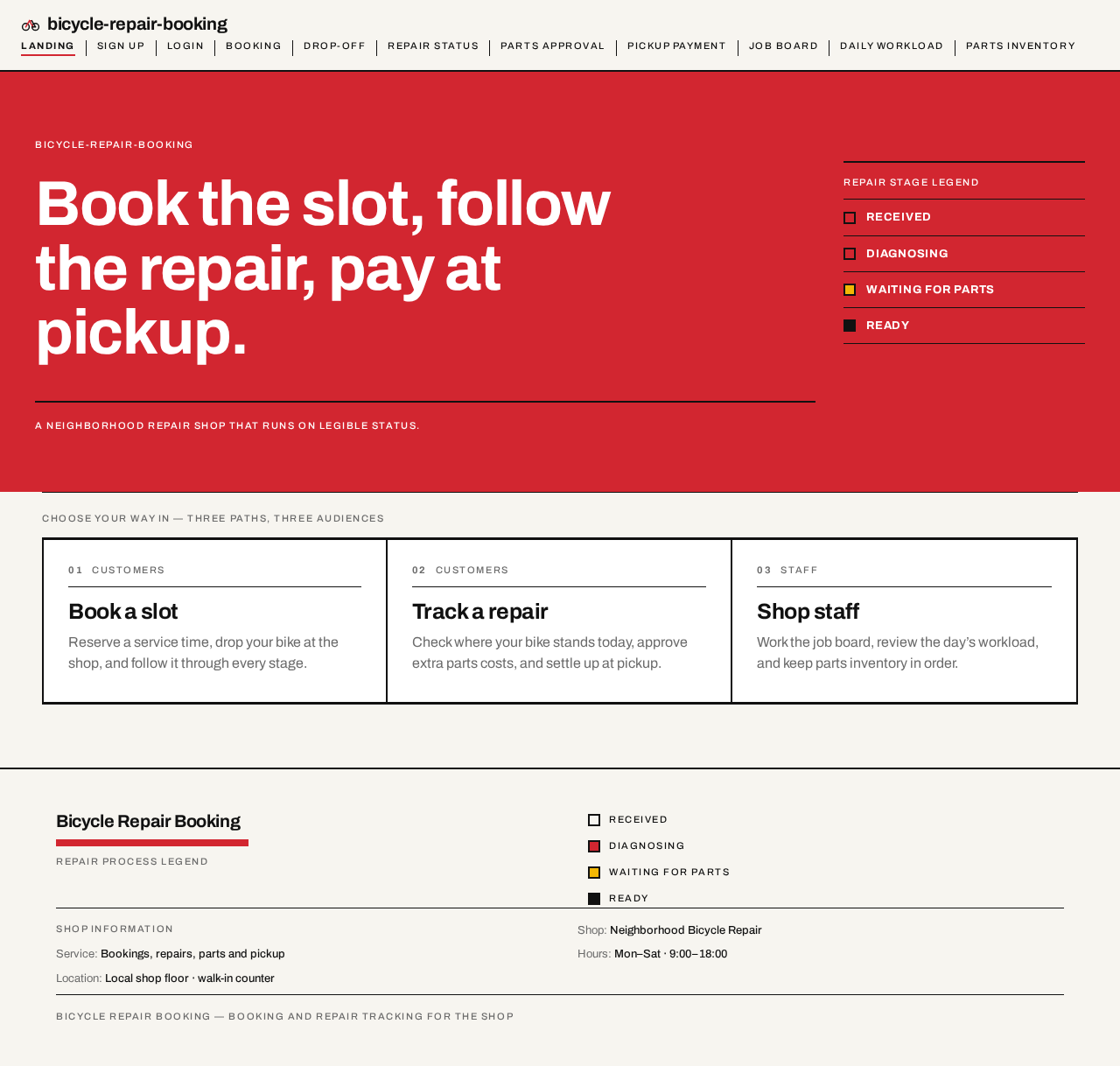
Book the slot, follow
the repair, pay at
pickup.
A neighborhood repair shop that runs on legible status.
Repair stage legend
- Received
- Diagnosing
- Waiting for parts
- Ready
Four-stage repair legend: Received, Diagnosing, Waiting for parts, Ready. The live stop is shown with its red rule.
Book the slot, follow
the repair, pay at
pickup.
A neighborhood repair shop that runs on legible status.
Repair stage legend
- Received
- Diagnosing
- Waiting for parts
- Ready
Four-stage repair legend: Received, Diagnosing, Waiting for parts, Ready. The live stop is shown with its red rule.
No comments yet. Be the first!