beverage-advertisement
 Fardin Faisal
Cinematic product b-roll of a cold aluminum soda can standing on a dark reflective surface, slow push-in camera movement, macro close-up on the can's label, condensation water droplets sliding down the metallic surface, fine mist rising around the can, soft rim lighting with bright specular highlights along the edges, deep shadows, shallow depth of field with creamy blurred background, vibrant color pop on the can, premium commercial look, ultra-sharp detail, 4K, smooth slow motion, high-end beverage advertisement style

Comments (0)
Sign in to leave a comment
System Requirements
System Requirements Document for beverage-advertisement
1. Introduction
beverage-advertisement is a visual creation experience for a creative requester who wants cinematic product B-roll for a premium beverage advertisement. Its current purpose is to present and create a polished shot of a cold aluminum soda can: upright on a dark reflective surface, with a slow camera push-in that resolves into a macro view of the label.
The B-roll must convey coldness and tactile detail through condensation droplets sliding down the metallic surface and fine mist rising around the can. Soft rim lighting, bright metallic edge highlights, deep shadows, shallow depth of field, and a creamy blurred background establish the requested commercial look. The can provides the vibrant color pop. The result is intended to be ultra-sharp 4K with smooth slow motion.
The active audience is the Creative requester, who supplies the visual brief and receives the resulting B-roll.
2. System Overview
The current product is a custom-UI experience with two ordered destinations: Landing and Create. Both are anonymously accessible. Landing introduces the visual-brief-to-B-roll outcome; Create lets the requester provide the detailed brief and receive the result in one cohesive, non-durable creation flow.
The current accepted behavior is limited to presenting and creating the specified cinematic beverage B-roll. The supplied soda-can image is visual inspiration for the can and label, not a source of additional product facts or capabilities. The image’s vivid citrus-yellow can and droplets inform the visual treatment; the requested dark reflective setting, rim light, mist, and cinematic camera movement remain required.
There is one active human persona: Creative requester. No other human participant, provider-owned workflow, external destination, account requirement, or durable project history is established. The creation flow does not require application identity. Generation failure must be visible to the requester, who can retry the creation from the Create destination.
2a. Product Interpretation and Delivery Boundary
The product is a public, anonymous creative experience, not a general-purpose beverage-advertising suite. Landing and Create are the complete current page contract. Landing provides the first impression and a clear path into creation; Create owns the brief-to-result interaction. The creation is non-durable: no account, saved history, or resume capability is required.
The current boundary includes the requested can, label, camera movement, condensation, mist, lighting, depth of field, color, resolution, motion, and premium commercial styling. It does not establish additional editing, export, sharing, campaign management, or account-management capabilities. No future requirements are specified.
2c. Page Content and Component Coverage
Landing
- Information and state
- Present the product’s visual-brief-to-cinematic-B-roll outcome.
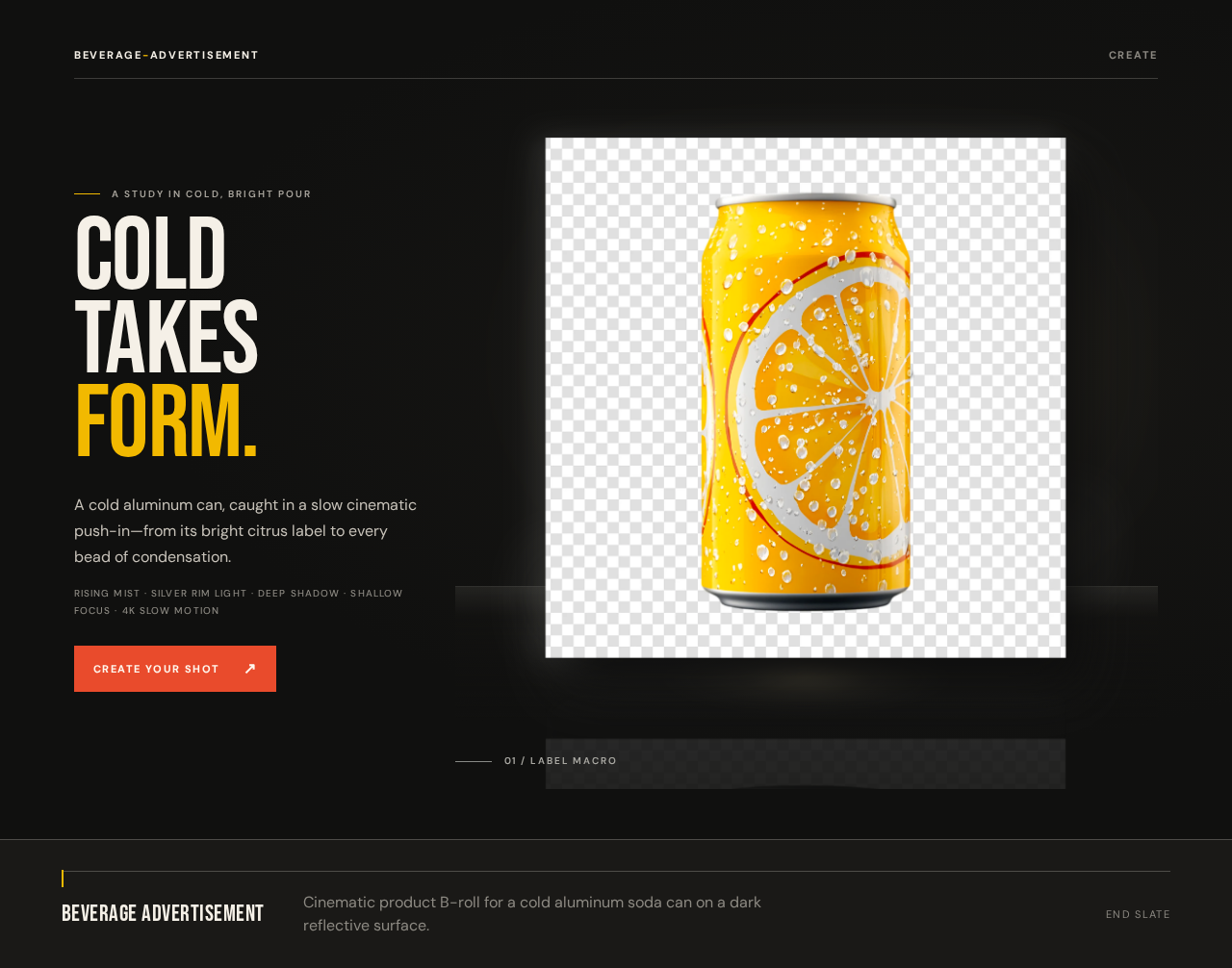
- Show a dark, reflective commercial scene featuring an upright cold aluminum soda can inspired by the supplied image: vivid citrus-yellow label, pale citrus motif, silver rim, and visible droplets.
- Communicate the defining visual treatment: slow push-in, macro label detail, condensation, fine mist, rim lighting, deep shadows, shallow focus, and premium beverage-advertisement styling.
- Anonymous entry; no identity or saved state.
- Primary actions
- Provide a clear action that takes the requester to Create.
- Supporting components
- Compact wordmark/navigation row with a clear path into Create.
- Asymmetric campaign composition: narrow left copy column and dominant can image on the right at desktop; copy above a contained can image on tablet and mobile.
- Editorial headline, brief summary, and primary action; cinematic shot metadata may frame the visual without implying additional functionality.
- States
- Loading: keep the page structure and action usable while the hero visual loads; do not cover readable text or controls.
- Empty: not applicable; the page has fixed introductory content.
- Success: the landing content is displayed and the requester can proceed to Create.
- Error and recovery: if the hero image cannot load, retain readable introductory content and the Create path, and provide a recoverable visual-loading state rather than blocking entry.
Create
- Information and state
- Provide the requester’s detailed visual brief and the resulting B-roll in one cohesive, non-durable creation flow.
- The brief must preserve the requested cold aluminum soda can, dark reflective surface, slow push-in, macro label close-up, sliding condensation droplets, rising fine mist, soft rim lighting, bright specular edge highlights, deep shadows, shallow depth of field, creamy blurred background, vibrant can color pop, premium commercial look, ultra-sharp detail, 4K, smooth slow motion, and high-end beverage-advertisement style.
- No account, saved history, or durable project state.
- Primary actions
- Let the requester provide the detailed brief and initiate creation.
- Present the resulting B-roll when creation succeeds.
- Let the requester retry after a material creation failure.
- Supporting components
- Brief input and creation action.
- Result presentation that makes the requested visual qualities observable.
- Clear progress, success, and error feedback.
- States
- Loading: show that creation is in progress and keep the current brief context visible.
- Empty: before a brief is supplied, explain the creation input and do not present a fabricated result.
- Success: show the generated B-roll to the requester, including its slow push-in and macro label detail.
- Error and recovery: explain that creation did not complete; retain the current brief for a retry within the active flow. Do not imply that a failed or completed creation is saved for later.
3. Functional Requirements
FR-1 — Present the beverage B-roll outcome
As a Creative requester, I should see the intended cinematic beverage B-roll outcome on Landing so that I can understand the visual result before beginning creation.
- Provenance:
required_inferencefor the Landing destination and introductory presentation; the visual outcome isexplicit. - Trigger/input: The requester opens Landing anonymously.
- Observable result: Landing presents the cold aluminum soda can on a dark reflective surface and communicates the slow push-in, macro label detail, condensation, mist, lighting, depth of field, and premium commercial style.
- Access: Anonymous; no identity is required.
- Failure/recovery: If the hero visual fails to load, the introductory content and path to Create remain available; the visual can recover without blocking entry.
- Continuation: The requester can proceed to Create.
FR-2 — Provide the detailed visual brief
As a Creative requester, I should be able to provide the detailed beverage-advertisement brief so that the creation flow can produce the requested B-roll.
- Provenance:
explicitfor the requested visual brief;required_inferencefor the input interaction needed to provide it. - Trigger/input: The requester opens Create and supplies the brief.
- Observable result: The active creation flow holds the brief needed to create the requested result, including the cold aluminum soda can, dark reflective surface, slow push-in, macro label close-up, sliding condensation droplets, rising fine mist, soft rim lighting, bright specular edge highlights, deep shadows, shallow depth of field, creamy blurred background, vibrant color pop, premium commercial look, ultra-sharp detail, 4K, smooth slow motion, and high-end beverage-advertisement style.
- Access: Anonymous; no identity is required. The brief and result are non-durable.
- Failure/recovery: If the brief cannot be used to start creation, show an actionable error and retain the active input for correction or retry.
- Continuation: The requester initiates creation from the supplied brief.
FR-3 — Create and present cinematic product B-roll
As a Creative requester, I should receive cinematic product B-roll of a cold aluminum soda can so that I can see the requested premium beverage-advertisement result.
- Provenance:
explicit. - Trigger/input: The requester initiates creation from the brief on Create.
- Observable result: The result depicts a cold aluminum soda can standing on a dark reflective surface; a slow push-in camera movement; a macro close-up on the can’s label; condensation water droplets sliding down the metallic surface; fine mist rising around the can; soft rim lighting with bright specular highlights along the edges; deep shadows; shallow depth of field with a creamy blurred background; a vibrant color pop on the can; a premium commercial look; ultra-sharp detail; 4K; smooth slow motion; and high-end beverage-advertisement styling. The requester can observe the resulting B-roll in the active Create flow.
- Access: Anonymous; no identity is required. The result is not established as saved or resumable.
- Failure/recovery: If creation fails, show a clear failure state and allow the requester to retry from the retained active brief.
- Continuation: On success, the requester views the result in Create. On failure, the requester may retry; no further workflow is specified.
4. User Personas
Creative requester
- Provenance:
required_inferencepersona from Planning Scope. - Product context: A person seeking a premium beverage-advertisement visual, with a specific cold soda-can shot in mind.
- Primary goal: Provide a visual brief and receive cinematic product B-roll that matches it.
- Distinct accepted responsibilities: Choose and provide the requested visual direction, initiate creation, inspect the resulting B-roll, and decide whether to retry if creation fails.
- Relevant inputs and decisions: The brief specifies the can and label mood, reflective setting, camera movement, macro detail, condensation, mist, lighting, shadows, depth of field, color pop, commercial style, sharpness, resolution, and slow motion.
- Interactions with other accepted participants: No other accepted human participant is involved. The requester initiates creation and observes its result or failure.
- Observable success: The requester sees the requested B-roll in the active Create flow, or receives a clear failure state with a retry path.
5. Core User Flows
Flow 1 — Understand the outcome and begin creation
- The Creative requester opens Landing anonymously.
- Landing presents the intended cold aluminum soda-can B-roll and its defining visual treatment.
- The requester selects the path into Create.
- Create opens as an anonymous, non-durable creation flow. The requester can provide the detailed brief.
Flow 2 — Provide a brief and receive B-roll
- The Creative requester opens Create and provides the detailed beverage-advertisement brief.
- Create holds the brief in the active flow and makes the creation action available.
- The requester initiates creation.
- While creation is in progress, Create communicates the loading state and retains the active brief context.
- On success, Create presents the resulting B-roll to the requester. The requester can observe the cold aluminum can on the dark reflective surface, slow push-in, macro label detail, sliding droplets, rising mist, rim lighting, deep shadows, shallow focus, vibrant can color, premium commercial styling, ultra-sharp detail, 4K, and smooth slow motion.
- If creation fails, Create communicates the failure and retains the active brief for retry. The requester may retry from Create.
- The flow has no specified save, export, sharing, or later-resume step.
6. Visuals Colors and Theme
Creative direction: “Editorial drama for a cold, bright pour.”
Muse: Tobias van Schneider.
The visual language is premium, tactile, photography-led, and editorial. The interface should support the requested beverage cinema rather than resemble a generic utility or dashboard. The uploaded soda-can image informs the can and label mood: a vivid citrus-yellow can, pale citrus motif, silver rim, and droplets. It does not replace the explicitly requested dark reflective commercial setting, rim light, mist, or cinematic camera movement.
Color tokens
| Role | Token |
|---|---|
| Background | #10100F |
| Surface | #1B1A18 |
| Primary text | #F5F0E7 |
| Primary accent / can color pop | #F2B900 |
| Sparing label detail / key action | #E94B2C |
| Muted text | #8C8982 |
| Metallic reflections | Silver-grey, kept distinct from pale UI panels |
Keep approximately 75% of the interface in near-black and graphite. Use warm off-white for readable copy, citrus yellow for the can’s dominant color field, and tomato red sparingly. Avoid blue–indigo accents and bright or white-first page grounds.
Typography and scale
- Headings: Bebas Neue, uppercase editorial stacks, assertive weight, compact leading.
- Body and controls: DM Sans.
- Display: 56px mobile to 128px desktop.
- Section titles: 36–64px.
- Body: 16–18px.
- Labels: 11–12px uppercase with tracked lettering.
- Scale and wrap text to fit; do not clip it.
Shape, spacing, and imagery
- Use sharp editorial edges, restrained framing, thin warm-metal rules, squared metadata labels, and a glossy oval reflection beneath the can.
- Use an asymmetric campaign composition: narrow left copy column and dominant right-side can image on desktop; stack copy above a contained can image on tablet and mobile.
- Use a sharp, premium aluminum soda can inspired by the supplied reference, with a saturated citrus-yellow label, pale citrus motif, silver rim, and visible cold droplets. Place it upright on a dark reflective surface with soft rim lighting, bright metallic edge highlights, deep shadows, and a creamy blurred background.
- Condensation, mist, and light belong in the atmospheric imagery, not as decorative UI blobs. Do not substitute unrelated stock imagery.
- Spacing rhythm: [Default — not specified by user] Use a consistent 4px base spacing scale, with larger editorial gaps between major content groups.
- Corner radius: [Default — not specified by user] Keep controls and framing mostly square-edged; use only restrained rounding where needed for usable controls.
Responsive and readability requirements
At 375px, 768px, and 1280px, headlines, wordmarks, labels, numbers, and controls must remain fully inside the viewport and their containers. Wrap or scale content rather than clipping it. No element may cover readable text or controls. Imagery and decoration may be cropped, bled off an edge, rotated, overlapped, or cut as the direction requires, provided they do not obscure readable content. The mobile hero stacks copy above a contained can image rather than cropping readable content.
7. Signature Design Concept
Build the Landing hero as a dark, full-bleed campaign stage. A narrow left column carries an oversized, flush-left condensed headline, a concise description of the requested B-roll, and a sharp-edged tomato-red action into Create. Pick out the headline’s final word in citrus yellow.
The right two-thirds are dominated by one upright yellow aluminum can on a dark mirror-like plane. Its reflection fades below it; silver edge highlights, visible droplets, and fine mist establish the cold, tactile atmosphere. Keep the can and its label as the visual focal point, with the background falling into creamy shadow. A restrained slow push-in resolves from the full can to a crisp label macro. A fine silver rule and compact uppercase shot metadata such as “01 / LABEL MACRO” may frame the composition as visual treatment, not as a new product control or capability.
At tablet and mobile widths, stack the copy above a contained can image and scale the headline so all text and controls remain fully visible. Do not place readable text or controls beneath the can, reflection, mist, or moving visual layers. The composition uses only the accepted B-roll subject, visual states, and path into Create.
8. Interaction Model & Motion Direction
Interaction Model: Animated
Motion Tempo: restrained
Hero Dimensionality: flat
Landing Hero Motion Brief
- Focal subject: A cold, upright aluminum soda can inspired by the supplied citrus-yellow reference, standing on a dark reflective surface.
- Input → transformation → outcome thesis: The requester moves from the Landing introduction into Create; the visual presentation transforms the full-can view into a label-focused macro, expressing the same accepted B-roll brief rather than introducing a new behavior.
- Motion vocabulary: Deliberate slow push-in, restrained label macro transition, subtle droplets sliding down the can, fine mist drifting upward, slow smooth easing, and shallow-focus transitions. Interface controls remain immediate and readable.
- Composed first frame: Full-bleed near-black stage; narrow left editorial copy column and clear action; oversized can on the right, upright on a reflective plane, with citrus-yellow label, silver rim highlights, visible droplets, and deep shadow.
- Reduced-motion state: Present a usable static composition of the full can and its label, with all copy and controls readable. Do not rely on motion to reveal essential text or controls.
9. Non-Functional Requirements
NFR-1 — Visual fidelity
- Provenance:
explicit. - The created B-roll must preserve the requested subject, setting, camera movement, macro label detail, condensation, mist, lighting, shadows, depth of field, color pop, premium commercial look, ultra-sharp detail, 4K, and smooth slow motion.
- The supplied image is visual inspiration for the can and label; it does not override the requested dark reflective setting or other explicit visual requirements.
NFR-2 — Readability and responsive composition
- Provenance:
explicitin the creative direction. - At 375px, 768px, and 1280px, readable text and controls must remain fully within the viewport and their containers, with no overlap that obscures them.
- Scale or wrap text rather than clipping it. On mobile, stack copy above a contained can image.
- Imagery and decoration may be cropped or overlap only when they do not cover readable text or controls.
NFR-3 — Reduced motion
- Provenance:
explicitin the creative direction. - When reduced motion is preferred, provide a usable static arrangement. Essential content and controls must remain available without animation.
NFR-4 — Non-durable anonymous creation
- Provenance:
required_inferencefrom the accepted Planning Scope. - Landing and Create are anonymously accessible. The creation flow is non-durable; no account, saved history, or later resume is required.
- A failure must be observable and recoverable by retrying from the active Create flow.
10. Tech Stack
- Frontend: [Default — not specified by user] React for the custom Landing and Create pages and their responsive, motion-aware presentation.
- Backend: [Default — not specified by user] One shared backend for any server-side creation behavior required by the accepted flow; no separate service is established by the requirements.
- Storage: [Default — not specified by user] No durable user or creation-history storage is required by the accepted non-durable flow.
- Deployment: [Default — not specified by user] Use Docker and docker-compose only if required by the project’s deployment environment; no independent worker, Kubernetes deployment, or additional runnable service is established here.
11. Assumptions and Constraints
- [Required inference] Landing is the anonymous first impression and Create is the anonymous, non-durable brief-to-result flow, as specified by the versioned page contract.
- [Required inference] The requester needs a way to provide the detailed brief, initiate creation, observe progress and outcome, and retry after failure for the accepted creation goal to be usable.
- No application identity, account management, saved history, or later resume is required.
- The supplied image is visual inspiration for the can and label only. The requested dark reflective surface, camera movement, lighting, mist, and other explicit visual details remain binding.
- No future requirements are specified.
- No additional editing, export, sharing, campaign management, or other adjacent capability is included in the current scope.
12. Glossary
- B-roll: Supporting product footage used to convey the beverage’s visual and sensory qualities.
- Macro label close-up: A close camera view that makes the can’s label a prominent, sharply detailed subject.
- Push-in: A gradual camera move toward the subject.
- Rim lighting: Edge lighting that outlines the can and produces bright highlights along its metallic edges.
- Shallow depth of field: A focus treatment in which the subject is sharp while the background is softly blurred.
- Non-durable creation flow: A brief-to-result interaction that does not establish saved history or later resume.
A study in cold, bright pour
COLD
TAKES
FORM.
A cold aluminum can, caught in a slow cinematic push-in—from its bright citrus label to every bead of condensation.
Rising mist · silver rim light · deep shadow · shallow focus · 4K slow motion
Create your shot
01 / Label macro
A study in cold, bright pour
COLD
TAKES
FORM.
A cold aluminum can, caught in a slow cinematic push-in—from its bright citrus label to every bead of condensation.
Rising mist · silver rim light · deep shadow · shallow focus · 4K slow motion
Create your shot01 / Label macro
No comments yet. Be the first!