befree-itr-automation-portal
 Palak Bera
Based on this document give me proper design


Comments (0)
Sign in to leave a comment
System Requirements
System Requirements Document
Introduction
This document outlines the system requirements for the Befree ITR Automation Platform, an AI-powered, multi-tenant SaaS product designed to automate the conversion of client source documents into verified, structured Individual Tax Return (ITR) workpapers. The platform is intended for use by tax professionals and firms, providing a hosted application with authenticated workspaces and AI/ML capabilities.
System Overview
The Befree ITR Automation Platform is a production-grade, multi-tenant SaaS application featuring:
- AI-native services for OCR, document classification, field extraction, and transaction categorization.
- A subscription-ready architecture with role-based access control and an API-first backend.
- Background processing for document handling to ensure scalability and efficiency.
- Configurable settings for document types, extraction fields, categories, and output templates to support diverse client needs.
Functional Requirements
As an Admin:
- I want to log in using email/password or SSO to access the platform.
- I want to view a dashboard with an operational overview of all cases.
- I want to manage users by creating, editing, and deactivating accounts.
- I want to define document types that the AI pipeline recognizes.
- I want to configure extraction fields for each document type.
- I want to maintain a category taxonomy for income, deductions, and offsets.
- I want to define and map output templates for structured workpapers.
- I want to view and filter a system-wide audit log for oversight and compliance.
- I want to oversee and troubleshoot cases with the ability to reassign them.
- I want to see AI confidence scores for extracted data to assess accuracy.
- I want to track per-job status to monitor processing progress.
- I want error alerting to be notified of any issues in the system.
As an Analyst:
- I want to log in to access my dashboard and view assigned cases.
- I want to create new cases by registering client ITR jobs.
- I want to ingest source documents for a case and manage their processing.
- I want to inspect extracted data and its mapping to the output template.
- I want to verify, edit, or reject AI-extracted data in the Review Workbench.
- I want to generate and download the final workpaper once review is complete.
- I want to see extracted fields grouped by document for easier review.
- I want to view each extracted value and its configured destination in the output template.
- I want document processing to run as background jobs, not inline in the request/response cycle, to ensure scalability.
- I want throughput to scale independently of the web tier to handle varying document volumes.
User Personas
- Admin: Responsible for configuring the platform, managing users, and overseeing all cases. Has full access to all configuration and audit features.
- Analyst: Executes the operational workflow, including creating cases, ingesting documents, and reviewing AI-extracted data. Limited to case-specific actions.
Core User Flows
Admin Flow
- Log in to the platform.
- Access the dashboard for an overview of all cases.
- Navigate to user management to add or edit users.
- Configure document types, extraction fields, categories, and output templates.
- Monitor the audit log for system-wide activities.
- Oversee cases and reassign as necessary.
Analyst Flow
- Log in to the platform.
- View the dashboard for assigned cases.
- Create a new case and ingest documents.
- Inspect extracted data and verify in the Review Workbench.
- Generate the final workpaper and download it.
Visuals Colors and Theme
- Default to a professional and clean design suitable for a SaaS application in the financial domain.
- Use a neutral color palette with blues and grays to convey trust and reliability.
Signature Design Concept
- Focus on a user-friendly interface with intuitive navigation and clear data presentation.
- Ensure responsive design for accessibility across devices.
Interaction Model & Motion Direction
- Utilize smooth transitions and animations to enhance user experience without distracting from core functionalities.
- Prioritize quick access to frequently used features and data.
Non-Functional Requirements
- Security: All routes must be authenticated and role-scoped.
- Scalability: Support variable document volumes and asynchronous processing.
- Maintainability: Ensure configurations are admin-managed and not hard-coded.
- Traceability: Maintain source references for all extracted data.
- Auditability: Log all human edits with detailed audit trails.
Tech Stack
- Frontend: React (Next.js) with TypeScript for a dynamic and responsive UI.
- Backend/API: Python (FastAPI) or Node (NestJS/Express) for a robust API layer.
- Auth: JWT or session-based authentication with password hashing.
- Database: PostgreSQL for relational data integrity.
- File Storage: S3-compatible object storage for document management.
- Background Processing: Job queue (e.g., Celery/RQ with Redis) for asynchronous tasks.
- Observability: Structured logging and status tracking for reliable operations.
Assumptions and Constraints
- The platform will initially ship as a single-tenant application but is designed for multi-tenancy.
- No public marketing pages or unauthenticated content are included in this build.
- The AI pipeline is modular and provider-agnostic, allowing future integration with real AI services.
Glossary
- ITR: Individual Tax Return
- OCR: Optical Character Recognition
- CRUD: Create, Read, Update, Delete
- SaaS: Software as a Service
- RBAC: Role-Based Access Control
- LLM: Large Language Model
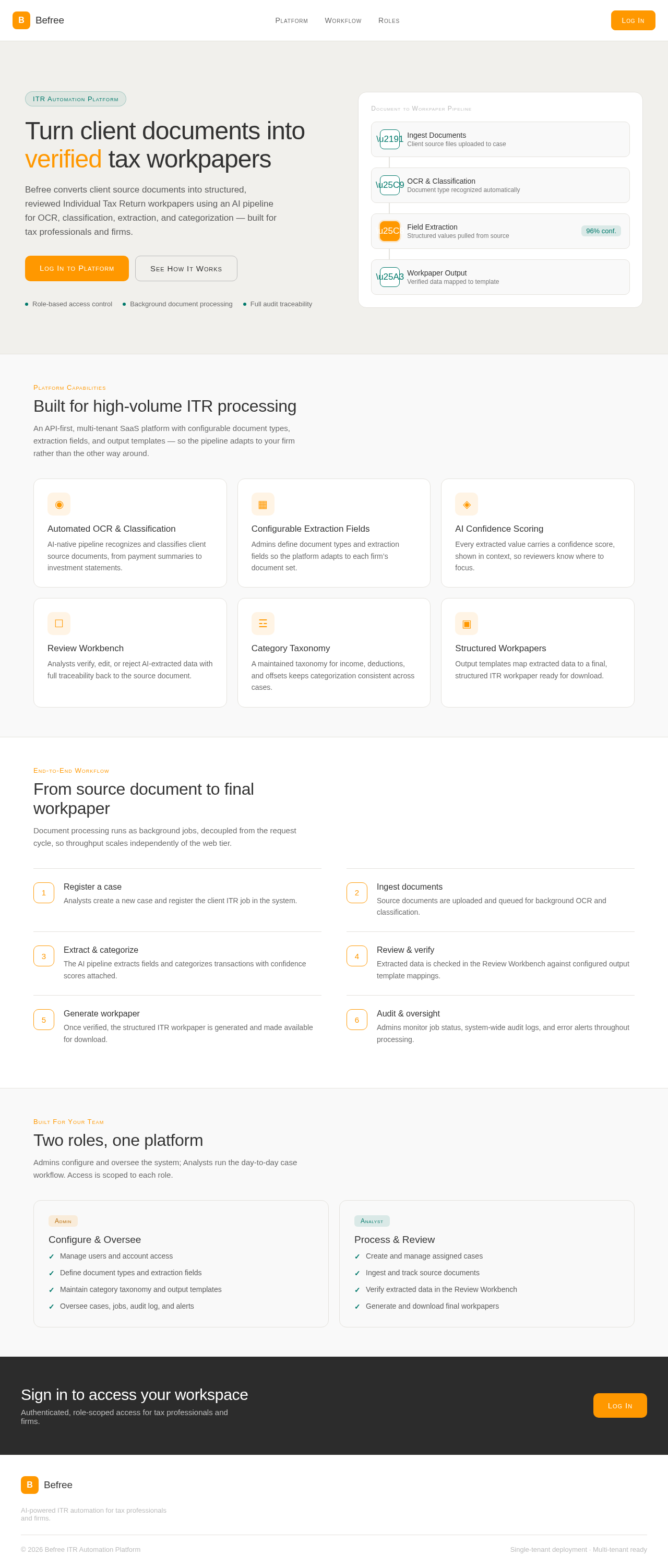
Turn client documents into verified tax workpapers
Befree converts client source documents into structured, reviewed Individual Tax Return workpapers using an AI pipeline for OCR, classification, extraction, and categorization — built for tax professionals and firms.
Document to Workpaper Pipeline
Ingest Documents
Client source files uploaded to case
OCR & Classification
Document type recognized automatically
Field Extraction
Structured values pulled from source
Workpaper Output
Verified data mapped to template
Platform Capabilities
Built for high-volume ITR processing
An API-first, multi-tenant SaaS platform with configurable document types, extraction fields, and output templates — so the pipeline adapts to your firm rather than the other way around.
Automated OCR & Classification
AI-native pipeline recognizes and classifies client source documents, from payment summaries to investment statements.
Configurable Extraction Fields
Admins define document types and extraction fields so the platform adapts to each firm’s document set.
AI Confidence Scoring
Every extracted value carries a confidence score, shown in context, so reviewers know where to focus.
Review Workbench
Analysts verify, edit, or reject AI-extracted data with full traceability back to the source document.
Category Taxonomy
A maintained taxonomy for income, deductions, and offsets keeps categorization consistent across cases.
Structured Workpapers
Output templates map extracted data to a final, structured ITR workpaper ready for download.
End-to-End Workflow
From source document to final workpaper
Document processing runs as background jobs, decoupled from the request cycle, so throughput scales independently of the web tier.
Register a case
Analysts create a new case and register the client ITR job in the system.
Ingest documents
Source documents are uploaded and queued for background OCR and classification.
Extract & categorize
The AI pipeline extracts fields and categorizes transactions with confidence scores attached.
Review & verify
Extracted data is checked in the Review Workbench against configured output template mappings.
Generate workpaper
Once verified, the structured ITR workpaper is generated and made available for download.
Audit & oversight
Admins monitor job status, system-wide audit logs, and error alerts throughout processing.
Built For Your Team
Two roles, one platform
Admins configure and oversee the system; Analysts run the day-to-day case workflow. Access is scoped to each role.
Configure & Oversee
- ✓Manage users and account access
- ✓Define document types and extraction fields
- ✓Maintain category taxonomy and output templates
- ✓Oversee cases, jobs, audit log, and alerts
Process & Review
- ✓Create and manage assigned cases
- ✓Ingest and track source documents
- ✓Verify extracted data in the Review Workbench
- ✓Generate and download final workpapers
Sign in to access your workspace
Authenticated, role-scoped access for tax professionals and firms.
Turn client documents into verified tax workpapers
Befree converts client source documents into structured, reviewed Individual Tax Return workpapers using an AI pipeline for OCR, classification, extraction, and categorization — built for tax professionals and firms.
Document to Workpaper Pipeline
Ingest Documents
Client source files uploaded to case
OCR & Classification
Document type recognized automatically
Field Extraction
Structured values pulled from source
Workpaper Output
Verified data mapped to template
Platform Capabilities
Built for high-volume ITR processing
An API-first, multi-tenant SaaS platform with configurable document types, extraction fields, and output templates — so the pipeline adapts to your firm rather than the other way around.
Automated OCR & Classification
AI-native pipeline recognizes and classifies client source documents, from payment summaries to investment statements.
Configurable Extraction Fields
Admins define document types and extraction fields so the platform adapts to each firm’s document set.
AI Confidence Scoring
Every extracted value carries a confidence score, shown in context, so reviewers know where to focus.
Review Workbench
Analysts verify, edit, or reject AI-extracted data with full traceability back to the source document.
Category Taxonomy
A maintained taxonomy for income, deductions, and offsets keeps categorization consistent across cases.
Structured Workpapers
Output templates map extracted data to a final, structured ITR workpaper ready for download.
End-to-End Workflow
From source document to final workpaper
Document processing runs as background jobs, decoupled from the request cycle, so throughput scales independently of the web tier.
Register a case
Analysts create a new case and register the client ITR job in the system.
Ingest documents
Source documents are uploaded and queued for background OCR and classification.
Extract & categorize
The AI pipeline extracts fields and categorizes transactions with confidence scores attached.
Review & verify
Extracted data is checked in the Review Workbench against configured output template mappings.
Generate workpaper
Once verified, the structured ITR workpaper is generated and made available for download.
Audit & oversight
Admins monitor job status, system-wide audit logs, and error alerts throughout processing.
Built For Your Team
Two roles, one platform
Admins configure and oversee the system; Analysts run the day-to-day case workflow. Access is scoped to each role.
Configure & Oversee
- ✓Manage users and account access
- ✓Define document types and extraction fields
- ✓Maintain category taxonomy and output templates
- ✓Oversee cases, jobs, audit log, and alerts
Process & Review
- ✓Create and manage assigned cases
- ✓Ingest and track source documents
- ✓Verify extracted data in the Review Workbench
- ✓Generate and download final workpapers
Sign in to access your workspace
Authenticated, role-scoped access for tax professionals and firms.
No comments yet. Be the first!