
bedwars-multiplayer

byNeeraj Prabash

Build a high-performance, multiplayer Web-Based Bedwars game modeled exactly after the core mechanics of Minecraft Bedwars, optimized for smooth 60FPS browser performance and zero-lag server state syncing. ### 1. Core Architecture & Tech Stack (Lag Prevention) - Frontend Framework: Use React or Next.js paired with HTML5 Canvas (or lightweight 2D/3D WebGL via Three.js with simple block meshes) to handle graphics rendering cleanly without DOM-node lag. - State Management & Networking: Implement an authoritative server-client architecture using WebSockets. Use delta compression and client-side interpolation/prediction to ensure player movement, block-breaking, and combat feel responsive and "zero-lag" even on high-ping connections. - Backend & Database: Deploy via Node.js/TypeScript in the managed Kubernetes namespace, tracking short-term session states in memory or Redis for sub-millisecond game loop updates. ### 2. Gameplay Mechanics (Exact Match) - Lobby & Matchmaking: Automatically group players into teams (Solo, Doubles, or 4v4v4v4 teams across Red, Blue, Green, and Yellow) and teleport them to team islands when the game lobby fills up. - Island Spawners: Program timed resource spawners at base islands (Iron and Gold), and neutral middle/side islands (Diamond and Emerald). - Item Shop NPC: An interactive visual menu where players trade Iron/Gold for weapons, blocks (wool, wood, obsidian), tools (shears, pickaxes), and armor. - Team Upgrade NPC: An interactive menu to trade Diamonds for permanent team buffs (Sharpened Swords, Reinforced Armor, Haste, and Traps). - The Bed Mechanic: Each team has a physical Bed on their island. While the bed is intact, team members can respawn infinitely after a 5-second countdown. If a bed is broken by an enemy player, respawning is permanently disabled for that team. - Combat & Knockback: Implement real-time hit registration, damage calculations, and visual velocity knockback when striking an enemy player with swords or knockback sticks. ### 3. Graphics, Polish & UI ("Exact But Better") - Visuals: Clean, high-fidelity voxel or styled low-poly aesthetic mimicking Minecraft but featuring modern web lighting, satisfying particle effects on block destruction, and smooth camera transitions. - Game Status UI: A real-time, scannable HUD showing current player inventory, team bed status (Alive/Broken/Eliminated), a match timer, and kill feeds. - Sound System: Hook up sound effects for block breaking, purchasing items, bed destruction, and combat impacts. ### 4. Code & Build Isolation Rules Please invoke the Project Manager Agent to break this into a sprint plan (UI/Canvas setup, WebSocket connection, Gameplay Logic, Shop UI). Ensure every single agentic code pass runs through the automated security scanner to guarantee secure, unprotected API-free WebSocket routes. Build a high-performance, multiplayer Web-Based Bedwars game modeled exactly after the core mechanics of Minecraft Bedwars, optimized for smooth 60FPS browser performance and zero-lag server state syncing. ### 1. Core Architecture & Tech Stack (Lag Prevention) - Frontend Framework: Use React or Next.js paired with HTML5 Canvas (or lightweight 2D/3D WebGL via Three.js with simple block meshes) to handle graphics rendering cleanly without DOM-node lag. - State Management & Networking: Implement an authoritative server-client architecture using WebSockets. Use delta compression and client-side interpolation/prediction to ensure player movement, block-breaking, and combat feel responsive and "zero-lag" even on high-ping connections. - Backend & Database: Deploy via Node.js/TypeScript in the managed Kubernetes namespace, tracking short-term session states in memory or Redis for sub-millisecond game loop updates. Long-term player records should use the native persistent storage volume. ### 2. Gameplay Mechanics (Exact Match) - Lobby & Matchmaking: Automatically group players into teams (Solo, Doubles, or 4v4v4v4 teams across Red, Blue, Green, and Yellow) and teleport them to team islands when the game lobby fills up. - Island Spawners: Program timed resource spawners at base islands (Iron and Gold), and neutral middle/side islands (Diamond and Emerald). - Item Shop NPC: An interactive visual menu where players trade Iron/Gold for weapons, blocks (wool, wood, obsidian), tools (shears, pickaxes), and armor. - Team Upgrade NPC: An interactive menu to trade Diamonds for permanent team buffs (Sharpened Swords, Reinforced Armor, Haste, and Traps). - The Bed Mechanic: Each team has a physical Bed on their island. While the bed is intact, team members can respawn infinitely after a 5-second countdown. If a bed is broken by an enemy player, respawning is permanently disabled for that team. - Combat & Knockback: Implement real-time hit registration, damage calculations, and visual velocity knockback when striking an enemy player with swords or knockback sticks. ### 3. Server-Side Anti-Cheat Validation Suite - Movement Verification: Implement strict server-side speed and coordinate tracking. Reject movement packets if a player's velocity exceeds the maximum possible walking/knockback velocity (Fly Hack and Speed Hack protection). - Hit-Register Verification: Validate all combat packets on the server. Reject hits if the distance between the attacker and the victim exceeds a strict maximum block reach or if the line-of-sight is completely obstructed by solid blocks (Reach and KillAura protection). - Interaction Verification: Verify player click rates (CPS checks) and ensure a block can only be placed or broken if the player is structurally within interacting range and possesses the matching tool in their active server-side inventory. ### 4. Global Leaderboard & Player Progression System - Persistent Stats Tracking: Track individual player profiles across sessions, logging total Wins, Kills, Beds Broken, Games Played, and current Level/XP. - Real-Time Global Leaderboard: Build a global sorting system driven by a Redis Sorted Set (ZSET) to instantly pull and display the top 100 players globally, filterable by 'Wins', 'Beds Broken', and 'Kills'. - UI Integration: Design a clean, visual Leaderboard menu in the main lobby, allowing players to view global rankings alongside an overlay summarizing their personal lifetime statistics. ### 5. Graphics, Polish & UI ("Exact But Better") - Visuals: Clean, high-fidelity voxel or styled low-poly aesthetic mimicking Minecraft but featuring modern web lighting, satisfying particle effects on block destruction, and smooth camera transitions. - Game Status UI: A real-time, scannable HUD showing current player inventory, team bed status (Alive/Broken/Eliminated), a match timer, and kill feeds. - Sound System: Hook up sound effects for block breaking, purchasing items, bed destruction, and combat impacts. ### 6. Code & Build Isolation Rules Please invoke the Project Manager Agent to break this into a sprint plan (UI/Canvas setup, WebSocket connection, Gameplay Logic, Anti-Cheat loop, Leaderboard processing). Ensure every single agentic code pass runs through the automated security scanner to guarantee secure, unprotected API-free WebSocket routes.

LandingLogin
Landing

Comments (0)

No comments yet. Be the first!

Architecture

No Services Diagrams Yet

Architecture diagrams will be automatically generated when the Project Manager creates tasks for your project.

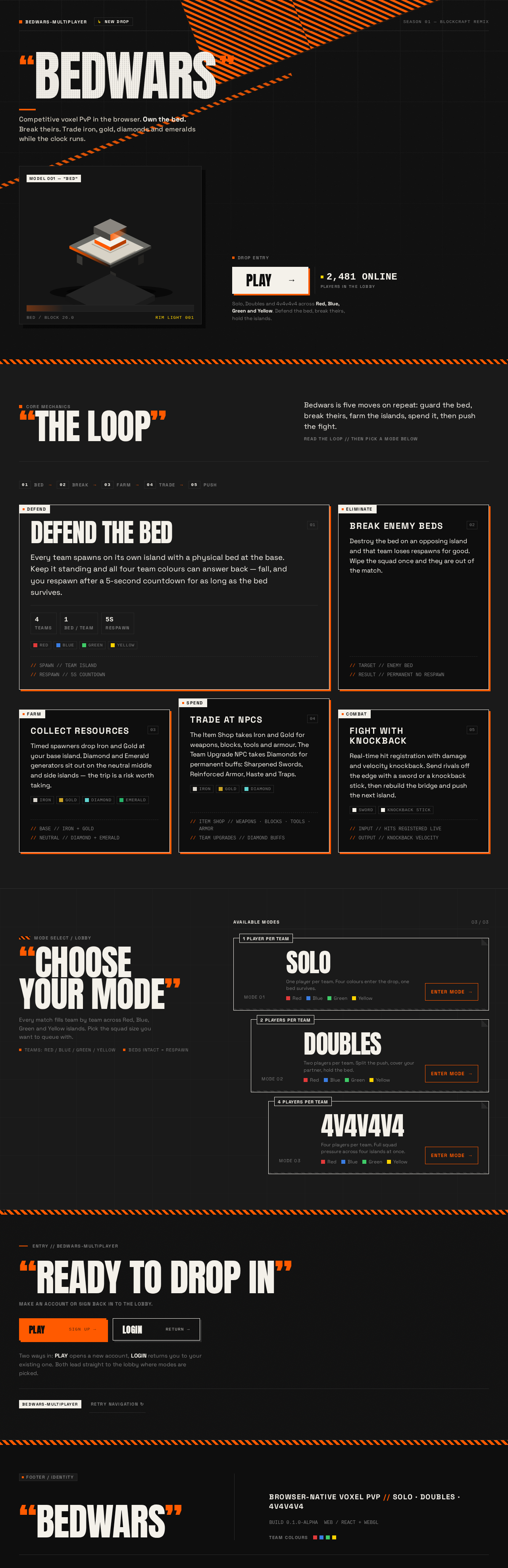
Landing design preview
Landing: Read mechanics summary
Landing: View mode cards
Sign Up: 1. Submit enrollment
Sign Up: 2. Fix validation error
Login: 1. Submit credentials
Login: 2. Retry invalid credentials
Lobby: Select mode
Lobby: 1. View team assignment
Lobby: 2. Reconnect session
Match: 1. Collect spawned resources
Item Shop: 2. Trade Iron and Gold
Item Shop: 3. Retry rejected purchase
Team Upgrades: 4. Trade Diamonds for buffs
Team Upgrades: 5. Retry rejected purchase
Match: 6. Attack enemy with sword
Match: 7. Reposition after rejected hit
Match: 8. Break enemy bed
Match: 9. Respawn on countdown
Match: 10. Reconnect after disconnect
Lobby: View updated stats
Landing design preview
Landing: Read mechanics summary
Landing: View mode cards
Sign Up: 1. Submit enrollment
Sign Up: 2. Fix validation error
Login: 1. Submit credentials
Login: 2. Retry invalid credentials
Lobby: Select mode
Lobby: 1. View team assignment
Lobby: 2. Reconnect session
Match: 1. Collect spawned resources
Item Shop: 2. Trade Iron and Gold
Item Shop: 3. Retry rejected purchase
Team Upgrades: 4. Trade Diamonds for buffs
Team Upgrades: 5. Retry rejected purchase
Match: 6. Attack enemy with sword
Match: 7. Reposition after rejected hit
Match: 8. Break enemy bed
Match: 9. Respawn on countdown
Match: 10. Reconnect after disconnect
Lobby: View updated stats