baseball-card-electronics
by Bobby Johnson
Bobby JohnsonGive me a website where I saw baseball card sports cards and electronics size game consoles computers and laptops

Comments (0)
Sign in to leave a comment
System Requirements
Page 1 of 27
System Requirements Document for baseball-card-electronics
1. Introduction
baseball-card-electronics is an online marketplace for baseball cards, sports cards, game consoles, computers, and laptops. It serves shoppers who want to browse and buy mixed collectible and electronics inventory online, and Store Owners / Sellers who list items, maintain prices, and review incoming orders.
The current product is a commerce site, not a display-only catalogue. Its central purpose is to make listed cards and electronics available for purchase.
Page 2 of 27
2. System Overview
The system delivers a custom web storefront with public shopping surfaces and protected seller administration surfaces.
Current system capabilities include:
- Displaying baseball cards and sports cards alongside electronics.
- Browsing game consoles, computers, and laptops as store inventory.
- Viewing an individual item and its price before purchase.
- Adding selected items to a shopping cart.
- Reviewing cart contents before checkout.
- Completing checkout to purchase items online.
- Allowing a Store Owner / Seller to enroll before accessing administrative work.
- Allowing a returning Store Owner / Seller to verify identity before accessing protected inventory, listing, and order administration.
- Allowing the Store Owner / Seller to maintain sellable inventory and its pricing.
- Allowing the Store Owner / Seller to create and edit item listings with prices.
- Allowing the Store Owner / Seller to review incoming orders and fulfillment status.
Current exclusions:
- The site must not be limited to displaying products.
- No shopper account, shopper profile management, loyalty program, marketplace messaging, reviews, wish lists, auctions, bidding, trade-in workflow, or seller-to-seller marketplace capability is specified for the current release.
- No delivery carrier, payment provider, shipping policy, returns policy, tax policy, grading provider, or external marketplace integration is specified for the current release.
- Future features must not be added to current pages unless explicitly accepted in a later requirement.
Page 3 of 27
2a. Product Interpretation and Delivery Boundary
The storefront is publicly available for shoppers to discover inventory, inspect listed items, add items to a cart, and complete checkout. The product must support purchasing the listed baseball cards, sports cards, game consoles, computers, and laptops online.
Seller administration is application-owned and protected. A Store Owner / Seller must enroll through Sign Up before first use and verify returning identity through Login before accessing Inventory, New Listing, or Orders.
The system distinguishes seller-only administrative access from public shopping access. This differentiated access is required because seller inventory, pricing, listings, and order administration are durable administrative state.
The current delivery boundary includes only the accepted storefront and seller administration workflows. External payment execution, shipment handling, and physical delivery are not defined as first-party workflows in this document. Checkout must still provide an observable completed purchase result and create an order visible to the seller.
2b. Page Content and Component Coverage
Page 4 of 27
Landing
- Information and state
- Introduces the store as a place to buy baseball cards, sports cards, game consoles, computers, and laptops.
- Presents the mixed marketplace inventory and online purchase purpose.
- Shows the current cart summary when the shopper has selected items.
- Primary actions
- Enter Shop.
- Navigate to product-category browsing for sports cards, game consoles, computers, and laptops.
- Open Cart.
- Supporting actions
- Navigate to seller Login or Sign Up.
- Domain entities
- Store inventory categories.
- Cart summary.
- Component responsibilities
- Masthead and category rail communicate available inventory types.
- Hero composition directs shoppers toward the store inventory.
- Persistent receipt-style cart indicator reflects current cart state.
- States
- Loading state while category or cart summary data is retrieved.
- Empty cart state shows that no items have been selected.
- Error state explains when storefront content cannot be loaded and provides a retry action.
- Success state allows continued browsing through Shop.
Page 5 of 27
Shop
- Information and state
- Displays mixed sellable inventory across baseball cards, sports cards, game consoles, computers, and laptops.
- Displays available item prices.
- Shows category context for the inventory being viewed.
- Primary actions
- Browse listed inventory.
- Select an item to view Item Details.
- Open Cart.
- Supporting actions
- Navigate between supported product categories.
- Return to Landing.
- Domain entities
- Inventory item.
- Item category.
- Item price.
- Cart summary.
- Component responsibilities
- Category rail supports movement among sports cards, game consoles, computers, and laptops.
- Product modules present category-specific item information and price.
- Cart indicator presents selected-item count and route to Cart.
- States
- Loading state while inventory is retrieved.
- Empty state when no listed items are available for the active category or browse context.
- Error state when inventory cannot be loaded, with retry.
- Success state supports continued item selection and cart review.
Page 6 of 27
Item Details
- Information and state
- Displays one selected item’s listing details and price before purchase.
- Identifies the item as a baseball card, sports card, game console, computer, or laptop where applicable.
- Reflects whether the item can be added to the current cart.
- Primary actions
- Add the selected item to Cart.
- Open Cart after adding an item.
- Supporting actions
- Return to Shop.
- Continue browsing after an item is added.
- Domain entities
- Inventory item.
- Item category.
- Item price.
- Cart.
- Component responsibilities
- Item presentation communicates the selected listing and price.
- Add-to-cart control records the shopper’s selection.
- Receipt-style cart summary confirms cart state.
- States
- Loading state while item details are retrieved.
- Error state when the item cannot be retrieved or cannot be added to the cart, with a retry or return-to-Shop path.
- Success state confirms that the selected item is in the cart and offers continuation to Cart or Shop.
Page 7 of 27
Cart
- Information and state
- Shows the items a shopper intends to buy.
- Shows item prices and cart total.
- Indicates whether the cart is ready for checkout.
- Primary actions
- Review selected items.
- Continue to Checkout when the cart contains items.
- Supporting actions
- Return to Shop to continue browsing.
- Return to an item through its listing context where available.
- Domain entities
- Cart.
- Cart line item.
- Item price.
- Cart total.
- Component responsibilities
- Receipt-style line-item panel presents the shopper’s intended purchase.
- Cart total communicates the monetary total for the selected items.
- Checkout action transfers the shopper to Checkout.
- States
- Empty cart state explains that checkout cannot be completed until an item is selected and directs the shopper to Shop.
- Loading state while cart contents are retrieved or updated.
- Error state when cart contents cannot be retrieved or updated, with retry and continuation to Shop.
- Success state allows the shopper to proceed to Checkout.
Page 8 of 27
Checkout
- Information and state
- Shows the items and total being purchased from the cart.
- Captures the information necessary to complete the accepted online purchase.
- Shows an observable purchase completion result.
- Primary actions
- Review the purchase.
- Submit checkout to buy the cart items.
- Supporting actions
- Return to Cart to review selected items before submitting checkout.
- Domain entities
- Cart.
- Cart line item.
- Purchase submission.
- Order.
- Order total.
- Component responsibilities
- Checkout summary presents selected items and total.
- Checkout submission creates the purchase outcome.
- Completion message confirms whether an order was created.
- States
- Empty-cart state prevents checkout completion and directs the shopper to Shop or Cart.
- Loading state while checkout information is being submitted.
- Error state explains when purchase completion fails, preserves the cart where possible, and allows retry or return to Cart.
- Success state confirms the completed purchase and communicates that the order is available to the Store Owner / Seller for review and fulfillment-status tracking.
Page 9 of 27
Inventory
- Information and state
- Protected seller overview of sellable inventory and pricing.
- Displays listed baseball cards, sports cards, game consoles, computers, and laptops.
- Shows item listing and price information available for maintenance.
- Primary actions
- Review current inventory and pricing.
- Start a listing through New Listing.
- Select an existing listing for editing through New Listing.
- Supporting actions
- Navigate to Orders.
- Sign out of protected seller access.
- Domain entities
- Inventory item.
- Item category.
- Item listing.
- Item price.
- Component responsibilities
- Inventory overview presents the seller’s sellable items and prices.
- Listing action opens New Listing for item creation.
- Edit action opens New Listing in existing-listing context.
- States
- Protected-access state requires verified Store Owner / Seller identity.
- Loading state while inventory is retrieved.
- Empty state explains when no sellable inventory is listed and directs the seller to New Listing.
- Error state provides retry when inventory cannot be loaded.
- Success state supports continued inventory review, listing creation, or editing.
Page 10 of 27
New Listing
- Information and state
- Protected seller workspace for creating or editing a sellable item listing.
- Captures item information, item category, and price required for shoppers to buy the item.
- Indicates whether the seller is creating a new listing or editing an existing listing.
- Primary actions
- Create a new listing.
- Edit an existing listing.
- Save item listing and price changes.
- Supporting actions
- Return to Inventory without completing a change.
- Navigate to Orders after a successful save.
- Sign out of protected seller access.
- Domain entities
- Item listing.
- Inventory item.
- Item category.
- Item price.
- Component responsibilities
- Listing form captures the item information required to identify and sell the item.
- Category selection identifies the item as a supported card or electronics category.
- Price control captures the item’s sellable price.
- Save control records the listing or pricing update.
- States
- Protected-access state requires verified Store Owner / Seller identity.
- Validation error state identifies missing or invalid required listing information before save.
- Loading state retrieves an existing listing for editing.
- Save error state explains when listing changes cannot be recorded and allows retry.
- Success state confirms the listing or update is available in Inventory for shopper purchase.
Page 11 of 27
Orders
- Information and state
- Protected seller view of incoming completed orders.
- Displays order contents and fulfillment status.
- Primary actions
- Review incoming orders.
- Review an order’s fulfillment status.
- Supporting actions
- Navigate to Inventory.
- Navigate to New Listing.
- Sign out of protected seller access.
- Domain entities
- Order.
- Order line item.
- Purchase total.
- Fulfillment status.
- Component responsibilities
- Orders list presents completed shopper purchases to the Store Owner / Seller.
- Order detail presentation identifies purchased items and fulfillment status.
- States
- Protected-access state requires verified Store Owner / Seller identity.
- Loading state while orders are retrieved.
- Empty state explains when no incoming orders are available.
- Error state provides retry when orders cannot be loaded.
- Success state supports continued review of order and fulfillment-status information.
Page 12 of 27
Login
- Information and state
- Anonymous identity-verification entry for a returning Store Owner / Seller.
- Provides access only after returning identity is successfully verified.
- Primary actions
- Submit returning seller credentials for verification.
- Supporting actions
- Navigate to Sign Up for first-use seller enrollment.
- Return to Landing.
- Domain entities
- Store Owner / Seller identity.
- Seller session.
- Component responsibilities
- Login form accepts the credentials required to verify a returning seller.
- Verification result grants or denies protected seller access.
- States
- Loading state while identity verification is in progress.
- Error state explains unsuccessful verification and permits retry.
- Success state creates a seller session and continues to protected seller administration, beginning with Inventory.
- Anonymous state keeps Inventory, New Listing, and Orders unavailable until verification succeeds.
Page 13 of 27
Sign Up
- Information and state
- Anonymous first-use enrollment entry for a Store Owner / Seller.
- Establishes seller identity required for future protected seller administration.
- Primary actions
- Submit enrollment information to create seller identity.
- Supporting actions
- Navigate to Login for an existing seller.
- Return to Landing.
- Domain entities
- Store Owner / Seller identity.
- Seller session.
- Component responsibilities
- Enrollment form captures the information required to establish seller identity.
- Enrollment result confirms whether the seller account was created.
- States
- Loading state while enrollment is submitted.
- Validation error state identifies missing or invalid enrollment information.
- Error state explains when enrollment cannot be completed and permits retry.
- Success state establishes seller identity and continues to protected Inventory access.
3. Functional Requirements
Page 14 of 27
FR-1 — Storefront Inventory Display
As a Shopper, I should be able to view a website displaying baseball cards, sports cards, game consoles, computers, and laptops so that I can find items available to buy.
- Provenance: explicit
- Access: Public; no identity verification is required.
- Trigger/input: The Shopper opens Landing or Shop.
- Required behavior:
- The system shall present baseball cards and sports cards alongside electronics.
- The electronics inventory shall include game consoles, computers, and laptops.
- The system shall present the store as a place to buy the listed items online.
- Observable result: The Shopper can identify the supported product categories and proceed to Shop.
- Failure and recovery: If storefront inventory cannot be loaded, the system shall show an error state and provide a retry path.
- Continuation: The Shopper may browse Shop, view Item Details, or open Cart.
Page 15 of 27
FR-2 — Browse Store Inventory
As a Shopper, I should be able to browse listed inventory across cards, consoles, computers, and laptops so that I can find an item to buy.
- Provenance: required_inference
- Access: Public.
- Trigger/input: The Shopper enters Shop or selects a supported category.
- Required behavior:
- The system shall display available listed items and their prices.
- The system shall support browsing baseball cards, sports cards, game consoles, computers, and laptops.
- The system shall allow the Shopper to select an item for focused review.
- Observable result: The Shopper can identify an item and open Item Details.
- Failure and recovery: If the selected browse context has no available inventory, the system shall show an empty state. If inventory retrieval fails, the system shall offer retry.
- Continuation: The Shopper may open Item Details, continue browsing, or review Cart.
Page 16 of 27
FR-3 — View Item Details and Price
As a Shopper, I should be able to view an individual item’s details and price so that I can decide whether to buy it.
- Provenance: required_inference
- Access: Public.
- Trigger/input: The Shopper selects an item from Shop.
- Required behavior:
- The system shall display the selected item’s listing details.
- The system shall display the item’s price.
- The system shall identify the item’s applicable supported category.
- Observable result: The Shopper can make a purchase decision using the item’s details and price.
- Failure and recovery: If item details cannot be retrieved, the system shall show an error and provide a return path to Shop.
- Continuation: The Shopper may add the item to Cart or return to Shop.
Page 17 of 27
FR-4 — Add Items to Cart
As a Shopper, I should be able to select items and add them to a cart so that I can prepare them for checkout.
- Provenance: required_inference
- Access: Public.
- Trigger/input: The Shopper activates the add-to-cart control from Item Details.
- Required behavior:
- The system shall add the selected item to the current cart.
- The system shall retain the cart as the Shopper moves from Item Details to Cart or back to Shop during the active shopping journey.
- The system shall show the resulting cart state.
- Observable result: The Shopper sees confirmation that the selected item is in Cart.
- Failure and recovery: If the item cannot be added, the system shall explain the failure and permit retry or continued browsing.
- Continuation: The Shopper may open Cart or continue shopping.
Page 18 of 27
FR-5 — Review Cart Before Checkout
As a Shopper, I should be able to review the items in my cart and their total so that I can confirm what I intend to buy before checkout.
- Provenance: required_inference
- Access: Public.
- Trigger/input: The Shopper opens Cart.
- Required behavior:
- The system shall show selected cart items.
- The system shall show applicable item prices and the cart total.
- The system shall allow Checkout only when the cart contains selected items.
- Observable result: The Shopper can confirm the intended purchase and proceed to Checkout.
- Failure and recovery: If the cart is empty, the system shall prevent checkout and direct the Shopper to Shop. If cart data cannot be retrieved, the system shall show an error and allow retry.
- Continuation: The Shopper may proceed to Checkout or return to Shop.
Page 19 of 27
FR-6 — Complete Online Purchase
As a Shopper, I should be able to complete checkout for items in my cart so that I can buy them online.
- Provenance: explicit for online purchase; required_inference for checkout mechanics
- Access: Public.
- Trigger/input: The Shopper opens Checkout with a non-empty cart and submits the checkout information required to complete the purchase.
- Required behavior:
- The system shall present the cart items and total at checkout.
- The system shall require a non-empty cart before a purchase can be completed.
- The system shall submit the purchase and create an order when checkout succeeds.
- The system shall present an observable purchase completion result to the Shopper.
- The completed order shall become available to the Store Owner / Seller in Orders.
- Indispensable participant outcome: The Store Owner / Seller receives the completed order for review, including its fulfillment status.
- Observable result: The Shopper receives purchase confirmation; the seller can review the resulting incoming order.
- Failure and recovery: If checkout cannot be completed, the system shall display an error, preserve the cart where possible, and allow the Shopper to retry or return to Cart.
- Continuation: The Shopper may continue shopping after completion. The Store Owner / Seller may review the order in Orders.
Page 20 of 27
FR-7 — Seller Self-Service Enrollment
As a Store Owner / Seller, I should be able to complete self-service enrollment so that I can access inventory, listing, and order administration for the shop.
- Provenance: required_inference
- Access: Public anonymous entry through Sign Up.
- Trigger/input: A first-time Store Owner / Seller opens Sign Up and submits enrollment information.
- Required behavior:
- The system shall provide self-service seller enrollment.
- The system shall establish seller identity only after enrollment succeeds.
- The system shall make protected administrative state unavailable until seller identity is established.
- Observable result: A successful seller enrollment creates seller identity and provides continuation to Inventory.
- Failure and recovery: Invalid or incomplete enrollment information shall produce a validation error. Enrollment failure shall provide retry.
- Continuation: The seller may continue to Inventory after successful enrollment or use Login if already enrolled.
Page 21 of 27
FR-8 — Returning Seller Identity Verification
As a Store Owner / Seller, I should be able to verify my returning identity so that I can securely access protected administrative state.
- Provenance: required_inference
- Access: Public anonymous entry through Login; protected seller destinations require successful verification.
- Trigger/input: A returning Store Owner / Seller submits credentials through Login.
- Required behavior:
- The system shall verify returning seller identity before granting access to Inventory, New Listing, or Orders.
- The system shall create a seller session after successful verification.
- The system shall deny protected seller access when verification fails.
- Observable result: A verified seller can access Inventory and continue to other seller administration pages.
- Failure and recovery: Unsuccessful verification shall show an error and permit retry. A first-time seller shall have a path to Sign Up.
- Continuation: The seller continues to Inventory after successful Login.
Page 22 of 27
FR-9 — Maintain Sellable Inventory and Pricing
As a Store Owner / Seller, I should be able to review sellable inventory and its pricing so that I can maintain the items shoppers can buy.
- Provenance: required_inference
- Access: Role-restricted seller access through Inventory.
- Trigger/input: A verified seller opens Inventory.
- Required behavior:
- The system shall display the seller’s sellable inventory.
- The system shall display listed item prices.
- The system shall support inventory covering baseball cards, sports cards, game consoles, computers, and laptops.
- The system shall provide entry to create a new listing or edit an existing listing.
- Observable result: The seller can identify listed items and current prices and begin a listing maintenance action.
- Failure and recovery: If inventory cannot be retrieved, the system shall show an error and provide retry. If no inventory exists, the system shall direct the seller to New Listing.
- Continuation: The seller may create or edit a listing through New Listing, review Orders, or sign out.
Page 23 of 27
FR-10 — Create and Edit Listings
As a Store Owner / Seller, I should be able to create and edit item listings with prices so that shoppers can buy the items.
- Provenance: required_inference
- Access: Role-restricted seller access through New Listing.
- Trigger/input: A verified seller starts a new listing from Inventory or opens an existing listing for editing.
- Required behavior:
- The system shall allow the seller to create a listing for an item.
- The system shall allow the seller to edit an existing listing.
- The system shall capture item information, supported item category, and price.
- The system shall save the listing and its price for availability in Inventory and shopper-facing browsing.
- Observable result: A successfully saved listing or update is visible in Inventory and can be presented to shoppers for purchase.
- Failure and recovery: Missing or invalid required listing information shall prevent save and identify the issue. A save failure shall preserve the seller’s work where possible and permit retry.
- Continuation: The seller may return to Inventory, create another listing, review Orders, or sign out.
Page 24 of 27
FR-11 — Review Incoming Orders and Fulfillment Status
As a Store Owner / Seller, I should be able to review incoming orders and their fulfillment status so that I can administer completed sales.
- Provenance: required_inference
- Access: Role-restricted seller access through Orders.
- Trigger/input: A verified seller opens Orders.
- Required behavior:
- The system shall present completed incoming shopper orders.
- The system shall show the items associated with each order.
- The system shall show fulfillment status for each order.
- Indispensable participant outcome: The Shopper’s completed checkout produces the order the seller reviews.
- Observable result: The seller can see incoming orders and their fulfillment-status information.
- Failure and recovery: If orders cannot be retrieved, the system shall show an error and provide retry. If no orders exist, the system shall show an empty state.
- Continuation: The seller may continue reviewing Orders, return to Inventory, create or edit listings, or sign out.
4. User Personas
Page 25 of 27
Shopper
- Product context: A public visitor looking to buy baseball cards, sports cards, game consoles, computers, or laptops from the mixed online store.
- Primary goal: Find listed items and complete an online purchase.
- Distinct accepted responsibilities:
- Browse mixed inventory across cards and electronics.
- Review an item’s details and price before buying.
- Select desired items and add them to Cart.
- Review Cart before proceeding to Checkout.
- Complete checkout for the selected items.
- Relevant inputs and decisions:
- Product category to browse.
- Individual item to inspect.
- Whether to add an item to Cart.
- Whether the Cart contents are ready for checkout.
- Checkout information required to complete the purchase.
- Interaction with other accepted participants: The Shopper’s completed checkout creates an order that becomes available to the Store Owner / Seller for review and fulfillment-status tracking.
- Observable success: The Shopper receives confirmation that the selected cart items were purchased online.
Page 26 of 27
Store Owner / Seller
- Product context: The person running the shop and making baseball cards, sports cards, game consoles, computers, and laptops available for purchase.
- Primary goal: Maintain sellable inventory and pricing, then review incoming completed orders.
- Distinct accepted responsibilities:
- Complete first-use seller enrollment.
- Verify returning identity before entering protected administration.
- Review sellable inventory and current prices.
- Create and edit listings with prices.
- Review incoming orders and fulfillment status.
- Relevant inputs and decisions:
- Enrollment information for first-time access.
- Returning seller credentials.
- Item information, supported category, and price for a listing.
- Selection of an existing listing to edit.
- Review of incoming order contents and fulfillment-status information.
- Interaction with other accepted participants: The seller makes listings and prices available to Shoppers. After a Shopper completes checkout, the seller can review the resulting order and fulfillment status.
- Observable success: The seller has listed, priced inventory available for shopper purchase and can review completed sales in Orders.
5. Core User Flows
Page 27 of 27
Shopper Flow 1 — Discover the Store and Browse Inventory
- The Shopper opens Landing anonymously.
- Landing communicates that the store sells baseball cards, sports cards, game consoles, computers, and laptops and supports buying them online.
- The Shopper selects Shop or a displayed supported product category.
- The system opens Shop and displays available listed inventory with prices.
- The Shopper browses cards, consoles, computers, or laptops.
- If inventory cannot be loaded, Shop displays an error and the Shopper selects retry.
- If no items are available in the current browse context, Shop displays an empty state and the Shopper may choose another supported category or return to Landing.
- The Shopper selects an item.
- The system opens Item Details for the selected item.
Shopper Flow 2 — Review an Item and Add It to Cart
- The Shopper arrives on Item Details from Shop.
- Item Details presents the selected item’s listing details, category
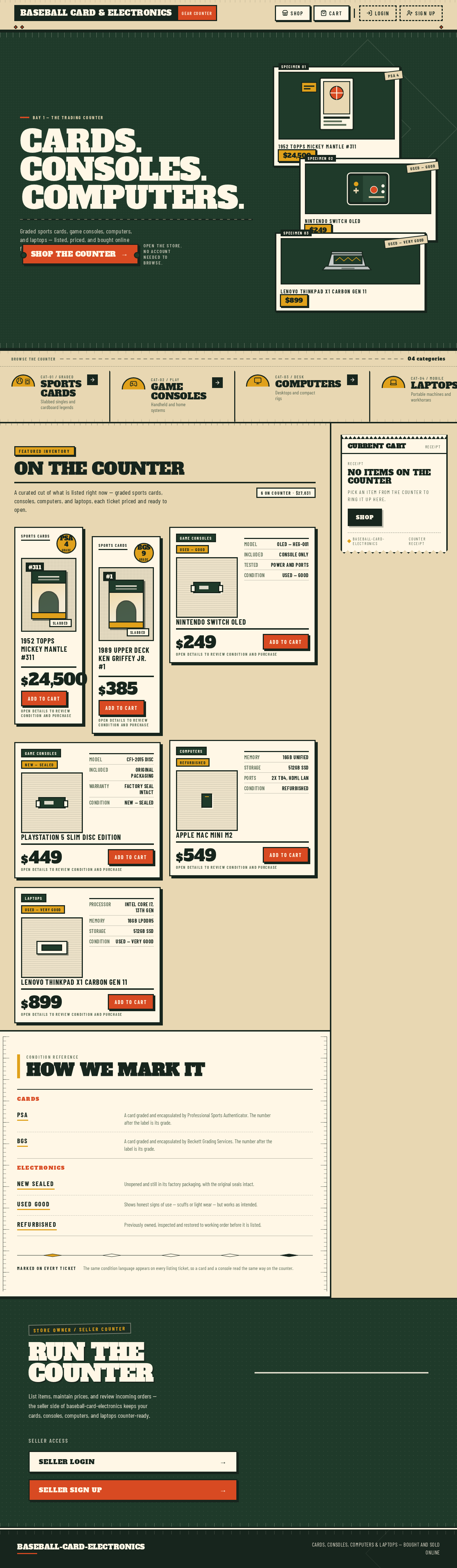
Bay 1 — The Trading Counter
Cards. Consoles.Computers.
Graded sports cards, game consoles, computers, and laptops — listed, priced, and bought online from one counter.
Shop the CounterOpen the store. No account needed to browse.
Nintendo Switch OLED
$249USED — GOODLenovo ThinkPad X1 Carbon Gen 11
$899USED — VERY GOODBrowse the counter04 categories
On the Counter
A curated cut of what is listed right now — graded sports cards, consoles, computers, and laptops, each ticket priced and ready to open.
6 on counter · $27,031Sports CardsPSA 4Grade
1952 Topps Mickey Mantle #311
$24,500
Sports CardsBGS 9Grade
1989 Upper Deck Ken Griffey Jr. #1
$385
Game ConsolesUsed — Good
- ModelOLED — HEG-001
- IncludedConsole only
- TestedPower and ports
- ConditionUsed — Good
Nintendo Switch OLED
$249
Game ConsolesNew — Sealed
- ModelCFI-2015 Disc
- IncludedOriginal packaging
- WarrantyFactory seal intact
- ConditionNew — Sealed
PlayStation 5 Slim Disc Edition
$449
ComputersRefurbished
- Memory16GB unified
- Storage512GB SSD
- Ports2x TB4, HDMI, LAN
- ConditionRefurbished
Apple Mac mini M2
$549
LaptopsUsed — Very Good
- ProcessorIntel Core i7, 13th Gen
- Memory16GB LPDDR5
- Storage512GB SSD
- ConditionUsed — Very Good
Lenovo ThinkPad X1 Carbon Gen 11
$899
Condition Reference
How We Mark It
- Cards
- PSA
- A card graded and encapsulated by Professional Sports Authenticator. The number after the label is its grade.
- BGS
- A card graded and encapsulated by Beckett Grading Services. The number after the label is its grade.
- Electronics
- New Sealed
- Unopened and still in its factory packaging, with the original seals intact.
- Used Good
- Shows honest signs of use — scuffs or light wear — but works as intended.
- Refurbished
- Previously owned, inspected and restored to working order before it is listed.
Marked On Every Ticket
The same condition language appears on every listing ticket, so a card and a console read the same way on the counter.
Store Owner / Seller Counter
Run the Counter
List items, maintain prices, and review incoming orders — the seller side of baseball-card-electronics keeps your cards, consoles, computers, and laptops counter-ready.
Bay 1 — The Trading Counter
Cards. Consoles.Computers.
Graded sports cards, game consoles, computers, and laptops — listed, priced, and bought online from one counter.
Shop the CounterOpen the store. No account needed to browse.
1952 Topps Mickey Mantle #311
$24,500PSA 4Nintendo Switch OLED
$249USED — GOODLenovo ThinkPad X1 Carbon Gen 11
$899USED — VERY GOODBrowse the counter04 categories
On the Counter
A curated cut of what is listed right now — graded sports cards, consoles, computers, and laptops, each ticket priced and ready to open.
6 on counter · $27,031Sports CardsPSA 4Grade
1952 Topps Mickey Mantle #311
$24,500
Sports CardsBGS 9Grade
1989 Upper Deck Ken Griffey Jr. #1
$385
Game ConsolesUsed — Good
- ModelOLED — HEG-001
- IncludedConsole only
- TestedPower and ports
- ConditionUsed — Good
Nintendo Switch OLED
$249
Game ConsolesNew — Sealed
- ModelCFI-2015 Disc
- IncludedOriginal packaging
- WarrantyFactory seal intact
- ConditionNew — Sealed
PlayStation 5 Slim Disc Edition
$449
ComputersRefurbished
- Memory16GB unified
- Storage512GB SSD
- Ports2x TB4, HDMI, LAN
- ConditionRefurbished
Apple Mac mini M2
$549
LaptopsUsed — Very Good
- ProcessorIntel Core i7, 13th Gen
- Memory16GB LPDDR5
- Storage512GB SSD
- ConditionUsed — Very Good
Lenovo ThinkPad X1 Carbon Gen 11
$899
Condition Reference
How We Mark It
- Cards
- PSA
- A card graded and encapsulated by Professional Sports Authenticator. The number after the label is its grade.
- BGS
- A card graded and encapsulated by Beckett Grading Services. The number after the label is its grade.
- Electronics
- New Sealed
- Unopened and still in its factory packaging, with the original seals intact.
- Used Good
- Shows honest signs of use — scuffs or light wear — but works as intended.
- Refurbished
- Previously owned, inspected and restored to working order before it is listed.
Marked On Every Ticket
The same condition language appears on every listing ticket, so a card and a console read the same way on the counter.
Store Owner / Seller Counter
Run the Counter
List items, maintain prices, and review incoming orders — the seller side of baseball-card-electronics keeps your cards, consoles, computers, and laptops counter-ready.
No comments yet. Be the first!