b2b-ai-saas
 tinful
b2b ai saas


Comments (0)
Sign in to leave a comment
System Requirements
System Requirements Document for B2B AI SaaS
1. Introduction
B2B AI SaaS is a business-to-business software-as-a-service product in which companies use AI-assisted work inside a shared company workspace. The product intent is narrow and concrete: a company gets a workspace, its people sign up and gain access to the AI features of that workspace, and workspace members send AI requests and receive results for their daily work. A workspace administrator controls who can use the AI features by adding members to the company workspace.
The audience is company teams rather than individual consumers. The product is for business (B2B) use. Three active human roles carry the accepted work: a Business buyer who evaluates the product for company use, compares plans, and starts a subscription; a Workspace member who uses the AI features and gets AI output for daily work; and a Workspace administrator who manages the company workspace and its members and controls who can use the AI features.
This document is the System Requirements Document for the product. It specifies the current delivery, the accepted behavior of each role, the page-level information architecture, and the technical and visual constraints under which the product is built.
2. System Overview
2a. Product Interpretation and Delivery Boundary
B2B AI SaaS is delivered as a first-party web application with application-owned identity. The application owns the public entry surface, the identity surfaces, the company workspace where AI requests are sent and results returned, and the member-management surface where an administrator adds members.
Access is layered and follows the accepted journeys:
- Public, no identity required. Landing explains the B2B AI SaaS product before identity establishment. Sign Up lets a visitor complete self-service enrollment to get access to a company workspace. Login lets a returning user verify identity and continue to the company workspace. These three surfaces are reachable without an established session.
- Identity required. Workspace and Members are protected. A visitor cannot reach them before establishing identity; the anonymous entry interaction lives on Sign Up and Login, never on the protected pages themselves.
- Role-restricted. Workspace is the working surface for the Workspace member and is restricted to authenticated workspace members. Members is the working surface for the Workspace administrator and is restricted to authenticated workspace administrators. This restriction is a control over shared product state — who can use the AI features of the company workspace — and is established by the accepted administrator responsibility, not by convention.
AI execution is not performed by the application itself. The shared backend calls a LiteLLM gateway for model-provider calls; the gateway is the boundary to external model providers. Application-owned persistent data lives in MariaDB. LiteLLM keeps its own supporting PostgreSQL store, which is separate from application-owned storage and holds no application domain data.
Current scope is the accepted behavior described in this document. Nothing beyond it — no additional modules, integrations, or workflows — is part of the current delivery. Future ideas are not part of current pages or acceptance.
Removed from scope
- None. No concept was explicitly removed by the user.
2b. Source Content Inventory
Not applicable. No reference directive in this request declares content_source; no external factual inventory is supplied or reproduced.
2c. Page Content and Component Coverage
Landing
- Purpose and access. Public entry surface, no identity required. Explains the B2B AI SaaS product before identity establishment. Reachable by Business buyer, Workspace member, and Workspace administrator.
- Information and state. Product name and positioning; the hero headline "AI work for your whole company"; the subline "One shared workspace where your team sends AI requests and gets results."; a live prompt-and-result panel showing real UI rows with tabular numerals; plan comparison information used by the Business buyer to evaluate the product for company use; the primary call to action "Start free".
- Primary actions. "Start free" leads to Sign Up. A secondary path to Login for a returning user.
- Supporting actions. Reading plan comparison rows; inspecting the prompt-and-result panel as a schematic of the workspace.
- Domain entities. Product offering, plan, workspace (as described, not as owned state).
- Component responsibilities. Hero block (oversized left headline across 8 columns, hairline rule, tangerine CTA below the headline); prompt-and-result panel (surface #1D1F22, hairline border, tabular numerals, acid green #C6F24E only on live AI output states); plan comparison rows divided by hairline rules; fixed left rail for section headers with hairline dividers.
- States. Loading: static content, no blocking spinner. Empty: not applicable. Success: page renders fully with hero and plan rows. Error: if plan data cannot be loaded, the hero and CTA remain usable and the plan area shows a plain inline message with a retry control. Recovery: retry reloads plan rows without losing the page.
Sign Up
- Purpose and access. Identity access surface, no identity required. A visitor completes self-service enrollment to get access to a company workspace.
- Information and state. Enrollment form fields for the visitor's identity and company workspace; explanation that enrollment grants access to the AI features of the company workspace; link to Login for an existing user.
- Primary actions. Submit enrollment to create identity and gain access to the company workspace.
- Supporting actions. Return to Landing; navigate to Login.
- Domain entities. User identity, company workspace, membership.
- Component responsibilities. Enrollment form with hairline-bordered fields and 6px control radii; inline field validation; submit control in tangerine #FF6A2B; error summary region.
- States. Loading: submit control shows a pending state and is not double-submittable. Empty: form starts blank with no error styling. Success: identity is established and the user continues into the company workspace. Error: invalid or incomplete input is reported inline per field with a summary; a failed submission preserves entered values and offers retry. Recovery: correcting fields and resubmitting, or returning to Login if identity already exists.
Login
- Purpose and access. Identity access surface, no identity required. A returning user verifies identity and continues to the company workspace.
- Information and state. Verification form for a returning user; link to Sign Up for a visitor without identity.
- Primary actions. Submit verification to establish a session and continue to the company workspace.
- Supporting actions. Return to Landing; navigate to Sign Up.
- Domain entities. User identity, session, company workspace membership.
- Component responsibilities. Verification form with hairline-bordered fields; inline validation; submit control in tangerine #FF6A2B; error region for failed verification.
- States. Loading: pending submit state, no double submission. Empty: blank form. Success: session established and the user continues to Workspace (or to Members if the user is a workspace administrator). Error: failed verification shows a plain message without revealing whether an identity exists; entered values other than the secret are preserved. Recovery: retry, or go to Sign Up.
Workspace
- Purpose and access. Role-restricted to authenticated Workspace members. The working surface where a member sends AI requests and gets results for daily work.
- Information and state. The company workspace context; a request input; the returned AI output rendered as live output; request history for the member within the workspace; the member's identity context.
- Primary actions. Send an AI request and receive the result.
- Supporting actions. Review prior requests and their results; start a new request; leave the workspace via session end.
- Domain entities. Company workspace, workspace member, AI request, AI result.
- Component responsibilities. Request composer with hairline border and 6px radii; result block styled as code-like output with tabular numerals in JetBrains Mono; acid green #C6F24E reserved exclusively for live AI output states; request history rows divided by hairline rules; fixed left rail with section headers.
- States. Loading: result area shows an in-progress state while the backend awaits the model provider through the LiteLLM gateway. Empty: no requests yet — the composer is focused and the history area states plainly that no requests have been sent. Success: result appears as live output with the acid green live marker, and the request is added to history. Error: a failed request shows a plain error in the result area with a retry control and the request text preserved. Recovery: retry resends the same request; the member may also edit and resend.
Members
- Purpose and access. Role-restricted to authenticated Workspace administrators. The surface where an administrator adds members to the company workspace and thereby controls who can use the AI features.
- Information and state. The company workspace's current member list; the add-member control; the administrator's identity context.
- Primary actions. Add a member to the company workspace.
- Supporting actions. Review the current member list; return to Workspace.
- Domain entities. Company workspace, workspace member, membership record.
- Component responsibilities. Member list as hairline-divided rows with tabular numerals for counts; add-member form with hairline-bordered fields and 6px radii; tangerine #FF6A2B for the add action and focus; inline validation and error region.
- States. Loading: member list shows a pending state. Empty: no members beyond the administrator — the list states this plainly and the add control remains available. Success: the added member appears in the list and gains access to the AI features of the company workspace. Error: an invalid or duplicate addition is reported inline and the entered values are preserved. Recovery: correct and resubmit, or dismiss the error and retry.
3. Functional Requirements
FR-1 — B2B AI SaaS product. As a Business buyer, I should be able to evaluate a B2B AI SaaS product for company use, so that my company can adopt AI-assisted work in a shared workspace.
- Provenance: explicit.
- Lifecycle: trigger — the buyer arrives at Landing. Input — the product positioning, the hero prompt-and-result panel, and plan comparison rows. Observable result — the buyer understands the product and the plans available for company use. Access — public, no identity required. Failure/recovery — if plan rows fail to load, the hero and CTA remain usable and the plan area offers retry. Continuation — the buyer proceeds to Sign Up via "Start free".
- Acceptance: Landing presents the product name, the headline "AI work for your whole company", the subline "One shared workspace where your team sends AI requests and gets results.", a prompt-and-result panel, plan comparison information, and a "Start free" call to action.
FR-2 — Self-service enrollment into a company workspace. As a visitor (Business buyer, Workspace member, or Workspace administrator), I should be able to complete self-service enrollment, so that I get access to a company workspace and its AI features.
- Provenance: required_inference (accepted current journey prerequisite).
- Lifecycle: trigger — the visitor selects "Start free" on Landing. Input — enrollment details for identity and company workspace. Observable result — identity is established and the visitor holds access to the company workspace. Access — Sign Up is reachable without identity. Failure/recovery — invalid or incomplete input is reported inline per field with a summary; a failed submission preserves entered values and offers retry. Continuation — the user continues into the company workspace.
- Acceptance: a visitor can submit enrollment from Sign Up and, on success, reaches the company workspace with access to its AI features; on failure, the form preserves input and reports the error.
FR-3 — Returning user verification. As a returning user, I should be able to verify my identity at Login, so that I continue to my company workspace.
- Provenance: required_inference (accepted current journey prerequisite).
- Lifecycle: trigger — the returning user opens Login. Input — verification credentials. Observable result — a session is established and the user continues to the company workspace. Access — Login is reachable without identity. Failure/recovery — failed verification shows a plain message that does not reveal whether an identity exists; non-secret input is preserved; the user may retry or go to Sign Up. Continuation — the user lands on Workspace, or on Members if the user is a workspace administrator.
- Acceptance: valid verification leads to the company workspace; invalid verification reports a plain error and allows retry.
FR-4 — Send AI requests and get results in the shared workspace. As a Workspace member, I should be able to send AI requests in my company workspace and get results, so that I get AI output for my daily work.
- Provenance: explicit.
- Lifecycle: trigger — the member submits a request from Workspace. Input — the request text. Observable result — the AI result is returned and rendered as live output, and the request is recorded in the member's workspace history. Access — Workspace is role-restricted to authenticated workspace members. Failure/recovery — a failed request shows a plain error in the result area with a retry control and the request text preserved; retry resends the same request; the member may edit and resend. Continuation — the member reviews the result, sends another request, or reviews history.
- Acceptance: a submitted request produces a rendered result marked as live AI output; a failed request is recoverable without losing the request text.
FR-5 — Add members to the company workspace. As a Workspace administrator, I should be able to add members to my company workspace, so that I control who can use the AI features.
- Provenance: required_inference (accepted current journey prerequisite; the administrator's accepted responsibility is to manage the workspace and its members and control who can use the AI features).
- Lifecycle: trigger — the administrator opens Members. Input — the identity of the person to add. Observable result — the person appears in the member list and gains access to the AI features of the company workspace. Access — Members is role-restricted to authenticated workspace administrators. Failure/recovery — an invalid or duplicate addition is reported inline with entered values preserved; the administrator corrects and resubmits or dismisses and retries. Continuation — the administrator reviews the updated member list or returns to Workspace.
- Acceptance: an added member appears in the member list and can use the AI features of the company workspace; an invalid addition is reported without losing input.
FR-6 — Administrator identity verification before adding members. As a Workspace administrator, I should be verified as an authenticated administrator before I can add members, so that only an authorized administrator controls who can use the AI features.
- Provenance: required_inference.
- Lifecycle: trigger — the administrator navigates to Members. Input — an established administrator session. Observable result — Members is available only to an authenticated workspace administrator; an unauthenticated visitor is directed to Login. Access — role-restricted. Failure/recovery — without an administrator session, Members is not shown and the visitor is routed to Login; failed verification follows FR-3. Continuation — after verification, the administrator reaches Members.
- Acceptance: Members is unreachable without an authenticated administrator session; verification leads to Members.
FR-7 — AI execution through the model gateway. As the system, I should route the workspace's AI requests through the LiteLLM gateway to model providers, so that members receive AI results.
- Provenance: required_inference (delivery infrastructure supporting FR-4).
- Lifecycle: trigger — the backend receives a member request. Input — the request and workspace context. Observable result — the model provider's response is returned to Workspace and rendered as live output. Failure/recovery — a gateway or provider failure surfaces as the FR-4 error state with retry. Continuation — the member's request remains in history.
- Acceptance: requests are executed via the LiteLLM gateway; provider failures are surfaced as recoverable errors in Workspace.
4. User Personas
Business buyer
- Product context. The buyer evaluates the B2B AI SaaS product for company use. The buyer arrives at Landing without identity and judges whether the product fits the company's need for AI-assisted work in a shared workspace.
- Primary goal. Decide whether the product is right for the company and start using it.
- Distinct accepted responsibilities. Comparing plans and starting a subscription; evaluating the product before any identity is established.
- Inputs and decisions. The product positioning, the hero prompt-and-result panel, and plan comparison rows; the decision to select "Start free".
- Interactions with other participants. The buyer's enrollment creates the company workspace that the Workspace administrator will manage and that Workspace members will use.
- Observable success. The buyer has compared plans, selected "Start free", completed enrollment, and holds access to the company workspace.
Workspace member
- Product context. The member works inside the company workspace and uses the AI features for daily work. The member reaches the workspace through Sign Up or Login and is restricted to the Workspace surface.
- Primary goal. Get AI output for daily work quickly and reliably.
- Distinct accepted responsibilities. Sending AI requests and reading results; reviewing prior requests and results in the workspace history.
- Inputs and decisions. The request text; whether to retry, edit, or resend after a failure.
- Interactions with other participants. The member's access to the AI features is granted by the Workspace administrator through membership of the company workspace.
- Observable success. A submitted request returns a rendered result marked as live AI output, and the request is visible in history.
Workspace administrator
- Product context. The administrator manages the company workspace and its members and controls who can use the AI features. The administrator reaches Members only after identity verification.
- Primary goal. Keep the right people in the company workspace with access to the AI features.
- Distinct accepted responsibilities. Adding members to the company workspace; reviewing the current member list; verifying identity before adding members.
- Inputs and decisions. The identity of the person to add; whether an addition is valid or duplicate.
- Interactions with other participants. The administrator grants Workspace members their access to the AI features; the administrator's own access to the workspace originates from enrollment or verification.
- Observable success. An added member appears in the member list and can use the AI features of the company workspace.
5. Core User Flows
Flow A — Business buyer evaluates the product and enrolls
- The Business buyer opens Landing without identity. The page presents the product name, the headline "AI work for your whole company", the subline "One shared workspace where your team sends AI requests and gets results.", a live prompt-and-result panel, and plan comparison rows.
- The buyer reads the plan comparison rows and inspects the prompt-and-result panel to judge fit for company use. If plan rows fail to load, the hero and CTA remain usable and the buyer retries the plan area.
- The buyer selects "Start free" and arrives at Sign Up.
- The buyer enters enrollment details for identity and company workspace and submits. On invalid input, inline field errors and a summary appear, entered values are preserved, and the buyer corrects and resubmits.
- On success, identity is established and the buyer holds access to the company workspace, continuing into Workspace.
- If the buyer already has identity, the buyer instead goes to Login and follows Flow B.
Flow B — Returning user verifies identity
- The returning user opens Login without identity.
- The user enters verification details and submits. On failure, a plain message appears that does not reveal whether an identity exists; non-secret input is preserved.
- The user retries, or goes to Sign Up if identity is missing.
- On success, a session is established. A Workspace member continues to Workspace; a Workspace administrator continues to Members.
Flow C — Workspace member sends an AI request and gets a result
- The authenticated Workspace member opens Workspace. If no requests have been sent, the composer is focused and the history area states plainly that no requests have been sent.
- The member types a request and submits it. The result area shows an in-progress state while the backend calls the LiteLLM gateway.
- On success, the result is rendered as live AI output with the acid green live marker, and the request is added to the member's workspace history.
- On failure, the result area shows a plain error with a retry control and the request text preserved. The member retries the same request, or edits and resends.
- The member reviews the result, sends another request, or reviews prior requests and results in history.
Flow D — Workspace administrator adds a member
- The Workspace administrator opens Members. Without an authenticated administrator session, Members is not shown and the administrator is routed to Login and follows Flow B.
- With an administrator session, the administrator reviews the current member list. If the list is empty beyond the administrator, it states this plainly and the add control remains available.
- The administrator enters the identity of the person to add and submits. On an invalid or duplicate addition, an inline error appears and the entered values are preserved; the administrator corrects and resubmits or dismisses and retries.
- On success, the added member appears in the member list and gains access to the AI features of the company workspace.
- The administrator reviews the updated list or returns to Workspace.
6. Visuals Colors and Theme
The creative direction is authoritative: Warm graphite craft for a B2B AI workspace, after the muse Rasmus Andersson. Headline: a serious tool with a warm graphite ground and one hot accent — precise, dense, and not a template.
Mode. Dark mode.
Colour tokens by role.
| Role | Token | Value |
|---|---|---|
| Background | --bg | #141517 |
| Surface | --surface | #1D1F22 |
| Text | --text | #F2EFE9 |
| Primary (actions, focus) | --primary | #FF6A2B |
| Accent (live AI output only) | --accent | #C6F24E |
| Muted | --muted | #8A8D93 |
Graphite ground covers 80 percent of any view. Tangerine #FF6A2B marks actions and focus. Acid green #C6F24E marks live AI output only and nothing else.
Typography.
- Headings: Space Grotesk, medium weight, tracking
-0.03em, sentence case, large scale contrast. - Body: Inter Tight.
- Data and numerals: JetBrains Mono, tabular numerals.
- Scale: 1.25 modular — 96 / 64 / 40 / 24 / 16 px. Headline sizes use
clamp()with an explicit mobile size so text stays whole at 375px, 768px, and 1280px.
Shape language. Hairline 1px borders; 6px control radii; sharp section edges; tabular alignment. No rounded pill buttons.
Layout. 12-column grid with 8-pt spacing. Dense left-aligned hero. Hairline rules divide rows. Section headers sit in a fixed left rail with hairline dividers.
Imagery style. The interface is the image: schematic diagrams, prompt rows, and code-like output blocks. No photography-led hero, no gradient blobs.
Avoid. Bootstrap blue on white; gradient blob heroes; hover-lift card grids; centred SaaS hero stacks; rounded pill buttons; Inter or Roboto defaults; the generic indigo/blue-on-white SaaS template.
7. Signature Design Concept
The public entry is a dark graphite full-width ground. An oversized Space Grotesk headline — "AI work for your whole company" — sits left across 8 columns at 64px to 96px, overlapping a hairline rule that runs the full width. To its right, a live prompt-and-result panel in #1D1F22 with a hairline border shows real UI rows: a prompt row, a result block in JetBrains Mono with tabular numerals, and the acid green #C6F24E live marker on the output state only. Below the headline sits one tangerine #FF6A2B CTA button, "Start free". The subline "One shared workspace where your team sends AI requests and gets results." sits beneath the headline in Inter Tight. Section headers below the hero sit in a fixed left rail divided by hairlines, and plan comparison rows are separated by hairline rules. The composition recomposes only accepted Landing content and controls; it introduces no new behavior.
8. Interaction Model & Motion Direction
Interaction Model: Animated Motion Tempo: restrained Hero Dimensionality: flat
Landing Hero Motion Brief
- Focal subject. The prompt-and-result panel: a real UI panel with a prompt row and a code-like result block, marked live in acid green.
- Input → transformation → outcome thesis. The visitor's attention lands on the oversized headline; the prompt-and-result panel reveals its rows in sequence (prompt row, then result block, then the live marker), showing the accepted workspace behavior — a request becomes a result — without simulating any behavior the product does not have. The outcome is the tangerine "Start free" CTA, which leads to Sign Up.
- Motion vocabulary. Fast 120–200ms functional transitions; one reveal on scroll; no decoration. Hairline rules and rows appear by opacity and position only.
- Composed first frame. Graphite ground, headline left across 8 columns overlapping a hairline rule, prompt-and-result panel right with its first row visible, tangerine CTA below the headline.
- Reduced-motion state. With
prefers-reduced-motion, the panel renders fully composed in its final state with no reveal; all rows are visible and readable, and the CTA is immediately available.
9. Non-Functional Requirements
- NFR-1 — Business use. The product is for business (B2B) use. (explicit)
- NFR-2 — Durable state. Application-owned persistent data is required and stored in MariaDB: identities, company workspaces, memberships, and workspace request history. (required_inference, supporting FR-2 through FR-6)
- NFR-3 — AI execution boundary. AI requests are executed through the LiteLLM gateway; the application does not call model providers directly. LiteLLM's PostgreSQL store is separate from application-owned storage and holds no application domain data. (required_inference, supporting FR-4 and FR-7)
- NFR-4 — Access control. Workspace is restricted to authenticated workspace members; Members is restricted to authenticated workspace administrators. Public surfaces (Landing, Sign Up, Login) require no identity. (required_inference, supporting FR-3, FR-5, FR-6)
- NFR-5 — Readability at every viewport. Headlines, wordmarks, labels, numbers, and card text and controls stay entirely inside the viewport and their container at 375px, 768px, and 1280px, wrapping or scaling with
clamp(); no other element covers any part of them. Imagery and decoration may be cropped or bled per the creative direction. (explicit design constraint) - NFR-6 — Reduced motion. With
prefers-reduced-motion, a usable static arrangement is provided; every item remains fully readable. (explicit design constraint) - NFR-7 — Error transparency. Failed verification does not reveal whether an identity exists; failed AI requests preserve the request text and offer retry. (required_inference, supporting FR-3 and FR-4)
10. Tech Stack
- Frontend. React application UI.
- Backend. Shared FastAPI process for application APIs and domain modules, including identity, workspace, membership, and AI request routes.
- Application storage. MariaDB for application-owned persistent data.
- AI gateway. LiteLLM gateway for the backend's model-provider calls.
- Gateway storage. PostgreSQL supporting LiteLLM; separate from application-owned storage.
- Orchestration. Docker and docker-compose for the frontend, backend, MariaDB, LiteLLM, and PostgreSQL services.
11. Assumptions and Constraints
- A-1. The product is for business (B2B) use; consumer use is not in scope. (explicit)
- A-2. Self-service enrollment creates identity and a company workspace in one step; invitation-based or provisioned enrollment is not specified and is not assumed. (required_inference)
- A-3. A Workspace administrator is an authenticated user with administrator rights over a company workspace; how that role is first assigned is not specified by the source and is not invented here. (required_inference)
- A-4. Workspace request history is scoped to the member within the company workspace. (required_inference)
- A-5. Plan comparison on Landing is informational; payment processing is not specified and is not assumed. (required_inference)
- A-6. The creative direction's palette, fonts, surfaces, tone, and layout are binding; unspecified details are filled by the catalogue only. (explicit design constraint)
- A-7. No concept was explicitly removed by the user; the "Removed from scope" list is empty. (explicit)
12. Glossary
- B2B AI SaaS. The product: a business-to-business software-as-a-service application for AI-assisted work in a shared company workspace.
- Company workspace. The shared space a company's people use for AI-assisted work; the unit of membership and access.
- Workspace member. An authenticated user with access to the AI features of a company workspace.
- Workspace administrator. An authenticated user who manages a company workspace and its members and controls who can use the AI features.
- Business buyer. A user who evaluates the product for company use, compares plans, and starts a subscription.
- AI request. A member's submitted prompt in the workspace.
- AI result. The model provider's response to an AI request, rendered as live output.
- Live AI output. The state marked exclusively with acid green
#C6F24E. - LiteLLM gateway. The service through which the backend calls model providers.
- Hairline. A 1px border used to divide rows and sections.
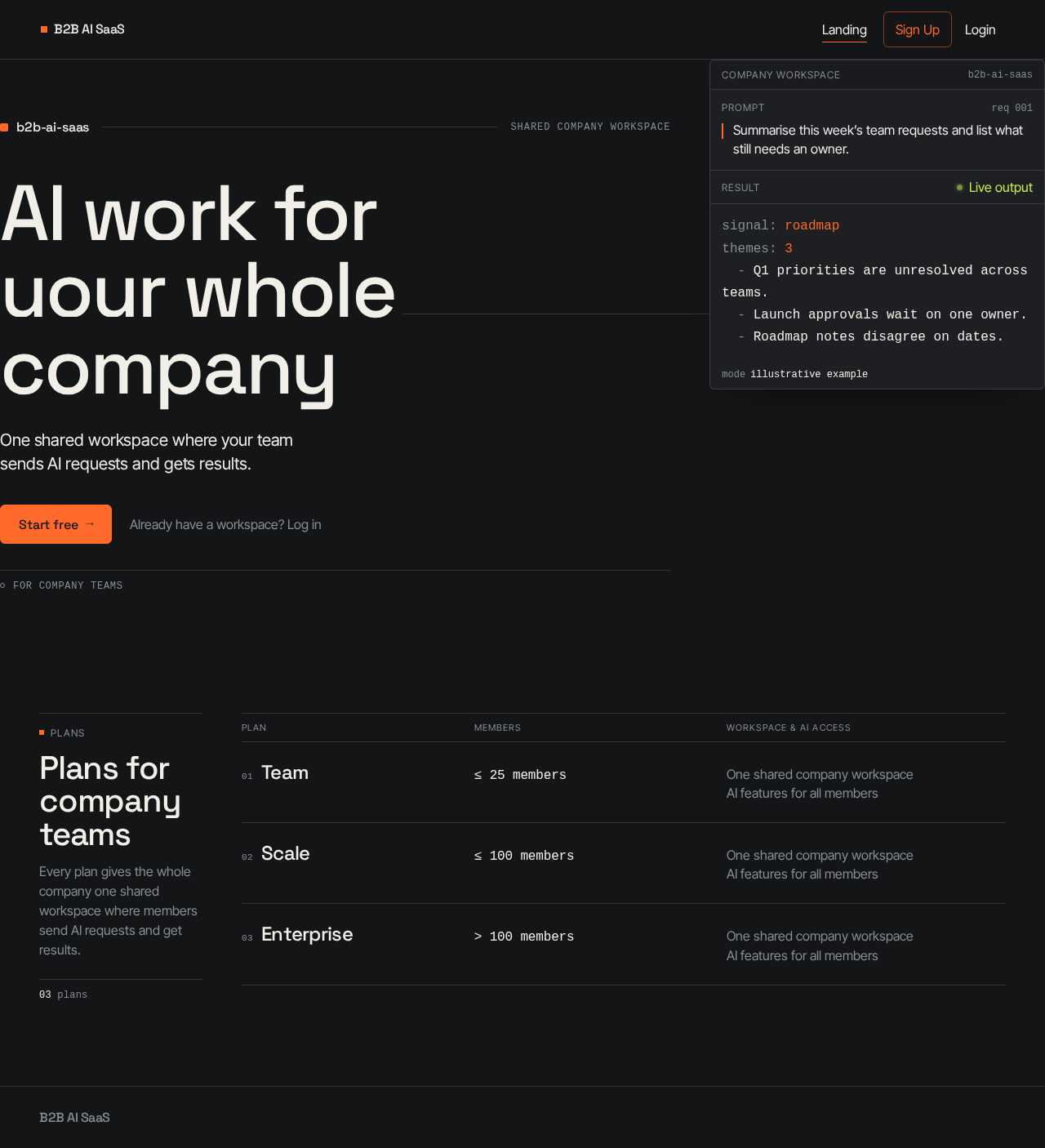
AI work for your whole company
One shared workspace where your team sends AI requests and gets results.
For company teams
Summarise this week’s team requests and list what still needs an owner.
signal: roadmap
themes: 3
  - Q1 priorities are unresolved across teams.
  - Launch approvals wait on one owner.
  - Roadmap notes disagree on dates.
Plans
Plans for company teams
Every plan gives the whole company one shared workspace where members send AI requests and get results.
03 plans
Plan comparison
01Team
Members≤ 25 membersWorkspace & AI accessOne shared company workspace
AI features for all members02Scale
Members≤ 100 membersWorkspace & AI accessOne shared company workspace
AI features for all members03Enterprise
Members> 100 membersWorkspace & AI accessOne shared company workspace
AI features for all members
AI work for your whole company
One shared workspace where your team sends AI requests and gets results.
For company teams
Summarise this week’s team requests and list what still needs an owner.
signal: roadmap
themes: 3
  - Q1 priorities are unresolved across teams.
  - Launch approvals wait on one owner.
  - Roadmap notes disagree on dates.
Plans
Plans for company teams
Every plan gives the whole company one shared workspace where members send AI requests and get results.
03 plans
Plan comparison
01Team
Members≤ 25 membersWorkspace & AI accessOne shared company workspace
AI features for all members02Scale
Members≤ 100 membersWorkspace & AI accessOne shared company workspace
AI features for all members03Enterprise
Members> 100 membersWorkspace & AI accessOne shared company workspace
AI features for all members
No comments yet. Be the first!