azure-voicenote
 Karam Harika (Kp)
build a voicenote app to keep winding to listen and voice like old recorder and clean voice with modern look for mobile app
Comments (0)
Sign in to leave a comment
System Requirements
System Requirements Document (SRD)
Project Name: Azure-VoiceNote
1. Introduction
The Azure-VoiceNote project aims to create a mobile application that replicates the nostalgic charm of old-school voice recorders while integrating modern design aesthetics and functionality. This app will allow users to record voice notes, experience a retro winding playback feature, attach photos and videos to recordings, enjoy clean audio quality, and share recordings with others.
Designed exclusively for mobile devices, the app will cater to personal journaling, quick note-taking, and sharing purposes. The project emphasizes a seamless user experience, blending retro and modern elements to create a unique and memorable product.
This document outlines the system requirements for the Azure-VoiceNote project, ensuring alignment with Karam Harika's vision and user expectations.
2. System Overview
The Azure-VoiceNote application will be a mobile-first solution, leveraging advanced technologies to deliver high-quality audio recording and playback. Key features include:
- Retro-inspired winding playback functionality for voice notes.
- Advanced audio processing to ensure clean and clear voice recordings.
- Integration of photos and videos alongside voice recordings for richer memory capture.
- A visually modern and intuitive interface optimized for mobile devices.
- Sharing capabilities to allow users to send recordings to others via social media or messaging apps.
- Selective re-run capability for regenerating specific SRD sections manually.
The system will be built using a robust tech stack, ensuring scalability, reliability, and ease of use. It will target Android and iOS platforms, providing a consistent experience across devices.
3. Functional Requirements
As User:
- I should be able to record voice notes with clean audio quality.
- I should be able to rewind and fast-forward recordings like an old-school recorder.
- I should be able to share my recordings with others via social media or messaging apps.
- I should be able to save recordings locally on my device.
- I should be able to delete recordings I no longer need.
- I should be able to organize recordings into folders or categories.
- I should be able to rename recordings for easy identification.
- I should be able to attach photos and videos to voice recordings.
- I should be able to manually trigger selective re-run capability to regenerate specific SRD sections.
4. User Personas
1. Primary User
- Description: Individuals who enjoy journaling, quick note-taking, or capturing ideas on the go.
- Goals: Record, organize, and share voice notes efficiently.
- Pain Points: Difficulty in managing recordings, poor audio quality, and lack of intuitive playback controls.
2. Social Sharer
- Description: Users who frequently share voice notes, photos, and videos with friends, family, or colleagues.
- Goals: Seamless sharing functionality with minimal effort.
- Pain Points: Complicated sharing workflows and compatibility issues.
3. Memory Keeper
- Description: Users who want to capture and preserve rich memories by combining voice recordings with photos and videos.
- Goals: Create multimedia recordings that are easy to organize and revisit.
- Pain Points: Lack of tools to integrate audio, photo, and video in a single app.
5. Visuals Colors and Theme
Color Palette:
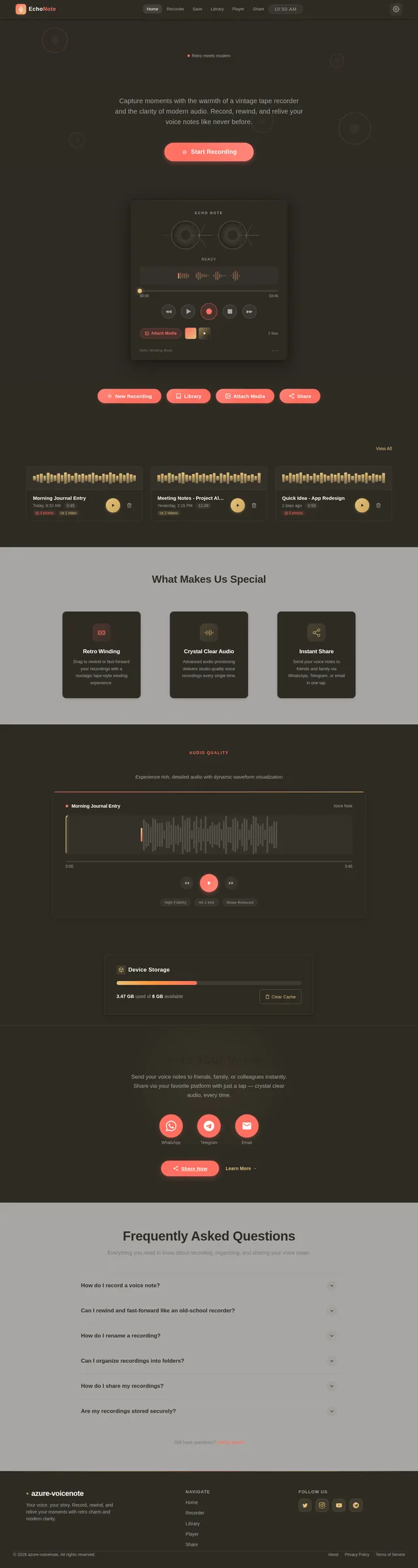
The Azure-VoiceNote app will feature a sleek, modern design inspired by retro aesthetics, closely resembling the reference image provided by Karam Harika.
- Background: #2E2B24 (Deep Vintage Brown)
- Surface: #FFFFFF (Bright Ivory White)
- Text: #FF6F61 (Retro Coral Red)
- Accent: #E5C07B (Muted Gold)
- Muted Tones: #A3A3A3 (Soft Steel Gray)
This palette balances nostalgia and modernity, creating a visually appealing and user-friendly interface.
6. Signature Design Concept
Interactive Retro Recorder with Multimedia Integration
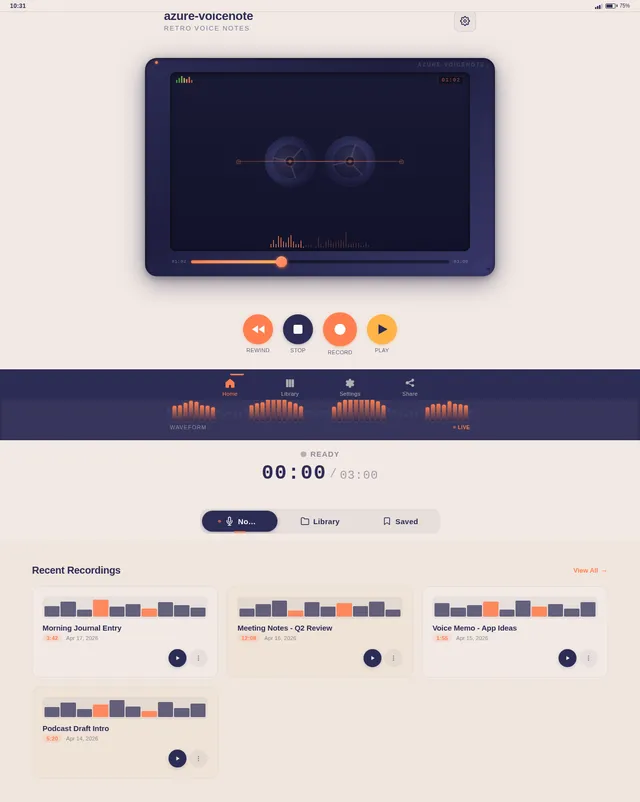
The home page of the Azure-VoiceNote app will feature a fully immersive retro recorder interface, designed to mimic the tactile experience of using a physical tape recorder while integrating multimedia functionality.
Key Features:
- 3D Recorder Design: The app interface will resemble a vintage tape recorder, complete with animated spinning reels and a slider for manual winding.
- Interactive Playback Slider: Users can drag the slider to rewind or fast-forward recordings, accompanied by realistic tape winding sound effects.
- Dynamic Audio Visualization: A live audio waveform will appear during recording and playback, providing visual feedback in sync with the sound.
- Photo and Video Integration: Users can attach photos and videos to recordings, displayed as thumbnails alongside the audio waveform.
- Tactile Button Animations: Buttons for record, stop, play, rewind, and attach media will have tactile animations, mimicking the feel of pressing physical buttons.
- Color Transitions: The background will shift subtly between the color palette based on user interactions, creating a dynamic and immersive experience.
- Haptic Feedback: Mobile devices will provide haptic feedback when users interact with buttons, enhancing the tactile experience.
This design concept ensures the app is both visually stunning and functionally engaging, leaving a lasting impression on users.
7. Non-Functional Requirements
- Performance: The app must load within 2 seconds on modern mobile devices.
- Scalability: Support up to 10,000 concurrent users without performance degradation.
- Security: Ensure recordings, photos, and videos are encrypted during storage and sharing.
- Compatibility: Fully functional on Android 10+ and iOS 13+.
- Localization: Default language set to English, with support for Hindi and other regional languages.
- Selective Re-run: Allow users to manually trigger regeneration of specific SRD sections without affecting the entire document.
8. Tech Stack
Frontend:
- React Native for mobile app development.
Backend:
- Python with FastAPI for API development.
Database:
- MySQL for structured data storage (e.g., user profiles, recording metadata).
- MongoDB for unstructured data storage (e.g., audio files, photos, videos).
AI Models:
- GPT 5.4 for user-friendly responses and transcription services.
- Google Nano Banana for generating visual assets (if needed).
AI Tools:
- LangChain for AI workflow orchestration.
- Litellm for LLM routing.
Orchestration:
- Docker and docker-compose for local development.
- Kubernetes for server-side orchestration.
9. Assumptions and Constraints
Assumptions:
- Users will primarily access the app on mobile devices.
- Internet connectivity is required for sharing recordings, photos, and videos.
- Users prefer a simple and intuitive interface over complex features.
Constraints:
- Limited storage space on mobile devices may impact the number of recordings, photos, and videos saved locally.
- Audio and multimedia processing must be optimized to minimize battery consumption.
10. Glossary
- Retro Recorder: A design element mimicking old-school tape recorders.
- Audio Waveform: A visual representation of sound waves during recording or playback.
- Encryption: A method to secure data by converting it into a code.
- Rewind/Fast-Forward: Playback controls allowing users to move through recordings.
- Selective Re-run: A feature enabling manual regeneration of specific SRD sections.
- LangChain: A tool for managing workflows in AI applications.
- Multimedia Integration: The ability to attach photos and videos to voice recordings.
End of Document.
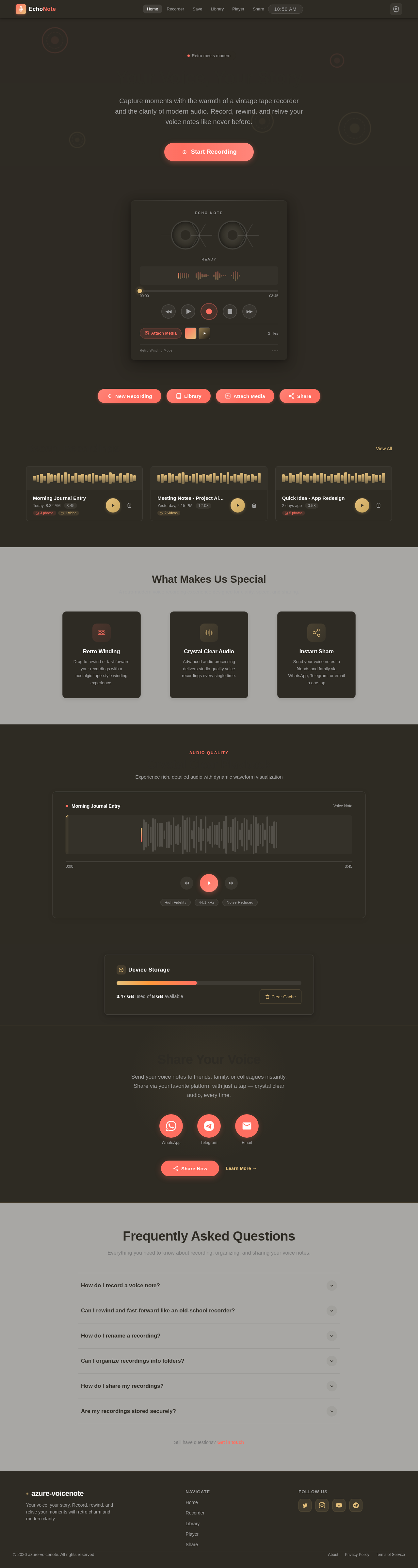
Your Voice, Your Story
Capture moments with the warmth of a vintage tape recorder and the clarity of modern audio. Record, rewind, and relive your voice notes like never before.
Recent Recordings
View AllWhat Makes Us Special
A retro-modern voice recording experience designed for clarity, speed, and sharing.
Retro Winding
Drag to rewind or fast-forward your recordings with a nostalgic tape-style winding experience.
Crystal Clear Audio
Advanced audio processing delivers studio-quality voice recordings every single time.
Instant Share
Send your voice notes to friends and family via WhatsApp, Telegram, or email in one tap.
Crystal Clear Playback
Experience rich, detailed audio with dynamic waveform visualization
Device Storage
3.47 GB used of 8 GB available
Share Your Voice
Send your voice notes to friends, family, or colleagues instantly. Share via your favorite platform with just a tap — crystal clear audio, every time.
Frequently Asked Questions
Everything you need to know about recording, organizing, and sharing your voice notes.
Still have questions?Get in touch
No comments yet. Be the first!