azure-todo
 Sameer Barvaliya
build a to-do website

Comments (0)
Sign in to leave a comment
System Requirements
System Requirements Document (SRD) for azure-todo
1. Introduction
The azure-todo project is a team-focused to-do website designed to enhance collaboration and productivity. This platform will allow teams to manage tasks effectively, assign responsibilities, track progress, and meet deadlines efficiently. The system is tailored for users in India (IN), ensuring locale-specific defaults such as time zones (IST) and formats.
This document outlines the system requirements for the azure-todo project, detailing its functional and non-functional requirements, user personas, design concepts, and technical specifications.
2. System Overview
The azure-todo platform will serve as a collaborative task management tool for teams. It will provide features such as task creation, assignment, deadline tracking, and status updates. The system will be accessible via a web interface and optimized for mobile devices. The platform will prioritize user-friendly design, seamless team collaboration, and robust performance.
Key objectives:
- Enable teams to manage tasks collaboratively.
- Provide intuitive interfaces for task tracking and updates.
- Ensure scalability for teams of varying sizes.
3. Functional Requirements
As a User:
- I should be able to create tasks.
- I should be able to assign tasks to team members.
- I should be able to set deadlines for tasks.
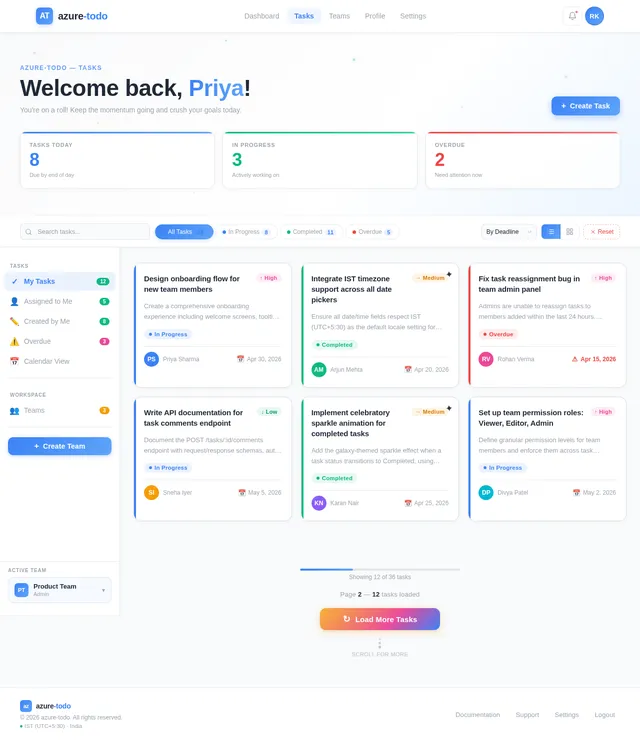
- I should be able to update the status of tasks (e.g., "In Progress," "Completed").
- I should be able to view all tasks assigned to me.
- I should be able to comment on tasks for better collaboration.
As an Admin:
- I should be able to create and manage teams.
- I should be able to invite users to join a team.
- I should be able to remove users from a team.
- I should be able to view the overall progress of all tasks within the team.
- I should be able to set permissions for team members (e.g., who can edit tasks).
4. User Personas
1. Team Member
- Description: A regular user who creates, updates, and completes tasks within a team.
- Key Actions: Create tasks, update task statuses, comment on tasks, view assigned tasks.
2. Team Admin
- Description: A user with administrative privileges to manage teams and oversee task progress.
- Key Actions: Manage team members, assign permissions, monitor team progress, and manage tasks.
5. Visuals Colors and Theme
Color Palette
The azure-todo platform will use a vibrant yet professional color scheme to inspire productivity and collaboration:
- Background:
#F9FAFB(Soft White) - Surface:
#FFFFFF(Pure White) - Text:
#1F2937(Charcoal Gray) - Accent:
#3B82F6(Azure Blue) - Muted:
#9CA3AF(Cool Gray)
This palette ensures clarity and focus while maintaining a modern and clean aesthetic.
6. Signature Design Concept
Interactive Task Galaxy
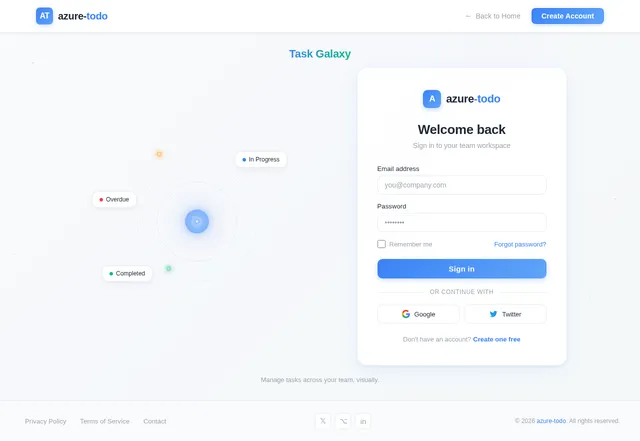
The homepage of azure-todo will feature an Interactive Task Galaxy. Users will see a dynamic, animated galaxy where each task is represented as a glowing star. Stars will be color-coded based on their status (e.g., blue for "In Progress," green for "Completed," red for "Overdue").
- Interactions: Hovering over a star will display task details in a floating tooltip. Clicking a star will open the task for editing or commenting.
- Animations: Stars will gently pulse to indicate activity, and completed tasks will emit a celebratory sparkle animation.
- Transitions: Smooth zoom-in and zoom-out effects will allow users to navigate between team tasks and individual tasks.
- Mood: The galaxy metaphor symbolizes collaboration and interconnectedness, aligning with the platform's team-focused mission.
This design will create an unforgettable first impression and make task management visually engaging.
7. Non-Functional Requirements
- Performance: The system should handle up to 1,000 concurrent users with minimal latency.
- Scalability: The platform must scale to support teams ranging from 2 to 500 members.
- Availability: Ensure 99.9% uptime to support critical team operations.
- Security: Implement role-based access control (RBAC) and secure data storage.
- Localization: Support Indian time zones (IST) and date formats (DD/MM/YYYY).
8. Tech Stack
Frontend
- React for Web
- React Native for Mobile App
Backend
- Python
- FastAPI
Database
- MySQL (preferred) or MariaDB with Alembic for migrations
AI Models
- GPT 5.4 for user-friendly responses
- Claude 4.6 Opas for coding-related assistance
AI Tools
- Litellm for LLM Routing
- Langchain
Orchestration
- Docker and docker-compose for local development
- Kubernetes for server-side orchestration
9. Assumptions and Constraints
Assumptions
- Users will primarily access the platform via web browsers and mobile devices.
- Teams will have a maximum of 500 members.
- Tasks will not exceed 10,000 per team.
Constraints
- The system must comply with Indian data protection regulations.
- The platform will initially support only English as the language.
10. Glossary
- Task: A unit of work to be completed by a team member.
- Team Member: A user with access to create and manage tasks within a team.
- Team Admin: A user with administrative privileges to manage teams and oversee tasks.
- RBAC: Role-Based Access Control, a method of regulating access based on user roles.
- IST: Indian Standard Time, the time zone used in India.

Collaborate, Organize,
Achieve Together
Manage team tasks with an intuitive, visually engaging interface. Track progress, assign responsibilities, and meet deadlines — all in one place.
Your Task Galaxy
Every task is a star in your team’s constellation. Watch your projects come alive as tasks orbit through creation, progress, and completion.
Everything You Need to Stay on Track
Powerful tools designed for modern teams to create, collaborate, and conquer tasks together.
Intuitive Task Creation
Create and organize tasks in seconds with a streamlined interface. Set deadlines, assign team members, and add details — all from one place.
Real-Time Collaboration
Work together seamlessly with live updates, comments, and shared task boards. Keep your entire team aligned and in sync.
Progress Tracking
Visualize team progress with intuitive status indicators and analytics. Track completion rates, spot bottlenecks, and celebrate wins.
Built for Teams
azure-todo brings your entire team onto one page. Assign, discuss, and ship work together — without the chaos.
Assign Tasks Instantly
Delegate work to the right team member with one click. Everyone sees their responsibilities clearly.
Comment on Work
Leave feedback, ask questions, and share updates directly on any task in real time.
Track Progress Together
Monitor team velocity, task completion rates, and deadlines from a shared dashboard.
Celebrate Wins
Completed tasks trigger celebratory animations. Recognise milestones and keep morale high.
Task Management Reimagined
Organise, prioritise, and execute with clarity. Our intuitive task interface gives your team a shared view of every deadline, status change, and conversation — all in one place.
- Smart DeadlinesSet due dates with automatic reminders so your team never misses a deadline again.
- Real-Time Status UpdatesTrack tasks through every stage — from pending to in progress to completed.
- Inline CommentsDiscuss tasks directly with threaded comments, mentions, and file attachments.
Security You Can Count On
Your team deserves a platform built with security at its core. We protect your data so you can focus on getting work done.
Enterprise Security
End-to-end encryption for all your team data. SOC 2 Type II certified infrastructure with continuous monitoring and threat detection.
99.9% Uptime
Built on a globally distributed architecture with automated failover. Your tasks and team collaboration stay accessible around the clock.
RBAC & Compliance
Granular role-based access control lets admins define who can view, edit, or manage tasks. Full audit logs for every action across your team.
Trusted by Teams Across India
See how teams are using azure-todo to collaborate better, ship faster, and stay on track.
azure-todo transformed how our engineering team handles sprints. We reduced missed deadlines by 40% in the first month. The task galaxy view makes standups genuinely enjoyable.
Simple, Transparent Pricing
Choose the plan that fits your team. Start free and scale as you grow. All plans include core task management features.
Starter
Perfect for small teams getting started with task management.
No credit card required
- Up to 5 team members
- Unlimited task creation
- Basic status tracking
- Task comments & collaboration
- IST time zone support
- Email notifications
Professional
For growing teams that need advanced collaboration tools.
Billed annually in INR
- Up to 50 team members
- Role-based access control
- Deadline tracking & reminders
- Task assignment & delegation
- Progress dashboards & reports
- Priority support
- Custom team permissions
Enterprise
For large organizations requiring full control and compliance.
Custom billing available
- Up to 500 team members
- Advanced RBAC & compliance
- 99.9% uptime SLA
- Dedicated account manager
- SSO & enterprise security
- API access & integrations
- Custom onboarding & training
- Data residency options
Frequently Asked Questions
Everything you need to know about azure-todo. Can't find what you're looking for? Reach out to our support team.
Creating tasks is simple. Navigate to your Dashboard, click "Create Task," fill in the details including title, description, and deadline, then assign it to any team member. You can also set priority levels and add comments for context.
Absolutely! Team Admins can create and manage multiple teams from the Teams page. Each team has its own task board, member list, and progress tracking. Switch between teams seamlessly from the sidebar navigation.
Tasks can be marked as "Pending," "In Progress," "Completed," or "Overdue." Status updates are reflected in real-time across the Interactive Task Galaxy and your Dashboard, so your entire team stays informed at a glance.
Team Admins can configure permissions for each member. You can control who can create tasks, edit existing ones, assign work, or manage team settings. This ensures the right people have the right level of access for smooth collaboration.
Yes. We implement enterprise-grade security including encrypted data storage, role-based access control, and compliance with Indian data protection regulations. Our infrastructure maintains 99.9% uptime with continuous monitoring.
The platform is fully optimized for mobile browsers, and a dedicated React Native mobile app is available for both iOS and Android. Your tasks, comments, and team updates sync instantly across all devices.
Teams can scale from 2 to 500 members. The platform is built to handle up to 1,000 concurrent users with minimal latency, making it suitable for small startups and large departments alike.
Yes! Every task has a built-in comment thread where team members can discuss details, share updates, ask questions, and provide feedback. Comments support mentions so you can notify specific colleagues directly.
Still have questions?
Get in touch with our team→Ready to Transform Your Team’s Productivity?
Join thousands of teams already using azure-todo to collaborate, organize tasks, and achieve their goals together.
No credit card required. Free 14-day trial.
No comments yet. Be the first!