azure-reedsy
 Hasnain justdigital
Create a sass project like reedsy

Comments (0)
Sign in to leave a comment
System Requirements
System Requirements Document for azure-reedsy
1. Introduction
azure-reedsy is a SaaS platform modeled on Reedsy: a marketplace and workspace where authors meet freelance publishing professionals — editors, designers, and marketers — and where the two sides collaborate on real book projects. The product intent is to give serious writers a place to create and manage book projects, draft and edit manuscript content, and find and engage the right publishing professional for their book; and to give freelance publishing professionals a portfolio-grade presence where they present their services and take on author projects.
The audience is creative but professional. Authors are writers who want craft and control over a book project from first draft to finished, publishable work. Freelance publishing professionals are independent specialists who need to be discovered and engaged by authors and to deliver paid publishing work. The platform treats both halves as first-class: the author's writing side and the professional's making side are in dialogue throughout the product.
2. System Overview
azure-reedsy is delivered as a custom web application with application-owned identity. Anonymous visitors arrive at a public Landing surface that explains the platform and routes them to the correct half. Authors and freelance publishing professionals enroll through Sign Up and return through Login. Once identified, an Author works across Projects (creating and managing book projects), Manuscript (drafting and editing manuscript content inside a selected project), and Professionals (browsing and engaging freelance publishing professionals for a book project). A Freelance Publishing Professional works in Service Profile (creating and maintaining the service offerings that present them to authors). Both sides meet in Collaboration, where a shared book project is worked on together.
Actors:
- Author — the writer who creates and manages book projects, drafts and edits manuscript content, browses and engages professionals, and collaborates on the shared project.
- Freelance Publishing Professional — the editor, designer, or marketer who maintains a service profile, is discovered and engaged by authors, and collaborates on the shared project.
- Anonymous visitor — a non-identified visitor who reaches the Landing surface before any identity establishment.
- Platform backend — the application-owned system that persists book projects, manuscript content, service profiles, engagements, and collaboration state.
Current accepted behavior covers: book project creation and management; freelance publishing professional profiles and service offerings; and collaboration between authors and professionals on book projects. Identity establishment (Sign Up) and returning verification (Login) are the access boundary for all protected state.
Narrow exclusions: this document does not add adjacent marketplace, payment, contract, messaging, or account-management capabilities beyond the accepted behavior above. No blue or indigo appears anywhere in the product's visual system.
2a. Product Interpretation and Delivery Boundary
azure-reedsy is delivered as a first-party web application. The application owns identity: an Author or Freelance Publishing Professional establishes their own account through Sign Up and verifies it on return through Login. The Landing surface is anonymously reachable and is the only surface a visitor sees before identity is established; it explains the platform and routes each visitor to the half that fits them. All durable, actor-specific state — book projects, manuscript content, service profiles, engagements, and shared collaboration state — lives behind that identity boundary and is bound to the correct participant.
The current delivery horizon covers the accepted behavior: project creation and management, manuscript drafting and editing, professional service profiles, discovery and engagement of professionals, and author–professional collaboration on a shared book project. Work that is not part of the accepted behavior — payments, contracts, messaging threads, and general account administration — is out of the current scope and is not represented as a page or a capability.
2b. Source Content Inventory
Not applicable. The Reedsy reference is declared as domain_context, feature_reference, and structure_reference with inspiration_only authority; it supplies no content_source facts, so no source content inventory is included.
2c. Page Content and Component Coverage
Landing
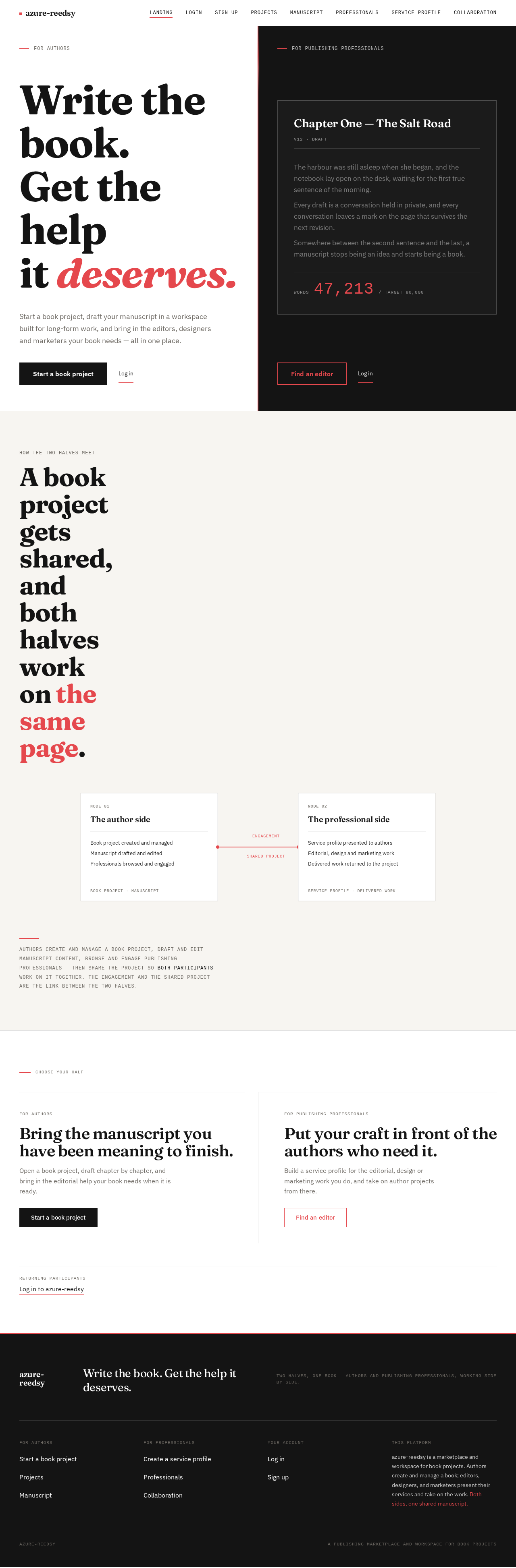
- Information/state: Anonymous entry surface. Explains the Reedsy-modeled platform connecting authors with freelance publishing professionals and providing book-writing collaboration tools. Presents the two halves of the product — the author's writing side and the professional's making side — as a full-viewport split.
- Primary actions: "Start a book project" (author half) routes an anonymous visitor toward Sign Up as an Author. "Find an editor" (professional half) routes an anonymous visitor toward Sign Up as a Freelance Publishing Professional. Both halves link to Login for returning users.
- Supporting actions: Mono micro-labels "FOR AUTHORS" and "FOR PUBLISHING PROFESSIONALS" at the top edge of each half; a live word-count readout panel on the professional half that shows the manuscript-workspace idea.
- Domain entities: None persisted. The surface presents the platform concept and the two participant roles.
- Component responsibilities: Split-screen hero with a 2px coral seam running edge to edge; Fraunces headline on the white author half; ink professional half containing a mono-typed manuscript-workspace panel with a chapter title, body copy, and a word-count readout; two entry buttons; a mono label per half.
- States: Loading — static content, no data fetch required. Empty — not applicable. Success — visitor selects a half and proceeds to Sign Up or Login. Error — not applicable. Recovery — not applicable.
Login
- Information/state: Identity verification surface for returning Authors and Freelance Publishing Professionals. Anonymous access; establishes the session that unlocks protected state.
- Primary actions: Submit credentials to verify identity and enter the application.
- Supporting actions: Link to Sign Up for visitors who do not yet have an account.
- Domain entities: Account identity (email and credential), session.
- Component responsibilities: Credential form; submit control; error region; link to Sign Up.
- States: Loading — submit control shows in-progress state while verification runs. Empty — form fields empty on arrival. Success — identity verified, session established, participant routed to their working surface (Author → Projects; Freelance Publishing Professional → Service Profile). Error — invalid credentials show an inline error and the form remains usable. Recovery — the participant can correct the entry and resubmit.
Sign Up
- Information/state: Self-service enrollment surface for Authors and Freelance Publishing Professionals. Anonymous access; creates the durable application identity that owns all subsequent state.
- Primary actions: Choose the participant role (Author or Freelance Publishing Professional), supply the required enrollment details, and submit to create the account.
- Supporting actions: Link to Login for visitors who already have an account.
- Domain entities: Account identity (email, credential, role).
- Component responsibilities: Role selection; enrollment form; submit control; validation and error region; link to Login.
- States: Loading — submit control shows in-progress state while the account is created. Empty — form fields empty on arrival. Success — account created, session established, participant routed to their working surface (Author → Projects; Freelance Publishing Professional → Service Profile). Error — invalid or incomplete enrollment details show inline errors and the form remains usable. Recovery — the participant can correct the entry and resubmit.
Projects
- Information/state: The Author's durable record of book projects. Lists the Author's own book projects with their identifying details and current state. Protected surface; only the owning Author's projects are shown.
- Primary actions: Create a new book project; open an existing book project.
- Supporting actions: Edit a book project's details; remove a book project; move from a project into its Manuscript or into Professionals to engage help.
- Domain entities: Book project (title, identifying details, state), owning Author.
- Component responsibilities: Project list; create-project control; per-project detail and management controls; entry points into Manuscript and Professionals for the selected project.
- States: Loading — project list shows a loading state while the Author's projects are fetched. Empty — no projects yet; the surface prompts the Author to create their first book project. Success — the created or updated project appears in the list with its details. Error — a failed create or update shows an inline error and preserves the Author's input. Recovery — the Author can retry the failed action or correct the project details.
Manuscript
- Information/state: The writing surface for a selected book project. Holds the Author's manuscript content for that project and shows the project's metadata alongside it. Protected surface; scoped to the owning Author's selected project.
- Primary actions: Draft and edit manuscript content; save the manuscript.
- Supporting actions: View project metadata (chapter title, version label, word count) in the mono sidebar; move between the manuscript and the project's other surfaces.
- Domain entities: Manuscript content, chapter, word count, version label, parent book project.
- Component responsibilities: Narrow ink sidebar holding project metadata in mono; wide paper writing pane holding the manuscript; save control; live word-count readout.
- States: Loading — the manuscript for the selected project loads into the writing pane. Empty — a project with no manuscript content yet shows an empty writing pane ready for the first draft. Success — saved content persists and the word-count readout updates on save. Error — a failed save shows an inline error and preserves the Author's unsaved content. Recovery — the Author can retry the save without losing drafted content.
Professionals
- Information/state: The directory of freelance publishing professionals an Author can browse and engage for a book project. Presents each professional's name, services, and rate. Protected surface for Authors.
- Primary actions: Browse the directory; open a professional's listing; engage a professional for a book project.
- Supporting actions: Filter or scan the directory by service; view a professional's work sample or portrait on row hover.
- Domain entities: Freelance publishing professional (name, services, rate, work sample), engagement with a book project.
- Component responsibilities: Ruled full-width directory rows (name in Fraunces, services in mono tags, rate in tabular numerals, hairline separators); row hover crossfade from metadata to portrait or work sample; engagement control tied to the Author's selected book project.
- States: Loading — directory rows load. Empty — no professionals match the current view; the surface states this plainly. Success — an engagement is recorded against the Author's selected book project. Error — a failed engagement shows an inline error and preserves the Author's selection. Recovery — the Author can retry the engagement or choose another professional.
Service Profile
- Information/state: The Freelance Publishing Professional's own service profile, presenting their offerings to authors. Protected surface; only the owning professional's profile is editable.
- Primary actions: Create the service profile; edit and maintain its offerings.
- Supporting actions: Add or update services; set the rate; add a work sample or portrait.
- Domain entities: Service profile (professional identity, services, rate, work sample, portrait).
- Component responsibilities: Profile form; services editor; rate field; work-sample and portrait upload; save control.
- States: Loading — the professional's existing profile loads. Empty — a professional with no profile yet is prompted to create one. Success — saved profile details persist and become the professional's presentation to authors. Error — a failed save shows an inline error and preserves the professional's input. Recovery — the professional can retry the save or correct the profile details.
Collaboration
- Information/state: The shared working surface for a book project that an Author and a Freelance Publishing Professional both participate in. Shows the shared project state and each participant's side of the work. Protected surface; reachable by both participants on the shared project.
- Primary actions: Author shares a book project with an engaged professional; both participants work on the shared project and see its current state.
- Supporting actions: View the shared project's manuscript and metadata; view the other participant's contribution.
- Domain entities: Shared book project, participating Author, participating Freelance Publishing Professional, shared project state.
- Component responsibilities: Shared project view; participant context for each side; shared manuscript and metadata display; state indicators for the shared work.
- States: Loading — the shared project loads for the participant. Empty — a project not yet shared with a professional shows the Author the sharing action. Success — the shared project is visible to both participants with its current state. Error — a failed share or failed load shows an inline error and preserves the participant's context. Recovery — the participant can retry the action or return to the project.
3. Functional Requirements
FR-1 — Author creates a book project. As an Author, I should create a book project so that I have a durable record to draft and manage my book in. Provenance: explicit. Lifecycle: initiated by the Author on Projects; input is the book project's identifying details; observable result is the new project appearing in the Author's project list; access state is the Author's verified session; material failure is a rejected or failed create, recovered by correcting the details and retrying; continuation is opening the project to draft its manuscript or engaging a professional. Acceptance: the created project is owned by the Author and persists across sessions.
FR-2 — Author manages book projects. As an Author, I should manage my book projects so that my project list stays accurate as my work changes. Provenance: explicit. Lifecycle: initiated by the Author on Projects; input is an edit or removal of an existing project; observable result is the updated project list; access state is the Author's verified session; material failure is a failed update or removal, recovered by retrying; continuation is returning to the project or creating another. Acceptance: only the owning Author's projects are affected.
FR-3 — Author drafts and edits manuscript content. As an Author, I should draft and edit manuscript content within a selected book project so that my book takes shape. Provenance: explicit. Lifecycle: initiated by the Author on Manuscript for a selected project; input is drafted or edited text; observable result is saved manuscript content and an updated word count; access state is the Author's verified session scoped to the owning project; material failure is a failed save, recovered by retrying without losing drafted content; continuation is continuing to write or moving to engage a professional. Acceptance: saved content persists with the project and the word-count readout reflects the save.
FR-4 — Freelance Publishing Professional creates a service profile. As a Freelance Publishing Professional, I should create a service profile so that authors can discover what I offer. Provenance: explicit. Lifecycle: initiated by the professional on Service Profile; input is their services, rate, and presentation details; observable result is a saved profile presenting their offerings; access state is the professional's verified session; material failure is a failed save, recovered by retrying or correcting the details; continuation is maintaining the profile as offerings change. Acceptance: the saved profile is owned by the professional and is the presentation authors see.
FR-5 — Freelance Publishing Professional maintains service offerings. As a Freelance Publishing Professional, I should maintain my service offerings so that my profile stays accurate as the work I take on changes. Provenance: explicit. Lifecycle: initiated by the professional on Service Profile; input is an added, updated, or removed service, rate, or work sample; observable result is the updated profile; access state is the professional's verified session; material failure is a failed update, recovered by retrying; continuation is returning to the profile or taking on author projects. Acceptance: only the owning professional's profile is affected.
FR-6 — Author browses freelance publishing professionals. As an Author, I should browse freelance publishing professionals so that I can find the right help for my book project. Provenance: explicit. Lifecycle: initiated by the Author on Professionals; input is the Author's scan or filter of the directory; observable result is the presented set of professionals with their services and rates; access state is the Author's verified session; material failure is a failed load, recovered by retrying; continuation is opening a professional's listing or engaging them. Acceptance: each professional is presented with name, services, and rate.
FR-7 — Author engages a freelance publishing professional. As an Author, I should engage a freelance publishing professional for my book project so that I can get the help my book needs. Provenance: explicit. Lifecycle: initiated by the Author on Professionals against a selected book project; input is the Author's selection of a professional; observable result is a recorded engagement between the Author's project and that professional; access state is the Author's verified session; material failure is a failed engagement, recovered by retrying or choosing another professional; continuation is sharing the project for collaboration. Acceptance: the engagement is bound to the correct Author, project, and professional.
FR-8 — Author and professional share a book project. As an Author, I should share my book project with an engaged professional so that we can work on it together. Provenance: explicit. Lifecycle: initiated by the Author on Collaboration for a selected project; input is the choice of the engaged professional to share with; observable result is the project becoming a shared project visible to both participants; access state is both participants' verified sessions; material failure is a failed share, recovered by retrying; continuation is both participants working on the shared project. Acceptance: the shared project is visible to the Author and to the engaged professional, and to no one else.
FR-9 — Author and professional collaborate on a shared book project. As an Author, I should collaborate with a freelance publishing professional on our shared book project so that the book moves forward with their help. Provenance: explicit. Lifecycle: initiated by either participant on Collaboration; input is each participant's work on the shared project; observable result is the shared project's current state reflecting both participants' contributions; access state is both participants' verified sessions on the shared project; material failure is a failed load or failed update, recovered by retrying; continuation is continuing the shared work or returning to the project. Acceptance: both participants see the shared project's current state.
FR-10 — Freelance Publishing Professional collaborates on a shared book project. As a Freelance Publishing Professional, I should collaborate with an author on their shared book project so that I can deliver the publishing work I was engaged for. Provenance: explicit. Lifecycle: initiated by the professional on Collaboration for a project shared with them; input is the professional's work on the shared project; observable result is the professional's contribution reflected in the shared project's state; access state is the professional's verified session on the shared project; material failure is a failed load or failed update, recovered by retrying; continuation is continuing the shared work. Acceptance: the professional sees the shared project's current state and their contribution is visible to the Author.
FR-11 — Anonymous visitor reaches the Landing surface. As an anonymous visitor, I should reach the Landing surface before any identity establishment so that I can understand the platform and choose my half. Provenance: required_inference. Lifecycle: initiated by the visitor arriving at the application; input is the visit; observable result is the Landing surface presenting the platform and both entry paths; access state is anonymous; material failure is not applicable to a static surface; continuation is proceeding to Sign Up or Login. Acceptance: the Landing surface is reachable without identity.
FR-12 — Author or Freelance Publishing Professional enrolls via Sign Up. As an Author or Freelance Publishing Professional, I should complete self-service enrollment so that I can create and control my durable application state. Provenance: required_inference. Lifecycle: initiated by the visitor on Sign Up; input is the chosen role and required enrollment details; observable result is a created account and an established session; access state is anonymous entry to the enrollment interaction; material failure is invalid or incomplete details, recovered by correcting and resubmitting; continuation is being routed to the participant's working surface. Acceptance: the created identity owns the participant's subsequent state and is bound to the chosen role.
FR-13 — Returning Author or Freelance Publishing Professional verifies identity via Login. As a returning Author or Freelance Publishing Professional, I should verify my identity so that I can reach my protected book projects, manuscripts, and service profile. Provenance: required_inference. Lifecycle: initiated by the returning participant on Login; input is their credentials; observable result is a verified session and access to their protected state; access state is anonymous entry to the verification interaction; material failure is invalid credentials, recovered by correcting and resubmitting; continuation is being routed to the participant's working surface. Acceptance: only the correct participant's protected state becomes reachable.
4. User Personas
Author
Product context. The Author is a writer with a book project in progress. They arrive at azure-reedsy to do two things that belong together: write, and get the right professional help for what they have written. Their work is recurring and durable — a book project is not a one-session task, and the manuscript accumulates over time.
Primary goal. To complete a publishable book project, with their manuscript drafted and organized and the right publishing professionals engaged to help.
Distinct accepted responsibilities. The Author creates and manages book projects (FR-1, FR-2), drafts and edits manuscript content inside a selected project (FR-3), browses freelance publishing professionals (FR-6), engages a professional for their project (FR-7), shares the project with that professional (FR-8), and collaborates on the shared project (FR-9). This is the only persona that owns book projects and manuscript content, and the only one that initiates an engagement and a share.
Relevant inputs or decisions. The book project's identifying details; the manuscript text they draft and edit; which professional to engage based on services and rate; which engaged professional to share the project with.
Interactions with other accepted participants. The Author engages a Freelance Publishing Professional and then shares the book project with them, after which both work on the shared project. The Author's engagement is what makes the professional's collaboration possible.
Observable success. The Author's project list reflects their book projects, their manuscript persists with an updated word count on save, and their shared project shows the professional's contribution alongside their own.
Freelance Publishing Professional
Product context. The Freelance Publishing Professional is an editor, designer, or marketer who sells publishing services to authors. They arrive at azure-reedsy to be found and to be engaged. Their work is presentation plus delivery: a profile that represents them well, and shared projects they actually work on.
Primary goal. To secure and deliver paid publishing work for authors.
Distinct accepted responsibilities. The professional creates a service profile (FR-4), maintains their service offerings (FR-5), and collaborates on a shared book project an author has shared with them (FR-10). This is the only persona that owns a service profile, and the only one whose collaboration begins from an author's share rather than from their own initiation.
Relevant inputs or decisions. Their services, rate, work sample, and portrait; how to present their offerings; how to contribute to a shared project they have been engaged for.
Interactions with other accepted participants. The professional is discovered and engaged by an Author, is shared onto the Author's book project, and then collaborates with the Author on that shared project. Their profile is what the Author browses when choosing whom to engage.
Observable success. Their saved service profile presents their offerings to authors, and their contribution appears in the shared project's current state alongside the Author's.
5. Core User Flows
Flow 1 — Anonymous visitor reaches Landing and chooses a half
- An anonymous visitor arrives at azure-reedsy with no identity established.
- The Landing surface presents the full-viewport split: the white author half with the Fraunces headline and "Start a book project", and the ink professional half with the mono manuscript-workspace panel and "Find an editor".
- The visitor reads the platform explanation and decides which half describes them.
- The visitor selects "Start a book project" (author path) or "Find an editor" (professional path), or follows the link to Login if they already have an account.
- Next step: the visitor proceeds to Sign Up with the chosen role, or to Login.
Flow 2 — Author enrolls and creates their first book project
- An anonymous visitor on the Landing surface selects "Start a book project" and arrives at Sign Up.
- The visitor chooses the Author role and supplies the required enrollment details.
- The visitor submits; the account is created and a session is established.
- Observable result: the Author is routed to Projects, which is empty and prompts them to create their first book project.
- The Author creates a book project by supplying its identifying details.
- Observable result: the new project appears in the Author's project list and persists.
- Failure/recovery: if the create fails, an inline error appears and the Author's input is preserved; the Author corrects the details and retries.
- Next step: the Author opens the project to draft its manuscript, or moves to Professionals to engage help.
Flow 3 — Author drafts and edits manuscript content
- The Author, already identified, opens a book project from Projects and moves into Manuscript for that project.
- The Manuscript surface loads the project's content into the wide paper writing pane, with the project's metadata — chapter title, version label, word count — in the narrow ink sidebar.
- The Author drafts or edits manuscript content in the writing pane.
- The Author saves.
- Observable result: the content persists with the project and the live word-count readout updates on the save.
- Failure/recovery: if the save fails, an inline error appears and the Author's unsaved content is preserved; the Author retries the save.
- Next step: the Author continues writing, or moves to Professionals to engage help for the project.
Flow 4 — Freelance Publishing Professional enrolls and creates a service profile
- An anonymous visitor on the Landing surface selects "Find an editor" and arrives at Sign Up.
- The visitor chooses the Freelance Publishing Professional role and supplies the required enrollment details.
- The visitor submits; the account is created and a session is established.
- Observable result: the professional is routed to Service Profile, which is empty and prompts them to create their profile.
- The professional creates their service profile by supplying their services, rate, and presentation details, including a work sample or portrait.
- Observable result: the saved profile persists and becomes the presentation authors see.
- Failure/recovery: if the save fails, an inline error appears and the professional's input is preserved; they correct the details and retry.
- Next step: the professional maintains their offerings as their work changes, and awaits engagement by an author.
Flow 5 — Author browses professionals and engages one
- The Author, already identified and with a book project selected, opens Professionals.
- The directory loads as ruled full-width rows: each professional's name in Fraunces, their services in mono tags, and their rate in tabular numerals, separated by hairlines.
- The Author scans or filters the directory by service.
- The Author hovers a row; the row's right column crossfades from mono metadata to a portrait or work sample in 240ms.
- The Author opens a professional's listing and decides to engage them for the selected book project.
- Observable result: the engagement is recorded and bound to the Author, the selected project, and that professional.
- Failure/recovery: if the engagement fails, an inline error appears and the Author's selection is preserved; the Author retries or chooses another professional.
- Next step: the Author shares the project with the engaged professional.
Flow 6 — Author shares the project and both participants collaborate
- The Author, already identified, opens Collaboration for the book project they have engaged a professional on.
- The project is not yet shared, so the surface shows the Author the sharing action.
- The Author chooses the engaged professional to share the project with and confirms.
- Observable result: the project becomes a shared project visible to the Author and to the engaged professional, and to no one else.
- Failure/recovery: if the share fails, an inline error appears and the Author's context is preserved; the Author retries.
- The Freelance Publishing Professional, already identified, opens Collaboration and sees the shared project with its current state.
- The professional works on the shared project; their contribution is reflected in the shared project's state.
- The Author returns to Collaboration and sees the shared project's current state, including the professional's contribution alongside their own.
- Failure/recovery: if a load or update fails for either participant, an inline error appears and their context is preserved; they retry.
- Next step: both participants continue the shared work, or return to the project.
Flow 7 — Returning participant verifies identity
- A returning Author or Freelance Publishing Professional arrives at Login.
- They supply their credentials and submit.
- Observable result: their identity is verified, a session is established, and they are routed to their working surface — the Author to Projects, the professional to Service Profile.
- Failure/recovery: if the credentials are invalid, an inline error appears and the form remains usable; the participant corrects the entry and resubmits.
- Next step: the participant resumes their work — the Author on their projects and manuscripts, the professional on their service profile and shared projects.
6. Visuals Colors and Theme
The creative direction is authoritative for this section. The muse is Adham Dannaway, and the headline idea is dual craft, split world — a writer's page and a maker's studio in dialogue. The palette stays in Reedsy's white-and-warm family while the split composition supplies the distinctiveness.
Colour tokens (light mode):
| Role | Hex | Use |
|---|---|---|
| Background | #FFFFFF | Dominant ground, about 70% of any screen |
| Surface | #F7F5F1 | Card and manuscript-paper surface |
| Text | #141414 | All type and the "code half" panels |
| Primary | #E5484D | Primary actions, active states, the split divider, one word in the hero headline |
| Accent | #141414 | Deep ink accent |
| Muted | #6E6A64 | Metadata, labels, secondary copy |
Coral-red #E5484D is the single hot accent and is never used as a background fill behind body text. The dark insert (#141414 at full strength) appears as the technical half of the split and in code-style metadata panels. No blue or indigo anywhere, including links: links are ink with a coral underline.
Typography:
- Headings: Fraunces at 600–700 weight, optical size high, SOFT axis slightly raised; tight tracking (-0.02em) on large sizes, generous leading (1.05) on display lines; sentence case, never all-caps.
- Body: IBM Plex Sans.
- Monospace companion: IBM Plex Mono for all metadata, word counts, version labels, and the technical half of the split — uppercase at 11–12px with 0.08em tracking.
- Scale: 1.333 modular on a 16px base — 96/72/54/40/28/20/16/14. Hero 56px mobile → 112px desktop (
clamp(3.5rem, 8vw, 7rem)); section headings 40px → 64px; card titles 20px → 28px; body 16px → 18px with 1.65 line-height; metadata 11px → 12px mono uppercase.
Shape language: Sharp corners on every surface — radius 0 on cards, inputs, and buttons; the only curves are the author's own words. Split-screen is the governing geometry: a hard vertical seam (1px #141414 at 40% opacity, or a 2px coral rule on the hero) divides author-side from professional-side, light from dark, serif from mono. Precise 8-pt spacing scale: 8/16/24/32/48/64/96. Cards are flat panels with hairline 1px #141414 at 12% opacity borders and no drop shadows — separation comes from the ground colour change, not elevation. One deliberate exception: the manuscript page inside the editor is a warm paper card (#F7F5F1) with a soft 1px inner rule, the only soft-edged object on the site.
Layout: Asymmetric editorial grid, 12 columns, max-width 1320px with 24px gutters at mobile and 48px at desktop. The signature structure is the mirrored split: on the Landing hero, the left half is white with a serif headline and author CTA, the right half is ink #141414 with a mono-typed professional panel and editor CTA — the seam runs full-bleed from top to bottom of the viewport. Below the hero, sections alternate which side leads, so the page reads as a conversation. Projects and Manuscript use a two-pane layout: a narrow ink sidebar (240px) holding project metadata in mono, and a wide paper pane holding the writing surface. Professionals is a ruled directory — no card grid; each professional is one full-width row with name in Fraunces, services in mono tags, and a rate in tabular numerals, separated by hairlines. Every row is a link, and hovering swaps the row's right side from metadata to a portrait or work sample.
Imagery: Editorial photography and interface-as-image. Author-side imagery: large, generous-crop portraits of writers at desks, warm-toned, one per section, bleeding off the right edge. Professional-side imagery: work samples — book covers, typeset spreads, illustration crops — shown as flat rectangles with hairline borders, never in device mockups. The manuscript editor itself is the hero image on the product pages: a real typeset paragraph, not a screenshot placeholder. Diagrams over photos where structure is the point: the author\xe2\x86\x94professional collaboration loop drawn as a simple two-node schematic with a coral connecting line. No stock handshakes, no laptops on white desks.
7. Signature Design Concept
The Landing surface is a full-viewport split-screen, not a centred hero. The viewport is divided vertically at 50/50 by a 2px coral rule that runs edge to edge.
- Left half — white ground. A Fraunces headline at
clamp(3.5rem, 8vw, 7rem)reading "Write the book. Get the help it deserves." set in three stacked lines, flush left, with the final word "deserves." in coral. Beneath it, a single ink button: "Start a book project". - Right half — ink
#141414ground. A mono-typed panel that looks like a real manuscript workspace: a chapter title in Fraunces white, three lines of body copy at low opacity, and a live word-count readout in IBM Plex Mono coral ("WORDS 47,213 / TARGET 80,000"). Below the readout, a coral-outlined button: "Find an editor". - Micro-labels. A small mono label sits at the very top of each half: "FOR AUTHORS" left, "FOR PUBLISHING PROFESSIONALS" right.
- Mobile. The split stacks — white author half first, ink professional half second — with the coral rule becoming a horizontal divider.
No centred headline, no gradient, no floating cards. The concept only recomposes accepted content, states, and controls: the two entry paths to Sign Up, the Login link, and the manuscript-workspace idea that the product itself delivers.
8. Interaction Model & Motion Direction
Interaction Model: Animated Motion Tempo: expressive Hero Dimensionality: layered_2d
Landing Hero Motion Brief
- Focal subject: the full-height 50/50 split itself — the white author half and the ink professional half divided by the 2px coral seam.
- Input → transformation → outcome thesis: as the visitor arrives and scrolls, the ink half slides in from the right while the white half holds, so the author/professional duality assembles as the page is read; a cursor-following coral highlight traces the seam, making the division itself the interactive object.
- Motion vocabulary: horizontal wipes for scroll-reveal; a cursor-following coral highlight on the seam; 240ms ease-out crossfades on professional rows; a 180ms ink wipe from the left edge on page transitions; a mono word count that counts up when a save completes. No bounces, no blobs, no particle fields.
- Composed first frame: the split already assembled at rest — white left with the Fraunces headline and ink button, ink right with the mono manuscript panel and coral-outlined button, the coral seam running edge to edge, and the two mono micro-labels at the top edges.
- Reduced-motion state: the split is presented statically with both halves fully composed and both entry buttons visible and usable; the cursor-following highlight and the scroll wipes are removed, and the word-count readout shows its value without counting up.
9. Non-Functional Requirements
- NFR-1 — Identity-bound durable state. Book projects, manuscript content, service profiles, engagements, and shared collaboration state must persist and remain bound to the correct participant across sessions. Provenance: required_inference. Rationale: the accepted journeys depend on durable, actor-specific state that a participant can resume.
- NFR-2 — Access isolation. A participant's protected state must be reachable only by that participant, and a shared project must be visible only to the Author and the engaged professional on it. Provenance: required_inference. Rationale: the accepted engagement and sharing behavior requires that shared state be bound to the correct participants and to no one else.
- NFR-3 — Anonymous entry to identity surfaces. Landing, Login, and Sign Up must be reachable without an established session; all other surfaces require a verified session. Provenance: required_inference. Rationale: a protected destination cannot own the interaction that establishes access to itself.
- NFR-4 — Readable text and controls at every viewport. Headlines, wordmarks, labels, numbers, and cards' text and controls must stay entirely inside the viewport and their container at 375px, 768px, and 1280px, wrapping or scaling to fit, with no other element covering any part of them. Provenance: explicit (creative direction). Rationale: the direction's split composition must not compromise legibility.
- NFR-5 — Reduced-motion support. With
prefers-reduced-motion, the product must provide a usable static arrangement in which every item can be brought fully into view. Provenance: explicit (creative direction). Rationale: motion reveals the duality but must never be required to use the product. - NFR-6 — No blue or indigo. No blue or indigo may appear anywhere in the palette, including link colours and focus rings; interactive affordance uses coral
#E5484Dor ink#141414. Provenance: explicit (creative direction). Rationale: the generic indigo/blue-on-white SaaS template is forbidden for this project.
10. Tech Stack
- Frontend: React — the custom UI surfaces (Landing, Login, Sign Up, Projects, Manuscript, Professionals, Service Profile, Collaboration) are first-party web pages. [Default — not specified by user]
- Backend: Python with FastAPI — a single shared backend serving the application's APIs for identity, book projects, manuscript content, service profiles, engagements, and shared collaboration state. [Default — not specified by user]
- Storage: a relational database for durable, actor-bound state (accounts, book projects, manuscript content, service profiles, engagements, shared projects). [Default — not specified by user]
- Packaging and local run: Docker and docker-compose, extending the existing backend process rather than adding separate services for these domain features. [Default — not specified by user]
- Deployment: Kubernetes only if deployment requires it; not required by the accepted behavior. [Default — not specified by user]
11. Assumptions and Constraints
- A-1. The Reedsy reference is
inspiration_onlyand supplies only domain context, feature reference, and structure reference. It contributes no product names, copy, facts, or capabilities beyond the accepted behavior. [Assumption — labeled] - A-2. Application-owned identity is required because participants must privately own and resume durable, actor-specific state — book projects, manuscripts, service profiles, and shared projects — and because engagements and shares must remain bound to the correct participants. [Assumption — labeled]
- A-3. The Landing, Login, and Sign Up surfaces are anonymously reachable; all other surfaces require a verified session. [Assumption — labeled]
- A-4. The Author role owns book projects and manuscript content; the Freelance Publishing Professional role owns a service profile. This is role ownership of state, not a differentiated permission system over shared product state. [Assumption — labeled]
- A-5. Payments, contracts, messaging threads, and general account administration are outside the current accepted behavior and are not represented as pages or capabilities. [Constraint — source-bounded]
- A-6. The creative direction is authoritative for visuals, theme, motion, and the signature design concept, and its explicit constraints (no blue or indigo, sharp corners, no drop shadows, readable text and controls at every viewport, reduced-motion support) are binding. [Constraint — explicit]
12. Glossary
- Author — the accepted persona who creates and manages book projects, drafts and edits manuscript content, browses and engages professionals, and collaborates on the shared project.
- Freelance Publishing Professional — the accepted persona — an editor, designer, or marketer — who maintains a service profile, is discovered and engaged by authors, and collaborates on the shared project.
- Book project — the durable record an Author creates and manages, which holds the manuscript and is the unit that professionals are engaged for and that is shared for collaboration.
- Manuscript — the Author's drafted and edited content within a selected book project, with its chapter title, version label, and word count.
- Service profile — the Freelance Publishing Professional's presentation of their services, rate, and work sample to authors.
- Engagement — the recorded relationship between an Author's book project and a Freelance Publishing Professional, created when the Author engages them.
- Shared project — a book project that an Author has shared with an engaged professional, visible to both participants and to no one else.
- Collaboration — the shared working surface where an Author and a Freelance Publishing Professional work on a shared book project.
- Split-screen — the governing visual geometry of the product: a hard vertical seam dividing the author's side from the professional's side, light from dark, serif from mono.
For publishing professionals
Chapter One — The Salt Road
v12 · DraftThe harbour was still asleep when she began, and the notebook lay open on the desk, waiting for the first true sentence of the morning.
Every draft is a conversation held in private, and every conversation leaves a mark on the page that survives the next revision.
Somewhere between the second sentence and the last, a manuscript stops being an idea and starts being a book.
A book project gets shared, and both halves work on the same page.
- NODE 01
The author side
- Book project created and managed
- Manuscript drafted and edited
- Professionals browsed and engaged
- NODE 02
The professional side
- Service profile presented to authors
- Editorial, design and marketing work
- Delivered work returned to the project
Authors create and manage a book project, draft and edit manuscript content, browse and engage publishing professionals — then share the project so both participants work on it together. The engagement and the shared project are the link between the two halves.
Choose your half
For publishing professionals
Put your craft in front of the authors who need it.
Build a service profile for the editorial, design or marketing work you do, and take on author projects from there.
Find an editorReturning participants
Log in to azure-reedsyFor publishing professionals
Chapter One — The Salt Road
v12 · DraftThe harbour was still asleep when she began, and the notebook lay open on the desk, waiting for the first true sentence of the morning.
Every draft is a conversation held in private, and every conversation leaves a mark on the page that survives the next revision.
Somewhere between the second sentence and the last, a manuscript stops being an idea and starts being a book.
A book project gets shared, and both halves work on the same page.
- NODE 01
The author side
- Book project created and managed
- Manuscript drafted and edited
- Professionals browsed and engaged
- NODE 02
The professional side
- Service profile presented to authors
- Editorial, design and marketing work
- Delivered work returned to the project
Authors create and manage a book project, draft and edit manuscript content, browse and engage publishing professionals — then share the project so both participants work on it together. The engagement and the shared project are the link between the two halves.
Choose your half
For publishing professionals
Put your craft in front of the authors who need it.
Build a service profile for the editorial, design or marketing work you do, and take on author projects from there.
Find an editorReturning participants
Log in to azure-reedsy
No comments yet. Be the first!