azure-app
 Sumit Chatterjee
English communication app with quizzes and assessment at multiple levels for the age of 21-70 years
Comments (0)
Sign in to leave a comment
System Requirements
System Requirements Document (SRD)
Project Name: azure-app
1. Introduction
The azure-app is an English communication application designed to cater to users aged 21-70 years. It combines spoken and written communication skills through interactive quizzes and assessments. The app is designed to be inclusive, offering multiple levels of engagement and progression, ensuring users can improve their communication skills regardless of their starting point.
This document outlines the system requirements for the azure-app, incorporating adaptive assessments and predefined levels (beginner, intermediate, advanced) as resolved by the API supervisor.
2. System Overview
The azure-app aims to provide a comprehensive platform for improving English communication skills. It integrates spoken and written exercises, quizzes, and assessments tailored to individual user needs. The app will feature:
- Adaptive learning paths based on user performance.
- Predefined levels (beginner, intermediate, advanced) for structured progression.
- Speech-to-text functionality for spoken communication assessments.
- Writing prompts and grammar exercises for written communication improvement.
- A user-friendly interface designed for accessibility across all age groups.
The app will be available on both web and mobile platforms, ensuring accessibility and convenience for users in India and globally.
3. Functional Requirements
Story Points:
- As a User, I should be able to take quizzes that test both spoken and written communication skills.
- As a User, I should be able to receive adaptive assessments based on my performance.
- As a User, I should be able to select predefined levels (beginner, intermediate, advanced) to start my learning journey.
- As a User, I should be able to use speech-to-text functionality for spoken communication exercises.
- As a User, I should be able to complete writing prompts and grammar exercises to improve my written communication.
- As an Admin, I should be able to manage user levels and monitor progress analytics.
- As an Admin, I should be able to upload new quizzes and assessments periodically.
- As an Admin, I should be able to configure adaptive learning algorithms.
4. User Personas
User
- Age: 21-70 years
- Goals: Improve English communication skills (spoken and written).
- Needs: Adaptive learning paths, engaging quizzes, and structured progression.
Admin
- Role: Manage content, monitor user progress, and configure learning algorithms.
- Goals: Ensure smooth operation of the app and maintain content relevance.
5. Visuals Colors and Theme
Color Palette:
- Background: #F5F9FF (Soft Sky Blue)
- Surface: #FFFFFF (Pure White)
- Text: #2D3748 (Charcoal Gray)
- Accent: #4A90E2 (Azure Blue)
- Muted Tones: #B0BEC5 (Soft Steel Gray)
The azure-app will feature a clean, professional design with a focus on accessibility and user engagement. The color palette is inspired by the app's name, emphasizing clarity and calmness.
6. Signature Design Concept
Interactive Learning Galaxy
The homepage of the azure-app will feature an Interactive Learning Galaxy. Users will navigate through a dynamic, animated galaxy where each star represents a quiz, assessment, or learning module.
- Visuals: Stars and planets glow softly, with trails of light connecting them. Hovering over a star reveals its name and level (e.g., Beginner Grammar Quiz).
- Animations: Stars pulse gently, and planets rotate slowly to create a sense of motion.
- Interactions: Clicking on a star zooms into its content, transitioning smoothly into the quiz or assessment.
- Color Shifts: The galaxy's background subtly changes hues (Azure Blue to Soft Sky Blue) based on the time of day.
- Micro-interactions: Completing a module causes the star to "burst" into a celebratory animation, rewarding the user visually.
This design concept ensures the homepage is unforgettable, engaging, and encourages exploration.
7. Non-Functional Requirements
- The app must support both web and mobile platforms.
- The app must be optimized for low-bandwidth environments, ensuring accessibility in rural areas.
- The app must comply with accessibility standards for users with disabilities.
- The app must support localization for Indian languages in addition to English.
- The app must ensure data security and privacy compliance as per Indian regulations.
8. Tech Stack
Frontend:
- React for Web
- React Native for Mobile
Backend:
- Python
- FastAPI
Database:
- MySQL (preferred) or MariaDB for structured data.
- MongoDB for unstructured data.
AI Models:
- GPT 5.4 for user-friendly responses.
- Claude 4.6 Opas for academic or coding work.
- Gemini 3.1 Pro for friendly responses.
- Google Nano Banana for image generation.
AI Tools:
- Litellm for LLM Routing.
- Langchain for AI workflow orchestration.
Local Orchestration:
- Docker
- docker-compose
Server-side Orchestration:
- Kubernetes
9. Assumptions and Constraints
Assumptions:
- Users will have basic familiarity with smartphones or computers.
- The app will primarily target users in India but will be accessible globally.
- Users will have access to stable internet connections for app functionality.
Constraints:
- The app must comply with Indian data protection laws.
- The app must be scalable to accommodate a large user base.
- The app must support multiple device types and screen sizes.
10. Glossary
- Adaptive Learning: A system that adjusts content difficulty based on user performance.
- Speech-to-Text: Technology that converts spoken words into written text.
- Predefined Levels: Fixed learning stages (beginner, intermediate, advanced) for structured progression.
- LLM Routing: Large Language Model routing for AI-based responses.
- Localization: Adapting content to suit regional languages and cultural contexts.
End of Document
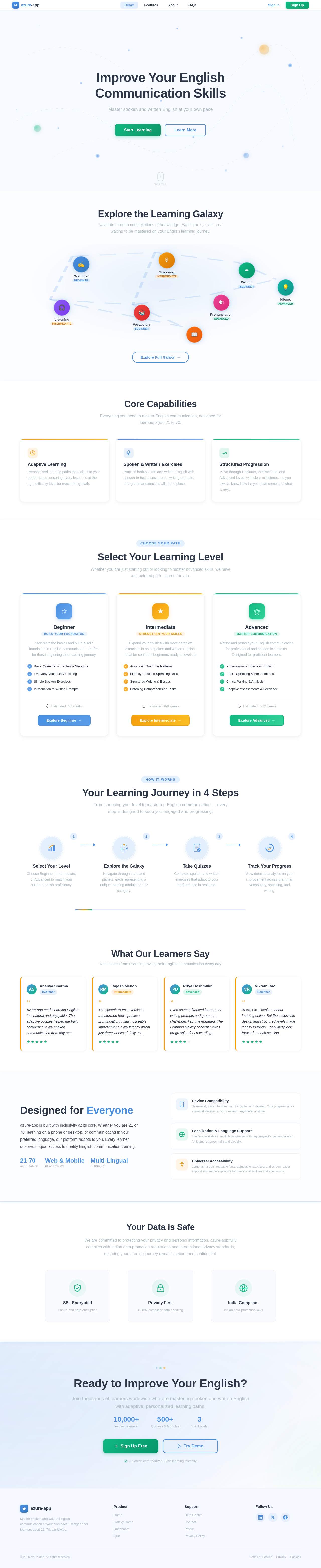
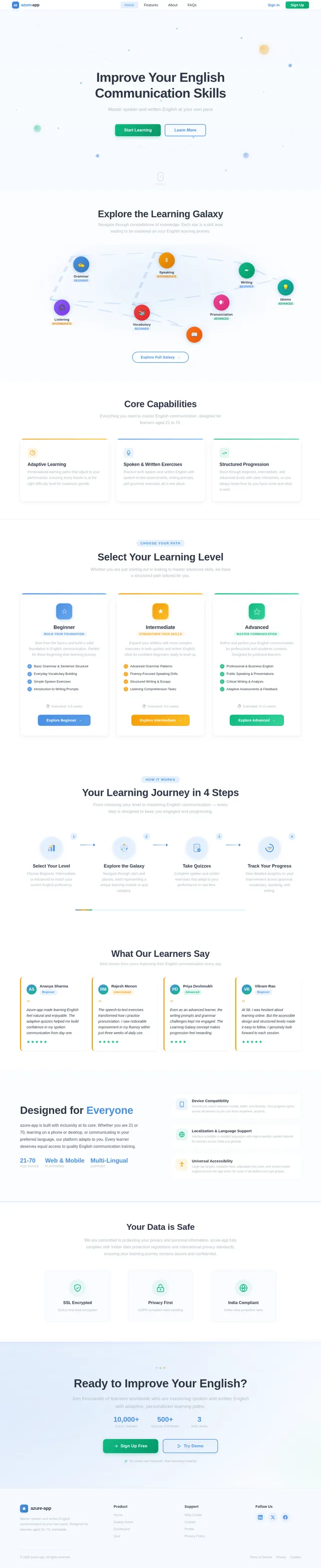
Improve Your English Communication Skills
Master spoken and written English at your own pace
Explore the Learning Galaxy
Navigate through constellations of knowledge. Each star is a skill area waiting to be mastered on your English learning journey.
Core Capabilities
Everything you need to master English communication, designed for learners aged 21 to 70.
Adaptive Learning
Personalised learning paths that adjust to your performance, ensuring every lesson is at the right difficulty level for maximum growth.
Spoken & Written Exercises
Practice both spoken and written English with speech-to-text assessments, writing prompts, and grammar exercises all in one place.
Structured Progression
Move through Beginner, Intermediate, and Advanced levels with clear milestones, so you always know how far you have come and what is next.
Select Your Learning Level
Whether you are just starting out or looking to master advanced skills, we have a structured path tailored for you.
Beginner
Build Your FoundationStart from the basics and build a solid foundation in English communication. Perfect for those beginning their learning journey.
- ✓Basic Grammar & Sentence Structure
- ✓Everyday Vocabulary Building
- ✓Simple Spoken Exercises
- ✓Introduction to Writing Prompts
Intermediate
Strengthen Your SkillsExpand your abilities with more complex exercises in both spoken and written English. Ideal for confident beginners ready to level up.
- ✓Advanced Grammar Patterns
- ✓Fluency-Focused Speaking Drills
- ✓Structured Writing & Essays
- ✓Listening Comprehension Tasks
Advanced
Master CommunicationRefine and perfect your English communication for professional and academic contexts. Designed for proficient learners.
- ✓Professional & Business English
- ✓Public Speaking & Presentations
- ✓Critical Writing & Analysis
- ✓Adaptive Assessments & Feedback
Your Learning Journey in 4 Steps
From choosing your level to mastering English communication — every step is designed to keep you engaged and progressing.
Select Your Level
Choose Beginner, Intermediate, or Advanced to match your current English proficiency.
Explore the Galaxy
Navigate through stars and planets, each representing a unique learning module or quiz category.
Take Quizzes
Complete spoken and written exercises that adapt to your performance in real time.
Track Your Progress
View detailed analytics on your improvement across grammar, vocabulary, speaking, and writing.
What Our Learners Say
Real stories from users improving their English communication every day
Azure-app made learning English feel natural and enjoyable. The adaptive quizzes helped me build confidence in my spoken communication from day one.
The speech-to-text exercises transformed how I practice pronunciation. I saw noticeable improvement in my fluency within just three weeks of daily use.
Even as an advanced learner, the writing prompts and grammar challenges kept me engaged. The Learning Galaxy concept makes progression feel rewarding.
At 58, I was hesitant about learning online. But the accessible design and structured levels made it easy to follow. I genuinely look forward to each session.
Designed for Everyone
azure-app is built with inclusivity at its core. Whether you are 21 or 70, learning on a phone or desktop, or communicating in your preferred language, our platform adapts to you. Every learner deserves equal access to quality English communication training.
Device Compatibility
Seamlessly switch between mobile, tablet, and desktop. Your progress syncs across all devices so you can learn anywhere, anytime.
Localization & Language Support
Interface available in multiple languages with region-specific content tailored for learners across India and globally.
Universal Accessibility
Large tap targets, readable fonts, adjustable text sizes, and screen reader support ensure the app works for users of all abilities and age groups.
Your Data is Safe
We are committed to protecting your privacy and personal information. azure-app fully complies with Indian data protection regulations and international privacy standards, ensuring your learning journey remains secure and confidential.
Ready to Improve Your English?
Join thousands of learners worldwide who are mastering spoken and written English with adaptive, personalized learning paths.
No comments yet. Be the first!