
azure-an

byUmang Suthar

create an inventory management system

Authentication
Authentication

Comments (0)

No comments yet. Be the first!

System Requirements

System Requirement Document
Page 1 of 5

System Requirements Document for azure-an

1. Introduction

This document outlines the system requirements for the project "azure-an," which is an inventory management system tailored for small businesses. The system is designed to help small businesses efficiently manage their inventory.

2. System Overview

The azure-an project aims to provide small business owners with a streamlined inventory management system. This system will allow users to add, update, and manage inventory items through a user-friendly interface. The system will also include authentication features to ensure secure access.

Page 2 of 5

2a. Product Interpretation and Delivery Boundary

  • Domain Descriptor: Small Business Inventory Management

    • Source Evidence: User request for an inventory management system for small businesses.
    • Confidence: 0.9
  • What is being built: An inventory management system with a custom user interface tailored for small businesses. The system includes features for adding and updating inventory items and secure user authentication.

  • Excluded Conventional Assumptions: The system does not include external recipient notifications, background automation, or generated documents.

  • First-party Custom Pages:

    • Inventory Dashboard: A custom page for small business owners to view and manage inventory.
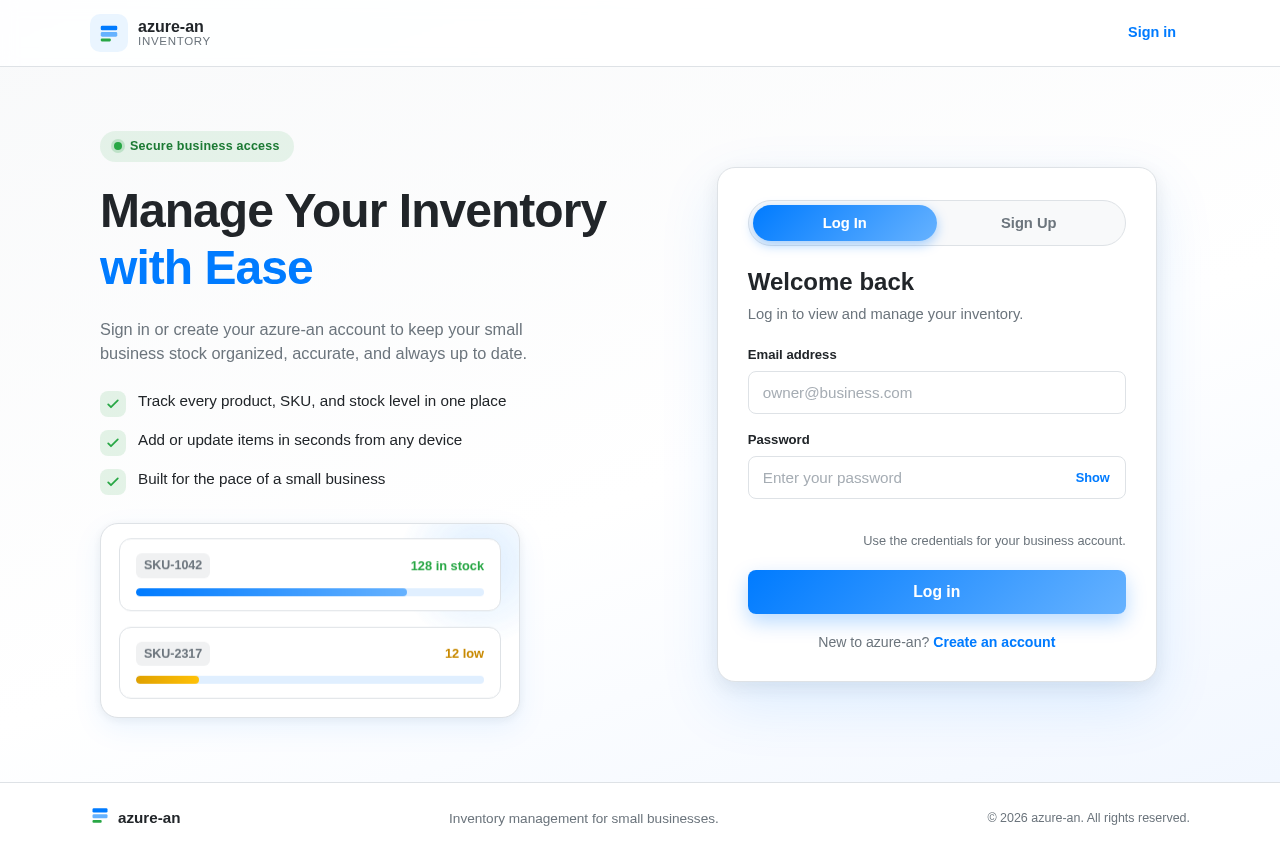
    • Authentication: A custom page for user login and session management.
  • Access: Application-owned identity is required for persistent user sessions.

  • Behavior Contracts:

    • ID: behavior-a8b285d727ae6142
    • Actor: Small Business Owner
    • Trigger: Decision to record a new product or update stock levels.
    • Observable Outcome: Inventory record is created or updated.
    • Persisted State: Inventory data is modified.
    • State Lifetime: Durable
    • Identity Continuity: Persistent
    • Audience Entry: Public
    • Touchpoints: Form fields for product entry or update
    • Failure Outcome: Inventory item is not saved or updated.
    • Provenance: basic_default
Page 3 of 5

3. Functional Requirements as Story Points

  • As a Small Business Owner, I should be able to sign up for an account to access the inventory management system. required_inference
  • As a Small Business Owner, I should be able to log in to the system to manage my inventory. required_inference
  • As a Small Business Owner, I should be able to add a new inventory item by entering product details such as name, SKU, and quantity. explicit
  • As a Small Business Owner, I should be able to update existing inventory items to reflect changes in stock levels. explicit
  • As a Small Business Owner, I should be able to view a dashboard that displays all inventory items and their details. required_inference

4. User Personas

  • Small Business Owner: The primary user managing inventory. This persona is responsible for adding, updating, and viewing inventory items.

5. Core User Flows

Small Business Owner

  1. Authentication Flow:

    • Navigate to the Authentication page.
    • Sign up for an account or log in with existing credentials.
    • Upon successful login, access the Inventory Dashboard.
  2. Inventory Management Flow:

    • Access the Inventory Dashboard.
    • Add a new inventory item by filling out the product entry form.
    • Update existing inventory items as needed.
    • View all inventory items and their details on the dashboard.
Page 4 of 5

6. Visuals Colors and Theme

  • Primary: #007BFF (Azure Blue)
  • Primary Light: #66B2FF
  • Secondary: #6C757D (Gray)
  • Accent: #28A745 (Green)
  • Highlight: #FFC107 (Yellow)
  • Background: #F8F9FA (Light Gray)
  • Surface: #FFFFFF (White)
  • Text: #212529 (Dark Gray)
  • Text Muted: #6C757D (Gray)
  • Border: #DEE2E6 (Light Gray)

7. Signature Design Concept

The Inventory Dashboard will feature a clean and intuitive layout, allowing small business owners to easily manage their inventory. The design will focus on clarity and ease of use, with a responsive layout that adapts to different screen sizes. The dashboard will prominently display inventory items, with options to add or update items through simple form interactions.

8. Interaction Model & Motion Direction

  • Interaction Model: Animated
    • Moderate scroll-triggered reveals and hover transitions will be used to enhance user interaction on the Inventory Dashboard.
    • The Authentication page will feature smooth transitions between login and sign-up forms.
Page 5 of 5

9. Non-Functional Requirements

No additional non-functional requirements were inferred beyond the need for secure authentication and durable state management for inventory data.

10. Tech Stack

  • Frontend: React for Web
  • Backend: Python with FastAPI
  • Database: MySQL or MariaDB, using Alembic for migrations
  • Local Orchestration: Docker and docker-compose

11. Assumptions and Constraints

  • The system is designed specifically for small businesses, focusing on simplicity and ease of use.
  • Authentication is required to ensure secure access to inventory management features.
  • The system will not include advanced analytics or reporting features in its initial version.

12. Glossary

  • SKU: Stock Keeping Unit, a unique identifier for each product.
  • Persistent Identity: A user session that remains active across multiple interactions with the system.
  • Durable State: Data that is saved and remains consistent across sessions.
Authentication design preview
Authentication: 1. Sign up or log in
Authentication: 2. Verify credentials
Inventory Dashboard: 1. View inventory items
Inventory Dashboard: 2. Enter product details to add or update item
Inventory Dashboard: 3. Process: Save inventory record
Inventory Dashboard: Process: Inventory item not saved
Authentication design preview
Authentication: 1. Sign up or log in
Authentication: 2. Verify credentials
Inventory Dashboard: 1. View inventory items
Inventory Dashboard: 2. Enter product details to add or update item
Inventory Dashboard: 3. Process: Save inventory record
Inventory Dashboard: Process: Inventory item not saved