Page 1 of 10
System Requirements Document for autumn-coi
1. Introduction
The purpose of this document is to outline the system requirements for the project "autumn-coi," which focuses on the collection and tracking of Certificates of Insurance (COI) for vendors and subcontractors. The project aims to automate the verification of COIs to ensure compliance and reduce liability for small-to-mid General Contractors (GCs), property management firms, franchise operators, facilities, and event venues.
2. System Overview
Page 2 of 10
2a. Product Interpretation and Delivery Boundary
-
Domain Descriptor: COI Compliance Automation
- Source Evidence: Automates the collection and verification of Certificates of Insurance (COI) to ensure compliance and reduce liability.
- Confidence: 0.9
-
Product Intent: The project aims to provide an automated solution for COI collection and compliance tracking, specifically targeting small-to-mid GCs and property managers.
-
Excluded Assumptions: Generic insurance management features and enterprise-level compliance modules are not included.
-
Access: Application-owned identity is required for managing compliance records and ensuring private ownership and control.
-
Behavior Contracts:
- COI Data Extraction: Triggered by COI document upload, extracting insurer, limits, policy period, and additional insured information.
- Compliance Monitoring: Updates compliance status based on extracted COI data.
- Deficiency Notification: Sends notifications to vendors when compliance deficiencies are identified.
- Send Digest of Expiring Vendors: Scheduled digest sent via Slack/email listing vendors with COIs expiring in 30 days.
- Parse ACORD 25 and Compare Endorsements with LLM: Extracts structured policy fields and compares endorsements and limits to requirements.
- Auto-Send Plain-English Deficiency Letter: Sends deficiency letters to the vendor's agent.
- Predict Renewal from Policy Period: Generates renewal predictions based on policy period dates.
- Risk Scoring of Vendor Portfolio: Updates portfolio risk score based on compliance or renewal data.
- Chat Over COI Archive: Provides relevant COI information based on user queries.
Page 3 of 10
2b. Source Content Inventory
No explicit content sources were provided for inventory.
Page 4 of 10
2c. Page Content and Component Coverage
Page 5 of 10
3. Functional Requirements as Story Points
- As a Risk/AP Administrator, I should be able to self-service enroll and log in through the Authentication Page before accessing protected compliance records.
required_inference
- As a Risk/AP Administrator, I should be able to manage a vendor list with required-coverage templates per project or vendor class.
explicit
- As a Risk/AP Administrator, I should be able to receive COI documents via a broker/vendor upload link or email-in COI inbox without requiring login.
explicit
- As a Risk/AP Administrator, I should be able to extract insurer, limits, policy period, and additional insured information from COI documents using OCR.
explicit
- As a Risk/AP Administrator, I should be able to automate deficiency and expiry chase sequences to vendors and their agents.
explicit
- As a Risk/AP Administrator, I should be able to view a compliance dashboard and export per-project compliance reports.
explicit
- As a Risk/AP Administrator, I should be able to store COI documents in a document vault with version history for claims defense.
explicit
- As a Risk/AP Administrator, I should receive a Slack/email digest of vendors with COIs expiring in 30 days.
explicit
- As a Risk/AP Administrator, I should be able to chat over the COI archive to retrieve relevant information.
explicit
- As a Risk/AP Administrator, I should be able to sign up and pay self-serve in the $29–$99/mo tier with no demo call required.
explicit
- As a Vendor / Subcontractor, I should be able to submit my certificate through the no-login upload link or email-in COI inbox and respond to deficiency and expiry chase sequences.
required_inference
- As a Vendor's Insurance Agent / Broker, I should receive auto-sent plain-English deficiency letters and reissue corrected certificates.
required_inference
- As a System, I should parse ACORD 25 forms and compare endorsements with LLM against the customer's contract requirement template.
explicit
- As a System, I should auto-send plain-English deficiency letters to the vendor's agent when deficiencies are identified.
explicit
- As a System, I should predict renewal from policy period dates.
explicit
- As a System, I should update the risk score of the vendor portfolio based on compliance or renewal data.
explicit
- As a System, I should run background OCR, compliance evaluation, notifications, digests, renewal prediction, and risk scoring without blocking the user interface.
required_inference
4. User Personas
- Risk/AP Administrator: The primary user responsible for managing COI compliance, typically working within small-to-mid GCs, property management firms, franchise operators, facilities, and event venues. They manage the vendor list with required-coverage templates per project or vendor class, receive COI documents via the broker/vendor upload link or email-in inbox, review OCR-extracted insurer/limits/policy period/additional-insured data, run automated deficiency and expiry chase sequences to vendors and their agents, monitor the compliance dashboard and export per-project compliance reports, store COIs in the document vault with version history for claims defense, receive the Slack/email digest of vendors expiring in 30 days, and chat over the COI archive. Success means every active sub/vendor holds a current, correctly-endorsed COI so an expired certificate never shifts liability onto the hiring party.
- Vendor / Subcontractor: The subcontractor or vendor whose COI must be on file, and the party who supplies the certificate through the broker/vendor upload link or email-in COI inbox without requiring login. They respond to automated deficiency and expiry chase sequences by providing corrected or renewed certificates, and their agent receives auto-sent plain-English deficiency letters. Success means their coverage is accepted as compliant so they can keep working for the hiring party.
- Vendor's Insurance Agent / Broker: The insurance agent or broker who issues the vendor's certificate and is the recipient of the auto-sent plain-English deficiency letters when endorsement or limit deficiencies are identified. They act on those deficiency notices to correct additional-insured wording, waivers of subrogation, limits, or policy period dates and reissue the certificate. Success means the vendor's certificate is corrected and accepted, keeping the vendor compliant.
Page 6 of 10
5. Core User Flows
-
Landing Page to Authentication:
- User visits the landing page for product orientation and discovery.
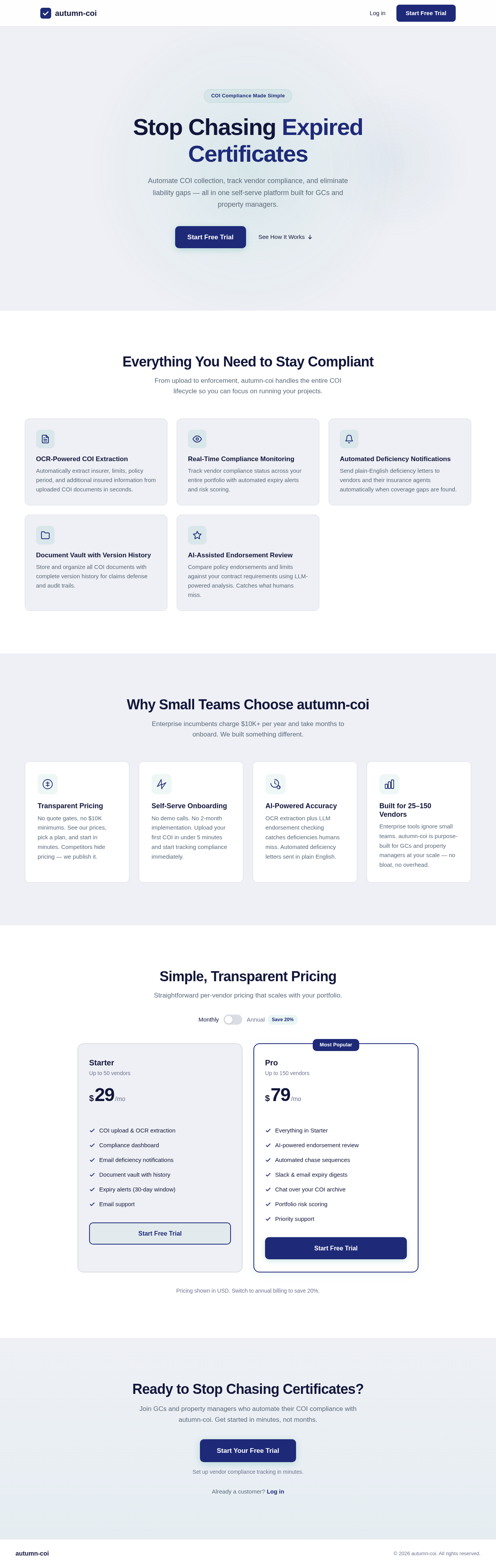
- User reviews published transparent pricing in the $29–$99/mo tier and self-serve sign-up with no demo call required.
- User proceeds to the authentication page for self-service sign-up or login.
- On successful authentication, the user is routed to the Compliance Dashboard.
-
Vendor Management:
- User accesses the Vendor List page to manage vendor information and coverage templates per project or vendor class.
- User generates and shares the no-login broker/vendor upload link and the email-in COI inbox address.
- Vendor, subcontractor, or their agent submits a COI through the no-login COI Intake surface.
-
Compliance Monitoring:
- User navigates to the Compliance Dashboard to monitor compliance status, deficiencies, and expiries.
- User generates and exports per-project compliance reports.
- User configures and receives the Slack/email digest of vendors with COIs expiring in 30 days.
-
Document Management:
- User accesses the Document Vault to upload and manage COI documents.
- User utilizes version history for claims defense.
-
AI Compliance Review:
- User interacts with the AI Compliance Review & Chat page for ACORD 25 parsing, endorsement checking, risk scoring, and renewal prediction.
- User engages with the chat interface for COI archive queries (e.g., "which subs lack waiver of subrogation on Project X?").
-
Deficiency and Expiry Chase:
- System identifies a deficiency or upcoming expiry from extracted COI data.
- System auto-sends a plain-English deficiency letter to the vendor's agent and runs the chase sequence to the vendor and their agent.
- Vendor or agent submits a corrected or renewed certificate through the no-login COI Intake surface, and the compliance status updates.
Page 7 of 10
6. Visuals Colors and Theme
- Primary: #2A9D8F
- Primary Light: #A8DADC
- Secondary: #457B9D
- Accent: #E63946
- Highlight: #F4A261
- Background: #F1FAEE
- Surface: #FFFFFF
- Text: #1D3557
- Text Muted: #A8A8A8
- Border: #E5E5E5
7. Signature Design Concept
The design concept for the autumn-coi project focuses on a clean, professional interface that emphasizes clarity and ease of use. The landing page will feature a hero section with a subtle animated background using the primary color palette to draw attention to the product's key features and benefits. The interface will maintain a consistent layout across all pages, with intuitive navigation and clear call-to-action buttons to guide users through the compliance tracking process.
8. Interaction Model & Motion Direction
- Landing Page: Animated with subtle motion to highlight key features and benefits.
- Internal Pages: Static layout prioritizing clarity and data density, with minimal motion for transitions and feedback.
Page 8 of 10
9. Non-Functional Requirements
- Performance: The system should handle up to 200 concurrent users without performance degradation.
required_inference
- Security: All data must be encrypted in transit and at rest.
required_inference
- Scalability: The system should be able to scale to accommodate future growth in user base and data volume.
required_inference
- Background Processing: OCR extraction, compliance evaluation, notifications, digests, renewal prediction, and risk scoring must run as backend jobs that do not block the user interface.
required_inference
- Identity: Application-owned identity is required for managing compliance records, ensuring private ownership and control.
explicit
- No-Login Intake: The broker/vendor upload link and email-in COI inbox must not require login.
explicit
10. Tech Stack
- Frontend: React for Web
- Backend: Python, FastAPI
- Database: MySQL or MariaDB, use alembic for migrations
- AI Models: GPT 5.4 for user-friendly response, Claude Sonnet 5 for academic or coding work
- AI Tools: Litellm for LLM Routing, Langchain
- Local Orchestration: Docker, docker-compose
- Server-side Orchestration: Kubernetes
Page 9 of 10
11. Assumptions and Constraints
- The system will primarily serve small-to-mid GCs (10–200 subs), property management firms, franchise operators, facilities, and event venues, typically served by one risk/AP administrator.
- The solution will be self-serve with no demo calls required.
- Pricing will be competitive, targeting the sub-$100/mo tier ($29–$99/mo).
- Generic insurance management features and enterprise-level compliance modules are excluded.
- The broker/vendor upload link and email-in COI inbox must not require login.
- Application-owned identity is required for managing compliance records, ensuring private ownership and control.
- The system should handle up to 200 concurrent users without performance degradation.
- All data must be encrypted in transit and at rest.
- The system should scale to accommodate future growth in user base and data volume.
- The best initial niche is residential/light-commercial GCs and property managers with 25–150 active subs who currently pay nothing and are refused by enterprise vendors' minimum spend.
11a. Competitive and Market Context
- Category incumbents: myCOI / illumend (mycoitracking.com/pricing — no price published; AI-native "Lumie"), TrustLayer (trustlayer.io — no price published; "Pricing details for this product isn't currently available" per G2), bcs / getBCS (getbcs.com/pricing-and-plans), COI Tracker (coitracker.co/pricing), and COISoftware (coisoftware.com/pricing).
- Published competitor pricing: bcs — Free up to 25 vendors; Self-Service $0.95/vendor/mo ($11.40/vendor/yr); Full-Service $17.80/vendor/yr with a $10,000 minimum annual spend. COI Tracker — Free (10 vendors), Starter $29/mo (25), Growth $59/mo (100), Pro $129/mo (unlimited). COISoftware — Starter $49/mo (promo $24/mo, billed $288/yr), Plus $149/mo (promo $74/mo). myCOI / illumend — no price published. TrustLayer — no price published.
- Why customers pay: One uninsured-sub claim can exceed the lifetime cost of the software; the $10,000 minimum annual spend of the full-service incumbent (bcs) proves the pain is worth five figures to mid-market buyers, leaving the sub-$100/mo tier wide open.
- Market validation: TrustLayer closed a $15M Series A in August 2021 (reported as $15.1M; total funding over $21M). myCOI has 37 G2 reviews at 4.7/5; TrustLayer has 15 G2 reviews at 4.8/5 with an average implementation of 2 months. Public demand complaints appear in r/ConstructionManagers and r/Construction threads about tracking sub insurance. Opportunity score: 8/10. Difficulty score: 4/10.
- Growth channels: SEO against "COI tracking software pricing" (incumbents hide pricing — publish ours); insurance-broker referral partnerships; construction subreddits and PM Facebook groups; free "COI expiry spreadsheet" lead magnet.
Page 10 of 10
12. Glossary
- COI: Certificate of Insurance
- GC: General Contractor
- LLM: Large Language Model
- OCR: Optical Character Recognition
- AP: Accounts Payable
- ACORD 25: The standard certificate of insurance form parsed into structured policy fields.
- Additional Insured: A party granted insured status under another party's policy, verified from COI wording.
- Waiver of Subrogation: A policy endorsement waiving the insurer's right to recover from another party, verified from COI wording.
- Deficiency Letter: A plain-English notice auto-sent to the vendor's agent describing missing or incorrect coverage.
- Chase Sequence: The automated deficiency and expiry follow-up cadence sent to the vendor and their agent.
- Document Vault: The versioned COI storage used for claims defense.
This document provides a comprehensive overview of the system requirements for the autumn-coi project, ensuring that all necessary features and functionalities are clearly defined and aligned with the project's objectives.



No comments yet. Be the first!