autumn-app
 Zabih Ullah
creat me an app for tracking office expenses
Comments (0)
Sign in to leave a comment
System Requirements
System Requirements Document (SRD) for autumn-app
1. Introduction
The autumn-app is a single-user office expense tracking application designed to simplify financial management for professionals in the United Kingdom. Developed for Zabih Ullah, this app aims to provide an intuitive and efficient solution for organizing office expenses. The system will cater to a single-user configuration, ensuring streamlined functionality without the complexity of multi-user setups.
2. System Overview
The autumn-app is tailored for individual office administrators who need to track, categorize, and analyze expenses. The app will allow users to log expenses, categorize them, set budgets, and generate monthly reports. It is designed to be user-friendly, secure, and optimized for Zabih's needs in the GB locale, including currency defaults in GBP (£) and timezone settings for GMT.
3. Functional Requirements
Story Points:
- As a User, I should be able to log office expenses with details such as amount, category, and date.
- As a User, I should be able to categorize expenses into predefined or custom categories.
- As a User, I should be able to set monthly budgets for specific categories.
- As a User, I should be able to view a summary of expenses for the current month.
- As a User, I should be able to generate and download monthly expense reports in PDF format.
- As a User, I should be able to edit or delete previously logged expenses.
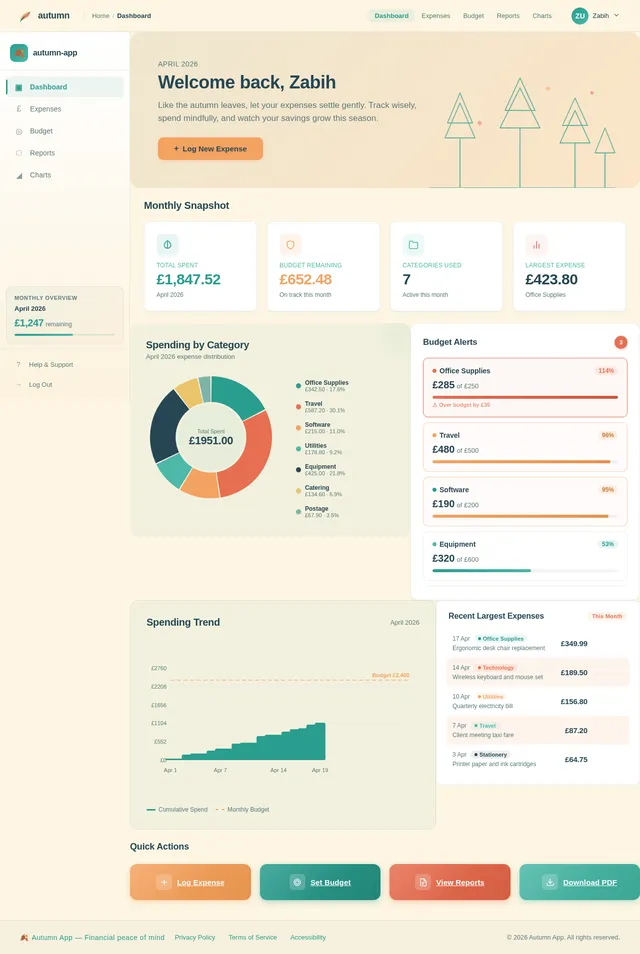
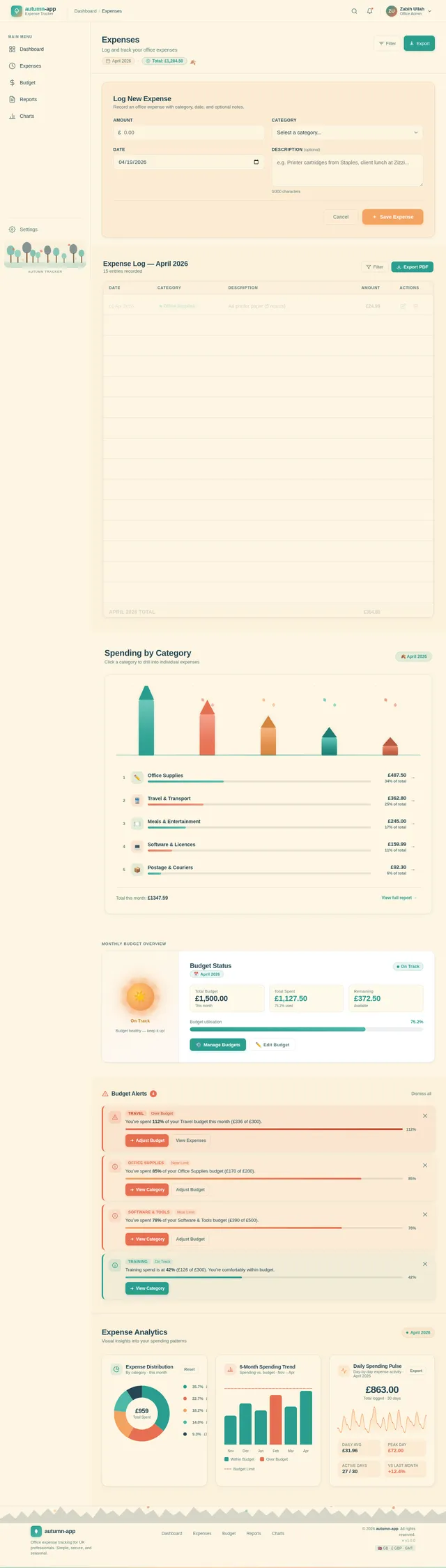
- As a User, I should be able to view visual charts (e.g., pie charts, bar graphs) summarizing expense categories.
- As a User, I should be able to receive notifications when nearing or exceeding a budget limit.
4. User Personas
Single User Persona:
Name: Office Administrator
Role: Individual managing office expenses
Goals:
- Efficiently track and categorize expenses.
- Stay within budget limits.
- Generate reports for financial analysis.
Pain Points: - Manual tracking methods are time-consuming.
- Lack of visual insights into spending patterns.
Usage Context: - Primarily used during office hours to log expenses and review summaries.
5. Visuals Colors and Theme
Color Palette:
The autumn-app will feature a warm, inviting color palette inspired by autumn tones to evoke a sense of comfort and organization.
- Background: #FDF6E3 (Soft Cream)
- Surface: #F4A261 (Muted Orange)
- Text: #264653 (Deep Teal)
- Accent: #E76F51 (Burnt Coral)
- Muted Tones: #2A9D8F (Soft Green)
This palette reflects the autumn season's warmth and professionalism, ensuring a visually appealing interface.
6. Signature Design Concept
Concept: Interactive Autumn Forest Dashboard
The autumn-app homepage will feature a dynamic, interactive autumn forest scene. As the user navigates through the app, the forest subtly changes to reflect the user's financial activity.
-
Visuals:
- Trees represent expense categories, growing taller as spending increases.
- Falling leaves symbolize logged expenses, with colors changing based on the category.
- A glowing sun in the background adjusts its brightness based on the user's budget status (dimmed for overspending, bright for staying within budget).
-
Animations:
- Smooth transitions as users switch between sections.
- Micro-interactions, such as leaves fluttering when hovering over buttons.
-
User Interaction:
- Clicking on a tree opens a detailed breakdown of that expense category.
- The forest scene resets monthly, providing a fresh start for tracking expenses.
This concept ensures the app is not only functional but also visually engaging and memorable.
7. Non-Functional Requirements
- Performance: The app must load within 2 seconds for all major functionalities.
- Security: User data must be encrypted using AES-256 encryption.
- Scalability: While designed for single-user configuration, the architecture should allow future scalability.
- Localization: Default settings for GBP (£) currency and GMT timezone.
- Accessibility: The app must comply with WCAG 2.1 Level AA standards.
8. Tech Stack
Frontend:
- React for Web
- React Native for Mobile
Backend:
- Python
- FastAPI
Database:
- MySQL (with Alembic for migrations)
AI Models:
- GPT 5.4 for user-friendly responses
AI Tools:
- Langchain
- Litellm for LLM Routing
Local Orchestration:
- Docker
- Docker-compose
Server-side Orchestration:
- Kubernetes
9. Assumptions and Constraints
Assumptions:
- The app will be used by a single user, eliminating the need for multi-user authentication or role-based access control.
- The user will primarily access the app during office hours.
Constraints:
- The app must operate within the GB locale, adhering to currency and timezone standards.
- The system must be optimized for individual use, avoiding unnecessary complexity.
10. Glossary
- AES-256 Encryption: Advanced Encryption Standard with a 256-bit key length, ensuring high security for user data.
- WCAG 2.1: Web Content Accessibility Guidelines, ensuring the app is accessible to users with disabilities.
- FastAPI: A modern web framework for building APIs with Python.
- Alembic: A database migration tool for SQLAlchemy.
- React: A JavaScript library for building user interfaces.
- Docker: A platform for developing, shipping, and running applications in containers.
No comments yet. Be the first!