autumn-api
 sunny udaykiran
API Cost Trackers and Management With the explosion of businesses integrating tools like OpenAI, Anthropic, and Google APIs, development teams are facing runaway API costs. revenuemap.app The Problem: Companies lack visibility into which specific teams, products, or users are burning through API credits. The Solution: A centralized dashboard that connects to major LLM APIs, surfaces cost-per-request, sets budget alerts, and tracks usage trends. Revenue Model: $29 to $79+ per month. It is an easy sell because teams are already spending hundreds or thousands on API calls; the tool pays for itself by preventing budget overruns.

Comments (0)
Sign in to leave a comment
System Requirements
System Requirements Document for autumn-api
1. Introduction
The autumn-api project aims to develop a micro SaaS application that provides a centralized dashboard for tracking and managing API costs. This tool is designed for development teams integrating with major LLM APIs like OpenAI, Anthropic, and Google APIs. The primary goal is to offer visibility into API credit usage, set budget alerts, and track usage trends to prevent budget overruns.
2. System Overview
The autumn-api system will deliver a centralized dashboard that connects to major LLM APIs, providing cost-per-request visibility, budget alerts, and usage trend tracking. The target audience includes development teams managing API costs. The product will be delivered as a micro SaaS with a subscription model ranging from $29 to $79+ per month. The system will not include playful elements, heavy photographic backgrounds, or overly decorative animations, adhering to a design language of functional clarity inspired by Dieter Rams.
2a. Product Interpretation and Delivery Boundary
The autumn-api will be delivered as a micro SaaS application, accessible via a web interface. The dashboard will be the primary interface for users to interact with the system. The application will not include account management capabilities beyond what is necessary for subscription management. Future expansions or additional features are not included in the current scope.
2b. Source Content Inventory
Not applicable as no content source directive was provided.
2c. Page Content and Component Coverage
Dashboard
- API Connection Management
- Connect to major LLM APIs (OpenAI, Anthropic, Google)
- Display connection status and API key management
- Cost Tracking
- Display cost-per-request for each connected API
- Visualize cost trends over time
- Budget Alerts
- Set and manage budget thresholds
- Receive alerts when approaching or exceeding budget limits
- Usage Trends
- Track API usage trends by team, product, or user
- Visualize data with graphs and charts
- User Interface
- Rounded-rectangle controls
- Strict modular grid layout
- Highlight key data points with primary orange
3. Functional Requirements
- As a development team member, I should be able to connect the dashboard to major LLM APIs to track API usage and costs. (explicit)
- As a user, I should be able to view cost-per-request data for each API to understand spending. (explicit)
- As a user, I should be able to set budget alerts to prevent exceeding API spending limits. (explicit)
- As a user, I should be able to track usage trends by team, product, or user to identify high usage areas. (explicit)
4. User Personas
- Development Team Member
- Responsible for integrating APIs and managing API costs.
- Uses the dashboard to connect APIs, view cost data, and set budget alerts.
5. Core User Flows
-
Connecting an API
- User accesses the Dashboard.
- User selects "Connect API" and enters API credentials.
- System verifies connection and displays status.
-
Viewing Cost Data
- User navigates to the Cost Tracking section.
- User views cost-per-request data and trends.
- User identifies high-cost areas.
-
Setting Budget Alerts
- User accesses the Budget Alerts section.
- User sets a budget threshold.
- System sends alerts when nearing or exceeding the budget.
-
Tracking Usage Trends
- User navigates to the Usage Trends section.
- User selects criteria (team, product, user).
- System displays usage trends with visualizations.
6. Visuals Colors and Theme
- Muse: Dieter Rams
- Palette:
- Background: #F7F7F7
- Surface: #FFFFFF
- Text: #333333
- Primary: #FF5733
- Accent: #1F8A70
- Muted: #CCCCCC
- Typography:
- Headings: Archivo, Medium weight, small caps
- Body: Fira Sans
- Scale: 1.25 modular
- Shape Language: Rounded-rectangle controls
- Layout: Modular grid
- Motion: Instant and mechanical feedback
7. Signature Design Concept
The public entry will feature a split-screen hero with a diagrammatic cost breakdown on the left and a live data feed on the right. The primary orange will highlight key data points, ensuring clarity and focus on the information presented.
8. Interaction Model & Motion Direction
- Interaction Model: Static
- Motion Tempo: Restrained
- Hero Dimensionality: Flat
- Landing Hero Motion Brief: The split-screen hero will present a composed view of cost breakdowns and live metrics, with instant feedback on user interactions.
9. Non-Functional Requirements
- Performance: The system must handle multiple API connections and display real-time data without significant delay.
- Usability: The interface must be intuitive and easy to navigate for development teams.
- Reliability: The system must provide accurate cost tracking and alerting.
10. Tech Stack
- Frontend: React
- Backend: Python/FastAPI
- Database: PostgreSQL
- Deployment: Docker, Kubernetes (if required)
11. Assumptions and Constraints
- The system will only support major LLM APIs initially.
- Subscription management will be handled externally.
12. Glossary
- LLM APIs: Large Language Model APIs such as OpenAI, Anthropic, and Google APIs.
- Micro SaaS: A small-scale SaaS application focusing on a specific niche or problem.
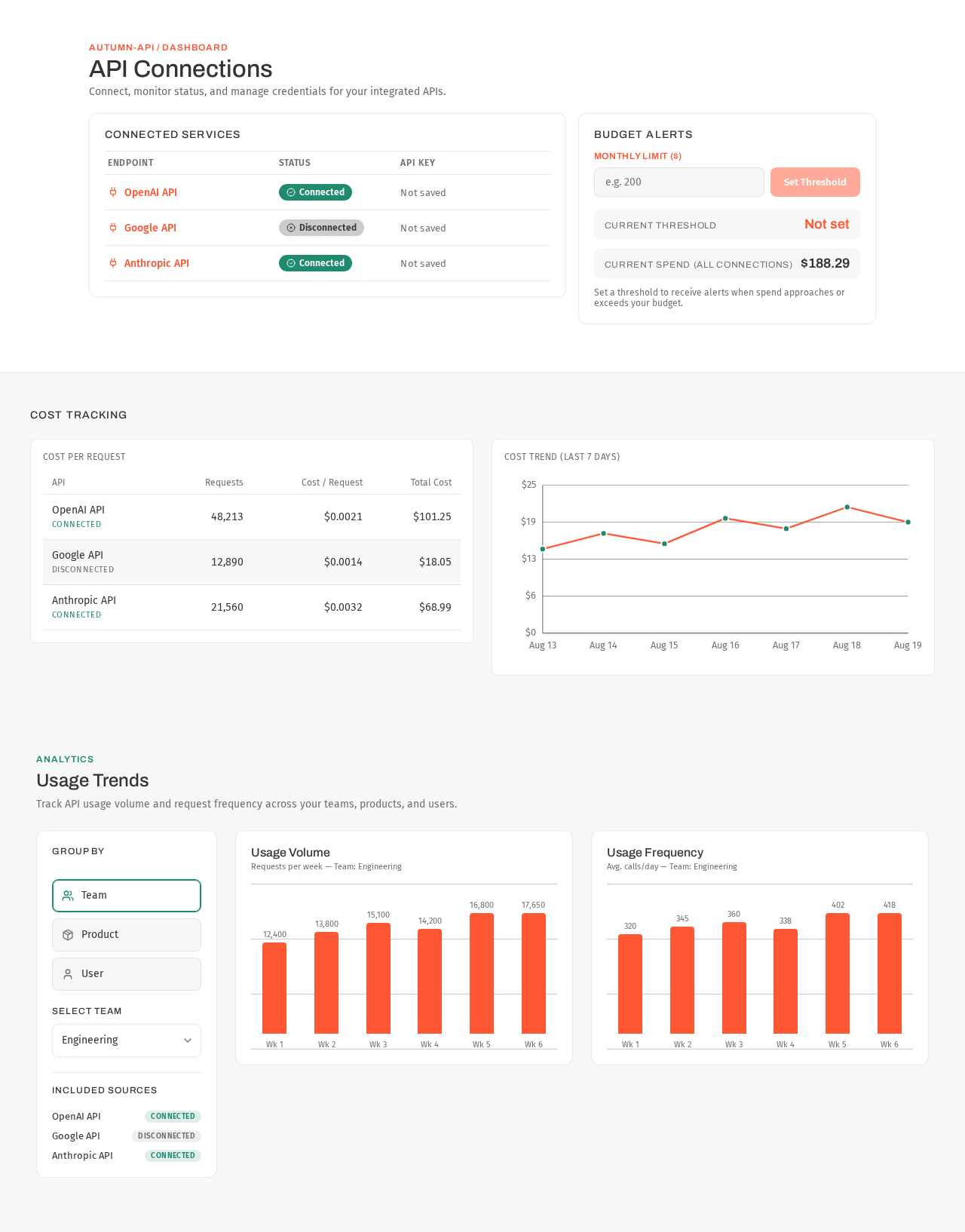
autumn-api / dashboard
API Connections
Connect, monitor status, and manage credentials for your integrated APIs.
Connected Services
Budget Alerts
Set a threshold to receive alerts when spend approaches or exceeds your budget.
Cost Tracking
| API | Requests | Cost / Request | Total Cost |
|---|---|---|---|
| OpenAI APIconnected | 48,213 | $0.0021 | $101.25 |
| Google APIdisconnected | 12,890 | $0.0014 | $18.05 |
| Anthropic APIconnected | 21,560 | $0.0032 | $68.99 |
Usage Trends
Track API usage volume and request frequency across your teams, products, and users.
Usage Volume
Requests per week — Team: Engineering
Usage Frequency
Avg. calls/day — Team: Engineering
autumn-api / dashboard
API Connections
Connect, monitor status, and manage credentials for your integrated APIs.
Connected Services
Budget Alerts
Set a threshold to receive alerts when spend approaches or exceeds your budget.
Cost Tracking
| API | Requests | Cost / Request | Total Cost |
|---|---|---|---|
| OpenAI APIconnected | 48,213 | $0.0021 | $101.25 |
| Google APIdisconnected | 12,890 | $0.0014 | $18.05 |
| Anthropic APIconnected | 21,560 | $0.0032 | $68.99 |
Usage Trends
Track API usage volume and request frequency across your teams, products, and users.
Usage Volume
Requests per week — Team: Engineering
Usage Frequency
Avg. calls/day — Team: Engineering
No comments yet. Be the first!