autorisation-d-absence-drs
 Pascal Messou
Salut


Comments (0)
Sign in to leave a comment
System Requirements
System Requirements Document
Introduction
This document outlines the system requirements for the "Autorisation d’absence – DRS" application. The project aims to transform the existing application into a solution that operates on Windows PCs and Android devices, functioning locally and offline. The goal is to retain the current interface and functionalities without rewriting the application from scratch.
System Overview
The "Autorisation d’absence – DRS" application is designed to manage absence authorizations. It will be available as a Windows and Android application, capable of operating without an internet connection. The application will leverage existing code and infrastructure, focusing on local storage and offline capabilities.
Functional Requirements
As a User:
- I want to use the application on both Windows and Android platforms without needing an internet connection.
- I want the application to retain the current interface and functionalities.
- I want the application to store data locally using localStorage.
- I want to generate PDFs locally using html2pdf.js.
- I want the application to function as a Progressive Web App (PWA) with offline capabilities.
- I want the application to remove or localize external dependencies, including Google Fonts and map components.
- I want to ensure the Service Worker supports offline functionality effectively.
- I want to be able to create, modify, and search for authorizations offline.
- I want to generate and save PDFs of authorizations offline.
- I want to ensure that data remains intact after closing and reopening the application offline.
As a Developer:
- I want to maintain the existing codebase and avoid rewriting the application from scratch.
- I want to ensure that all external resources are integrated directly into the application.
- I want to conduct real offline tests to validate the application's functionality.
- I want to ensure that the application is packaged for both Windows and Android after successful offline validation.
- I want to use React and TypeScript as the core technologies for the application.
- I want to use Vite for building the application.
- I want to use Tailwind CSS for styling the application.
- I want to ensure that the application uses Express for server-side operations.
- I want to follow a phased approach, creating a copy at each significant step.
- I want to perform targeted tests after each major modification.
- I want to ensure that no function is declared "OK" without real testing.
- I want to ensure that the application is not moved to Windows and Android until offline functionality is validated.
User Personas
End User
- Uses the application to manage absence authorizations on Windows and Android devices.
- Requires offline functionality to access and modify data without internet connectivity.
Developer
- Responsible for maintaining and enhancing the application.
- Ensures the application meets technical and functional requirements.
Core User Flows
End User Flow
- Launch the application on a Windows PC or Android device.
- Access the main interface and navigate through the application.
- Create a new absence authorization.
- Modify an existing authorization.
- Search for specific authorizations.
- Generate a PDF of an authorization.
- Save the PDF locally.
- Close the application.
- Reopen the application and verify data integrity.
Developer Flow
- Maintain the existing codebase.
- Integrate all external resources locally.
- Conduct offline tests to validate functionality.
- Package the application for Windows and Android.
- Perform targeted tests after each modification.
- Validate offline functionality before final deployment.
Visuals Colors and Theme
- Utilize Tailwind CSS for styling.
- Maintain a consistent and user-friendly interface across platforms.
Signature Design Concept
- Retain the existing interface design to ensure user familiarity.
Interaction Model & Motion Direction
- Follow standard interaction models for Windows and Android applications.
- Ensure smooth transitions and responsive design.
Non-Functional Requirements
- The application must operate efficiently without internet connectivity.
- Data integrity must be maintained across sessions.
- The application must be secure and protect user data.
Tech Stack
- Frontend: React, TypeScript
- Build Tool: Vite
- Styling: Tailwind CSS
- Data Storage: localStorage
- PDF Generation: html2pdf.js
- PWA: manifest.json, Service Worker
- Server: Express
Assumptions and Constraints
- The application will not migrate to IndexedDB immediately due to current data volume.
- The application must pass real offline tests before final deployment.
- External dependencies must be removed or localized for offline functionality.
Glossary
- PWA: Progressive Web App, a type of application software delivered through the web, built using common web technologies including HTML, CSS, and JavaScript.
- Service Worker: A script that the browser runs in the background, separate from a web page, enabling features that don't need a web page or user interaction.
- localStorage: A web storage object that stores data locally within the user's browser.
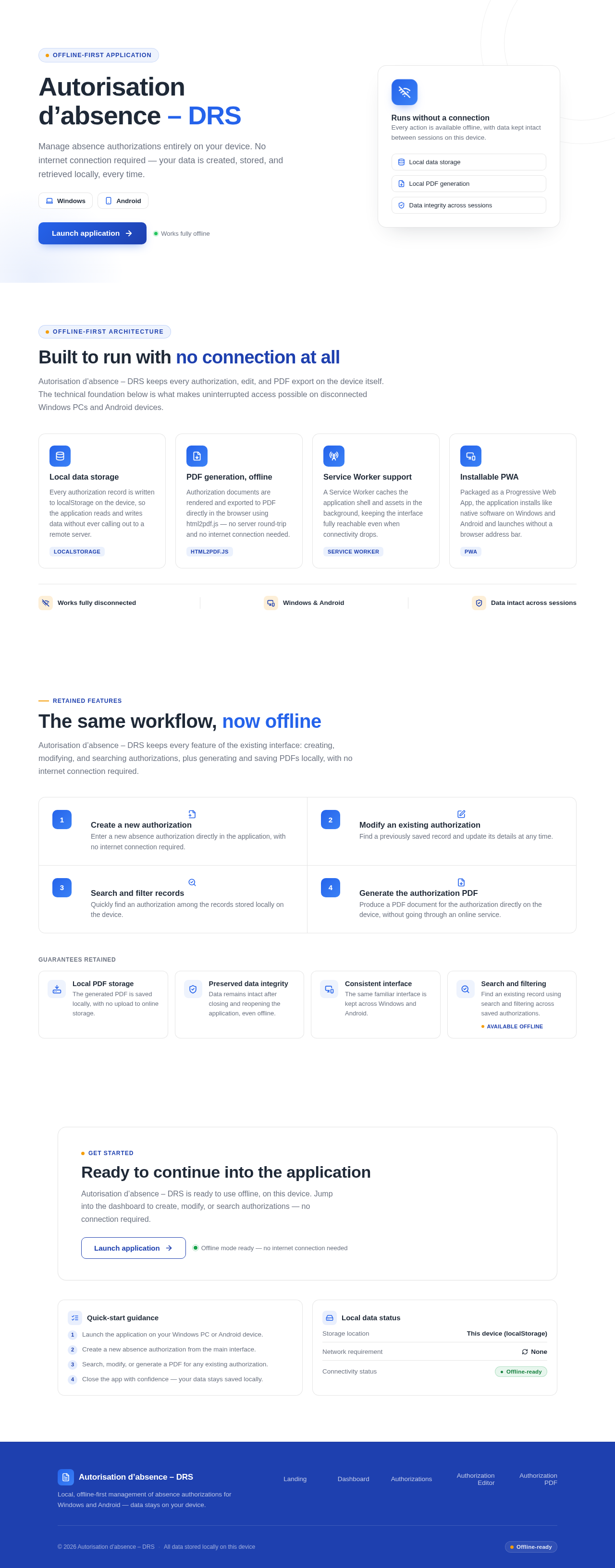
Autorisation d’absence – DRS
Manage absence authorizations entirely on your device. No internet connection required — your data is created, stored, and retrieved locally, every time.
Runs without a connection
Every action is available offline, with data kept intact between sessions on this device.
Built to run with no connection at all
Autorisation d’absence – DRS keeps every authorization, edit, and PDF export on the device itself. The technical foundation below is what makes uninterrupted access possible on disconnected Windows PCs and Android devices.
Local data storage
Every authorization record is written to localStorage on the device, so the application reads and writes data without ever calling out to a remote server.
localStoragePDF generation, offline
Authorization documents are rendered and exported to PDF directly in the browser using html2pdf.js — no server round-trip and no internet connection needed.
html2pdf.jsService Worker support
A Service Worker caches the application shell and assets in the background, keeping the interface fully reachable even when connectivity drops.
Service WorkerInstallable PWA
Packaged as a Progressive Web App, the application installs like native software on Windows and Android and launches without a browser address bar.
PWARetained features
The same workflow, now offline
Autorisation d’absence – DRS keeps every feature of the existing interface: creating, modifying, and searching authorizations, plus generating and saving PDFs locally, with no internet connection required.
Create a new authorization
Enter a new absence authorization directly in the application, with no internet connection required.
Modify an existing authorization
Find a previously saved record and update its details at any time.
Search and filter records
Quickly find an authorization among the records stored locally on the device.
Generate the authorization PDF
Produce a PDF document for the authorization directly on the device, without going through an online service.
Guarantees retained
Local PDF storage
The generated PDF is saved locally, with no upload to online storage.
Preserved data integrity
Data remains intact after closing and reopening the application, even offline.
Consistent interface
The same familiar interface is kept across Windows and Android.
Search and filtering
Find an existing record using search and filtering across saved authorizations.
Available offlineGet started
Ready to continue into the application
Autorisation d’absence – DRS is ready to use offline, on this device. Jump into the dashboard to create, modify, or search authorizations — no connection required.
Quick-start guidance
- 1Launch the application on your Windows PC or Android device.
- 2Create a new absence authorization from the main interface.
- 3Search, modify, or generate a PDF for any existing authorization.
- 4Close the app with confidence — your data stays saved locally.
Local data status
Autorisation d’absence – DRS
Manage absence authorizations entirely on your device. No internet connection required — your data is created, stored, and retrieved locally, every time.
Runs without a connection
Every action is available offline, with data kept intact between sessions on this device.
Built to run with no connection at all
Autorisation d’absence – DRS keeps every authorization, edit, and PDF export on the device itself. The technical foundation below is what makes uninterrupted access possible on disconnected Windows PCs and Android devices.
Local data storage
Every authorization record is written to localStorage on the device, so the application reads and writes data without ever calling out to a remote server.
localStoragePDF generation, offline
Authorization documents are rendered and exported to PDF directly in the browser using html2pdf.js — no server round-trip and no internet connection needed.
html2pdf.jsService Worker support
A Service Worker caches the application shell and assets in the background, keeping the interface fully reachable even when connectivity drops.
Service WorkerInstallable PWA
Packaged as a Progressive Web App, the application installs like native software on Windows and Android and launches without a browser address bar.
PWARetained features
The same workflow, now offline
Autorisation d’absence – DRS keeps every feature of the existing interface: creating, modifying, and searching authorizations, plus generating and saving PDFs locally, with no internet connection required.
Create a new authorization
Enter a new absence authorization directly in the application, with no internet connection required.
Modify an existing authorization
Find a previously saved record and update its details at any time.
Search and filter records
Quickly find an authorization among the records stored locally on the device.
Generate the authorization PDF
Produce a PDF document for the authorization directly on the device, without going through an online service.
Guarantees retained
Local PDF storage
The generated PDF is saved locally, with no upload to online storage.
Preserved data integrity
Data remains intact after closing and reopening the application, even offline.
Consistent interface
The same familiar interface is kept across Windows and Android.
Search and filtering
Find an existing record using search and filtering across saved authorizations.
Available offlineGet started
Ready to continue into the application
Autorisation d’absence – DRS is ready to use offline, on this device. Jump into the dashboard to create, modify, or search authorizations — no connection required.
Quick-start guidance
- 1Launch the application on your Windows PC or Android device.
- 2Create a new absence authorization from the main interface.
- 3Search, modify, or generate a PDF for any existing authorization.
- 4Close the app with confidence — your data stays saved locally.
No comments yet. Be the first!