aurafx
 Damilare Omoniyi
Gm

Comments (0)
Sign in to leave a comment
System Requirements
System Requirements Document for aurafx
1. Introduction
Aurafx is a gaming application designed to provide an immersive and interactive experience for players. The app aims to captivate users with a futuristic design and engaging gameplay, leveraging advanced UI concepts inspired by Gleb Kuznetsov's hyper-futuristic style.
2. System Overview
Aurafx delivers a cinematic and interactive gaming experience through a custom UI. The application is designed for players who seek an engaging and visually captivating environment. The system includes three primary pages: Landing, Games, and Gameplay, each serving a distinct role in the player's journey. The app operates without requiring user accounts, allowing players to access the gaming experience directly.
2a. Product Interpretation and Delivery Boundary
Aurafx is delivered as a custom gaming application with a focus on providing an immersive experience. The app does not require user accounts, allowing players to access the gaming experience anonymously. The system is designed to offer a seamless transition between the public landing page, game selection, and gameplay, ensuring a cohesive user journey.
2b. Source Content Inventory
Not applicable as no content source directive was provided.
2c. Page Content and Component Coverage
Landing
- Information/State: Introduction to the gaming app, overview of available games, and entry instructions.
- Primary Actions: Enter the gaming experience.
- Supporting Actions: View game descriptions.
- Domain Entities: Games, Player.
- Components: Full-bleed 3D scene, floating glass panels, luminous strokes.
- States: Loading, success, error, recovery.
Games
- Information/State: List of available games, game details.
- Primary Actions: Select a game to play.
- Supporting Actions: View game rules, return to Landing.
- Domain Entities: Games, Player.
- Components: Game list, selection interface.
- States: Loading, empty (no games available), success, error, recovery.
Gameplay
- Information/State: Active game session, player progress.
- Primary Actions: Participate in gameplay.
- Supporting Actions: Pause game, view game rules.
- Domain Entities: Games, Player.
- Components: Game interface, interactive elements.
- States: Loading, active gameplay, paused, success, error, recovery.
3. Functional Requirements
- As a Player, I should be able to access the public landing experience to learn about the gaming app and how to enter the interactive gaming experience. (required_inference)
- As a Player, I should be able to view and select from available games before starting gameplay. (required_inference)
- As a Player, I should be able to participate in an interactive gameplay session for the selected game. (explicit)
4. User Personas
- Player: The primary user of the gaming app, responsible for accessing the app, selecting games, and participating in gameplay.
5. Core User Flows
-
Accessing the Landing Page
- Trigger: Player opens the app.
- Steps:
- Player views the introduction and overview of the gaming app.
- Player decides to enter the gaming experience.
- Outcome: Player enters the Games page.
-
Selecting a Game
- Trigger: Player is on the Games page.
- Steps:
- Player views the list of available games.
- Player selects a game to play.
- Outcome: Player is directed to the Gameplay page.
-
Participating in Gameplay
- Trigger: Player has selected a game.
- Steps:
- Player engages in the interactive gameplay session.
- Player can pause or view game rules if needed.
- Outcome: Player completes the game or exits to the Games page.
6. Visuals Colors and Theme
- Muse: Gleb Kuznetsov
- Palette:
- Background: #000022
- Surface: #0A0A30
- Text: #FFFFFF
- Primary: #00FFFF
- Accent: #FF00FF
- Muted: #666699
- Typography:
- Headings: Orbitron — Uppercase, wide letterspacing
- Body: Space Grotesk
- Scale: 1.5 modular (64/42/28/18)
- Shape Language: Full-bleed 3D scene with floating glass panels and thin luminous strokes.
- Layout: Radial layouts with asymmetric balance and layering.
7. Signature Design Concept
The public entry page features a full-viewport 3D hero scene with interactive elements that respond to user input. Floating glass panels overlay the main content, providing a sense of depth, while thin luminous strokes guide user attention. The design incorporates uppercase micro-labels in Orbitron for a high-tech aesthetic.
8. Interaction Model & Motion Direction
- Interaction Model: Animated
- Motion Tempo: Cinematic
- Hero Dimensionality: WebGL
- Landing Hero Motion Brief: The focal subject is a full-bleed 3D holographic object set against a deep navy background. The transformation involves user input leading to interactive responses, using continuous slow-motion parallax effects to create a sense of immersion.
9. Non-Functional Requirements
- The application must maintain a high frame rate to support smooth animations and transitions. (provenance: required_inference)
- The system should be optimized for performance on a range of devices, ensuring accessibility and responsiveness. (provenance: required_inference)
10. Tech Stack
- Frontend: React, WebGL/R3F for 3D interactions
- Backend: Python/FastAPI
- Storage: Appropriate storage solution for game data
- Deployment: Docker/docker-compose
11. Assumptions and Constraints
- The application will operate without requiring user accounts, allowing anonymous access to the gaming experience.
- The design and functionality are inspired by Gleb Kuznetsov's style, focusing on a cinematic and futuristic experience.
12. Glossary
- Player: The user engaging with the gaming app.
- Gameplay: The interactive session where the player participates in a selected game.
- Landing Page: The initial page providing an overview of the gaming app.
- Games Page: The page where players can view and select available games.
AURAFX
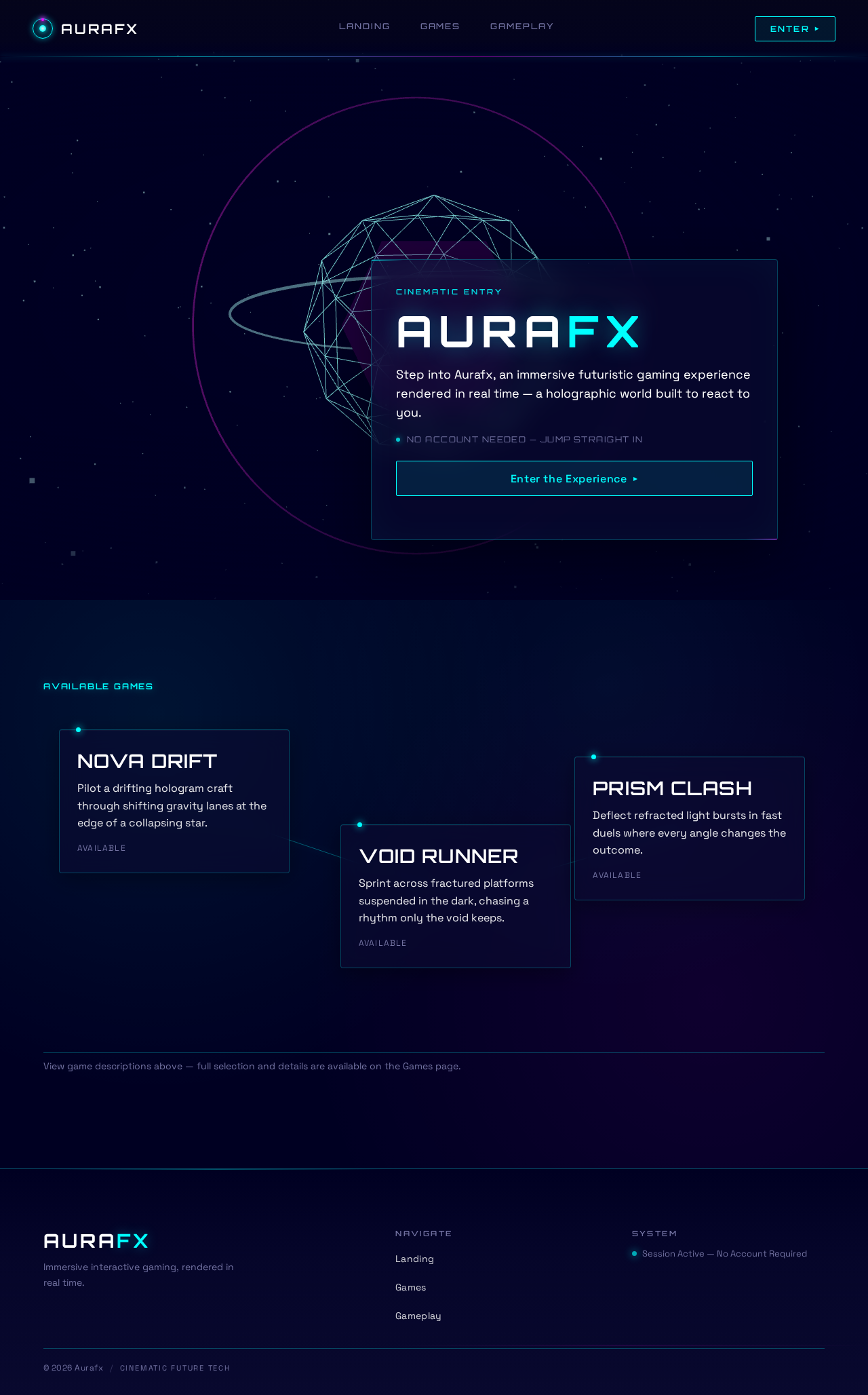
Step into Aurafx, an immersive futuristic gaming experience rendered in real time — a holographic world built to react to you.
Nova Drift
Pilot a drifting hologram craft through shifting gravity lanes at the edge of a collapsing star.
Void Runner
Sprint across fractured platforms suspended in the dark, chasing a rhythm only the void keeps.
Prism Clash
Deflect refracted light bursts in fast duels where every angle changes the outcome.
AURAFX
Step into Aurafx, an immersive futuristic gaming experience rendered in real time — a holographic world built to react to you.
Nova Drift
Pilot a drifting hologram craft through shifting gravity lanes at the edge of a collapsing star.
Void Runner
Sprint across fractured platforms suspended in the dark, chasing a rhythm only the void keeps.
Prism Clash
Deflect refracted light bursts in fast duels where every angle changes the outcome.
No comments yet. Be the first!