LAYER 01embedded
APK shell
Rootfs tarball and default extensions embedded in app assets
 Joseph Itoro
Build the following to your best abilities

Sign in to leave a comment
2026-10-11T18:52:31.613873 USER: Build the following to your best abilities [attachments: android_ai_agent_spec.PDF] 2026-10-11T18:53:56.970034 USER: User chose project name aura-harness
TECHNICAL REPORT & ARCHITECTURE SPECIFICATION
Android AI Coding Agent IDE
Comprehensive Technical Landscape Analysis, Memory Optimization Paradigms & Production Build
Specification
CRITICAL ARCHITECTURAL PARADIGM: THE FUSION MODEL
Traditional AI coding agents accumulate conversational history naively, resulting in quadratic token growth
( O(T2) ). On mobile hardware, this causes massive API costs, latency spikes, and frequent Low-Memory Kills
Android AI Coding Agent Specification
Page 1 of 5
Android AI Coding Agent Specification
Page 2 of 5
PRODUCTION BUILD PROMPT: ANDROID AI CODING AGENT
IDE
COPY & PASTE INTO AI
ASSISTANT
Use the following self-contained prompt to direct code-generation models to build the complete, production-grade Android
mobile AI coding environment.
PROMPT BEGINS
•
•
•
•
•
•
Android AI Coding Agent Specification
Page 3 of 5
•
•
•
•
•
•
•
•
•
•
•
PROMPT ENDS
•
•
•
•
•
•
•
•
•
•
Android AI Coding Agent Specification
Page 5 of 5
Bringing desktop-class AI coding agents to Android requires overcoming significant OS-level constraints, specifically
aggressive Out-Of-Memory (OOM) background task terminations, severe POSIX environment limitations, and
memory overheads associated with long-running LLM conversation histories. Existing pioneer projects
demonstrate distinct trade-offs across execution sandboxing, background persistence, and tool capabilities:
Claude Code, Codex, Gemini
CLI, OpenCode native
support.
Rootless execution without
Termux dependencies; unified file
Code architecture embedded
directly in APK.
Native Rust agent core with
19 built-in tools.
High-performance native
command loop with minimal IPC
Mobile
Harness
Extended
Desktop-class Android IDE
userland.
(LMK). The Fusion Architectural Paradigm eliminates cumulative history accumulation through immutable
system prefixes, explicit structured state tracking, and bounded per-step context patches. This reduces
cumulative token usage by 14.8x and caps core resident set size (RSS) under 22–30 MB.
You are tasked with building a complete, production-ready Android application: a Claude Code alternative for
Android — a mobile-native AI coding agent IDE with a powerful in-app Linux environment, custom AI model
support, and first-class web development capabilities (specifically tailored for full-stack environments including
PHP/LAMP, Node.js, and Python). This is not a thin chat wrapper; it is a full agentic coding environment that runs
entirely on-device.
Embed a complete Linux userland inside the APK assets (extracted to app-private storage /data/data/<package>/
files/usr on first launch without requiring network downloads or root access):
Pre-installed Binaries:
├── sample-projects/php-crud/ # Sample PHP + MariaDB app for verification
CodeMirror editor.
management.
Self-healing loops with a 17-
skill agent ecosystem.
AST-level code intelligence and
localized multi-step error
correction.
Concurrent runner for 5
local/remote agent
configurations.
Zero-Termux foreground service
execution model with persistent
loops.
In-App Linux Userland: Pre-extracted, app-private Debian AArch64 rootfs containing full developer toolchains
( PHP 8.2+ , Composer , MariaDB , Apache2 , Node v22+ , Python 3.12+ , GCC ). Integrates localized LAMP
stacks (such as TAMP/PhantomPHP patterns) directly with web-root mapping.
Background Persistence & OS Hardening: Implementation of AgentForegroundService using START_STICKY ,
PARTIAL_WAKE_LOCK , and WIFI_MODE_FULL_LOW_LATENCY combined with OEM-specific battery optimization
bypass mechanisms (Samsung, Xiaomi MIUI/HyperOS, Huawei PowerGenie).
Code Intelligence & Performance Benchmarks: On-device LSP client integration for AST diagnostics, type
definition lookup, and inline ghost-text completions. Benchmark evaluations (Android Bench 2.0) indicate
Background Execution Service: Implement an Android Foreground Service ( AgentForegroundService )
configured with START_STICKY , maintaining a PARTIAL_WAKE_LOCK and WIFI_MODE_FULL_LOW_LATENCY .
Include OEM autostart hardening for aggressive background-killing ROMs (Samsung Device Care, Xiaomi
MIUI/HyperOS, Huawei PowerGenie, Oppo/Vivo battery savers).
LAMP Stack Integration: Pre-configure Apache2 + PHP-FPM + MariaDB with phpMyAdmin accessible via
local localhost ports (e.g., http://localhost:8080/phpmyadmin ). Provide a single-tap "Start Web Server" action
in the UI that orchestrates stack daemons. Map the default web root to /sdcard/htdocs or an accessible app-
private directory via Android's Storage Access Framework (SAF).
OpenAI-Compatible REST Provider: Handles any standard endpoint exposing /v1/chat/completions
(OpenAI, Groq, DeepSeek, OpenRouter, Together, Fireworks, Ollama, LM Studio, vLLM).
Anthropic Provider: Direct native client for Anthropic Messages API with header customization ( anthropic-
version ).
Model Management Features: Provide full UI configuration for adding custom providers with dynamic base
URLs, API keys, arbitrary model IDs, custom headers, and request body JSON templates. Support per-model
hyperparameter adjustment (temperature, top-p, max tokens, custom system prompt overrides). Store all
credentials strictly encrypted via Android's EncryptedSharedPreferences (MasterKey backed by Android
Keystore). Support native tool/function calling with structured JSON-schema fallback for models without native
tool calling support. Implement Model Context Protocol (MCP) client support.
The agent operates in two user-selectable modes:
PLAN Mode: Read-only architectural planning. Agent analyzes project structure, asks clarifying questions,
and emits a structured execution blueprint. File modifications and execution commands are disabled.
AGENT Mode: Autonomous execution loop. The agent reads files, edits code, executes shell commands,
resolves dependencies, and verifies fixes iteratively.
Built-in Tool Ecosystem:
file_read / file_write / file_edit : Collision-safe block editing with line-number addressing and unified diff
directory_list / glob_grep : High-speed file pattern matching and text search via Rust ignore and rg
crates.
shell_exec : Non-blocking terminal execution with output streaming, explicit timeout control, and exit code
capture.
git_operation : Native libgit2 wrapper for status, diff, commit, branch, and push/pull commands.
web_search & web_fetch : Lightweight web browsing with token-efficient DOM-to-Markdown conversion
("snapshot mode").
dependency_resolver : Autonomous dependency detection and installation ( apt , npm , pip , composer ).
Self-Healing Loop & Undo System: After every file modification, the agent automatically executes the
appropriate project linter or compiler ( tsc , php -l , python -m py_compile , cargo check ). If errors are
detected, the agent parses stdout/stderr and attempts autonomous repair before presenting results. All changes
are tracked in an atomic snapshot tree allowing single-tap rollbacks.
Editor Core: CodeMirror 6 embedded via optimized Android WebView (or native Jetpack Compose text
engine) supporting syntax highlighting for 40+ languages, line numbers, bracket matching, find & replace,
and multi-tab management.
LSP & Real-Time Intelligence: Embedded Language Server Protocol (LSP) client connecting to background
server instances (e.g., intelephense , typescript-language-server , pyright ) for real-time type checking,
autocomplete, and method signature tooltips. Support inline LLM ghost-text completions (accepted via Tab
key).
Web Preview & Live Reload: Built-in WebView panel displaying local web servers in split view with auto-
reload on file save.
Database Browser: Embedded graphical UI to inspect MariaDB/SQLite schemas, run custom SQL queries,
view result grids, and launch phpMyAdmin.
Framework Scaffolding: One-tap template initialization for Laravel, Symfony, Express, Vue, React, and basic
PHP/HTML applications.
Full ANSI-compliant terminal emulator ( vt100 compatible) with extended virtual key row (Ctrl, Alt, Esc, Tab,
Arrow keys).
Chat interface with rich Markdown, code block syntax highlighting, streaming text response, and step-by-step
thinking/tool cards.
Interactive permission confirmation prompts for destructive execution actions ( rm -rf , drop database,
system package purge).
The project user operates aura-harness and selects how the agent should work on a project.
Responsibilities and goals
Primary journeys
Planning journey
Autonomous execution journey
Observable success
The agent is a supporting system actor rather than a human persona. Its behavior differs according to the user-selected mode.
Actor: Developer. Trigger: The developer selects a project and chooses PLAN Mode. The agent reads the project structure and uses AST-level code intelligence to understand the codebase. It remains read-only: file modifications and execution commands are disabled. The agent may ask clarifying questions, then returns a structured execution blueprint describing the proposed work, affected files, dependencies, and verification approach. The developer can review the blueprint and continue the work separately in AGENT Mode; planning does not itself modify the project.
Actor: Developer. Supporting actors: Agent runtime, model provider, configured tools, and project services. Trigger: The developer selects AGENT Mode and submits a coding objective. The agent reads relevant files, searches directories and content with directory_list and glob_grep, and uses file_read before proposing or applying collision-safe block edits through file_write or file_edit, using line-number addressing and unified diffs.
The agent can use the 17-skill ecosystem, including shell execution, Git operations, web search and fetching, dependency resolution, and code intelligence. shell_exec runs non-blocking commands with streamed output, explicit timeout control, and captured exit codes. git_operation supports status, diff, commit, branch, and push/pull through the native libgit2 wrapper. Web results use token-efficient DOM-to-Markdown snapshot mode. The dependency resolver can detect and install dependencies through apt, npm, pip, and composer.
After changes, the agent automatically runs the appropriate project linter or compiler, such as tsc, php -l, python -m py_compile, or cargo check. It parses standard output and standard error, applies localized multi-step corrections when errors are found, and repeats the self-healing loop until verification succeeds or the task cannot be repaired. Every modification is tracked in an atomic snapshot tree. The developer can use single-tap rollback to recover from an unwanted or unsuccessful change. Destructive actions, including rm -rf, dropping a database, or purging system packages, pause for an interactive permission confirmation; without confirmation, the action is not executed and the developer can revise or abandon it.
Actor: Developer. Trigger: The developer opens model management. The developer adds or edits a custom provider with a dynamic base URL, API key, arbitrary model ID, custom headers, and a request-body JSON template. Per-model settings include temperature, top-p, maximum tokens, and a custom system-prompt override. Credentials are stored encrypted through Android EncryptedSharedPreferences, backed by a MasterKey in the Android Keystore.
The developer configures native tool/function calling where supported and a structured JSON-schema fallback for models without native support. The developer can also configure the Model Context Protocol (MCP) client. The resulting configuration is available to the agent runtime for PLAN Mode analysis, AGENT Mode execution, streaming chat responses, and inline completion requests. If a provider or model cannot perform a requested tool call, the runtime uses the supported structured fallback rather than treating the tool as completed.
Actor: Developer. Trigger: The developer opens project files. The CodeMirror 6 editor, embedded through the optimized Android WebView or native Jetpack Compose text engine, displays syntax highlighting for 40+ languages, line numbers, bracket matching, find and replace, and multiple tabs. The developer edits code directly and can use AST-level intelligence for code understanding, definition lookup, and localized diagnostics.
The LSP client connects to background servers such as intelephense, typescript-language-server, and pyright to provide real-time type checking, autocomplete, and method-signature tooltips. Inline LLM ghost-text completions appear in the editor and are accepted with the Tab key. Editor changes can then be saved, passed to the agent’s verification and self-healing loop, or reviewed alongside the resulting diagnostics.
Actor: Developer. Trigger: The developer opens the project chat or submits a request during an agent run. The chat displays rich Markdown, syntax-highlighted code blocks, streaming text responses, and step-by-step thinking/tool cards. Tool cards expose the agent’s activity and results, including file operations, searches, shell output, dependency actions, verification, and repair attempts. Permission prompts appear in the conversation when a destructive execution action requires confirmation. The developer can review the result, continue with a follow-up request, approve an eligible destructive action, or use rollback after a modification.
Actor: Developer. Trigger: The developer opens a web project or saves a file requiring a local preview. The built-in WebView panel displays a local web server in split view beside the editor and automatically reloads after a file save. A concurrent runner supports up to 5 local or remote agent configurations.
For a new project, the developer can use one-tap framework scaffolding for Laravel, Symfony, Express, Vue, React, or basic PHP/HTML applications. The scaffolded project remains available for editing, agent execution, verification, and preview. If the local service is unavailable, the preview remains unavailable until the relevant service is started or recovered; the developer can continue editing or inspect the associated terminal output.
Actor: Developer. Trigger: The developer chooses the one-tap Start Web Server action. The application orchestrates the preconfigured Apache2, PHP-FPM, and MariaDB daemons. The default web root maps to /sdcard/htdocs or an accessible app-private directory through Android’s Storage Access Framework. Once running, the local site is available through the configured localhost port, with phpMyAdmin accessible at a local address such as http://localhost:8080/phpmyadmin.
The developer can open the local site in the WebView preview and use the database browser to inspect MariaDB or SQLite schemas, run custom SQL queries, and view result grids. The developer can also launch phpMyAdmin. If a daemon or database operation fails, the developer can review streamed terminal output and exit codes, correct the project or service configuration, and retry; no successful service state is assumed until the relevant process is running.
Actor: Developer. Supporting actor: Zero-Termux foreground service. Trigger: The developer opens the terminal or an agent invokes a shell action. The application provides a full ANSI-compliant, VT100-compatible terminal emulator with an extended virtual-key row containing Ctrl, Alt, Esc, Tab, and arrow keys. Commands execute through the Zero-Termux foreground-service model, which supports persistent loops without requiring Termux to remain in the foreground.
The developer can observe streamed output and captured exit codes. Agent-initiated commands honor explicit timeouts and remain non-blocking. A timed-out or failed command reports its outcome for recovery through the agent’s self-healing process, a corrected retry, or direct developer intervention. Persistent loops can continue while the developer works elsewhere in the application, subject to the configured local or remote agent configuration.
Actor: Developer. Trigger: Verification detects an error, or the developer decides a change should be undone. After a modification, the agent parses the applicable linter or compiler output and attempts autonomous localized correction. Each correction is verified again through the applicable project check. If repair succeeds, the corrected result and tool cards are presented for review. If repair fails or a change is unwanted, the developer uses the atomic snapshot tree for a single-tap rollback, reviews the restored state, and may continue manually or submit a revised task. Permission-denied destructive operations and unavailable services follow a recoverable path: the failed outcome is surfaced, no unsupported completion is claimed, and the developer can retry after changing the relevant condition.
[Design proposal; unspecified choices are defaults.]
Muse: Gleb Kuznetsov. Headline: “FUSION CORE.” aura-harness uses a dark-theme, mobile-first Material 3 system: near-black void #05060B as the default background, #0E1220 glass surfaces at 70–80% opacity, 1px borders in rgba(47,230,255,0.18), primary cyan #2FE6FF, rare AGENT/live-step violet #B24BFF, readable text #EAF2FF, and muted labels, timestamps and RSS figures #7C8AA6. The void occupies roughly 70% of each screen. No light-mode default, blue-on-white treatment, gradient-blob hero, stock photography or pastel surfaces.
Headings use Space Grotesk at 500–700 weight with -0.02em display tracking; body text uses IBM Plex Sans; token counts, RSS values and port numbers use IBM Plex Mono with tabular numerals. The 4px baseline follows a 1.333 modular scale: 56/128px display, 40/56px hero subhead, 28/36px section, 20/24px card title, 16/17px body, 13px data and 11px uppercase micro-labels with +0.14em tracking. Hard-edged glass rectangles use 12–16px radii, 1px luminous strokes and cyan HUD hairlines. Chamfered chips distinguish PLAN and AGENT; concentric gauges present telemetry. Soft radial glow is reserved for active data.
A persistent 56px rail contains Files, Editor, Terminal, Models, MCP, Database and Git. Floating panels use a 12-column grid with 24px gutters at 1280px, collapse to one column at 768px, and stack as bottom sheets at 375px. The tablet and landscape-foldable editor retains an adjustable split view with a 1px cyan divider, draggable percentage readout and real-time adjacent-panel reflow. Readable text and controls wrap or scale to remain fully visible at supported viewports; decoration may overlap only where it does not obscure them.
•
•
Android AI Coding Agent Specification
Page 4 of 5
Dark-theme mobile-first UI built with Material 3 components.
Split-view editor with adjustable panel sizing for tablet and landscape foldables.
[Design proposal; unspecified choices are defaults.]
aura-harness is an Android-native AI coding agent IDE: a machine room held in the hand, combining its AArch64 Rust agent core, embedded Linux userland, model providers, LSP-aware editor and persistent execution service. Its public entry is a full-viewport “FUSION CORE” scene rather than a conventional SaaS hero: a cyan wireframe and volumetric runtime core with particle streams, bounded-memory rings and faint AArch64 traces, plus one violet node representing the live agent step. The oversized Space Grotesk headline overlaps the core’s left edge. A full-width cyan rule introduces the telemetry strip “RSS 24.6 MB · TOKENS 14.8x ↓ · LOOP 0.4 ms,” expressing the Fusion Model’s bounded 22–30 MB RSS envelope and 14.8x token reduction. A ghost-outlined “INITIATE HARNESS” control sits bottom-left.
The same language carries through the accepted IDE: luminous line-art runtime diagrams, concentric gauges for RSS, token budget and tool-call count, the persistent navigation rail, and a split editor with a draggable divider and live percentage. PLAN remains cyan and read-only, with file-write tools visibly struck through; AGENT introduces the violet live node and enables the existing loop. The public scene recomposes accepted runtime, telemetry, agent-state and initiation content without adding a destination or capability.
[Design proposal; unspecified choices are defaults.]
Interaction Model: Parallax Motion Tempo: cinematic Hero Dimensionality: webgl
Landing Hero Motion Brief — Focal subject: the cyan volumetric wireframe Fusion Core, with one violet live-step node at its centre. Input → transformation → outcome: the accepted INITIATE HARNESS control starts the existing agent harness; slow core orbit, telemetry presentation and runtime-layer movement transform that initiation into a legible view of bounded execution, RSS, token reduction and loop timing without adding behavior. Use a 40-second orbit, layered glass-panel parallax, scroll-scrubbed camera dolly through APK → Rust core → Linux userland → model provider, restrained telemetry counter ticks as sections enter, and cyan edge sweeps during tool execution. Terminal output uses the specified 28ms-per-character treatment where existing terminal output is shown.
The composed first frame is a full #05060B viewport: the core sits behind the flush-left “FUSION CORE” wordmark, with one violet node, a full-width cyan rule, telemetry strip and bottom-left ghost control. With prefers-reduced-motion, freeze the scene to one lit frame, render output instantly, and retain usable wrapping or horizontal scrolling.
Landing Hero 3D Scene Brief — DIRECTION-DERIVED: render one real-time WebGL/R3F Fusion Core using layered cyan wireframe geometry, bounded-memory topographic rings and particle streams, with one violet node encoding the live agent step. The object must communicate runtime telemetry and the 22–30 MB envelope rather than serve as decorative abstraction. Provide the specified CSS 3D/static fallback for reduced motion.
14.8x
TOKEN REDUCTION
< 30 MB
RESIDENT STATE RSS
overhead.
modern mobile agent architectures achieve 82–85% autonomous completion on standard software engineering
tasks.
•
•
•
•
Memory Efficiency (Fusion Model): Memory footprint must be strictly bounded. Do not use append-only
conversational histories. Maintain state via an immutable system prefix combined with explicit structured JSON
state patches (active file list, step goals, modified lines, terminal buffers). Keep per-step context size constant
( O(1) prompt growth) and core engine resident set size (RSS) under 30 MB.
Cold Start Time: < 500 ms.
Agent Loop Overhead: Step latency < 200 ms (excluding LLM inference latency).
UI Performance: Sustained 60 fps rendering during heavy stdout terminal streaming.
Memory Footprint: Idle RSS < 150 MB; active execution RSS < 300 MB. Zero OOM terminations on 4 GB RAM
devices.
Battery Consumption: < 5% battery drain per hour of continuous agent activity.
├── .github/workflows/ci.yml # GitHub Actions pipeline (builds APK & runs unit tests)
AArch64
NATIVE RUST ENGINE
LAMP + LSP
IN-APP WEB USERLAND
Project
Architecture & Userland
Agent & Model Engine
Key Innovations
TermFold
Debian 13 proot container
packaged in APK. Embedded
AnyClaw
ARM64 native Linux runtime
(Node.js 24, npm, git) in
background service.
Custom Model Provider Architecture: Universal BYOM (Bring Your Own Model) routing via Rust-backed JNI
abstraction supporting standard REST endpoints (OpenAI /v1/chat/completions , Anthropic Messages API,
Google Gemini API), alongside local llama.cpp binding for GGUF model execution offline.
Build the application using a high-performance hybrid architecture:
Frontend: Kotlin with Jetpack Compose for a mobile-first, reactive UI layer targeting Android 10+
( minSdk 29 , targetSdk 35 , compileSdk 35 ).
Core Execution Engine: Rust core compiled to aarch64-linux-android exposed via JNI or UniFFI bindings. The
Rust core handles agent reasoning, state representation, tool invocation, file I/O, process spawning, and diff
calculation.
sh , bash , apt (configured with Debian/Ubuntu AArch64 mirrors), git , curl ,
wget , node (v22+), npm , python3 , pip , php (8.2+), composer , mariadb (server and client),
apache2 , nginx , sqlite3 , gcc , make , and openssl .
Implement a unified ModelProvider abstraction trait in Rust supporting four provider backends:
Google Gemini Provider: Gemini REST/gRPC API routing.
Local Offline Provider: Embedded llama.cpp bindings compiled directly into the Rust core, supporting
direct loading of GGUF quantized models for offline execution.
Provide full source code organized as follows:
├── app/ # Android Jetpack Compose Application
│ ├── src/main/java/ # UI, ViewModels, Service, JNI Bindings
│ └── src/main/assets/ # Rootfs tarball, default extensions
├── core/ # Rust Engine (aarch64 target)
│ ├── src/agent/ # Reasoning, tool executor, Fusion state
│ ├── src/providers/ # OpenAI, Anthropic, Gemini, llama.cpp
│ └── src/tools/ # File, shell, git, web, lsp tools
├── README.md # Setup & build instructions (./gradlew assembleRelease)
└── CONTRIBUTING.md # Architecture diagrams & Rust-JNI contracts
No additional details specified.
Claw Code
Android
Clean-room rewrite of Claude
validation.
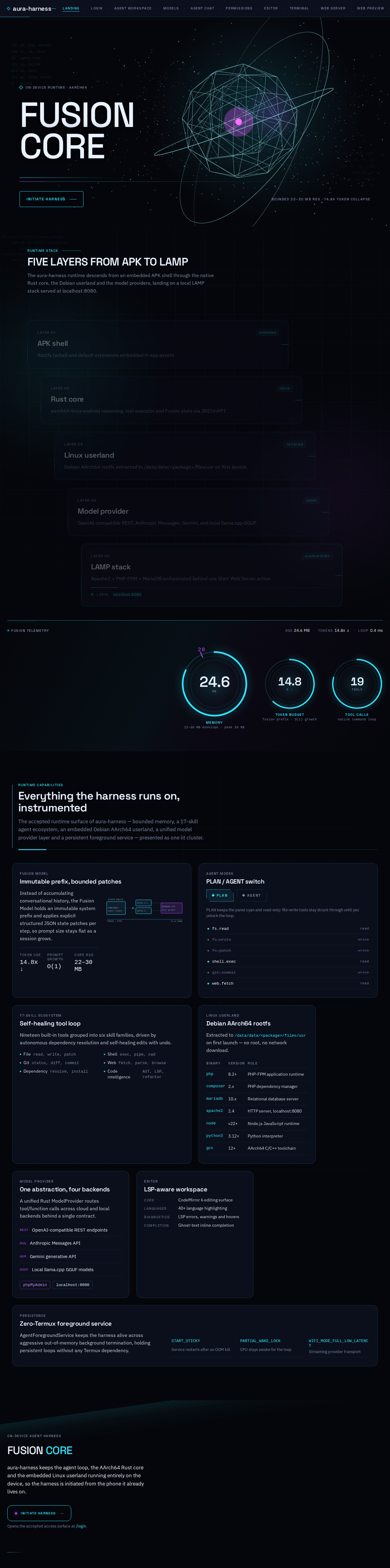
The aura-harness runtime descends from an embedded APK shell through the native Rust core, the Debian userland and the model providers, landing on a local LAMP stack served at localhost:8080.
Rootfs tarball and default extensions embedded in app assets
aarch64-linux-android reasoning, tool executor and Fusion state via JNI/UniFFI
Debian AArch64 rootfs extracted to /data/data/<package>/files/usr on first launch
OpenAI-compatible REST, Anthropic Messages, Gemini, and local llama.cpp GGUF
Apache2 + PHP-FPM + MariaDB orchestrated behind one Start Web Server action
The accepted runtime surface of aura-harness — bounded memory, a 17-skill agent ecosystem, an embedded Debian AArch64 userland, a unified model provider layer and a persistent foreground service — presented as one lit cluster.
Instead of accumulating conversational history, the Fusion Model holds an immutable system prefix and applies explicit structured JSON state patches per step, so prompt size stays flat as a session grows.
PLAN keeps the panel cyan and read-only: file-write tools stay struck through until you unlock the loop.
Nineteen built-in tools grouped into six skill families, driven by autonomous dependency resolution and self-healing edits with undo.
Extracted to /data/data/<package>/files/usr on first launch — no root, no network download.
| Binary | Version | Role |
|---|---|---|
| php | 8.2+ | PHP-FPM application runtime |
| composer | 2.x | PHP dependency manager |
| mariadb | 10.x | Relational database server |
| apache2 | 2.4 | HTTP server, localhost:8080 |
| node | v22+ | Node.js JavaScript runtime |
| python3 | 3.12+ | Python interpreter |
| gcc | 12+ | AArch64 C/C++ toolchain |
A unified Rust ModelProvider routes tool/function calls across cloud and local backends behind a single contract.
AgentForegroundService keeps the harness alive across aggressive out-of-memory background termination, holding persistent loops without any Termux dependency.
On-device agent harness
aura-harness keeps the agent loop, the AArch64 Rust core and the embedded Linux userland running entirely on the device, so the harness is initiated from the phone it already lives on.
Opens the accepted access surface at /login.
The aura-harness runtime descends from an embedded APK shell through the native Rust core, the Debian userland and the model providers, landing on a local LAMP stack served at localhost:8080.
Rootfs tarball and default extensions embedded in app assets
aarch64-linux-android reasoning, tool executor and Fusion state via JNI/UniFFI
Debian AArch64 rootfs extracted to /data/data/<package>/files/usr on first launch
OpenAI-compatible REST, Anthropic Messages, Gemini, and local llama.cpp GGUF
Apache2 + PHP-FPM + MariaDB orchestrated behind one Start Web Server action
The accepted runtime surface of aura-harness — bounded memory, a 17-skill agent ecosystem, an embedded Debian AArch64 userland, a unified model provider layer and a persistent foreground service — presented as one lit cluster.
Instead of accumulating conversational history, the Fusion Model holds an immutable system prefix and applies explicit structured JSON state patches per step, so prompt size stays flat as a session grows.
PLAN keeps the panel cyan and read-only: file-write tools stay struck through until you unlock the loop.
Nineteen built-in tools grouped into six skill families, driven by autonomous dependency resolution and self-healing edits with undo.
Extracted to /data/data/<package>/files/usr on first launch — no root, no network download.
| Binary | Version | Role |
|---|---|---|
| php | 8.2+ | PHP-FPM application runtime |
| composer | 2.x | PHP dependency manager |
| mariadb | 10.x | Relational database server |
| apache2 | 2.4 | HTTP server, localhost:8080 |
| node | v22+ | Node.js JavaScript runtime |
| python3 | 3.12+ | Python interpreter |
| gcc | 12+ | AArch64 C/C++ toolchain |
A unified Rust ModelProvider routes tool/function calls across cloud and local backends behind a single contract.
AgentForegroundService keeps the harness alive across aggressive out-of-memory background termination, holding persistent loops without any Termux dependency.
On-device agent harness
aura-harness keeps the agent loop, the AArch64 Rust core and the embedded Linux userland running entirely on the device, so the harness is initiated from the phone it already lives on.
Opens the accepted access surface at /login.
No comments yet. Be the first!