attendance-management-checkin
 Royce Talents
Recreate my Android app from scratch called CHECKIN. Build it with Kotlin + Jetpack Compose + Material 3, CameraX, ML Kit, Supabase, Room, Coroutines, ViewModels and Repository architecture. The app is a real attendance management system with two separate roles: 1. STUDENT 2. LECTURER IMPORTANT: Build REAL functionality, not UI prototypes, simulations, fake data, random attendance, or placeholder camera/biometric features. CORE FEATURES: • Email/password authentication, verification, password reset and persistent login. • Lecturer can create an institution using: - School name - Unique permanent institution code • Students and lecturers can join an existing institution using the code. • Institution data must be stored in Supabase and work across different devices. • Never use hardcoded/demo institutions or randomly assign users to institutions. • Use one canonical institution ID for all users, courses, sessions and attendance. DATABASE: Create Supabase tables for: - profiles - institutions - institution_members - courses - attendance_sessions - attendance_records Use proper foreign keys, unique constraints and Row Level Security. LECTURER: - Create/manage courses - Create attendance sessions - Generate QR attendance - Start live attendance - Use a REAL CameraX camera to detect multiple people - Show detected people count - Support biometric/face verification where implemented - Support GPS/geofence attendance - View attendance records and statistics - Export attendance STUDENT: - View institution and courses - See active attendance sessions from Supabase - Scan REAL QR codes using CameraX - Use REAL face/biometric verification - Use GPS verification when required - View attendance history and statistics CROSS-DEVICE FLOW: Lecturer creates session → Supabase → Student device retrieves session → Student verifies using QR/face/GPS → AttendanceRecord created → Supabase → Lecturer sees updated attendance. A student from another institution MUST NOT see or join the session. GPS must only be required when the session actually requires GPS. CAMERA: Use real CameraX frame processing. Do not simulate faces, counts or attendance. Do not create fake biometric matches. OFFLINE: Use Room as a local cache. Queue attendance when offline. Sync with Supabase when internet returns. Never report a failed sync as successful. UI: Create a professional modern Material 3 interface with separate Student and Lecturer dashboards, loading states, errors, empty states, permissions and proper navigation. IMPORTANT: Do not claim a feature is complete unless it is actually implemented and tested. Before completion: - Build the project - Fix compilation errors - Verify Supabase/database integration - Verify authentication - Verify institution joining - Verify cross-device sessions - Verify QR - Verify GPS - Verify biometric/face functionality - Verify lecturer multi-person camera - Verify attendance recording - Verify offline sync - Verify security/RLS At the end, give me a short report showing each major feature as: IMPLEMENTED / PARTIALLY IMPLEMENTED / NOT IMPLEMENTED and mention the exact files/components involved.

Comments (0)
Sign in to leave a comment
attendance-management-checkin
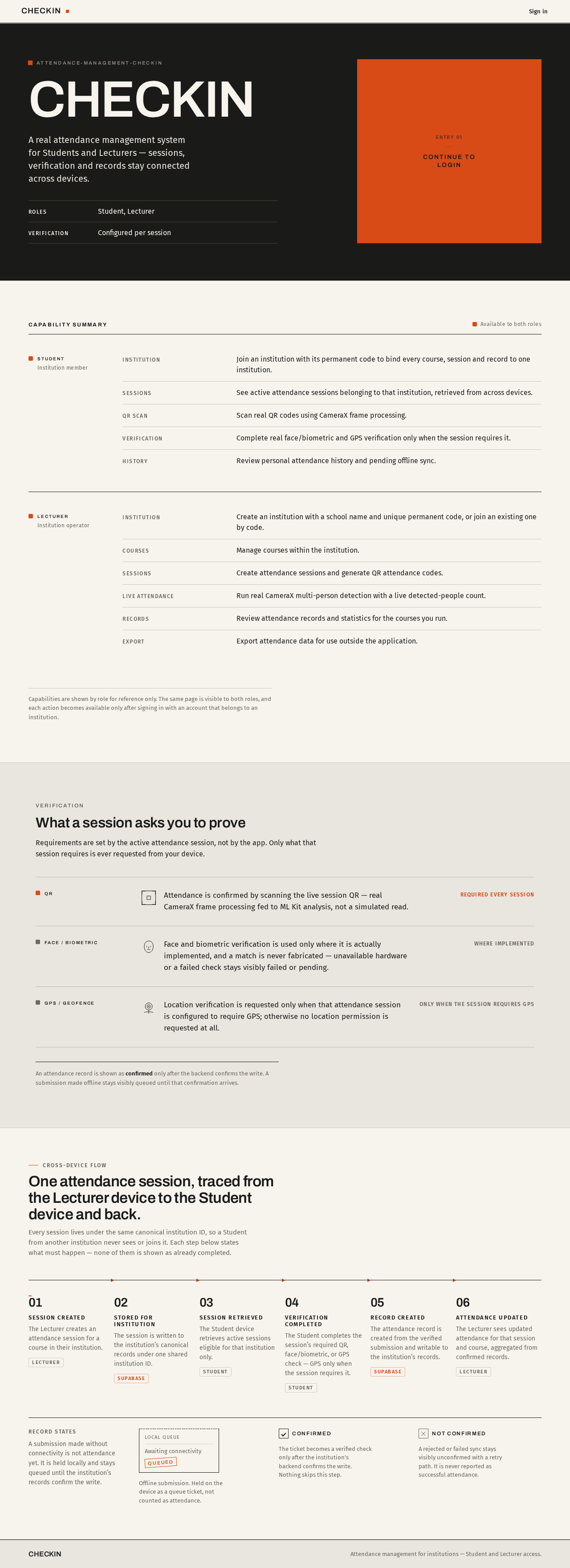
CHECKIN
A real attendance management system for Students and Lecturers — sessions, verification and records stay connected across devices.
- ROLES
- Student, Lecturer
- VERIFICATION
- Configured per session
Capability summary
Available to both roles- InstitutionJoin an institution with its permanent code to bind every course, session and record to one institution.
- SessionsSee active attendance sessions belonging to that institution, retrieved from across devices.
- QR scanScan real QR codes using CameraX frame processing.
- VerificationComplete real face/biometric and GPS verification only when the session requires it.
- HistoryReview personal attendance history and pending offline sync.
- InstitutionCreate an institution with a school name and unique permanent code, or join an existing one by code.
- CoursesManage courses within the institution.
- SessionsCreate attendance sessions and generate QR attendance codes.
- Live attendanceRun real CameraX multi-person detection with a live detected-people count.
- RecordsReview attendance records and statistics for the courses you run.
- ExportExport attendance data for use outside the application.
Capabilities are shown by role for reference only. The same page is visible to both roles, and each action becomes available only after signing in with an account that belongs to an institution.
Verification
What a session asks you to prove
Requirements are set by the active attendance session, not by the app. Only what that session requires is ever requested from your device.
Attendance is confirmed by scanning the live session QR — real CameraX frame processing fed to ML Kit analysis, not a simulated read.
Required every session
Face and biometric verification is used only where it is actually implemented, and a match is never fabricated — unavailable hardware or a failed check stays visibly failed or pending.
Where implemented
Location verification is requested only when that attendance session is configured to require GPS; otherwise no location permission is requested at all.
Only when the session requires GPS
An attendance record is shown as confirmed only after the backend confirms the write. A submission made offline stays visibly queued until that confirmation arrives.
Cross-device flow
One attendance session, traced from the Lecturer device to the Student device and back.
Every session lives under the same canonical institution ID, so a Student from another institution never sees or joins it. Each step below states what must happen — none of them is shown as already completed.
- 01Session createdThe Lecturer creates an attendance session for a course in their institution.Lecturer
- 02Stored for institutionThe session is written to the institution’s canonical records under one shared institution ID.Supabase
- 03Session retrievedThe Student device retrieves active sessions eligible for that institution only.Student
- 04Verification completedThe Student completes the session’s required QR, face/biometric, or GPS check — GPS only when the session requires it.Student
- 05Record createdThe attendance record is created from the verified submission and writable to the institution’s records.Supabase
- 06Attendance updatedThe Lecturer sees updated attendance for that session and course, aggregated from confirmed records.Lecturer
Record states
A submission made without connectivity is not attendance yet. It is held locally and stays queued until the institution’s records confirm the write.
Offline submission. Held on the device as a queue ticket, not counted as attendance.
The ticket becomes a verified check only after the institution’s backend confirms the write. Nothing skips this step.
A rejected or failed sync stays visibly unconfirmed with a retry path. It is never reported as successful attendance.
attendance-management-checkin
CHECKIN
A real attendance management system for Students and Lecturers — sessions, verification and records stay connected across devices.
- ROLES
- Student, Lecturer
- VERIFICATION
- Configured per session
Capability summary
Available to both roles- InstitutionJoin an institution with its permanent code to bind every course, session and record to one institution.
- SessionsSee active attendance sessions belonging to that institution, retrieved from across devices.
- QR scanScan real QR codes using CameraX frame processing.
- VerificationComplete real face/biometric and GPS verification only when the session requires it.
- HistoryReview personal attendance history and pending offline sync.
- InstitutionCreate an institution with a school name and unique permanent code, or join an existing one by code.
- CoursesManage courses within the institution.
- SessionsCreate attendance sessions and generate QR attendance codes.
- Live attendanceRun real CameraX multi-person detection with a live detected-people count.
- RecordsReview attendance records and statistics for the courses you run.
- ExportExport attendance data for use outside the application.
Capabilities are shown by role for reference only. The same page is visible to both roles, and each action becomes available only after signing in with an account that belongs to an institution.
Verification
What a session asks you to prove
Requirements are set by the active attendance session, not by the app. Only what that session requires is ever requested from your device.
Attendance is confirmed by scanning the live session QR — real CameraX frame processing fed to ML Kit analysis, not a simulated read.
Required every session
Face and biometric verification is used only where it is actually implemented, and a match is never fabricated — unavailable hardware or a failed check stays visibly failed or pending.
Where implemented
Location verification is requested only when that attendance session is configured to require GPS; otherwise no location permission is requested at all.
Only when the session requires GPS
An attendance record is shown as confirmed only after the backend confirms the write. A submission made offline stays visibly queued until that confirmation arrives.
Cross-device flow
One attendance session, traced from the Lecturer device to the Student device and back.
Every session lives under the same canonical institution ID, so a Student from another institution never sees or joins it. Each step below states what must happen — none of them is shown as already completed.
- 01Session createdThe Lecturer creates an attendance session for a course in their institution.Lecturer
- 02Stored for institutionThe session is written to the institution’s canonical records under one shared institution ID.Supabase
- 03Session retrievedThe Student device retrieves active sessions eligible for that institution only.Student
- 04Verification completedThe Student completes the session’s required QR, face/biometric, or GPS check — GPS only when the session requires it.Student
- 05Record createdThe attendance record is created from the verified submission and writable to the institution’s records.Supabase
- 06Attendance updatedThe Lecturer sees updated attendance for that session and course, aggregated from confirmed records.Lecturer
Record states
A submission made without connectivity is not attendance yet. It is held locally and stays queued until the institution’s records confirm the write.
Offline submission. Held on the device as a queue ticket, not counted as attendance.
The ticket becomes a verified check only after the institution’s backend confirms the write. Nothing skips this step.
A rejected or failed sync stays visibly unconfirmed with a retry path. It is never reported as successful attendance.
No comments yet. Be the first!