attack-on-titan
 Sadik Ali
Anime website


Comments (0)
Sign in to leave a comment
System Requirements
System Requirements Document for attack-on-titan
1. Introduction
attack-on-titan is an anime website built around the world of Attack on Titan. It exists so that anime viewers can discover the series, read a title's details, and watch its episodes, and so that a Site Curator can keep the catalog and its episode listings accurate and current.
The product intent, derived from the authoritative requirement thread, is threefold:
- Browse and discover — visitors can browse the anime catalog and open a title to view its details.
- Watch — visitors can watch anime episodes on the site.
- Maintain — the site's anime catalog and episode listings are maintained so they stay current, by a Site Curator who enrolls and signs in to a protected studio.
The audience is passionate anime viewers who want a cinematic, high-energy browse-and-watch experience, plus the curator who maintains the catalog. The visual register is epic, tense, defiant and poster-like — a propaganda wall inside the Walls rather than a generic streaming grid.
2. System Overview
2a. Product Interpretation and Delivery Boundary
The product is a single first-party web application delivered as a React frontend, a shared FastAPI backend, and a MariaDB database. All accepted behavior is owned by the application itself; there is no provider-owned or external-only surface in the current scope.
Public, anonymous browsing and watching. The Landing, Catalog, Title Details, and Watch pages are reachable without an account. A visitor can arrive, understand what the site is, browse the catalog, open a title, and play an episode without ever establishing identity. No account is required to watch.
Application-owned identity for the curator only. The catalog and episode listings are durable, shared, application-owned state. Maintaining them is a responsibility that must remain bound to the correct person, so the Site Curator establishes identity through self-service Sign Up and returns through Login. Curator Studio is protected and role-restricted to the Site Curator. Viewers never need an account, and no viewer-facing account, profile, watchlist, or history capability is in scope.
Current versus future. Everything described in this document is current. There is no accepted future horizon; nothing is deferred.
Explicitly out of scope. No viewer accounts, no watchlists, no comments or ratings, no subscription or payment, no social features, no recommendation engine, and no third-party streaming provider integration are accepted by the source. The site plays episodes itself.
2b. Source Content Inventory
Not applicable — no reference directive with content_source was supplied.
2c. Page Content and Component Coverage
Landing
- Information and state: The public entry surface. Presents the site identity and what it offers before any identity establishment. Anonymous access, no account required.
- Primary actions: Enter the Catalog (solid red rectangular button, bottom-left of the hero). Navigate to Login or Sign Up for curator access.
- Supporting actions: Follow the type marquee into the catalog; read the metadata line.
- Domain entities: Site identity; aggregate catalog facts (season count, episode count) surfaced as a metadata line.
- Component responsibilities:
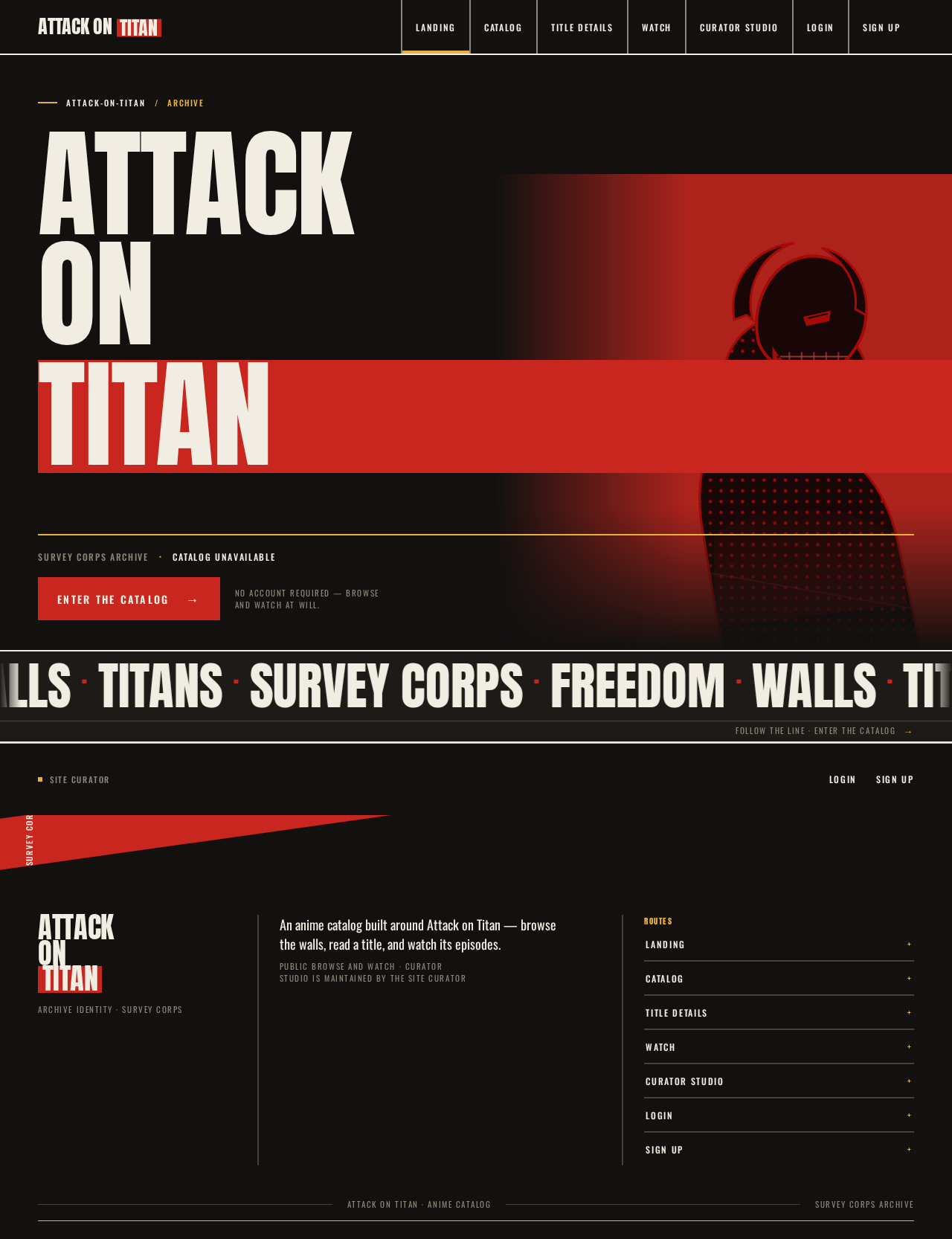
- Full-viewport poster hero: "ATTACK ON TITAN" in Anton, stacked in three lines filling the left nine columns, final line reversed out of a solid blood-red block bleeding off the right edge.
- Duotone key-art cut-out cropped hard at bottom-right, partially under the red block, never over text.
- Thin gold rule above a single uppercase metadata line ("SURVEY CORPS ARCHIVE · 4 SEASONS · 87 EPISODES").
- Solid-red "ENTER THE CATALOG" button pinned bottom-left.
- Horizontal Anton type marquee ("WALLS · TITANS · SURVEY CORPS · FREEDOM") between hero and catalog, pausing on hover, wrapping to static rows under reduced motion.
- Curator access links to Login and Sign Up.
- States:
- Loading: hero type renders immediately from static content; aggregate metadata shows a muted placeholder until catalog counts resolve.
- Empty: if the catalog has no titles yet, the metadata line reads as unavailable and the Enter the Catalog action still leads to the Catalog's empty state.
- Success: hero and marquee render; Enter the Catalog navigates to Catalog.
- Error: if aggregate counts fail to load, the metadata line is omitted rather than showing wrong numbers; the rest of the page remains usable.
- Recovery: counts retry on next visit; no blocking failure.
Catalog
- Information and state: The independently revisitable browse owner. A 3–4 column poster grid of title cards with a persistent left rail of colour-coded genre filters. Anonymous access.
- Primary actions: Select a genre filter; open a title card to reach Title Details.
- Supporting actions: Clear filters; scroll the poster grid.
- Domain entities: Anime title (cover art, title, genre, episode count).
- Component responsibilities:
- Left rail of colour-coded genre filters, hard-edged, with active state in mustard-gold.
- Poster grid: hard-edged 2:3 poster frames, title set in stacked Anton over a solid colour-block footer, gold episode count.
- Hover: red block slides in behind the title, text inverts to bone.
- 2px bone rules separating poster-grid columns.
- States:
- Loading: poster frames render as flat charcoal blocks with bone rules; no spinners.
- Empty: when no titles exist or a filter matches nothing, a full-bleed statement block explains there is nothing to show and offers to clear the filter.
- Success: grid renders with filters applied.
- Error: a hard-edged error band states the catalog could not be loaded and offers retry.
- Recovery: retry re-requests the catalog; filters persist across retry.
Title Details
- Information and state: Focused owner for a title's details and the entry point for playing its episodes. Split poster: oversized title block on the left, episode list as ruled data rows on the right. Anonymous access.
- Primary actions: Select an episode to watch; return to Catalog.
- Supporting actions: Read title metadata (synopsis, genre, season/episode counts).
- Domain entities: Anime title; episode (number, title, duration).
- Component responsibilities:
- Oversized Anton title block, flush-left, stacked.
- Metadata in muted warm grey.
- Episode list as ruled data rows: gold episode number in Oswald, Anton episode title, duration right-aligned; rows invert to a solid gold band on hover.
- Diagonal 8° colour band separating the title block from the episode list, with a vertical uppercase Oswald section label along the band edge.
- States:
- Loading: title block and ruled rows render as flat placeholders.
- Empty: a title with no episodes yet shows the title details and a ruled statement that episodes are not yet listed.
- Success: details and episode rows render; selecting a row opens Watch for that episode.
- Error: an unknown or unavailable title shows a hard-edged not-found band with a link back to Catalog.
- Recovery: returning to Catalog and reselecting retries the load.
Watch
- Information and state: Owner for playing an episode of a title from its detail view. Full-bleed player with the episode title set as a giant Anton caption below. Anonymous access.
- Primary actions: Play, pause, and seek the episode; move to the next or previous episode.
- Supporting actions: Return to Title Details.
- Domain entities: Episode; parent anime title.
- Component responsibilities:
- Full-bleed player frame, hard-edged, 0px radius.
- Giant Anton episode caption below the player.
- Ruled episode navigation rows consistent with Title Details.
- States:
- Loading: player frame renders as a flat charcoal block with the caption already set.
- Empty: an episode with no playable media shows a hard-edged statement and a link back to Title Details.
- Success: playback begins; caption and navigation render.
- Error: playback failure shows a hard-edged error band with retry and a link back to Title Details.
- Recovery: retry reloads the media; navigation to another episode remains available.
Curator Studio
- Information and state: Protected, role-restricted owner where the Site Curator adds and updates anime titles and their episode listings. Reuses the poster grid as an editorial table with red/gold status stamps. Requires an authenticated Site Curator session.
- Primary actions: Add a new anime title; update an existing title's details; add or update episodes on a title.
- Supporting actions: Review the current catalog and episode listings; sign out.
- Domain entities: Anime title; episode; curator session.
- Component responsibilities:
- Editorial table built on the poster grid, with 2px bone rules.
- Status stamps in red and gold indicating saved/updated state.
- Title and episode editing forms with hard-edged fields and solid red or gold rectangular submit buttons.
- Sign-out control.
- States:
- Loading: table rows render as flat placeholders.
- Empty: a catalog with no titles shows a ruled statement and the add-title action.
- Success: a saved title or episode appears in the table with a gold status stamp.
- Error: validation failures appear inline on the offending field; save failures show a hard-edged error band and preserve entered values.
- Recovery: the curator corrects the field or retries the save; entered values are never discarded on failure.
- Access: an unauthenticated visitor is redirected to Login; a signed-in non-curator is denied with a hard-edged statement and a link to Login.
Login
- Information and state: Returning verification for the Site Curator. Anonymous access.
- Primary actions: Submit credentials to sign in.
- Supporting actions: Navigate to Sign Up.
- Domain entities: Curator account; session.
- Component responsibilities: Hard-edged credential form with solid red submit button; inline error band.
- States:
- Loading: submit button shows a pending state and is disabled.
- Empty: fields start blank.
- Success: on valid credentials, the curator lands in Curator Studio.
- Error: invalid credentials show a hard-edged error band without revealing which field was wrong.
- Recovery: the curator retries or navigates to Sign Up.
Sign Up
- Information and state: Self-service first-use enrollment for a curator who independently begins maintaining the catalog. Anonymous access.
- Primary actions: Submit enrollment details to create a curator account.
- Supporting actions: Navigate to Login.
- Domain entities: Curator account.
- Component responsibilities: Hard-edged enrollment form with solid red submit button; inline validation; error band.
- States:
- Loading: submit button shows a pending state and is disabled.
- Empty: fields start blank.
- Success: on successful enrollment, the curator is signed in and lands in Curator Studio.
- Error: validation failures appear inline; a duplicate-account failure shows a hard-edged error band with a link to Login.
- Recovery: the curator corrects the field or signs in instead.
3. Functional Requirements
FR-1 — Browse the anime catalog (explicit) As an Anime Viewer, I should browse the anime catalog so that I can discover titles to watch.
- Trigger/input: The viewer opens Catalog, optionally selecting a genre filter.
- Observable result: A poster grid of title cards renders, filtered by the selected genre.
- Access state: Anonymous; no account required.
- Failure/recovery: If the catalog fails to load, an error band offers retry; filters persist across retry.
- Continuation: The viewer selects a title card to open Title Details.
FR-2 — View a title's details (explicit) As an Anime Viewer, I should open a title and view its details so that I can decide whether to watch it.
- Trigger/input: The viewer selects a title card from Catalog.
- Observable result: Title Details renders the title block, metadata, and the episode list as ruled rows.
- Access state: Anonymous.
- Failure/recovery: An unknown or unavailable title shows a not-found band with a link back to Catalog.
- Continuation: The viewer selects an episode to watch, or returns to Catalog.
FR-3 — Watch an anime episode (explicit) As an Anime Viewer, I should watch an episode of a title so that I can enjoy the series on the site.
- Trigger/input: The viewer selects an episode row on Title Details.
- Observable result: Watch opens with the full-bleed player and the episode caption; playback begins.
- Access state: Anonymous.
- Failure/recovery: Playback failure shows an error band with retry and a link back to Title Details; an episode with no playable media shows a statement and a link back.
- Continuation: The viewer moves to the next or previous episode, or returns to Title Details.
FR-4 — Maintain the anime catalog (explicit) As a Site Curator, I should add and update anime titles so that the catalog stays current.
- Trigger/input: The signed-in curator opens Curator Studio and submits a new or edited title.
- Observable result: The title appears in the editorial table with a gold status stamp and becomes visible on Catalog and Title Details.
- Access state: Authenticated, role-restricted to the Site Curator.
- Failure/recovery: Validation failures appear inline; save failures preserve entered values and offer retry.
- Continuation: The curator continues editing or signs out.
FR-5 — Maintain episode listings (explicit) As a Site Curator, I should add and update episodes on a title so that viewers see accurate episode listings.
- Trigger/input: The signed-in curator selects a title in Curator Studio and submits a new or edited episode.
- Observable result: The episode appears in the title's ruled episode list on Title Details and in Watch navigation.
- Access state: Authenticated, role-restricted to the Site Curator.
- Failure/recovery: Validation failures appear inline; save failures preserve entered values and offer retry.
- Continuation: The curator continues editing or signs out.
FR-6 — Curator self-service enrollment (required_inference) As a Site Curator, I should enroll myself before first catalog maintenance so that my catalog changes are bound to me.
- Trigger/input: A new curator opens Sign Up and submits enrollment details.
- Observable result: A curator account is created and the curator is signed in, landing in Curator Studio.
- Access state: Anonymous entry; the resulting session is authenticated.
- Failure/recovery: Validation failures appear inline; a duplicate-account failure offers a link to Login.
- Continuation: The curator proceeds to maintain the catalog.
FR-7 — Curator returning verification (required_inference) As a Site Curator, I should sign in before accessing Curator Studio so that only I can change the catalog.
- Trigger/input: A returning curator opens Login and submits credentials.
- Observable result: A session is established and the curator lands in Curator Studio.
- Access state: Anonymous entry; protected destination requires the resulting session.
- Failure/recovery: Invalid credentials show an error band without revealing which field was wrong; the curator retries or navigates to Sign Up.
- Continuation: The curator maintains the catalog.
FR-8 — Protected access to Curator Studio (required_inference) As the application, I should restrict Curator Studio to an authenticated Site Curator so that catalog state remains bound to the correct person.
- Trigger/input: Any request to Curator Studio.
- Observable result: An authenticated curator sees the studio; an unauthenticated visitor is redirected to Login; a signed-in non-curator is denied with a statement and a link to Login.
- Access state: Role-restricted.
- Failure/recovery: Denial is explicit and offers the Login path.
- Continuation: The curator signs in and proceeds.
4. User Personas
Anime Viewer
- Product context: A passionate anime viewer who arrives at the site to find something to watch. They may arrive cold from a link or return directly to the catalog. They never need an account.
- Primary goal: Find a title they want and get to the episode they want to watch.
- Distinct accepted responsibilities: Browse the catalog, apply genre filters, open a title's details, and watch episodes. They do not create, edit, or maintain any catalog content.
- Relevant inputs or decisions: Which genre to filter by; which title card to open; which episode to play; whether to continue to the next episode.
- Interactions with other accepted participants: The viewer is the beneficiary of the Site Curator's maintenance work — the titles and episodes they browse and watch are the ones the curator keeps current. The viewer never interacts with the curator directly.
- Observable success: They reach a playing episode from the catalog in a few steps, and the episode list they see matches what the curator has published.
Site Curator
- Product context: The person responsible for keeping the site's anime catalog and episode listings accurate and current. They enroll themselves, sign in, and work inside a protected studio.
- Primary goal: Ensure viewers have accurate, current titles and episodes to browse and watch.
- Distinct accepted responsibilities: Add new anime titles, update existing titles' details, and add or update episodes on a title. They are the only persona who changes durable catalog state.
- Relevant inputs or decisions: Title details (name, synopsis, genre, cover art); episode details (number, title, duration, media); when a title or episode needs correction.
- Interactions with other accepted participants: The curator's saved work becomes what the Anime Viewer browses and watches. The curator does not act on the viewer's behalf and does not see viewer activity.
- Observable success: A saved title or episode appears with a gold status stamp in Curator Studio and is immediately visible to viewers on Catalog, Title Details, and Watch.
5. Core User Flows
Flow A — Anime Viewer discovers and watches an episode
- The viewer opens Landing anonymously. The full-viewport Anton hero renders, the marquee crosses the viewport, and the metadata line shows the archive facts.
- The viewer selects ENTER THE CATALOG. The app navigates to Catalog.
- On Catalog, the poster grid renders. The viewer selects a genre in the left rail; the grid filters and the active filter turns mustard-gold.
- The viewer selects a title card. The red block slides behind the title on hover, then the app navigates to Title Details.
- On Title Details, the oversized title block and metadata render on the left; the ruled episode rows render on the right with gold episode numbers and right-aligned durations.
- The viewer selects an episode row. The app navigates to Watch.
- On Watch, the full-bleed player loads and playback begins; the giant Anton episode caption renders below.
- Continuation: The viewer selects the next episode from the ruled navigation, or returns to Title Details.
- Failure/recovery: If playback fails, an error band offers retry and a link back to Title Details. If the catalog fails to load at step 3, an error band offers retry and the selected filter persists.
Flow B — Site Curator enrolls and first maintains the catalog
- A new curator opens Sign Up anonymously from Landing.
- The curator fills the enrollment form and submits. The submit button shows a pending state.
- On success, the app creates the curator account, establishes a session, and lands the curator in Curator Studio.
- In Curator Studio, the editorial table renders the current catalog. The curator selects the add-title action.
- The curator enters the title's details and submits. On success, the title appears in the table with a gold status stamp and becomes visible on Catalog and Title Details.
- The curator selects the new title and adds its episodes. Each saved episode appears in the title's ruled episode list.
- Continuation: The curator signs out, or continues editing.
- Failure/recovery: Validation failures appear inline on the offending field; save failures preserve entered values and offer retry. A duplicate-account failure at step 2 offers a link to Login.
Flow C — Site Curator returns and updates listings
- A returning curator opens Login anonymously.
- The curator submits credentials. The submit button shows a pending state.
- On success, a session is established and the curator lands in Curator Studio.
- The curator selects an existing title and edits its details or an episode. On save, the change appears with a gold status stamp and is immediately reflected on Title Details and Watch.
- Continuation: The curator signs out.
- Failure/recovery: Invalid credentials show an error band without revealing which field was wrong; the curator retries or navigates to Sign Up.
Flow D — Unauthenticated visitor reaches Curator Studio
- A visitor navigates to Curator Studio without a session.
- The app redirects them to Login.
- The visitor signs in as a curator and lands in Curator Studio, or navigates to Sign Up to enroll.
- A signed-in non-curator is denied with a hard-edged statement and a link to Login.
6. Visuals Colors and Theme
Muse: Paula Scher. Headline: Typography as architecture for the Survey Corps.
Mode: Dark only.
Colour tokens (exact hex by role):
| Role | Hex | Use |
|---|---|---|
| Background | #121110 | Charcoal-black ground |
| Surface | #1D1B18 | Flat colour-block surfaces (never glass) |
| Text | #F2EDE3 | Warm bone text |
| Primary | #C8261E | Blood-red — dominant full-bleed blocks, primary CTAs |
| Accent | #E8B23A | Mustard-gold — episode numbers, tags, active states |
| Muted | #8C8578 | Warm grey metadata |
Proportion: ~70% charcoal, 18% red, 8% gold, 4% bone/muted.
Typography:
- Headings: Anton, all-caps, ultra-condensed, flush-left, leading 0.86–0.92, tracking -0.01em. Headlines stack in 2–3 lines filling the column edge-to-edge; some words rotated 90° or set on a diagonal band.
- Body/UI: Oswald regular/medium; uppercase micro-labels with 0.14em tracking.
- Scale (1.5 modular display scale): hero
clamp(56px, 11vw, 160px); section headersclamp(32px, 5vw, 72px); card titlesclamp(20px, 2.4vw, 28px); body 16–18px; micro-labels 11–12px uppercase. All display sizes useclampso Anton stays inside its container at 375px.
Shape language: Hard edges only — 0px radii on cards, buttons, and image frames. Diagonal bands and full-bleed colour blocks cut at 8–12° angles. Poster-grid columns separated by 2px bone rules. Buttons are solid red or gold rectangles with uppercase labels; no pills, no soft shadows, no rounded corners anywhere.
Layout: Dense poster grid on a 12-column base with hard vertical rules. Landing opens with a full-viewport type composition; Catalog is a 3–4 column poster grid with a persistent left rail of colour-coded genre filters; Title Details is a split poster; Watch is a full-bleed player with a giant Anton caption; Curator Studio reuses the poster grid as an editorial table with red/gold status stamps.
Imagery: Typography is the image — full-bleed Anton words, duotone (charcoal + red) key-art cut-outs, hard-edged colour blocks. Supporting imagery limited to title cover art inside 2:3 poster frames and grayscale wall/titan stills cropped to the grid. No gradient blobs, no rounded photo cards.
Readability rule: Headlines, wordmarks, labels, numbers, card text, and controls stay entirely inside the viewport and their container at 375px, 768px, and 1280px, wrapping or scaling to fit; no element covers any part of them. Imagery and decoration may crop, bleed, rotate, or overlap freely.
7. Signature Design Concept
The public entry is a full-viewport propaganda poster. The words ATTACK ON TITAN are set in Anton at clamp(56px, 13vw, 190px), stacked in three lines filling the left nine columns edge-to-edge. The final line, TITAN, is reversed out of a solid blood-red block (#C8261E) that bleeds off the right edge. A single duotone key-art cut-out of a titan silhouette is cropped hard at the bottom-right, partially under the red block, never over any text. A thin gold rule runs the full width above a single uppercase metadata line — SURVEY CORPS ARCHIVE · 4 SEASONS · 87 EPISODES — and one solid-red rectangular ENTER THE CATALOG button is pinned bottom-left. The background is flat charcoal #121110.
Below the hero, a horizontal Anton type marquee — WALLS · TITANS · SURVEY CORPS · FREEDOM — crosses the viewport, pausing on hover and wrapping to static rows under prefers-reduced-motion.
The concept recomposes only accepted content and controls: the site identity, the aggregate archive facts, the Enter the Catalog action, and the curator access links. It introduces no new behavior or destination.
8. Interaction Model & Motion Direction
Interaction Model: Animated Motion Tempo: expressive Hero Dimensionality: flat
Landing Hero Motion Brief
- Focal subject: The stacked Anton wordmark ATTACK ON TITAN, with the final line reversed out of a bleeding blood-red block, and the duotone titan cut-out cropped at bottom-right.
- Input → transformation → outcome thesis: On load, each headline line snaps up 16px with a 40ms stagger, resolving the poster into its composed state; the marquee then begins its horizontal crossing. The outcome is a fully readable poster with the Enter the Catalog control pinned and available.
- Motion vocabulary: Staggered word reveals on scroll (16px snap, 40ms stagger); horizontal type marquee; colour-block wipes on hover (red block slides in behind a title); episode rows inverting to gold on hover. No bounces, no easing theatrics.
- Composed first frame: Charcoal ground; three stacked Anton lines flush-left filling the left nine columns; final line reversed out of the red block bleeding right; gold rule and metadata line; red Enter the Catalog button bottom-left; titan cut-out cropped bottom-right.
- Reduced-motion state: Reveals removed — the poster renders in its composed state immediately; the marquee is replaced with a static wrapped row so every item is fully readable.
9. Non-Functional Requirements
- NFR-1 — Responsive readability (explicit, from creative direction): Headlines, labels, numbers, card text, and controls stay entirely inside the viewport and their container at 375px, 768px, and 1280px. Display type uses
clampwith a mobile floor. Rationale: the poster typography must remain legible and operable at every breakpoint. - NFR-2 — Reduced motion (explicit, from creative direction): Under
prefers-reduced-motion, the marquee becomes a static wrapped row and scroll reveals are removed. Rationale: accessibility of motion. - NFR-3 — Durable catalog state (required_inference): Titles and episodes persist in MariaDB and survive restarts. Rationale: the catalog must stay current and be shared across all viewers.
- NFR-4 — Protected curator state (required_inference): Curator Studio mutations require an authenticated Site Curator session; sessions are bound to the correct account. Rationale: catalog changes must remain bound to the correct person.
- NFR-5 — Anonymous viewing (explicit): Landing, Catalog, Title Details, and Watch are reachable without an account. Rationale: the source requires visitors to browse and watch.
- NFR-6 — Hard-edged visual system (explicit, from creative direction): 0px radii, flat colour blocks, no glass, no soft shadows, no gradient blobs, no 3D scenes. Rationale: the Paula Scher poster register.
10. Tech Stack
- Frontend: React application UI. Anton and Oswald loaded as web fonts.
- Backend: Shared FastAPI process for application APIs and domain modules (catalog, episodes, curator authentication and authorization).
- Database: MariaDB for application-owned persistent data (titles, episodes, curator accounts, sessions).
- Orchestration:
docker-compose.ymlwith three services —frontend,backend,database. Feature APIs extend the shared backend; no additional services are required for the current scope.
11. Assumptions and Constraints
- A-1 (assumption): The site hosts or serves episode media itself; no third-party streaming provider integration is accepted by the source.
- A-2 (assumption): Curator enrollment is self-service with no invitation or provisioning boundary, per the Planning Scope.
- A-3 (constraint): Viewers never require an account; no viewer-facing account, watchlist, history, comment, rating, or payment capability is in scope.
- A-4 (constraint): Curator Studio is role-restricted to the Site Curator.
- A-5 (constraint): The visual system is dark-only, hard-edged, and uses Anton/Oswald; the generic indigo/blue-on-white SaaS template is forbidden.
- A-6 (assumption): The archive metadata line on Landing ("4 SEASONS · 87 EPISODES") reflects aggregate catalog facts and updates as the curator maintains the catalog.
12. Glossary
- Anime Viewer — The anonymous visitor persona who browses the catalog, views title details, and watches episodes.
- Site Curator — The authenticated persona who maintains the anime catalog and episode listings in Curator Studio.
- Catalog — The collection of anime titles and their episodes maintained by the Site Curator and browsed by viewers.
- Title — An anime series entry with details (name, synopsis, genre, cover art) and an episode list.
- Episode — A single watchable installment of a title, with number, title, duration, and media.
- Curator Studio — The protected, role-restricted page where the Site Curator adds and updates titles and episodes.
- Poster grid — The hard-edged 2:3 card grid used on Catalog and reused as an editorial table in Curator Studio.
- Status stamp — The red/gold marker in Curator Studio indicating a saved or updated title or episode.
- Marquee — The horizontal Anton type band ("WALLS · TITANS · SURVEY CORPS · FREEDOM") between hero and catalog.
attack-on-titanARCHIVE
ATTACKONTITAN
Site Curator
attack-on-titanARCHIVE
ATTACKONTITAN
Site Curator
No comments yet. Be the first!