Oxygen
268kg
Reserve holds
 Rehan Shaikh
OUTPOST - A JUNIOR ASTRONAUT MISSION TRAINER 2026 NASA Space Apps Challenge | Challenge: "Build a Junior Astronaut Mission Trainer" Projects: Games | Planets & Moons | Software | Space Exploration | Sun One line: an interactive outpost simulator where students run a four-person lunar or Martian base for ninety days, where every decision is paid for in one currency: mass. THE PROBLEM, IN THE CHALLENGE'S OWN WORDS Space-themed STEM content does one of two things: it oversimplifies the engineering trade-offs that define a real mission, or it presents them too complexly to hold a young learner's attention. Almost nothing makes those trade-offs tangible and fun. That is the gap OUTPOST fills. WHAT THE PLAYER DOES The student is the Commander of an outpost. There is one lander, a fixed cargo capacity, four crew and ninety days to survive. Before landing they spend a mass budget on: habitat, power source, oxygen generator, carbon-dioxide scrubber, water processor, shielding, greenhouse, rover, spares and food. In play, they allocate power and crew hours each sol, respond to failures and events, and watch six dashboards: power, oxygen, carbon dioxide, water, food and radiation, plus crew health and morale. WHY IT TEACHES: THE TRADE-OFFS ARE REAL - Power vs food. Greenhouse lights draw eight kilowatts continuously, and that power can starve oxygen generation. - Shielding vs mass. A metre of regolith over the habitat costs 1,200 kg and halves radiation dose - yet on a ninety-day Moon mission it is the wrong purchase, because unshielded the crew accrues only 81 mSv against a 600 mSv career limit. On Mars for 500 days, shielding is mandatory. - Recycling vs resupply. Closing the air and water loops costs hardware up front and saves several thousand kilograms over a mission - but only if the mission lasts long enough to pay it back. - Greenhouse vs mass. Forty square metres of hydroponics saves barely 150 kg of stored food while costing 1,950 kg and eight kilowatts. It earns its place through morale and biology, not mass. - Hygiene vs morale. How much laundry and dishwashing the outpost permits swings landed mass by about a thousand kilograms. Rationing saves mass and costs morale. No build has everything. Our balance model lands the "everything" design at 24,386 kg against a 12,000 kg lander. That is not a tuning problem to be smoothed away; it is the challenge statement. AN EXAMPLE OF WHAT A STUDENT FACES WATER PROCESSOR - urine line pressure loss. The reclamation loop is losing 40 per cent of its throughput. Three spares remain; the next resupply window is 22 sols away. A. Replace the pump now - one spare, three crew-hours. B. Run the loop at half rate - water falls by 1.4 kg per sol. C. Bypass to storage until resupply - the potable reserve drops below its 30-sol margin. Real-world note: ISS water processors were designed to keep running while degraded. That is an engineering feature, not luck. Every card ends with a note like that, so each decision becomes a transferable engineering idea in under twelve words. THE INNOVATION: LIVE NASA DATA AS GAMEPLAY The outpost's environment is not fiction. At startup the game pulls NASA open data and turns it into tomorrow's weather: - DONKI solar flare and solar-particle-event feeds drive in-game solar storms. When the Sun really flares, the crew of this outpost shelters. - DSCOVR/EPIC imagery powers an "Earth View" morale action, showing the crew a photograph of Earth taken today. - Moon Trek and Mars Trek tiles place the outpost on real terrain at Shackleton Crater rim and Jezero Crater. - PDS LRO/Diviner temperature data drives cold-soak penalties in permanently shadowed regions. Every data-driven element carries an on-screen citation, and the game runs offline on cached snapshots with a LIVE/CACHED badge, so no classroom depends on venue Wi-Fi. WHY IT IS SCIENTIFICALLY VALID Every constant traces to a NASA source, and the numbers were verified before a line of game code was written. Daily per-crew requirements come from the Life Support Baseline Values and Assumptions Document: 0.84 kg of oxygen, 1 kg of carbon dioxide, 3,035 kilocalories, 3.52 kg of drinking and food-preparation water. Oxygen generation uses the real 9:8 water-to-oxygen mass ratio; lithium-hydroxide scrubbing costs about two kilograms per kilogram of carbon dioxide; ISS-class water recovery is 85-89 per cent. Radiation figures come from the Curiosity rover's RAD instrument: roughly 0.64 mSv per day on the Martian surface and 0.9 mSv on the Moon, against NASA's 600 mSv career limit. Power assumptions follow NASA's lunar surface and fission surface power work: a 20 kW habitat load, a 2 kW keep-alive load, a 60-70 kW ISRU peak, and a 40 kW reactor that must sit a kilometre from the crew. The simulation is a deterministic, unit-tested engine - seed in, identical mission out - and a companion model reproduces the mass ledger so game and science cannot drift apart. WHAT STUDENTS LEARN By the end of one twenty-minute session a student can explain that an outpost is a closed loop; identify trade-offs between power, shielding, food and life support; read a dashboard to find the limiting resource; explain why radiation is a design limit rather than a monster; and describe why plants are chemistry as well as food. Each run ends in a debrief that names the exact system that failed The mission log exports at the end of every run, giving teachers an assessment artefact and students a record of their decisions. HOW IT GETS BUILT A browser-based TypeScript application: a pure simulation package with no interface dependencies, a React front end with vector graphics and charts, offline-capable as a progressive web app, saving locally with no accounts or trackers, so it is safe for minors. Content - modules, events, crops, scenarios - lives in JSON so non-programmers can write it. The build order is fixed: simulation engine, loadout screen, dashboard, events, live data, debrief. The full specification, a sixty-second demo script and a teacher pack are already written. THE 48-HOUR BUILD PLAN Hour zero: freeze the scope and deploy a live URL by hour two. Hours two to six: the simulation engine, with tests and a headless ninety-sol trace. Hours seven to eleven: the loadout screen and the dashboard. Hours eleven to thirteen: events and alarms. Hours fourteen to nineteen: content, balance, then the NASA data layer. Hours nineteen to twenty-four: the debrief and mission log. Day two: bug bash, accessibility and offline passes, a full balance sweep, documentation with citations, the sixty-second video, and the project page - frozen, verified and submitted with an hour to spare. ACCESSIBILITY, ETHICS AND INCLUSION Alarms are distinguished by sound and shape as well as colour. Every screen is keyboard-navigable and labelled for screen readers. Simulation speed is adjustable and pausable mid-sol. Text is large, high-contrast and dyslexia-friendly. The crew never dies on screen: failures are equipment failures with a survivable abort, modelling NASA's real abort criteria rather than dramatising loss of life. The game collects no personal data from minors and ships with no analytics. WHY THE CURRENCY IS MASS, NOT POINTS Most educational games reward players with points and abstract coins, which teach budgeting, not engineering. OUTPOST pays for everything in kilograms, because that is the currency real mission designers spend. A student who wants a sixty-kilowatt ice-mining plant must find sixty kilowatts of power and several tonnes of lander capacity, and explain which of the other things they wanted is no longer coming. That one choice teaches more than any amount of explanatory text. WHAT WE WOULD BUILD NEXT Three months later: a cutaway visualisation of the outpost so students watch the lights dim and the crops wilt; a module designer that lets a class define its own hardware and have the simulation judge it; localisation into Hindi, Spanish and Arabic; and a teacher dashboard that aggregates exported mission logs into a class-wide picture of which misconceptions persist. IMPACT Free, browser-based, offline-capable and requiring no account, OUTPOST runs in any classroom with a laptop or tablet, in any country. It is aimed at ages ten to sixteen, with a Cadet mode and a Commander mode. The teacher pack contains a 45-minute lesson plan, a shared mission seed so every student faces the same solar storm, exit-ticket questions, and differentiation tiers for supported, core and extension learners. Two scenarios ship so that the correct answers invert between them - teaching that engineering problems have no single right answer, which is the most valuable thing a young person can carry away from a space-themed game. The source code, the scientific citations and the teacher pack are all released openly under a permissive open licence, so any school, club or space agency can reuse, translate or extend the project without asking permission. WHY IT ANSWERS THE JUDGING CRITERIA Impact - a free, classroom-ready tool aimed at the exact gap NASA named. Creativity - live solar weather as gameplay, and one physical currency instead of points. Validity - every number sourced, and a deterministic, tested simulation. Relevance - all named demands (life support, shielding, power, food) modelled and made to conflict. Presentation - a written demo script, a screenshot plan and a rehearsed live demonstration. NASA Life Support Baseline Values and Assumptions Document | NASA-STD-3001 technical briefs | MSL/RAD Mars radiation measurements | NASA solar-versus-fission surface power study | NASA fission surface power reference design | NASA lunar surface power briefings | CELSS crop research. NASA open APIs: DONKI, EPIC, Moon and Mars Trek, PDS, NASA Image and Video Library.

Sign in to leave a comment
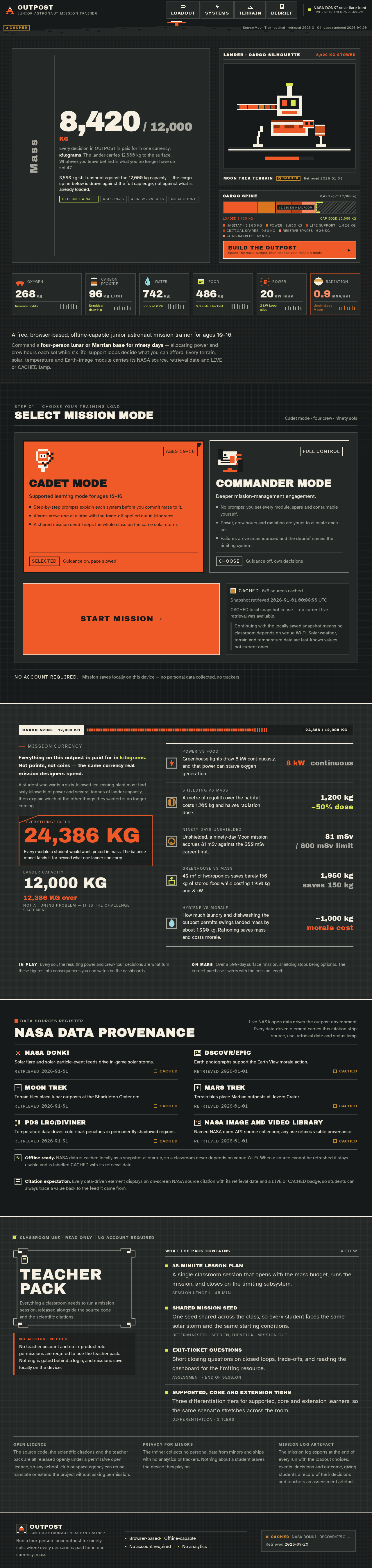
Every decision in OUTPOST is paid for in one currency: kilograms. The lander carries 12,000 kg to the surface. Whatever you leave behind is what you no longer have on sol 47.
3,580 kg still unspent against the 12,000 kg capacity — the cargo spine below is drawn against the full cap edge, not against what is already loaded.
Moon Trek terrainCACHEDRetrieved 2026-01-01
268kg
96kg LiOH
742kg
486kg
20kW load
0.9mSv/sol
A free, browser-based, offline-capable junior astronaut mission trainer for ages 10–16.
Command a four-person lunar or Martian base for ninety days — allocating power and crew hours each sol while six life-support loops decide what you can afford. Every terrain, solar, temperature and Earth-image module carries its NASA source, retrieval date and LIVE or CACHED lamp.
Step 01 — choose your training load
Snapshot retrieved 2026-01-01 00:00:00 UTC
CACHED local snapshot in use — no current live retrieval was available.
Continuing with the locally saved snapshot means no classroom depends on venue Wi-Fi. Solar weather, terrain and temperature data are last-known values, not current ones.
No account required.Mission saves locally on this device — no personal data collected, no trackers.
Mission currency
A student who wants a sixty-kilowatt ice-mining plant must find sixty kilowatts of power and several tonnes of lander capacity, then explain which of the other things they wanted is no longer coming.
In playEvery sol, the resulting power and crew-hour decisions are what turn these figures into consequences you can watch on the dashboards.
On MarsOver a 500-day surface mission, shielding stops being optional. The correct purchase inverts with the mission length.
Live NASA open data drives the outpost environment. Every data-driven element carries this citation strip: source, use, retrieval date and status lamp.
Solar flare and solar-particle-event feeds drive in-game solar storms.
Earth photographs support the Earth View morale action.
Terrain tiles place lunar outposts at the Shackleton Crater rim.
Terrain tiles place Martian outposts at Jezero Crater.
Temperature data drives cold-soak penalties in permanently shadowed regions.
Named NASA open-API source collection; any use retains visible provenance.
Offline ready. NASA data is cached locally as a snapshot at startup, so a classroom never depends on venue Wi-Fi. When a source cannot be refreshed it stays usable and is labelled CACHED with its retrieval date.
Citation expectation. Every data-driven element displays an on-screen NASA source citation with its retrieval date and a LIVE or CACHED badge, so students can always trace a value back to the feed it came from.
Classroom use · read only · no account required
Everything a classroom needs to run a mission session, released alongside the source code and the scientific citations.
No teacher account and no in-product role permissions are required to use the teacher pack. Nothing is gated behind a login, and missions save locally on the device.
A single classroom session that opens with the mass budget, runs the mission, and closes on the limiting subsystem.
One seed shared across the class, so every student faces the same solar storm and the same starting conditions.
Short closing questions on closed loops, trade-offs, and reading the dashboard for the limiting resource.
Three differentiation tiers for supported, core and extension learners, so the same scenario stretches across the room.
Every decision in OUTPOST is paid for in one currency: kilograms. The lander carries 12,000 kg to the surface. Whatever you leave behind is what you no longer have on sol 47.
3,580 kg still unspent against the 12,000 kg capacity — the cargo spine below is drawn against the full cap edge, not against what is already loaded.
Moon Trek terrainCACHEDRetrieved 2026-01-01
268kg
96kg LiOH
742kg
486kg
20kW load
0.9mSv/sol
A free, browser-based, offline-capable junior astronaut mission trainer for ages 10–16.
Command a four-person lunar or Martian base for ninety days — allocating power and crew hours each sol while six life-support loops decide what you can afford. Every terrain, solar, temperature and Earth-image module carries its NASA source, retrieval date and LIVE or CACHED lamp.
Step 01 — choose your training load
Snapshot retrieved 2026-01-01 00:00:00 UTC
CACHED local snapshot in use — no current live retrieval was available.
Continuing with the locally saved snapshot means no classroom depends on venue Wi-Fi. Solar weather, terrain and temperature data are last-known values, not current ones.
No account required.Mission saves locally on this device — no personal data collected, no trackers.
Mission currency
A student who wants a sixty-kilowatt ice-mining plant must find sixty kilowatts of power and several tonnes of lander capacity, then explain which of the other things they wanted is no longer coming.
In playEvery sol, the resulting power and crew-hour decisions are what turn these figures into consequences you can watch on the dashboards.
On MarsOver a 500-day surface mission, shielding stops being optional. The correct purchase inverts with the mission length.
Live NASA open data drives the outpost environment. Every data-driven element carries this citation strip: source, use, retrieval date and status lamp.
Solar flare and solar-particle-event feeds drive in-game solar storms.
Earth photographs support the Earth View morale action.
Terrain tiles place lunar outposts at the Shackleton Crater rim.
Terrain tiles place Martian outposts at Jezero Crater.
Temperature data drives cold-soak penalties in permanently shadowed regions.
Named NASA open-API source collection; any use retains visible provenance.
Offline ready. NASA data is cached locally as a snapshot at startup, so a classroom never depends on venue Wi-Fi. When a source cannot be refreshed it stays usable and is labelled CACHED with its retrieval date.
Citation expectation. Every data-driven element displays an on-screen NASA source citation with its retrieval date and a LIVE or CACHED badge, so students can always trace a value back to the feed it came from.
Classroom use · read only · no account required
Everything a classroom needs to run a mission session, released alongside the source code and the scientific citations.
No teacher account and no in-product role permissions are required to use the teacher pack. Nothing is gated behind a login, and missions save locally on the device.
A single classroom session that opens with the mass budget, runs the mission, and closes on the limiting subsystem.
One seed shared across the class, so every student faces the same solar storm and the same starting conditions.
Short closing questions on closed loops, trade-offs, and reading the dashboard for the limiting resource.
Three differentiation tiers for supported, core and extension learners, so the same scenario stretches across the room.
No comments yet. Be the first!