arctic-store
 Sushant Verma
<!DOCTYPE html> <html lang="en"> <head> <meta charset="UTF-8"> <title>My Ecommerce Store</title> <style> body { font-family: Arial; margin: 0; background: #f1f3f6; } header { display: flex; justify-content: space-between; padding: 15px; background: #2874f0; color: white; } .products { display: grid; grid-template-columns: repeat(auto-fit, minmax(200px, 1fr)); gap: 20px; padding: 20px; } .product { background: white; padding: 15px; border-radius: 10px; text-align: center; } .product img { width: 100%; height: 180px; object-fit: cover; } button { padding: 10px; background: #ff9f00; color: white; border: none; cursor: pointer; border-radius: 5px; margin-top: 10px; } #cart-page { display: none; padding: 20px; } </style> </head> <body> <header> <h2>🛍 My Store</h2> <button onclick="showCart()">Cart (<span id="cart-count">0</span>)</button> </header> <!-- PRODUCTS --> <div id="home"> <div class="products" id="product-list"></div> </div> <!-- CART --> <div id="cart-page"> <h2>🛒 Your Cart</h2> <div id="cart-items"></div> <h3 id="total"></h3> <button onclick="goHome()">⬅ Back</button> </div> <script> let products = [ { id: 1, name: "Shoes", price: 999, img: "https://via.placeholder.com/200" }, { id: 2, name: "Watch", price: 1999, img: "https://via.placeholder.com/200" }, { id: 3, name: "T-Shirt", price: 499, img: "https://via.placeholder.com/200" }, { id: 4, name: "Headphones", price: 1499, img: "https://via.placeholder.com/200" } ]; let cart = JSON.parse(localStorage.getItem("cart")) || []; function displayProducts() { let container = document.getElementById("product-list"); container.innerHTML = ""; products.forEach(p => { container.innerHTML += ` <div class="product"> <img src="${p.img}"> <h3>${p.name}</h3> <p>₹${p.price}</p> <button onclick="addToCart(${p.id})">Add to Cart</button> </div> `; }); } function addToCart(id) { let item = products.find(p => p.id === id); cart.push(item); localStorage.setItem("cart", JSON.stringify(cart)); updateCartCount(); alert("Added to cart!"); } function updateCartCount() { document.getElementById("cart-count").innerText = cart.length; } function showCart() { document.getElementById("home").style.display = "none"; document.getElementById("cart-page").style.display = "block"; displayCart(); } function goHome() { document.getElementById("home").style.display = "block"; document.getElementById("cart-page").style.display = "none"; } function displayCart() { let container = document.getElementById("cart-items"); let total = 0; container.innerHTML = ""; if (cart.length === 0) { container.innerHTML = "<p>Your cart is empty</p>"; } cart.forEach((item, index) => { total += item.price; container.innerHTML += ` <div class="product"> <h3>${item.name}</h3> <p>₹${item.price}</p> <button onclick="removeItem(${index})">Remove</button> </div> `; }); document.getElementById("total").innerText = "Total: ₹" + total; } function removeItem(index) { cart.splice(index, 1); localStorage.setItem("cart", JSON.stringify(cart)); displayCart(); updateCartCount(); } displayProducts(); updateCartCount(); </script> </body> </html>
Comments (0)
Sign in to leave a comment
System Requirements
System Requirements Document (SRD)
Project Name: Arctic-Store
1. Introduction
Welcome to the System Requirements Document (SRD) for Arctic-Store, a fully functional Pro Ecommerce Store designed to provide users with a seamless shopping experience. This document outlines the functional and non-functional requirements, design concepts, and technical specifications for the project.
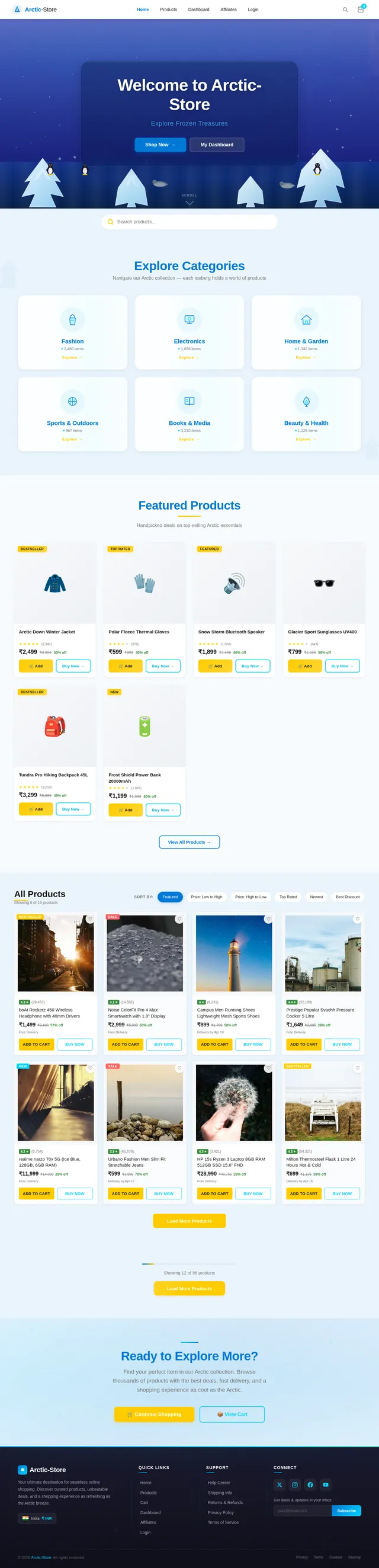
Arctic-Store aims to deliver a dynamic, client-side e-commerce platform featuring product listings, search functionality, cart management with localStorage persistence, and affiliate "Buy Now" redirect links. The platform is tailored for customers in India (IN), with locale-specific currency (₹) and design considerations.
2. System Overview
Arctic-Store is a client-side e-commerce platform that enables users to browse products, search for items, add/remove items from their cart, and view a dynamically updated total price. The system leverages localStorage for cart persistence, ensuring a smooth user experience across sessions. Additionally, the platform integrates "Buy Now" buttons with affiliate links for external purchases.
Key features include:
- Responsive product grid layout.
- Persistent cart functionality using localStorage.
- Search bar for product filtering.
- Dynamic total price calculation in the cart.
- Affiliate links for external purchases.
- Locale-specific currency (₹) and design considerations for Indian users.
3. Functional Requirements
As User:
- I should be able to view a list of products with images, names, and prices.
- I should be able to add products to my cart.
- I should be able to remove items from my cart.
- I should be able to see the total price of items in my cart.
- I should be able to search for products using a search bar.
- I should be able to click "Buy Now" to be redirected to an external affiliate link for purchasing.
As Admin:
- I should be able to add, update, or remove products from the storefront (future scope).
- I should be able to manage affiliate links for products (future scope).
As Guest:
- I should be able to browse products without logging in.
- I should be able to add items to the cart without requiring authentication.
4. User Personas
1. User
- Primary shopper browsing and purchasing products.
- Interested in a seamless and intuitive shopping experience.
2. Admin
- Responsible for managing product listings and affiliate links.
- Ensures the storefront is updated with accurate product details.
3. Guest
- Casual visitor exploring products without commitment.
- May convert to a user upon finding desirable items.
5. Visuals Colors and Theme
Color Palette:
- Background:
#eaf4fc(Soft blue for a clean and modern look). - Surface:
#ffffff(White for product cards and sections). - Text:
#1a1a1a(Dark gray for readability). - Accent:
#0078d7(Vibrant blue for headers and buttons). - Muted Tones:
#ffcc00(Warm yellow for call-to-action buttons).
6. Signature Design Concept
Interactive Product Grid with Dynamic Search
The homepage will feature a dynamic product grid that updates in real-time as users type into the search bar. The search bar will be prominently displayed in the header, allowing users to filter products by name or category instantly.
Details:
- Animations: Smooth fade-in/out transitions for products as the search results update.
- Micro-interactions: Hovering over a product card reveals a subtle shadow effect and highlights the "Add to Cart" and "Buy Now" buttons.
- User Interaction: Clicking "Buy Now" opens the affiliate link in a new tab, while "Add to Cart" updates the cart count dynamically.
- Responsive Design: The product grid adjusts seamlessly across devices, ensuring a consistent experience on mobile, tablet, and desktop.
- Color Shifts: The header background subtly changes color based on the time of day (light blue for morning, darker blue for evening).
This design ensures a visually captivating and highly functional user experience, making Arctic-Store stand out in the e-commerce space.
7. Non-Functional Requirements
- Performance: The storefront must load within 2 seconds on standard broadband connections.
- Scalability: The system should support up to 10,000 products without performance degradation.
- Security: Ensure secure handling of affiliate links and localStorage data.
- Accessibility: The platform must comply with WCAG 2.1 standards for accessibility.
- Localization: Currency and language defaults tailored for Indian users (₹).
8. Tech Stack
Frontend:
- React for Web (to build a dynamic and responsive UI).
Backend:
- FastAPI (future scope for admin functionalities).
Database:
- MySQL (future scope for product and user data management).
AI Models:
- GPT 5.4 for user-friendly responses (future scope for chatbot integration).
AI Tools:
- Langchain for intelligent routing (future scope).
Local Orchestration:
- Docker for containerization.
9. Assumptions and Constraints
Assumptions:
- Users will access the platform primarily via desktop and mobile browsers.
- Affiliate links will be provided by the admin and are assumed to be valid.
Constraints:
- The current system is client-side only, with no backend integration.
- Cart data is stored locally and may not persist across devices.
10. Glossary
- Affiliate Link: A URL directing users to an external site for purchasing products.
- Local Storage: A browser-based storage mechanism for persisting data across sessions.
- WCAG: Web Content Accessibility Guidelines, ensuring web accessibility for all users.
- Frontend: The user-facing part of the application.
- Backend: The server-side logic and database management (future scope).
End of Document
No comments yet. Be the first!