appointment-booking
 Hemen Ashodia
Build a simple appointment booking app for a small dental clinic: patients pick a dentist and a time slot, and staff see the day's schedule.

Comments (0)
Sign in to leave a comment
System Requirements
System Requirements Document for appointment-booking
1. Introduction
Product intent. appointment-booking is a simple appointment booking app for a small dental clinic. It exists so that a patient can book a dental visit without phoning the front desk: the patient picks a dentist and a time slot, and the appointment is confirmed. It also exists so that clinic staff can see the day's schedule of booked appointments and know which patients are coming and when.
Audience. Two human roles use the product. Patients book their own appointments — often on a phone, between other tasks, and often while anxious about the visit itself. Clinic Staff run the front desk and need a calm, glanceable view of the day. The product is deliberately small: one clinic, two roles, one booking flow, one day view.
Tone. The register is reassuring and warm rather than clinical, corporate, or playful — trust without coldness, softness without cuteness. The booking moment itself should lower the patient's pulse.
2. System Overview
appointment-booking is a first-party web application with its own custom UI and its own application-owned identity. It has a small public entry surface, a self-service enrollment and returning-verification boundary for patients, a three-step patient booking sequence (dentist → time → confirm), and a single dense staff surface showing the day's schedule.
Actors.
- Patient (human, active) — enrolls, verifies on return, chooses a dentist, chooses a time slot, confirms an appointment, and sees the confirmed result.
- Clinic Staff (human, active) — is provisioned or invited into the app, verifies on return, and views the day's schedule of booked appointments.
- Application / backend (non-persona system actor) — persists confirmed appointments and the clinic schedule durably, and supplies the dentist roster and available time slots.
Accepted behavior in scope.
- Patients pick a dentist and a time slot to book an appointment.
- Staff see the day's schedule.
- Patient self-service enrollment, clinic staff invitation or provisioning, and returning verification through Login, as journey prerequisites.
- Durable persistence of confirmed appointments and the clinic schedule.
Narrow exclusions. No clinical records, charting, treatment notes, billing, insurance, payments, reminders, rescheduling or cancellation workflows, multi-location or multi-clinic support, or patient-facing schedule browsing beyond the booking flow are part of this product. The app is for a small dental clinic and should be simple.
2a. Product Interpretation and Delivery Boundary
Delivery ownership. The product is delivered as a first-party custom web application. Every page in the current information architecture is owned by the application itself; there is no provider-owned or external-only surface in the current scope, and no headless-only delivery.
Identity and access ownership. Identity is application-owned. Patients establish their own identity through self-service enrollment on Sign Up; Clinic Staff are brought in through invitation or provisioning rather than self-enrollment. Both roles verify on return through Login. Landing, Login, and Sign Up are anonymously reachable — a protected destination never owns the interaction that establishes access to itself. Dentists, Time Slots, and Appointment are patient booking destinations and require an established patient identity; Schedule requires an established Clinic Staff identity. Access here is continuity of identity, not differentiated permission over shared product state: the two roles simply work in different parts of the product.
Current vs. future. Everything described in this document is current. Nothing in the current scope is deferred, and no future-horizon capability is claimed as available now.
2b. Source Content Inventory
Not applicable — no reference directive in this project declares a content_source, so no source content inventory is produced.
2c. Page Content and Component Coverage
Landing
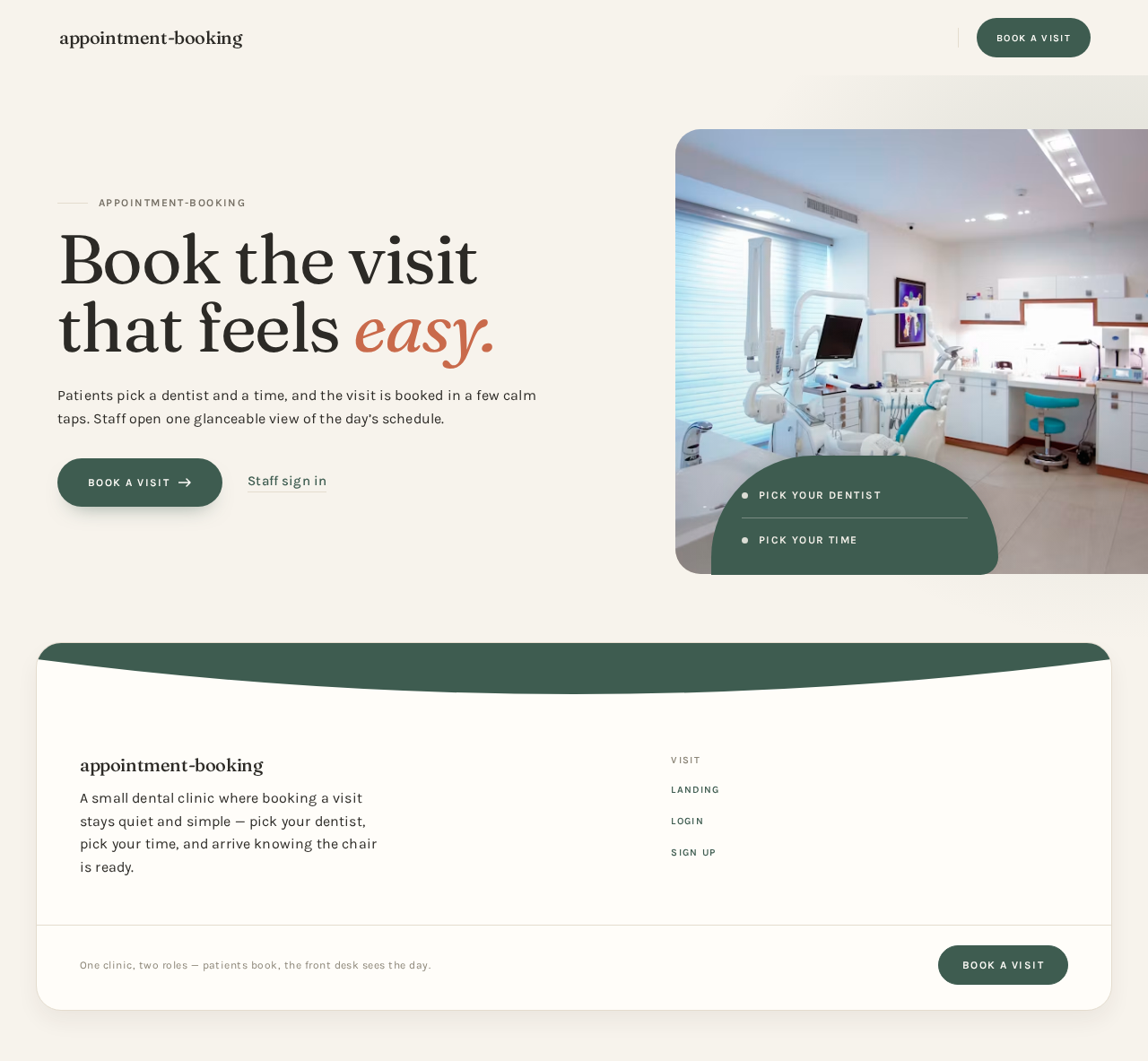
- Information / state. Anonymous public entry. States the product's purpose for a small dental clinic: patients book a visit by picking a dentist and a time; staff see the day's schedule. Presents the two quick value lines — "Pick your dentist" and "Pick your time" — and the two entry actions.
- Primary action. Capsule sage CTA leading to Sign Up for a patient who is new.
- Supporting actions. Text link "Staff sign in" leading to Login; a returning patient also reaches Login.
- Domain entities. None owned; the page describes the booking promise only.
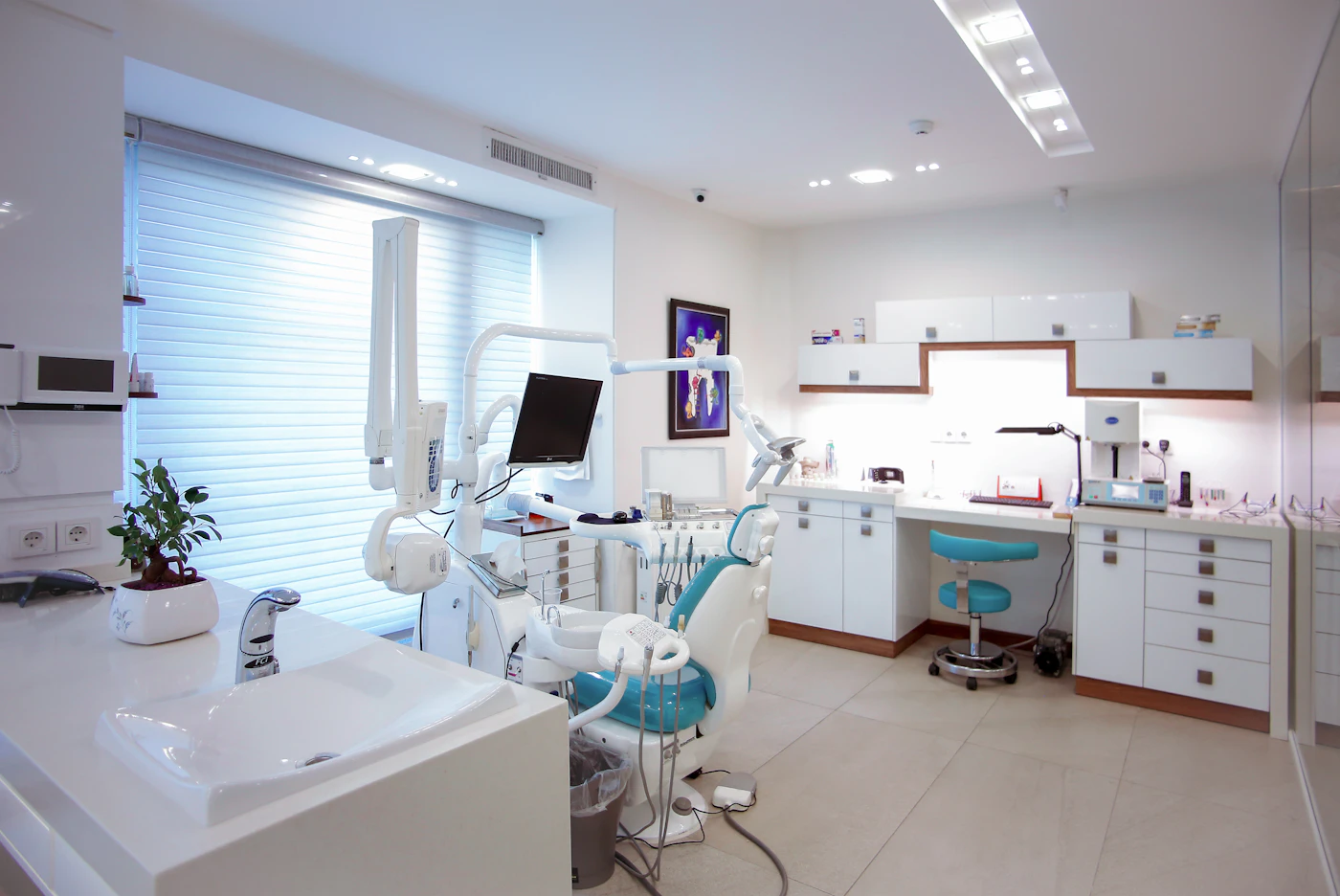
- Component responsibilities. Split asymmetric hero (oversized Fraunces headline with one terracotta word, one-line subtext, capsule CTA, staff text link); a single soft-lit warm-clinic still-life photograph bleeding off the right viewport edge, its bottom-left corner cut by a wide sage arc holding the two value lines as small caps; on mobile the photograph moves below the headline at 60vh with the arc pinned to its top edge.
- States. Loading — static content, no data fetch. Empty — not applicable. Success — the visitor understands the product and chooses an entry action. Error — not applicable. Recovery — not applicable.
Login
- Information / state. Anonymous returning-verification surface for both roles. Collects the credentials of an already-established identity and routes the person to the part of the product their identity belongs to.
- Primary action. Verify and continue — a patient continues into the booking sequence, Clinic Staff continue into the day's schedule.
- Supporting actions. Link to Sign Up for a patient who has not enrolled yet.
- Domain entities. Identity (patient or clinic staff), session.
- Component responsibilities. Credential form with capsule submit; inline error region; link to enrollment.
- States. Loading — submit in progress, control disabled. Empty — blank form. Success — identity verified, session established, routed onward. Error — unrecognized or incorrect credentials shown inline with the form preserved so the person can correct and retry. Recovery — retry in place; a person without an identity is routed to Sign Up.
Sign Up
- Information / state. Anonymous self-service enrollment for patients. Establishes a patient identity so the booking sequence can be resumed and the confirmed appointment stays bound to the correct person.
- Primary action. Create the patient identity and continue into the booking sequence.
- Supporting actions. Link back to Login for someone who already has an identity.
- Domain entities. Patient identity, session.
- Component responsibilities. Enrollment form with capsule submit; inline validation and error region; link to Login.
- States. Loading — submit in progress, control disabled. Empty — blank form. Success — patient identity established and the person continues to Dentists. Error — invalid or already-used details shown inline with entered values preserved. Recovery — correct and resubmit, or switch to Login.
Dentists
- Information / state. Step one of the booking sequence. Shows the clinic's dentists as portrait-led rounded tiles, each with its own soft shadow, so the patient can choose who they will see. A small sage dot pulses once on a dentist who has availability today.
- Primary action. Select a dentist; the selection is held for the rest of the booking sequence.
- Supporting actions. Change the selected dentist before confirming; move forward to Time Slots.
- Domain entities. Dentist (name, portrait, availability-today indicator), current booking selection.
- Component responsibilities. Dentist tile grid (two-up at 768px, four-up at 1280px); selected-state treatment in deep sage; left-edge progress rail at 1280px showing step one as the current step.
- States. Loading — tiles in a calm placeholder arrangement. Empty — no dentists available to book, with a plain explanation and no forward action. Success — a dentist is selected and the patient continues. Error — roster could not be loaded, with a retry action. Recovery — retry reloads the roster; the patient can also return to this step from later steps.
Time Slots
- Information / state. Step two of the booking sequence. Shows available time slots for the selected dentist as a wrapping capsule grid grouped by morning and afternoon, each group under a small-caps Karla label. Times are set in tabular numerals.
- Primary action. Select a time slot; the selection is held for the rest of the booking sequence.
- Supporting actions. Change the selected slot; step back to Dentists to change the dentist; move forward to Appointment.
- Domain entities. Time slot (start time, morning/afternoon group, availability), selected dentist, current booking selection.
- Component responsibilities. Capsule slot grid with group labels; sage fill rising from the bottom edge on selection; left-edge progress rail showing step two as current and step one as completed.
- States. Loading — slot grid in a calm placeholder arrangement. Empty — no available slots for the selected dentist, with a plain explanation and a way back to Dentists. Success — a slot is selected and the patient continues. Error — slots could not be loaded, with a retry action. Recovery — retry reloads slots; if the chosen slot is taken before confirmation, the patient is returned here to choose another.
Appointment
- Information / state. Step three of the booking sequence. Restates the selected dentist and the selected time slot so the patient can review them before committing, and carries the confirm action.
- Primary action. Confirm the appointment.
- Supporting actions. Step back to Dentists or Time Slots to change either selection before confirming.
- Domain entities. Appointment (dentist, time slot, patient identity, confirmed state), current booking selection.
- Component responsibilities. Review summary of dentist and time; capsule confirm CTA with the sage bottom-edge fill and a 1px terracotta focus ring; confirmed-appointment marker in terracotta on success; left-edge progress rail showing steps one and two completed and step three current.
- States. Loading — confirm in progress, control disabled. Empty — not reachable without a dentist and a slot selected; the patient is returned to the missing step. Success — the appointment is confirmed, persisted, and the patient sees the confirmed result with the dentist and time. Error — confirmation failed, stated plainly with a retry action and the selections preserved. Recovery — retry confirmation; if the slot was taken in the meantime, the patient returns to Time Slots to choose another.
Schedule
- Information / state. The Clinic Staff day view. A ruled 30-minute day column with appointment cards inset in their real time bands, a terracotta rule marking the current time, and a terracotta "today" rule. Each card shows the patient and the appointment time.
- Primary action. Read the day's schedule.
- Supporting actions. Move between dates; the day column cross-fades between dates.
- Domain entities. Appointment (patient, dentist, time), day schedule, current time.
- Component responsibilities. Ruled 30-minute day column; inset appointment cards; terracotta now-rule that slides down as the day advances; date navigation; cross-fade transition between dates.
- States. Loading — the day column in a calm placeholder arrangement. Empty — no appointments for the selected day, stated plainly with the day still visible. Success — the day's appointments are shown in their real time bands. Error — the schedule could not be loaded, with a retry action. Recovery — retry reloads the day; the staff member can move to another date and back.
3. Functional Requirements
FR-1 — Patient books an appointment by choosing a dentist and a time slot. (explicit) As a Patient, I should pick a dentist and a time slot so that I have a booked dental appointment.
- Trigger / input. The patient has an established identity and enters the booking sequence.
- Observable result. A confirmed appointment exists for the selected dentist and the selected time slot, bound to that patient.
- Access state. Requires an established patient identity; the booking destinations are not anonymously reachable.
- Failure / recovery. If the dentist roster or the slot list cannot be loaded, the patient can retry; if the chosen slot is taken before confirmation, the patient returns to slot selection and chooses another.
- Continuation. The patient sees the confirmed appointment with its dentist and time.
FR-2 — Patient chooses a dentist. (explicit) As a Patient, I should choose the dentist I will see so that the appointment is with the right person.
- Trigger / input. The patient opens the dentist step of the booking sequence.
- Observable result. One dentist is selected and carried forward through the rest of the booking sequence.
- Access state. Requires an established patient identity.
- Failure / recovery. If the roster cannot be loaded, the patient can retry; the patient can change the selection at any later step before confirming.
- Continuation. The patient proceeds to choose a time slot for that dentist.
FR-3 — Patient chooses a time slot. (explicit) As a Patient, I should choose an available time slot for the selected dentist so that the appointment is at a time I can attend.
- Trigger / input. A dentist has been selected.
- Observable result. One available time slot for that dentist is selected and carried forward.
- Access state. Requires an established patient identity.
- Failure / recovery. If no slots are available for that dentist, the patient is told plainly and can go back to choose another dentist; if slots cannot be loaded, the patient can retry.
- Continuation. The patient proceeds to review and confirm.
FR-4 — Patient confirms the appointment. (explicit) As a Patient, I should confirm the appointment using the selected dentist and time slot so that the booking becomes real.
- Trigger / input. A dentist and a time slot are both selected and the patient commits.
- Observable result. The appointment is confirmed and durably persisted, and the patient sees the confirmed result with the dentist and time.
- Access state. Requires an established patient identity.
- Failure / recovery. If confirmation fails, the patient is told plainly, the selections are preserved, and confirmation can be retried; if the slot was taken in the meantime, the patient returns to slot selection.
- Continuation. The confirmed appointment appears on the clinic's day schedule.
FR-5 — Clinic Staff see the day's schedule. (explicit) As a Clinic Staff member, I should see the day's schedule so that I know which patients are coming and when.
- Trigger / input. The staff member opens the schedule for a day.
- Observable result. The day's booked appointments are shown in their real time bands, with the current time marked.
- Access state. Requires an established Clinic Staff identity.
- Failure / recovery. If the schedule cannot be loaded, the staff member can retry; an empty day is shown plainly rather than as an error.
- Continuation. The staff member can move to another date and back.
FR-6 — Patient self-service enrollment. (required_inference) As a Patient, I should be able to begin using the app on my own so that I can book without staff help.
- Trigger / input. An anonymous visitor chooses to enroll as a patient.
- Observable result. A patient identity is established and the person continues into the booking sequence.
- Access state. The enrollment interaction is anonymously reachable; the booking destinations remain unavailable until the identity is established.
- Failure / recovery. Invalid or already-used details are shown inline with entered values preserved so the person can correct and resubmit, or switch to verification instead.
- Continuation. The patient proceeds to choose a dentist.
FR-7 — Clinic Staff invitation or provisioning. (required_inference) As a Clinic Staff member, I should be brought into the app through the clinic rather than enrolling myself so that my staff identity is the one the clinic intends.
- Trigger / input. The clinic invites or provisions a staff identity.
- Observable result. A Clinic Staff identity exists that can verify on return and reach the day's schedule.
- Access state. Staff do not self-enroll; the staff identity is established by the clinic.
- Failure / recovery. If verification fails, the staff member is told inline and can retry.
- Continuation. The staff member verifies and reaches the day's schedule.
FR-8 — Returning verification through Login. (required_inference) As a Patient or Clinic Staff member, I should verify my identity on return so that I reach my own booking work or the clinic's schedule.
- Trigger / input. An established person returns and submits their credentials.
- Observable result. The identity is verified, a session is established, and the person is routed to the part of the product their identity belongs to.
- Access state. The verification interaction is anonymously reachable; protected destinations stay unavailable until verification succeeds.
- Failure / recovery. Unrecognized or incorrect credentials are shown inline with the form preserved so the person can correct and retry; a person without an identity is routed to enrollment.
- Continuation. A patient continues into the booking sequence; a staff member continues into the day's schedule.
FR-9 — Durable persistence of confirmed appointments and the clinic schedule. (required_inference) As the application, I should persist confirmed appointments and the clinic schedule durably so that a confirmed booking survives and the day's schedule is accurate.
- Trigger / input. A patient confirms an appointment.
- Observable result. The confirmed appointment is stored and is reflected in the clinic's day schedule for its date.
- Access state. System-side; no human interaction.
- Failure / recovery. A failed write surfaces as a confirmation failure to the patient with the selections preserved and a retry available.
- Continuation. The appointment appears on the schedule for its day.
4. User Personas
Patient
Product context. A person who needs dental care at a small clinic and books it themselves, usually on a phone, often between other tasks, and often with some anxiety about the visit. They do not want to phone the front desk, and they do not want to learn a system.
Primary goal. To leave the app with a confirmed appointment with a specific dentist at a specific time.
Distinct accepted responsibilities. The Patient is the only role that enrolls itself, the only role that chooses a dentist, the only role that chooses a time slot, and the only role that confirms an appointment. Their work is a short, ordered, three-step commitment: dentist, then time, then confirm.
Relevant inputs and decisions. Which dentist to see; which available time slot to take; whether to commit to the appointment at the review step; whether to change either selection before committing.
Interactions with other accepted participants. The Patient's confirmed appointment is the thing Clinic Staff later read on the day's schedule — the Patient's commitment is the staff member's input. The Patient never interacts with staff inside the app.
Observable success. A confirmed appointment for the chosen dentist and time, shown back to the patient, and present on the clinic's schedule for that day.
Constraints carried from source. The Patient must be able to complete this without staff help, and the flow must stay simple.
Clinic Staff
Product context. A front-desk person at a small dental clinic who needs to know, at a glance, who is coming in and when. They work in a busy, interruptible environment and need the day view to be calm and readable rather than dense data-table chrome.
Primary goal. An accurate view of the day's booked appointments.
Distinct accepted responsibilities. Clinic Staff are the only role that reads the day's schedule, and the only role that is brought into the app by the clinic rather than enrolling itself. They do not book, choose dentists, or choose time slots on the patient's behalf in this product.
Relevant inputs and decisions. Which day to look at; reading each appointment's patient and time in its real time band; noticing the current time against the day's appointments.
Interactions with other accepted participants. Clinic Staff read the results of Patients' confirmed bookings. They do not act on the Patient's behalf inside the app.
Observable success. The day's appointments are visible in their real time bands with the current time marked, and the view matches what patients have confirmed.
Constraints carried from source. The staff view is the one dense surface in an otherwise simple app, and it must remain glanceable.
5. Core User Flows
Flow A — A new patient books an appointment
- The Patient opens Landing anonymously and reads what the app does: pick a dentist, pick a time.
- The Patient chooses the capsule CTA and arrives at Sign Up.
- The Patient enters their details and submits. The app establishes a patient identity and continues the Patient into the booking sequence. (If the details are invalid or already used, the form shows the problem inline with the entered values preserved; the Patient corrects and resubmits, or switches to Login.)
- On Dentists, the Patient sees the clinic's dentists as portrait-led tiles. A small sage dot pulses once on a dentist who has availability today.
- The Patient selects a dentist. The tile takes the deep sage selected state and the left-edge progress rail marks step one complete.
- On Time Slots, the Patient sees available slots for that dentist as capsule tiles grouped under morning and afternoon small-caps labels, times set in tabular numerals.
- The Patient selects a slot; the tile fills with sage from its bottom edge and the progress rail marks step two complete. (If no slots are available for that dentist, the Patient is told plainly and returns to Dentists to choose another.)
- On Appointment, the Patient reviews the selected dentist and time.
- The Patient confirms. The appointment is persisted and the Patient sees the confirmed result with the dentist and time, marked in terracotta. (If confirmation fails, the Patient is told plainly with the selections preserved and can retry; if the slot was taken in the meantime, the Patient returns to Time Slots and chooses another.)
- Next step. The confirmed appointment now appears on the clinic's day schedule for its date.
Flow B — A returning patient books another appointment
- The Patient opens Login anonymously and submits their credentials.
- The app verifies the identity, establishes a session, and routes the Patient into the booking sequence.
- The Patient continues from step 4 of Flow A: choose a dentist, choose a time slot, confirm.
- Next step. The new confirmed appointment appears on the clinic's day schedule.
Flow C — A Clinic Staff member verifies and reads the day's schedule
- The clinic invites or provisions the Clinic Staff member's identity. The staff member does not self-enroll.
- The Clinic Staff member opens Login anonymously and submits their credentials. (If the credentials are not recognized, the error is shown inline with the form preserved and the staff member retries.)
- The app verifies the identity and routes the staff member to Schedule.
- On Schedule, the staff member reads the day column: ruled 30-minute rows, appointment cards inset in their real time bands showing the patient and the time, a terracotta rule marking the current time, and a terracotta "today" rule.
- The staff member moves to another date; the day column cross-fades to that day. (If the schedule cannot be loaded, the staff member is told plainly and can retry; an empty day is shown plainly with the day still visible.)
- Next step. The staff member returns to today's date and continues working the front desk from the same view.
6. Visuals, Colors and Theme
Muse and headline. Yves Béhar — soft forms around serious technology, wellbeing first. The headline register is warm and unhurried: "Book the visit that feels easy."
Mode. Light mode only.
Colour tokens by role.
| Role | Hex | Use |
|---|---|---|
| Background | #F7F3EC | Warm oat ground carrying every page |
| Surface | #FFFDF9 | Cards, slot tiles, inputs |
| Text | #2C2A26 | Body and headline text (~12:1 on background) |
| Primary | #3E5C50 | Deep sage: primary actions, selected states, active dentist (~7:1 on surface) |
| Accent | #C96A4B | Terracotta, used sparingly: confirmed-appointment marker, "today" rule, "now" rule, one word in the hero headline |
| Muted | #8B8577 | Labels, timestamps, secondary metadata |
| Hairline | #E4DCCE | 1px card and divider borders |
No blue or indigo appears anywhere in the product. The generic indigo/blue-on-white SaaS template is forbidden for this project.
Typography.
- Headings: Fraunces, weights 300–500, soft optical-size axis, tracking
-0.02em, sentence case. Large but never shouting. - Body: Karla, weights 400/500, line-height 1.6, tracking
0.01em. - Labels and time ranges: Karla 600, uppercase, 11–12px, tracking
0.12em. - Numerals: tabular Karla for all times.
- Scale: 1.25 modular, mobile-first — display
clamp(2.75rem, 6vw, 5.5rem); section 28/32; card title 20; slot time 18 tabular; body 16; label 12.
Shape language. Soft continuous curves throughout: 20px radii on slot tiles and inputs, 28px on cards, full capsule on the primary CTA and on dentist avatars. Section boundaries are gentle arcs or wide-radius blocks rather than hard rules. Nothing is perfectly rectangular except the 1px hairline dividers, which stay straight so the softness reads as intentional.
Spacing rhythm. Single readable column on mobile; 12-column grid with 40–64px gutters on desktop. Cards and slot tiles sit on #FFFDF9 with a 1px #E4DCCE hairline and a soft 12px offset shadow.
Imagery style. Softly lit photography and rendered still lifes with real materials — a ceramic tray, folded linen, a hand resting on a chair arm, a dentist's loupe on a wooden counter — shot on oat and cream grounds with natural window light. One abstract sage-to-oat gradient plane is allowed as a hero backdrop. No stock-smiling stock-photo people, no clip art, no glossy 3D blobs, no stainless-steel stock imagery, no tooth icons.
Readable-text rule. Headlines, wordmarks, labels, numbers, card text and controls stay entirely inside the viewport and their container at 375px, 768px and 1280px, wrapping or scaling to fit, and no other element covers any part of them. Imagery and decoration may be cropped, bled, rotated, overlapped or cut as the direction asks, provided they cover no readable text or control.
7. Signature Design Concept
The clinic's one tactile gesture, on the public entry.
The Landing page is a split, asymmetric hero. The left 7 columns hold an oversized Fraunces headline set in two lines — "Book the visit" in #2C2A26 with "that feels easy." where the word easy is terracotta #C96A4B — sitting above a one-line subtext and a capsule sage CTA, with the secondary "Staff sign in" as a text link. The right 5 columns bleed a single large, soft-lit warm-clinic still life off the right viewport edge with a shallow depth of field; its bottom-left corner is cut by a wide sage arc that overlaps the photograph by 40px and holds the two quick value lines — "Pick your dentist" / "Pick your time" — as small caps.
The signature move is the capsule CTA: a soft sage fill that fills from the bottom edge on hover or selection, paired with a 1px terracotta focus ring. It is the same gesture the patient meets again on the slot tiles and the confirm button, so the entry and the booking flow share one tactile language. On mobile the photograph moves below the headline at 60vh with the arc pinned to its top edge. The hero is never centred, never a gradient blob, and never a blue button.
8. Interaction Model & Motion Direction
Interaction Model: Animated Motion Tempo: restrained Hero Dimensionality: layered_2d
Landing Hero Motion Brief.
- Focal subject. The warm-clinic still life bleeding off the right viewport edge, cut by the wide sage arc that carries the two value lines.
- Input → transformation → outcome thesis. As the visitor arrives, the headline and subtext settle into place and the capsule CTA's sage fill rises from its bottom edge on hover or focus; the outcome is a calm, legible entry where the visitor understands "pick your dentist, pick your time" and chooses an entry action. Only accepted entry behavior is used — the CTA leads to Sign Up, the text link leads to Login.
- Motion vocabulary. Breathing, wellbeing pace: 320–420ms
cubic-bezier(0.22, 1, 0.36, 1)for entrances, 180ms for state changes. A slow 6s ambient shadow drift on the hero object. Nothing bounces, nothing loops for decoration. - Composed first frame. Headline and subtext fully legible, CTA at rest in flat sage, photograph already in place with the arc overlapping it — the page reads completely before any motion runs.
- Reduced-motion state.
prefers-reduced-motioncollapses everything to instant state changes: no entrance animation, no ambient shadow drift, the CTA fill appears immediately on hover or focus.
Motion across the rest of the product. Slot tiles fill with sage from the bottom edge on selection (180ms). The booking flow's left-edge progress rail draws its connecting hairline over 400ms, with filled sage dots for completed steps and a terracotta dot for the current step. The staff day column cross-fades between dates. The terracotta "now" rule slides down as the day advances. Under prefers-reduced-motion all of these become instant state changes.
9. Non-Functional Requirements
- Simplicity. The app is for a small dental clinic and should be simple. (explicit) The patient-facing flow must not carry dense data-table chrome, and the product must not grow beyond the accepted booking and day-schedule responsibilities.
- Readability and contrast. Body text
#2C2A26on#F7F3ECis approximately 12:1; primary#3E5C50on#FFFDF9is approximately 7:1. Body text and buttons stay readable at every viewport. (explicit — creative direction) - Viewport integrity. Headlines, wordmarks, labels, numbers, card text and controls stay entirely inside the viewport and their container at 375px, 768px and 1280px, wrapping or scaling to fit, with no other element covering any part of them. (explicit — creative direction)
- Motion accessibility.
prefers-reduced-motioncollapses all motion to instant state changes. (explicit — creative direction) - Performance on clinic wifi. The app must stay fast on clinic wifi; the restrained motion and
layered_2ddepth ceiling exist to support this. (explicit — creative direction) - Durable persistence. Confirmed appointments and the clinic schedule must persist durably so a confirmed booking survives and the day's schedule is accurate. (required_inference)
- Identity continuity. Application-owned identity must keep a patient's booking work and confirmed appointment bound to the correct person, and must keep the staff schedule reachable only to an established Clinic Staff identity. (required_inference)
10. Tech Stack
No technology choices were specified by the user. The following are coherent defaults for this product and are labeled as such.
- Frontend: React with a component-based custom UI.
[Default — not specified by user] - Backend: Python with FastAPI, serving the dentist roster, available time slots, appointment confirmation, and the day's schedule.
[Default — not specified by user] - Storage: A relational database for durable persistence of patients, staff identities, dentists, time slots, and confirmed appointments.
[Default — not specified by user] - Packaging and local run: Docker with docker-compose.
[Default — not specified by user] - Deployment: Kubernetes is not required for a single small-clinic application and is not included.
[Default — not specified by user]
11. Assumptions and Constraints
Constraints (from source).
- The app is for a small dental clinic. (explicit)
- The app should be simple. (explicit)
- The generic indigo/blue-on-white SaaS template is forbidden for this project. (explicit — creative direction)
- No blue or indigo primary or accent on white; no glassmorphism, frosted panels or gradient-blob heroes; no Inter, Roboto, Poppins or system-ui for headings or body; no identical hover-lift card grids repeated section after section; no clinical cold-white surfaces, stainless-steel stock imagery or tooth icons; no playful bounce, confetti or cartoon mascots; no hard 0px corners or heavy black rules; no dense data-table chrome on the patient-facing flow. (explicit — creative direction)
Assumptions (narrow, labeled).
- The clinic's dentist roster and each dentist's available time slots are supplied by the application's own backend; no external scheduling provider is integrated. (required_inference)
- Clinic Staff identities are established by the clinic through invitation or provisioning; the app does not provide staff self-enrollment. (required_inference)
- A confirmed appointment is not rescheduled or cancelled inside this product; those workflows are outside the accepted scope. (required_inference)
- The day schedule shows the appointments for one selected day at a time. (required_inference)
- Access in this product is continuity of identity, not differentiated permission over shared product state: patients work in the booking sequence and Clinic Staff work in the day schedule. (required_inference)
12. Glossary
- Appointment — a confirmed booking of a specific patient with a specific dentist at a specific time slot.
- Booking sequence — the patient's ordered three-step flow: choose a dentist, choose a time slot, confirm.
- Clinic Staff — the front-desk role that reads the day's schedule.
- Day schedule — the Clinic Staff view of one day's confirmed appointments, laid out in ruled 30-minute time bands.
- Dentist — a clinician at the clinic whom a patient can choose for an appointment.
- Patient — the role that enrolls itself, chooses a dentist and a time slot, and confirms an appointment.
- Progress rail — the slim left-edge indicator at 1280px showing completed booking steps as filled sage dots and the current step as a terracotta dot.
- Time slot — an available appointment time for a specific dentist, grouped as morning or afternoon.
- Now rule — the terracotta rule on the day schedule marking the current time.
appointment-booking
Book the visitthat feels easy.
Patients pick a dentist and a time, and the visit is booked in a few calm taps. Staff open one glanceable view of the day’s schedule.
Pick your dentist
Pick your time
appointment-booking
Book the visitthat feels easy.
Patients pick a dentist and a time, and the visit is booked in a few calm taps. Staff open one glanceable view of the day’s schedule.
Pick your dentist
Pick your time
No comments yet. Be the first!