apex-grid-gym
 Manav
Manavcreate a professional multi page gym websitein which user can register online for fee and can see pricing in monthly and yearly tenure even track their daily workout with list of every day work out add an ai assistant for peoples to ask small doubts and querries make the assistante as is he couldn't solve a querry given by the user it will give the mobile no of his owner to talk and give most of the information about our gym that can make the user feel the gym is good and make the website premium add seamless sections and intractive ui components with some scroll animation and attractive design make the website responsive across all the devices the components should not break or overlap the theme of the website would be in red and black colour and add try to add pages that are suitable for a professional gym website and add the following layout to the website


Comments (0)
Sign in to leave a comment
System Requirements
System Requirements Document for apex-grid-gym
1. Introduction
The apex-grid-gym project aims to create a professional, multi-page gym website. The website will allow users to register online for a fee, view pricing options in monthly and yearly tenures, and track their daily workouts. An AI assistant will be available to answer user queries, providing a seamless and interactive user experience. The website will feature a premium design with a red and black theme, responsive across all devices, and include scroll animations and interactive UI components.
2. System Overview
The apex-grid-gym website will deliver a comprehensive online platform for gym users, featuring online registration, pricing information, workout tracking, and an AI assistant for user queries. The design will be interactive and responsive, with a red and black theme to convey a premium feel. The website will be accessible to all users without requiring an account for initial exploration, but registration will be necessary for personalized features like workout tracking.
2a. Product Interpretation and Delivery Boundary
The website will be delivered as a responsive web application accessible on all devices. Users can explore the site anonymously but must register to access personalized features such as workout tracking. The AI assistant will provide immediate responses to user queries, and if unable to resolve an issue, it will offer the gym owner's contact number for further assistance. The website will not include adjacent capabilities such as gym equipment sales or external service integrations.
2b. Source Content Inventory
Not applicable as no explicit content_source directive is provided.
2c. Page Content and Component Coverage
Home Page
- Hero Section: Full-screen color block with oversized white typography and a red CTA button.
- About Us: Information about the gym's mission and values.
- AI Assistant: Interactive icon for user queries, animated with hover effects.
- Navigation Bar: Bold, geometric red and black with hover effects.
Registration Page
- Registration Form: Fields for user details and payment information.
- Pricing Information: Monthly and yearly options displayed.
- Submit Button: Red button with hover animation.
Workout Tracker Page
- Daily Workout List: Interactive list of daily exercises.
- Progress Tracker: Visual representation of workout progress.
- Animation Transitions: Scroll-triggered animations between sections.
Contact Page
- Contact Information: Gym owner's phone number and email.
- AI Assistant Integration: Direct link to AI assistant for queries.
3. Functional Requirements
-
As a user, I should be able to register online for a fee
- Provenance: User requirement
- Lifecycle Facts: Registration form submission, payment processing, confirmation message
- Observable Acceptance: Successful registration confirmation
-
As a user, I should be able to view pricing in monthly and yearly tenures
- Provenance: User requirement
- Lifecycle Facts: Pricing information display, selection option
- Observable Acceptance: Pricing options visible and selectable
-
As a user, I should be able to track my daily workout with a list of exercises
- Provenance: User requirement
- Lifecycle Facts: Daily workout list display, progress tracking
- Observable Acceptance: Workout progress visibly tracked
-
As a user, I should be able to ask the AI assistant small doubts and queries
- Provenance: User requirement
- Lifecycle Facts: Query input, AI response, fallback to contact information
- Observable Acceptance: Query resolved or contact information provided
4. User Personas
- Gym User: Individuals looking to register, view pricing, track workouts, and interact with the AI assistant. They seek a premium, interactive experience with easy access to gym information.
5. Core User Flows
-
User Registration Flow
- Start: User navigates to the Registration Page.
- Action: Fills out registration form and submits payment.
- Outcome: Receives confirmation of successful registration.
-
Pricing Viewing Flow
- Start: User accesses the Registration Page.
- Action: Views and selects pricing options.
- Outcome: Pricing options are displayed and selectable.
-
Workout Tracking Flow
- Start: User logs into the Workout Tracker Page.
- Action: Views daily workout list and tracks progress.
- Outcome: Workout progress is updated and visible.
-
AI Assistant Interaction Flow
- Start: User clicks on the AI assistant icon.
- Action: Inputs query and receives response.
- Outcome: Query resolved or contact information provided.
6. Visuals Colors and Theme
- Muse: Jessica Walsh
- Palette:
- Background: #000000
- Surface: #1C1C1C
- Text: #FFFFFF
- Primary: #FF0000
- Accent: #FF4500
- Muted: #333333
- Typography:
- Headings: Archivo Black
- Body: Nunito
- Scale: 1.5 modular, 64/48/32/24/18
7. Signature Design Concept
The Home Page will feature a full-screen color block hero with oversized white typography and a striking red CTA button. The design will incorporate dynamic AI assistant icons and interactive workout trackers with lively animations, creating an engaging and premium user experience.
8. Interaction Model & Motion Direction
- Interaction Model: Animated
- Motion Tempo: Expressive
- Hero Dimensionality: Layered_2d
- Landing Hero Motion Brief: The hero section will feature a full-page colored background with an oversized typographic statement in white. The focal subject will be the red CTA button, which will animate with a bouncy scale-in effect upon hover. Reduced-motion state will simplify animations to ensure accessibility.
9. Non-Functional Requirements
- Responsiveness: The website must be responsive across all devices, ensuring that components do not break or overlap.
- Performance: The website should load quickly and handle animations smoothly without lag.
- Accessibility: Ensure all interactive elements are accessible to users with disabilities.
10. Tech Stack
- Frontend: React
- Backend: Python/FastAPI
- Database: PostgreSQL
- Deployment: Docker/docker-compose
11. Assumptions and Constraints
- Assumption: Users will have internet access to interact with the website.
- Constraint: The website must adhere to the red and black theme as specified.
12. Glossary
- AI Assistant: A virtual assistant integrated into the website to answer user queries.
- CTA (Call to Action): A button or link that prompts users to take a specific action, such as registering or contacting the gym.
- Responsive Design: A design approach that ensures the website functions well on various devices and screen sizes.
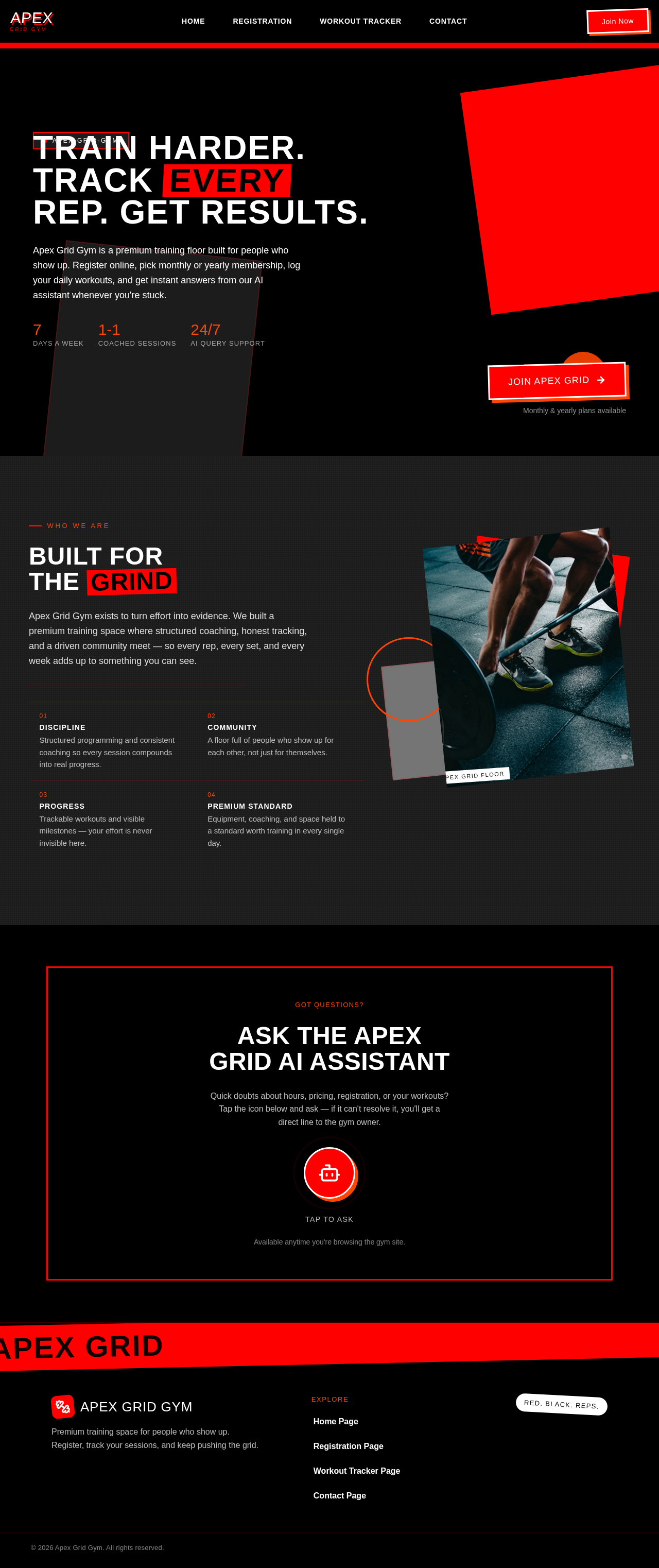
Train Harder.Track EveryRep. Get Results.
Apex Grid Gym is a premium training floor built for people who show up. Register online, pick monthly or yearly membership, log your daily workouts, and get instant answers from our AI assistant whenever you're stuck.
Built For The Grind
Apex Grid Gym exists to turn effort into evidence. We built a premium training space where structured coaching, honest tracking, and a driven community meet — so every rep, every set, and every week adds up to something you can see.
- 01Discipline
Structured programming and consistent coaching so every session compounds into real progress.
- 02Community
A floor full of people who show up for each other, not just for themselves.
- 03Progress
Trackable workouts and visible milestones — your effort is never invisible here.
- 04Premium Standard
Equipment, coaching, and space held to a standard worth training in every single day.
 Apex Grid Floor
Got Questions?
Ask The Apex Grid AI Assistant
Quick doubts about hours, pricing, registration, or your workouts? Tap the icon below and ask — if it can't resolve it, you'll get a direct line to the gym owner.
Available anytime you're browsing the gym site.
Train Harder.Track EveryRep. Get Results.
Apex Grid Gym is a premium training floor built for people who show up. Register online, pick monthly or yearly membership, log your daily workouts, and get instant answers from our AI assistant whenever you're stuck.
Built For The Grind
Apex Grid Gym exists to turn effort into evidence. We built a premium training space where structured coaching, honest tracking, and a driven community meet — so every rep, every set, and every week adds up to something you can see.
- 01Discipline
Structured programming and consistent coaching so every session compounds into real progress.
- 02Community
A floor full of people who show up for each other, not just for themselves.
- 03Progress
Trackable workouts and visible milestones — your effort is never invisible here.
- 04Premium Standard
Equipment, coaching, and space held to a standard worth training in every single day.
Apex Grid FloorGot Questions?
Ask The Apex Grid AI Assistant
Quick doubts about hours, pricing, registration, or your workouts? Tap the icon below and ask — if it can't resolve it, you'll get a direct line to the gym owner.
Available anytime you're browsing the gym site.
No comments yet. Be the first!