Share your link
Your personal link is one short URL. Drop it in an Instagram story, a Snapchat reply, a WhatsApp group or your bio — wherever people already talk to you.
 Rithu Budhathoki
Build a complete mobile anonymous-messaging app heavily inspired by the current NGL app experience. The goal is to reproduce the same overall user experience, navigation structure, interaction patterns, screens, and core functionality as closely as possible, while using original code and replacing NGL's proprietary branding, logos, copyrighted assets, and exact proprietary visual assets with my own app name and assets. This must be a REAL, FUNCTIONAL mobile application — not a UI mockup or prototype. ## 1. APP CONCEPT The app allows a user to create a profile and receive anonymous messages through a personal link. Example: https://myapp.com/username The user shares this link on Instagram, Snapchat, WhatsApp, etc. Someone opens the link and sends an anonymous message. The recipient receives the message inside their app inbox. The overall experience should feel extremely close to the familiar NGL-style anonymous messaging experience. ## 2. MOBILE APP Build it for: * Android * iOS Use React Native + Expo if possible. Make the UI responsive for different phone screen sizes. Use smooth animations and transitions. ## 3. ONBOARDING Create an onboarding flow similar in structure to an anonymous messaging/social app: * Welcome screen * Create username * Profile setup * Profile picture * Continue button * Notification permission * Generate personal message link * Share link The onboarding should be simple, attractive and fast. ## 4. HOME / INBOX Create a main inbox screen where received anonymous messages appear as cards. Each message should contain: * Message text * Date/time * Read/unread status * Reply option * Share option * Delete option * Report option * Block option * Sender Details option Use a clean card-based layout with animations. Add: * Pull to refresh * Loading skeletons * Empty inbox state * Notification badge * Search/filter messages if appropriate ## 5. ANONYMOUS MESSAGE PAGE Every user gets a unique public URL. Example: /u/rohit When somebody opens it: Show: * Profile picture * Username * Short profile description * Anonymous message input * Character counter * Send button The sender should NOT need an account to send a message if anonymous submissions are enabled. After sending: Show a confirmation screen/animation. ## 6. SENDER INFORMATION Add a "View Sender Details" feature. IMPORTANT: Only show information that the application legitimately has access to and is permitted to display. For messages from registered users, show: * Username * Account ID * Profile information * Message ID * Date * Time For technical metadata legitimately collected by the server, show appropriate non-sensitive information such as: * Device type * Browser/app version * Operating system * Approximate region when legally permitted Do NOT falsely claim that an anonymous sender's real identity has been discovered. Do NOT expose private personal information simply because someone sent an anonymous message. If information isn't available, display: "Information unavailable." Clearly distinguish between: "Account information" and "Technical information." ## 7. MESSAGE ACTIONS Each received message should have actions similar to a modern anonymous-message app: * Reply * Share * Delete * Report * Block * View Details Reply should allow the recipient to create a response/post using the received message. ## 8. SHARE / SOCIAL MEDIA FLOW Add sharing functionality for: * Instagram * WhatsApp * Snapchat * Copy link * System share sheet Generate a personal link automatically. Example: https://myapp.com/u/username Add a beautiful share screen encouraging users to share their link. ## 9. PROFILE Profile screen: * Profile picture * Username * Personal anonymous link * Copy link * Share link * Edit profile * Message count * Settings ## 10. SETTINGS Create: * Account settings * Username * Profile picture * Password * Notifications * Privacy * Blocked users * Report history * Delete account * Logout ## 11. AUTHENTICATION Implement: * Email/password signup * Login * Logout * Forgot password * Secure sessions Use Supabase Auth or Firebase Authentication. ## 12. DATABASE Use Supabase/PostgreSQL or Firebase. Create appropriate tables/collections for: Users * id * username * email * password/auth reference * profile picture * bio * created_at Messages * id * recipient_id * sender_id if available * message_text * anonymous_status * created_at * read_status * reported_status Sender metadata * message_id * device information * app/browser information * approximate location where legitimately available * timestamps Blocked users Reports Notifications Use proper database security rules so users cannot access another user's private inbox. ## 13. NOTIFICATIONS Implement push notifications. When somebody sends a message: "Someone sent you an anonymous message 👀" The recipient receives a push notification. Allow users to disable notifications. ## 14. SECURITY Implement: * Rate limiting * Spam protection * CAPTCHA where appropriate * Input validation * XSS protection * SQL injection protection * Authentication security * Authorization * Secure database rules * Abuse reporting * Blocking * Message moderation Never expose server secrets or database credentials in the mobile app. ## 15. ADMIN PANEL Create a separate admin dashboard. Admin can: * View reported messages * Remove abusive messages * Ban accounts * Review reports * View legitimate technical metadata where authorized * Manage users * Manage moderation settings Keep administrative information inaccessible to normal users. ## 16. UI / UX The app should have the polished feel of a popular anonymous social messaging app. Use: * Rounded cards * Smooth page transitions * Attractive gradients * Modern typography * Large touch targets * Bottom navigation where appropriate * Animated buttons * Message animations * Skeleton loading * Dark mode * Light mode * Haptic feedback where supported Make the experience feel familiar to users of NGL without copying NGL's proprietary assets or branding. ## 17. IMPORTANT — DO NOT MAKE A DEMO Do NOT create fake buttons. Do NOT create placeholder screens that don't work. Every major button must perform its intended action. The following must actually work: Signup Login Profile creation Unique link generation Anonymous message sending Message storage Inbox Read/unread status Delete Report Block Sender details Push notifications Profile editing Logout ## 18. FINAL REQUIREMENT Build the entire project as a production-ready mobile application. After generating the app: 1. Test every major user flow. 2. Fix navigation errors. 3. Fix authentication errors. 4. Fix database errors. 5. Fix message delivery. 6. Fix notification problems. 7. Make sure users cannot access other users' private messages. 8. Make sure anonymous messaging works. 9. Make sure the app works on Android. 10. Provide instructions for generating an APK/AAB. The final result should feel like a complete NGL-style anonymous messaging app rather than a generic messaging application.


Sign in to leave a comment
anonymous-messaging-inbox is a production-ready mobile anonymous-messaging application for Android and iOS. It enables a person to create a profile, receive anonymous messages through a unique personal link, manage received messages in a private inbox, and share their link through supported social channels.
The product is inspired by the familiar anonymous social-message experience and interaction patterns of the current NGL app, while using original code, original app branding, and original visual assets. It must not copy NGL’s logos, wordmark, copyrighted assets, or exact proprietary visual artwork.
The audience includes people who want to invite anonymous messages through a shareable link, people who wish to send an anonymous message without creating an account, and authorized administrators who moderate abuse and manage reported content.
The system consists of:
https://myapp.com/u/username.Recipients create an account and profile, choose a username, generate a personal anonymous-message link, and share it through Instagram, WhatsApp, Snapchat, copy-link actions, or the device system share sheet. Anonymous senders can open a public recipient link and submit an anonymous message without creating an account when anonymous submissions are enabled.
Received messages are stored in the intended recipient’s private inbox. Recipients can read, reply to, share, delete, report, block, and view permitted sender details for messages. Administrators can review reported messages, remove abusive content, ban accounts, manage users, access authorized technical metadata, and manage moderation settings.
The mobile product must be real and functional rather than a prototype, mockup, or collection of fake controls. Every major button and flow must perform its intended function.
The application owns recipient authentication, onboarding, private inboxes, profile management, settings, public message-link delivery, message storage, moderation workflows, and administrative access. Social applications and the device share sheet are external destinations used to distribute a recipient’s personal link.
Anonymous message senders do not need an account when anonymous submissions are enabled. A sender’s real-world identity must never be claimed, inferred, or exposed merely because they sent a message. Sender details are limited to information that is legitimately collected, authorized for display, and permitted by applicable law.
The current scope includes Android and iOS delivery, account creation and login, anonymous message submission, private inbox management, push notifications, abuse controls, and administration. It excludes copying NGL proprietary branding, logos, assets, or exact visual artwork.
https://myapp.com/u/username.Information unavailable. for unavailable information. Never claim that an anonymous sender’s real identity was discovered. Do not expose private personal information./u/rohit, available without sender authentication when anonymous submissions are enabled.As a Recipient (App User), Anonymous Sender, or Administrator / Moderator, I should use anonymous-messaging-inbox on Android and iOS so that the system is available as a real mobile application.
As a Recipient (App User), I should sign up, log in, log out, and recover a forgotten password so that my inbox and profile remain bound to a secure session.
As a Recipient (App User), I should complete Welcome screen, Create username, Profile setup, Profile picture, Notification permission, Generate personal message link, and Share link steps so that I can create and distribute a functioning anonymous-message profile.
As a Recipient (App User), I should receive and share my personal anonymous-message link so that others can send me anonymous messages.
https://myapp.com/u/username.As an Anonymous Sender, I should open a recipient’s public link and send an anonymous message without creating an account when anonymous submissions are enabled.
As a Recipient (App User), I should view my received anonymous messages in a private card-based inbox so that I can manage incoming messages.
As a Recipient (App User), I should reply to, share, delete, report, block, and view details for a received message so that I can respond to and control my inbox.
As a Recipient (App User), I should view only authorized sender details so that I can understand a message without falsely exposing anonymous identity.
Information unavailable. when requested information is unavailable.As a Recipient (App User), I should view and edit my profile so that my public message page and personal link remain accurate.
As a Recipient (App User), I should manage account settings, username, profile picture, password, notifications, privacy, blocked users, report history, account deletion, and logout so that I can control my account and experience.
As a Recipient (App User), I should receive a push notification when somebody sends me a message so that I know to check my inbox.
Someone sent you an anonymous message 👀.As the system, I should securely store users, messages, sender metadata, blocked users, reports, and notifications so that accepted product workflows have durable state.
id, username, email, password/auth reference, profile picture, bio, and created_at.id, recipient_id, sender_id if available, message_text, anonymous_status, created_at, read_status, and reported_status.message_id, device information, app/browser information, approximate location where legitimately available, and timestamps.As a Recipient (App User), Anonymous Sender, and Administrator / Moderator, I should use a protected messaging service so that abuse and unauthorized access are reduced.
As an Administrator / Moderator, I should use a separate protected dashboard to moderate reported content and manage abuse so that harmful content and accounts can be handled.
As a project owner, I should receive a tested production-ready application and Android build instructions so that the application can be delivered reliably.
Product context: The recipient creates an authenticated profile, receives anonymous messages through a personal public link, and manages their private inbox.
Primary goal: Establish a shareable anonymous-message link and reliably receive and manage messages that arrive through it.
Distinct responsibilities:
Relevant decisions and inputs: Email/password credentials, username, profile description, profile picture, notification permission, sharing target, message action selection, settings preferences, reporting and blocking decisions.
Interaction with other participants: The recipient’s link is used by Anonymous Senders. Recipient reports and moderation-relevant actions are available to the Administrator / Moderator through the protected moderation workflow.
Observable success: The recipient has a functioning unique personal link, can share it, receives messages in an inbox that only they can access, and can safely manage received content.
Provenance: required_inference from accepted account, profile, inbox, sharing, and message-management requirements.
Product context: The anonymous sender opens a recipient’s public URL and submits a message without needing an account when anonymous submissions are enabled.
Primary goal: Send an anonymous message to the recipient through the public link.
Distinct responsibilities:
Relevant decisions and inputs: Anonymous message text and any required anti-abuse interaction.
Interaction with other participants: The sender’s successful message creates a new message for the Recipient (App User). The sender is not promised identification disclosure. Any technical data shown later is limited to legitimately collected and authorized information.
Observable success: The message is accepted, stored for the intended recipient, and the sender sees a confirmation animation without account creation or identity exposure.
Provenance: required_inference from accepted public anonymous submission requirements.
Product context: The administrator or moderator operates a separate role-restricted dashboard for content safety, reports, users, and moderation settings.
Primary goal: Review and resolve abuse while keeping moderation and technical information inaccessible to normal users.
Distinct responsibilities:
Relevant decisions and inputs: Report-review decision, content-removal decision, account-ban decision, user-management decision, and moderation-setting updates.
Interaction with other participants: The administrator acts on reports originating from recipient message-management workflows and on content produced through anonymous message submission.
Observable success: Reported content is reviewed and handled, administrative actions are confirmed, and normal users remain unable to access administrative information.
Provenance: explicit.
https://myapp.com/u/username.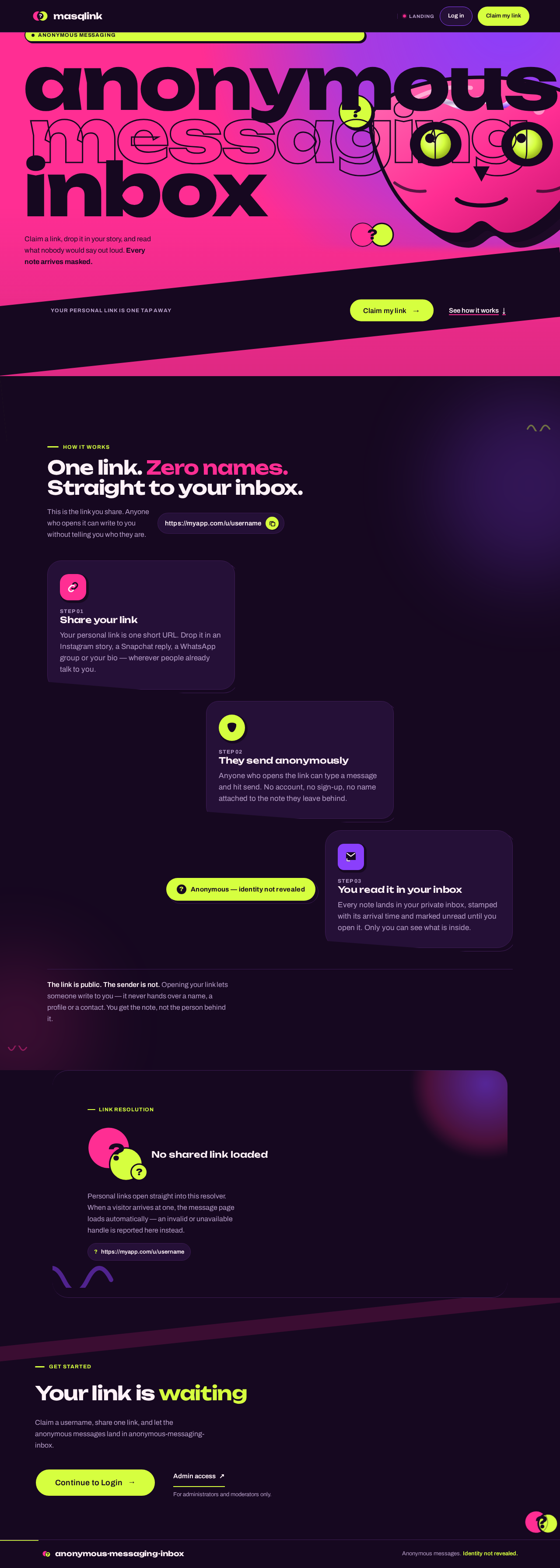
Anonymous messaging
Claim a link, drop it in your story, and read what nobody would say out loud. Every note arrives masked.
How it works
This is the link you share. Anyone who opens it can write to you without telling you who they are.
Your personal link is one short URL. Drop it in an Instagram story, a Snapchat reply, a WhatsApp group or your bio — wherever people already talk to you.
Anyone who opens the link can type a message and hit send. No account, no sign-up, no name attached to the note they leave behind.
Every note lands in your private inbox, stamped with its arrival time and marked unread until you open it. Only you can see what is inside.
Anonymous — identity not revealed
The link is public. The sender is not. Opening your link lets someone write to you — it never hands over a name, a profile or a contact. You get the note, not the person behind it.
Personal links open straight into this resolver. When a visitor arrives at one, the message page loads automatically — an invalid or unavailable handle is reported here instead.
?https://myapp.com/u/usernameClaim a username, share one link, and let the anonymous messages land in anonymous-messaging-inbox.
For administrators and moderators only.
Anonymous messaging
Claim a link, drop it in your story, and read what nobody would say out loud. Every note arrives masked.
How it works
This is the link you share. Anyone who opens it can write to you without telling you who they are.
Your personal link is one short URL. Drop it in an Instagram story, a Snapchat reply, a WhatsApp group or your bio — wherever people already talk to you.
Anyone who opens the link can type a message and hit send. No account, no sign-up, no name attached to the note they leave behind.
Every note lands in your private inbox, stamped with its arrival time and marked unread until you open it. Only you can see what is inside.
Anonymous — identity not revealed
The link is public. The sender is not. Opening your link lets someone write to you — it never hands over a name, a profile or a contact. You get the note, not the person behind it.
Personal links open straight into this resolver. When a visitor arrives at one, the message page loads automatically — an invalid or unavailable handle is reported here instead.
?https://myapp.com/u/usernameClaim a username, share one link, and let the anonymous messages land in anonymous-messaging-inbox.
For administrators and moderators only.
No comments yet. Be the first!