annexure-template
 Bhautik Vadaliya
HEY 8080, I JUST WANT TO BUILD ANNEXURE TEMPLATE GENERATION WHICH SHOULD BE EXTRACT TEMPLATES FROM TENDER DOCS WITH HIGHLIGHTED FIELDS WHICH ARE FILLABLE AND ALSO ASSUME ONE COMPANY TEMPLATE PROFILE AND USING IT FILL THE TEMPLATE WHICH ARE GENERATED AND GIVE THE FINAL TEMPLATES IN EDITABLE FORMAT SO BIDDER CAN FILL THE REMAINING DETAILS OR EDIT THE FILLED DEATILS IF REQUIRED, AND COST SHOULD BE LOWER FURTHERMORE, RESULT WOULD BE ACCURATE & STABLE


Comments (0)
Sign in to leave a comment
System Requirements
System Requirements Document for annexure-template
1. Introduction
annexure-template is a tender-paperwork instrument. It extracts annexure templates from tender documents, marks every fillable field so nothing is missed, merges a single reusable company template profile into those templates, and delivers the result in an editable format so a bidder can complete the remaining details or correct anything already filled.
The product intent is narrow and deliberate: turn a tender document into a set of accounted-for annexures with a visible, auditable field map, then hand that set to the bidder as an editable deliverable. The audience is bid teams, estimators, tender document preparers and back-office compliance staff in construction, infrastructure, supply and government contracting — people who are sceptical of automation, price-sensitive, and who measure success by the absence of omissions rather than by the presence of features.
Two demands govern every decision in this document: cost should be lower, and results must be accurate and stable.
2. System Overview
annexure-template is a first-party web application with application-owned identity. A tender document preparer signs up or logs in, uploads a tender document, and triggers extraction. The system parses the document into annexure templates and highlights every fillable field. A company template profile maintainer creates and maintains the single company template profile. The profile is then applied to the generated annexure templates, producing final templates in an editable format. The bidder opens the delivered templates, fills the remaining details, and edits already-filled details where required.
Actors:
- Bidder / Tender Submission User — completes and corrects annexures per tender.
- Company Template Profile Maintainer — keeps the single company template profile current.
- Tender Document Preparer — supplies the tender document, triggers extraction, reviews the generated annexure templates, and hands them on.
The system also performs non-human work: document parsing, field detection, profile merge, and editable-format export. These are system processes supporting the human lifecycles above; they are not personas.
Narrow exclusions: the product does not author tender documents, does not submit bids to any tender authority, does not maintain multiple company profiles, and does not provide a general-purpose document editor beyond completing and editing the generated annexure templates.
2a. Product Interpretation and Delivery Boundary
Delivery ownership. All nine destinations are first-party application pages. Identity is application-owned: self-service enrollment establishes a new account, and returning verification is required before protected tender, profile, and template records can be reached. Landing, Login, and Sign Up are anonymously reachable; every other page requires an established identity.
Current boundary. Everything described in this document is current: extraction of annexure templates with highlighted fillable fields, one company template profile, profile-based autofill of generated templates, editable final template delivery, bidder completion and editing, lower cost, and accurate and stable results.
Future boundary. No future-horizon requirements were stated. Nothing in this document is deferred.
Cost posture. Lower cost is a hard constraint, not an aspiration. It is expressed as: no paid third-party document-intelligence service is required for the core extraction path, extraction runs on the application's own parsing pipeline, and the editable output format is an open format that requires no per-seat licence to open or edit.
Accuracy and stability posture. Accuracy means extracted annexures match the tender document's annexure set and highlighted fields correspond to genuinely fillable fields. Stability means the same tender document and the same company template profile produce the same extracted annexure set and the same autofilled values across repeated runs.
2b. Source Content Inventory
No reference directive in this project declares content_source. This section is intentionally omitted.
2c. Page Content and Component Coverage
Landing
- Information/state: Anonymous first impression. Oversized flush-left headline "Every annexure. Every field. Accounted for." stacked in four ragged lines over the paper ground, with a 3px signal-red rule under the first line. One line of 14px muted copy: "Extract annexures, highlight fillable fields, autofill from one company profile, export editable." A live-rendered annexure sheet (real HTML, not an image) pinned to the right edge and bleeding off-screen, with three fillable fields outlined in signal red and one amber auto-filled value labelled "from company profile".
- Primary actions: "Upload a tender" — a single red rectangular button cut flush to the left margin, no pill, no shadow — routes an anonymous visitor into identity establishment and then to Tender Upload. "Log in" routes to Login.
- Supporting actions: "Create an account" routes to Sign Up. A schematic of the extraction pipeline (PDF → annexure blocks → field map → profile merge → editable output) rendered as a numbered transit line.
- Domain entities: none persisted; the rendered annexure sheet is illustrative of the product's own output shape.
- Component responsibilities: hero split (55% type / 45% document), numbered pipeline schematic, field-status legend preview, primary and secondary entry controls.
- States: loading — not applicable, the page is static. empty — not applicable. success — page renders. error — if the illustrative annexure sheet fails to render, the hero falls back to the headline and button alone with no broken frame. recovery — the fallback is silent and the entry controls remain fully usable.
Login
- Information/state: Returning verification surface. Email and password fields, both with 1px #DED8CB borders and 2px radius. A muted line stating that tender documents, the company profile, and generated templates are protected.
- Primary actions: "Log in" submits credentials and, on success, routes to the destination the user was originally heading for, or to Tender Upload by default.
- Supporting actions: "Create an account" routes to Sign Up. "Forgot password" is not in scope and is not offered.
- Domain entities: account identity (email, credential).
- Component responsibilities: credential form, inline field-level validation, submission control, cross-link to Sign Up.
- States: loading — submit control shows a restrained 120–180ms state change and disables re-submission. empty — fields render empty with visible labels. success — redirect to the intended protected page. error — unrecognised credentials produce an inline message above the form; the form retains the entered email and clears the password. recovery — the user may retry immediately; repeated failures do not lock the account.
Sign Up
- Information/state: Self-service enrollment surface. Email, password, and confirm-password fields. A muted line stating that one company template profile will be created for the account.
- Primary actions: "Create account" establishes the identity and routes to Company Profile so the single company template profile can be set up.
- Supporting actions: "Log in" routes to Login.
- Domain entities: account identity (email, credential), the account's single company template profile (created empty).
- Component responsibilities: enrollment form, password confirmation check, inline validation, submission control, cross-link to Login.
- States: loading — submit control shows a restrained state change and disables re-submission. empty — fields render empty with visible labels. success — identity established, session started, routed to Company Profile. error — an already-registered email produces an inline message with a direct link to Login; mismatched passwords produce a field-level message. recovery — the user corrects the field and resubmits without losing other entered values.
Tender Upload
- Information/state: The entry point of the numbered workflow rail (station 01). Shows the currently selected tender document's filename, size, and page count once chosen. A muted note states that extraction produces annexure templates with highlighted fillable fields.
- Primary actions: "Select tender document" opens a file picker; "Extract annexures" starts the extraction run.
- Supporting actions: "Replace document" clears the current selection. A link to Company Profile for users who have not yet set up the profile.
- Domain entities: tender document (filename, size, page count, upload timestamp), extraction run (status, annexure count).
- Component responsibilities: file selection control, document summary row, extraction trigger, extraction progress departure board.
- States: loading — during extraction, a horizontal route line draws left-to-right with station ticks lighting up as each annexure is parsed, and tabular numbers tick up beside annexure names. empty — no document selected; the trigger is disabled and a single-line centred empty state reads "No tender document selected." success — extraction completes with a hard state change to Annexure Templates, not a toast. error — an unreadable or unsupported document produces an inline error naming the file and the reason, and the previous selection is retained. recovery — the user replaces the document and re-runs extraction; a failed run leaves no partial annexure set behind.
Annexure Templates
- Information/state: Station 02. The extracted annexure set for the current tender document, listed with tabular numbering. The document viewer occupies the widest column; a right inspector panel lists fields as label/value rows aligned flush left with a colour bar in the gutter. Fillable fields in the document carry a 3px signal-red left bar and a red 1px outline. A field-status legend renders four pictogram tiles — solid red = fillable, amber half = auto-filled, hollow = missing, green = verified.
- Primary actions: "Confirm annexure set" advances to Autofill. Clicking a legend tile filters the document to matching elements.
- Supporting actions: Hovering a fillable field in the document instantly highlights its matching label/value row in the inspector with a red gutter bar, and vice versa. "Re-extract" returns to Tender Upload with the current document retained.
- Domain entities: annexure template (name, sequence number, source page range), fillable field (label, field ID, status, source location).
- Component responsibilities: annexure list, document viewer, field inspector, legend-as-filter control, confirmation control.
- States: loading — the viewer shows the route line completing and annexure rows populating in sequence. empty — extraction produced no annexures; a single-line centred empty state reads "No annexures found in this document" with a direct action to re-extract or replace the document. success — every annexure and its fillable fields are listed and inspectable. error — an annexure that fails to render shows a hollow-square pictogram and a muted reason in its row while the rest of the set remains usable. recovery — the user re-extracts or replaces the document; confirmed sets are not silently altered by a later failed run.
Company Profile
- Information/state: Station 03. The single company template profile for the account, presented as a form of labelled fields with 11–12px uppercase tracked labels. Values already saved render with an amber left colour bar indicating they are profile-sourced. A muted line states that this one profile is used to fill every generated annexure template.
- Primary actions: "Save profile" persists the profile.
- Supporting actions: "Clear field" empties a single profile value. A link to Autofill for users whose profile is already complete.
- Domain entities: company template profile (a single record per account, holding the company's reusable field values).
- Component responsibilities: profile field form, per-field state bars, save control, completeness indicator.
- States: loading — fields render in a read state until values arrive. empty — a newly created account shows an empty profile with all fields unset and a muted prompt to enter company details. success — saved values persist and are immediately available to Autofill. error — a value that fails validation is marked inline and the save is rejected as a whole so the profile is never left half-written. recovery — the user corrects the offending field and saves again; previously saved values are unchanged.
Autofill
- Information/state: Station 04. The confirmed annexure set on the left, the company template profile values on the right, and a merge preview showing, per field, the profile value that will be written and the fields that will remain unfilled. Auto-filled fields are marked amber; fields with no profile match remain hollow.
- Primary actions: "Apply profile" runs the merge and produces the final templates.
- Supporting actions: "Exclude a field" removes a single field from the merge for this run. A link to Company Profile to fill a gap discovered during preview.
- Domain entities: annexure template, fillable field, company template profile value, merge result (per-field filled/unfilled status).
- Component responsibilities: side-by-side merge preview, per-field status bars, exclusion control, apply control.
- States: loading — the preview populates field by field with tabular counts. empty — if the company template profile has no values, a single-line centred empty state reads "Company profile is empty" with a direct action to Company Profile. success — merge completes and routes to Final Templates. error — a merge that cannot complete leaves the confirmed annexure set untouched and reports which fields blocked it. recovery — the user fills the missing profile values or excludes the blocking fields, then re-applies.
Final Templates
- Information/state: Station 05. The final annexure templates in editable format, listed with tabular numbering and per-template field counts. Each template shows its filled fields in amber and its remaining unfilled fields in signal red. A muted line states the format is editable and can be opened and edited without a paid licence.
- Primary actions: "Download all" exports the full set in the editable format. "Open in Bidder Workspace" hands the set to the bidder.
- Supporting actions: "Download one" exports a single template. "Back to Autofill" returns to the merge preview.
- Domain entities: final annexure template (name, sequence number, editable-format file, filled field count, unfilled field count).
- Component responsibilities: final template list, per-template status summary, export controls, handoff control.
- States: loading — templates render with counts settling. empty — no final templates exist yet; a single-line centred empty state reads "No final templates yet" with a direct action to Autofill. success — every template is listed, downloadable, and openable in Bidder Workspace. error — an export that fails reports the affected template and leaves the rest of the set downloadable. recovery — the user retries the export for the affected template only.
Bidder Workspace
- Information/state: Station 06. The delivered annexure templates for the bidder, opened for completion. Each template shows its fields as label/value rows; auto-filled values carry an amber bar and are editable, remaining fields carry a signal-red bar and are empty. The field-status legend behaves as a filter, dimming every element that does not match the selected status.
- Primary actions: "Save changes" persists the bidder's edits to the template.
- Supporting actions: "Mark verified" sets a completed field to the green verified state. "Download" exports the current state of the template in the editable format.
- Domain entities: final annexure template, fillable field (label, value, status: fillable / auto-filled / missing / verified), bidder edit.
- Component responsibilities: template viewer, field editor, legend-as-filter control, verification control, save and download controls.
- States: loading — templates render in a read state until values arrive. empty — no templates have been handed to the bidder; a single-line centred empty state reads "No templates delivered yet." success — edits persist and the template's filled and verified counts update. error — a save that fails reports the affected template and preserves the user's in-progress edits in the form. recovery — the user retries the save; no edit is silently discarded.
3. Functional Requirements
FR-1 — Extract annexure templates from a tender document (explicit) As a Tender Document Preparer, I should upload a tender document and have the system extract its annexure templates, so that I have the annexure set without rebuilding it by hand.
- Trigger/input: a tender document selected on Tender Upload and an "Extract annexures" action.
- Observable result: the extracted annexure set appears on Annexure Templates, listed with tabular numbering and source page ranges.
- Access state: requires an established identity.
- Failure/recovery: an unreadable or unsupported document produces an inline error naming the file and reason; the previous selection is retained and no partial annexure set is left behind.
- Continuation: the preparer reviews the set on Annexure Templates.
- Acceptance: every annexure present in the tender document appears exactly once in the extracted set.
FR-2 — Highlight fillable fields in extracted templates (explicit) As a Tender Document Preparer, I should see every fillable field in an extracted annexure template highlighted, so that nothing that must be filled is missed.
- Trigger/input: a completed extraction run.
- Observable result: each fillable field carries a 3px signal-red left bar and a red 1px outline in the document viewer, and a matching label/value row in the inspector.
- Access state: requires an established identity.
- Failure/recovery: an annexure that fails to render shows a hollow-square pictogram and a muted reason in its row while the rest of the set remains usable.
- Continuation: the preparer inspects fields and confirms the set.
- Acceptance: hovering a highlighted field highlights its inspector row with a red gutter bar, and hovering an inspector row highlights its field.
FR-3 — Maintain one company template profile (explicit) As a Company Template Profile Maintainer, I should create and maintain a single company template profile, so that the company's reusable details are available to fill generated templates.
- Trigger/input: profile field values entered on Company Profile and a "Save profile" action.
- Observable result: the profile persists as a single record for the account, with saved values marked amber.
- Access state: requires an established identity.
- Failure/recovery: a value that fails validation is marked inline and the save is rejected as a whole, so the profile is never left half-written.
- Continuation: the saved profile is immediately available to Autofill.
- Acceptance: exactly one company template profile exists per account; no second profile can be created.
FR-4 — Fill generated templates using the company template profile (explicit) As a Tender Document Preparer, I should apply the company template profile to the generated annexure templates, so that the company's known details are filled automatically.
- Trigger/input: a confirmed annexure set and a saved company template profile, with an "Apply profile" action on Autofill.
- Observable result: a merge preview shows, per field, the profile value that will be written; after applying, filled fields are marked amber and unmatched fields remain hollow.
- Access state: requires an established identity.
- Failure/recovery: a merge that cannot complete leaves the confirmed annexure set untouched and reports which fields blocked it.
- Continuation: the merge routes to Final Templates.
- Acceptance: every field with a matching profile value is filled with that value; no field is filled with a value absent from the profile.
FR-5 — Deliver final templates in an editable format (explicit) As a Tender Document Preparer, I should receive the final annexure templates in an editable format, so that the bidder can work on them directly.
- Trigger/input: a completed merge on Autofill.
- Observable result: Final Templates lists each template with its filled and unfilled field counts, and offers "Download all" and "Download one".
- Access state: requires an established identity.
- Failure/recovery: an export that fails reports the affected template and leaves the rest of the set downloadable.
- Continuation: the preparer hands the set to the bidder via "Open in Bidder Workspace".
- Acceptance: the exported format opens and edits without a paid licence.
FR-6 — Bidder fills remaining details (explicit) As a Bidder / Tender Submission User, I should fill the remaining details the system could not supply, so that the annexure is complete for submission.
- Trigger/input: a delivered template opened in Bidder Workspace, with values entered into fields carrying a signal-red bar.
- Observable result: entered values persist on "Save changes" and the template's filled count updates.
- Access state: requires an established identity.
- Failure/recovery: a save that fails reports the affected template and preserves in-progress edits in the form.
- Continuation: the bidder continues to the next field or template.
- Acceptance: no entered value is silently discarded.
FR-7 — Bidder edits already-filled details (explicit) As a Bidder / Tender Submission User, I should edit details that were already filled, so that I can correct anything the profile supplied incorrectly for this tender.
- Trigger/input: an auto-filled field carrying an amber bar, opened for editing in Bidder Workspace.
- Observable result: the corrected value replaces the profile-supplied value in that template and persists on "Save changes".
- Access state: requires an established identity.
- Failure/recovery: a save that fails preserves the corrected value in the form and reports the affected template.
- Continuation: the bidder marks the field verified or moves on.
- Acceptance: editing a filled field changes only that template's value and does not alter the company template profile.
FR-8 — Verify completed fields (explicit) As a Bidder / Tender Submission User, I should mark a completed field as verified, so that I can see at a glance which parts of the annexure are settled.
- Trigger/input: a "Mark verified" action on a filled field in Bidder Workspace.
- Observable result: the field takes the green verified state and the template's verified count updates.
- Access state: requires an established identity.
- Failure/recovery: verification is not offered on an empty field; the control is unavailable until a value exists.
- Continuation: the bidder filters by the verified legend tile to review what remains.
- Acceptance: verified fields are distinguishable from filled-but-unverified fields.
FR-9 — Filter the document by field status (explicit) As a Tender Document Preparer or Bidder / Tender Submission User, I should click a field-status legend tile to dim every element that does not match, so that I can query the document by what still needs attention.
- Trigger/input: a click on one of the four pictogram tiles (solid red = fillable, amber half = auto-filled, hollow = missing, green = verified).
- Observable result: non-matching document elements dim; matching elements remain at full contrast.
- Access state: requires an established identity.
- Failure/recovery: clicking the active tile clears the filter and restores full contrast.
- Continuation: the user acts on the visible matching fields.
- Acceptance: the filter applies consistently across the document viewer and the inspector.
FR-10 — Self-service enrollment (required_inference) As a new user, I should create an account myself, so that I can start using the product without an invitation or provisioning step.
- Trigger/input: email, password, and confirm-password entered on Sign Up.
- Observable result: an identity is established, a session starts, and the account's single company template profile is created empty.
- Access state: anonymous entry; Sign Up is reachable without an identity.
- Failure/recovery: an already-registered email produces an inline message with a direct link to Login; mismatched passwords produce a field-level message and other entered values are retained.
- Continuation: the user is routed to Company Profile.
- Acceptance: no invitation, provisioning, or provider account is required.
FR-11 — Returning verification (required_inference) As a returning user, I should verify my identity before reaching protected records, so that my tender documents, company profile, and generated templates remain mine.
- Trigger/input: email and password entered on Login.
- Observable result: on success the user reaches the destination they were originally heading for, or Tender Upload by default.
- Access state: anonymous entry; Login is reachable without an identity.
- Failure/recovery: unrecognised credentials produce an inline message above the form; the email is retained, the password is cleared, and the user may retry immediately without lockout.
- Continuation: the user proceeds to the protected page they intended.
- Acceptance: Tender Upload, Annexure Templates, Company Profile, Autofill, Final Templates, and Bidder Workspace are unreachable without an established identity.
FR-12 — Company profile must exist before autofill completes (required_inference) As a Tender Document Preparer, I should be told when the company template profile is empty, so that I can supply the values that autofill depends on.
- Trigger/input: opening Autofill when the account's company template profile holds no values.
- Observable result: a single-line centred empty state reads "Company profile is empty" with a direct action to Company Profile.
- Access state: requires an established identity.
- Failure/recovery: the merge cannot be applied while the profile is empty; the confirmed annexure set is untouched.
- Continuation: the user fills the profile and returns to Autofill.
- Acceptance: autofill never runs against an empty profile.
FR-13 — Tender document must be supplied before extraction (required_inference) As a Tender Document Preparer, I should be prevented from starting extraction without a document, so that a run never produces a meaningless result.
- Trigger/input: opening Tender Upload with no document selected.
- Observable result: the extraction trigger is disabled and a single-line centred empty state reads "No tender document selected."
- Access state: requires an established identity.
- Failure/recovery: selecting a document enables the trigger; replacing the document clears the previous selection cleanly.
- Continuation: the user selects a document and extracts.
- Acceptance: extraction cannot be started without a selected tender document.
FR-14 — Generated templates must exist before bidder completion (required_inference) As a Bidder / Tender Submission User, I should see a clear state when nothing has been delivered to me, so that I do not mistake an empty workspace for a lost submission.
- Trigger/input: opening Bidder Workspace before any final templates have been handed over.
- Observable result: a single-line centred empty state reads "No templates delivered yet."
- Access state: requires an established identity.
- Failure/recovery: once templates are handed over, the workspace lists them and the empty state no longer appears.
- Continuation: the bidder opens a delivered template and begins completing it.
- Acceptance: the bidder cannot edit a template that has not been generated and delivered.
FR-15 — Lower cost (explicit) As a project owner, I should be able to run the full extraction, autofill, and delivery path without a paid third-party document-intelligence service or a per-seat output licence, so that the cost of producing annexure templates stays low.
- Trigger/input: any extraction, merge, or export run.
- Observable result: extraction runs on the application's own parsing pipeline and the editable output format opens and edits without a paid licence.
- Access state: not applicable.
- Failure/recovery: if a document cannot be parsed by the built-in pipeline, the run fails with a clear inline error rather than silently falling back to a paid external service.
- Continuation: the user replaces the document or re-runs extraction.
- Acceptance: no core path requires a paid external document-intelligence subscription.
FR-16 — Accurate and stable results (explicit) As a Tender Document Preparer, I should get the same annexure set and the same autofilled values when I run the same tender document against the same company template profile, so that I can trust the output.
- Trigger/input: re-running extraction on an unchanged tender document, or re-applying an unchanged company template profile.
- Observable result: the extracted annexure set, the highlighted fillable fields, and the autofilled values are identical to the previous run.
- Access state: requires an established identity.
- Failure/recovery: a run that cannot reproduce the prior result reports the divergence rather than silently overwriting the confirmed set.
- Continuation: the user reviews the reported divergence and decides whether to re-confirm.
- Acceptance: repeated runs over unchanged inputs produce identical annexure sets and identical autofilled values.
4. User Personas
Bidder / Tender Submission User
Product context. The bidder is the end recipient of the generated annexure templates. They work under submission deadlines, on documents they did not create, and they are accountable for what the annexure says when it is filed. They are the person who discovers that a field was filled with a stale company detail, or that a field nobody noticed was left empty.
Primary goal. Complete and correct the annexures for a specific tender so the submission is accurate and nothing is missing.
Distinct accepted responsibilities. Filling the remaining details the system could not supply (FR-6); editing already-filled details where the profile supplied something wrong for this tender (FR-7); marking completed fields as verified so the remaining work is visible (FR-8); filtering the document by field status to find what still needs attention (FR-9).
Relevant inputs or decisions. Which fields to fill versus leave; whether an auto-filled value is correct for this tender; when a field is genuinely settled and can be marked verified.
Interactions with other accepted participants. Receives the final templates from the Tender Document Preparer via the handoff on Final Templates. Does not edit the company template profile — a correction made in the bidder's template stays in that template.
Observable success. Every field in every delivered template is either filled and verified, or deliberately left, and the bidder can see that state at a glance through the legend filter.
Company Template Profile Maintainer
Product context. This person owns the company's reusable facts — the details that are the same on every tender and therefore should never be retyped. Their work is upstream of every autofill run, and their mistakes surface as wrong values in a bidder's annexure.
Primary goal. Keep the single company template profile current and complete so that filled annexures are accurate and stable across tenders.
Distinct accepted responsibilities. Creating and maintaining the one company template profile (FR-3); supplying the values that autofill depends on when the profile is found empty (FR-12); reviewing the merge preview on Autofill to see which fields the profile does and does not cover (FR-4).
Relevant inputs or decisions. Company details and their current values; which fields the profile should cover; whether a gap discovered during a merge preview should be closed in the profile or excluded for that run.
Interactions with other accepted participants. Works alongside the Tender Document Preparer, who applies the profile. The maintainer's saved values appear as amber auto-filled fields in the bidder's workspace, where the bidder may override them per tender without changing the profile.
Observable success. The profile is complete enough that a merge preview leaves few or no hollow fields, and the same profile produces the same autofilled values on every run.
Tender Document Preparer
Product context. This person receives the tender document and is responsible for turning it into a usable annexure set. They are the first to see whether extraction worked, and the last to check it before it reaches the bidder.
Primary goal. Produce a correctly extracted annexure template set with the right fields highlighted as fillable, then hand it on.
Distinct accepted responsibilities. Uploading the tender document and triggering extraction (FR-1); reviewing the extracted annexures and their highlighted fillable fields (FR-2); confirming the annexure set; applying the company template profile to produce final templates (FR-4); delivering the final templates in editable format (FR-5); confirming that repeated runs over unchanged inputs produce identical results (FR-16).
Relevant inputs or decisions. Which tender document to run; whether the extracted annexure set is complete and correct; whether to re-extract or replace the document; which fields to exclude from a merge; when the set is ready to hand to the bidder.
Interactions with other accepted participants. Depends on the Company Template Profile Maintainer for profile values, and hands the finished set to the Bidder / Tender Submission User through Bidder Workspace.
Observable success. The extracted annexure set matches the tender document's annexures exactly, every fillable field is highlighted, and the delivered editable templates open and edit without friction.
5. Core User Flows
Flow A — Tender Document Preparer: from tender document to delivered editable templates
- The preparer opens Landing anonymously and reads the promise: extract annexures, highlight fillable fields, autofill from one company profile, export editable.
- The preparer selects "Upload a tender". Because no identity exists yet, they are routed through Sign Up, entering email, password, and confirm-password. On success an identity is established, a session starts, and the account's single company template profile is created empty.
- The preparer lands on Company Profile and enters the company's reusable details, then selects "Save profile". Saved values render with an amber bar. If a value fails validation, the save is rejected as a whole and the offending field is marked inline; the preparer corrects it and saves again.
- The preparer opens Tender Upload (station 01) and selects the tender document. The document's filename, size, and page count appear. The preparer selects "Extract annexures".
- Extraction runs. A horizontal route line draws left-to-right with station ticks lighting up as each annexure is parsed, and tabular numbers tick up beside annexure names. On completion there is a hard state change to Annexure Templates — no toast.
- On Annexure Templates (station 02) the preparer reviews the extracted set. Each annexure is listed with tabular numbering and source page ranges. In the document viewer, every fillable field carries a 3px signal-red left bar and a red 1px outline. The preparer hovers a highlighted field; its matching label/value row in the inspector highlights instantly with a red gutter bar. They hover an inspector row; the field highlights in the document.
- The preparer clicks the solid-red legend tile to dim everything that is not fillable, confirming that the highlighted set is complete, then clicks the tile again to clear the filter.
- If an annexure failed to render, its row shows a hollow-square pictogram and a muted reason while the rest of the set stays usable. The preparer selects "Re-extract", which returns to Tender Upload with the current document retained, and runs extraction again. The confirmed set is not silently altered by the failed run.
- Satisfied, the preparer selects "Confirm annexure set" and advances to Autofill (station 04).
- On Autofill the confirmed annexure set appears on the left and the company template profile values on the right, with a merge preview showing, per field, the profile value that will be written. Fields with a profile match are marked amber; fields with no match remain hollow.
- The preparer notices one field that should not be filled from the profile for this tender and selects "Exclude a field" for it. They also notice a hollow field that the profile should cover, follow the link to Company Profile, add the missing value, save, and return to Autofill. The preview updates.
- The preparer selects "Apply profile". The merge completes and routes to Final Templates (station 05).
- On Final Templates each template is listed with tabular numbering and its filled and unfilled field counts. Filled fields show amber; remaining unfilled fields show signal red.
- The preparer selects "Download all" to export the full set in the editable format. If one template's export fails, the failure is reported for that template only and the rest of the set remains downloadable; the preparer retries that one export.
- The preparer selects "Open in Bidder Workspace" to hand the set to the bidder.
- Continuation and stability check: the preparer re-runs extraction on the same unchanged tender document and re-applies the same unchanged profile. The extracted annexure set, the highlighted fillable fields, and the autofilled values are identical to the previous run. If a run cannot reproduce the prior result, the divergence is reported rather than silently overwriting the confirmed set, and the preparer decides whether to re-confirm.
Flow B — Company Template Profile Maintainer: keeping the single profile current
- The maintainer opens Login anonymously and enters email and password. On success they reach the destination they were heading for, or Tender Upload by default.
- The maintainer opens Company Profile (station 03). The single company template profile for the account is presented as a form of labelled fields; saved values render with an amber left bar.
- The maintainer updates the company's reusable details and selects "Save profile". The values persist and are immediately available to Autofill.
- If a value fails validation, the save is rejected as a whole and the field is marked inline. The maintainer corrects the offending field and saves again; previously saved values are unchanged.
- The maintainer selects "Clear field" on a value that is no longer current. The field empties and the profile's completeness indicator drops.
- Gap-closing loop: the maintainer opens Autofill and reviews the merge preview against a confirmed annexure set. Hollow fields reveal what the profile does not cover. The maintainer returns to Company Profile, adds the missing values, saves, and returns to Autofill to confirm the preview now shows amber for those fields.
- Continuation: the maintainer's saved values appear as amber auto-filled fields in the bidder's workspace. When a bidder overrides one for a specific tender, the profile itself is unchanged — the maintainer's next merge still uses the profile value.
Flow C — Bidder / Tender Submission User: completing and correcting a delivered annexure
- The bidder opens Login anonymously and enters email and password. On success they reach the destination they were heading for, or Tender Upload by default.
- The bidder opens Bidder Workspace (station 06). The delivered annexure templates are listed. If nothing has been delivered yet, a single-line centred empty state reads "No templates delivered yet."
- The bidder opens a template. Fields appear as label/value rows: auto-filled values carry an amber bar and are editable; remaining fields carry a signal-red bar and are empty.
- Filling remaining details: the bidder enters values into the signal-red fields. They select "Save changes". The values persist and the template's filled count updates. If the save fails, the affected template is reported and the bidder's in-progress edits remain in the form; the bidder retries and no edit is silently discarded.
- Correcting a filled detail: the bidder finds an amber auto-filled value that is wrong for this tender. They edit it directly. The corrected value replaces the profile-supplied value in that template and persists on save. The company template profile is not altered.
- Verifying: the bidder selects "Mark verified" on a completed field. It takes the green verified state and the template's verified count updates. The control is unavailable on an empty field until a value exists.
- Finding what remains: the bidder clicks the hollow-square legend tile. Every document element that is not a missing field dims, leaving only what still needs attention. They work through those fields, then click the tile again to clear the filter.
- The bidder selects "Download" to export the current state of the template in the editable format, and repeats steps 3–7 for the next delivered template.
- Completion: every field in every delivered template is either filled and verified, or deliberately left, and the bidder can see that state at a glance through the legend filter.
Flow D — New user: first-use identity establishment
- A visitor arrives on Landing anonymously. The hero reads "Every annexure. Every field. Accounted for." with the promise line beneath it and a live-rendered annexure sheet showing three red-outlined fillable fields and one amber value labelled "from company profile".
- The visitor selects "Create an account" and is routed to Sign Up.
- The visitor enters email, password, and confirm-password. If the email is already registered, an inline message appears with a direct link to Login; if the passwords do not match, a field-level message appears and the other entered values are retained.
- On success the identity is established, a session starts, and the account's single company template profile is created empty. The visitor is routed to Company Profile.
- Continuation: the new user either completes the profile (Flow B) or goes straight to Tender Upload (Flow A, step 4). If they later return, they verify through Login (Flow A step 1 / Flow B step 1 / Flow C step 1) and reach the protected page they intended.
6. Visuals Colors and Theme
Muse: Erik Spiekermann. Headline idea: typography as infrastructure — a routing and signage layer for tender documents, where the interface reads like a serious instrument rather than a subscription toy. The emotional target is warm, orderly confidence: the specific relief of controlled, auditable paperwork.
Colour tokens
| Role | Hex | Usage |
|---|---|---|
| Background (paper ground) | #F4F1EA | Carries the whole product |
| Surface (document sheet) | #FFFDF8 | Document surfaces, annexure pages |
| Text (ink) | #1B1A17 | All type |
| Primary (signal red) | #D2371F | Primary actions, required/fillable fields, route lines — never decorative |
| Accent (amber) | #C88A00 | Auto-filled-from-profile values, warnings |
| Verified (transit green) | #2F6B4F | Verified / complete state only |
| Muted | #6E6A61 | Metadata, field IDs, timestamps |
| Hairline rule | #DED8CB | 1px borders and rules |
Ratio target: roughly 70% paper, 20% surface, 6% ink rules, 4% signal colours. Light mode only.
Typography
- Headings: Fira Sans, Semibold 600 at large sizes, tight
-0.02emtracking, sentence case for page titles. - Body: Fira Sans, 16px / 1.6.
- Field labels and section numbers: Fira Sans 500, uppercase, 11–12px,
+0.14emtracking — station-signage treatment. - Dense table rows: 14px / 1.45. Micro-labels: 11px / 1.2 uppercase.
- Numerals: tabular (
tnum) everywhere, so annexure counts and page numbers align in columns. - Scale: 1.25 modular on a 4px baseline — 64 / 48 / 32 / 24 / 18 / 16 / 14 / 12.
Shape language
Almost no radii: 2px on inputs and buttons, 0px on cards and document surfaces so pages read as paper, not app tiles. Controls are honest rectangles with visible 1px borders and a 3px left colour bar encoding state (red = fillable, amber = auto-filled, green = verified). No blobs, no glass, no soft shadows — depth comes from a single 1px border plus a 0 1px 0 rule.
Layout
A 12-column wayfinding grid with a persistent left rail: numbered workflow stations (01 Upload · 02 Annexures · 03 Profile · 04 Autofill · 05 Final · 06 Bidder) rendered as a vertical transit line with station dots that fill in as work completes. The document viewer is the widest column; a right inspector panel lists fields as label/value rows aligned flush left with a colour bar in the gutter. Section boundaries are full-width 3px ink rules with the section number set huge in the left margin. Everything is flush-left, ragged-right; nothing is centred except single-line empty states.
Imagery
No stock photography at all. The visual material is the documents themselves: rendered annexure pages with red-outlined field boxes, schematic diagrams of the extraction pipeline (PDF → annexure blocks → field map → profile merge → editable output), and transit-signage pictograms for file states — filled square for complete, hollow square for missing, half square for auto-filled. Profile avatars are monogram tiles in ink on paper, never photos.
7. Signature Design Concept
The departure board for documents.
The public entry is a full-viewport split that reads as a transit departure board for tender paperwork.
Left 55% — the signage panel. An oversized flush-left headline in Fira Sans Semibold at clamp(44px, 7vw, 104px), stacked in four ragged lines over the paper ground:
Every annexure. Every field. Accounted for.
A 3px signal-red rule sits under the first line. Beneath the headline, one line of 14px muted copy states the promise: "Extract annexures, highlight fillable fields, autofill from one company profile, export editable." A single red rectangular "Upload a tender" button is cut flush to the left margin — no pill, no shadow, 2px radius, honest rectangle. A secondary "Log in" text link sits beside it.
Right 45% — the live sheet. A real HTML-rendered annexure sheet, tilted 0deg and pinned to the right edge so it bleeds off-screen. Three of its fields are outlined in signal red with 3px left bars. One field carries an amber bar and a label reading "from company profile". The sheet is not an image; it is the product's own output shape rendered in the product's own type.
The numbered rail. Down the left edge runs the transit-line workflow rail — 01…06 station dots that fill solid red as each stage completes, with the current station's label rotated 90° in the margin. On the landing page the rail is shown in its schematic form as the extraction pipeline: PDF → annexure blocks → field map → profile merge → editable output.
The legend as the primary query control. Four pictogram tiles — solid red = fillable, amber half = auto-filled, hollow = missing, green = verified — appear beneath the hero as a preview of the product's core semantic. On the working pages they behave as a filter, dimming every document element that does not match.
No gradient, no centred stack, no illustration, no stock photography, no hover-lift feature card grid.
8. Interaction Model & Motion Direction
Interaction Model: Static Motion Tempo: restrained Hero Dimensionality: flat
Landing Hero Motion Brief
- Focal subject: the live-rendered annexure sheet bleeding off the right edge, with three signal-red fillable fields and one amber auto-filled value labelled "from company profile".
- Input → transformation → outcome thesis: the visitor's attention moves from the oversized headline to the sheet; the sheet's red field outlines and amber value resolve into a legible field map; the outcome is that the visitor understands — before reading any feature copy — that this product marks which fields must be filled and which were supplied from the company profile.
- Motion vocabulary: functional and short. 120–180ms linear-ish transitions on state changes. No bounce, no easing theatre. The one permitted flourish is the extraction progress route line that draws left-to-right with station ticks lighting up as each annexure is parsed, plus tabular numbers ticking up — a departure board, not a loading spinner. Hover on a fillable field in the document highlights its row in the inspector instantly, both linked by the same red.
- Composed first frame: headline stacked in four ragged lines at the left margin with the red 3px rule under the first line; the annexure sheet already pinned and bleeding off the right edge with its red outlines and amber value visible; the "Upload a tender" button cut flush left; the pipeline schematic resting beneath the headline.
- Reduced-motion state: all transitions resolve instantly to their end state. The extraction route line appears fully drawn with all station ticks lit. Tabular counts appear at their final values. Hover linking between document field and inspector row still applies, but as an immediate state change with no transition. No element depends on motion to be understood.
9. Non-Functional Requirements
NFR-1 — Cost (explicit) The full extraction, autofill, and delivery path must run without a paid third-party document-intelligence service and without a per-seat licence for the editable output format. Rationale: "cost should be lower" is an explicit hard constraint. If the built-in parsing pipeline cannot handle a document, the run fails with a clear inline error rather than silently falling back to a paid external service.
NFR-2 — Accuracy (explicit) Extracted annexures must match the tender document's annexure set, and highlighted fields must correspond to genuinely fillable fields. Rationale: "result would be accurate" is an explicit hard constraint.
NFR-3 — Stability (explicit) The same tender document run against the same company template profile must produce the same extracted annexure set, the same highlighted fillable fields, and the same autofilled values across repeated runs. A run that cannot reproduce the prior result must report the divergence rather than silently overwriting the confirmed set. Rationale: "result would be stable" is an explicit hard constraint.
NFR-4 — Single profile invariant (explicit) Exactly one company template profile exists per account. No second profile can be created. Rationale: "assume one company template profile" is an explicit hard constraint.
NFR-5 — Editable output (explicit) Final templates must be delivered in an editable format that the bidder can open and edit without a paid licence, so that remaining details can be filled and already-filled details corrected. Rationale: explicit requirement that the bidder can fill and edit.
NFR-6 — Protected records (required_inference) Tender documents, the company template profile, and generated templates are protected state and are unreachable without an established identity. Rationale: these records are durable, account-specific, and must remain bound to the correct participant.
NFR-7 — No silent data loss (required_inference) A failed save or export must never silently discard a user's entered or edited value. Rationale: the bidder's edits are the product's final deliverable and cannot be reconstructed.
NFR-8 — Accessibility of state encoding (required_inference) Field status is encoded by colour bar plus pictogram shape (solid / half / hollow square) plus text label, so status is never conveyed by colour alone. Rationale: the field-status system is the product's primary semantic and must survive colour-vision differences.
10. Tech Stack
- Frontend: React (web), TypeScript. Fira Sans served as a self-hosted webfont family with tabular numerals enabled.
- Backend: Python with FastAPI, exposing the extraction, profile, merge, and export endpoints.
- Document parsing: a Python document-parsing pipeline running in-process for PDF text and layout extraction, annexure block detection, and fillable-field identification. No paid external document-intelligence service on the core path (NFR-1).
- Storage: relational storage for accounts, the single company template profile per account, tender documents, extraction runs, annexure templates, fillable fields and their statuses, merge results, and bidder edits; object storage for uploaded tender documents and generated editable template files.
- Editable output format: an open, licence-free document format that preserves field structure and can be opened and edited without paid software (NFR-5).
- Packaging and deployment: Docker with docker-compose for local and single-host deployment. Kubernetes is not required at the current scope.
11. Assumptions and Constraints
Constraints (binding):
- Cost should be lower — no paid third-party document-intelligence service on the core path, and no per-seat licence for the editable output format.
- Results must be accurate and stable — repeated runs over unchanged inputs produce identical annexure sets and identical autofilled values.
- Only one company template profile is assumed — exactly one profile per account, and no second profile can be created.
Assumptions (narrow, labeled):
- [Assumption] Tender documents are supplied as files that the built-in parsing pipeline can read. Documents it cannot read fail with a clear inline error rather than a silent fallback.
- [Assumption] The company template profile's field set is defined by the fields the maintainer enters; the product does not prescribe a fixed company-detail schema beyond what the profile form offers.
- [Assumption] The bidder reaches Bidder Workspace through the same application identity model as the other protected pages. No separate bidder invitation or external handoff channel is established by the source.
- [Assumption] "Editable format" means a format that preserves the annexure's field structure so that remaining fields can be filled and filled fields corrected, and that opens without paid software.
- [Default — not specified by user] Light mode only; no dark theme is defined.
- [Default — not specified by user] No password-reset flow is offered; the source establishes only self-service enrollment and returning verification.
- [Default — not specified by user] No email delivery, notification, or reminder capability is included.
Explicit exclusions:
- The product does not author or modify tender documents.
- The product does not submit bids to any tender authority.
- The product does not maintain multiple company profiles.
- The product does not provide a general-purpose document editor beyond completing and editing the generated annexure templates.
12. Glossary
- Annexure — a structured attachment within a tender document that a bidder must complete and submit.
- Annexure template — the extracted, structured representation of an annexure, carrying its fillable fields and their statuses.
- Fillable field — a field in an annexure template that a human must or may supply a value for. Marked with a 3px signal-red left bar and a red 1px outline.
- Field status — one of four states: fillable (solid red), auto-filled (amber half), missing (hollow), verified (green).
- Company template profile — the single reusable record of a company's details per account, used to fill generated annexure templates. Exactly one exists per account.
- Autofill — the merge of company template profile values into a confirmed annexure set.
- Merge preview — the per-field view on Autofill showing which profile value will be written and which fields will remain unfilled.
- Final template — an annexure template after the profile merge, delivered in editable format.
- Editable format — an open, licence-free document format that preserves field structure and can be opened and edited without paid software.
- Extraction run — a single pass of the parsing pipeline over one tender document, producing an annexure set.
- Workflow station — one of the six numbered stages in the left rail: 01 Upload · 02 Annexures · 03 Profile · 04 Autofill · 05 Final · 06 Bidder.
- Departure board — the extraction progress display: a horizontal route line drawing left-to-right with station ticks lighting up and tabular counts ticking up.
- Legend filter — the four pictogram tiles that double as the product's primary query control, dimming every document element that does not match the selected status.
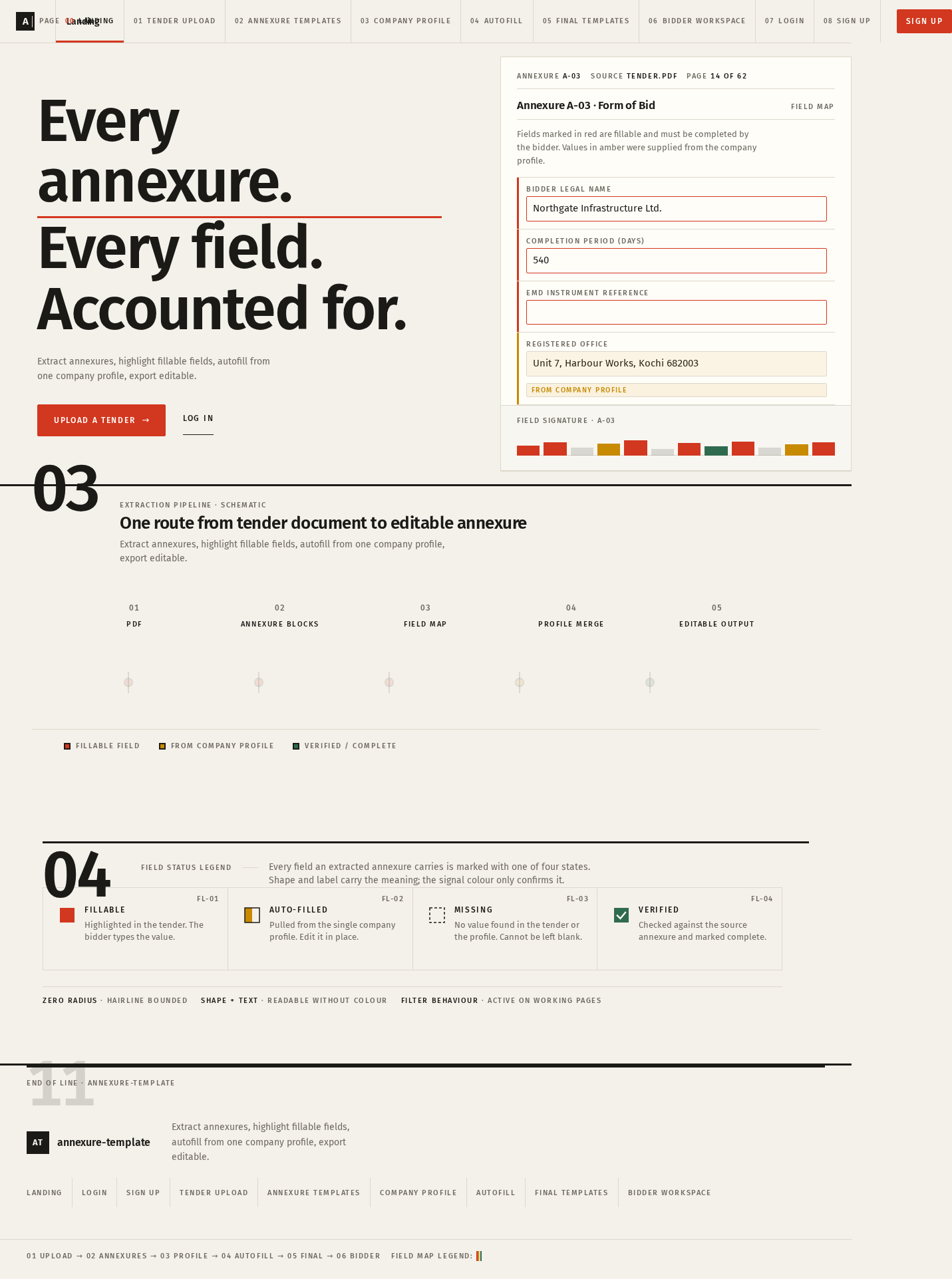
Every annexure.Every field.Accounted for.
Extract annexures, highlight fillable fields, autofill from one company profile, export editable.
Annexure A-03 · Form of Bid
Field mapFields marked in red are fillable and must be completed by the bidder. Values in amber were supplied from the company profile.
- FillableHighlighted in the tender. The bidder types the value.
- Auto-filledPulled from the single company profile. Edit it in place.
- MissingNo value found in the tender or the profile. Cannot be left blank.
- VerifiedChecked against the source annexure and marked complete.
Every annexure.Every field.Accounted for.
Extract annexures, highlight fillable fields, autofill from one company profile, export editable.
Annexure A-03 · Form of Bid
Field mapFields marked in red are fillable and must be completed by the bidder. Values in amber were supplied from the company profile.
- FillableHighlighted in the tender. The bidder types the value.
- Auto-filledPulled from the single company profile. Edit it in place.
- MissingNo value found in the tender or the profile. Cannot be left blank.
- VerifiedChecked against the source annexure and marked complete.
No comments yet. Be the first!