amber-start
 Diya Trivedi
start a project to build a simple single page design of calcuator

Comments (0)
Sign in to leave a comment
System Requirements
System Requirements Document for amber-start
1. Introduction
amber-start is a simple calculator delivered as a single page design. The product intent is narrow and complete: a person opens one page, enters numbers and arithmetic operators, sees the computed result on the calculator display, and can clear the calculator to begin a new calculation. The interface itself is the product — a compact, instrument-grade keypad and readout rather than a marketing site wrapped around a tool.
The audience is the everyday arithmetic user: anyone who needs to add, subtract, multiply, or divide a few numbers quickly and read a correct result without ceremony. There is no account, no saved history, and no second page. The single page is the anonymous public entry and owns expression entry, evaluation, and clearing.
2. System Overview
amber-start is a single-page web calculator. The current delivery consists of:
- Calculator — the one and only page, an anonymous public entry surface that owns expression entry, evaluation, and clearing.
- Calculator User — the one active human persona who operates the calculator.
- A shared FastAPI backend process for application APIs and domain modules.
- A MariaDB database service provisioned as application-owned persistent storage.
- A React frontend application that renders the Calculator page.
Accepted behavior is limited to: entering numbers and arithmetic operators, seeing the computed result on the display, and clearing the calculator to start a new calculation. The design must be a single page, and the design must remain simple.
The calculator's arithmetic evaluation is a client-side interaction on the Calculator page; the provisioned backend and database exist as infrastructure but carry no accepted calculator domain entities, no authentication, and no persistence requirement in this scope.
Removed from scope
- None. No concept has been explicitly removed by the user.
2a. Product Interpretation and Delivery Boundary
The user asked for a simple single page design of a calculator. That request is the whole product: one page, one calculator, everyday arithmetic. The page is publicly reachable without identity — there is no sign-in, no account, and no durable per-user state, because nothing in the accepted behavior requires a person to be recognized, resumed, or bound to a commitment. Clearing the calculator is the only reset mechanism and it is entirely local to the page.
The backend and database are provisioned infrastructure. They do not create calculator features, do not store calculations, and do not introduce authentication. Any future persistence or history would be a new requirement, not part of this delivery.
2c. Page Content and Component Coverage
Calculator
The single page of the product. Anonymous public entry; no identity required.
Information and state
- Current expression being entered (digits, decimal point, operators).
- Current computed result shown on the display.
- Active operator indicator (the operator key currently in effect).
- Keyboard hint line:
0–9 · + − × ÷ · Enter · Esc.
Primary actions
- Enter digits 0–9.
- Enter a decimal point.
- Select an arithmetic operator: add, subtract, multiply, divide.
- Evaluate the expression (equals).
- Clear the calculator to start a new calculation.
Supporting actions
- Keyboard input mirroring the on-screen keypad: digits, operators, Enter to evaluate, Esc to clear.
Domain entities
- Expression (the sequence of operands and operators currently entered).
- Result (the computed numeric value shown on the display).
- Active operator (the operator awaiting its right operand).
Component responsibilities
- Wordmark row —
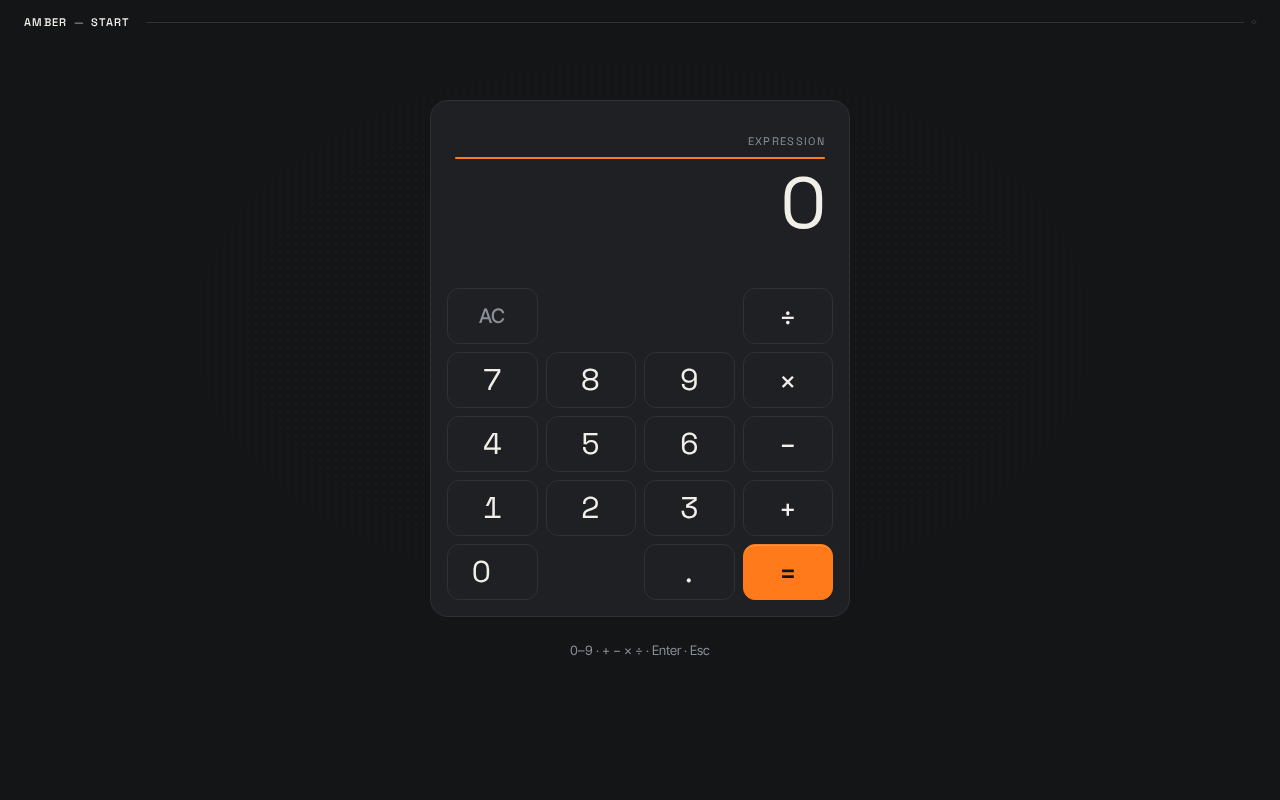
AMBER — STARTin 11px all-caps Space Grotesk with 0.12em tracking, followed by a 1px hairline rule running to the viewport edge. - Readout block — right-aligned tabular numerals at
clamp(40px, 8vw, 72px), warm off-white#F2EFE9, sitting above a single 2px tangerine#FF7A1Arule. Acts as the page's hero headline. - Keypad — strict 4-column, 5-row grid on an 8pt rhythm with 8px gutters. Digits 1–9 and 0, operators in the right column, a wide zero, and the equals key spanning two rows in solid tangerine
#FF7A1A. Every other key is a hairline-bordered#1E2023rectangle with no fill and no shadow. - Operator keys — invert to tangerine text on press and remain tangerine while active, so the current operation is legible as a coloured mark in the keypad.
- Keyboard hint line — a single muted
#8A8F98line below the calculator body. - Calculator body —
#1E2023surface, 1px hairline#2E3136border, 18px radius, max-width 420px, centred on the#141517graphite field with a faint 8pt dot grid at 4% opacity behind it.
States
- Loading — not applicable; the calculator is immediately interactive on page load with an empty/zero readout.
- Empty — readout shows the initial zero state; no expression entered.
- Success — the computed result appears on the readout after evaluation.
- Error — an invalid or incomplete expression (for example, an operator with a missing operand, or division by zero) does not produce a misleading result; the readout reflects that the expression cannot be evaluated, and the user can clear to recover.
- Recovery — clearing resets the expression, result, and active operator to the initial state so a new calculation can begin.
3. Functional Requirements
FR-1 — Single-page calculator delivery (explicit) As a Calculator User, I should reach the calculator as a single page, so that I can perform everyday arithmetic without navigating anywhere else.
- Trigger: opening the product.
- Observable result: the Calculator page renders with the readout and keypad.
- Access: anonymous public entry; no identity required.
- Failure/recovery: not applicable to page delivery.
- Continuation: the user proceeds to enter an expression.
FR-2 — Enter numbers and arithmetic operators (explicit) As a Calculator User, I should enter numbers and arithmetic operators, so that I can build the expression I want to compute.
- Trigger: pressing digit keys, the decimal point, and operator keys (add, subtract, multiply, divide) on the keypad, or typing the equivalent keys.
- Observable result: the entered digits and operators appear in the readout; the selected operator key is shown as active in tangerine.
- Access: anonymous public entry.
- Failure/recovery: an incomplete expression (operator with no right operand) is not evaluated as if complete; the user can continue entering or clear.
- Continuation: the user evaluates the expression or continues entering operands.
FR-3 — See the computed result on the display (explicit) As a Calculator User, I should see the computed result on the calculator display, so that I can read the answer to my calculation.
- Trigger: pressing equals (or Enter).
- Observable result: the computed numeric result appears on the readout in tabular numerals.
- Access: anonymous public entry.
- Failure/recovery: if the expression cannot be evaluated (for example, division by zero), the readout does not present a misleading numeric result; the user can clear and retry.
- Continuation: the user reads the result, continues calculating from it, or clears.
FR-4 — Clear the calculator to start a new calculation (explicit) As a Calculator User, I should clear the calculator, so that I can start a new calculation from a clean state.
- Trigger: pressing the clear control (or Esc).
- Observable result: the expression, result, and active operator reset to the initial state.
- Access: anonymous public entry.
- Failure/recovery: not applicable; clearing always succeeds.
- Continuation: the user begins a new expression.
FR-5 — Keyboard input mirrors the keypad (required_inference) As a Calculator User, I should use my keyboard for digits, operators, Enter, and Esc, so that I can calculate at speed without reaching for the pointer.
- Trigger: typing
0–9,+ − × ÷, Enter, or Esc. - Observable result: the same readout and keypad state changes as the corresponding on-screen keys.
- Access: anonymous public entry.
- Failure/recovery: unrecognized keys are ignored without disturbing the current expression.
- Continuation: the user continues entering or evaluates.
- Rationale: the accepted keyboard hint line (
0–9 · + − × ÷ · Enter · Esc) and the power-user expectation of the interface establish keyboard parity as indispensable to the accepted experience.
4. User Personas
Calculator User
Product context. The Calculator User opens amber-start to do a quick piece of everyday arithmetic — a sum, a difference, a product, a quotient — and expects the answer immediately. They are not signing in, not saving anything, and not looking for a dashboard. The page is the tool.
Primary goal. Enter a short expression and read a correct result, then either continue from that result or clear and start again.
Distinct accepted responsibilities.
- Entering numbers and arithmetic operators to build an expression.
- Reading the computed result from the display.
- Clearing the calculator to start a new calculation.
- Optionally using the keyboard for the same operations.
Relevant inputs and decisions. Which operands and operators to enter; when to evaluate; whether to continue from the current result or clear. The user reads the active operator indicator to confirm which operation is in effect.
Interactions with other accepted participants. None. The Calculator User is the only active human participant; there is no counterparty, recipient, or approver in the accepted behavior.
Observable success. The readout shows the correct computed result for the entered expression, and the calculator can be cleared and reused for the next calculation.
5. Core User Flows
Flow 1 — Perform a calculation
- The Calculator User opens amber-start. The Calculator page renders on the graphite field with the readout at its initial zero state and the keypad ready.
- The user presses digit keys to enter the first operand. The digits appear in the readout in tabular numerals.
- The user presses an arithmetic operator key. The operator key becomes active and is shown in tangerine, so the current operation is legible in the keypad.
- The user presses digit keys to enter the second operand. The readout reflects the expression being built.
- The user presses equals (or Enter). The computed result appears on the readout.
- Continuation: the user reads the result and either continues calculating from it or proceeds to Flow 3 to clear.
Flow 2 — Calculate with the keyboard
- The Calculator User is on the Calculator page with the keypad visible.
- The user types digits and operators on the keyboard. The readout and active-operator indicator respond exactly as they do for the on-screen keys.
- The user presses Enter to evaluate. The computed result appears on the readout.
- Failure/recovery: if the user types an unrecognized key, it is ignored and the current expression is undisturbed; the user continues.
- Continuation: the user reads the result or presses Esc to clear.
Flow 3 — Clear and start a new calculation
- The Calculator User is on the Calculator page with an expression or result on the readout.
- The user presses the clear control (or Esc). The expression, result, and active operator reset to the initial state.
- The user begins a new expression by entering digits and operators, returning to Flow 1 step 2.
Flow 4 — Recover from an expression that cannot be evaluated
- The Calculator User has entered an expression that cannot be evaluated (for example, an operator with a missing operand, or division by zero) and pressed equals.
- The readout does not present a misleading numeric result.
- The user presses the clear control (or Esc). The calculator resets to the initial state.
- The user re-enters a valid expression and evaluates it, returning to Flow 1.
6. Visuals Colors and Theme
The creative direction is authoritative for this section.
Muse and headline. Rasmus Andersson — instrument-grade product craft for an everyday calculator. The interface itself is the product; precision, legibility, and speed matter more than decoration. The emotional register is calm confidence.
Mode. Dark mode only.
Colour tokens (exact hex by role)
| Role | Hex | Use |
|---|---|---|
| Background | #141517 | Deep graphite page ground |
| Surface | #1E2023 | Calculator body and key faces |
| Text | #F2EFE9 | Digits, operators, warm off-white |
| Primary | #F2EFE9 | Primary text and numerals |
| Accent | #FF7A1A | Tangerine — equals key fill, active operator, readout top rule only |
| Muted | #8A8F98 | Secondary labels, history, keyboard hint line |
| Hairline border | #2E3136 | 1px borders on every key and the calculator body |
| Key pressed | #2A2D31 | Key background on :active |
No blue, no indigo, no gradients.
Typography
- Headings and wordmark: Space Grotesk, 500–700 weight, tight tracking (-0.02em); wordmark in sentence case, micro-labels all-caps at 11px with 0.12em tracking.
- Display readout: Space Grotesk 400 with tabular numerals and tight leading.
- Body: Inter Tight.
- Scale (1.25 modular): 11 / 13 / 16 / 20 / 25 / 31 / 39 / 49 / 61.
- Readout:
clamp(40px, 8vw, 72px). Keypad numerals:clamp(22px, 3.2vw, 30px). Wordmark:clamp(20px, 2.4vw, 28px).
Shape language. Compact, precise rectangles. 10–14px radii on keys, 18px on the calculator body. 1px hairline borders (#2E3136) on every key. No shadows except a single 1px inner highlight on the equals key. Keys sit on an 8pt grid with 8px gutters.
Layout. Single centred column on the graphite field. Top: slim wordmark row — AMBER — START in all-caps micro-type on the left, a 1px hairline rule running to the right edge. Centre: calculator body, max-width 420px, readout block at the top (right-aligned tabular numerals, thin tangerine rule above it) and a 4×5 keypad below. The keypad is a strict 4-column grid: digits 1–9 and 0, operators in the right column, a wide zero, and the equals key spanning two rows in tangerine. Below the body, a single muted line of keyboard hints (0–9 · + − × ÷ · Enter · Esc). Everything stacks cleanly to 375px with the body at full width minus 24px margins.
Imagery. No photography, no illustration, no stock imagery. The interface itself is the imagery: tabular numerals as the hero ornament, a faint 8pt dot grid at 4% opacity behind the calculator body, and schematic hairline rules.
Accessibility of text and controls. Headlines, wordmarks, labels, numbers, and controls stay entirely inside the viewport and their container at 375px, 768px, and 1280px, wrapping or scaling to fit. No element covers any part of readable text or a control.
7. Signature Design Concept
The first screen is the instrument itself, not a marketing hero. A full-viewport graphite field (#141517) holds a single centred calculator body (#1E2023, 1px hairline border, 18px radius, max-width 420px) floating in generous negative space.
The dominant element is the readout — an oversized tabular-numeral line at clamp(40px, 8vw, 72px) in warm off-white, right-aligned above a thin 2px tangerine rule that is the only saturated mark on the page. The wordmark sits as a small all-caps label at the top-left with a hairline rule extending to the viewport edge. There is no centred marketing headline, no subtext, no CTA button, and no gradient blob — the calculator is the composition.
The keypad is a strict 4×5 grid on an 8pt rhythm where every key is a hairline-bordered #1E2023 rectangle with no fill and no shadow. Only the equals key breaks the rule with a solid tangerine #FF7A1A fill spanning two rows. Operator keys invert to tangerine text on press and stay tangerine while active, so the current operation is always legible as a coloured mark in the keypad. A faint 8pt dot grid at 4% opacity sits behind the calculator body, visible only as texture at the edges of the negative space.
8. Interaction Model & Motion Direction
Interaction Model: Animated Motion Tempo: restrained Hero Dimensionality: flat
Landing Hero Motion Brief
- Focal subject: the calculator readout — oversized tabular numerals right-aligned above the single tangerine rule.
- Input → transformation → outcome thesis: a key press (input) depresses the key 1px with a background shift to
#2A2D31and, for operators, inverts the key to tangerine text (transformation), and the readout value swaps with a 120ms crossfade of numerals (outcome). The equals key flashes to a lighter tangerine on press. - Motion vocabulary: fast, functional 120–160ms transitions with a standard ease-out. No bounces, no parallax, no decorative loops.
- Composed first frame: the graphite field with the wordmark row and hairline rule at top, the calculator body centred with the readout at its initial zero state above the tangerine rule, and the keypad at rest with the equals key in solid tangerine.
- Reduced-motion state: with
prefers-reduced-motion, all transitions collapse to zero duration and state changes are instant.
9. Non-Functional Requirements
- Single-page constraint (explicit): the product must be delivered as a single page. No additional pages, routes, or navigation destinations.
- Simplicity constraint (explicit): the design must remain a simple single page design of a calculator.
- Readable text and controls (explicit, from creative direction): headlines, wordmarks, labels, numbers, and controls stay entirely inside the viewport and their container at 375px, 768px, and 1280px; no element covers any part of them.
- Reduced motion (explicit, from creative direction): with
prefers-reduced-motion, all transitions collapse to zero duration and state changes are instant. - No blue or indigo (explicit, from creative direction): the accent is tangerine
#FF7A1Aonly; the generic indigo/blue-on-white SaaS template is forbidden. - No photography or illustration (explicit, from creative direction): the interface itself is the imagery.
10. Tech Stack
- Frontend: React application UI rendering the single Calculator page.
- Backend: shared FastAPI process for application APIs and domain modules.
- Database: MariaDB, provisioned as application-owned persistent storage. No calculator domain entities, authentication, or persistence requirement is established in this scope.
- Containerization: docker-compose with the
backend,database, andfrontendservices as provisioned.
11. Assumptions and Constraints
- A-1 (assumption): The calculator performs the four basic arithmetic operations — add, subtract, multiply, divide — as implied by "arithmetic operators" and the keyboard hint line
0–9 · + − × ÷ · Enter · Esc. - A-2 (assumption): The calculator is publicly reachable without identity; no account, sign-in, or saved history is required by the accepted behavior.
- A-3 (assumption): Arithmetic evaluation happens on the Calculator page; the provisioned backend and database do not carry calculator domain state in this scope.
- A-4 (constraint): The product is exactly one page. No additional destinations may be added.
- A-5 (constraint): The design must remain simple; no adjacent calculator features (scientific functions, memory, history, unit conversion) are in scope.
12. Glossary
- Calculator — the single page of amber-start; the anonymous public entry that owns expression entry, evaluation, and clearing.
- Calculator User — the one active human persona who operates the calculator.
- Expression — the sequence of operands and operators currently entered by the user.
- Result — the computed numeric value shown on the readout after evaluation.
- Active operator — the arithmetic operator currently in effect, shown in tangerine in the keypad.
- Readout — the oversized tabular-numeral display at the top of the calculator body.
- Keypad — the strict 4×5 grid of hairline-bordered keys below the readout.
- Clear — the action that resets the expression, result, and active operator to the initial state.
Keyboard: digits 0 to 9, plus, minus, multiply, divide, Enter to evaluate, Escape to clear.
Keyboard: digits 0 to 9, plus, minus, multiply, divide, Enter to evaluate, Escape to clear.
No comments yet. Be the first!