amber-python
 Neerab delegate of Belgium
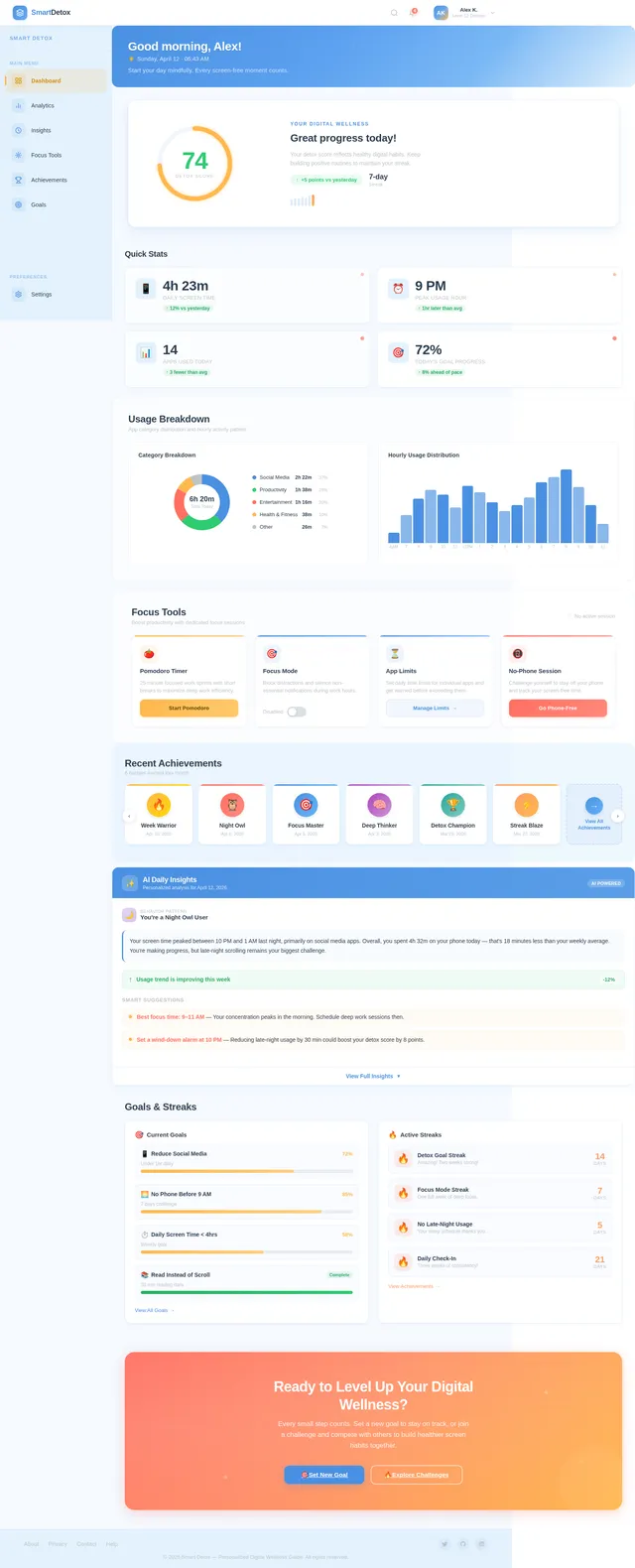
You are a senior Python developer, AI engineer, and hackathon winner. Build a complete, production-ready Python application for a hackathon based on the theme: "Smart Detox - Personalized Digital Wellness Guide" The app is a Screen Time Detox Assistant that helps users reduce excessive phone/app usage and build healthier digital habits. Core Features: 1. App Usage Tracker (simulate data if real tracking not possible) 2. Dashboard showing: * Daily and weekly screen time * Most used apps * Time spent on social media 3. Smart Insights: * Detect excessive usage patterns * Highlight “addiction zones” (e.g., Instagram > 2 hrs) 4. Focus Mode: * User sets time limits for apps * Simulate blocking or warning messages when limit exceeded 5. Personalized Suggestions: * Recommend breaks * Suggest alternative activities (study, exercise, reading) 6. Detox Score: * Give user a daily score based on usage habits Technical Requirements: * Use Python + Streamlit for UI * Use pandas for data handling * Use matplotlib or plotly for charts * Simulate app usage data realistically if needed * Include basic AI logic (rule-based or simple pattern detection) UI Requirements: * Clean, modern dashboard * Use colors (red = overuse, green = healthy) * Easy navigation (sidebar) Constraints: * Entire project must be in ONE Python file * No placeholders or incomplete code * Fully runnable locally * Beginner-friendly but impressive Output Format: 1. Full Python code (single file) 2. requirements.txt 3. Step-by-step instructions to run 4. 5–7 line explanation for judges (pitch-ready) 5. Optional: Ideas to extend the project Important: * Make the project visually impressive * Ensure all features actually work (even if simulated) * Optimize for hackathon demo (clarity > complexity)
Comments (0)
Sign in to leave a comment
System Requirements
System Requirements Document (SRD) for amber-python
1. Introduction
The amber-python project is a comprehensive Python-based application designed to promote digital wellness by helping users reduce excessive phone and app usage. This "Smart Detox - Personalized Digital Wellness Guide" serves as a Screen Time Detox Assistant, offering personalized insights, gamified engagement, and AI-driven recommendations to build healthier digital habits.
This document outlines the system requirements for the full production-ready application, ensuring all features are implemented and functional. The application will cater to users globally, with a focus on intuitive design and impactful features.
2. System Overview
The amber-python application is a digital wellness tool that tracks app usage, provides actionable insights, and encourages users to adopt healthier digital habits. It combines data analytics, AI-driven insights, and gamification to create an engaging and effective experience. The app will be built using Python and Streamlit for a clean, modern UI, and will simulate realistic app usage data for functionality.
Key highlights of the system:
- Tracks daily and weekly screen time.
- Detects excessive usage patterns and addiction zones.
- Offers personalized suggestions and AI-driven insights.
- Includes gamified elements like streaks, badges, and leaderboards.
- Provides focus tools like timers, app limits, and Pomodoro sessions.
The application will be fully functional, beginner-friendly, and optimized for local deployment.
3. Functional Requirements
The following features will be implemented in the amber-python application:
- As a User, I should be able to track daily screen time.
- As a User, I should be able to view weekly screen time analytics.
- As a User, I should be able to see app-wise usage breakdown.
- As a User, I should be able to detect the most used app.
- As a User, I should be able to identify peak usage times.
- As a User, I should be able to view category-based usage (e.g., social, study).
- As a User, I should be able to compare day-to-day usage.
- As a User, I should be able to generate a weekly summary report.
- As a User, I should be able to set and track screen time goals.
- As a User, I should be able to track usage streaks.
- As a User, I should receive overuse detection alerts (rule-based AI).
- As a User, I should receive personalized usage warnings.
- As a User, I should receive addiction alerts for specific apps.
- As a User, I should see next-day usage predictions (basic logic).
- As a User, I should receive AI-generated daily summaries.
- As a User, I should see behavior pattern classifications (e.g., night user, binge user).
- As a User, I should receive suggestions for the best focus times.
- As a User, I should receive smart break suggestions.
- As a User, I should receive weekly performance feedback.
- As a User, I should see trend improvement detection.
- As a User, I should use a focus mode timer.
- As a User, I should set app time limits.
- As a User, I should receive warnings when app limits are exceeded.
- As a User, I should simulate app blocking for overuse.
- As a User, I should use a Pomodoro timer.
- As a User, I should receive break reminder alerts.
- As a User, I should track deep work sessions.
- As a User, I should activate a no-phone session mode.
- As a User, I should set daily detox goals.
- As a User, I should track focus streaks.
- As a User, I should see a detox score (0–100).
- As a User, I should rate my daily performance.
- As a User, I should earn achievement badges.
- As a User, I should progress through levels.
- As a User, I should earn streak rewards.
- As a User, I should receive overuse penalties.
- As a User, I should see a simulated leaderboard.
- As a User, I should participate in challenge modes (e.g., reduce usage %).
- As a User, I should earn XP points.
- As a User, I should receive weekly grades.
- As a User, I should interact with dashboard cards UI.
- As a User, I should see color-coded indicators (red/green/yellow).
- As a User, I should interact with interactive charts.
- As a User, I should view progress bars for goals.
- As a User, I should experience a minimal, clean UI design.
- As a User, I should interact with an AI chatbot for digital wellness.
- As a User, I should use a voice-based assistant (basic simulation).
- As a User, I should receive smart notification simulations.
- As a User, I should receive habit replacement suggestions.
- As a User, I should generate a personalized daily schedule.
4. User Personas
1. General User
- Description: Individuals seeking to reduce screen time and build healthier digital habits.
- Goals: Track usage, receive insights, and achieve detox goals.
- Pain Points: Difficulty managing screen time and breaking app addiction.
2. Gamified User
- Description: Users motivated by rewards, streaks, and challenges.
- Goals: Earn badges, maintain streaks, and compete on leaderboards.
- Pain Points: Lack of engaging tools to sustain motivation.
3. Focus-Oriented User
- Description: Individuals aiming to improve productivity and focus.
- Goals: Use focus tools like timers, app limits, and no-phone modes.
- Pain Points: Distractions and inability to maintain focus.
5. Visuals Colors and Theme
Color Palette
- Background: #F5F9FF (soft blue-white)
- Surface: #FFFFFF (pure white)
- Text: #2C3E50 (dark slate gray)
- Accent: #FF6F61 (vibrant coral)
- Muted: #BDC3C7 (light gray)
This palette reflects a clean, modern, and calming aesthetic, aligning with the app's wellness theme.
6. Signature Design Concept
Interactive Digital Wellness Galaxy
The landing page will feature an interactive galaxy map where each star represents a feature or section of the app. Users can hover over stars to see a brief description of the feature, and clicking on a star will zoom into that section with a smooth animation. The galaxy will subtly shift colors based on the time of day (e.g., warm tones in the morning, cool tones at night).
Additional details:
- Animations: Stars will twinkle and pulse gently, creating a dynamic and engaging experience.
- Transitions: Smooth zoom-in and zoom-out effects when navigating between sections.
- Micro-interactions: Hover effects will display tooltips with feature descriptions.
- Color Shifts: Background gradients will transition subtly throughout the day.
This design will make the app feel alive and immersive, leaving a lasting impression on users.
7. Non-Functional Requirements
- The app must run locally on any system with Python installed.
- The app must be responsive and load within 3 seconds.
- The app must handle up to 1,000 simulated users without performance degradation.
- The app must be beginner-friendly with clear navigation and tooltips.
- The app must use minimal external dependencies to ensure lightweight deployment.
8. Tech Stack
- Frontend: Streamlit
- Backend: Python, FastAPI
- Database: SQLite (for simplicity and local storage)
- AI Models:
- GPT 5.4 for user-friendly responses.
- Claude 4.6 Opas for behavioral insights.
- Data Handling: pandas
- Charts: matplotlib, plotly
- Containerization: Docker, docker-compose
9. Assumptions and Constraints
- The app will simulate app usage data rather than track real usage.
- All features must be contained in a single Python file.
- The app will be optimized for local deployment, not cloud hosting.
- Advanced AI features will use rule-based logic for simplicity.
10. Glossary
- Detox Score: A numerical representation of a user's digital wellness.
- Focus Mode: A mode that limits app usage to improve productivity.
- Pomodoro Timer: A time management tool based on work/break intervals.
- Streaks: Consecutive days of achieving goals.
- Leaderboard: A simulated ranking of users based on performance.
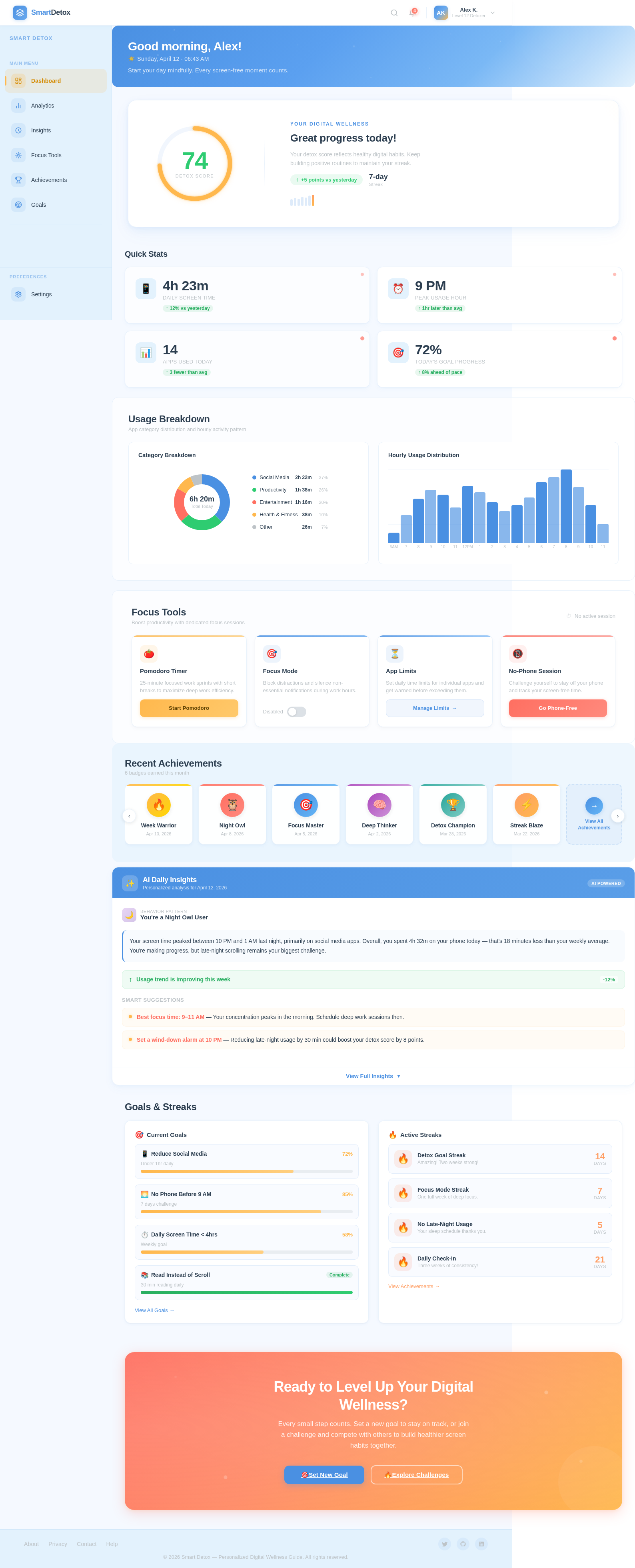
Good night, Alex!
Saturday, July 11 · 04:39 AM
Time to unplug and recharge. Tomorrow is a fresh start.
Your Digital Wellness
Great progress today!
Your detox score reflects healthy digital habits. Keep building positive routines to maintain your streak.
Quick Stats
Usage Breakdown
App category distribution and hourly activity pattern
Category Breakdown
Hourly Usage Distribution
Focus Tools
Boost productivity with dedicated focus sessions
Pomodoro Timer
25-minute focused work sprints with short breaks to maximize deep work efficiency.
Focus Mode
Block distractions and silence non-essential notifications during work hours.
App Limits
Set daily time limits for individual apps and get warned before exceeding them.
Manage Limits→No-Phone Session
Challenge yourself to stay off your phone and track your screen-free time.
Recent Achievements
6 badges earned this month
- Best focus time: 9–11 AM — Your concentration peaks in the morning. Schedule deep work sessions then.
- Set a wind-down alarm at 10 PM — Reducing late-night usage by 30 min could boost your detox score by 8 points.
Goals & Streaks
Current Goals
Under 1hr daily
7 days challenge
Weekly goal
30 min reading daily
Active Streaks
Detox Goal Streak
Amazing! Two weeks strong!
Focus Mode Streak
One full week of deep focus.
No Late-Night Usage
Your sleep schedule thanks you.
Daily Check-In
Three weeks of consistency!
No comments yet. Be the first!