amarya-app
 Seun Ogundipe
Build a food delivery app named Amarya


Comments (0)
Sign in to leave a comment
System Requirements
System Requirements Document for amarya-app
1. Introduction
Amarya is a food delivery application designed to provide a vibrant and engaging experience for users looking to order food from local restaurants. The app targets a youthful, energetic audience and aims to stand out in the crowded food delivery market with its playful maximalism and vibrant design.
2. System Overview
Amarya is a food delivery app that facilitates the ordering and delivery of food from local restaurants. The app supports multiple user roles, including customers, restaurant staff, delivery drivers, and app administrators. Each role has specific responsibilities and access to different parts of the application. The app is designed to provide a seamless experience from browsing food options to tracking delivery progress.
2a. Product Interpretation and Delivery Boundary
Amarya is a custom-built food delivery application with a focus on vibrant and playful design. The application requires user authentication for most interactions, with a public landing page available for first-time users. The system supports backend integration for order management, user authentication, and role-based access control. The app's delivery is limited to the current scope, with future enhancements possible based on user feedback and market demands.
2b. Source Content Inventory
Not applicable as no content source directive was provided.
2c. Page Content and Component Coverage
Landing
- Information/State: Introduction to Amarya, vibrant design elements, and call-to-action for login or sign-up.
- Primary Actions: Navigate to Login or Browse.
- Components: Hero image, introductory text, navigation buttons.
- States: Loading, success, error.
Login
- Information/State: User authentication interface for returning users.
- Primary Actions: Login, password recovery.
- Components: Username field, password field, login button, forgot password link.
- States: Loading, success, error.
Browse
- Information/State: Display of available food offerings.
- Primary Actions: Add to Cart, view item details.
- Components: Food item listings, search bar, filters.
- States: Loading, empty, success, error.
Cart
- Information/State: Review of selected items for order.
- Primary Actions: Proceed to Checkout, modify cart items.
- Components: Item list, total price, checkout button.
- States: Loading, empty, success, error.
Checkout
- Information/State: Delivery details and payment processing.
- Primary Actions: Place Order, modify delivery details.
- Components: Address fields, payment options, order summary.
- States: Loading, success, error.
Order Tracking
- Information/State: Status of placed orders.
- Primary Actions: View order details, contact support.
- Components: Order list, status indicators.
- States: Loading, empty, success, error.
Restaurant Orders
- Information/State: List of incoming orders for restaurant staff.
- Primary Actions: Update order status, view order details.
- Components: Order list, status update buttons.
- States: Loading, empty, success, error.
Restaurant Order Details
- Information/State: Detailed view of a specific order.
- Primary Actions: Update status, contact customer.
- Components: Order details, status update options.
- States: Loading, success, error.
Deliveries
- Information/State: List of deliveries assigned to drivers.
- Primary Actions: Update delivery status, view delivery details.
- Components: Delivery list, status update buttons.
- States: Loading, empty, success, error.
Delivery Details
- Information/State: Detailed view of a specific delivery.
- Primary Actions: Update status, contact customer.
- Components: Delivery details, status update options.
- States: Loading, success, error.
Users
- Information/State: Management of application users by administrators.
- Primary Actions: Add, edit, or remove users.
- Components: User list, action buttons.
- States: Loading, empty, success, error.
Restaurants
- Information/State: Management of restaurants on the platform.
- Primary Actions: Add, edit, or remove restaurants.
- Components: Restaurant list, action buttons.
- States: Loading, empty, success, error.
Admin Orders
- Information/State: Overview of all orders for administrative oversight.
- Primary Actions: View order details, intervene in order processing.
- Components: Order list, action buttons.
- States: Loading, empty, success, error.
Issues
- Information/State: Tracking and resolution of operational issues.
- Primary Actions: Log new issues, update issue status.
- Components: Issue list, status update options.
- States: Loading, empty, success, error.
3. Functional Requirements
- As a Customer, I should be able to browse food offerings to discover available options and add items to my cart. (required_inference)
- As a Customer, I should be able to view and modify my cart before proceeding to checkout. (required_inference)
- As a Customer, I should be able to enter delivery details and place an order to complete the purchase process. (required_inference)
- As a Customer, I should be able to track my order to stay updated on its status and delivery progress. (required_inference)
- As Restaurant staff, I should be able to receive and review incoming orders to prepare them for delivery. (required_inference)
- As Restaurant staff, I should be able to update order status to reflect the current state of preparation. (required_inference)
- As a Delivery driver, I should be able to review assigned deliveries to plan my delivery route. (required_inference)
- As a Delivery driver, I should be able to update delivery progress to keep the system and customers informed. (required_inference)
- As an App administrator, I should be able to oversee users, restaurants, and orders to ensure smooth operation of the platform. (required_inference)
- As an App administrator, I should be able to track and resolve operational issues to maintain service quality. (required_inference)
4. User Personas
- Customer: Browses food options, places orders, and tracks delivery status.
- Restaurant staff: Manages incoming orders and updates their status.
- Delivery driver: Fulfills delivery orders and updates delivery progress.
- App administrator: Oversees users, restaurants, orders, and resolves operational issues.
5. Core User Flows
Customer Flow
- Landing: Customer visits the landing page and navigates to the login or browse page.
- Login: Customer logs in to access personalized features.
- Browse: Customer explores food offerings and adds items to the cart.
- Cart: Customer reviews the cart and proceeds to checkout.
- Checkout: Customer enters delivery details and places the order.
- Order Tracking: Customer tracks the order status until delivery completion.
Restaurant Staff Flow
- Login: Restaurant staff logs in to access order management features.
- Restaurant Orders: Staff reviews incoming orders.
- Restaurant Order Details: Staff updates order status as preparation progresses.
Delivery Driver Flow
- Login: Delivery driver logs in to access delivery assignments.
- Deliveries: Driver reviews assigned deliveries.
- Delivery Details: Driver updates delivery status as progress is made.
App Administrator Flow
- Login: Administrator logs in to access management features.
- Users: Administrator manages user accounts.
- Restaurants: Administrator manages restaurant profiles.
- Admin Orders: Administrator oversees all orders.
- Issues: Administrator tracks and resolves operational issues.
6. Visuals Colors and Theme
- Muse: Jessica Walsh
- Palette:
- Background: #FFFAF0
- Surface: #FFFFFF
- Text: #333333
- Primary: #FF5733
- Accent: #FFC300
- Muted: #BDBDBD
- Typography:
- Headings: Archivo Black — Chunky, expressive, all-caps
- Body: Unbounded
- Scale: 1.414 modular, 64/45/32/22/16
- Shape Language: Bold color fields, overlapping shapes, sticker-like elements, unexpected crops
- Layout: Creative, asymmetrical layouts with overlapping elements and vibrant color blocking
- Motion: Bouncy scale-ins, marquee text, color flips on hover
7. Signature Design Concept
The public entry page will feature a full-bleed vibrant color block with an oversized, playful headline in Archivo Black. This will be accented by surreal food photography that captures attention immediately. The primary color will dominate, with accent colors providing supportive contrast. Dynamic, bouncy animations will be used for CTA buttons and hover effects.
8. Interaction Model & Motion Direction
- Interaction Model: Animated
- Motion Tempo: Expressive
- Hero Dimensionality: Layered_2d
- Landing Hero Motion Brief: The landing hero will feature a vibrant color block with a playful headline. On hover, elements will exhibit bouncy animations and color flips, drawing the user's attention to the call-to-action buttons.
9. Non-Functional Requirements
- Performance: The app should load pages within 2 seconds under normal network conditions.
- Scalability: The backend should support up to 10,000 concurrent users.
- Security: User data must be encrypted in transit and at rest.
10. Tech Stack
- Frontend: React
- Backend: Python/FastAPI
- Database: PostgreSQL
- Containerization: Docker
- Orchestration: Kubernetes (if required for deployment)
11. Assumptions and Constraints
- Assumptions:
- Users have access to a stable internet connection.
- Restaurants will manage their menus and availability through a separate interface.
- Constraints:
- The app must adhere to the playful maximalism design theme.
- The app must be named Amarya.
12. Glossary
- CTA: Call to Action
- UI: User Interface
- UX: User Experience
- API: Application Programming Interface
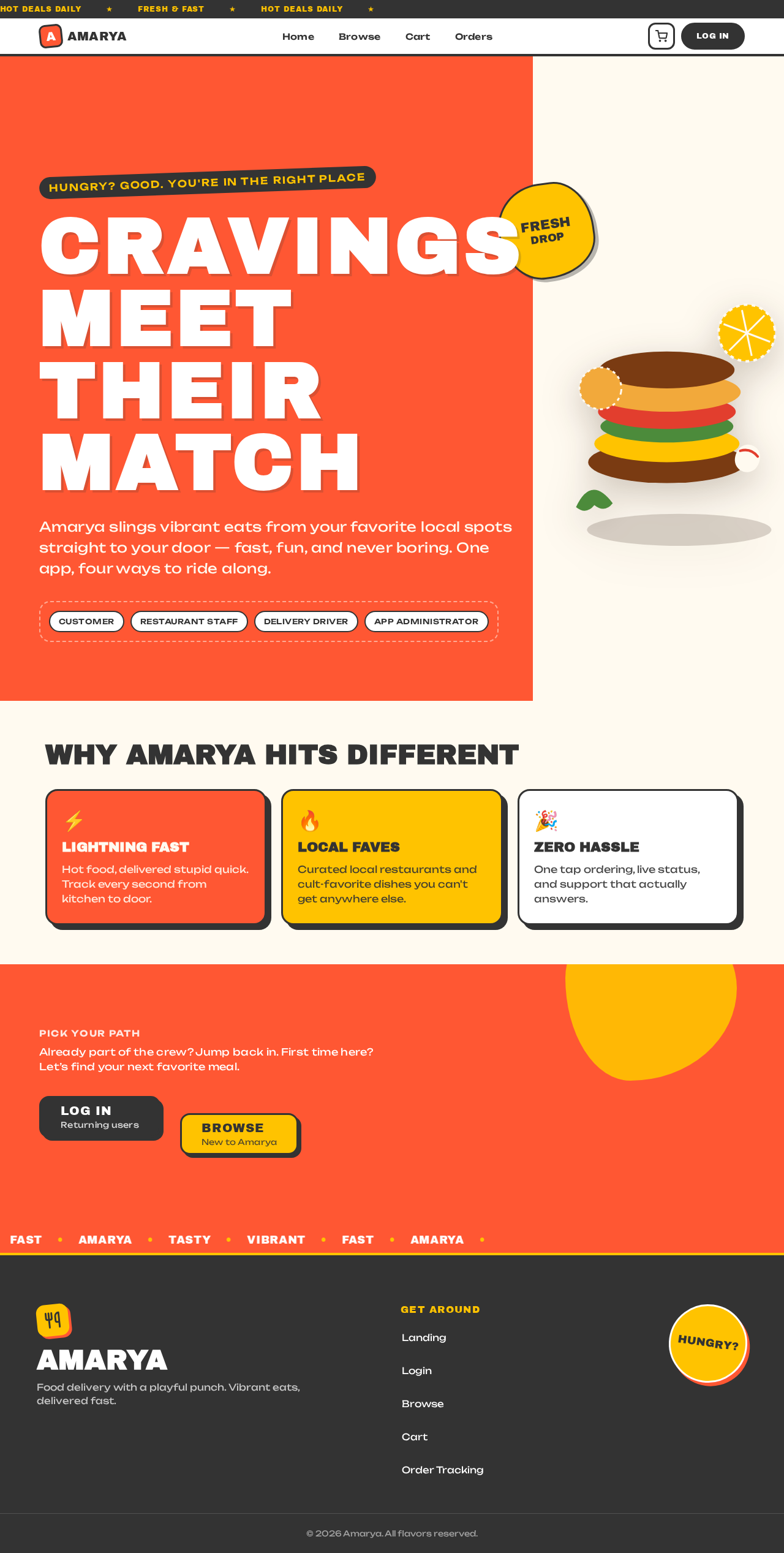
CRAVINGS
MEET THEIR
MATCH
Amarya slings vibrant eats from your favorite local spots straight to your door — fast, fun, and never boring. One app, four ways to ride along.
WHY AMARYA HITS DIFFERENT
LIGHTNING FAST
Hot food, delivered stupid quick. Track every second from kitchen to door.
LOCAL FAVES
Curated local restaurants and cult-favorite dishes you can't get anywhere else.
ZERO HASSLE
One tap ordering, live status, and support that actually answers.
Already part of the crew? Jump back in. First time here? Let’s find your next favorite meal.
CRAVINGS
MEET THEIR
MATCH
Amarya slings vibrant eats from your favorite local spots straight to your door — fast, fun, and never boring. One app, four ways to ride along.
WHY AMARYA HITS DIFFERENT
LIGHTNING FAST
Hot food, delivered stupid quick. Track every second from kitchen to door.
LOCAL FAVES
Curated local restaurants and cult-favorite dishes you can't get anywhere else.
ZERO HASSLE
One tap ordering, live status, and support that actually answers.
Already part of the crew? Jump back in. First time here? Let’s find your next favorite meal.
No comments yet. Be the first!