alert-for-task-ai-growth

bydeca properties

AI-powered launch readiness automation challenge with early alerts to sales,  inventory, and marketing so they can prepare in advance.

LandingLoginSign UpAlertsReadiness Checks
Landing

Comments (0)

No comments yet. Be the first!

System Requirements

System Requirements Document for alert-for-task-ai-growth

1. Introduction

alert-for-task-ai-growth is an AI-powered launch readiness automation product for deca properties (AE). It exists to answer one question before a launch date arrives: is this launch ready, and who needs to know now? The product runs AI-driven launch readiness checks and, from their results, sends early alerts to the sales, inventory, and marketing teams so each team can prepare in advance of the launch rather than react after it.

The audience is the launch-operations team at deca properties and the three receiving teams. Sales needs to know what it can promise and when; inventory needs to know what stock must be in place; marketing needs to know what campaign work must be finished. All three read the same readiness signal, expressed as a status per check — blocked, watch, or ready — and act on it before launch day.

This document is the System Requirements Document for the product. It covers the current delivery: the public entry, identity access, the readiness-check workspace, and the alerts surface, together with the AI and alerting behavior behind them.

2. System Overview

Page 1 of 21

2a. Product Interpretation and Delivery Boundary

The product is a first-party web application. A team member arrives at the public Landing page, which explains what the product does and offers to start a check. Because readiness results and alerts are durable, team-specific records, the application owns identity: a new team member enrolls through Sign Up, and a returning team member verifies identity through Login. The Readiness Checks and Alerts surfaces are protected and are only readable after identity is established.

Readiness checking is AI-driven: the backend submits launch readiness material to a model provider through the provisioned LiteLLM gateway and records the resulting checks with a status per check. Alerting is automated: when a check result warrants early warning, the product produces alerts addressed to the sales, inventory, and marketing teams, and those teams read them on the Alerts surface and prepare their own work in advance of the launch.

Current scope is exactly the accepted behavior: AI launch readiness checks, early alerts to the three teams, and the identity and reading surfaces those require. Nothing adjacent — campaign execution, purchase-order creation, CRM pipeline management, or launch scheduling — is part of this product. All persistent application data is owned by the application's MariaDB database; the PostgreSQL instance exists only to support the LiteLLM gateway and holds no application domain data.

2b. Source Content Inventory

Not applicable — no reference directive declares content_source.

2c. Page Content and Component Coverage

Page 2 of 21

Landing

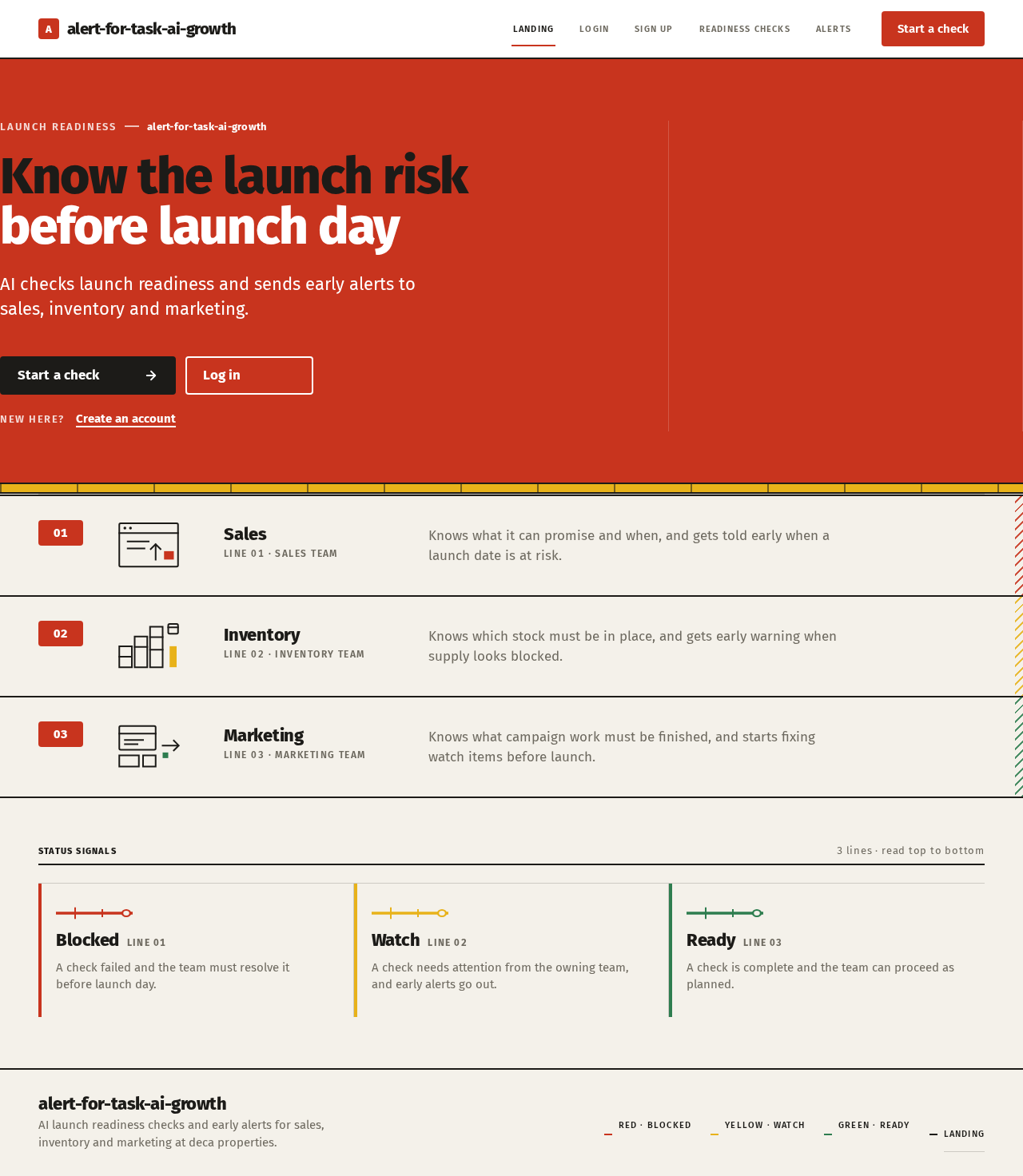
  • Information and state: anonymous public entry. Product name alert-for-task-ai-growth; hero headline "Know the launch risk before launch day"; subline "AI checks launch readiness and sends early alerts to sales, inventory and marketing."; a red signal band carrying the headline; a yellow status strip beneath it; three ruled line rows for sales, inventory, and marketing running edge to edge; a short explanation of the three status signals (red blocked, yellow watch, green ready).
  • Primary action: "Start a check" — routes an unauthenticated visitor to Sign Up (or Login if already enrolled), preserving the intent to start a check.
  • Supporting actions: "Log in" link to Login; "Create an account" link to Sign Up.
  • Domain entities: none persisted on this page.
  • Component responsibilities: signal band (headline container, flush left, 9 columns); status strip (yellow, static); three team line rows (team label, schematic pictogram, one-line description of what that team prepares); status legend; primary and secondary calls to action.
  • States: loading — not applicable (static content); empty — not applicable; success — page renders fully at 375px, 768px, and 1280px with all text and controls whole; error — if the visitor's session check fails, the page still renders and the calls to action route to Login; recovery — retry by following either call to action.
Page 3 of 21

Login

  • Information and state: anonymous identity-verification surface for returning team members. Fields: email, password. Inline error region.
  • Primary action: submit credentials to verify identity and continue to the requested protected surface (Readiness Checks or Alerts), defaulting to Readiness Checks.
  • Supporting actions: link to Sign Up; link back to Landing.
  • Domain entities: team member account (email, credential).
  • Component responsibilities: credential form; validation messaging; submit control with in-flight state; error region for invalid credentials.
  • States: loading — submit control shows in-flight state and is not re-submittable; empty — fields blank with no error shown; success — session established and redirect to the intended protected surface; error — invalid credentials show a single non-revealing message and the form remains editable; recovery — correct the credentials and resubmit, or follow the link to Sign Up.
Page 4 of 21

Sign Up

  • Information and state: anonymous self-service enrollment surface. Fields: name, email, password, team (sales, inventory, or marketing). Inline validation region.
  • Primary action: create the team member account and establish a session, then continue to Readiness Checks.
  • Supporting actions: link to Login; link back to Landing.
  • Domain entities: team member account (name, email, credential, team).
  • Component responsibilities: enrollment form; team selector; field-level validation; submit control with in-flight state; error region.
  • States: loading — submit control shows in-flight state and is not re-submittable; empty — fields blank, team unselected; success — account created, session established, redirect to Readiness Checks; error — an already-enrolled email or invalid field shows a specific message and preserves entered values; recovery — correct the field or follow the link to Login.
Page 5 of 21

Readiness Checks

  • Information and state: protected workspace. A list of the team member's launch readiness checks, each with launch name, launch date, run timestamp, and overall status; a detail view for a selected check listing each individual check with its status (blocked / watch / ready), its owning team, and its finding text. Empty state when no check has been run.
  • Primary action: start a new AI launch readiness check by supplying a launch name, launch date, and the readiness material to assess; the result is recorded and displayed.
  • Supporting actions: open a check's detail; re-run a check; navigate to Alerts.
  • Domain entities: readiness check (launch name, launch date, run timestamp, overall status, owner); individual check result (name, status, owning team, finding); alert (created from check results).
  • Component responsibilities: check list as numbered ruled rows with a coloured line badge per status; new-check form; check detail panel; per-check status badge; in-progress indicator while the AI assessment runs; error region.
  • States: loading — list skeleton while checks load; in-progress — a running check shows an explicit running state and cannot be submitted twice; empty — no checks yet, with a prompt to start the first check; success — check recorded with per-check statuses and any resulting alerts created; error — model or gateway failure shows a retryable message and the check is not recorded as complete; recovery — retry the run or correct the supplied material and resubmit.
Page 6 of 21

Alerts

  • Information and state: protected alert feed. Each alert is a numbered ruled row showing the team it is addressed to, the launch it concerns, the risk or check it derives from, its status colour (red blocked, yellow watch, green ready), and the launch date. Filter by team and by status.
  • Primary action: read an alert and mark it as acknowledged, recording that the team member has seen it.
  • Supporting actions: filter by team; filter by status; open the originating check in Readiness Checks.
  • Domain entities: alert (team, launch, source check, status, launch date, created timestamp, acknowledgement state and acknowledging team member).
  • Component responsibilities: alert row with numbered line badge and status colour; team and status filters; acknowledgement control; link to source check; empty and error regions.
  • States: loading — row skeleton while alerts load; empty — no alerts for the current filter, stated explicitly; success — rows render with acknowledgement reflected immediately; error — load failure shows a retryable message; recovery — retry the load or clear filters.
Page 7 of 21

3. Functional Requirements

FR-1 — AI launch readiness check (explicit) As a Sales team member, Inventory planner, or Marketing team member, I should start an AI-powered launch readiness check so that launch readiness is assessed automatically rather than by hand.

  • Trigger/input: authenticated team member supplies a launch name, a launch date, and the readiness material to assess on Readiness Checks.
  • Observable result: the backend sends the material to the model provider through the LiteLLM gateway and records a readiness check with an overall status and a set of individual check results, each carrying a status of blocked, watch, or ready, an owning team, and a finding.
  • Access: login required.
  • Failure/recovery: if the gateway or model call fails, the check is not recorded as complete and a retryable error is shown; the team member retries or corrects the material.
  • Continuation: the recorded check is listed and openable, and its results feed alert creation (FR-2).
Page 8 of 21

FR-2 — Early alerts to sales, inventory, and marketing (explicit) As the product, I should send early alerts derived from readiness check results to the sales, inventory, and marketing teams so that each team learns of launch risk before the launch date.

  • Trigger/input: completion of a readiness check whose results include a blocked or watch condition attributable to a team.
  • Observable result: an alert is created for each affected team, carrying the team, the launch, the source check, the status colour, and the launch date, and it appears on Alerts for members of that team.
  • Access: alert creation is a system process; reading is login required.
  • Failure/recovery: if alert creation fails after a check completes, the check remains recorded and the alert can be regenerated by re-running the check; the failure is surfaced on the check.
  • Continuation: the alert is readable on Alerts and links back to its source check.

FR-3 — Teams prepare in advance (explicit) As a Sales team member, Inventory planner, or Marketing team member, I should read the early alerts addressed to my team and acknowledge them so that my team's preparation work starts before the launch date.

  • Trigger/input: an alert exists for the team member's team; the team member opens Alerts.
  • Observable result: the alert row is displayed with its team, risk, status colour, and launch date; acknowledging it records the acknowledging team member and time and is reflected immediately.
  • Access: login required.
  • Failure/recovery: if the feed fails to load, a retryable message is shown; acknowledgement failure leaves the row unacknowledged and re-submittable.
  • Continuation: the team member opens the source check to see the full finding, or returns to the feed for the next alert.
Page 9 of 21

FR-4 — Self-service enrollment (required_inference) As a team member, I should enroll myself on Sign Up before first protected use so that my checks and alert acknowledgements are bound to me.

  • Trigger/input: an unauthenticated visitor follows "Start a check" or "Create an account" and submits name, email, password, and team.
  • Observable result: an account is created, a session is established, and the team member lands on Readiness Checks.
  • Access: anonymous entry; the protected surfaces remain unavailable until enrollment succeeds.
  • Failure/recovery: an already-enrolled email or invalid field shows a specific message with entered values preserved; the team member corrects it or goes to Login.
  • Continuation: the team member starts a check.

FR-5 — Returning identity verification (required_inference) As a returning team member, I should verify my identity on Login so that I can read my readiness checks and my team's alerts again.

  • Trigger/input: a returning team member submits email and password on Login.
  • Observable result: a session is established and the team member is taken to the requested protected surface, defaulting to Readiness Checks.
  • Access: anonymous entry; protected content is not readable before verification.
  • Failure/recovery: invalid credentials show a single non-revealing message and the form stays editable; the team member retries or goes to Sign Up.
  • Continuation: the team member resumes reading checks or alerts.

4. User Personas

Page 10 of 21

Sales team member

  • Product context: works launch-adjacent commitments — what can be promised, to whom, and from when. Uses the product as a signal source, not as a sales system.
  • Primary goal: know launch risks early enough that sales commitments are not made against an unready launch.
  • Distinct responsibilities: reads alerts addressed to sales; distinguishes blocked from watch conditions before committing; acknowledges alerts so the team's awareness is recorded; can start a readiness check when a launch needs assessing.
  • Inputs and decisions: the alert's status colour and finding text, and the launch date; decides whether a commitment can proceed, must be qualified, or must wait.
  • Interactions with other participants: consumes alerts produced from checks that inventory and marketing findings also contribute to; shares the same readiness signal with those teams.
  • Observable success: sales risks are known and acknowledged before the launch date.
Page 11 of 21

Inventory planner

  • Product context: owns stock readiness for the launch. Needs lead time, so an alert that arrives late is worth little.
  • Primary goal: have inventory in place before the launch date.
  • Distinct responsibilities: reads alerts addressed to inventory; treats blocked inventory checks as gating; acknowledges alerts; can start a readiness check for a launch.
  • Inputs and decisions: the inventory-attributed check findings, their status, and the launch date; decides what stock action must begin and by when.
  • Interactions with other participants: reads the same alert feed as sales and marketing, filtered to inventory; the inventory findings it acts on are visible in the shared check detail.
  • Observable success: inventory readiness is confirmed, or its blockers are known and acknowledged, before launch day.

Marketing team member

  • Product context: owns campaign and launch-communication readiness. Needs enough notice to finish creative and scheduling work.
  • Primary goal: have marketing work ready before the launch date.
  • Distinct responsibilities: reads alerts addressed to marketing; acknowledges them; can start a readiness check for a launch.
  • Inputs and decisions: marketing-attributed findings, their status, and the launch date; decides which campaign work must start now.
  • Interactions with other participants: shares the alert feed and check detail with sales and inventory.
  • Observable success: marketing work is ready, or its risks are known and acknowledged, before launch day.
Page 12 of 21

5. Core User Flows

Flow A — First-time team member starts a readiness check

  1. The visitor opens Landing and reads the headline, subline, and the three team line rows.
  2. The visitor selects "Start a check".
  3. Because no session exists, the visitor is routed to Sign Up with the start-a-check intent preserved.
  4. The visitor enters name, email, password, and team, and submits.
  5. On success, an account is created, a session is established, and the visitor lands on Readiness Checks. On failure (email already enrolled or invalid field), a specific message appears with values preserved; the visitor corrects it or follows the link to Login.
  6. On Readiness Checks, the team member supplies a launch name, launch date, and readiness material, and starts the check.
  7. The check shows an explicit running state; the backend assesses it through the LiteLLM gateway.
  8. On success, the check is recorded with an overall status and per-check statuses, and any resulting alerts are created. On failure, a retryable message appears and the check is not recorded as complete; the team member retries.
  9. The team member opens the check detail to read each finding, then continues to Alerts.
Page 13 of 21

Flow B — Returning team member reads and acknowledges alerts

  1. The team member opens Login and submits email and password.
  2. On success, the session is established and the team member is taken to the requested protected surface, defaulting to Readiness Checks. On failure, a single non-revealing message appears and the form stays editable.
  3. The team member navigates to Alerts and filters to their own team.
  4. Each alert appears as a numbered ruled row with its team, risk, status colour, and launch date.
  5. The team member reads an alert and acknowledges it; the acknowledgement is reflected immediately and records who acknowledged it and when.
  6. The team member opens the originating check in Readiness Checks to read the full finding, then returns to the feed for the next alert.
  7. If the feed fails to load, a retryable message appears; the team member retries or clears filters.

Flow C — Inventory planner acts on a blocked check

  1. The Inventory planner signs in on Login and opens Alerts.
  2. A red blocked row addressed to inventory shows the launch and its date.
  3. The planner opens the source check and reads the inventory-attributed finding.
  4. The planner acknowledges the alert, recording that inventory has seen the blocker.
  5. The planner begins the stock action outside the product, with the launch date as the deadline.
Page 14 of 21

Flow D — Marketing team member re-runs a check after correcting material

  1. The Marketing team member signs in and opens Readiness Checks.
  2. The team member opens a previously recorded check and selects re-run.
  3. The team member corrects the supplied readiness material and resubmits.
  4. The check runs again and is recorded with updated per-check statuses; alerts are created for any newly affected team.
  5. The team member continues to Alerts to confirm the updated signal.
Page 15 of 21

6. Visuals Colors and Theme

Muse: Erik Spiekermann — typographic infrastructure for launch readiness. Warm, legible information systems with transit-line signal logic.

Colour tokens (light mode):

RoleHex
Background (warm paper)#F4F1EA
Surface (cards, forms)#FFFFFF
Text (ink)#1C1B18
Primary (signal red)#C8341E
Accent (watch yellow)#E8B21A
Muted#6E6A60
Ready (green)#2E7D4F

Warm paper ground at roughly 70% of the surface; ink text on white cards. Signal red marks blocked checks, yellow marks watch items, green marks ready.

Typography: Fira Sans throughout. Headings Fira Sans Heavy 800, tight tracking, sentence case. Body Fira Sans. Small caps for labels. Numbers use tabular figures. Modular scale 1.333: 64 / 48 / 32 / 22 / 17 / 15 desktop, 40 / 32 / 24 / 18 / 16 / 14 mobile, applied with clamp() so headlines and numbers stay whole at 375px, 768px, and 1280px.

Shape language: hard 4px radii, 2px rules, numbered line badges. Controls are rectangular and flat — no pills, no soft drop shadows.

Page 16 of 21

Layout: twelve-column grid with visible hairline rules. Alerts stack as numbered rows, not cards; each row aligns team, risk, and date in columns. Section headers use small-caps labels above a 2px rule.

Imagery: schematic diagrams and pictograms for each team. No stock photography, no 3D.

Avoid: blue or indigo primaries; rounded pill buttons; soft drop shadows; gradient blobs; glass panels; centred hero text with a floating card.

7. Signature Design Concept

The public entry is a signal board. A full-width red signal band (#C8341E) spans the viewport and holds the headline "Know the launch risk before launch day" set flush left in ink and white across 9 of 12 columns, with the subline "AI checks launch readiness and sends early alerts to sales, inventory and marketing." beneath it and the "Start a check" control as a flat rectangular button. Directly under the band, a yellow status strip (#E8B21A) runs edge to edge. Below that, three ruled line rows for sales, inventory, and marketing run edge to edge, each with a numbered line badge, a schematic pictogram, and a one-line statement of what that team prepares. A small-caps legend above a 2px rule explains the three status colours as transit lines: red blocked, yellow watch, green ready. The composition is left-aligned and rule-driven; nothing is centred and nothing floats.

Page 17 of 21

8. Interaction Model & Motion Direction

Interaction Model: Animated Motion Tempo: restrained Hero Dimensionality: flat

Landing Hero Motion Brief

  • Focal subject: the red signal band and the three ruled team rows beneath it.
  • Thesis: on load, the signal band resolves first, then the three team rows slide in once, left to right, so the visitor reads the three teams as three lines of one signal — input is the page load, transformation is a single 150ms slide per row, outcome is a fully composed signal board with every row readable.
  • Motion vocabulary: short 150ms state changes only; alert rows slide in once on load; no bounce, no parallax, no scroll-linked depth.
  • Composed first frame: red band with headline and subline already in place, yellow strip beneath, three rows at their final positions with the first row settled and the remaining rows arriving within the same 150ms cadence.
  • Reduced-motion state: all rows render in their final positions immediately with no slide; the page is fully readable and every control is operable.
Page 18 of 21

9. Non-Functional Requirements

  • Durable state (explicit via Planning Scope): readiness checks, individual check results, alerts, acknowledgements, and team member accounts persist in the application's MariaDB database and survive restarts.
  • AI dependency (explicit): readiness assessment is performed by a model provider reached through the provisioned LiteLLM gateway; the backend never calls a provider directly. Gateway or provider failure must surface as a retryable error and must not record a partial check as complete.
  • Alert latency (required_inference): alerts are created as part of check completion so that the "early" property of the alert holds relative to the launch date; a check whose launch date has passed still records its result but the alert is marked as past its preparation window.
  • Access control (explicit via Planning Scope): Readiness Checks and Alerts require an established session; Landing, Login, and Sign Up are anonymously reachable. No differentiated role permissions are established by the source; the team field on an account determines which alerts are addressed to that member, not what they may do.
  • Readability and containment (explicit design constraint): headlines, wordmarks, labels, numbers, card text, and controls remain entirely inside the viewport and their container at 375px, 768px, and 1280px, wrapping or scaling to fit, with no element covering them.
  • Accessibility (required_inference): status is never conveyed by colour alone — every status carries its text label (blocked, watch, ready) alongside the colour; focus states are visible on the flat rectangular controls.
  • Data separation (explicit via scaffold): the PostgreSQL instance supports LiteLLM only and holds no application domain data.
Page 19 of 21

10. Tech Stack

  • Frontend: React application UI.
  • Backend: shared FastAPI process hosting all application APIs and domain modules — readiness checks, alert generation, and identity.
  • Application storage: MariaDB for application-owned persistent data (accounts, checks, check results, alerts, acknowledgements).
  • AI gateway: LiteLLM, reached by the backend for all model-provider calls.
  • Gateway storage: PostgreSQL, supporting LiteLLM only.
  • Orchestration: docker-compose with the five services above (frontend, backend, database, litellm, postgres).

11. Assumptions and Constraints

  • A-1 (assumption): readiness material is supplied by the team member as text at the time a check is started; no external system integration for launch data is in scope.
  • A-2 (assumption): the team field chosen at enrollment is the routing key for alerts; a team member reads alerts addressed to their own team.
  • A-3 (constraint): no differentiated permissions, roles, or visibility rules beyond team-based alert addressing are established by the source.
  • A-4 (constraint): the product does not execute sales, inventory, or marketing work; it informs those teams so they can prepare elsewhere.
  • A-5 (constraint): no stock photography, no 3D, no parallax, no blue or indigo primary colour.
  • A-6 (assumption): a check may be re-run; re-running creates a new recorded result and may create new alerts for newly affected teams.
Page 20 of 21

12. Glossary

  • Launch readiness check — an AI assessment of a named launch against supplied material, producing an overall status and individual check results.
  • Check result — one finding within a check, carrying a status, an owning team, and finding text.
  • Status — blocked (red, #C8341E), watch (yellow, #E8B21A), or ready (green, #2E7D4F).
  • Alert — an early warning derived from a check result and addressed to sales, inventory, or marketing, carrying the launch and its date.
  • Acknowledgement — the record that a team member has seen an alert, with who and when.
  • Signal band — the full-width red hero band on Landing.
  • Line badge — the numbered coloured marker on an alert or check row.
  • LiteLLM gateway — the provisioned service through which the backend reaches model providers.
Page 21 of 21
Live
Landing design preview
Landing: Read readiness signals
Sign Up: 1. Enroll with inventory team
Sign Up: 2. Correct invalid field
Login: Sign in instead
Readiness Checks: 1. Start readiness check
Readiness Checks: 2. Retry failed assessment
Readiness Checks: Open check detail
Alerts: 1. Filter to inventory alerts
Alerts: 2. Read blocked inventory alert
Readiness Checks: Read inventory finding
Alerts: Acknowledge blocker
Alerts: 3. Retry feed load
Login: 1. Submit credentials
Login: 2. Correct credentials and resubmit
Live
Landing design preview
Landing: Read readiness signals
Sign Up: 1. Enroll with inventory team
Sign Up: 2. Correct invalid field
Login: Sign in instead
Readiness Checks: 1. Start readiness check
Readiness Checks: 2. Retry failed assessment
Readiness Checks: Open check detail
Alerts: 1. Filter to inventory alerts
Alerts: 2. Read blocked inventory alert
Readiness Checks: Read inventory finding
Alerts: Acknowledge blocker
Alerts: 3. Retry feed load
Login: 1. Submit credentials
Login: 2. Correct credentials and resubmit